2017 RENAULT CAPTUR ignition
[x] Cancel search: ignitionPage 51 of 248

1.45
WARNING LIGHTS (2/5)
®STOP light
This lights up when the ignition
is switched on and goes out as soon as
the engine is started. It comes on with
other warning lights and/or messages,
and is accompanied by a beep.
It requires you to stop immediately, for
your own safety, as soon as traffic con-
ditions allow. Switch off the engine and
do not restart it.
Contact an approved Dealer.
ÀOil pressure warning light
This lights up when the ignition
is switched on and goes out after a few
seconds.
If it comes on on the road, accompa-
nied by the
® warning light and a
beep, stop immediately and cut the ig-
nition.
Check the oil level. If the level is normal,
the indicator light is being lit by some-
thing else. Contact an approved Dealer.
©Warning light
This lights up when the ignition
is switched on and goes out as soon as
the engine is started. It can light up in
conjunction with other indicator lights
and/or messages on the instrument
panel.
It means you should drive very care-
fully to an approved dealer as soon as
possible. If you fail to follow this recom-
mendation, you risk damaging your ve-
hicle.
DHandbrake on and brake cir-
cuit incident warning light
This comes on when the ignition is
switched on and goes out as soon as
the handbrake is released.
If it comes on during braking and is ac-
companied by the
® warning light
and a beep, it indicates that the fluid
level in the circuit is low or that there is
a braking system fault.
Stop as soon as traffic conditions allow
and contact an approved Dealer.
ÚBattery charge warning light
This lights up when the ignition
is switched on and goes out after a few
seconds.
If it comes on on the road, accompa-
nied by the
® warning light and a
beep, this indicates an overload or dis-
charge in the electrical circuit.
Stop as soon as traffic conditions allow
and contact an approved Dealer.
A
The display of information shown below DEPENDS ON THE VEHICLE EQUIPMENT \
AND COUNTRY.
Page 52 of 248

1.46
xAnti-lock braking warning
light
This lights up when the ignition is
switched on and goes out after a few
seconds.
If it lights up when you are driving, it in-
dicates a fault in the anti-lock braking
system.
Braking will then be as normal, without
the ABS. Contact an approved Dealer
as soon as possible.
ÔCoolant temperature warn-
ing light
This comes on when the ignition is
switched on.
If it turns red, stop and let the engine
idle for a minute or two.
The temperature should lower and the
warning light should return to a blue
colour. If not, stop the engine. Let the
engine cool down before checking the
coolant.
Contact an approved Dealer.
WARNING LIGHTS (3/5)
Electronic Stability Program
(ESP) and traction control
system warning light
This lights up when the ignition is
switched on and goes out after a few
seconds.
There are several reasons for the warn-
ing light to come on: please refer to the
information on “Driver correction de-
vices and aids” in Section 2.
ÄToxic Fume Filter System
Warning Light
On vehicles which are equipped with it,
this light comes on when the engine is
started and, depending on the vehicle,
when the ignition is switched off if the
vehicle is in the engine standby phase
(Refer to the information on the "Stop
and Start Function" in section 2) then
goes out.
– If it lights up continuously, consult your approved dealer as soon as
possible;
– if it flashes, reduce the engine speed until the light stops flashing. Contact
your approved Dealer as soon as
possible.
Refer to the information on “Advice:
antipollution, fuel economy and driving”
in Section 2.
A
The display of information shown below DEPENDS ON THE VEHICLE EQUIPMENT \
AND COUNTRY.
Page 56 of 248

1.50
Speedometer 5(km or miles per hour)
Overspeed buzzer
Depending on the vehicle, a warning
beep sounds for approximately 10 sec-
onds every 30 seconds, as long as the
vehicle is travelling in excess of 75 mph
(120 km/h).
8
9
6
6
To return to the previous mode, repeat
the same operation.
Note: once the battery is switched off,
the trip computer and warning system
automatically returns to the original unit
of measurement.
DISPLAYS AND INDICATORS (2/2)
5
7
Instrument panel in miles
(option to switch to km/h)
– With ignition off, press button 8 or 9 at the end of stalk 6 and the start
button 7;
– the speedometer unit indicator flashes for approximately ten sec-
onds, then the new unit is displayed:
release button 8 or 9 when the unit
stops flashing.
Page 61 of 248

The display of information shown below DEPENDS ON THE VEHICLE EQUIPMENT \
AND COUNTRY.
Examples of selectionsInterpreting the display selected
On-board computer")
1.55
TRIP COMPUTER: trip settings (3/5)
The display of information shown below DEPENDS ON THE VEHICLE EQUIPMENT \
AND COUNTRY.
Examples of selectionsInterpreting the display selected
On-board computer with mileage-
before-service message
h) Mileage before service or oil change.Mileage before service
With the ignition switched on, the engine not running and
the display set to “SERVICE INTERVALS”, press button 2 or 3
for approximately 5 seconds to display the mileage before serv-
ice (distance or time to the next service). When the range ap-
proaches its limit, there are several possible scenarios:
– distance/time remaining less than 900 miles (1,500 km) or
one month : the message “Service due in” is displayed, ac-
companied by the nearest term (distance or time);
– range equal to 0 km/miles or service date reached: the
message “Service required ” is displayed accompanied by
warning light
©.
The vehicle requires a service as soon as possible.
SERVICE
INTERVALS
Service in
30 000 Kms / 12 MO
Service due in
300 Kms / 24 DAYS
Service required
Resetting: to reset the distance before service, press and hold button 2 or 3 for approximately 10 seconds until the display
shows the service mileage without flashing.
NB: if a service is performed without changing the engine oil, only the mi\
leage before the next service should be reset. In the
event of an oil change, both the distance before the next service and th\
e next oil change should be reset.
Page 62 of 248

The display of information shown below DEPENDS ON THE VEHICLE EQUIPMENT \
AND COUNTRY.
Examples of selectionsInterpreting the display selected
On-board computer")
1.56
TRIP COMPUTER: trip settings (4/5)
The display of information shown below DEPENDS ON THE VEHICLE EQUIPMENT \
AND COUNTRY.
Examples of selectionsInterpreting the display selected
On-board computer with distance before
next service message (cntd.)
h) Mileage before service or oil change.Mileage before service
With the ignition switched on and the engine not running ,
when the message “SERVICE INTERVALS” is displayed, press
button 2 or 3 for around 5 seconds to display the mileage before
the next service, then briefly press button 2 or 3 to view the
mileage before the next oil change (distance or time remaining
before the next service). When the range approaches its limit,
there are several possible scenarios:
– distance/time remaining less than 900 miles (1,500 km) or
one month : the message “Service due in” is displayed, ac-
companied by the nearest term (distance or time);
– range equal to 0 km/miles or service date reached: the
message “Service required ” is displayed accompanied by
warning light
©.
The vehicle requires an oil change as soon as possible.
SERVICE
INTERVALS
Oil change in
30 000 Kms / 24 MO
Service due in
300 Kms / 24 DAYS
Service required
Depending on the vehicle, the mileage before an oil change varies accord\
ing to the driving style (frequent driving at low speed ,
door-to-door journeys, extensive use at idling speed, towing a trailer, etc.). The distance remaining until the next oil change can
therefore decrease more quickly in some cases than the actual distance t\
ravelled.
Resetting: to reset the mileage before the next service, press and hold button 2 or 3 for approximately 10 seconds until the
display shows the mileage before service without flashing.
NB: if a service is performed without changing the engine oil, only the mi\
leage before the next service should be reset. In the
event of an oil change, both the distance before the next service and th\
e next oil change should be reset.
Page 70 of 248

1.64
Heated door mirrorsWith the engine running, mirror de-
icing is activated simultaneously with
rear screen de-icing/demisting.
Folding door mirrors
(depending on vehicle)
Move button 1 to position D and the
door mirrors fold in. To reset them for
driving, return to posi- tion A, B or C.
If you manually fold the door mirrors,
before setting them to the driving posi-
tion (A , B , C ), you must position con-
trol 1 to D.
Objects observed in the
door mirror glass are actu-
ally closer than they appear.
For your safety, take this
into account in order to correctly
assess the distance before any ma-
noeuvre.
Door mirrors with electrical
adjustment
With the ignition on , turn button 1:
– position A to adjust the left-hand
door mirror;
– position C to adjust the right-hand
door mirror;
B is the inactive position.
REAR VIEW MIRRORS
B
A
C
For safety reasons, carry
out any adjustments when
the vehicle is not being
driven.
Interior rear view mirrorIts position can be adjusted.
Rear-view mirror with lever 2
For night driving, to avoid being dazzled
by the headlights of the car behind you,
flip the small lever 2 located behind the
rear view mirror.
Rear view mirror without lever 2
The rear view mirror darkens automa-
tically at night if you are being followed
by a vehicle with its lights on.
D
21
Page 77 of 248

1.71
Special note
When driving, the wiping speed slows
down whenever the vehicle stops. For
example: the speed will change from
a fast wiping speed to normal wiping
speed.
As soon as the vehicle moves off,
wiping will return to the speed originally
selected.
Any action on stalk 1 overrides and
cancels automatic operation.
Starting the vehicle with the stalk in
position D triggers a slow continuous
sweeping movement. Adjusting the
stalk to position D is necessary to trig-
ger a rapid continuous sweeping move-
ment.
Vehicles with automatic wiper
function
With the engine running, move stalk 1
– A park.
– B automatic wiper function
When this position is selected,
the system detects water on the
windscreen and triggers the wipers
at a suitable wiping speed. It is
possible to change the triggering
threshold and the time sweeps by
turning ring 2:
– E: minimum sensitivity
– F: maximum sensitivity
NB: in foggy weather or during
snowfalls, the wiping is not automati-
cally triggered and remains under
the driver’s control.
– C normal wiping speed.
– D fast wiping speed.
With the ignition on, move stalk 1
– A park.
– B intermittent wiping.
The wipers will pause for seve-
ral seconds between sweeps. It
is possible to change the time
between sweeps by turning ring 2.
– C normal wiping speed.
– D fast wiping speed.
WINDSCREEN WASH/WIPE (1/2)
A
B
C
D
112E
F
Position C is accessible with the ig-
nition on. Positions B and D are ac-
cessible only with the engine run-
ning.Positions B, C and D are accessible
with the ignition on.
Page 78 of 248
1.72
Before any action involving
the windscreen (washing
the vehicle, de-icing,
cleaning the windscreen,
etc.) return stalk 1 to position A
(park).
Risk of injury and/or damage.
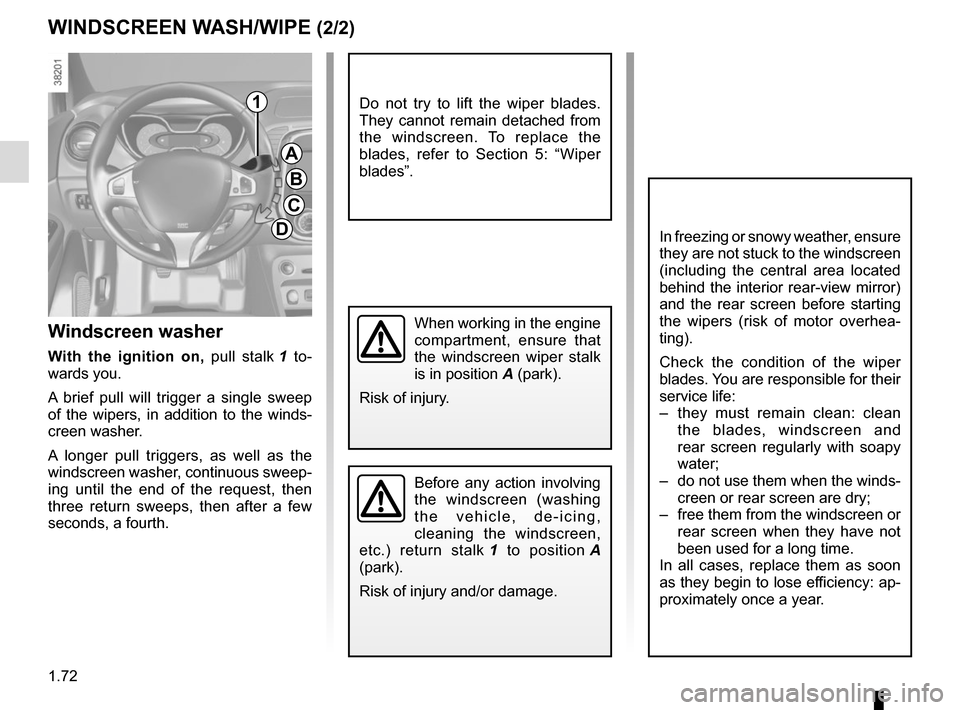
Windscreen washer
With the ignition on, pull stalk 1 to-
wards you.
A brief pull will trigger a single sweep
of the wipers, in addition to the winds-
creen washer.
A longer pull triggers, as well as the
windscreen washer, continuous sweep-
ing until the end of the request, then
three return sweeps, then after a few
seconds, a fourth.
WINDSCREEN WASH/WIPE (2/2)
A
B
C
D
1
In freezing or snowy weather, ensure
they are not stuck to the windscreen
(including the central area located
behind the interior rear-view mirror)
and the rear screen before starting
the wipers (risk of motor overhea-
ting).
Check the condition of the wiper
blades. You are responsible for their
service life:
– they must remain clean: clean the blades, windscreen and
rear screen regularly with soapy
water;
– do not use them when the winds- creen or rear screen are dry;
– free them from the windscreen or rear screen when they have not
been used for a long time.
In all cases, replace them as soon
as they begin to lose efficiency: ap-
proximately once a year.
When working in the engine
compartment, ensure that
the windscreen wiper stalk
is in position A (park).
Risk of injury.
Do not try to lift the wiper blades.
They cannot remain detached from
the windscreen. To replace the
blades, refer to Section 5: “Wiper
blades”.