Page 126 of 260
124
Partner-2-VU_en_Chap07_Verification_ed02-2016
PEUGEOT & TOTAL,
A PARTNERSHIP TO DELIVER
BETTER PERFORMANCE!
2015 was marked by PEUGEOT's return to Rally-
Raid, one of the most difficult motorsport disciplines
in the world. To obtain the best performance in these
trials, PEUGEOT Sport chose TOTAL QUARTZ for the
PEUGEOT 2008 DKR, a lubricant of high technology
which protects the engine in the most severe conditions.
TOTAL QUARTZ protects your engine against the
effects of time.
TOTAL QUARTZ Ineo First is a high performance
lubricant, the result of work done together by PEUGEOT
and TOTAL R&D. Specially formulated for the engines
in PEUGEOT vehicles, its innovative technology
significantly reduces CO
2 emissions and keeps your
engine clean.
RECOMMENDS
Maintenance with TOTAL
Page 158 of 260

156
Partner-2-VU_en_Chap08_Aide-rapide_ed02-2016
CHANGING A FUSE
The fuseboxes are located:
-
in the lower dashboard on the left-
hand side (behind the cover),
-
under the bonnet (near the battery).
If fitted on your vehicle, an additional
fusebox is used for towing, the
towbar and the connections for
the coachbuilder and platform cab
modifications. It is located on the right
behind the load retaining partition.
The indications communicated
are only those fuses which can be
changed by the user using the tweezer
,
located behind the dashboard storage
compartment on the right-hand side.
For any other work, visit a PEUGEOT
dealer or a qualified workshop.
Removing and fitting a fuse
Always replace a failed fuse with a
fuse of the same rating.
PEUGEOT will not accept
responsibility for the cost incurred in
repairing your vehicle or for rectifying
the malfunctions resulting from
the installation of accessories not
supplied and not recommended by the
PEUGEOT network and not installed
in accordance with its instructions,
in particular when the combined
consumption of all of the additional
equipment connected exceeds
10
milliamperes.
Motor trade technicians: for
complete information on the fuses
and relays, refer to the "Repair
manual" diagram via the dealer
network. Before replacing a fuse, the cause
of the incident must be found and
rectified.
-
Use the tweezer
.
Changing a fuse
Page 161 of 260
159
Partner-2-VU_en_Chap08_Aide-rapide_ed02-2016
Fuses under the bonnet
After opening the bonnet, unclip and tilt
the box to gain access to the fuses.Fuses
F Amperes
A Allocation
1 20 Engine management
2 15Horn
3 10 Front and rear screenwash pump
4 20 LED
5 15 Engine components
6 10 Steering wheel angle sensor, DSC
7 10 Brake switch, clutch switch
8 25Starter motor
9 10 Headlamp beam motor, parc management unit
10 30 Engine components 11 40 Not used
12 30 Wipers
13 40 Built-in systems interface
14 30 Pump
15 10 Right-hand main beam headlamp
16 10 Left-hand main beam headlamp
17 15Right-hand dipped beam headlamp
18 15Left-hand dipped beam headlamp
QUICK HELP
8
Changing a fuse
Page 183 of 260
Audio and Telematics
181
Partner-2-VU_en_Chap10a_SMEGplus_ed02-2016
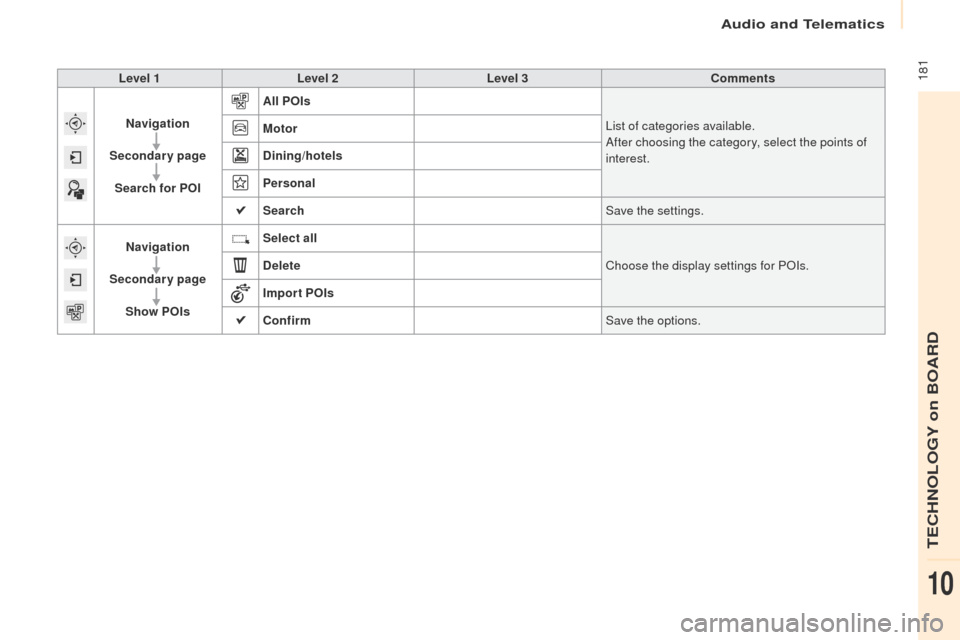
Level 1Level 2 Level 3 Comments
Navigation
Secondary page Search for POI All POIs
List of categories available.
After choosing the category, select the points of
interest.
Motor
Dining/hotels
Personal
Search
Save the settings.
Navigation
Secondary page Show POIs Select all
Choose the display settings for POIs.
Delete
Import POIs
Confirm Save the options.
TECHNOLOGY on BOARD
10
Page 188 of 260
Audio and Telematics
186
Partner-2-VU_en_Chap10a_SMEGplus_ed02-2016
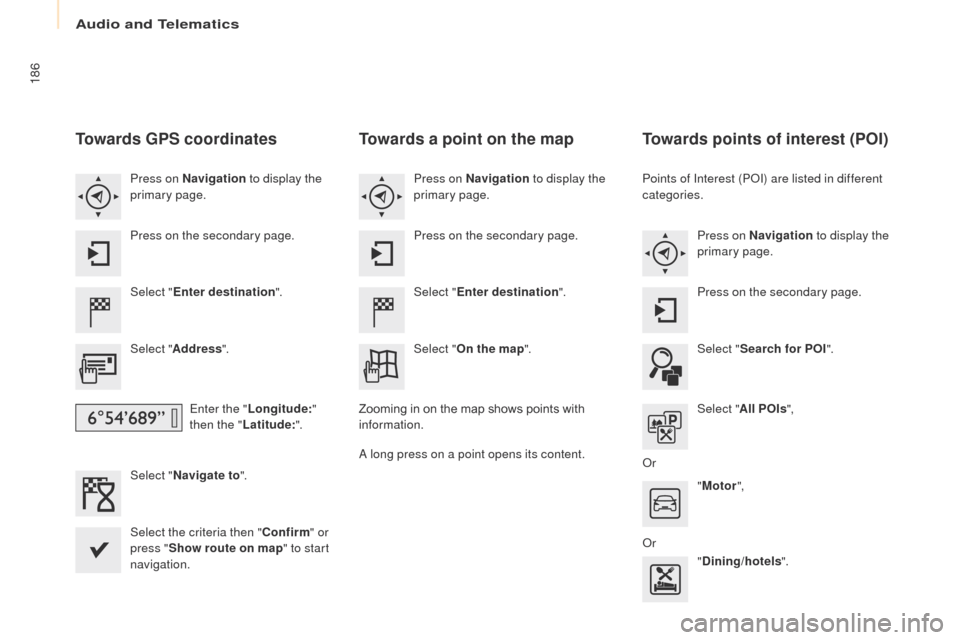
Towards GPS coordinates
Select "Enter destination ".
Select " Address ".
Enter the " Longitude: "
then the " Latitude: ".
Select " Navigate to ".
Select the criteria then " Confirm" or
press " Show route on map " to start
navigation. Press on Navigation to display the
primary page.
Press on the secondary page.
Towards a point on the map
Select " Enter destination ".
Select " On the map ".
Press on Navigation
to display the
primary page.
Press on the secondary page.
Zooming in on the map shows points with
information.
A long press on a point opens its content.
Towards points of interest (POI)
Points of Interest (POI) are listed in different
categories. Press on Navigation to display the
primary page.
Press on the secondary page.
Select " Search for POI ".
Select " All POIs ",
Or "Motor ",
Or "Dining/hotels ".
Page 191 of 260
Audio and Telematics
189
Partner-2-VU_en_Chap10a_SMEGplus_ed02-2016
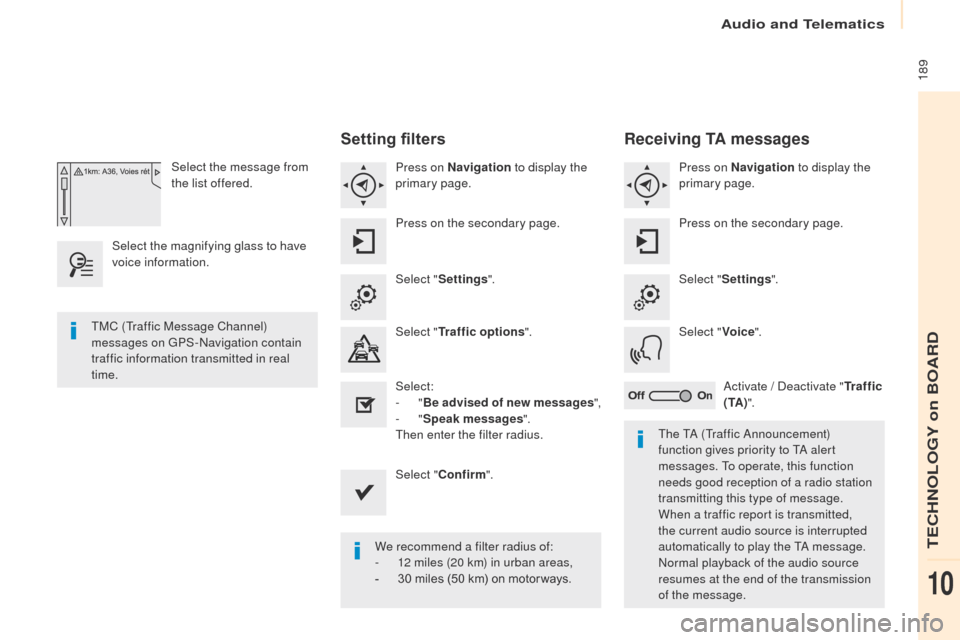
Select the message from
the list offered.
Select the magnifying glass to have
voice information.
Setting filters
Press on Navigation to display the
primary page.
Press on the secondary page.
Select " Settings ".
Select " Traffic options ".
Select:
-
"Be advised of new messages ",
-
"Speak messages ".
Then enter the filter radius.
Select " Confirm ".
We recommend a filter radius of:
-
1
2 miles (20 km) in urban areas,
-
3
0 miles (50 km) on motor ways.
TMC (Traffic Message Channel)
messages on GPS-Navigation contain
traffic information transmitted in real
time.
The TA (Traffic Announcement)
function gives priority to TA alert
messages. To operate, this function
needs good reception of a radio station
transmitting this type of message.
When a traffic report is transmitted,
the current audio source is interrupted
automatically to play the TA message.
Normal playback of the audio source
resumes at the end of the transmission
of the message.
Receiving TA messages
Press on Navigation to display the
primary page.
Press on the secondary page.
Select " Settings ".
Select " Voice".
Activate / Deactivate " Tr a f f i c
( TA ) ".
TECHNOLOGY on BOARD
10
Page 226 of 260

Audio and Telematics
224
Partner-2-VU_en_Chap10a_SMEGplus_ed02-2016
The table below gives answers to the most frequently asked questions on your audio system.
Frequently asked questions
Navigation
QUESTIONANSWER SOLUTION
The route calculation is not
successful. The navigation settings may conflict with the current location
(exclusion of toll roads on a toll motor way). Check the settings in the "Navigation" menu.
The POIs do not appear. The POIs have not been selected. Select the POIs in the list of POIs.
The Risk areas audible
warning does not work. The audible warning is not active.
Activate audible warnings in the "Navigation"
menu.
The system does not
suggest a detour around an
incident on the route. The guidance criteria do not take account of TMC messages. Select the "Information" function in the list of
guidance criteria.
I receive a Risk areas alert
which is not on my route. Other than guidance, the system announces all Risk areas
positioned in a cone located in front of the vehicle. It may provide an
alert for Risk areas located on nearby or parallel roads. Zoom in on the map to view the exact position of
the Risk areas. Select "On the route" to no longer
receive alerts other than guidance or to reduce
the time for the announcement.
Page 227 of 260
Audio and Telematics
225
Partner-2-VU_en_Chap10a_SMEGplus_ed02-2016
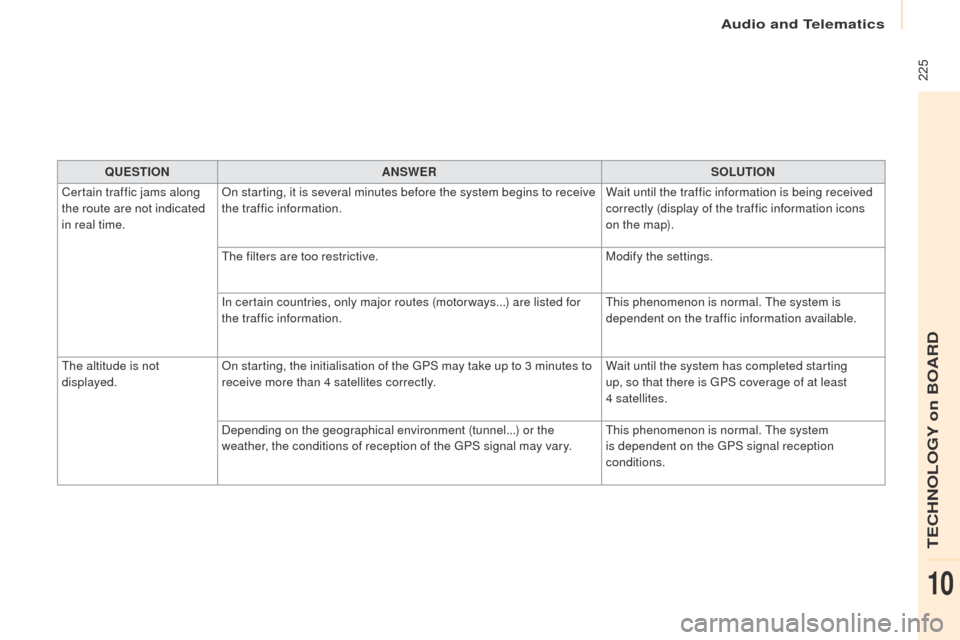
QUESTIONANSWER SOLUTION
Certain traffic jams along
the route are not indicated
in real time. On starting, it is several minutes before the system begins to receive
the traffic information.
Wait until the traffic information is being received
correctly (display of the traffic information icons
on the map).
The filters are too restrictive. Modify the settings.
In certain countries, only major routes (motor ways...) are listed for
the traffic information. This phenomenon is normal. The system is
dependent on the traffic information available.
The altitude is not
displayed. On starting, the initialisation of the GPS may take up to 3 minutes to
receive more than 4 satellites correctly. Wait until the system has completed starting
up, so that there is GPS coverage of at least
4
satellites.
Depending on the geographical environment (tunnel...) or the
weather, the conditions of reception of the GPS signal may vary. This phenomenon is normal. The system
is dependent on the GPS signal reception
conditions.
TECHNOLOGY on BOARD
10