Page 339 of 392
337
308_en_Chap10b_SMegplus_ed01-2016
At each change of colour scheme
the system restarts, showing a black
screen for a few moments.
th
e "Interactive help" included in
the system is not intended to be a
substitute for the more complete
content of the printed handbook.
As a safety measure, the procedure
for changing the color scheme is only
possible with the vehicle stationary. As a safety measure, consultation of
the handbook is only possible with the
vehicle stationary.
Press on Configuration
to display
the primary page. Press on Configuration
to display
the primary page.
Select " Color schemes ". Select "Interactive help ".
Select the colour scheme in the list,
then " Confirm ".
Color schemes Interactive help
.
Audio and telematics
Page 340 of 392

338
308_en_Chap10b_SMegplus_ed01-2016
Press on Configuration to display
the primary page then go to the
secondary page. Press on Configuration
to display
the primary page then go to the
secondary page.
Press on Configuration
to display
the primary page then go to the
secondary page.
Select:
-
"Time/Date " to change the time
zone, synchronisation with
g
P
S,
the time and its format and then
the date.
-
"Languages " to change the
language.
-
"Calculator " to display a
calculator.
-
"Calendar " to display a calendar.
Select "
System Settings ".
Select "Screen settings ".
Select " Units" to change the units
of distance, fuel consumption and
temperature. Activate or deactivate "
Activate
automatic text scrolling " and
" Activate animations ".
Select " Delete data " to delete the
list of recent destinations, personal
points of interest, contacts in the list.
Choose the item then select " Delete".
Select " Factory settings " to return
to the original settings.
System
Modify system settings
Audio and telematics
Page 342 of 392
340
308_en_Chap10b_SMegplus_ed01-2016
Connected services
Level 1Level 2
"Connected services"
Primary page
Driving assistance
applications, see the
"P
e
uge
Ot
Connect Apps"*
section. Identification
DUN connection settings Transfer rate Certain new generation
smartphones are not compatible
with this standard.
Secondary page
Internet navigation via Bluetooth
telephone Dial-
u
p Networking
(D
uN)
.
* Depending on country.
Audio and telematics
Page 343 of 392

341
308_en_Chap10b_SMegplus_ed01-2016
PeugeOt Connect Apps
these applications use vehicle data such as
the current speed, mileage, remaining fuel
range or even
g
P
S position to provide pertinent
information.
As a safety measure, some functions can only
be used when stationary.
th
e "My
Peuge
O
t
" application is a link between
the user, the manufacturer and its dealer network.
It allows the customer to know everything about
their vehicle: servicing plan, accessory range,
service contracts taken out, ...
It also makes possible the sending of the vehicle's
mileage to the "My Peuge
O
t
" site, or to identify
a dealer.
Press on the "Connected services"
menu to display the applications.
Plug the "P
e
uge
Ot
Connect
Apps" connection key into the
uS
B port.
* Depending on country. "P
e
uge
Ot
Connect Apps"* is
a service providing driving aid
applications in real time; it gives access
to useful information such as the state
of the traffic, danger zones, fuel prices,
the availability of parking places, tourist
sites, weather conditions, correct
addresses…
It includes access to the mobile
network associated with the use
of these applications. "P
e
uge
Ot
Connect Apps"* is a service available
under subscription contract from
P
e
uge
Ot d
ealers, depending on
country and the type of touch screen,
both before and after delivery of a new
vehicle.
.
Audio and telematics
Page 344 of 392
342
308_en_Chap10b_SMegplus_ed01-2016
Level 1
telephone
Level 2Level 3
Contacts Call log
"Telephone"
Primary page
Audio and telematics
Page 345 of 392
343
308_en_Chap10b_SMegplus_ed01-2016
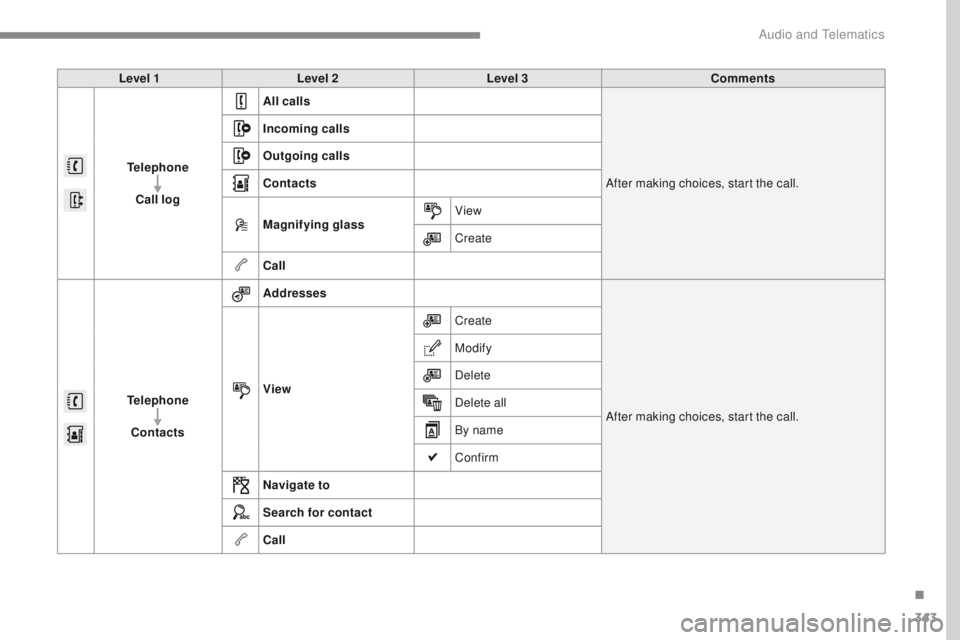
Level 1Level 2 Level 3 Comments
Telephone Call log All calls
After making choices, start the call.
Incoming calls
Outgoing calls
Contacts
Magnifying glass
View
Create
Call
Telephone Contacts Addresses
After making choices, start the call.
View Create
Modify
Delete
Delete all
By name
Confirm
Navigate to
Search for contact
Call
.
Audio and telematics
Page 346 of 392
344
308_en_Chap10b_SMegplus_ed01-2016
Bluetooth (equipment)
Telephone Options Devices detected
Telephone connection
Level 1
Level 2Level 3"Telephone"
Secondary page
Audio and telematics
Page 347 of 392

345
308_en_Chap10b_SMegplus_ed01-2016
Level 1Level 2 Level 3 Comments
Telephone
connection
Secondary page Bluetooth
connection Search
Start the search for another peripheral device to
connect.
Disconnect Stop the Bluetooth connection to the selected
peripheral device.
Update Import the contacts from the selected telephone
to store them in the audio system.
Delete Delete the selected telephone.
Confirm Save the settings.
Telephone
conn ection
Secondary page Search for devices Devices detected
te
lephoneStart the search for peripheral devices.
Audio streaming
Internet
Telephone
connection
Secondary page
Telephone Options Put on hold
Cut the microphone temporarily so that the
contact cannot hear your conversation with a
passenger.
Update Import the contacts from the selected telephone
to save them in the audio system.
Ringtones Choose the telephone ringtone and volume.
Memory info. Contact records used and free, percentage of
storage space used by internal contacts and
Bluetooth contacts.
Confirm Save the settings.
.
Audio and telematics