2017 Peugeot 308 wheel
[x] Cancel search: wheelPage 153 of 392

151
308_en_Chap06_conduite_ed01-2016
For Diesel vehicles, in sub-
zero temperatures the engine
will not start until the pre-heater
warning lamp has gone off.
If this warning lamp comes on
after pressing the "S
tA
R
t/
StO
P" button, press down on
the brake or clutch pedal until
the warning lamp goes off,
without pressing the "S
tA
R
t/
StO
P" button again, until the
engine starts and runs.
F
P
lace the electronic key inside the vehicle,
in the recognition zone.
Starting
F Press the " START/STOP"
button.
th
e presence in the recognition zone of
the electronic key of the "Keyless e
n
try
and Starting" system is essential. For
reasons of safety, do not leave this zone
while the engine is running.
A message is displayed if the electronic
key is not detected in the zone. Move
the electronic key into the zone to be
able to start the engine.
Starting and switching off the engine,
"Keyless e
n
try and Starting"
the steering column unlocks and the engine
starts more or less immediately. If one of the starting conditions is not
met, a reminder message appears in
the instrument panel screen. In some
circumstances, it is necessary to
turn the steering wheel slightly while
pressing the "S
tA
R
t/
S
tO
P" button
to assist unlocking of the steering;
a message warns you when this is
needed.
(Read the information on Diesel versions). F
I
f your vehicle has a manual gearbox, place
the gear lever in neutral then fully depress
the clutch pedal.
F
I
f your vehicle has an automatic gearbox,
place the selector at position P then press
the brake pedal firmly.
6
Driving
Page 156 of 392

154
308_en_Chap06_conduite_ed01-2016
Manual parking brake
When parking on a slope, direct your
wheels against the kerb, apply the
parking brake, engage a gear and
switch off the ignition.
When the vehicle is being driven, this
warning lamp coming on, accompanied
by an audible signal and a message,
indicates that the parking brake is still
on or has not been fully released. Pressing the brake pedal facilitates the
application and release of the manual
parking brake.
Release
F With your foot on the brake pedal, pull the
parking brake lever up gently, press the
release button then lower the lever fully.
Application
F With your foot on the brake pedal, pull the parking brake lever up to immobilise your
vehicle.
Anti-theft protection
Electronic engine immobiliser
the keys contain an electronic chip which has
a secret code. When the ignition is switched
on, this code must be recognised in order for
starting to be possible.
th
is electronic engine immobiliser locks the
engine management system a few minutes
after the ignition is switched off and prevents
starting of the engine by anyone who does not
have the key.
In the event of a malfunction, you are informed
by a message in the instrument panel screen.
In this case, your vehicle does not start; contact
a P
e
uge
Ot
dealer if required.
For reasons of safety and theft protection,
do not leave your electronic key in the
vehicle, even when you are close to it.
It is recommended that you keep it on
your person.
Driving
Page 157 of 392

155
308_en_Chap06_conduite_ed01-2016
electric parking brake
Never leave a child alone inside the
vehicle with the ignition on, as they
could release the parking brake.Indicator lamp
this indicator lamp comes on in the
instrument panel and in the control
lever to confirm the application of the
parking brake.
th
e system allows the application of the
parking brake on switching off the engine and
release as the vehicle moves off.
When towing, parking on a steep slope,
or if your vehicle is heavily laden,
turn the wheels towards the kerb and
engage a gear.
For towing, your vehicle is approved for
parking on slopes of up to 12%.
It goes off to confirm the release of the parking
brake.
th
e indicator lamp in the control lever
flashes during manual application or
release. In the event of a battery failure, the
electric parking brake no longer works.
As a safety measure, if the parking
brake is not applied, immobilise the
vehicle by placing a chock against one
of the wheels.
th
e driver can take over at any time to apply
or release the parking brake, by operating the
control lever.
-
B
y briefly pulling
the control
lever to apply the brake,
-
B
y briefly pushing
the control lever, while
pressing the brake
pedal, to release it.
th
e technology adopted for the electric
parking brake does not allow the fitment
of 15 inch wheels. With a manual gearbox, you can
immobilise the vehicle by engaging a
g e a r.
Contact a P
e
uge
Ot
dealer or a
qualified workshop.
6
Driving
Page 160 of 392

158
308_en_Chap06_conduite_ed01-2016
Immobilising the vehicle
with the engine running
Application of the parking brake
is confirmed by illumination of
the brake indicator lamp and
the P indicator lamp in the control
lever, accompanied by the display of
a message.
th
e complete release of the parking
brake is confirmed by the brake
indicator lamp and the P indicator
lamp in the control lever going off,
accompanied by the display of a
message.
to i
mmobilise the vehicle with the engine
running, briefly pull the control lever. In very cold conditions (risk of freezing),
during recovery or in a car wash tunnel,
it is recommended that the parking
brake not be applied.
Parking the vehicle with the
parking brake released
F Switch off the ignition.
to
immobilise your vehicle, engage a
gear or fit a chock to one of the wheels.
F
S
witch off the engine.
Application of the parking brake is confirmed
by illumination of of the indicator lamps in the
instrument panel and the control lever.
F
S
witch the ignition on again, without
starting the engine.
F
R
elease the parking brake manually by
pushing the control lever while keeping
your foot on the brake pedal.
Driving
Page 163 of 392

161
308_en_Chap06_conduite_ed01-2016
SituationConsequences
Display of the message " Parking brake fault" and these
warning lamps.
th
e parking brake is faulty, the manual and automatic functions may not operate.
When stationary , to immobilise your vehicle:
F
p
ull and hold the control lever for about 7 to 15 seconds, until the warning lamp
comes on in the instrument panel.
If this procedure does not work, you should make your vehicle safe:
F
p
ark on a level sur face,
F
enga
ge a gear,
F
i
f possible, fit a wheel chock.
Call on a P
e
uge
Ot
dealer or a qualified workshop.
Display of the message " Parking brake fault" and these
warning lamps. -
t
h
e parking brake does not have its full per formance to securely hold the vehicle
in all situations.
You should make your vehicle safe:
-
p
ark on a level sur face,
-
enga
ge a gear,
-
i
f possible, fit a wheel chock.
Call on a P
e
uge
Ot
dealer or a qualified workshop.
th
e flashing of the P warning lamps on starting the vehicle indicates that the parking
brake is not correctly applied.
As soon as possible, stop the vehicle and try to completely release the parking brake,
using the control lever, with your foot on the brake pedal.
Display of the message " Battery fault" and this warning
lamp. -
t
h
e state of charge of the battery is very low and requires immobilisation of the
vehicle in a safe place.
-
O
nce the battery is completely discharged, the controls do not operate: to
release the parking brake, call on a P
e
uge
Ot
dealer or a qualified workshop.
6
Driving
Page 177 of 392
175
308_en_Chap06_conduite_ed01-2016
Switching on / Pause
F turn the thumbwheel 1 to the "LIMIT"
position: the speed limiter mode is selected
but is not switched on (Pause).
F
S
witch the speed limiter back on by
pressing button 4 , if the speed displayed
is suitable (by default, the last speed
programmed).
F
Y
ou can temporarily stop the speed limiter
by pressing button 4 again: the display
confirms that it has been stopped (Pause). You do not have to switch the speed limiter on
in order to set the speed.
Once the function is selected, you can modify
the speed setting by:
-
u
sing buttons 2 and 3, increasing or
decreasing the speed displayed:
F
b
y successive short presses, to modify
by + or - 1 mph (1 km/h),
F
b
y a maintained press, to modify in steps
of + or - 5 mph (5 km/h). -
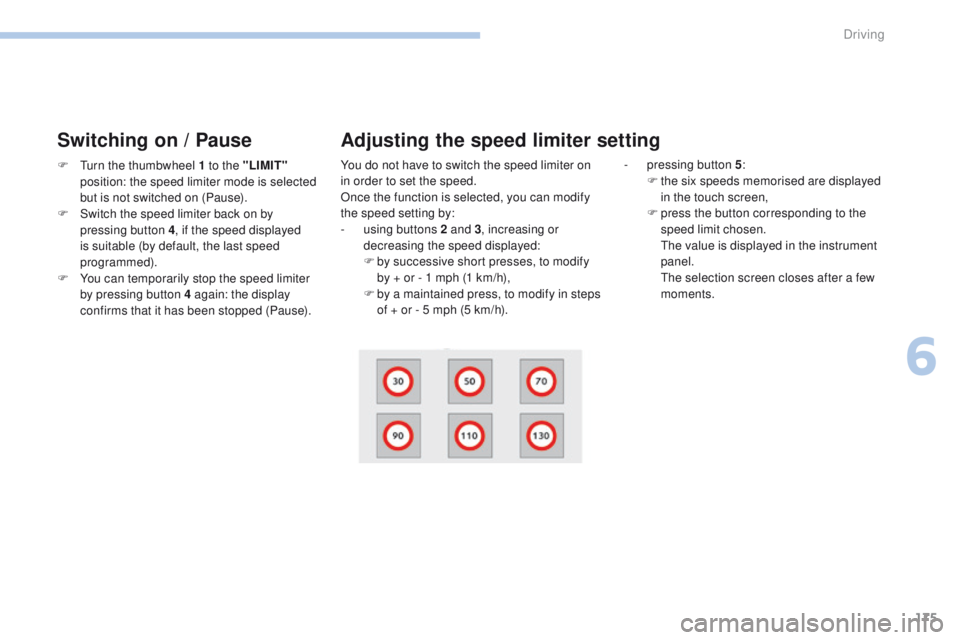
p ressing button 5
:
F t he six speeds memorised are displayed
in the touch screen,
F
p
ress the button corresponding to the
speed limit chosen.
t
h
e value is displayed in the instrument
panel.
t
h
e selection screen closes after a few
moments.
Adjusting the speed limiter setting
6
Driving
Page 178 of 392

176
308_en_Chap06_conduite_ed01-2016
On sharp acceleration, as when
descending a steep hill, the speed
limiter will not be able to prevent
the vehicle from exceeding the
programmed speed.
the
limiter is temporarily deactivated
and the displayed programmed speed
flashes.
An audible signal accompanies the
flashing of the programmed speed
when exceeding the speed is not due to
an action by the driver.
th
e use of mats not approved by
P
e
uge
Ot
may inter fere with the
operation of the speed limiter.
to a
void any risk of jamming of the
pedals:
-
e
nsure that the mat is secured
c o r r e c t l y,
-
d
o not fit one mat on top of another.
Flashing of the dashes indicates a fault with the
speed limiter.
Have it checked by a P
e
uge
Ot
dealer or a
qualified workshop.Operating fault
Temporarily exceeding the
programmed speed
Switching off
F Press f irmly on the accelerator pedal,
going beyond the point of resistance, to
exceed the programmed speed limit.
th
e speed limiter is deactivated temporarily
and the displayed programmed speed flashes.
An audible signal accompanies the flashing
of the programmed speed when exceeding
the speed is not due to an action by the driver
(steep hill...).
As soon as the vehicle's speed returns to the
programmed value, the limiter operates again:
the display of the programmed speed becomes
steady again.
F
t
u
rn the wheel 1 to the "0" position.
t
h
e display of speed limiter information
disappears.
Driving
Page 180 of 392

178
308_en_Chap06_conduite_ed01-2016
Switching on / Pause
If the cruise control is switched on, you can then
modify the cruise speed in one of the following ways:
- using buttons 2 or 3:
F b y successive short presses, to modify
the speed by + or - 1 mph (km/h),
F
b
y a long press, to modify the speed in
steps of + or - 5 mph (km/h),
Exceeding the programmed
speed
F turn wheel 1 to the "CRUISE" position: the
cruise control mode is selected but is not
switched on (Pause).
F
P
ress button 2 or 3 : your vehicle's current
speed becomes the cruise speed.
th
e cruise control is activated (ON).
Modification of the cruise
speed setting
- pressing button 5 :
F t he six memorised speeds are displayed
in the the touch screen,
F
c
hoose a value: it is displayed in the
instrument panel.
t
h
e selection screen closes after a few
moments.
t
he
modification is then accepted. If the programmed speed is exceeded, the
displayed speed flashes.
Once the vehicle returns to the programmed
speed, the display becomes steady again.
Switching off
F turn wheel 1 to the "0"
position.
th e display of information related to the
cruise control disappears.
Once switched on, you can pause the cruise
control at any time by pressing button 4: the
screen confirms the pause.
Driving