Page 116 of 392
114
308_en_Chap04_eclairage-et-visibilite_ed01-2016
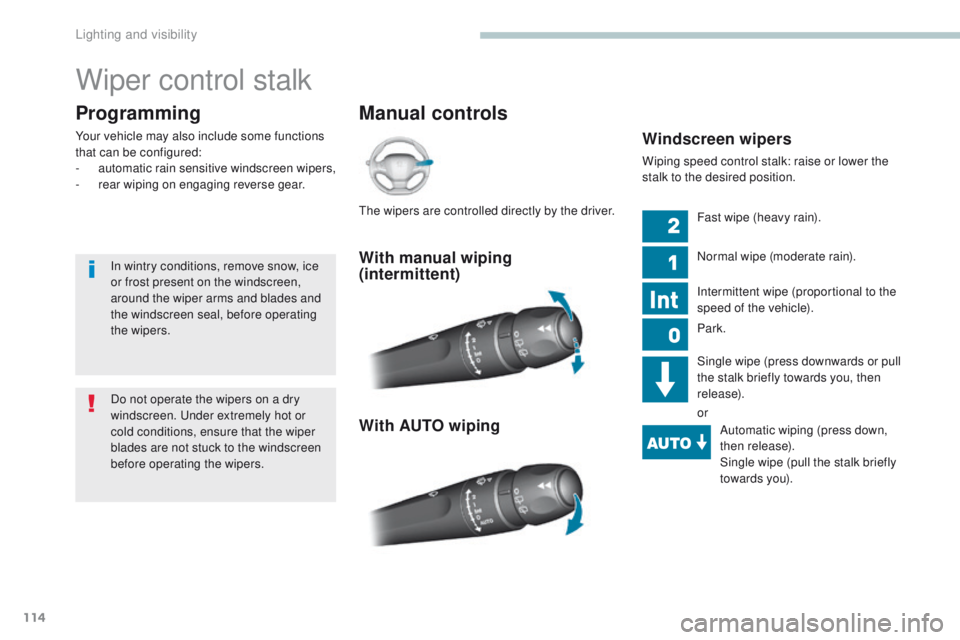
Wiper control stalk
Manual controls
Programming
Your vehicle may also include some functions
that can be configured:
-
a
utomatic rain sensitive windscreen wipers,
-
r
ear wiping on engaging reverse gear.Windscreen wipers
Wiping speed control stalk: raise or lower the
stalk to the desired position.
With manual wiping
(intermittent)
With AUTO wiping
Fast wipe (heavy rain).
Normal wipe (moderate rain).
Intermittent wipe (proportional to the
speed of the vehicle).
Park.
Single wipe (press downwards or pull
the stalk briefly towards you, then
release).
orAutomatic wiping (press down,
then release).
Single wipe (pull the stalk briefly
towards you).
Do not operate the wipers on a dry
windscreen.
u
n
der extremely hot or
cold conditions, ensure that the wiper
blades are not stuck to the windscreen
before operating the wipers.
In wintry conditions, remove snow, ice
or frost present on the windscreen,
around the wiper arms and blades and
the windscreen seal, before operating
the wipers.th
e wipers are controlled directly by the driver.
Lighting and visibility
Page 117 of 392

115
308_en_Chap04_eclairage-et-visibilite_ed01-2016
Rear wiper
Park.
Intermittent wipe.
Wash-wipe (set duration).F
P
ull the windscreen wiper stalk towards
you. the screenwash then the wipers
operate for a fixed period.
th
e headlamp wash is only activated if the
dipped headlamps are on and the vehicle is
moving .
With daytime running lamps, to activate the
headlamp wash, position the lighting stalk in
the dipped beam position.
Windscreen and headlamp
wash
On vehicles fitted with automatic
air conditioning, any action on the
windscreen wash control results in
temporary closing of the air intake to
avoid odours inside the passenger
compartment.
Rear wiper selection ring:
If a significant accumulation of snow or
ice is present, or when using a bicycle
carrier on the boot, deactivate the
automatic rear wiper.
th
is function is activated by default.
F
Sel
ect the "
Driving assistance "
menu, then " Vehicle settings ".
Reverse gear
When reverse gear is engaged, the rear wiper
will come into operation automatically if the
windscreen wipers are operating.
Activation or deactivation of this automatic
function can be set in the touch screen.
4
Lighting and visibility
Page 118 of 392

116
308_en_Chap04_eclairage-et-visibilite_ed01-2016
Screenwash/headlamp wash
level low
In the case of vehicles fitted with headlamp
washers, when the fluid reservoir low level
is reached this warning lamp comes on in
the instrument panel, accompanied by an
audible signal and a message.
Automatic rain sensitive windscreen wipers
Switching on
Briefly push the control stalk downwards.
A wiping cycle confirms that the
instruction has been accepted.
th
is warning lamp comes on in the
instrument panel and a message is
displayed.
Briefly push the control stalk
downwards again, or place
the
control stalk in another
position
(Int, 1 or 2).
th
is warning lamp goes off in the
instrument panel and a message is
displayed.Switching off
the automatic rain sensitive windscreen
wipers must be reactivated by pushing
the control stalk downwards, if the
ignition has been off for more than
one
minute.
th
e warning lamp comes on when the ignition
is switched on, or every time the stalk is
operated, until the reservoir is refilled.
Next time you stop, refill the screenwash /
headlamp wash reservoir.
th
e windscreen wipers operate automatically, without any action on the part of the driver, if rain is
detected (sensor behind the rear view mirror), adapting their speed to the intensity of the rainfall.
Do not cover the rain sensor, linked with
the sunshine sensor and located in the
centre of the windscreen behind the rear
view mirror.
Switch off the automatic rain sensitive
wipers when using an automatic car wash.
In winter, it is advisable to wait until the
windscreen is completely clear of ice
before activating the automatic rain
sensitive wipers.
Operating fault
If a fault occurs with the automatic rain
sensitive wipers, the wipers will operate in
intermittent mode.
Have it checked by P
e
uge
Ot
dealer or a
qualified workshop.
Lighting and visibility
Page 119 of 392

117
308_en_Chap04_eclairage-et-visibilite_ed01-2016
Special position of the
windscreen wipers
this position permits release of the windscreen
wiper blades.
It is used for cleaning or replacement of the
wiper blades. It can also be useful, in winter, to
release the wiper blades from the windscreen.
to m
aintain the effectiveness of the flat
wiper blades, it is advisable to:
-
h
andle them with care,
-
c
lean them regularly using soapy
water,
-
a
void using them to retain
cardboard on the windscreen,
-
r
eplace them at the first signs of
w e a r.
F
A
ny action on the wiper stalk within one
minute after switching off the ignition
places the wiper blades vertically on the
screen.
F
t
o p
ark the wiper blades again, switch on
the ignition and operate the wiper stalk.
Heated windscreen and
washer jets*
* Depending on the country of sale. In area 1 , the heating frees the wiper blades
when they are stuck by snow or ice.
In area 2 , the heating improves visibility by
avoiding the accumulation of snow when the
wipers are operating.
Switching onF With the engine running, press this button; its indicator lamp
comes on.
th
e period of operation depends on the
ambient temperature.
Pressing this button again switches the function
off; its indicator lamp goes off.
th
is function heats the windscreen and washer
jets under cold conditions.
4
Lighting and visibility
Page 171 of 392

169
308_en_Chap06_conduite_ed01-2016
Dynamic pack (Driver Sport Pack)
this pack conditions:
- t he visual ambience, with specific back-
lighting for the instrument panel,
-
t
he acoustic ambience of the engine,
-
t
he power assistance for the steering,
-
t
he acceleration,
-
t
he information to the driver in the
instrument panel on dynamic settings.
th
is function is only available when
Park Assist is not selected and snow
mode in the automatic gearbox is not
selected.
If Park Assist
is switched on, this
automatically deactivates the function.Activation
F Press the end of the wiper control stalk to display in the instrument panel the different
information on dynamic settings.
F
P
ress and hold the button until the back-
lighting in the instrument panel changes.
th
e L
eD i
n the button stays on.
Display
F Press repeatedly to go from one screen to another.
If the L
eD f
lashes, activation is not
possible (for example if Park Assist
or snow mode is selected) and so
the back-lighting returns to its normal
mode.
If the L
eD c
ontinues flashing for a long
time, contact a P
e
uge
Ot
dealer or a
qualified workshop.
With an automatic gearbox, gear
changes are faster.
th
e telemetry data (longitudinal and
lateral acceleration, power produced,
turbocharger pressure,
...) are given as
an indication only.
6
Driving
Page 221 of 392

219
308_en_Chap07_info-pratiques_ed01-2016
System which manages the duration of use of certain functions to conserve a sufficient level of
charge in the battery.
After the engine has stopped, you can still use functions such as the audio and telematics
system, windscreen wipers, dipped beam headlamps, courtesy lamps, etc. for a maximum
combined duration of about forty minutes.
energy economy mode
Switching to economy
mode
A message appears in the instrument panel
screen indicating that the vehicle has switched
to economy mode and the active functions are
put on standby.
If a telephone call is being made at this time, it
will be maintained for around 10 minutes with
the Bluetooth hands-free system of your audio
system.
Exiting economy mode
these functions are reactivated automatically
next time the vehicle is driven.
In order to restore the use of these functions
immediately, start the engine and let it run:
-
f
or less than ten minutes, to use the
equipment for approximately five minutes,
-
f
or more than ten minutes, to use the
equipment for up to approximately thirty
minutes.
Let the engine run for the duration specified to
ensure that the battery charge is sufficient.
Do not repeatedly and continuously restart the
engine in order to charge the battery.
A flat battery prevents the engine from starting.
Load reduction mode
System which manages the use of certain
functions according to the level of charge
remaining in the battery.
When the vehicle is being driven, the load
reduction function temporarily deactivates
certain functions, such as the air conditioning,
the heated rear screen...
th
e deactivated functions are reactivated
automatically as soon as conditions permit.
For more information on the 12 V
battery , refer to the corresponding
section.
7
Practical information
Page 224 of 392
222
308_en_Chap07_info-pratiques_ed01-2016
Changing a wiper blade
F Within one minute after switching off the ignition, operate the wiper stalk to
position the wiper blades vertically on
the
windscreen.
Removing
F Raise the corresponding wiper arm.
F un clip the wiper blade and remove it.
Fitting
F Put the corresponding new wiper blade in place and clip it.
F
F
old down the wiper arm carefully.
After fitting a front wiper
blade
F Switch on the ignition.
F O perate the wiper stalk again to park the
wiper blades.
Before removing a front
wiper blade
Do not fit an accessory carrier to the
tailgate.
Bicycle / accessory
carrier
Practical information
Page 266 of 392
264
308_en_Chap08_en-cas-de-panne_ed01-2016
Dashboard fuses
the fusebox is placed in the lower dashboard
(left-hand side). Fuse
N° Rating
(A) Functions
F4 5
em
ergency and assistance calls.
F6 A or B 15Audio system, touch screen, CD player, navigation.
F11 5"Keyless
e
n
try and starting" system
F13 10Front 12 V accessory socket.
F14 1012 V accessory socket in the boot.
F16 3
gl
ove box lamp, rear courtesy lamp.
F17 3Vanity mirror lamp, front courtesy lamp.
F19 5Instrument panel.
F21 10Multifunction screen, air conditioning.
F22 5Reversing camera, parking sensors.
F24 3Rain and sunshine sensor
F25 5Airbags.
F28 A or B 15Audio system (battery +).
F30 20Rear wiper.
F31 30Locks.
F32 10Hi-Fi amplifier.
F33 3Memorisation of driving positions.
F34 5
el
ectric power steering.
F35 3Seat belts not fastened display.
F
u
n
clip the cover by pulling at top left, then
right.
Version 1 (Full)
Access to the fuses
In the event of a breakdown

