Page 353 of 392

351
308_en_Chap10b_SMegplus_ed01-2016
QUESTIONANSWER SOLUTION
Certain traffic jams along
the route are not indicated
in real time. On starting, it is several minutes before the system begins to receive
the traffic information.
Wait until the traffic information is being received
correctly (display of the traffic information icons
on the map).
th
e filters are too restrictive. Modify the settings.
In certain countries, only major routes (motor ways...) are listed for
the traffic information.
th
is phenomenon is normal. t
he
system is
dependent on the traffic information available.
th
e altitude is not
displayed. On starting, the initialisation of the
g
P
S may take up to 3 minutes to
receive more than 4 satellites correctly. Wait until the system has started up completely so
that there is
g
P
S coverage by at least 4 satellites.
Depending on the geographical environment (tunnel...) or the
weather, the conditions of reception of the
g
P
S signal may vary.
th
is phenomenon is normal. t
he
system
is dependent on the
g
P
S signal reception
conditions.
.
Audio and telematics
Page 354 of 392

352
308_en_Chap10b_SMegplus_ed01-2016
Radio
QUESTIONANSWER SOLUTION
th
e quality of reception of
the radio station listened
to gradually deteriorates
or the stored stations do
not function (no sound,
87.5
Mhz is displayed...).
th
e vehicle is too far from the transmitter used by the station
listened to or there is no transmitter in the geographical area
through which the vehicle is travelling. Activate the "RDS" function by means of the
short-cut menu to enable the system to check
whether there is a more power ful transmitter in
the geographical area.
th
e environment (hills, buildings, tunnels, basement car parks...)
block reception, including in RDS mode.
th
is phenomenon is normal and does not indicate
a fault with the audio system.
th
e aerial is absent or has been damaged (for example when going
through a car wash or into an underground car park). Have the aerial checked by a P
e
uge
Ot
dealer.
I cannot find some radio
stations in the list of
stations received.
th
e station is not received or its name has changed in the list. Press and hold the "List" button at the steering mounted controls to update the list of stations
received or press on the system update function:
"
up
date list".
Some radio stations send other information in place of their name
(the title of the song for example).
th
e system interprets this information as the name of the station.
th
e name of the radio
station changes.
Audio and telematics
Page 356 of 392
354
308_en_Chap10b_SMegplus_ed01-2016
QUESTIONANSWER SOLUTION
th
e CD player sound is
p o o r.
th
e CD used is scratched or of poor quality. Insert good quality CDs and store them in suitable
conditions.
th
e audio equipment settings (bass, treble, ambiences) are
unsuitable. Set the treble or bass level to 0, without selecting
an ambience.
Some characters in the
media information are not
displayed correctly while
playing.
th
e audio system does not display some types of characters.
u
se standard characters to name tracks and
folders.
Playing of streaming files
does not start.
th
e peripheral device connected does not support automatic play. Start the playback from the device.
th
e names of tracks and
the track length are not
displayed on the screen
when streaming audio.
th
e Bluetooth profile does not allow the transfer of this information.
Audio and telematics
Page 359 of 392

357
308_en_Chap10b_SMegplus_ed01-2016
Telephone
QUESTIONANSWER SOLUTION
I cannot connect my
Bluetooth telephone.
th
e telephone's Bluetooth function may be switched off or the
telephone may not be visible. Check that your telephone's Bluetooth function is
switched on.
Check in the telephone settings that it is "visible
to all ".
th
e Bluetooth telephone is not compatible with the system. You can check the compatibility of your telephone
at www.peugeot.co.uk (services).
th
e volume of the
telephone connected
in Bluetooth mode is
inaudible.
th
e volume depends both on the system and on the telephone. Increase the volume of the audio system, to maximum if required, and increase the volume of
the telephone if necessary.
th
e ambient noise level has an influence on the quality of telephone
communication. Reduce the ambient noise level (close the
windows, reduce the booster fan speed, slow
down...).
Some contacts are
duplicated in the list.
th
e options for synchronizing contacts are synchronizing the
contacts on the SIM card, the contacts on the telephone, or both.
When both synchronizations are selected, some contacts may be
duplicated. Select "Display SIM card contacts" or "Display
telephone contacts".
Contacts are not shown in
alphabetical order. Some telephones offer display options. Depending on the settings
chosen, contacts can be transferred in a specific order. Modify the display setting in the telephone
di r e c to r y.
th
e system does not receive
SMS text messages.
th
e Bluetooth mode does not permit sending SMS text messages to
the system.
.
Audio and telematics
Page 362 of 392
360
308_en_Chap10c_RD45_ed01-2016
First steps
On/off, volume setting.
Display the list of local stations.
Long press: CD tracks or MP3
folders (CD / u
S
B).
Select source:
Radio; audio CD / MP3 CD;
u
S
B;
Jack connection; Streaming; A
uX
.
Select wavebands FM, DAB and AM. Audio settings: front/rear fader, left/
right balance, bass/treble, loudness,
audio ambiences.
tA (tr
affic Announcements) on/off. Select the screen display mode:
date, audio functions, telephone,
Bluetooth, personalisation-
configuration.
Select next frequency down/up.
Select previous/next MP3 folder.
Select previous/next folder / genre /
artist / playlist (
uS
B).
Abandon the current operation. Confirm.
Buttons 1 to 6:
Select a pre-set radio station.
Long press: pre-set a station. Automatic frequency search down/up.
Select previous/next CD, MP3 or
uS
B track.
Display main menu.
Audio and telematics
Page 364 of 392
362
308_en_Chap10c_RD45_ed01-2016
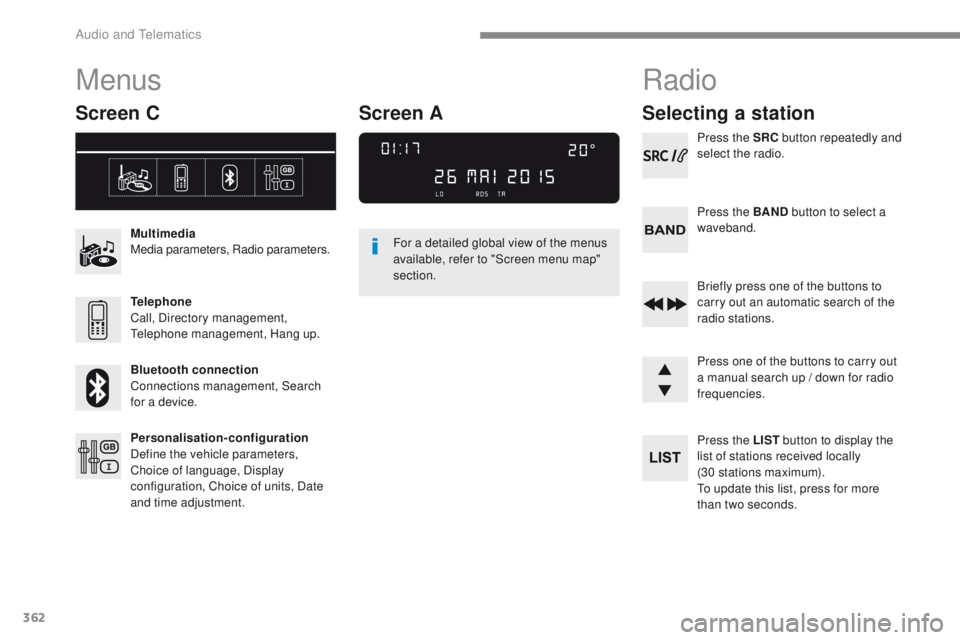
Menus
Screen C
Multimedia
Media parameters, Radio parameters.
Telephone
Call, Directory management,
te
lephone management, Hang up.
Bluetooth connection
Connections management, Search
for a device.
Personalisation-configuration
Define the vehicle parameters,
Choice of language, Display
configuration, Choice of units, Date
and time adjustment. For a detailed global view of the menus
available, refer to "Screen menu map"
section.
Radio
Selecting a station
Press the SRC
button repeatedly and
select the radio.
Press the BAND button to select a
waveband.
Briefly press one of the buttons to
carry out an automatic search of the
radio stations.
Press one of the buttons to carry out
a manual search up / down for radio
frequencies.
Press the LIST button to display the
list of stations received locally
(30 stations maximum).
to u
pdate this list, press for more
than two seconds.
Screen A
Audio and telematics
Page 365 of 392

363
308_en_Chap10c_RD45_ed01-2016
RDS
the external environment (hills,
buildings, tunnels, basement car
parks, ...) may block reception,
including in RDS mode.
t
h
is is a
normal effect of the way in which radio
waves are transmitted and does not
indicate any failure of the audio system.
Press the MENU button.
Select " Audio functions ".
Press OK.
Select the " FM waveband
preferences " function.
Press OK. Select "
Activate RDS ".
Press OK , RDS is displayed in the
screen.
In " Radio " mode, press OK directly to activate /
deactivate RDS mode.
RDS, if displayed, enables you to continue
listening to the same station by automatic
retuning to alternative frequencies.
However, in certain conditions, coverage
of an RDS station may not be assured
throughout the country as radio stations
do not cover 100 % of the territory.
t
h
is
explains the loss of reception of a station
that can occur during a journey.
Receiving TA messages
Press the TA button to activate or
deactivate traffic messages.
th
e t
A (tr
affic Announcement)
function gives priority to t
A a
lert
messages. t
o o
perate, this function
needs good reception of a radio station
transmitting this type of message.
When a traffic report is transmitted, the
current audio source (Radio, CD, ...)
is interrupted automatically to play the
tA m
essage. Normal playback of the
audio source resumes at the end of the
transmission of the message.
.
Audio and telematics
Page 366 of 392
364
308_en_Chap10c_RD45_ed01-2016
DAB (Digital Audio Broadcasting) radio
Display options:
if active but not available, the display will be
struck out.Preset stations, buttons 1 to 6.
Short press: select the preset radio
station.
Long press: preset a radio station.
Display the name of the multiplex
service being used.
Represents the signal strength for the
band being listened to. Display of Radio
te
xt (
tXt) f
or the
current radio station. Display the name of the current
station.
If the "DAB" station being listened to
is not available on "FM", "DAB
FM" is
struck out.
Audio and telematics