Page 6 of 307
4IntroductionDanger, Warnings andCautions9 Danger
Text marked 9 Danger provides
information on risk of fatal injury.
Disregarding this information may
endanger life.
9 Warning
Text marked 9 Warning provides
information on risk of accident or
injury. Disregarding this
information may lead to injury.
Caution
Text marked Caution provides
information on possible damage to
the vehicle. Disregarding this
information may lead to vehicle
damage.
Symbols
Page references are indicated with 3.
3 means "see page".
Page references and index entries
refer to the indented headings given
in the section table of content.
We wish you many hours of
pleasurable driving.
Adam Opel AG
Page 13 of 307

In brief111Power windows .....................32
2 Exterior mirrors .....................29
3 Cruise control .....................179
Speed limiter ....................... 180
Adaptive cruise control .......182
Forward collision alert .........188
4 Side air vents ...................... 156
5 Turn and lane-change
signals, headlight flash,
low beam and high beam,
high beam assist ................145
Exit lighting ......................... 149
Parking lights ...................... 146
Buttons for Driver
Information Centre ..............116
6 Instruments ........................ 104
7 Steering wheel controls .......97
8 Driver Information Centre .... 116
9 Windscreen wiper,
windscreen washer
system, headlight washer
system, rear wiper, rear
washer system ......................9810Central locking system ..........22
Hazard warning flashers ....145
Sport mode ........................ 177
Tour mode .......................... 177
Fuel selector ....................... 105
Control indicator for airbag
deactivation ........................ 111
Control indicator for front
passenger seat belt ...........110
11 Info-Display ........................ 120
12 Centre air vents .................. 156
13 Anti-theft alarm system
status LED ........................... 27
14 Glovebox .............................. 66
15 Climate control system ........ 150
16 AUX input, USB input, SD
card slot ................................ 10
Power outlet ........................ 102
17 Selector lever, manual
transmission ....................... 172
Automatic transmission ......16918Traction Control system .....176
Electronic Stability Control . 176
Lane departure warning .....207
19 Electric parking brake .........174
20 Parking assist systems .......194
Eco button for stop-start
system ................................. 161
21 Ignition switch with
steering wheel lock ............160
22 Horn ..................................... 98
Driver airbag ........................ 57
23 Bonnet release lever ..........225
24 Fuse box ............................ 243
Storage compartment ...........68
25 Steering wheel adjustment ..97
26 Light switch ........................ 138
Headlight range
adjustment ......................... 141
Front fog lights ...................146
Rear fog light ...................... 146
Instrument illumination .......147
Page 16 of 307
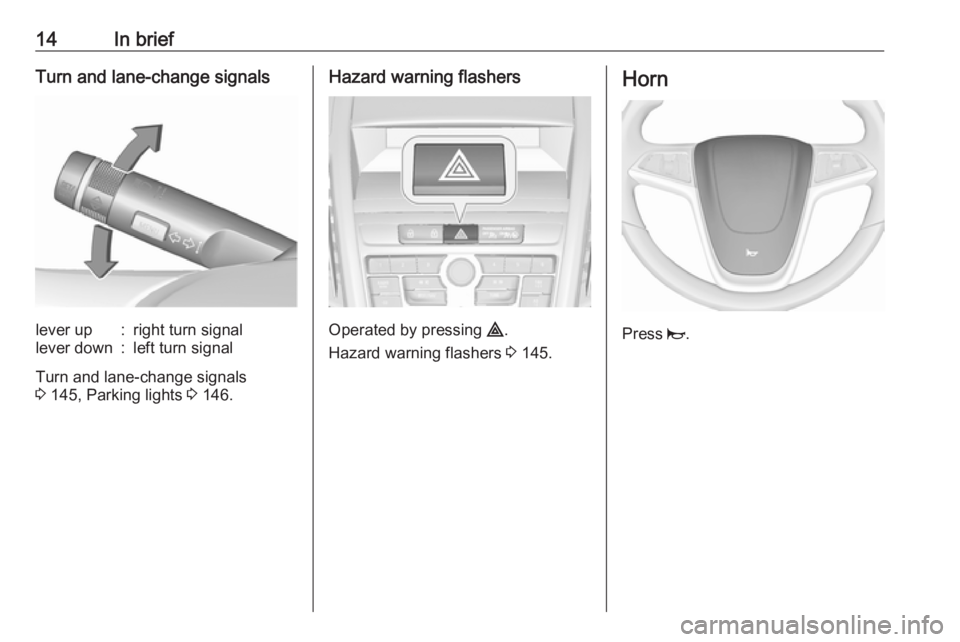
14In briefTurn and lane-change signalslever up:right turn signallever down:left turn signal
Turn and lane-change signals
3 145, Parking lights 3 146.
Hazard warning flashers
Operated by pressing ¨.
Hazard warning flashers 3 145.
Horn
Press j.
Page 20 of 307

18In briefStarting the engine
● Turn key to position 1.
● Move the steering wheel slightly to release the steering wheel
lock.
● Operate clutch and brake.
● Automatic transmission in P or N.
● Do not operate accelerator pedal.
● Diesel engines: turn the key to position 2 for preheating and wait
until control indicator !
extinguishes.
● Turn key to position 3 and
release.
Starting the engine 3 160.
Stop-start system
If the vehicle is at a low speed or at a
standstill and certain conditions are
fulfilled, activate an Autostop as
follows:
● Depress the clutch pedal.
● Shift the selector lever to N.
● Release the clutch pedal.
An Autostop is indicated by the
needle at the AUTOSTOP position in
the tachometer.
To restart the engine, depress the
clutch pedal again.
Stop-start system 3 161.
Parking9 Warning
● Do not park the vehicle on an
easily ignitable surface. The
high temperature of the
exhaust system could ignite the
surface.
● Always apply the parking brake. Activate the manual
parking brake without pressing the release button. Apply as
firmly as possible on a downhill slope or uphill slope. Depress
brake pedal at the same time to
reduce operating force.
For vehicles with electric
parking brake, pull switch m for
approx. one second.
The electric parking brake is applied when control indicator
m illuminates 3 111.
● Switch off the engine.
● If the vehicle is on a level surface or uphill slope, engage
first gear or set the selector
Page 23 of 307

Keys, doors and windows21Key with foldaway key section
Press button to extend. To fold the
key, first press the button.
Car Pass The Car Pass contains security
related vehicle data and should
therefore be kept in a safe place.
When the vehicle is taken to a
workshop, this vehicle data is needed
in order to perform certain operations.
Radio remote control
Used to operate:
● central locking system
● anti-theft locking system
● anti-theft alarm system
● power windows
The radio remote control has a range of approx. 20 metres. It can be
restricted by external influences. The
hazard warning flashers confirm
operation.
Handle with care, protect from
moisture and high temperatures and
avoid unnecessary operation.
Fault
If the central locking system cannot
be operated with the radio remote
control, it may be due to the following:
● The range is exceeded.
● The battery voltage is too low.
● Frequent, repeated operation of the radio remote control while not
in range, which will require re-
synchronisation.
● Overload of the central locking system by operating at frequent
intervals, the power supply is
interrupted for a short time.
● Interference from higher-power radio waves from other sources.
Unlocking 3 22.
Basic settings Some settings can be changed in the
Settings menu in the Info-Display.
Vehicle personalisation 3 129.
Radio remote control battery
replacement
Replace the battery as soon as the
range reduces.
Page 27 of 307
Keys, doors and windows25transmission) or the selector lever is
moved to position P (automatic
transmission).
Settings can be changed in the
Settings menu in the Info-Display.
Vehicle personalisation 3 129.
The settings can be saved for the key
being used 3 24.
Child locks9 Warning
Use the child locks whenever
children are occupying the rear
seats.
Using a key or suitable screwdriver,
turn the child lock in the rear door to
the horizontal position. The door
cannot be opened from the inside. For
deactivation turn the child lock to the
vertical position.Doors
Load compartment Tailgate
Opening
After unlocking, push the touchpad
switch under the tailgate moulding
and open the tailgate.
Central locking system 3 22.
Page 28 of 307
26Keys, doors and windowsClosing
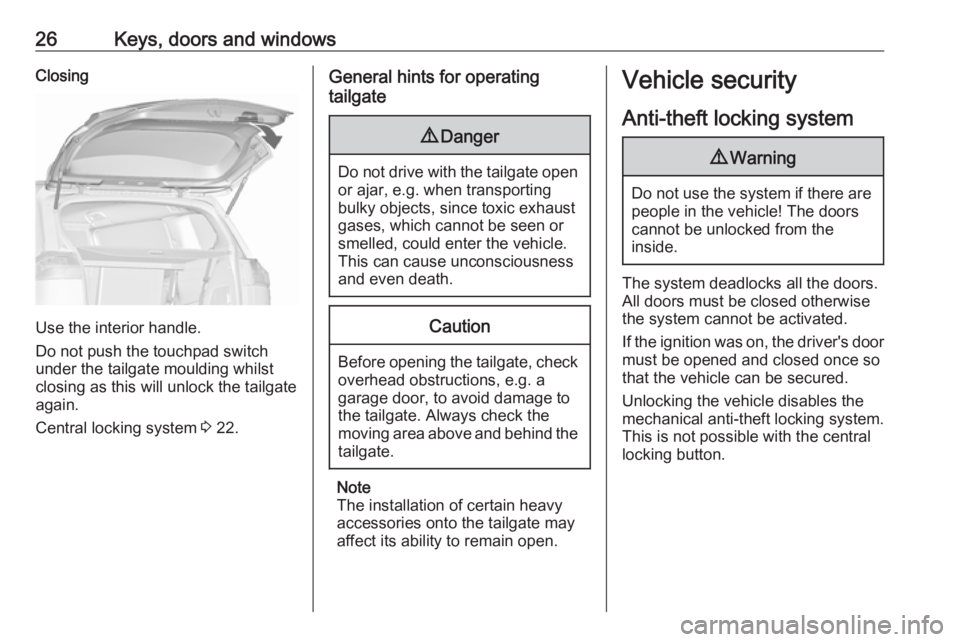
Use the interior handle.
Do not push the touchpad switch
under the tailgate moulding whilst
closing as this will unlock the tailgate
again.
Central locking system 3 22.
General hints for operating
tailgate9 Danger
Do not drive with the tailgate open
or ajar, e.g. when transporting
bulky objects, since toxic exhaust
gases, which cannot be seen or
smelled, could enter the vehicle.
This can cause unconsciousness
and even death.
Caution
Before opening the tailgate, check overhead obstructions, e.g. a
garage door, to avoid damage to
the tailgate. Always check the
moving area above and behind the
tailgate.
Note
The installation of certain heavy
accessories onto the tailgate may
affect its ability to remain open.
Vehicle security
Anti-theft locking system9 Warning
Do not use the system if there are
people in the vehicle! The doorscannot be unlocked from the
inside.
The system deadlocks all the doors. All doors must be closed otherwise
the system cannot be activated.
If the ignition was on, the driver's door
must be opened and closed once so
that the vehicle can be secured.
Unlocking the vehicle disables the
mechanical anti-theft locking system.
This is not possible with the central
locking button.
Page 30 of 307

28Keys, doors and windowsmovements triggering the alarm. Alsoswitch off when the vehicle is on a
ferry or train.
1. Close tailgate, bonnet and windows.
2. Press o. LED in the button
illuminates for a maximum of ten
minutes.
3. Close doors.
4. Activate the anti-theft alarm system.
Status message is displayed in the
Driver Information Centre.
Status LEDStatus LED is integrated into the
sensor on top of the instrument panel.
Status during the first 30 seconds of
anti-theft alarm system activation:LED illuminates:test, arming delayLED flashes
quickly:doors, tailgate or
bonnet not
completely closed,
or system fault
Status after system is armed:
LED flashes
slowly:system is armed
Seek the assistance of a workshop in the event of faults.
Deactivation Unlocking the vehicle deactivates the
anti-theft alarm system.
Alarm When triggered, the alarm hornsounds and the hazard warning lights
flash simultaneously. The number
and duration of alarm signals are
stipulated by legislation.
The alarm can be silenced by
pressing any button on the radio
remote control or by switching on the
ignition.
The anti-theft alarm system can be
deactivated only by pressing c or by
switching on the ignition.
A triggered alarm, which has not been interrupted by the driver, will be
indicated by the hazard warning
lights. They will flash quickly three
times when the vehicle is next
unlocked with the radio remote
control. Additionally, a warning
message or a warning code is
displayed in the Driver Information
Centre after switching on the ignition.
Vehicle messages 3 122.
Immobiliser The system is part of the ignition
switch and checks whether the
vehicle is allowed to be started with
the key being used.
The immobiliser is activated
automatically after the key has been
removed from the ignition switch.