2017 OPEL ZAFIRA TOURER warning
[x] Cancel search: warningPage 185 of 307

Driving and operating183Activation by setting the speed
Adaptive cruise control can be
activated between 50 km/h and
180 km/h.
Accelerate to the desired speed and
turn thumb wheel to SET/-; the
current speed is stored and
maintained. Control indicator m
illuminates green.
The adaptive cruise control symbol,
the following distance setting and set
speed are indicated in the top line ofthe Driver Information Centre.
The accelerator pedal can be
released. Adaptive cruise control
remains activated while gearshifting.
Overriding set speed
It is always possible to drive faster
than the selected set speed by
depressing the accelerator pedal. When the accelerator pedal is
released, the vehicle returns to the
desired distance if a slower vehicle is
ahead. Otherwise it returns to the
stored speed.
Once the system is activated,
adaptive cruise control decelerates or
brakes if it detects a vehicle ahead
which is slower or closer than the
desired following distance.
9 Warning
Accelerating by the driver
deactivates automatic braking by
the system. This is indicated as a
pop-up warning in the Driver
Information Centre.
Increase speed
With adaptive cruise control active,
hold thumb wheel turned to RES/+:
speed increases continuously in large
increments, or activate RES/+
repeatedly: speed increases in small increments.
With adaptive cruise control active, if
the vehicle is driven much faster than the desired speed, e.g. after
depressing the accelerator pedal,
then the current speed can be stored
and maintained by turning the thumb
wheel to SET/-.
Reduce speed With adaptive cruise control active,hold thumb wheel turned to SET/-:
speed decreases continuously in
Page 187 of 307

Driving and operating1859Warning
The driver accepts full
responsibility for the appropriate
following distance based on traffic, weather and visibility conditions.
Following distance must be
adjusted or the system switched
off when required by the prevailing
conditions.
Detecting the vehicle ahead
The green illuminated "vehicle
ahead" control indicator A is
displayed in the speedometer when the system detects a vehicle in the
driving path.
If this symbol does not appear, or
appears briefly, adaptive cruise
control will not respond to vehicles
ahead.
Deactivation
Adaptive cruise control is deactivated by the driver when:
● y is pressed.
● Brake pedal is applied.
● Clutch pedal is depressed for more than four seconds.
● Gear selector lever of automatic transmission is moved to N.
The system is also automatically deactivated when:
● Vehicle speed slows down below
45 km/h or accelerates above
190 km/h.
● Traction Control system is operating for more than
20 seconds.● Electronic Stability Control is operating.
● There is no traffic and nothing detected on the road sides forseveral minutes. In this case
there are no radar echoes and
the sensor may report that it is
blocked.
● Collision imminent braking system is applying the brakes.
● Radar sensor is blocked by an ice
or water film.
● A fault is detected in the radar, engine or brake system.
When adaptive cruise control is
deactivated automatically, the control indicator m illuminates white and a
warning symbol is displayed as a pop- up in the Driver Information Centre.
Page 188 of 307

186Driving and operating
The stored speed is maintained.
9Warning
When adaptive cruise control is
deactivated, the driver must take
over full brake and engine control.
Switching off
Press C to switch off adaptive cruise
control. The control indicator m
extinguishes. The stored speed is
deleted.
Switching off the ignition also
switches off adaptive cruise control
and deletes the stored speed.
Driver's attention
● Use adaptive cruise control carefully on bends or mountain
roads, as it can lose the vehicle
ahead and require time to detect
it again.
● Do not use the system on slippery roads as it can create
rapid changes in tyre traction
(wheel spinning), so that you
could lose control.
● Do not use adaptive cruise control during rain, snow or
heavy dirt, as the radar sensor
can be covered by a water film,
dust, ice or snow. This reduces or completely suppresses the
visibility. In case of sensor
blockage, clean the sensor
cover.
System limits ● The system's automatic brake force does not permit hard
braking and the braking level
may not be sufficient to avoid a
collision.● After a sudden lane change, the system needs a certain time to
detect the next preceding
vehicle. So if a new vehicle is
detected, the system may
accelerate instead of braking.
● Adaptive cruise control does ignore the oncoming traffic.
● Adaptive cruise control does not brake for stopped vehicles,
pedestrians or animals.
Bends
The adaptive cruise control calculates
a predicted path based on the
centrifugal force. This predicted path
considers the current bend
characteristic, but cannot consider a
future bend change. The system may lose the current vehicle ahead or
consider a vehicle which is not in the
actual lane. This can happen when
Page 190 of 307

188Driving and operatingRadar unit
The radar unit is mounted behind the
radiator grille below the brand
emblem.
9 Warning
The radar unit was aligned
carefully during manufacture.
Therefore, after a frontal accident, do not use the system. The front
bumper may appear to be intact,
however the sensor behind can be
out of position and react
incorrectly. After an accident,
consult a workshop to verify and
correct the adaptive cruise control
sensor position.
Settings
Settings can be changed in the Auto
collision preparation menu in the
vehicle personalisation 3 129.
Fault
If the adaptive cruise control does not
work due to temporary conditions
(e.g. blockage by ice) or if there is a
permanent system error, then a
message is displayed in the Driver
Information Centre.
Vehicle messages 3 122.
Forward collision alert The forward collision alert can help to
avoid or reduce the damage caused
by front-end crashes.
A vehicle ahead is indicated by a
control indicator A.
Page 191 of 307

Driving and operating189
If a vehicle directly ahead is
approached too quickly, a warning
chime and alert in the Driver
Information Centre is provided.
A precondition is that forward collision
alert is activated in the vehicle
personalisation menu 3 129 or that it
is not deactivated by pressing V
(depending on the system, see
following).
Depending on the vehicle's
equipment, there are two variants of
the forward collision alert available:
● Forward collision alert based on
radar system
on vehicles equipped with
adaptive cruise control 3 182.
● Forward collision alert based on
front camera system
on vehicles with traditional cruise
control or none 3 179.
Forward collision alert based on
radar system
The system uses the radar sensor
behind the radiator grille to detect a
vehicle directly ahead, in your path,
within a distance of max. 150 metres.
Activation
Forward collision alert operates
automatically above walking speed,
provided that Auto collision
preparation setting is not deactivated
in the vehicle personalisation menu
3 129.
Selecting the alert sensitivity
The alert sensitivity can be set to
near, medium or far.
Press E; the current setting is shown
in the Driver Information Centre.
Press E again to change the alert
sensitivity. The setting is also displayed in the top line of the Driver
Information Centre.
Page 192 of 307

190Driving and operating
Note that the alert timing sensitivity
setting is shared with the following distance setting of the adaptive cruise control. So changing the alert timing
sensitivity changes the adaptive
cruise control following distance
setting.
Alerting the driver
A green illuminated vehicle ahead
control indicator A illuminates in the
instrument cluster when the system has detected a vehicle in the driving
path. When the distance to a
preceding moving vehicle gets too
small or when approaching another
vehicle too rapidly and a collision is
imminent, the collision alert symbol
pops-up in the Driver Information
Centre. Simultaneously a warning
chime sounds.
Depress the brake pedal, if it is
required by the situation.
Settings
Settings can be changed in the Auto
collision preparation menu in the
vehicle personalisation 3 129.
Forward collision alert based on
front camera system
Forward collision alert uses the front
camera system in the windscreen to
detect a vehicle directly ahead, in
your path, within a distance of approx.
60 metres.
Activation
Forward collision alert operates
automatically above 40 km/h, if it is
not deactivated by pressing V, see
below.
Selecting the alert sensitivity
The alert sensitivity can be set to
near, medium or far.
Page 193 of 307
Driving and operating191
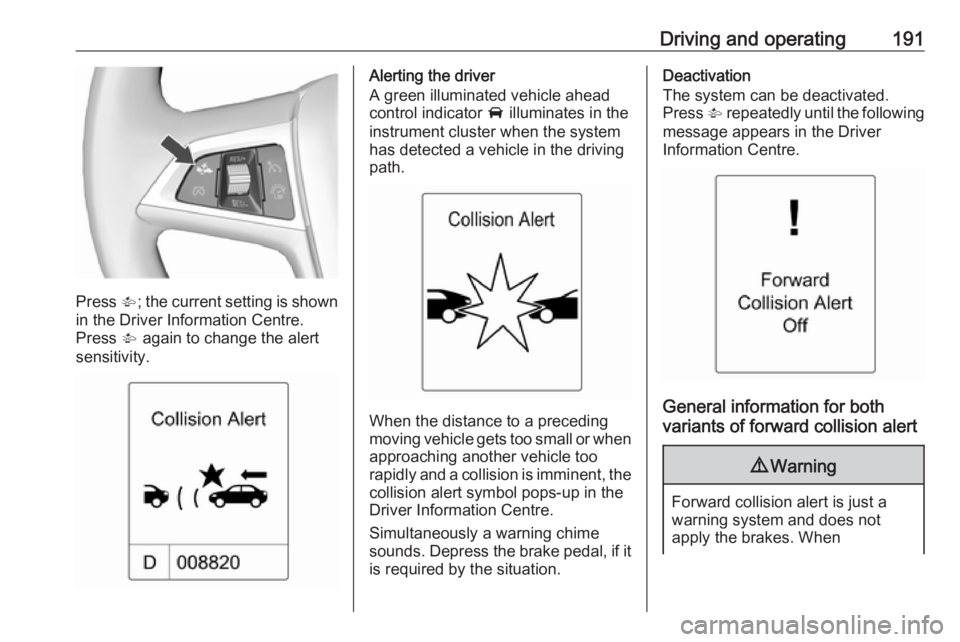
Press V; the current setting is shown
in the Driver Information Centre.
Press V again to change the alert
sensitivity.
Alerting the driver
A green illuminated vehicle ahead
control indicator A illuminates in the
instrument cluster when the system has detected a vehicle in the driving
path.
When the distance to a preceding
moving vehicle gets too small or when
approaching another vehicle too
rapidly and a collision is imminent, the
collision alert symbol pops-up in the
Driver Information Centre.
Simultaneously a warning chime
sounds. Depress the brake pedal, if it is required by the situation.
Deactivation
The system can be deactivated.
Press V repeatedly until the following
message appears in the Driver
Information Centre.
General information for both
variants of forward collision alert
9 Warning
Forward collision alert is just a
warning system and does not
apply the brakes. When
Page 195 of 307

Driving and operating193The feature uses various inputs (e.g.
radar sensor, brake pressure, vehicle
speed) to calculate the probability of
a frontal collision.
Active emergency braking operates
automatically above walking speed,
provided that Auto collision
preparation setting is not deactivated
in the vehicle personalisation menu
3 129.
The system includes: ● brake preparation system
● emergency automatic braking
● forward looking brake assist9Warning
This system is not intended to
replace the driver responsibility of driving the vehicle and looking
ahead. Its function is limited to
supplemental use only. The driver shall continue to apply the brake
pedal as the driving situation
dictates.
Brake preparation system
When approaching a vehicle ahead
so quickly that a collision is likely, the
brake preparation system slightly
pressurises the brakes. This reduces
the response time, when a manual or automatic braking is requested.
The brake system is prepared so that braking can occur more rapidly.
Emergency automatic braking
After the brake preparation and just
before the imminent collision, this
function automatically applies limited
braking to reduce the impact speed of the collision.
Forward looking brake assist
In addition to brake preparation
system and emergency automatic
braking, the forward looking brake
assist function makes the brake assist more sensitive. In this way,
depressing the brake pedal slightly
results immediately in a strong
braking. This function helps the driver
brake quicker and stronger before the imminent collision.9 Warning
Active emergency braking is not
designed to apply strong
autonomous braking or to avoid automatically a collision. It is
designed to reduce the vehicle
speed before collision. It may not
react on stopped vehicles,
pedestrians or animals. After a
sudden lane change, the system
needs a certain time to detect the
next preceding vehicle.
The complete attention of the
driver is always required while
driving. The driver shall always be ready to take action and apply the brakes and steer to avoid
collisions. The system is designed
to work with all occupants wearing their seat belts.
System limitations
The active emergency braking has
limited or no function during rain,
snow or heavy dirt, as the radar
sensor can be covered by a water