Page 107 of 671
1. Vents (P. 4-32)
2. Turn signal switch (P. 2-57)Wiper and washer switch (P. 2-49)
3. Steering wheel switch for audio control
(P. 4-82)
Bluetooth® Hands-Free Phone System
(P. 4-82)
Vehicle information display controls
(P. 2-32)
4. Driver supplemental air bag (P. 1-51) Horn (P. 2-58)
5. Meters and gauges (P. 2-6) Warning and indicator lights (P. 2-21)
6. Cruise control main/set switches
(P. 5-40)
7. Shift lever (P. 5-16) Tow mode switch (P. 2-68)
8. Audio controls (P. 4-46)
9. Center display (P. 4-4)
10. Climate controls (P. 4-33)
11. Front passenger supplemental air bag
(P. 1-51)
12. Glove box (P. 2-74)
13. Front passenger air bag status light
(if so equipped) (P. 1-51)
14. Power outlet (P. 2-69)
LII2352
INSTRUMENT PANEL
2-4Instruments and controls
Page 108 of 671
15. Heated steering wheel switch(if so equipped) (P. 2-62)
Warning Systems switch
(if so equipped) (P. 2-63)
16. Power outlet (P. 2-69)
17. Auxiliary jack (P. 4-46) USB port (P. 4-46)
18. Hazard warning flasher switch (P. 6-2)
19. Trailer Brake Controller Unit
(if so equipped) (P. 2-69)
20. Climate control seat switch
(if so equipped) (P. 2-58)
Heated front seat switches
(if so equipped) (P. 2-60)
21. Vehicle Dynamic Control (VDC) OFF
switch (P. 2-63)
Parking sensor (sonar) system OFF
switch (if so equipped) (P. 2-67)
22. 4WD shift switch (if so equipped)
(P. 5-44)
23. Push-button ignition switch (P. 5-10)
24. Tilt and telescopic steering wheel
control (P. 3-25)
25. Headlight aiming control
(if so equipped) (P. 2-53)
Power inverter switch (if so equipped)
(P. 2-67) Cargo lamp switch (P. 2-58)
Electronic locking rear differential
(E-Lock) system switch (if so
equipped) (P. 2-65)
Hill descent control system switch
(if so equipped) (P. 2-64)
26. Headlight switch (P. 2-53) Fog light switch (if so equipped)
(P. 2-57)
Instrument brightness control switches
(P. 2-53)
Trip reset switch (P. 2-6)
Refer to the page number indicated in pa-
renthesis for operating details.
Instruments and controls2-5
Page 109 of 671
1. Tachometer
2. Warning and indicator lights
3. Vehicle information displayOdometer
Outside temperature display 4. Speedometer
5. Fuel gauge
6. Engine coolant temperature gauge
Type A (if so equipped)
LIC3100
METERS AND GAUGES
2-6Instruments and controls
Page 110 of 671
1. Tachometer
2. Warning and indicator lights
3. Speedometer
4. Fuel gauge5. Trip computer
Odometer
Outside temperature display
6. Engine coolant temperature gauge
SPEEDOMETER AND ODOMETER
This vehicle is equipped with a speedometer and
odometer. The speedometer is located on the
right side of the meter cluster. The odometer is
located in the vehicle information display (Type A)
(if so equipped) or the trip computer (Type B) (if
so equipped) to the left of the speedometer and
can be accessed with the vehicle in the ON
position.
Type B (if so equipped)
LIC3497
Instruments and controls2-7
Page 113 of 671
CAUTION
If the gauge indicates coolant tempera-
ture near the hot (H) end of the normal
range, reduce vehicle speed to decrease
temperature. If the gauge is over the nor-
mal range, stop the vehicle as soon as
safely possible. If the engine is over-
heated, continued operation of the vehicle
may seriously damage the engine. For ad-
ditional information, refer to “If your ve-
hicle overheats” in the “In case of emer-
gency” section of this manual for
immediate action required.
FUEL GAUGE
The gauge indicates theapproximatefuel level
in the tank.
The gauge may move slightly during braking,
turning, acceleration, or going up or down hills.
The gauge needle returns to 0 (Empty) after the
ignition switch is placed in the OFF position.
The low fuel warning light comes on when the
amount of fuel in the tank is getting low.
Refill the fuel tank before the gauge regis-
ters 0 (Empty) . The
indicates that the fuel-filler door is
located on the driver’s side of the vehicle.
CAUTION
● If the vehicle runs out of fuel, theMalfunction Indicator Light (MIL) may
come on. Refuel as soon as possible.
After a few driving trips. the
light
should turn off. If the light remains on
after a few driving trips, have the vehicle
inspected. It is recommended that you
visit a NISSAN dealer for this service.
● For additional information, refer to
“Malfunction Indicator Light (MIL)” in
this section.
LIC2222
2-10Instruments and controls
Page 120 of 671
To reset the mileage, press and hold the ENTER
button for approximately 1 second.
To return to the main menu selections, scroll to
“EXIT” and press ENTER.
For additional information, refer to “Maintenance
schedules” in the “Maintenance and schedules”
section of this manual.
Units
The units menu item allows the user to change
the trip computer units to US or METRIC. To
select the units, press the ENTER button when
desired unit is shown.
To return to the main menu selections, scroll to
“EXIT” and press ENTER.
4WD error
The “4WD ERROR” message appears in the
center of the trip computer when there is a mal-
function with the 4–wheel drive system. For ad-
ditional information, refer to “4–Wheel Drive
(4WD) warning light” in this section.
4WD tires
The “4WD TIRES” message appears in the cen-
ter of the trip computer when there is a large
difference in wheel rotation. If this messages
appears, switch the vehicle into 2WD mode. For
additional information, refer to “Using 4–Wheel
Drive (4WD)” in the “Starting and driving” section
of this manual.
LIC3544LIC3545
Instruments and controls2-17
Page 124 of 671
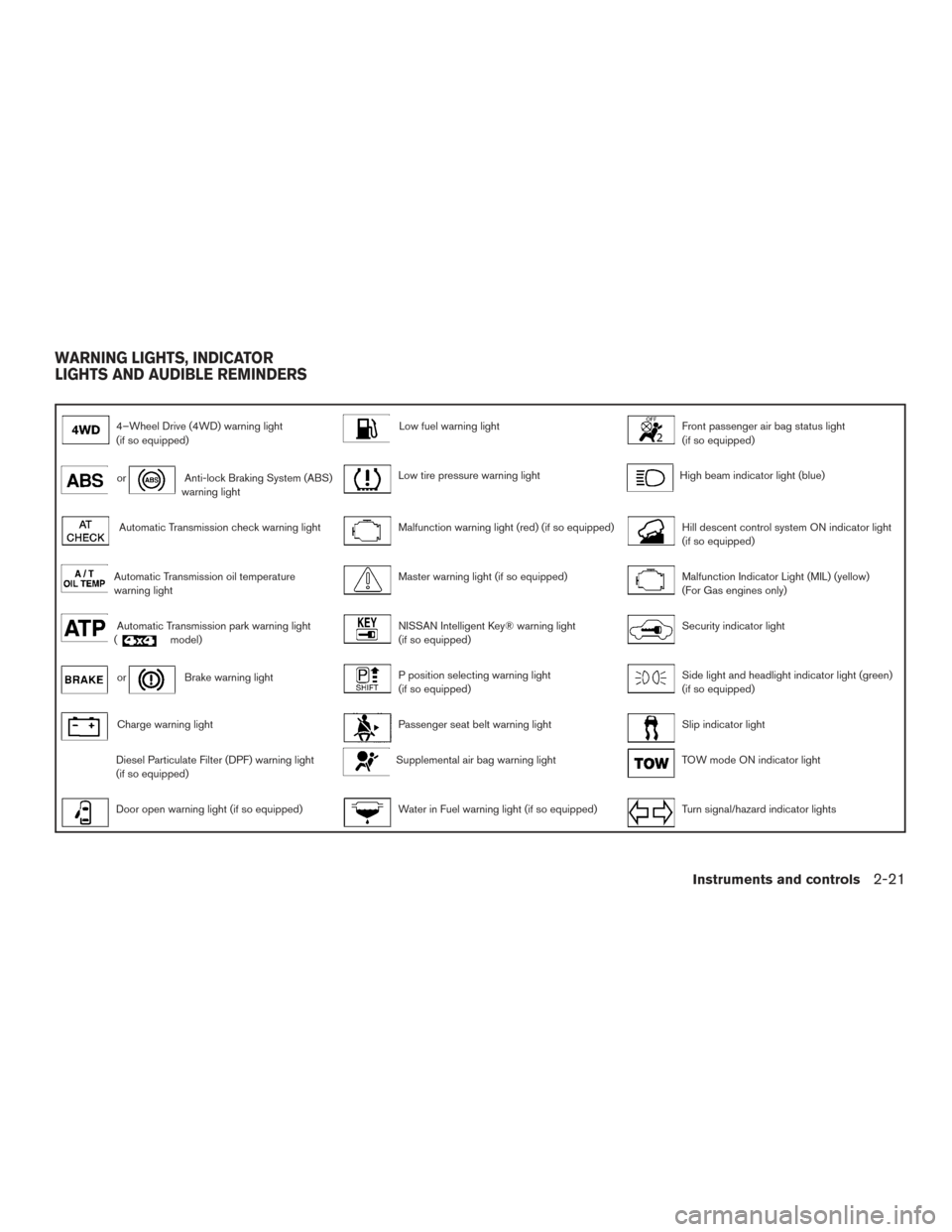
4–Wheel Drive (4WD) warning light
(if so equipped)Low fuel warning lightFront passenger air bag status light
(if so equipped)
orAnti-lock Braking System (ABS)
warning lightLow tire pressure warning lightHigh beam indicator light (blue)
Automatic Transmission check warning lightMalfunction warning light (red) (if so equipped)Hill descent control system ON indicator light
(if so equipped)
Automatic Transmission oil temperature
warning lightMaster warning light (if so equipped)Malfunction Indicator Light (MIL) (yellow)
(For Gas engines only)
Automatic Transmission park warning light
(model)NISSAN Intelligent Key® warning light
(if so equipped)Security indicator light
orBrake warning lightP position selecting warning light
(if so equipped)Side light and headlight indicator light (green)
(if so equipped)
Charge warning lightPassenger seat belt warning lightSlip indicator light
Diesel Particulate Filter (DPF) warning light
(if so equipped)Supplemental air bag warning lightTOW mode ON indicator light
Door open warning light (if so equipped)Water in Fuel warning light (if so equipped)Turn signal/hazard indicator lights
WARNING LIGHTS, INDICATOR
LIGHTS AND AUDIBLE REMINDERS
Instruments and controls2-21
Page 125 of 671
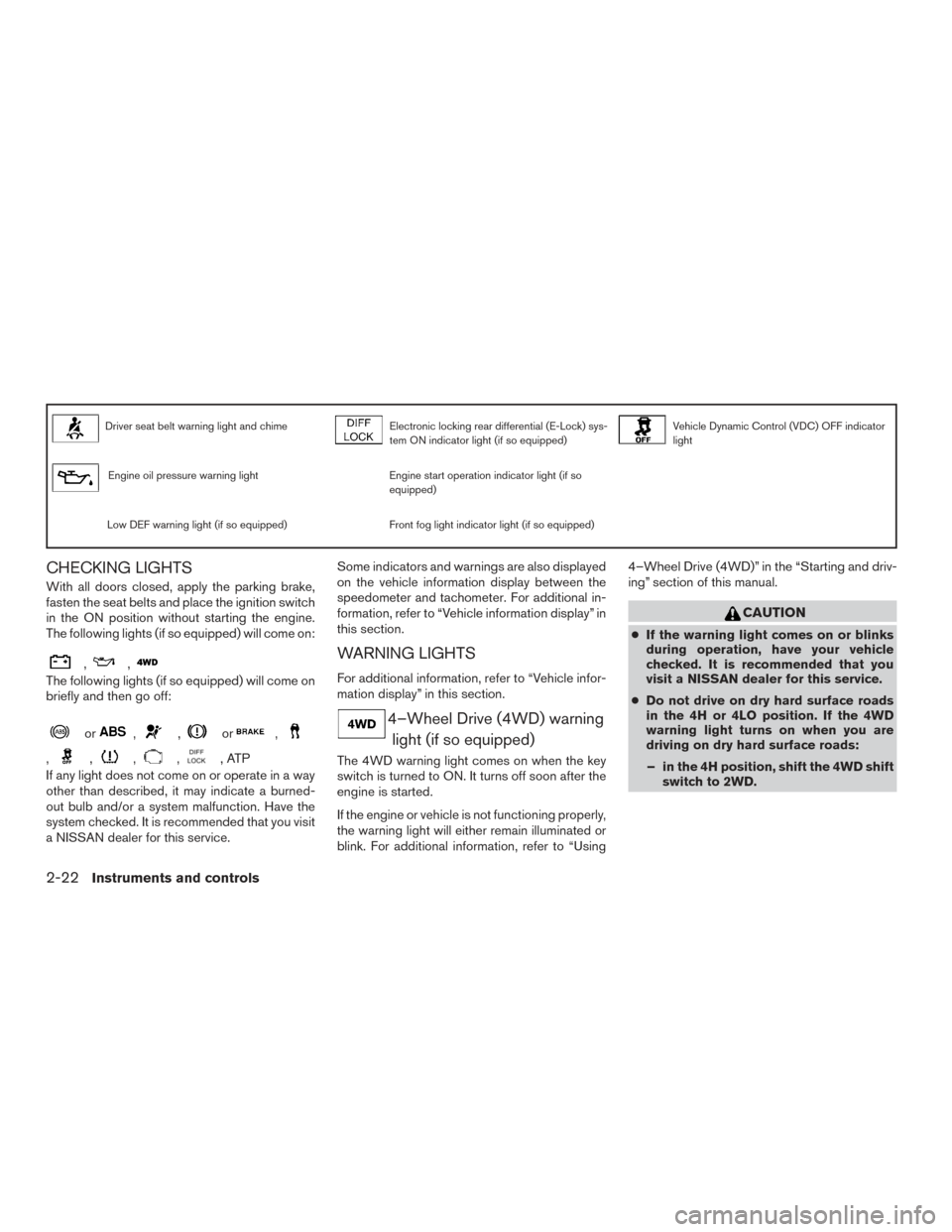
Driver seat belt warning light and chimeElectronic locking rear differential (E-Lock) sys-
tem ON indicator light (if so equipped)Vehicle Dynamic Control (VDC) OFF indicator
light
Engine oil pressure warning lightEngine start operation indicator light (if so
equipped)
Low DEF warning light (if so equipped)Front fog light indicator light (if so equipped)
CHECKING LIGHTS
With all doors closed, apply the parking brake,
fasten the seat belts and place the ignition switch
in the ON position without starting the engine.
The following lights (if so equipped) will come on:
,,
The following lights (if so equipped) will come on
briefly and then go off:
or,,or,
,,,,,ATP
If any light does not come on or operate in a way
other than described, it may indicate a burned-
out bulb and/or a system malfunction. Have the
system checked. It is recommended that you visit
a NISSAN dealer for this service. Some indicators and warnings are also displayed
on the vehicle information display between the
speedometer and tachometer. For additional in-
formation, refer to “Vehicle information display” in
this section.
WARNING LIGHTS
For additional information, refer to “Vehicle infor-
mation display” in this section.
4–Wheel Drive (4WD) warning
light (if so equipped)
The 4WD warning light comes on when the key
switch is turned to ON. It turns off soon after the
engine is started.
If the engine or vehicle is not functioning properly,
the warning light will either remain illuminated or
blink. For additional information, refer to “Using 4–Wheel Drive (4WD)” in the “Starting and driv-
ing” section of this manual.
CAUTION
●
If the warning light comes on or blinks
during operation, have your vehicle
checked. It is recommended that you
visit a NISSAN dealer for this service.
● Do not drive on dry hard surface roads
in the 4H or 4LO position. If the 4WD
warning light turns on when you are
driving on dry hard surface roads:
– in the 4H position, shift the 4WD shift switch to 2WD.
2-22Instruments and controls