Page 407 of 671
SYSTEM TEMPORARILY
UNAVAILABLE
When radar blockage is detected, the system will
be deactivated automatically. The “Side Radar
Obstruction” warning message will appear and
the blind spot indicator (white) will blink
�Ain the
vehicle information display.
The system is not available until the conditions no
longer exist.
The radar sensors may be blocked by temporary
ambient conditions such as splashing water, mist
or fog. The blocked condition may also be caused
by objects such as ice, frost or dirt obstructing
the radar sensors.
NOTE:
If the BSW system stops working, the RCTA
system (if so equipped) will also stop work-
ing.
Action to take:
When the above conditions no longer exist, the
system will resume automatically.
LSD2608
5-30Starting and driving
Page 408 of 671
Malfunction
If the BSW system malfunctions, it will turn off
automatically. The system malfunction warning
message with the BSW/RCTA indicator (orange)
will appear in the vehicle information display.
NOTE:
If the BSW system stops working, the RCTA
system (if so equipped) will also stop work-
ing.
Action to take:
Stop the vehicle in a safe location, place the
vehicle in the P (Park) position, turn the engine off
and restart the engine. If the message continues
to appear, have the system checked. It is recom-
mended that you visit a NISSAN dealer for this
service.
SYSTEM MAINTENANCE
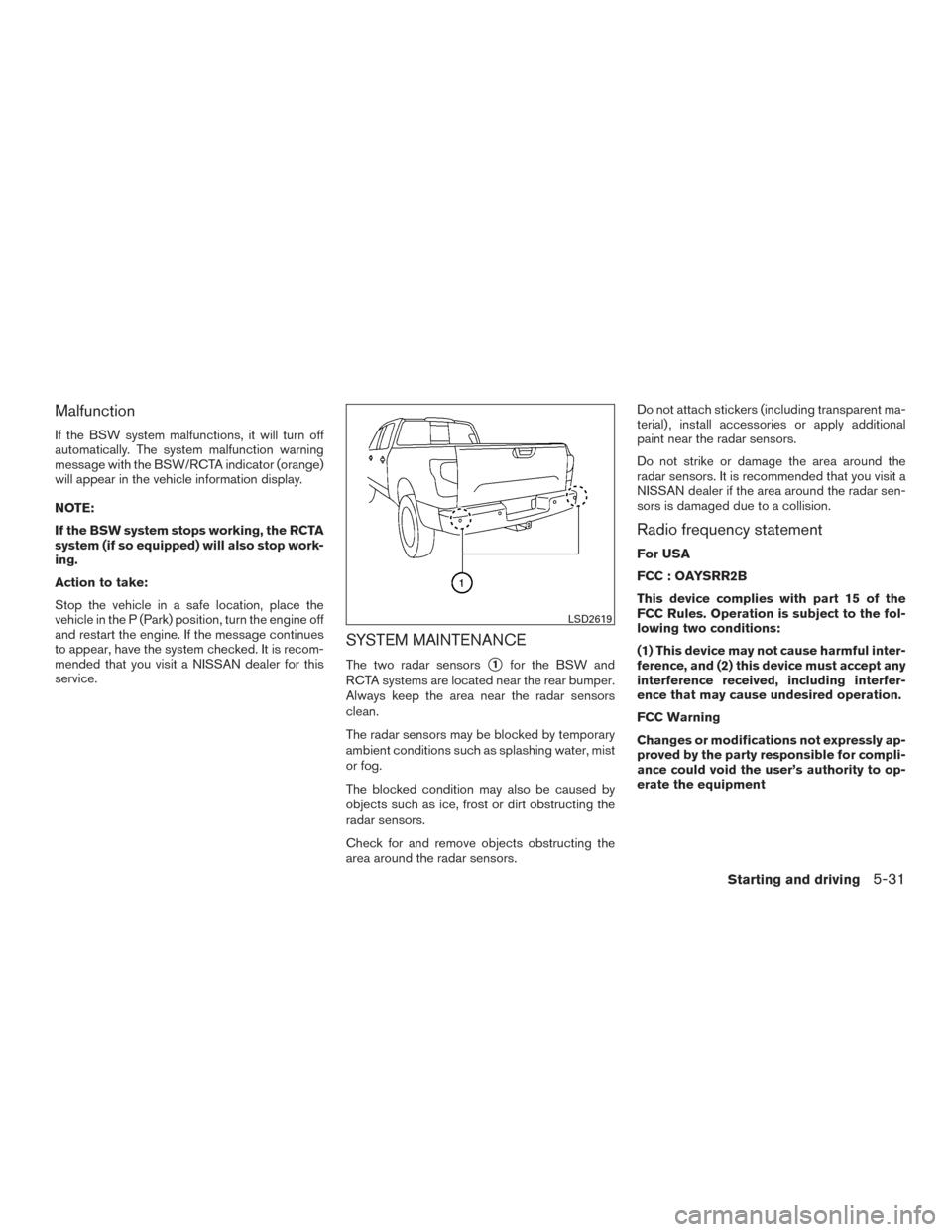
The two radar sensors�1for the BSW and
RCTA systems are located near the rear bumper.
Always keep the area near the radar sensors
clean.
The radar sensors may be blocked by temporary
ambient conditions such as splashing water, mist
or fog.
The blocked condition may also be caused by
objects such as ice, frost or dirt obstructing the
radar sensors.
Check for and remove objects obstructing the
area around the radar sensors. Do not attach stickers (including transparent ma-
terial) , install accessories or apply additional
paint near the radar sensors.
Do not strike or damage the area around the
radar sensors. It is recommended that you visit a
NISSAN dealer if the area around the radar sen-
sors is damaged due to a collision.
Radio frequency statement
For USA
FCC : OAYSRR2B
This device complies with part 15 of the
FCC Rules. Operation is subject to the fol-
lowing two conditions:
(1) This device may not cause harmful inter-
ference, and (2) this device must accept any
interference received, including interfer-
ence that may cause undesired operation.
FCC Warning
Changes or modifications not expressly ap-
proved by the party responsible for compli-
ance could void the user’s authority to op-
erate the equipment
LSD2619
Starting and driving5-31
Page 409 of 671
For Canada
Applicable law: Canada 310
This device complies with Industry Canada
licence-exempt RSS standard(s) . Opera-
tion is subject to the following two condi-
tions: (1) this device may not cause inter-
ference, and (2) this device must accept any
interference, including interference that
may cause undesired operation of the de-
vice.
Frequency bands: 24.05GHz – 24.25GHz
Output power: less than 20 milliwattsWARNING
Failure to follow the warnings and instruc-
tions for proper use of the RCTA could
result in serious injury or death.
●The RCTA system is not a replacement
for proper driving procedures and is not
designed to prevent contact with ve-
hicles or objects. When backing out of a
parking space, always use the side and
rear mirrors and turn and look in the
direction you will move. Never rely
solely on the RCTA system.
The RCTA will assist you when backing out from
a parking space. When the vehicle is in reverse,
the system is designed to detect other vehicles
approaching from the right or left of the vehicle. If
the system detects cross traffic, it will alert you.
REAR CROSS TRAFFIC ALERT (RCTA)
(if so equipped)
5-32Starting and driving
Page 411 of 671
The RCTA system uses radar sensors�1in-
stalled on both sides near the rear bumper to
detect an approaching vehicle.
The radar sensors
�1can detect an approaching
vehicle from up to approximately 66 ft (20 m)
away.
If the radar detects a vehicle approaching from
the side, the system gives visual and audible
warnings.
LSD2216LSD2619
5-34Starting and driving
Page 413 of 671
RCTA SYSTEM LIMITATIONS
WARNING
●Listed below are the system limitations
for RCTA. Failure to operate the vehicle
in accordance with these system limita-
tions could result in serious injury or
death.
● Always check surroundings and turn to
check what is behind you before back-
ing up. The radar sensors detect ap-
proaching (moving) vehicles. The radar
sensors cannot detect every object such
as:
– Pedestrians, bicycles, motorcycles, animals or child-operated toy
vehicles
– A vehicle that is passing at speeds greater than approximately 19 mph
(30 km/h)
– A vehicle that is passing at speeds lower than approximately 5 mph
(8 km/h)
● The radar sensors may not detect ap-
proaching vehicles in certain situations:
– Illustration a: When a vehicle parked next to you obstructs the beam of the
radar sensor.
LSD2173
5-36Starting and driving
Page 416 of 671
SYSTEM TEMPORARILY
UNAVAILABLE
When radar blockage is detected, the system will
be deactivated automatically. The “Side Radar
Obstruction” warning message will appear and
the BSW/RCTA indicator (white) will blink
�Ain
the vehicle information display.
The systems are not available until the conditions
no longer exist.
The radar sensors may be blocked by temporary
ambient conditions such as splashing water, mist
or fog.
The blocked condition may also be caused by
objects such as ice, frost or dirt obstructing the
radar sensors.
NOTE:
If the BSW system stops working, the RCTA
system will also stop working.
Action to take:
When the above conditions no longer exist, the
system will resume automatically.
Malfunction
When the RCTA system malfunctions, it will turn
off automatically. The system malfunction warn-
ing message with the BSW/RCTA indicator (or-
ange) will appear in the vehicle information dis-
play.
NOTE:
If the BSW system stops working, the RCTA
system (if so equipped) will also stop work-
ing.
Action to take
Stop the vehicle in a safe location, place the
vehicle in the P (Park) position, turn the engine off
and restart the engine. If the message continues
to appear, have the system checked. It is recom-
mended that you visit a NISSAN dealer for this
service.
SYSTEM MAINTENANCE
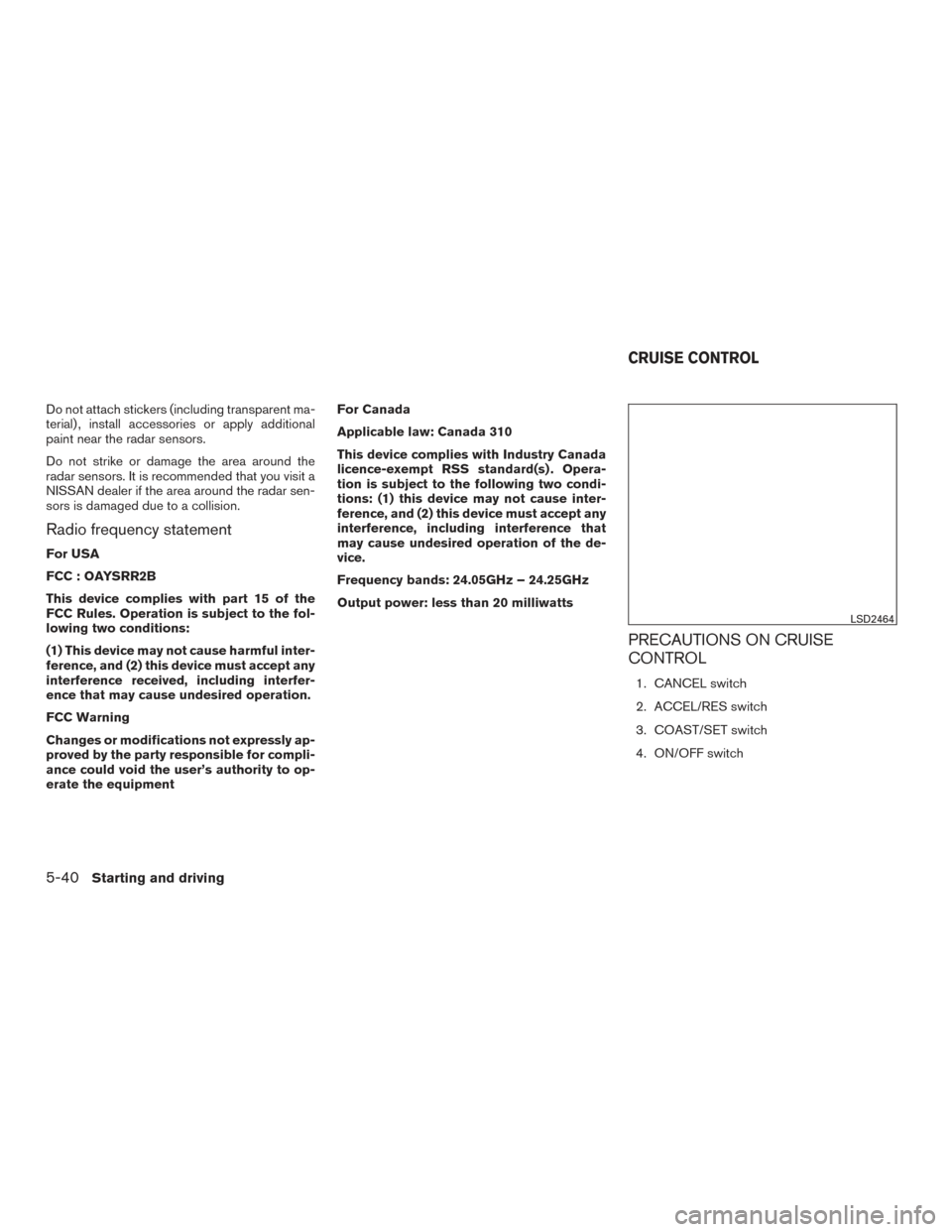
The two radar sensors�1for the BSW and
RCTA systems are located near the rear bumper.
Always keep the area near the radar sensors
clean.
The radar sensors may be blocked by temporary
ambient conditions such as splashing water, mist
or fog.
The blocked condition may also be caused by
objects such as ice, frost or dirt obstructing the
radar sensors.
Check for and remove objects obstructing the
area around the radar sensors.
LSD2619
Starting and driving5-39
Page 417 of 671
Do not attach stickers (including transparent ma-
terial) , install accessories or apply additional
paint near the radar sensors.
Do not strike or damage the area around the
radar sensors. It is recommended that you visit a
NISSAN dealer if the area around the radar sen-
sors is damaged due to a collision.
Radio frequency statement
For USA
FCC : OAYSRR2B
This device complies with part 15 of the
FCC Rules. Operation is subject to the fol-
lowing two conditions:
(1) This device may not cause harmful inter-
ference, and (2) this device must accept any
interference received, including interfer-
ence that may cause undesired operation.
FCC Warning
Changes or modifications not expressly ap-
proved by the party responsible for compli-
ance could void the user’s authority to op-
erate the equipmentFor Canada
Applicable law: Canada 310
This device complies with Industry Canada
licence-exempt RSS standard(s) . Opera-
tion is subject to the following two condi-
tions: (1) this device may not cause inter-
ference, and (2) this device must accept any
interference, including interference that
may cause undesired operation of the de-
vice.
Frequency bands: 24.05GHz – 24.25GHz
Output power: less than 20 milliwatts
PRECAUTIONS ON CRUISE
CONTROL
1. CANCEL switch
2. ACCEL/RES switch
3. COAST/SET switch
4. ON/OFF switch
LSD2464
CRUISE CONTROL
5-40Starting and driving
Page 418 of 671
●If the cruise control system malfunctions, it
cancels automatically. The
(green) or
SET indicator light illuminates in the vehicle
information display then blinks to warn the
driver. For additional information, refer to
“Vehicle information display” in the “Instru-
ments and controls” section of this manual.
● If the
(green) or SET indicator light
blinks, push the cruise control ON/OFF
switch off and have the system checked. It is
recommended that you visit a NISSAN
dealer for this service.
● The
(green) or SET indicator light may
blink when the cruise control ON/OFF
switch is pushed ON while pushing the
ACCEL/RES, COAST/SET, or CANCEL
switch. To properly set the cruise control
system, use the following procedures.
WARNING
Do not use the cruise control when driving
under the following conditions:
● When it is not possible to keep the
vehicle at a set speed.
● In heavy traffic or in traffic that varies in
speed.
● On winding or hilly roads. ●
On slippery roads (rain, snow, ice, etc.) .
● In very windy areas.
Doing so could cause a loss of vehicle
control and result in an accident.
CRUISE CONTROL OPERATIONS
The cruise control allows driving at a speed be-
tween 25 - 89 mph (40 - 144 km/h) without
keeping your foot on the accelerator pedal.
To turn on the cruise control, push the
ON/OFF switch on. The
(white) or
CRUISE indicator light in the vehicle information
display will illuminate.
To set cruising speed, accelerate the vehicle to
the desired speed, push the COAST/SET switch
and release it. The
(green) or SET indica-
tor light in the vehicle information display will
illuminate. Take your foot off the accelerator
pedal. Your vehicle maintains the set speed.
● To pass another vehicle, depress the ac-
celerator pedal. When you release the
pedal, the vehicle returns to the previously
set speed.
● The vehicle may not maintain the set speed
when going up or down steep hills. If this
happens, drive without the cruise control. To cancel the preset speed,
use one of the
following three methods:
● Push the CANCEL switch; the
or SET
indicator light in the vehicle information dis-
play goes out.
● Tap the brake pedal; the
or SET indi-
cator light goes out.
● Push the ON/OFF switch off. The
in-
dicator light or both the CRUISE indicator
light and SET indicator light in the vehicle
information display go out.
The cruise control is automatically canceled and
the
or SET light in the vehicle information
display goes out if:
● You depress the brake pedal while pushing
the ACCEL/RES or SET/COAST switch.
The preset speed is deleted from memory.
● The vehicle slows down more than 8 mph
(13 km/h) below the set speed.
● You move the shift lever to N (Neutral) .
To reset at a faster cruising speed, use one of
the following three methods:
● Depress the accelerator pedal. When the
vehicle attains the desired speed, push and
release the COAST/SET switch.
Starting and driving5-41