2017 NISSAN TITAN lock
[x] Cancel search: lockPage 517 of 671
Your NISSAN has been designed to have mini-
mum maintenance requirements with long ser-
vice intervals to save you both time and money;
however, some day-to-day and regular mainte-
nance is essential to maintain your NISSAN’s
good mechanical condition as well as its emis-
sions and engine performance.
It is the owner’s responsibility to make sure that
the scheduled maintenance, as well as general
maintenance, is performed.
As the vehicle owner, you are the only one who
can ensure that your vehicle receives proper
maintenance. You are a vital link in the mainte-
nance chain.
GENERAL MAINTENANCE
General maintenance includes those items which
should be checked during normal day-to-day op-
eration. They are essential for proper vehicle op-
eration. It is your responsibility to perform these
maintenance procedures regularly as prescribed.
Performing general maintenance checks requires
minimal mechanical skill and only a few general
automotive tools.
These checks or inspections can be done by you,
a qualified technician or, if you prefer, a NISSAN
dealer.
SCHEDULED MAINTENANCE
The maintenance items listed in this section are
required to be serviced at regular intervals. How-
ever under severe driving conditions, additional
or more frequent maintenance will be required.
WHERE TO GO FOR SERVICE
If maintenance service is required or your vehicle
appears to malfunction, have the systems
checked and corrected. It is recommended that
you visit a NISSAN dealer for this service.
NISSAN technicians are well-trained specialists
who are kept up-to-date with the latest service
information through technical bulletins, service
tips and in-dealership training programs. They
are completely qualified to work on NISSAN ve-
hiclesbefore they work on your vehicle rather
than after they have worked on it.
You can be confident that a NISSAN dealer’s
service department performs excellent service to
meet the maintenance requirements on your ve-
hicle — in a reliable and economical way. During the normal day-to-day operation of the
vehicle, general maintenance should be per-
formed regularly as prescribed in this section. If
you detect any unusual sounds, vibrations or
smells, be sure to check for the cause or have a
NISSAN dealer do it promptly. In addition, it is
recommended that you visit a NISSAN dealer if
you think that repairs are required.
When performing any checks or maintenance
work, closely observe the “Maintenance precau-
tions” in the “Do-it-yourself” section of this
manual.
EXPLANATION OF GENERAL
MAINTENANCE ITEMS
Additional information on the following
items with“*”isfound in the “Do-it-
yourself” section of this manual.
Outside the vehicle
The maintenance items listed here should be
performed from time to time, unless otherwise
specified.
Doors and engine hood:
Check that the doors
and engine hood operate properly. Also ensure
that all latches lock securely. Lubricate hinges,
latches, latch pins, rollers and links if necessary.
MAINTENANCE REQUIREMENTS GENERAL MAINTENANCE
9-2Maintenance and schedules
Page 518 of 671
Make sure that the secondary latch keeps the
hood from opening when the primary latch is
released.
When driving in areas using road salt or other
corrosive materials, check lubrication frequently.
Lights*:Clean the headlights on a regular basis.
Make sure that the headlights, stop lights, tail
lights, turn signal lights, and other lights are all
operating properly and installed securely. Also
check headlight aim.
Road wheel nuts (lug nuts)*: When checking
the tires, make sure no wheel nuts are missing,
and check for any loose wheel nuts. Tighten if
necessary.
Tire rotation*: Tires should be rotated every
5,000 miles (8,000 km).
Tires*: Check the pressure with a gauge often
and always prior to long distance trips. If neces-
sary, adjust the pressure in all tires, including the
spare, to the pressure specified. Check carefully
for damage, cuts or excessive wear.
Tire Pressure Monitoring System (TPMS)
transmitter components: Replace the TPMS
transmitter grommet seal, valve core and cap
when the tires are replaced due to wear or age.
Wheel alignment and balance: If the vehicle
should pull to either side while driving on a straight and level road, or if you detect uneven or
abnormal tire wear, there may be a need for wheel
alignment. If the steering wheel or seat vibrates at
normal highway speeds, wheel balancing may be
needed.
For additional information regarding tires, refer to
“Important Tire Safety Information” (US) or “Tire
Safety Information” (Canada) in the Warranty In-
formation Booklet.
Windshield:
Clean the windshield on a regular
basis. Check the windshield at least every six
months for cracks or other damage. Have a dam-
aged windshield repaired by a qualified repair
facility.
Windshield wiper blades*: Check for cracks
or wear if they do not wipe properly.
Inside the vehicle
The maintenance items listed here should be
checked on a regular basis, such as when per-
forming scheduled maintenance, cleaning the ve-
hicle, etc.
Accelerator pedal: Check the pedal for smooth
operation and make sure the pedal does not bind
or require uneven effort. Keep the floor mat away
from the pedal.
Automatic transmission P (Park) position
mechanism: On a fairly steep hill check that your vehicle is held securely with the shift lever in
the P (Park) position without applying any brakes.
Brake pedal:
Check the pedal for smooth op-
eration. If the brake pedal suddenly goes down
further than normal, the pedal feels spongy or the
vehicle seems to take longer to stop, have your
vehicle checked immediately. It is recommended
that you visit a NISSAN dealer for this service.
Brakes: Check that the brakes do not pull the
vehicle to one side when applied.
Parking brake: Check the parking brake opera-
tion regularly. The vehicle should be securely held
on a fairly steep hill with only the parking brake
applied. If the parking brake needs adjustment, it
is recommended that you visit a NISSAN dealer
for this service.
Seats: Check seat position controls such as
seat adjusters, seatback recliner, etc., to ensure
they operate smoothly and all latches lock se-
curely in every position. Check that the head
restraints/headrests move up and down
smoothly and the locks (if so equipped) hold
securely in all latched positions.
Seat belts: Check that all parts of the seat belt
system (for example, buckles, anchors, adjusters
and retractors) operate properly and smoothly,
and are installed securely. Check the belt web-
bing for cuts, fraying, wear or damage.
Maintenance and schedules9-3
Page 544 of 671
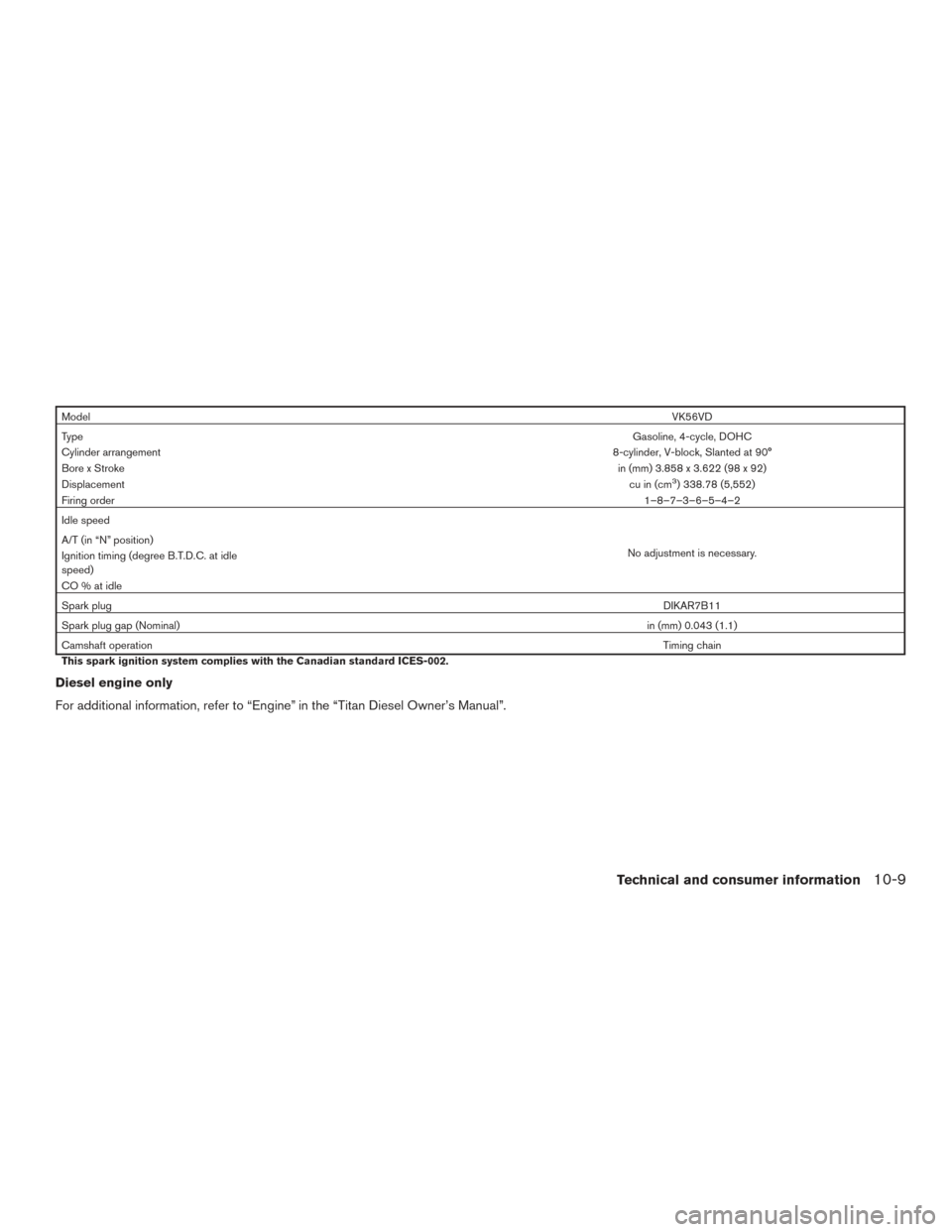
ModelVK56VD
Type Gasoline, 4-cycle, DOHC
Cylinder arrangement 8-cylinder, V-block, Slanted at 90°
Bore x Stroke in (mm) 3.858 x 3.622 (98 x 92)
Displacement cu in (cm
3) 338.78 (5,552)
Firing order 1–8–7–3–6–5–4–2
Idle speed
No adjustment is necessary.
A/T (in “N” position)
Ignition timing (degree B.T.D.C. at idle
speed)
CO%atidle
Spark plug
DIKAR7B11
Spark plug gap (Nominal) in (mm) 0.043 (1.1)
Camshaft operation Timing chain
This spark ignition system complies with the Canadian standard ICES-002.
Diesel engine only
For additional information, refer to “Engine” in the “Titan Diesel Owner’s Manual”.
Technical and consumer information10-9
Page 559 of 671
NOTE:
If the bed liner storage bins (if so equipped)
are installed on the vehicle, use type B
cleats in the side channel locations. The
use of type A cleats in the side channel
locations with the bed liner storage bins
installed will interfere with bed liner stor-
age bin lid operation. For additional infor-
mation on bed liner storage bins, refer to
“Storage” in the “Instruments and con-
trols” section of this manual.
The Utili-track™ channel system allows you to
move tie-down clamps in the bed to the best
location to secure a load.
The tie-down cleats must be installed so the clamp
is properly seated in the notches in the rail. If the
tie-down cleat is not seated in the notches, it will
not be flush with the rail and cannot be properly
tightened. The bolt in the center of the cleat must
be tightened hand tight (20 – 40 in-lbs)
Check the tightness of the tie-down cleat peri-
odically during a trip to make sure the center bolt
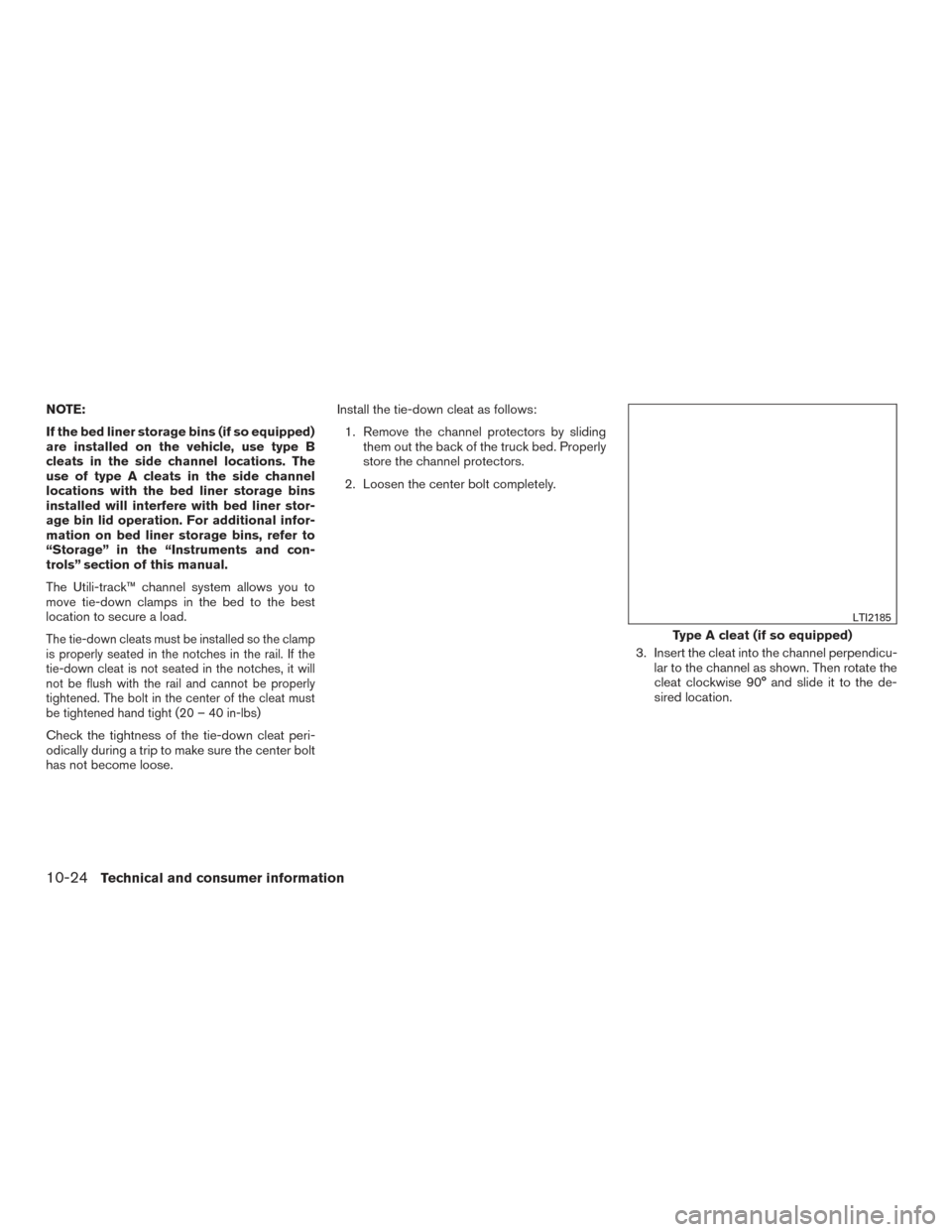
has not become loose.Install the tie-down cleat as follows:
1. Remove the channel protectors by sliding them out the back of the truck bed. Properly
store the channel protectors.
2. Loosen the center bolt completely.
3. Insert the cleat into the channel perpendicu-lar to the channel as shown. Then rotate the
cleat clockwise 90° and slide it to the de-
sired location.
Type A cleat (if so equipped)
LTI2185
10-24Technical and consumer information
Page 576 of 671
TOWING SAFETY
Trailer hitch
Your vehicle may be equipped with an optional
trailer tow package. The trailer tow package in-
cludes a receiver-type frame mounted hitch. This
hitch is rated for the maximum towing capacity of
this vehicle when the proper towing equipment is
used. Choose a proper ball mount and hitch ball
that is rated for the trailer to be towed. Genuine
NISSAN ball mounts and hitch balls are available
at a NISSAN dealer.
If your vehicle is not equipped with the optional
trailer tow package, check the towing capacity of
your bumper hitch or receiver-type frame
mounted hitch. Choose a proper hitch for your
vehicle and trailer. A Genuine NISSAN trailer
hitch is available at a NISSAN dealer. Make sure
the trailer hitch is securely attached to the vehicle
to help avoid personal injury or property damage
due to sway caused by crosswinds, rough road
surfaces or passing trucks.
A hitch used for towing 5th wheel and gooseneck
trailers can also be installed on your vehicle.
Contact a professional supplier of towing equip-
ment to purchase and have a 5th wheel or goose-
neck hitch installed.
WARNING
Trailer hitch components have specific
weight ratings. Your vehicle may be ca-
pable of towing a trailer heavier than the
weight rating of the hitch components.
Never exceed the weight rating of the
hitch components. Doing so can cause
serious personal injury or property
damage.
Hitch ball
Choose a hitch ball of the proper size and weight
rating for your trailer:● The required hitch ball size is stamped on
most trailer couplers. Most hitch balls also
have the size printed on the top of the ball.
● Choose the proper class hitch ball based on
the trailer weight.
● The diameter of the threaded shank of the
hitch ball must be matched to the ball mount
hole diameter. The hitch ball shank should
be no more than 1/16” smaller than the hole
in the ball mount. ●
The threaded shank of the hitch ball must be
long enough to be properly secured to the
ball mount. There should be at least 2
threads showing beyond the lock washer
and nut.
Ball mount
The hitch ball is attached to the ball mount and
the ball mount is inserted into the hitch receiver.
Choose a proper class ball mount based on the
trailer weight. Additionally, the ball mount should
be chosen to keep the trailer tongue level with the
ground.
Technical and consumer information10-41
Page 589 of 671
●Be certain your rearview mirrors conform to
all federal, state or local regulations. If not,
install any mirrors required for towing before
driving the vehicle.
● Determine the overall height of the vehicle
and trailer so the required clearance is
known.
Trailer towing tips
In order to gain skill and an understanding of the
vehicle’s behavior, you should practice turning,
stopping and backing up in an area which is free
from traffic. Steering stability and braking perfor-
mance will be somewhat different than under
normal driving conditions.
● Always secure items in the trailer to prevent
load shift while driving.
● Lock the trailer hitch coupler with a pin or
lock to prevent the coupler from inadver-
tently becoming unlatched.
● Avoid abrupt starts, acceleration or stops.
● Avoid sharp turns or lane changes.
● Always drive your vehicle at a moderate
speed. ●
When backing up, hold the bottom of the
steering wheel with one hand. Move your
hand in the direction in which you want the
trailer to go. Make small corrections and
back up slowly. If possible, have someone
guide you when you are backing up.
Always block the wheels on both vehicle and
trailer when parking. Parking on a slope is not
recommended; however, if you must do so:CAUTION
If you move the shift selector to the P
(Park) position before blocking the
wheels and applying the parking brake,
transmission damage could occur.
1. Apply and hold the brake pedal.
2. Have someone place blocks on the downhill side of the vehicle and trailer wheels.
3. After the wheel blocks are in place, slowly release the brake pedal until the blocks ab-
sorb the vehicle load.
4. Apply the parking brake.
5. Shift the transmission into P (Park) . 6. Make sure the
indicator light (if so
equipped) indicates the transfer case is in
4H, 4L, or 2H and that the ATP light is off. If
the
indicator light is flashing, or the
ATP light is ON, make sure the transmission
is in P (Park) (A/T) and turn the 4WD switch
to 2WD or 4H. For additional information,
refer to “Automatic transmission park warn-
ing light” in the “Instruments and controls”
section and “Using 4-wheel drive (4WD)” in
the “Starting and driving” section of this
manual.
7. Turn off the engine.
To drive away:
1. Start the vehicle.
2. Apply and hold the brake pedal.
3. Shift the transmission into gear.
4. Release the parking brake.
5. Drive slowly until the vehicle and trailer are clear from the blocks.
6. Apply and hold the brake pedal.
7. Have someone retrieve and store the blocks.
10-54Technical and consumer information
Page 598 of 671
11 Index
4WD.......................5-44
4WDwarninglight...............2-22
4-Wheel Drive.................5-44
A
Aiming control, headlights ...........2-55
Air bag (See supplemental restraint
system) .....................1-51
Air bag system Front (See supplemental front impact
air bag system) ............1-58,1-72
Airbagwarninglabels.............1-77
Airbagwarninglight...........1-78,2-28
Air bag warning light, supplemental . .1-78, 2-28
Aircleaner....................8-18
Air cleaner housing filter ............8-18
Air conditioner Air conditioner operation ..........4-37
Air conditioner specification label ....10-18
Air conditioner system refrigerant and
oil recommendations ............10-8
Air conditioner system refrigerant
recommendations ..............10-8
Heater and air conditioner (automatic)
(if so equipped) ...............4-42
Heater and air conditioner controls ....4-43
Servicing air conditioner ..........4-45
Airflowcharts..................4-38
Alarm system (See vehicle security system). .2-47
Anchor point locations .............1-31
Antenna .....................4-83 Antifreeze
....................5-65
Anti-lock brake warning light ..........2-22
Anti-lock Braking System (ABS) ........5-55
Apps .......................4-83
AroundView®Monitor.............4-16
Audible reminders ...............2-31
Audio system ..................4-46
AMradioreception.............4-46
Bluetooth®audio..........4-79,4-80
Bluetooth® streaming audio ....4-79,4-80
Compact disc (CD) player . .4-56, 4-62, 4-69
FM/AM radio with compact disc (CD)
player ....................4-54
FM/AM/SAT radio with compact disc (CD)
player.................4-58,4-64
FMradioreception.............4-46
iPod® Player .............4-74,4-76
iPod® player operation .......4-74,4-76
Radio ....................4-46
Steering wheel audio control switch . . .4-82
USB interface ............4-70,4-72
USB
(Universal Serial Bus) Connection Port . .4-72
Autolight switch .................2-54
Automatic Automatic drive positioner .....3-37,3-39
Automatic power window switch .....2-85
Driving with automatic transmission ....5-17
Automatic anti-glare inside mirror . . .3-28, 3-29
Automatic door locks ..............3-7
Automatic drive positioner .......3-37,3-39
Automatic transmission fluid temperature
gauge......................2-11 AUXjack ....................4-70
B
Back button ....................4-7
Battery ..................5-65, 8-14
Charge warning light ............2-24
Battery replacement ..............8-25
Keyfob ...................8-25
NISSAN Intelligent Key® ..........8-25
Before starting the engine ...........5-14
Belt (See drive belt) ..............8-17
Blind Spot Warning (BSW) warning
system......................5-22
Block heater Engine ....................5-66
Bluetooth® audio ............4-79,4-80
Bluetooth® hands-free phone
system.................4- 114, 4-126
Boosterseats..................1-47
Brake Anti-lock Braking System (ABS) ......5-55
Brake fluid ..................8-13
Brakelight(Seestoplight).........8-29
Brake system ................5-54
Brakewarninglight.............2-24
Brakewearindicators........2-31,8-20
Parking brake operation ..........5-22
Self-adjusting brakes ............8-20
Brake assist ...................5-56
Brake fluid ....................8-13
Brakes ......................8-20
Page 599 of 671
Brake system...................5-54
Break-in schedule ................5-42
Brightness/contrastbutton............4-9
Brightness control Instrument panel ...............2-56
Bulb check/instrument panel ..........2-22
Bulb replacement ................8-29
C
Capacities and recommended
fuel/lubricants ..................10-2
Cargolightswitch................2-58
Cargo (See vehicle loading information) . . .10-20
Car phone or CB radio .............4-113
CD care and cleaning ..............4-81
CD player (See audio system) . .4-56, 4-62, 4-69
Check tire pressure ...............2-42
Child restraints .......1-24,1-24,1-26,1-28
LATCH (Lower Anchors and Tethers for
CHildren) System ..............1-28
Precautions on child
restraints.....1-26,1-33,1-39,1-43,1-48
Top tether strap anchor point locations . .1-31
Child safety rear door lock ............3-7
Chimes, audible reminders ...........2-31
Cleaningexteriorandinterior........7-2,7-4
Climatecontrolseatswitch...........2-58
Clock setting
(models with Navigation System) ........4-7
Clock setting (models without Navigation
System) ..................4-55,4-59
C.M.V.S.S. certification label .........10-16
Cold weather driving ...............5-65
Compact disc (CD) player ....4-56,4-62,4-69Compass
.....................2-18
Connect phone .................4-84
Console light ...................2-88
Control panel buttons ...............4-4
Back button ..................4-7
Brightness/contrast button ..........4-9
Enterbutton..................4-4
With navigation system ............4-4
Controls Audio controls (steering wheel) .......4-82
Heater and air conditioner controls .....4-43
Heater and air conditioner controls
(manual) ...................4-33
Coolant Capacities and recommended
fuel/lubricants ................10-2
Changingenginecoolant...........8-6
Checking engine coolant level ........8-6
Engine coolant temperature gauge .....2-9
Corrosion protection ...............7-7
Cruisecontrol ...........5-40,5-40,5-41
Cupholders...................2-80
Curtainside-impactandrolloverairbag....1-74
D
Daytime Running Light System .....2-56,8-28
Diesel Particulate Filter (DPF) ..........8-11
Digital video disc DVD ..............4-88
Dimensionsandweights............10-11
Dimmer switch for instrument panel ......2-56
Display......................2-32
Display controls (see control panel buttons) . .4-4
Door locks .....................3-5
Door open warning light .............2-25 Doors
........................3-5
Drive belt .....................8-17
Drive positioner, Automatic ........3-37,3-39
Driving Cold weather driving .............5-65
Driving with automatic transmission ....5-17
Precautions when starting and
driving ...................5-2,5-8
Driving the vehicle ................5-16
E
Eco Drive Report .................5-52
Economy-fuel..................5-44
Electronic
locking rear differential (E-Lock)
system ......................5-51
Electronic locking rear differential (E-Lock)
system switch ..................2-65
Emergency engine shutoff .........5-13,6-2
Emission control information label ......10-17
Emission control system warranty .......10-59
Engine Before starting the engine ..........5-14
Blockheater.................5-66
Capacities and recommended
fuel/lubricants ................10-2
Changing engine coolant ...........8-6
Changingengineoil..............8-8
Changing engine oil filter ...........8-9
Checking engine coolant level ........8-6
Checking engine oil level ...........8-7
Engine compartment check locations ....8-3
Engine coolant temperature gauge .....2-9
Engine cooling system ............8-5
Engineoil ...................8-7
11-2