Page 321 of 491
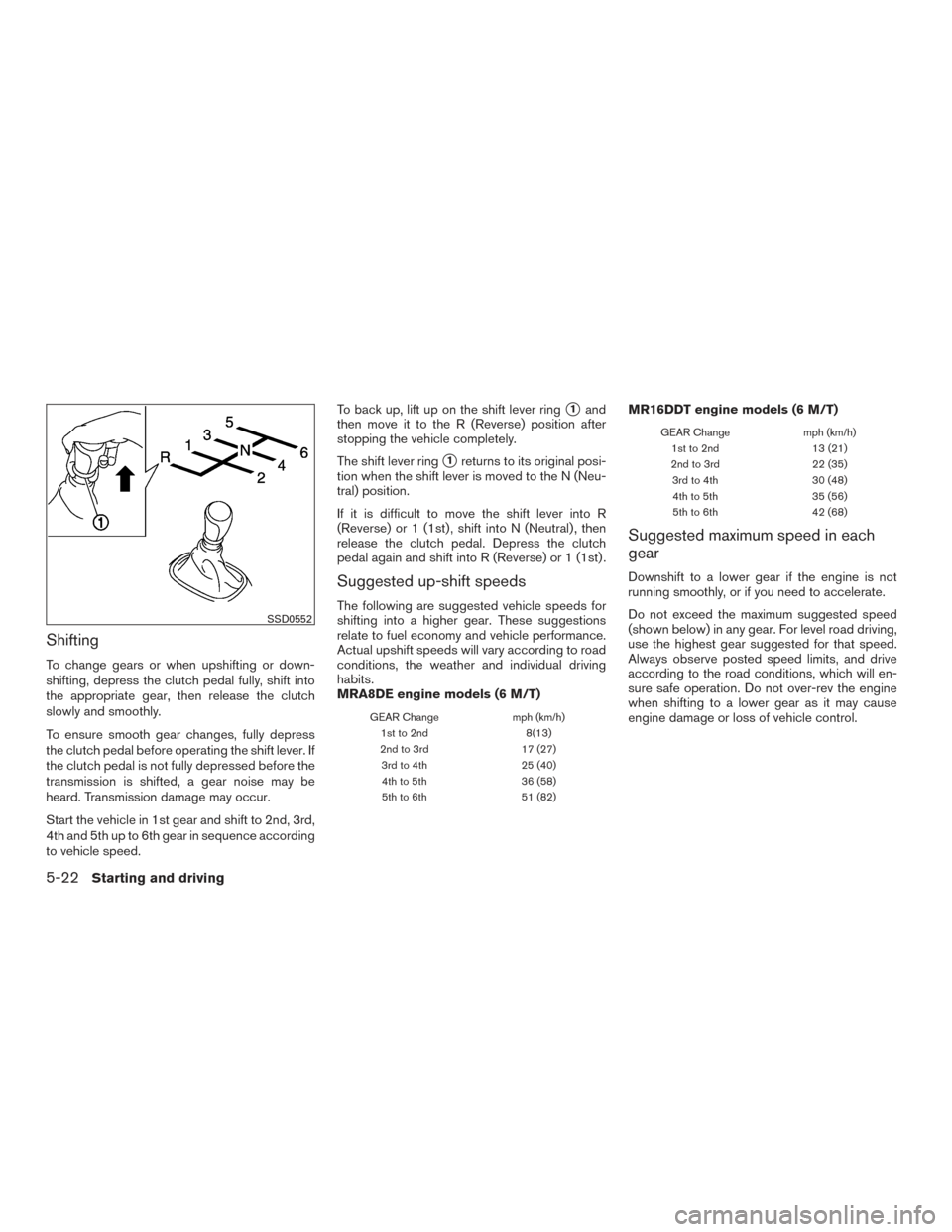
Shifting
To change gears or when upshifting or down-
shifting, depress the clutch pedal fully, shift into
the appropriate gear, then release the clutch
slowly and smoothly.
To ensure smooth gear changes, fully depress
the clutch pedal before operating the shift lever. If
the clutch pedal is not fully depressed before the
transmission is shifted, a gear noise may be
heard. Transmission damage may occur.
Start the vehicle in 1st gear and shift to 2nd, 3rd,
4th and 5th up to 6th gear in sequence according
to vehicle speed.To back up, lift up on the shift lever ring
�1and
then move it to the R (Reverse) position after
stopping the vehicle completely.
The shift lever ring
�1returns to its original posi-
tion when the shift lever is moved to the N (Neu-
tral) position.
If it is difficult to move the shift lever into R
(Reverse) or 1 (1st) , shift into N (Neutral) , then
release the clutch pedal. Depress the clutch
pedal again and shift into R (Reverse) or 1 (1st) .
Suggested up-shift speeds
The following are suggested vehicle speeds for
shifting into a higher gear. These suggestions
relate to fuel economy and vehicle performance.
Actual upshift speeds will vary according to road
conditions, the weather and individual driving
habits.
MRA8DE engine models (6 M/T)
GEAR Change mph (km/h)
1st to 2nd 8(13)
2nd to 3rd 17 (27)
3rd to 4th 25 (40)
4th to 5th 36 (58)
5th to 6th 51 (82)
MR16DDT engine models (6 M/T)
GEAR Change mph (km/h)
1st to 2nd 13 (21)
2nd to 3rd 22 (35)
3rd to 4th 30 (48)
4th to 5th 35 (56)
5th to 6th 42 (68)
Suggested maximum speed in each
gear
Downshift to a lower gear if the engine is not
running smoothly, or if you need to accelerate.
Do not exceed the maximum suggested speed
(shown below) in any gear. For level road driving,
use the highest gear suggested for that speed.
Always observe posted speed limits, and drive
according to the road conditions, which will en-
sure safe operation. Do not over-rev the engine
when shifting to a lower gear as it may cause
engine damage or loss of vehicle control.
SSD0552
5-22Starting and driving
Page 322 of 491
MRA8DE engine models (6 M/T)
GEARmph (km/h)
1st 30 (48)
2nd 52 (84)
3rd 73 (117)
4th 94 (152)
5th —
6th —
MR16DDT engine models (6 M/T)
GEARmph (km/h)
1st 29 (46)
2nd 47 (75)
3rd 68 (108)
4th 90 (145)
5th —
6th —
WARNING
●Be sure the parking brake is fully re-
leased before driving. Failure to do so
can cause brake failure and lead to an
accident.
● Do not release the parking brake from
outside the vehicle.
● Do not use the shift lever in place of the
parking brake. When parking, be sure
the parking brake is fully engaged.
● To help avoid risk of injury or death
through unintended operation of the
vehicle and/or its systems, do not leave
children, people who require the assis-
tance of others or pets unattended in
your vehicle. Additionally, the tempera-
ture inside a closed vehicle on a warm
day can quickly become high enough to
cause a significant risk of injury or
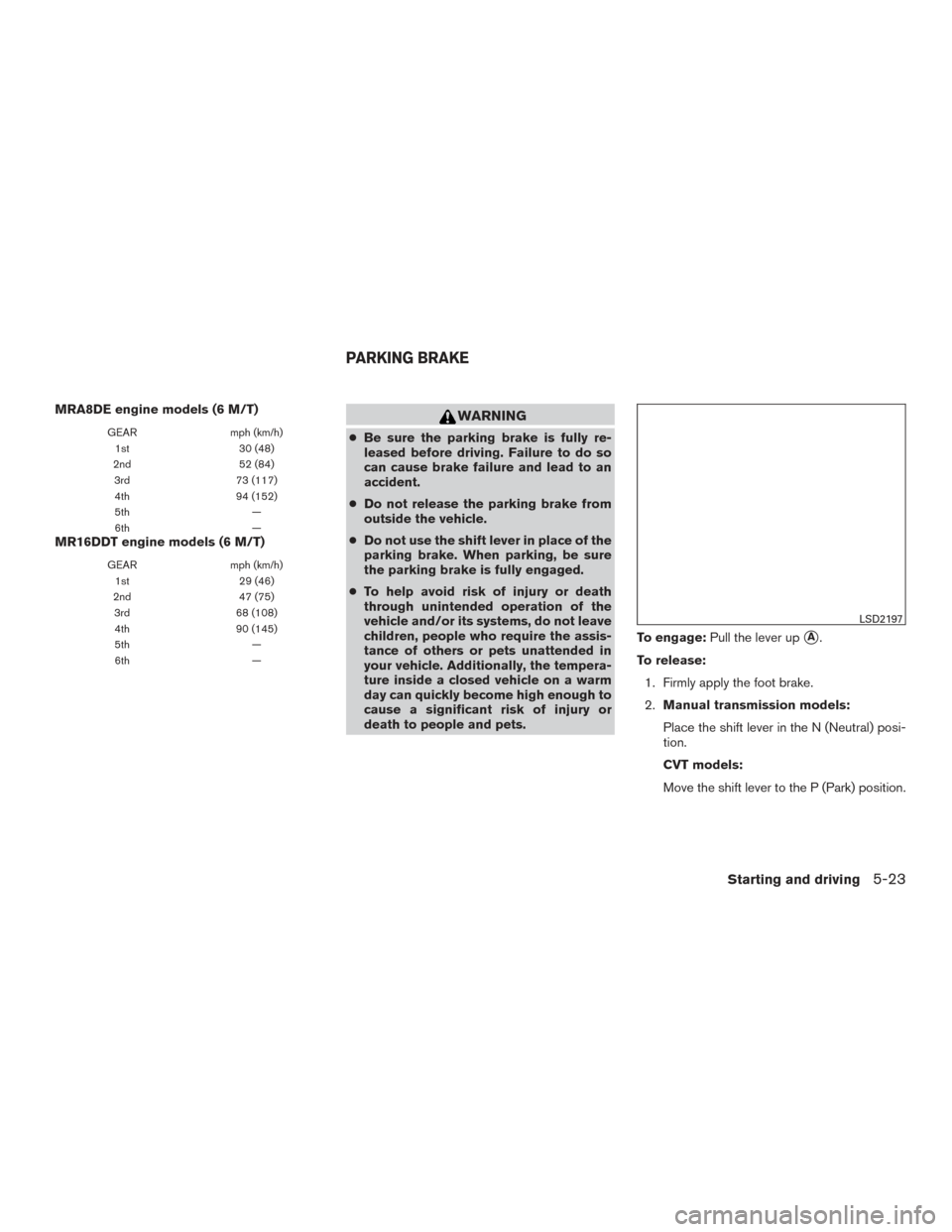
death to people and pets. To engage:
Pull the lever up
�A.
To release: 1. Firmly apply the foot brake.
2. Manual transmission models:
Place the shift lever in the N (Neutral) posi-
tion.
CVT models:
Move the shift lever to the P (Park) position.
LSD2197
PARKING BRAKE
Starting and driving5-23
Page 324 of 491
The ECO mode cannot be turned off while the
accelerator pedal is depressed, even if the ECO
mode switch is pushed to OFF. Release the
accelerator pedal to turn off the ECO mode.
The ECO mode will turn off automatically if a
malfunction occurs in the system.
Turn off the ECO mode, or depress the accelera-
tor pedal fully when:● Driving with a heavy load of passengers or
cargo in the vehicle
● Driving on a steep uphill slope
● ECO mode may affect air conditioner perfor-
mance
NOTE:
Selecting this drive mode will not necessar-
ily improve fuel economy as many driving
factors influence its effectiveness.
SHIFT LEVER INDICATOR (MRA8DE
engine Manual Transmission models
only)
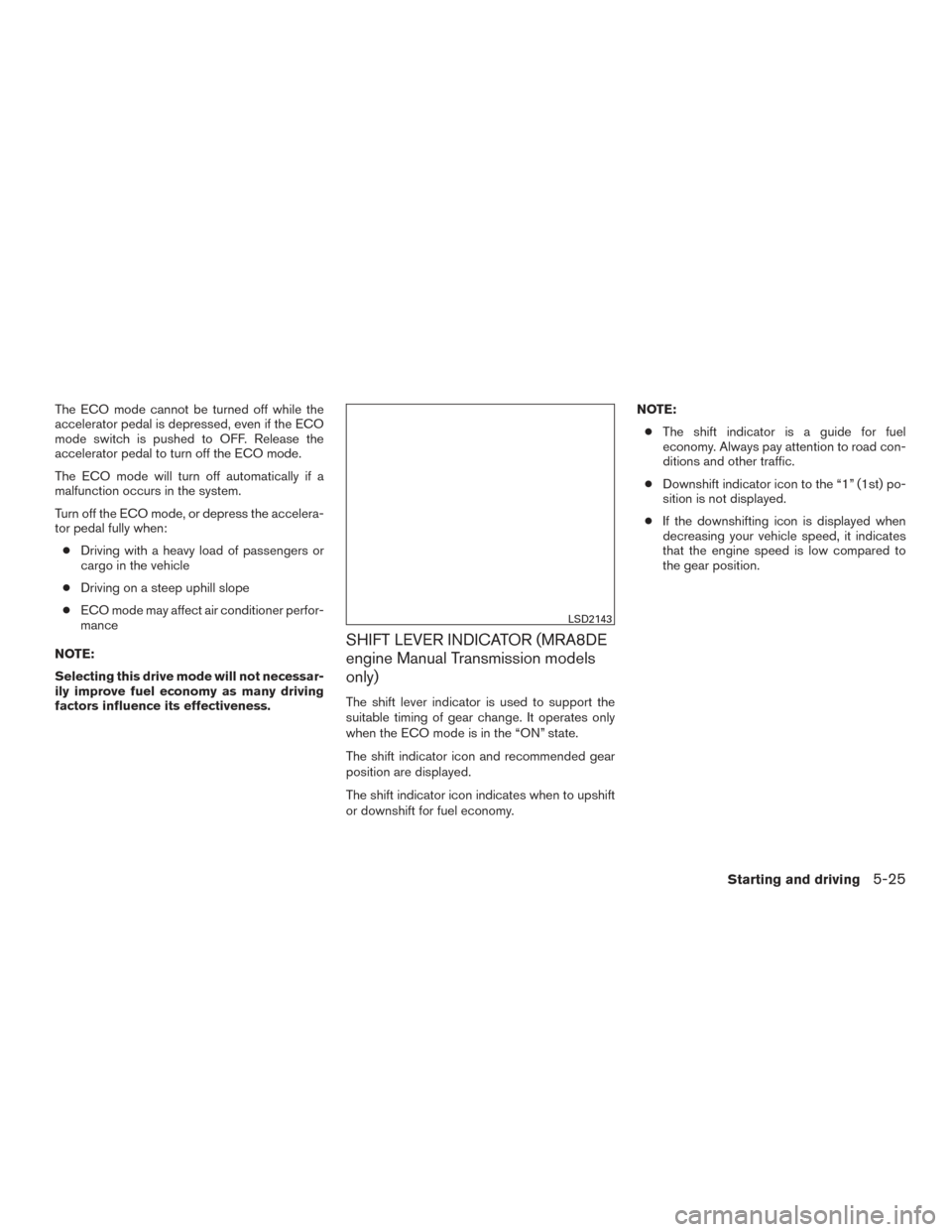
The shift lever indicator is used to support the
suitable timing of gear change. It operates only
when the ECO mode is in the “ON” state.
The shift indicator icon and recommended gear
position are displayed.
The shift indicator icon indicates when to upshift
or downshift for fuel economy. NOTE:
● The shift indicator is a guide for fuel
economy. Always pay attention to road con-
ditions and other traffic.
● Downshift indicator icon to the “1” (1st) po-
sition is not displayed.
● If the downshifting icon is displayed when
decreasing your vehicle speed, it indicates
that the engine speed is low compared to
the gear position.
LSD2143
Starting and driving5-25
Page 328 of 491
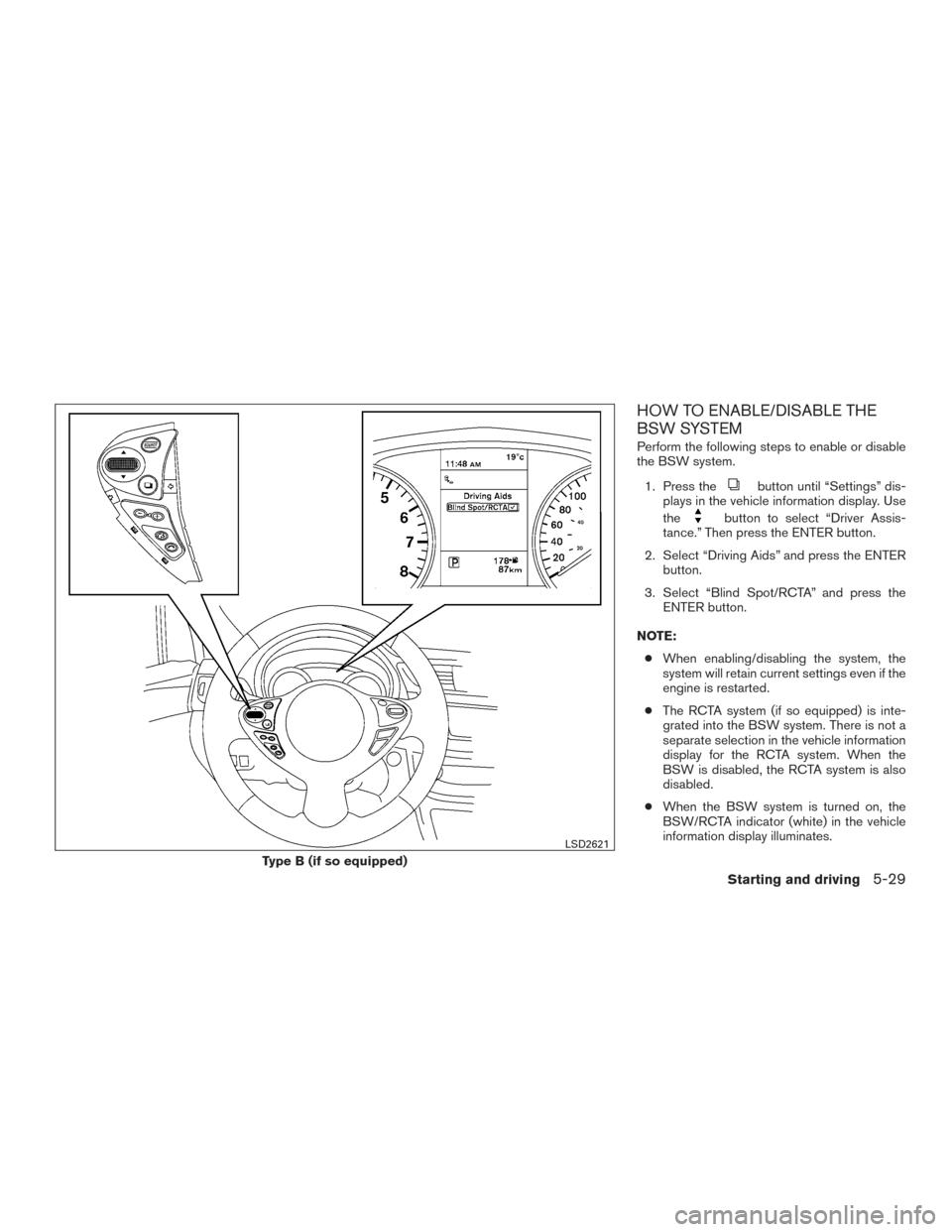
HOW TO ENABLE/DISABLE THE
BSW SYSTEM
Perform the following steps to enable or disable
the BSW system.1. Press the
button until “Settings” dis-
plays in the vehicle information display. Use
the
button to select “Driver Assis-
tance.” Then press the ENTER button.
2. Select “Driving Aids” and press the ENTER button.
3. Select “Blind Spot/RCTA” and press the ENTER button.
NOTE: ● When enabling/disabling the system, the
system will retain current settings even if the
engine is restarted.
● The RCTA system (if so equipped) is inte-
grated into the BSW system. There is not a
separate selection in the vehicle information
display for the RCTA system. When the
BSW is disabled, the RCTA system is also
disabled.
● When the BSW system is turned on, the
BSW/RCTA indicator (white) in the vehicle
information display illuminates.
Type B (if so equipped)
LSD2621
Starting and driving5-29
Page 334 of 491
Malfunction
If the BSW system malfunctions, it will turn off
automatically. The system malfunction warning
message with the BSW/RCTA indicator (orange)
will appear in the vehicle information display.
NOTE:
If the BSW system stops working, the RCTA
system (if so equipped) will also stop work-
ing.
Action to take:
Stop the vehicle in a safe location, turn the engine
off and restart the engine. If the message contin-
ues to appear, have the system checked. It is
recommended that you visit a NISSAN dealer for
this service.
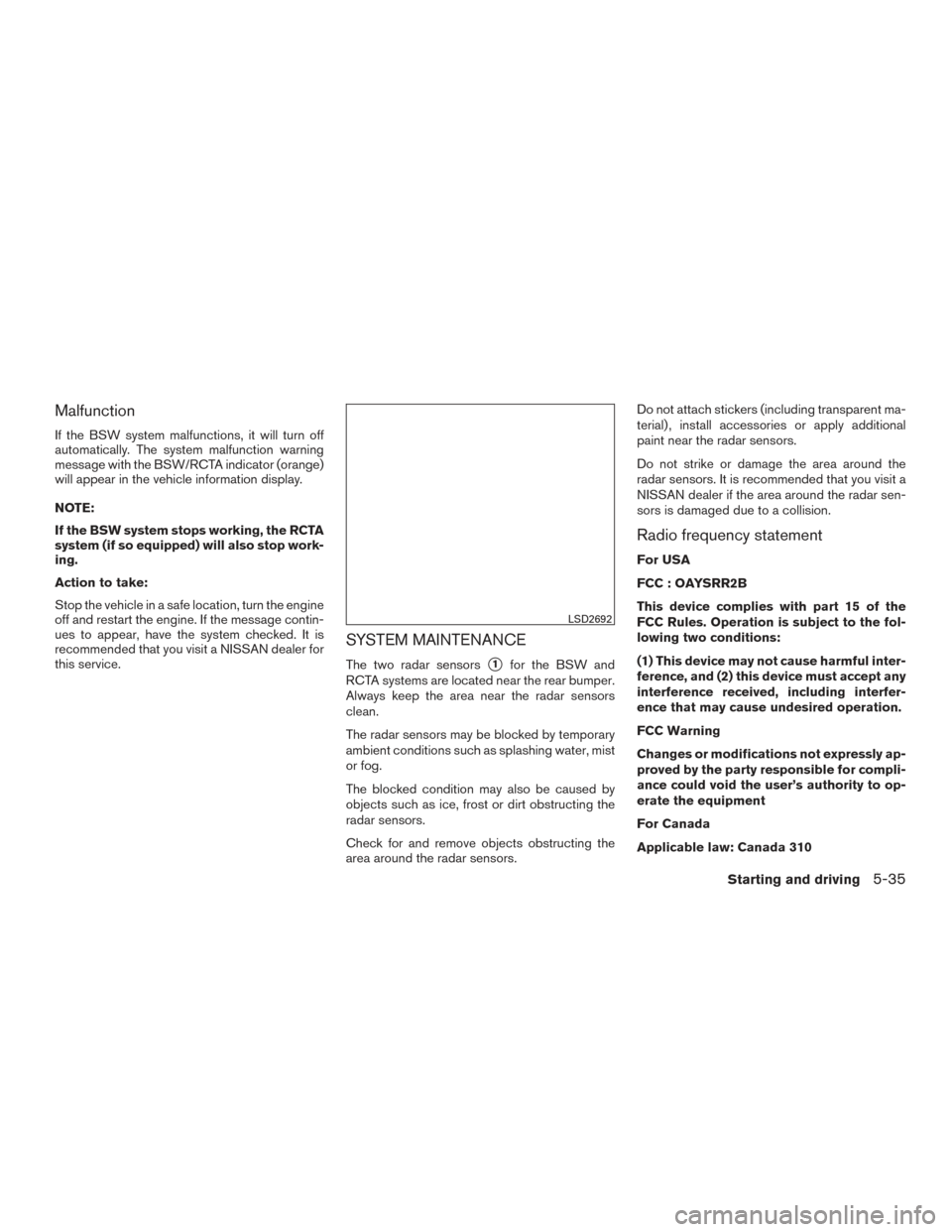
SYSTEM MAINTENANCE
The two radar sensors�1for the BSW and
RCTA systems are located near the rear bumper.
Always keep the area near the radar sensors
clean.
The radar sensors may be blocked by temporary
ambient conditions such as splashing water, mist
or fog.
The blocked condition may also be caused by
objects such as ice, frost or dirt obstructing the
radar sensors.
Check for and remove objects obstructing the
area around the radar sensors. Do not attach stickers (including transparent ma-
terial) , install accessories or apply additional
paint near the radar sensors.
Do not strike or damage the area around the
radar sensors. It is recommended that you visit a
NISSAN dealer if the area around the radar sen-
sors is damaged due to a collision.
Radio frequency statement
For USA
FCC : OAYSRR2B
This device complies with part 15 of the
FCC Rules. Operation is subject to the fol-
lowing two conditions:
(1) This device may not cause harmful inter-
ference, and (2) this device must accept any
interference received, including interfer-
ence that may cause undesired operation.
FCC Warning
Changes or modifications not expressly ap-
proved by the party responsible for compli-
ance could void the user’s authority to op-
erate the equipment
For Canada
Applicable law: Canada 310
LSD2692
Starting and driving5-35
Page 339 of 491
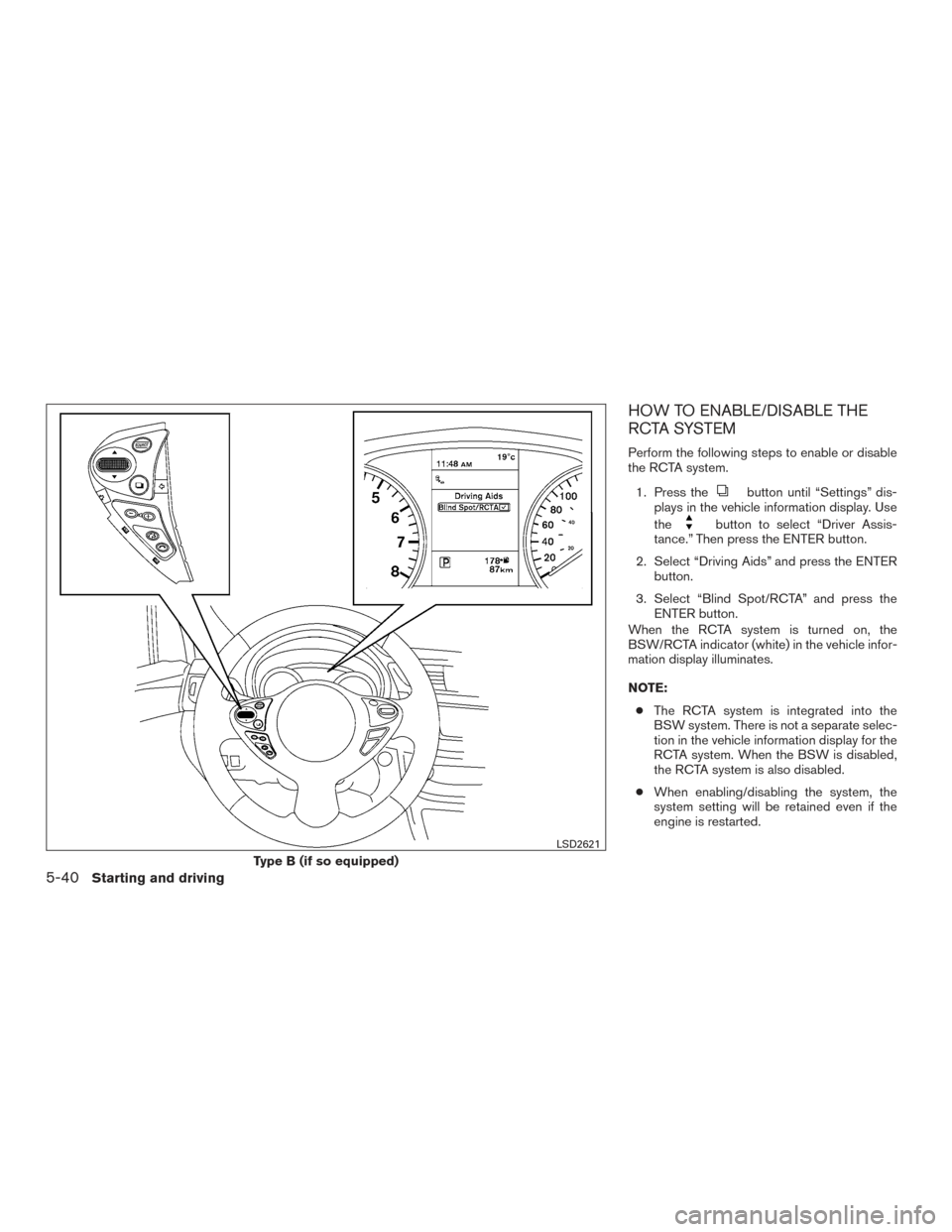
HOW TO ENABLE/DISABLE THE
RCTA SYSTEM
Perform the following steps to enable or disable
the RCTA system.1. Press the
button until “Settings” dis-
plays in the vehicle information display. Use
the
button to select “Driver Assis-
tance.” Then press the ENTER button.
2. Select “Driving Aids” and press the ENTER button.
3. Select “Blind Spot/RCTA” and press the ENTER button.
When the RCTA system is turned on, the
BSW/RCTA indicator (white) in the vehicle infor-
mation display illuminates.
NOTE:
● The RCTA system is integrated into the
BSW system. There is not a separate selec-
tion in the vehicle information display for the
RCTA system. When the BSW is disabled,
the RCTA system is also disabled.
● When enabling/disabling the system, the
system setting will be retained even if the
engine is restarted.
Type B (if so equipped)
LSD2621
5-40Starting and driving
Page 343 of 491
Malfunction
When the RCTA system malfunctions, it will turn
off automatically. The system malfunction warn-
ing message with the BSW/RCTA indicator (or-
ange) will appear in the vehicle information dis-
play.
NOTE:
If the BSW system stops working, the RCTA
system (if so equipped) will also stop work-
ing.
Action to take
Stop the vehicle in a safe location, turn the engine
off and restart the engine. If the message contin-
ues to appear, have the system checked. It is
recommended that you visit a NISSAN dealer for
this service.
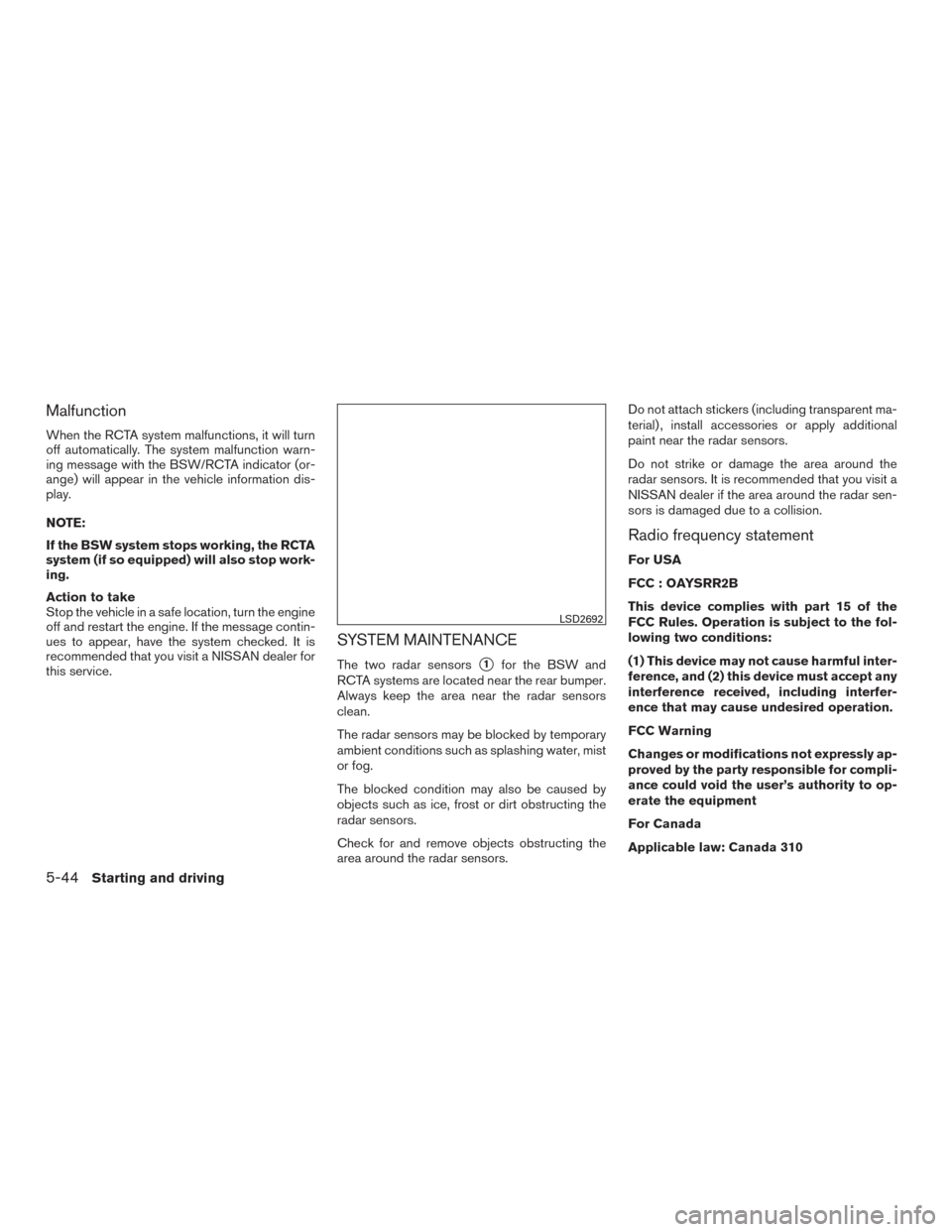
SYSTEM MAINTENANCE
The two radar sensors�1for the BSW and
RCTA systems are located near the rear bumper.
Always keep the area near the radar sensors
clean.
The radar sensors may be blocked by temporary
ambient conditions such as splashing water, mist
or fog.
The blocked condition may also be caused by
objects such as ice, frost or dirt obstructing the
radar sensors.
Check for and remove objects obstructing the
area around the radar sensors. Do not attach stickers (including transparent ma-
terial) , install accessories or apply additional
paint near the radar sensors.
Do not strike or damage the area around the
radar sensors. It is recommended that you visit a
NISSAN dealer if the area around the radar sen-
sors is damaged due to a collision.
Radio frequency statement
For USA
FCC : OAYSRR2B
This device complies with part 15 of the
FCC Rules. Operation is subject to the fol-
lowing two conditions:
(1) This device may not cause harmful inter-
ference, and (2) this device must accept any
interference received, including interfer-
ence that may cause undesired operation.
FCC Warning
Changes or modifications not expressly ap-
proved by the party responsible for compli-
ance could void the user’s authority to op-
erate the equipment
For Canada
Applicable law: Canada 310
LSD2692
5-44Starting and driving
Page 353 of 491
To resume the preset speed:push and re-
lease the ACCEL/RES switch. The vehicle will
resume the last set cruising speed when the
vehicle speed is over 20 mph (32 km/h).
How to change the set distance to the
vehicle ahead
The distance to the vehicle ahead can be se-
lected at any time depending on the traffic con-
ditions.
Each time the distance switch
�Ais pushed, the
set distance will change to long, middle, short
and back to long again, in that sequence.
Distance Approximate distance at
60 mph (100 km/h) [ft (m)]
1. Long 200 (60)
2. Middle 150 (45)
3. Short 90 (30)
● The distance to the vehicle ahead will
change according to the vehicle speed. The
higher the vehicle speed, the longer the dis-
tance.
● If the engine is stopped, the set distance
becomes “long.” (Each time the engine is
started, the initial setting becomes “long.”)
LSD2510LSD2636
5-54Starting and driving