2017 NISSAN ROGUE SPORT battery
[x] Cancel search: batteryPage 263 of 512

4-84Heater, air conditioner, audio and phone systems
vehicle.
Once your cellular phone is connected to
the in-vehicle phone module, no other
phone connecting procedure is required.
Your phone is automatically connected
with the in-vehicle phone module when
the ignition switch is placed in the ACC or
ON position with the previously con-
nected cellular phone turned on and
carried in the vehicle.
NOTE:
Some devices require the user to accept
connections to other Bluetooth® de-
vices. If your phone does not connect
automatic ally to the system, consult
the phone’s owner’s manual for details
on device operation.
You can connect up to five different
Bluetooth® cellular phones to the in-
vehicle phone module. However, you can
talk on only one cellular phone at a time.
Before using the Bluetooth® Hands-Free
Phone System, refer to the following
notes.
.Set up the wireless connection be-
tween a compatible cellular phone
and the in-vehicle phone module be-
fore using the Hands-Free Phone
System. .
Some Bluetooth® enabled cellular
phones may not be recognized by
the in-vehicle phone module. Please
visit www.nissanusa.com/bluetooth
or www.nissan.ca/bluetooth for a re-
commended phone list.
. You will not be able to use a hands-
free phone under the following condi-
tions:
— Your vehicle is outside of the cel-
lular service area.
— Your vehicle is in an area where it is difficult to receive a cellular signal;
such as in a tunnel, in an under-
ground parking garage, near a tall
building or in a mountainous area.
— Your cellular phone is locked to prevent it from being dialed.
. When the radio wave condition is not
ideal or ambient sound is too loud, it
may be difficult to hear the other
person’s voice during a call.
. Do not place the cellular phone in an
area surrounded by metal or far away
from the in-vehicle phone module to
prevent tone quality degradation and
wireless connection disruption.
. While a cellular phone is connected
through the Bluetooth® wireless con-
nection, the battery power of the
cellular phone may discharge quicker
than usual. The Bluetooth® Hands- Free Phone System cannot charge
cellular phones.
. If the Bluetooth® Hands-Free Phone
System seems to be malfunctioning,
visit www.nissanusa.com/bluetooth
or www.nissan.ca/bluetooth for trou-
bleshooting help.
. Some cellular phones or other devices
may cause interference or a buzzing
noise to come from the audio system
speakers. Storing the device in a
different location may reduce or elim-
inate the noise.
. Refer to the cellular phone owner’s
manual regarding the telephone
charges, cellular phone antenna and
body, etc.
REGULATORY INFORMATION
FCC Regulatory information
.CAUTION: To maintain compliance
with FCC’s RF exposure guidelines,
use only the supplied antenna. Un-
authorized antenna, modification, or
attachments could damage the trans-
mitter and may violate FCC regula-
tions.
. Operation is subject to the following
two conditions:
1) this device may not cause interfer-
ence and
Page 272 of 512
standard options when sending a
text message. To set a custom
message, send a text message to
your own phone number while the
phone is connected to the system.
Three custom messages can be set.
Custom messages can only be set
while the vehicle is stationary.
.Auto Reply (if so equipped)Select to turn on or off the Auto
Reply function. When enabled, the
vehicle will automatically send a
predefined text message to the
sender when a text message is
received while driving.
.Auto Reply Message (if so equipped)
Select to choose the message that
is sent when the Auto Reply func-
tion is enabled. Choose from “I’m
Driving” or one of the three custom
messages stored in the system.
.Vehicle Signature On/Off (if soequipped)
Select to choose whether or not
the vehicle signature is added to
outgoing text messages from the
vehicle. This message cannot be
changed or customized.
WARNING
. Use a phone after stopping your
vehicle in a safe location. If you
have to use a phone while driving,
exercise extreme caution at all
times so full attention may be
given to vehicle operation.
. If you are unable to devote full
attention to vehicle operation
while talking on the phone, pull
off the road to a safe location and
stop your vehicle.
CAUTION
To avoid discharging the vehicle
battery, use a phone after starting
the engine.
Your vehicle is equipped with the Blue-
tooth® Hands-Free Phone System. If you
have a compatible Bluetooth® enabled
cellular phone, you can set up the wire-
less connection between your cellular
phone and the in-vehicle phone module.
With Bluetooth® wireless technology, you
can make or receive a hands-free tele-
phone call with your cellular phone in the vehicle.
Once your cellular phone is connected to
the in-vehicle phone module, no other
phone connecting procedure is required.
Your phone is automatically connected
with the in-vehicle phone module when
the ignition switch is placed in the ON
position with the connected cellular
phone turned on and carried in the
vehicle.
You can register up to five different Blue-
tooth® cellular phones to the in-vehicle
phone module. However, you can talk on
only one cellular phone at a time.
NISSAN Voice Recognition system sup-
ports the phone commands, so dialing a
phone number using your voice is possi-
ble. For more details, see “NISSAN Voice
Recognition system (models with naviga-
tion system)” (P.4-100).
Before using the Bluetooth® Hands-Free
Phone System, refer to the following
notes.
.
Set up the wireless connection be-
tween a cellular phone and the in-
vehicle phone module before using
the Hands-Free Phone System.
. Some Bluetooth® enabled cellular
phones may not be recognized by
the in-vehicle phone module. Please
visit www.nissanusa.com/bluetooth
Heater, air conditioner, audio and phone systems4-93
Bluetooth® HANDS-FREE PHONE SYSTEM
(models with navigation system)
Page 273 of 512

4-94Heater, air conditioner, audio and phone systems
or www.nissan.ca/bluetooth for a re-
commended phone list and connect-
ing.
. You will not be able to use a hands-
free phone under the following condi-
tions:
— Your vehicle is outside of the cel-
lular service area.
— Your vehicle is in an area where it is difficult to receive cellular signal;
such as in a tunnel, in an under-
ground parking garage, near a tall
building or in a mountainous area.
— Your cellular phone is locked to prevent it from being dialed.
. When the radio wave condition is not
ideal or ambient sound is too loud, it
may be difficult to hear the other
person’s voice during a call.
. Immediately after the ignition switch
is placed in the ON position, it may be
impossible to receive a call for a short
period of time.
. Do not place the cellular phone in an
area surrounded by metal or far away
from the in-vehicle phone module to
prevent tone quality degradation and
wireless connection disruption.
. While a cellular phone is connected
through the Bluetooth® wireless con-
nection, the battery power of the
cellular phone may discharge quicker than usual. The Bluetooth® Hands-
Free Phone System cannot charge
cellular phones.
. If the Bluetooth® Hands-Free Phone
System seems to be malfunctioning,
visit www.nissanusa.com/bluetooth
or www.nissan.ca/bluetooth for trou-
bleshooting help.
. Some cellular phones or other devices
may cause interference or a buzzing
noise to come from the audio system
speakers. Storing the device in a
different location may reduce or elim-
inate the noise.
. Refer to the cellular phone owner’s
manual regarding the telephone
charges, cellular phone antenna and
body, etc.
. The signal strength display on the
monitor will not coincide with the
signal strength display of some cellu-
lar phones.REGULATORY INFORMATION
FCC Regulatory information
.CAUTION: To maintain compliance
with FCC’s RF exposure guidelines,
use only the supplied antenna. Un-
authorized antenna, modification, or
attachments could damage the trans-
mitter and may violate FCC regula-
tions.
. Operation is subject to the following
two conditions:
1) This device may not cause inter-
ference and
2) This device must accept any inter- ference, including interference
that may cause undesired opera-
tion of the device.
IC Regulatory information
.Operation is subject to the following
two conditions: (1) this device may not
cause interference, and (2) this device
must accept any interference, includ-
ing interference that may cause un-
desired operation of the device.
. This Class B digital apparatus meets
all requirements of the Canadian In-
terference- Causing Equipment Regu-
lations.
Page 286 of 512

5 Starting and driving
Precautions when starting and driving ...................... 5-4Exhaust gas (carbon monoxide) ................................ 5-4
Three-way catalyst ............................................................... 5-4
Tire Pressure Monitoring System (TPMS) ........... 5-5
Avoiding collision and rollover .................................... 5-8
On-pavement and off-road
driving precautions .............................................................. 5-8
Off-road recovery .................................................................. 5-9
Rapid air pressure loss ...................................................... 5-9
Drinking alcohol/drugs and driving ..................... 5-10
Driving safety precautions .......................................... 5-10
Ignition switch (models without Intelligent
Key system) ........................................................................\
............ 5-12
Continuously Variable
Transmission (CVT) ............................................................ 5-13
Manual Transmission (MT) ........................................... 5-13
Key positions ........................................................................\
.. 5-14
Push-button ignition switch (model with
Intelligent Key system) .......................................................... 5-14 Operating range for engine start function ...... 5-14
Push-button ignition switch operation ............. 5-15
Push-button ignition switch positions .............. 5-16
Emergency engine shut off ........................................ 5-16
Intelligent Key battery discharge ........................... 5-17
Before starting the engine ................................................. 5-17 Starting the engine (model without Intelligent
Key system) ........................................................................\
........... 5-18
Starting the engine (model with Intelligent
Key system) ........................................................................\
........... 5-19
Remote engine start (if so equipped) .............. 5-20
Driving the vehicle ................................................................... 5-20
Continuously Variable
Transmission (CVT) ......................................................... 5-20
Manual Transmission (MT) ........................................ 5-25
Parking brake ........................................................................\
....... 5-27
Pedal type ........................................................................\
....... 5-27
Switch type (models with electronic
parking brake system) ................................................. 5-27
ECO mode system ................................................................... 5-29 ECO Pedal Guide function ......................................... 5-30
Ambient ECO ........................................................................\
5-30
ECO Drive Report .............................................................. 5-31
Lane Departure Warning (LDW) (if
so equipped) ........................................................................\
......... 5-32 LDW system operation ................................................. 5-33
How to enable/disable the LDW system ....... 5-34
LDW system limitations ............................................... 5-35
System temporarily unavailable ........................... 5-36
System malfunction ....................................................... 5-36
System maintenance .................................................... 5-36
Page 288 of 512

Increasing fuel economy ................................................. 5-100
Intelligent 4x4 (if so equipped) ................................... 5-100Intelligent 4x4 LOCK switch operations ...... 5-102
Parking/parking on hills ................................................... 5-104
Electric power steering ..................................................... 5-105
Brake system ........................................................................\
.... 5-106 Braking precautions ..................................................... 5-106
Brake assist ........................................................................\
........ 5-107
Brake assist ........................................................................\
. 5-107
Anti-lock Braking System (ABS) ........................... 5-107
Vehicle Dynamic Control (VDC) system ............... 5-108
Chassis control ........................................................................\
5-110 Intelligent Trace Control ........................................... 5-110 Intelligent Engine Brake (Continuously
Variable Transmission (CVT) models) .......... 5-111
Active Ride Control ..................................................... 5-112
Hill Start Assist system ..................................................... 5-113
Cold weather driving ......................................................... 5-113 Freeing a frozen door lock ................................... 5-113
Anti-freeze ........................................................................\
.. 5-113
Battery ........................................................................\
........... 5-113
Draining of coolant water ..................................... 5-113
Tire equipment ............................................................... 5-114
Special winter equipment ..................................... 5-114
Driving on snow or ice ............................................. 5-114
Page 299 of 512
5-14Starting and driving
KEY POSITIONS
LOCK: Normal parking position (0)
OFF: (Not used) (1)
This position activates electrical acces-
sories such as the radio when the engine
is not running.
ON: Normal operating position (2)
This position turns on the ignition system
and the electrical accessories.
START: (3)
This position starts the engine. As soon as
the engine has started, release the key. It
automatically returns to the ON position.
WARNING
Do not operate the push-button
ignition switch while driving the ve-
hicle except in an emergency. (The
engine will stop when the ignition
switch is pushed 3 consecutive times
or the ignition switch is pushed and
held for more than 2 seconds.) If the
engine stops while the vehicle is
being driven, this could lead to a
crash and serious injury.
Before operating the push-button igni-
tion switch, be sure to move the shift
lever to the P (Park) position (for Con-
tinuously Variable Transmission (CVT)
models) or the shift lever to the N
(Neutral) position (for Manual Transmis-
sion (MT) models).
SSD0436
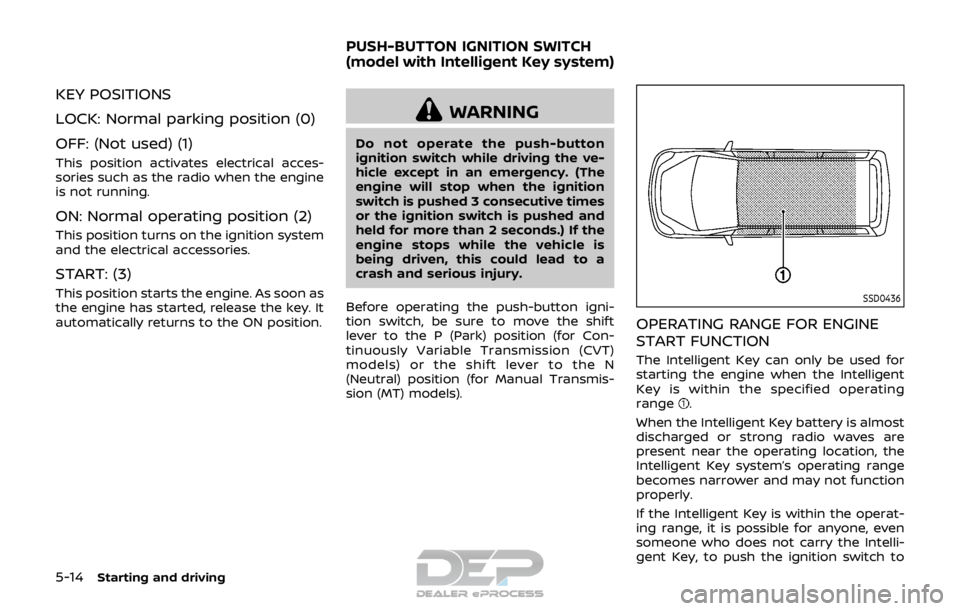
OPERATING RANGE FOR ENGINE
START FUNCTION
The Intelligent Key can only be used for
starting the engine when the Intelligent
Key is within the specified operating
range
.
When the Intelligent Key battery is almost
discharged or strong radio waves are
present near the operating location, the
Intelligent Key system’s operating range
becomes narrower and may not function
properly.
If the Intelligent Key is within the operat-
ing range, it is possible for anyone, even
someone who does not carry the Intelli-
gent Key, to push the ignition switch to
PUSH-BUTTON IGNITION SWITCH
(model with Intelligent Key system)
Page 300 of 512
start the engine.
.The cargo room area is not included in
the operating range but the Intelligent
Key may function.
. If the Intelligent Key is placed on the
instrument panel, inside the glove box
or door pocket, the Intelligent Key may
not function.
. If the Intelligent Key is placed near the
door or window outside the vehicle,
the Intelligent Key may function.
PUSH-BUTTON IGNITION SWITCH
OPERATION
CAUTION
.Do not leave the vehicle for ex-
tended periods of time when the
ignition switch is in the ON posi-
tion and the engine is not run-
ning. This can discharge the
battery.
. Use electrical accessories with
the engine running to avoid dis-
charging the vehicle battery. If
you must use accessories while
the engine is not running, do not
use them for extended periods of
time and do not use multiple
electrical accessories at the same time.
JVS0937X
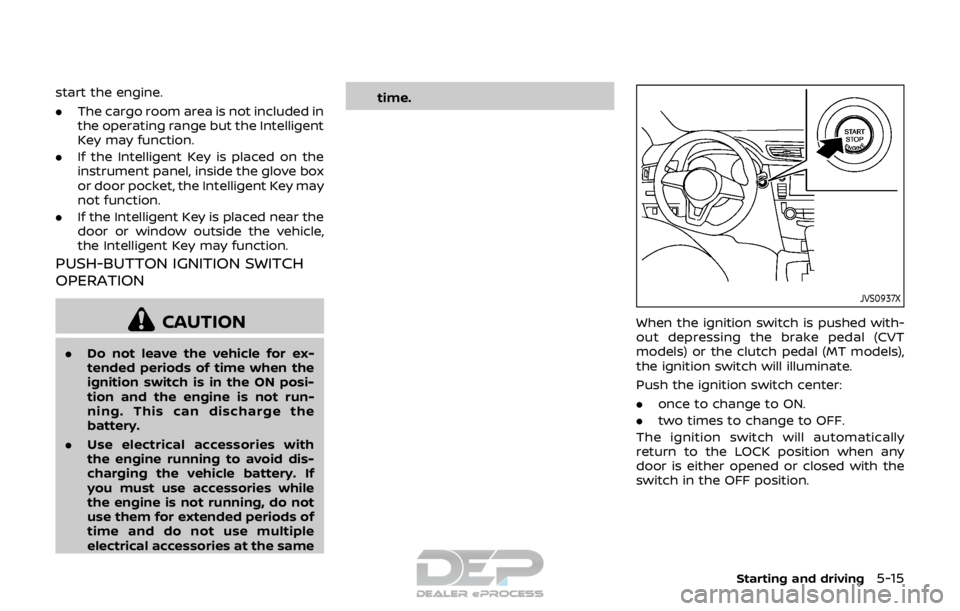
When the ignition switch is pushed with-
out depressing the brake pedal (CVT
models) or the clutch pedal (MT models),
the ignition switch will illuminate.
Push the ignition switch center:
.
once to change to ON.
. two times to change to OFF.
The ignition switch will automatically
return to the LOCK position when any
door is either opened or closed with the
switch in the OFF position.
Starting and driving5-15
Page 301 of 512

5-16Starting and driving
Continuously Variable Transmis-
sion (CVT) models
The ignition lock is designed so that the
ignition switch position cannot be
switched to OFF until the shift lever is
moved to the P (Park) position.
When the ignition switch cannot be
pushed toward the OFF position, proceed
as follows:
1. Move the shift lever into the P (Park)position.
2. Push the ignition switch. The ignition switch position will change to the ON
position.
3. Push the ignition switch again to the OFF position.
The shift lever can be moved from the P
(Park) position if the ignition switch is in
the ON position and the brake pedal is
depressed.
PUSH-BUTTON IGNITION SWITCH
POSITIONS
LOCK (Normal parking position)
The ignition switch can only be locked at
this position.
The ignition switch will lock when any
door is opened or closed with the ignition
switched off.
ON (Normal operating position)
The ignition system and the electrical
accessory power activate at this position
without the engine turned on.
The ON position has a battery saver
feature that will place the ignition switch
in the OFF position, if the vehicle is not
running, after some time under the fol-
lowing conditions:
. all doors are closed.
. shift lever is in P (Park) position (CVT
model) or N (Neutral) position (MT
model).
The battery saver feature will be can-
celled if any of the following occur:
. any door is opened.
. shift lever is moved out of the P (Park)
position (CVT model). .
ignition switch changes position.
OFF position
The engine is turned off in this position.
Auto ACC position
With the vehicle in the P (Park) position
(CVT models) or the N (Neutral) position
(MT models), the Intelligent Key with you
and the ignition placed from ON to OFF,
the radio can still be used for a period of
time, or until the driver’s door is opened.
After a period of time, functions such as
radio, navigation (if so equipped), and
Bluetooth® Hands-Free Phone System
may be restarted by turning on the audio
system (See “Audio system” (P.4-38) in this
manual), or by the UNLOCK button on the
Intelligent Key for up to a total of 30
minutes.
EMERGENCY ENGINE SHUT OFF
To shut off the engine in an emergency
situation while driving, perform the fol-
lowing procedure:
.Rapidly push the push-button ignition
switch 3 consecutive times in less
than 1.5 seconds, or
. Push and hold the push-button igni-
tion switch for more than 2 seconds.