Page 386 of 554

Action to take
When the conditions listed above are no longer
present, turn the system off using the ICC
CRUISE ON/OFF switch. Turn the ICC system
back on to use the system.
Condition B
When the radar sensor area of the front bumper
is covered with dirt or is obstructed, the ICC
system will automatically be canceled.
The chime will sound and the “Unavailable: Front
Radar Obstruction” warning message will appear
in the vehicle information display.Action to take
If the warning message appears, stop the vehicle
in a safe place, place the shift lever in the P (Park)
position, and turn the engine off. When the radar
signal is temporarily interrupted, clean the sensor
area of the front bumper and restart the engine. If
the “Unavailable: Front Radar Obstruction” warn-
ing message continues to be displayed, have the
system checked. It is recommended that you visit
a NISSAN dealer for this service.
Condition C
When the ICC system is not operating properly, a
chime sounds and the ICC system warning light
(orange) will come on.Action to take
If the warning light comes on, park the vehicle in a
safe place. Turn the engine off, restart the engine,
resume driving and set the ICC system again.
If it is not possible to set the system or the
indicator stays on, it may indicate that the
system is malfunctioning. Although the ve-
hicle is still drivable under normal condi-
tions, have the vehicle checked. It is recom-
mended that you visit a NISSAN dealer for
this service.
LSD2685LSD2721
Starting and driving5-75
Page 387 of 554

SYSTEM MAINTENANCE
The sensor for the ICC system�Ais located on
the front of the vehicle.
To keep the ICC system operating properly, be
sure to observe the following:
● Always keep the sensor area clean.
● Do not strike or damage the areas around
the sensor.
● Do not attach a sticker (including transpar-
ent material) or install an accessory near the
sensor. This could cause failure or malfunc-
tion. ●
Do not attach metallic objects near the sen-
sor area (brush guard, etc.) This could cause
failure or malfunction.
● Do not alter, remove, or paint the front bum-
per. Before customizing or restoring the
front bumper, it is recommended that you
visit a NISSAN dealer.
Radio frequency statement
For USA
FCC ID OAYARS4B
This device complies with Part 15 of the FCC
Rules. Operation is subject to the following two
conditions:
1. This device may not cause harmful interfer- ence, and
2. This device must accept any interference received, including interference that may
cause undesired operation.
FCC Warning
Changes or modifications not expressly ap-
proved by the party responsible for compliance
could void the user’s authority to operate the
equipment. For Canada
Model: ARS4–B
IC: 4135A-ARS4B
FCC ID: OAYARS4B
This device complies with Part 15 of the FCC
Rules and with Industry Canada licence-exempt
RSS standard(s) . Operation is subject to the
following two conditions:
1. This device may not cause harmful interfer- ence, and
2. This device must accept any interference received, including interference that may
cause undesired operation.
Le présent appareil est conforme aux CNR
d’Industrie Canada applicables aux appareils ra-
dio exempts de licence. L’exploitation est autori-
sée aux deux conditions suivantes: 1. L’appareil ne doit pas produire de brouillage, et
2. L’utilisateur de l’appareil doit accepter tout brouillage radioélectrique subi, même si le
brouillage est susceptible d’en comprom-
ettre le fonctionnement.
LSD2690
5-76Starting and driving
Page 388 of 554

Radio Frequency Radiation Exposure Informa-
tion:
This equipment complies with FCC radiation ex-
posure limits set forth for an uncontrolled envi-
ronment.
This equipment should be installed and operated
with minimum distance of 30 cm between the
radiator and your body.
The transmitter must not be co-located or oper-
ating in conjunction with any other antenna or
transmitter.
Cet équipement est conforme aux limites
d’exposition aux rayonnements IC établies pour
un environnement non contrôlé. Cet équipement
doit être installé et utilisé avec un minimum de
30 cm de distance entre la source de rayonne-
ment et votre corps.
FCC Notice
Changes or modifications not expressly ap-
proved by the party responsible for compliance
could void the user’s authority to operate the
equipment.CONVENTIONAL (fixed speed)
CRUISE CONTROL MODE
This mode allows driving at a speed between 25
to 90 mph (40 to 144 km/h) without keeping your
foot on the accelerator pedal.
WARNING
●In the conventional (fixed speed) cruise
control mode, a warning chime does not
sound to warn you if you are too close
to the vehicle ahead, as neither the
presence of the vehicle ahead nor the
vehicle-to-vehicle distance is detected.
● Pay special attention to the distance
between your vehicle and the vehicle
ahead of you or a collision could occur.
● Always confirm the setting in the ICC
system display.
● Do not use the conventional (fixed
speed) cruise control mode when driv-
ing under the following conditions:
– When it is not possible to keep the vehicle at a set speed
– In heavy traffic or in traffic that varies in speed
– On winding or hilly roads – On slippery roads (rain, snow, ice,
etc.)
– In very windy areas
● Doing so could cause a lose of vehicle
control and result in an accident.
Starting and driving5-77
Page 389 of 554

Conventional (fixed speed) cruise
control switches
1. CANCEL switch:Deactivates the system without erasing the
set speed
2. RES/+ switch: Resumes set speed or increases speed in-
crementally
3. SET/- switch: Sets desired cruise speed or reduces speed
incrementally
4. CRUISE ON/OFF switch: Master switch to activate the system
Conventional (fixed speed) cruise
control mode display and indicators
The display is located in the vehicle information
display.
1. Cruise indicator: This indicator indicates the condition of the
ICC system depending on a color.
● Cruise control ON indicator (gray): Indi-
cates that the CRUISE ON/OFF switch is
on
● Cruise control SET indicator (green): In-
dicates that the cruising speed is set ●
Cruise control warning (yellow): Indicates
that there is a malfunction in the ICC
system
2. Set vehicle speed indicator: This indicator indicates the set vehicle
speed. For Canadian models, the speed is
displayed in km/h.
LSD2723LSD2724
5-78Starting and driving
Page 393 of 554
WARNING
Failure to follow the warnings and instruc-
tions for proper use of the FEB system
could result in serious injury or death.
●The FEB system is a supplemental aid
to the driver. It is not a replacement for
the driver’s attention to traffic condi-
tions or responsibility to drive safely. It
cannot prevent accidents due to care-
lessness or dangerous driving
techniques.
● The FEB system does not function in all
driving, traffic, weather and road
conditions.
The FEB system can assist the driver when there
is a risk of a forward collision with the vehicle
ahead in the traveling lane. The FEB system uses a radar sensor
�Alocated
behind the front bumper to measure the distance
to the vehicle ahead in the same lane.
LSD2690
FORWARD EMERGENCY BRAKING
(FEB) (if so equipped)
5-82Starting and driving
Page 394 of 554
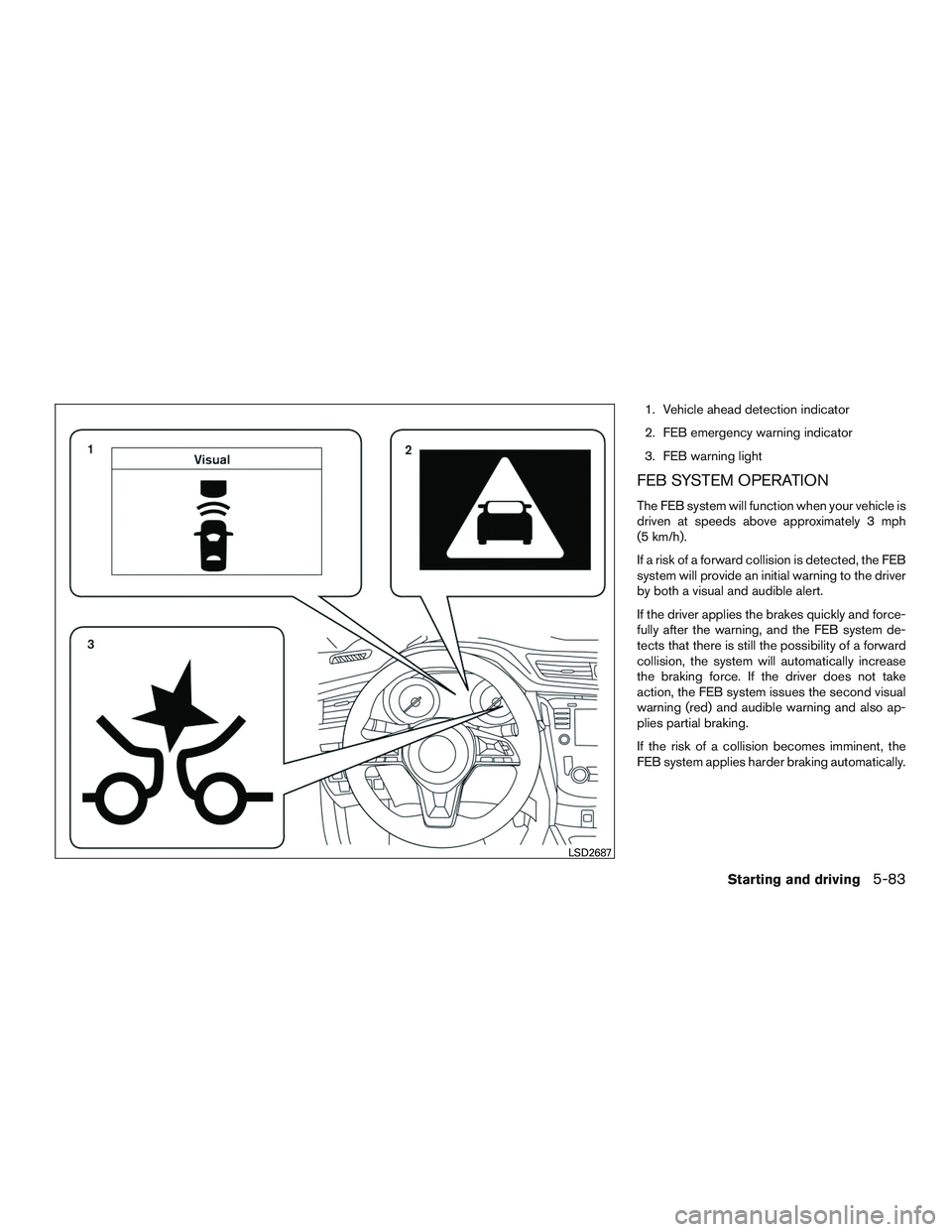
1. Vehicle ahead detection indicator
2. FEB emergency warning indicator
3. FEB warning light
FEB SYSTEM OPERATION
The FEB system will function when your vehicle is
driven at speeds above approximately 3 mph
(5 km/h).
If a risk of a forward collision is detected, the FEB
system will provide an initial warning to the driver
by both a visual and audible alert.
If the driver applies the brakes quickly and force-
fully after the warning, and the FEB system de-
tects that there is still the possibility of a forward
collision, the system will automatically increase
the braking force. If the driver does not take
action, the FEB system issues the second visual
warning (red) and audible warning and also ap-
plies partial braking.
If the risk of a collision becomes imminent, the
FEB system applies harder braking automatically.
LSD2687
Starting and driving5-83
Page 396 of 554

TURNING THE FEB SYSTEM
ON/OFF
Perform the following steps to turn the FEB sys-
tems ON or OFF.1. Press the
button until “Settings” dis-
plays in the vehicle information display and
then press OK button. Use the
button
to select “Driver Assistance”. Then press the
OK button.
2. Select “Driving Aids” and press the OK but- ton.
3. Select “Emergency Brake” and press the OK button.
When the FEB system is turned off, the FEB
system warning light illuminates.
NOTE:
The FEB system will be automatically
turned on when the engine is restarted.
FEB SYSTEM LIMITATIONS
WARNING
Listed below are the system limitations for
the FEB system. Failure to operate the
vehicle in accordance with these system
limitations could result in serious injury or
death.
● The FEB system cannot detect all ve-
hicles under all conditions.
● The radar sensor does not detect the
following objects:
– Pedestrians, animals or obstacles in the roadway.
– Oncoming vehicles.
– Crossing vehicles.
● The radar sensor has some perfor-
mance limitations. If a stationary ve-
hicle is in the vehicles’s path, the FEB
system will not function when the ve-
hicle is driven at speeds over approxi-
mately 50 mph (80 km/h).
● The radar sensor may not detect a ve-
hicle ahead in the following conditions:
– Dirt, ice, snow or other material cov- ering the radar sensor. – Interference by other radar sources.
– Snow or road spray from traveling
vehicles.
– If the vehicle ahead is narrow (e.g. motorcycle) .
– When driving on a steep downhill slope or roads with sharp curves.
● In some road or traffic conditions, the
FEB system may unexpectedly apply
partial braking. When acceleration is
necessary, continue to depress the ac-
celerator pedal to override the system.
● Braking distances increase on slippery
surfaces.
● The system is designed to automatically
check the sensor’s functionality, within
certain limitations. The system may not
detect some forms of obstructions of
the sensor area such as ice, snow, stick-
ers, etc. In these cases, the system may
not be able to worn the driver properly.
Be sure that you check, clean and clear
the sensor area regularly.
● Excessive noise will interfere with the
warning chime sound, and the chime
may not be heard.
Starting and driving5-85
Page 397 of 554
SYSTEM TEMPORARILY
UNAVAILABLE
Condition A
When the radar sensor picks up interference
from another radar source, making it impossible
to detect a vehicle ahead, the FEB system is
automatically turned off.
The FEB system warning light (orange) will illu-
minate.
Action to take
When the above conditions no longer exist, the
FEB system will resume automatically.
Condition B
When the sensor area of the front bumper is
covered with dirt or is obstructed, making it im-
possible to detect a vehicle ahead, the FEB sys-
tem is automatically turned off.
The FEB system warning light (orange) will illu-
minate and the “Unavailable: Front Radar Ob-
struction” warning message will appear in the
vehicle information display.
When driving on roads with limited road struc-
tures or buildings (for example, long bridges,
deserts, snow fields, driving next to long walls) ,
the system may illuminate the system warning
LSD2717
5-86Starting and driving