2017 NISSAN QUEST headlights
[x] Cancel search: headlightsPage 126 of 520
SIC3672
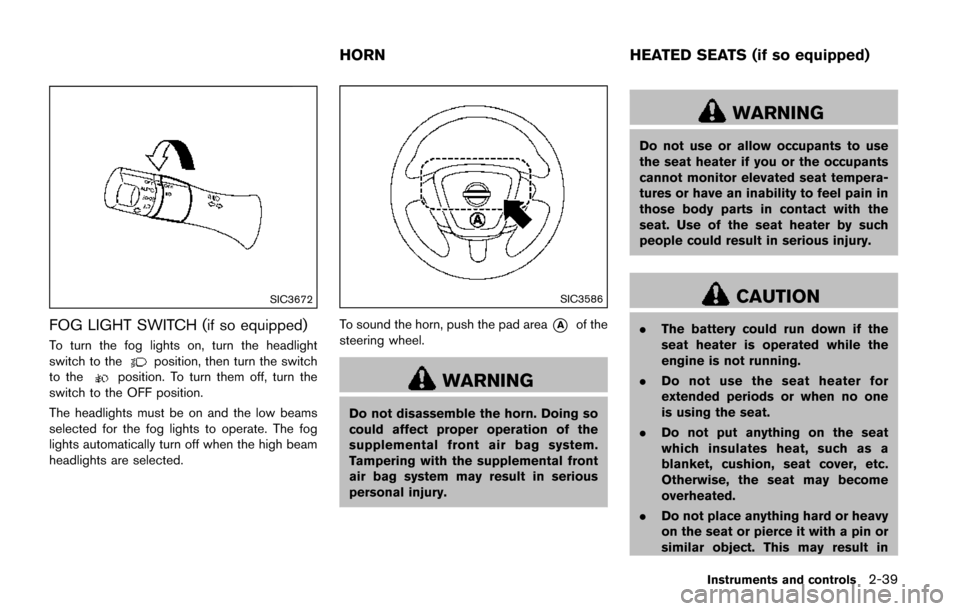
FOG LIGHT SWITCH (if so equipped)
To turn the fog lights on, turn the headlight
switch to theposition, then turn the switch
to theposition. To turn them off, turn the
switch to the OFF position.
The headlights must be on and the low beams
selected for the fog lights to operate. The fog
lights automatically turn off when the high beam
headlights are selected.
SIC3586
To sound the horn, push the pad area*Aof the
steering wheel.
WARNING
Do not disassemble the horn. Doing so
could affect proper operation of the
supplemental front air bag system.
Tampering with the supplemental front
air bag system may result in serious
personal injury.
WARNING
Do not use or allow occupants to use
the seat heater if you or the occupants
cannot monitor elevated seat tempera-
tures or have an inability to feel pain in
those body parts in contact with the
seat. Use of the seat heater by such
people could result in serious injury.
CAUTION
. The battery could run down if the
seat heater is operated while the
engine is not running.
. Do not use the seat heater for
extended periods or when no one
is using the seat.
. Do not put anything on the seat
which insulates heat, such as a
blanket, cushion, seat cover, etc.
Otherwise, the seat may become
overheated.
. Do not place anything hard or heavy
on the seat or pierce it with a pin or
similar object. This may result in
Instruments and controls2-39
HORN HEATED SEATS (if so equipped)
Page 129 of 520
2-42Instruments and controls
CAUTION
.Use power outlet with the engine
running to avoid discharging the
vehicle battery.
. Avoid using power outlet when the
air conditioner, headlights or rear
window defroster is on.
. Before inserting or disconnecting a
plug, be sure the electrical acces-
sory being used is turned OFF.
. When not in use, be sure to close
the cap. Do not allow water or any
liquid to contact the outlet.
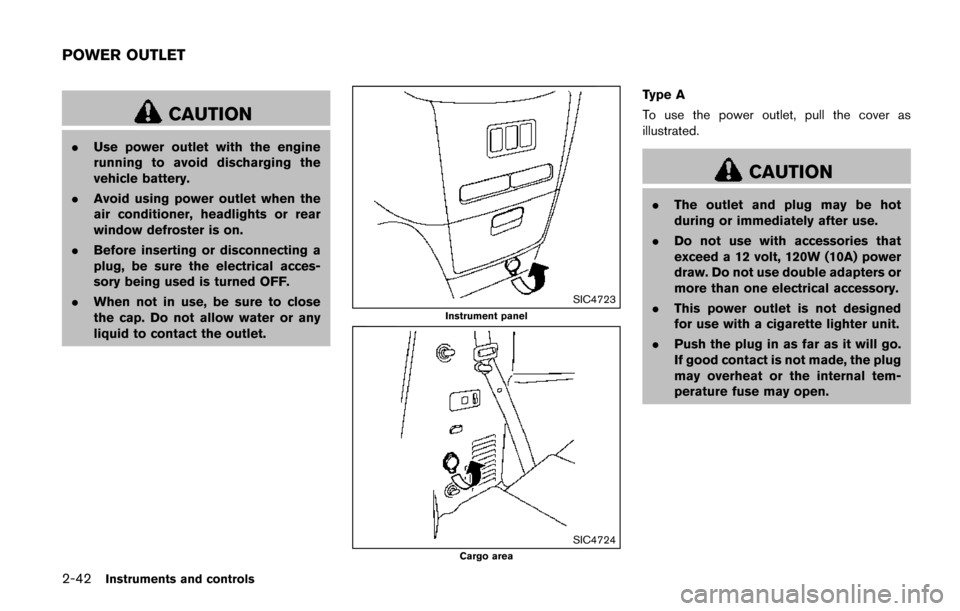
SIC4723
Instrument panel
SIC4724Cargo area
Type A
To use the power outlet, pull the cover as
illustrated.
CAUTION
.The outlet and plug may be hot
during or immediately after use.
. Do not use with accessories that
exceed a 12 volt, 120W (10A) power
draw. Do not use double adapters or
more than one electrical accessory.
. This power outlet is not designed
for use with a cigarette lighter unit.
. Push the plug in as far as it will go.
If good contact is not made, the plug
may overheat or the internal tem-
perature fuse may open.
POWER OUTLET
Page 174 of 520
Opening/closing power sliding door (if
so equipped)
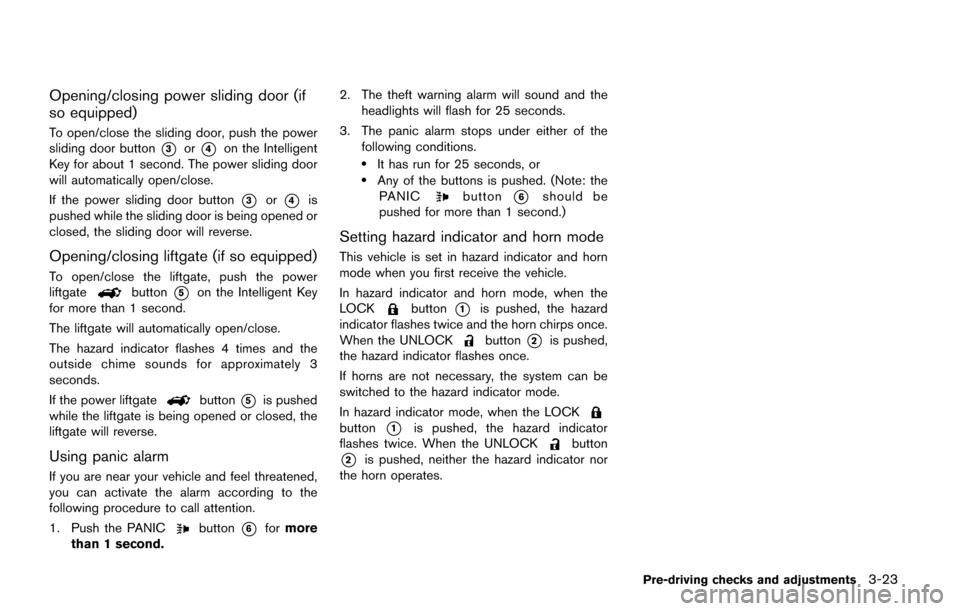
To open/close the sliding door, push the power
sliding door button
*3or*4on the Intelligent
Key for about 1 second. The power sliding door
will automatically open/close.
If the power sliding door button
*3or*4is
pushed while the sliding door is being opened or
closed, the sliding door will reverse.
Opening/closing liftgate (if so equipped)
To open/close the liftgate, push the power
liftgatebutton*5on the Intelligent Key
for more than 1 second.
The liftgate will automatically open/close.
The hazard indicator flashes 4 times and the
outside chime sounds for approximately 3
seconds.
If the power liftgate
button*5is pushed
while the liftgate is being opened or closed, the
liftgate will reverse.
Using panic alarm
If you are near your vehicle and feel threatened,
you can activate the alarm according to the
following procedure to call attention.
1. Push the PANIC
button*6for more
than 1 second. 2. The theft warning alarm will sound and the
headlights will flash for 25 seconds.
3. The panic alarm stops under either of the following conditions.
.It has run for 25 seconds, or.Any of the buttons is pushed. (Note: thePANICbutton*6should be
pushed for more than 1 second.)
Setting hazard indicator and horn mode
This vehicle is set in hazard indicator and horn
mode when you first receive the vehicle.
In hazard indicator and horn mode, when the
LOCK
button*1is pushed, the hazard
indicator flashes twice and the horn chirps once.
When the UNLOCK
button*2is pushed,
the hazard indicator flashes once.
If horns are not necessary, the system can be
switched to the hazard indicator mode.
In hazard indicator mode, when the LOCK
button*1is pushed, the hazard indicator
flashes twice. When the UNLOCKbutton
*2is pushed, neither the hazard indicator nor
the horn operates.
Pre-driving checks and adjustments3-23
Page 185 of 520
3-34Pre-driving checks and adjustments
SPA2143
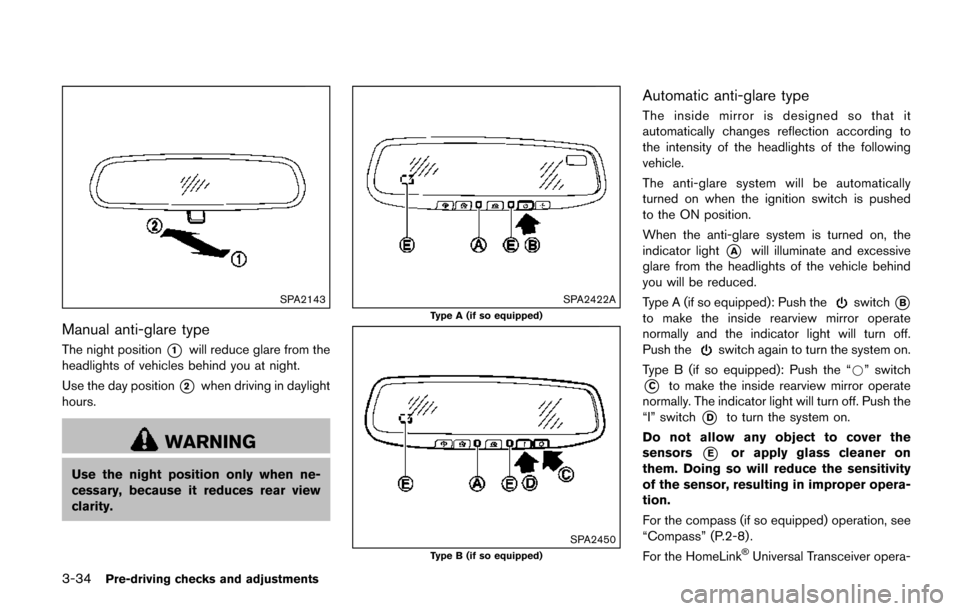
Manual anti-glare type
The night position*1will reduce glare from the
headlights of vehicles behind you at night.
Use the day position
*2when driving in daylight
hours.
WARNING
Use the night position only when ne-
cessary, because it reduces rear view
clarity.
SPA2422A
Type A (if so equipped)
SPA2450Type B (if so equipped)
Automatic anti-glare type
The inside mirror is designed so that it
automatically changes reflection according to
the intensity of the headlights of the following
vehicle.
The anti-glare system will be automatically
turned on when the ignition switch is pushed
to the ON position.
When the anti-glare system is turned on, the
indicator light
*Awill illuminate and excessive
glare from the headlights of the vehicle behind
you will be reduced.
Type A (if so equipped): Push the
switch*B
to make the inside rearview mirror operate
normally and the indicator light will turn off.
Push the
switch again to turn the system on.
Type B (if so equipped): Push the “*” switch
*Cto make the inside rearview mirror operate
normally. The indicator light will turn off. Push the
“I” switch
*Dto turn the system on.
Do not allow any object to cover the
sensors
*Eor apply glass cleaner on
them. Doing so will reduce the sensitivity
of the sensor, resulting in improper opera-
tion.
For the compass (if so equipped) operation, see
“Compass” (P.2-8) .
For the HomeLink
ŠUniversal Transceiver opera-
Page 209 of 520
4-20Monitor, heater, air conditioner, audio, phone and voice recognition systems
When any mode button is pushed with the
screen off, the screen turns on for further
operation. The screen will turn off automatically
5 seconds after the operation is finished.
To turn on the screen, set this item to the ON
position, or push and hold the “
OFF”
button.
. Brightness/Contrast/Background Color
To adjust the brightness and contrast of the
screen, select the “Brightness” or “Contrast”
key.
Then, you can adjust the brightness and the
contrast using the multi-function controller.
For information on the “Background Color” key,
refer to the separate Navigation System Own-
er’s Manual.
Color Theme:
Choose the theme color of the menu screen.
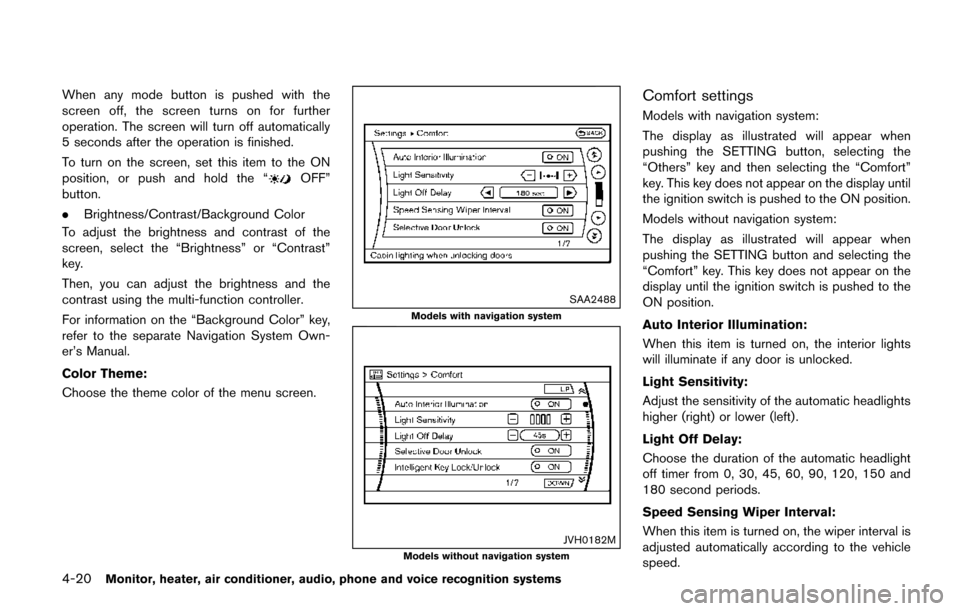
SAA2488
Models with navigation system
JVH0182MModels without navigation system
Comfort settings
Models with navigation system:
The display as illustrated will appear when
pushing the SETTING button, selecting the
“Others” key and then selecting the “Comfort”
key. This key does not appear on the display until
the ignition switch is pushed to the ON position.
Models without navigation system:
The display as illustrated will appear when
pushing the SETTING button and selecting the
“Comfort” key. This key does not appear on the
display until the ignition switch is pushed to the
ON position.
Auto Interior Illumination:
When this item is turned on, the interior lights
will illuminate if any door is unlocked.
Light Sensitivity:
Adjust the sensitivity of the automatic headlights
higher (right) or lower (left) .
Light Off Delay:
Choose the duration of the automatic headlight
off timer from 0, 30, 45, 60, 90, 120, 150 and
180 second periods.
Speed Sensing Wiper Interval:
When this item is turned on, the wiper interval is
adjusted automatically according to the vehicle
speed.
Page 430 of 520
8 Do-it-yourself
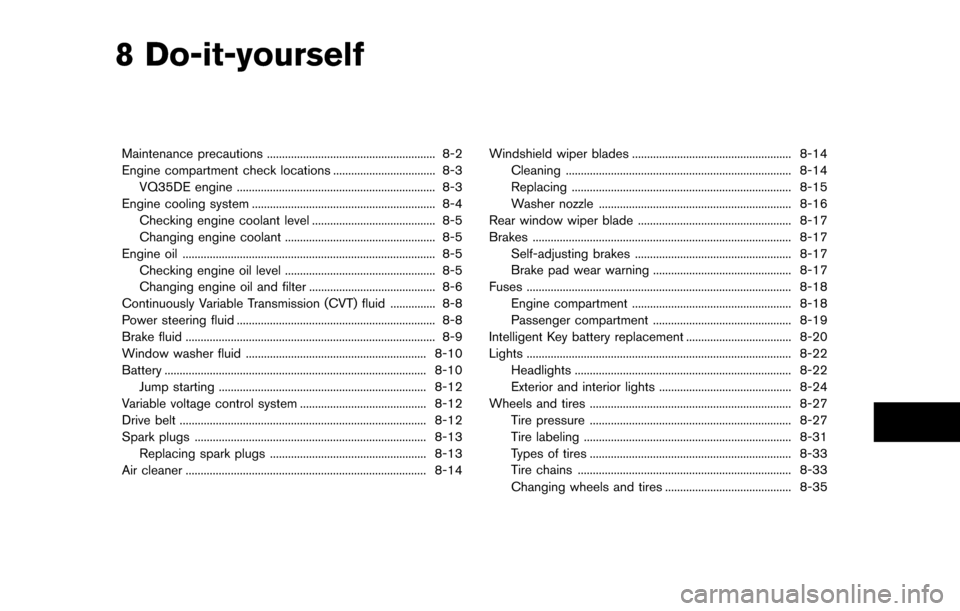
Maintenance precautions ........................................................ 8-2
Engine compartment check locations .................................. 8-3VQ35DE engine .................................................................. 8-3
Engine cooling system ............................................................. 8-4 Checking engine coolant level ......................................... 8-5
Changing engine coolant .................................................. 8-5
Engine oil ........................................................................\
............ 8-5 Checking engine oil level .................................................. 8-5
Changing engine oil and filter .......................................... 8-6
Continuously Variable Transmission (CVT) fluid ............... 8-8
Power steering fluid .................................................................. 8-8
Brake fluid ........................................................................\
........... 8-9
Window washer fluid ............................................................ 8-10
Battery ........................................................................\
............... 8-10 Jump starting ..................................................................... 8-12
Variable voltage control system .......................................... 8-12
Drive belt ........................................................................\
.......... 8-12
Spark plugs ........................................................................\
..... 8-13 Replacing spark plugs .................................................... 8-13
Air cleaner ........................................................................\
........ 8-14 Windshield wiper blades ..................................................... 8-14
Cleaning ........................................................................\
... 8-14
Replacing ........................................................................\
. 8-15
Washer nozzle ................................................................ 8-16
Rear window wiper blade ................................................... 8-17
Brakes ........................................................................\
.............. 8-17
Self-adjusting brakes .................................................... 8-17
Brake pad wear warning .............................................. 8-17
Fuses ........................................................................\
................ 8-18 Engine compartment ..................................................... 8-18
Passenger compartment .............................................. 8-19
Intelligent Key battery replacement ................................... 8-20
Lights ........................................................................\
................ 8-22
Headlights ........................................................................\
8-22
Exterior and interior lights ............................................ 8-24
Wheels and tires ................................................................... 8-27
Tire pressure ................................................................... 8-27
Tire labeling ..................................................................... 8-31
Types of tires ................................................................... 8-33
Tire chains ....................................................................... 8-33
Changing wheels and tires .......................................... 8-35
Page 451 of 520
8-22Do-it-yourself
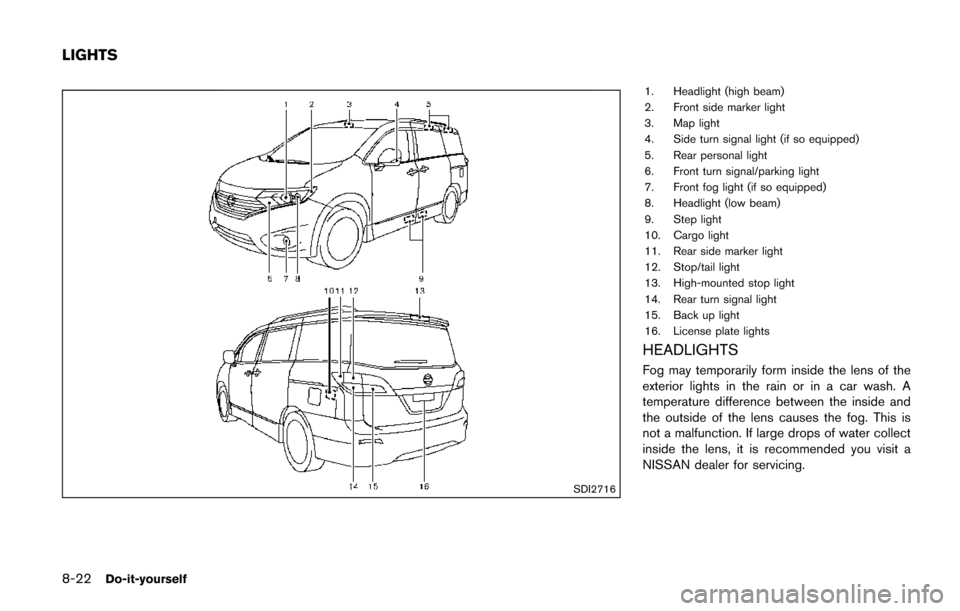
SDI2716
1. Headlight (high beam)
2. Front side marker light
3. Map light
4. Side turn signal light (if so equipped)
5. Rear personal light
6. Front turn signal/parking light
7. Front fog light (if so equipped)
8. Headlight (low beam)
9. Step light
10. Cargo light
11. Rear side marker light
12. Stop/tail light
13. High-mounted stop light
14. Rear turn signal light
15. Back up light
16. License plate lights
HEADLIGHTS
Fog may temporarily form inside the lens of the
exterior lights in the rain or in a car wash. A
temperature difference between the inside and
the outside of the lens causes the fog. This is
not a malfunction. If large drops of water collect
inside the lens, it is recommended you visit a
NISSAN dealer for servicing.
LIGHTS
Page 452 of 520
Replacing
If replacement is required, it is recommended
you visit your NISSAN dealer for this service.
Xenon headlight model:
WARNING
HIGH VOLTAGE
When xenon headlights are on, they
produce a high voltage. To prevent an
electric shock, never attempt to modify
or disassemble. It is recommended to
have your xenon headlights replaced at
a NISSAN dealer. For additional infor-
mation, see “Headlight and turn signal
switch” (P.2-33) .
Halogen headlight model:
The headlight is a semi-sealed beam type which
uses a replaceable headlight (halogen) bulb.
CAUTION
. Do not leave the bulb out of the
headlight reflector for a long period
of time. Dust, moisture, smoke, etc.
entering the headlight body may affect bulb performance.
. High pressure halogen gas is sealed
inside the halogen bulb. The bulb
may break if the glass envelope is
scratched or the bulb is dropped.
. Only touch the plastic base when
handling the bulb. Never touch the
glass envelope.
. Aiming is not necessary after repla-
cing the bulb. When aiming adjust-
ment is necessary, it is
recommended you visit a NISSAN
dealer for this service.
Use the same number and wattage as originally
installed as shown in the chart.
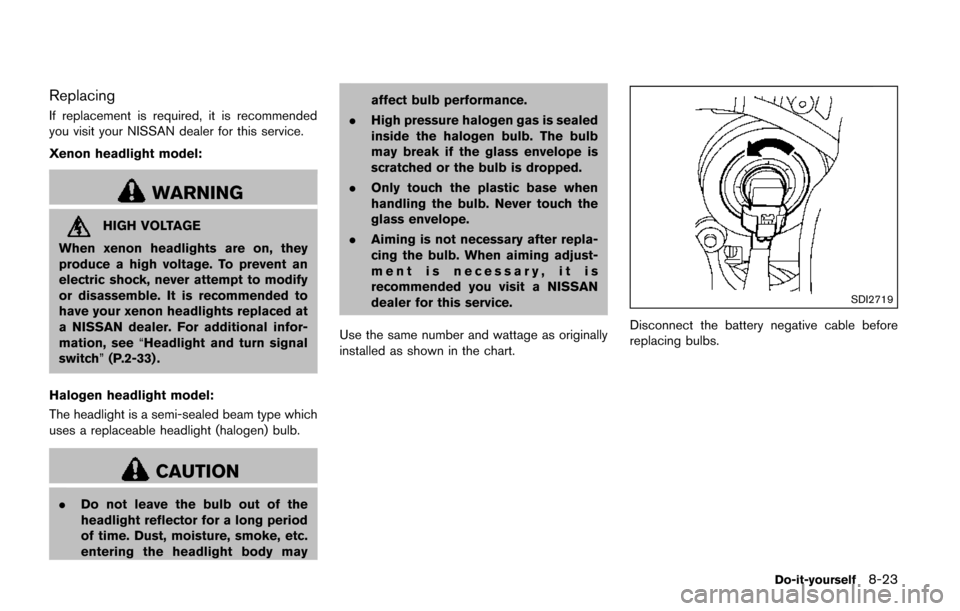
SDI2719
Disconnect the battery negative cable before
replacing bulbs.
Do-it-yourself8-23