2017 NISSAN QUEST ad blue
[x] Cancel search: ad bluePage 273 of 520
4-84Monitor, heater, air conditioner, audio, phone and voice recognition systems
operational. To select an item, push ENTER.
Items in the iPodŠmenu appear on the display in
the following order.
. Now Playing
. Playlists
. Artists
. Albums
. Songs
. Podcasts
. Genres
. Composers
. Audiobooks
. Shuffle Songs
For more information about each item, see the
iPod
ŠOwner’s Manual.
Next/Previous Track and Fast
Forward/Rewind:
When the FF or REW button is pushed for more
than 1.5 seconds while the iPod
Šis playing, the
iPodŠwill play while fast forwarding or rewind-
ing. When the button is released, the iPodŠwill
return to the normal play speed.
When the FF or REW button is pushed for less
than 1.5 seconds while the iPod
Šis playing, the
next track or the beginning of the current track
on the iPod
Šwill be played. Push the buttons
several times to skip through the tracks. The multi-function controller can also be used to
select tracks when the iPod
Šis playing.
REPEAT (RPT):
When the RPT play button is pushed while a
track is being played, the play pattern can be
changed as follows:
(Repeat Off) ?1 Track Repeat? All Repeat?
(Repeat Off)
Random (RDM):
When the RDM play button is pushed while a
track is being played, the play pattern can be
changed as follows:
(Shuffle Off) ?Track Shuffle ?(Shuffle Off)
BACK button:
When the BACK button is pushed, it returns to
the previous display.
BluetoothŠaudio player operation
If you have a compatible BluetoothŠaudio
device that is capable of playing audio files,
the device can be connected to the vehicle’s
audio system so that the audio files on the
device play through the vehicle’s speakers.
Regulatory information:
Bluetooth
Štrademark:
BluetoothŠis a trademark owned
by Bluetooth SIG, Inc. and li-
censed to Visteon Corporation.
Connecting BluetoothŠdevice:
To connect your BluetoothŠdevice to the
vehicle, follow the procedure below:
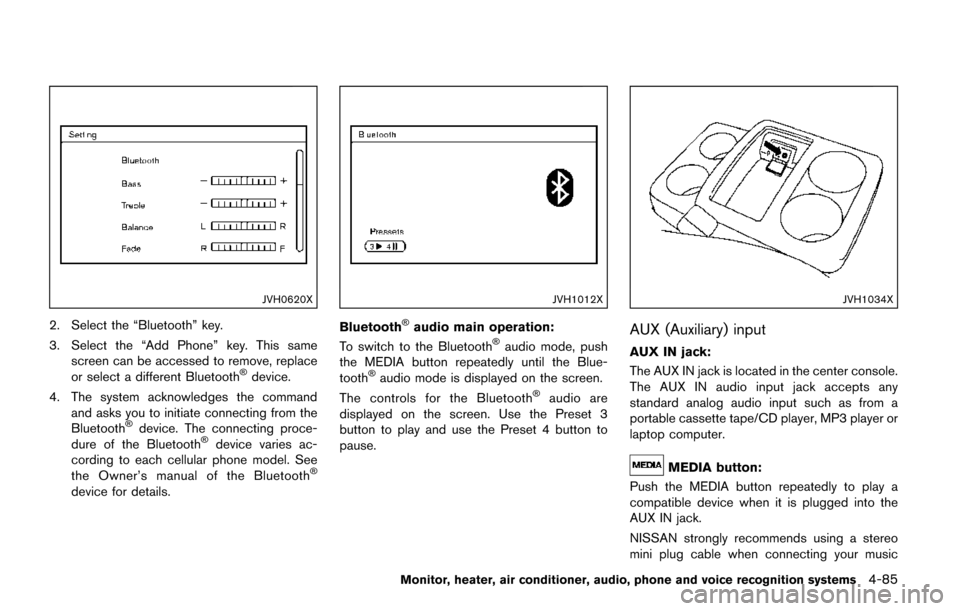
1. Push the ENTER/SETTING button.
Page 274 of 520
JVH0620X
2. Select the “Bluetooth” key.
3. Select the “Add Phone” key. This samescreen can be accessed to remove, replace
or select a different Bluetooth
Šdevice.
4. The system acknowledges the command and asks you to initiate connecting from the
Bluetooth
Šdevice. The connecting proce-
dure of the BluetoothŠdevice varies ac-
cording to each cellular phone model. See
the Owner’s manual of the Bluetooth
Š
device for details.
JVH1012X
BluetoothŠaudio main operation:
To switch to the BluetoothŠaudio mode, push
the MEDIA button repeatedly until the Blue-
tooth
Šaudio mode is displayed on the screen.
The controls for the BluetoothŠaudio are
displayed on the screen. Use the Preset 3
button to play and use the Preset 4 button to
pause.
JVH1034X
AUX (Auxiliary) input
AUX IN jack:
The AUX IN jack is located in the center console.
The AUX IN audio input jack accepts any
standard analog audio input such as from a
portable cassette tape/CD player, MP3 player or
laptop computer.
MEDIA button:
Push the MEDIA button repeatedly to play a
compatible device when it is plugged into the
AUX IN jack.
NISSAN strongly recommends using a stereo
mini plug cable when connecting your music
Monitor, heater, air conditioner, audio, phone and voice recognition systems4-85
Page 277 of 520
4-88Monitor, heater, air conditioner, audio, phone and voice recognition systems
Turn the VOL control knob to adjust the volume.
Adjusting tone quality and speaker bal-
ance:
To adjust Bass, Treble, Balance and Fade, push
the Audio control knob. When the display shows
the setting you want to change (Bass, Treble,
Balance and Fade) , rotate the Audio control
knob to set the desired setting. For the other
setting methods, see “How to use SETTING
button” (P.4-15).
This vehicle has some sound effect functions as
follows:
.Speed Sensitive Vol.
For more details, see “Vehicle information and
settings (models with center multi-function
control panel)” (P.4-10) .
Switching the display:
Pushing the DISC·AUX button will switch the
displays as follows:
iPod
Š/USB ?CD/DVD ?BluetoothŠAudio (if
so equipped) ?AUX ?iPodŠ/USB
FM-AM-SAT radio operation
When the radio band select button is pushed
while the ignition switch is in the ACC or ON
position, the radio will come on at the channel
last played.
The last channel played will also come on when
the ON·OFF button is pushed to ON.
If another audio source is playing when the radio
band select button is turned on, the audio
source will automatically be turned off and the
last radio channel played will come on.
When the stereo broadcast signal is weak, the
radio will automatically change from stereo to
monaural reception.
radio (FM/AM) band select:
Pushing the radio band select button will
change the band as follows:
AM ?FM1 ?FM2 ?AM
radio (SAT) band select:
Pushing the radio band select button will
change the band as follows:
XM1 ?XM2 ?XM3 ?XM1
The satellite radio is not available in Alaska,
Hawaii and Guam. TUNE (Tuning):
.
For AM and FM radio
Turn the radio TUNE knob for manual tuning.
. For SiriusXM Satellite Radio
Turn the radio TUNE knob to seek channels
from all of the categories when any category
is not selected.
or/SEEK tuning/CATE-
GORY (CAT):
. For AM and FM radio
Push the SEEK button
orto tune
from low to high or high to low frequencies
and to stop at the next broadcasting station.
. For SiriusXM Satellite Radio
Push the SEEK button
orto tune
to the first channel of the next or previous
category.
During satellite radio reception, the following
notices will be displayed under certain condi-
tions.
. NO SIGNAL (No signal is received while the
SAT tuner is connected.)
. OFF AIR (Broadcasting signed off)
. CHECK ANTENNA (Antenna connection
error)
. LOADING (When the initial setting is
performed)
Page 290 of 520
Next/Previous Track and Fast
Forward/Rewind:
When the
orbutton is pushed for more
than 1.5 seconds while the iPodŠis playing, the
iPodŠwill play while fast forwarding or rewind-
ing. When the button is released, the iPodŠwill
return to the normal play speed.
When the
orbutton is pushed for less
than 1.5 seconds while the iPodŠis playing, the
next track or the beginning of the current track
on the iPod
Šwill be played.
The multi-function controller can also be used to
select tracks when the iPod
Šis playing.
REPEAT (RPT) , RANDOM (RDM):
When the RPT button is pushed while a track is
being played, the play pattern can be changed
as follows:
BluetoothŠSTREAMING AUDIO (mod-
els with navigation system)
Your vehicle is equipped with BluetoothŠ
Streaming Audio. If you have a compatible
BluetoothŠdevice with streaming audio (A2DP
profile) , you can set up the wireless connection
between your Bluetooth
Šdevice and the in-
vehicle audio system. This connection allows
you to listen to the audio from the Bluetooth
Š
device using your vehicle speakers. It also may
allow basic control of the device for playing and
skipping audio files using the AVRCP Blue-
tooth
Šprofile. All BluetoothŠDevices do not
have the same level of controls for AVRCP.
Please consult the manual for your Bluetooth
Š
Device for more details.
Once your BluetoothŠdevice is connected to
the in-vehicle audio system, it will automatically
reconnect whenever the device is present in the
vehicle and you select Bluetooth
ŠAudio from
your audio system. You do not need to manually
reconnect for each usage.
Wireless LAN (Wi-Fi) and the Bluetooth
Š
functions share the same frequency band (2.4
GHz) . Using the BluetoothŠand the wireless
LAN functions at the same time may slow down
or disconnect the communication and cause
undesired noise. It is recommended that you
turn off the wireless LAN (Wi-Fi) when using the Bluetooth
Šfunctions.
Regulatory information
FCC Regulatory information:
.
CAUTION: To maintain compliance with
FCC’s RF exposure guidelines, use only
the supplied antenna. Unauthorized antenna,
modification, or attachments could damage
the transmitter and may violate FCC regula-
tions.
. Operation is subject to the following two
conditions:
1) This device may not cause interference
and
2) This device must accept any interfer- ence, including interference that may
cause undesired operation of the device
IC Regulatory information:
. Operation is subject to the following two
conditions:
1) This device may not cause interference,
and
2) This device must accept any interfer- ence, including interference that may
cause undesired operation of the device.
. This Class B digital apparatus meets all
requirements of the Canadian Interference-
Causing Equipment Regulations.
Monitor, heater, air conditioner, audio, phone and voice recognition systems4-101
Page 291 of 520
4-102Monitor, heater, air conditioner, audio, phone and voice recognition systems
Bluetooth trademark:
BluetoothŠis a trademark
owned by Bluetooth SIG, Inc.
and licensed to Clarion Co.,
Ltd.
JVH0158M
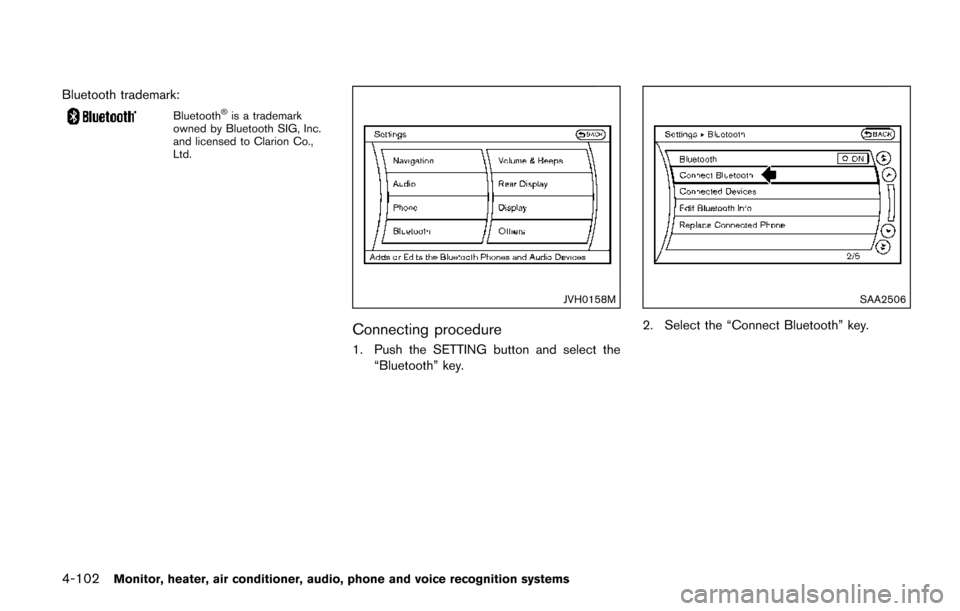
Connecting procedure
1. Push the SETTING button and select the
“Bluetooth” key.
SAA2506
2. Select the “Connect Bluetooth” key.
Page 292 of 520

SAA2507
3. A confirmation screen will be displayed.Select “No”.
Note: Selecting “Yes” will only connect the
hands free phone portion of a Bluetooth
Š
device.
SAA3005
4. Choose a PIN code to use with thecompatible BluetoothŠaudio device using
the number input screen. The PIN code will
need to be entered into the Bluetooth
Š
audio device after step 5. Select the “OK”
key.
SAA3006
5. The standby message screen will appear.
Operate the compatible BluetoothŠaudio
device. For the connecting procedure of the
audio device, see the Bluetooth
Šaudio
instructions.
When the connecting is completed, the
screen will return to the Bluetooth
Šsetup
display.
Monitor, heater, air conditioner, audio, phone and voice recognition systems4-103
Page 293 of 520
4-104Monitor, heater, air conditioner, audio, phone and voice recognition systems
SAA2510
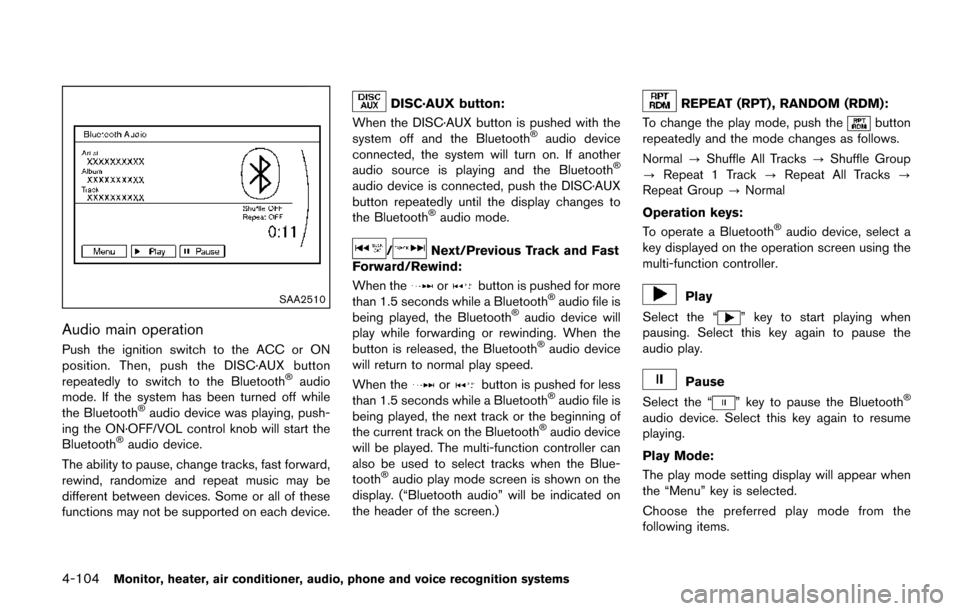
Audio main operation
Push the ignition switch to the ACC or ON
position. Then, push the DISC·AUX button
repeatedly to switch to the Bluetooth
Šaudio
mode. If the system has been turned off while
the Bluetooth
Šaudio device was playing, push-
ing the ON·OFF/VOL control knob will start the
Bluetooth
Šaudio device.
The ability to pause, change tracks, fast forward,
rewind, randomize and repeat music may be
different between devices. Some or all of these
functions may not be supported on each device.
DISC·AUX button:
When the DISC·AUX button is pushed with the
system off and the Bluetooth
Šaudio device
connected, the system will turn on. If another
audio source is playing and the Bluetooth
Š
audio device is connected, push the DISC·AUX
button repeatedly until the display changes to
the Bluetooth
Šaudio mode.
/Next/Previous Track and Fast
Forward/Rewind:
When the
orbutton is pushed for more
than 1.5 seconds while a BluetoothŠaudio file is
being played, the BluetoothŠaudio device will
play while forwarding or rewinding. When the
button is released, the Bluetooth
Šaudio device
will return to normal play speed.
When the
orbutton is pushed for less
than 1.5 seconds while a BluetoothŠaudio file is
being played, the next track or the beginning of
the current track on the Bluetooth
Šaudio device
will be played. The multi-function controller can
also be used to select tracks when the Blue-
tooth
Šaudio play mode screen is shown on the
display. (“Bluetooth audio” will be indicated on
the header of the screen.)
REPEAT (RPT) , RANDOM (RDM):
To change the play mode, push the
button
repeatedly and the mode changes as follows.
Normal ?Shuffle All Tracks ?Shuffle Group
? Repeat 1 Track ?Repeat All Tracks ?
Repeat Group ?Normal
Operation keys:
To operate a Bluetooth
Šaudio device, select a
key displayed on the operation screen using the
multi-function controller.
Play
Select the “
” key to start playing when
pausing. Select this key again to pause the
audio play.
Pause
Select the “
” key to pause the BluetoothŠ
audio device. Select this key again to resume
playing.
Play Mode:
The play mode setting display will appear when
the “Menu” key is selected.
Choose the preferred play mode from the
following items.
Page 294 of 520
.Shuffle
Choose “Shuffle OFF”, “Shuffle All Tracks”
and “Shuffle Group”.
. Repeat
Choose from “Repeat OFF”, “Repeat 1
Track”, “Repeat All Tracks” and “Repeat
Group”.
SAA2511
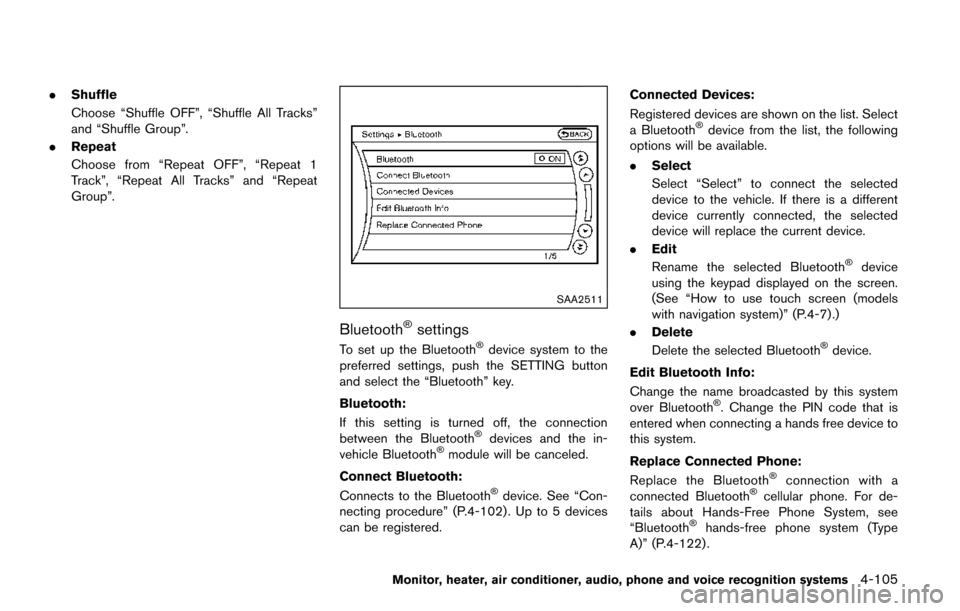
BluetoothŠsettings
To set up the BluetoothŠdevice system to the
preferred settings, push the SETTING button
and select the “Bluetooth” key.
Bluetooth:
If this setting is turned off, the connection
between the Bluetooth
Šdevices and the in-
vehicle BluetoothŠmodule will be canceled.
Connect Bluetooth:
Connects to the Bluetooth
Šdevice. See “Con-
necting procedure” (P.4-102) . Up to 5 devices
can be registered. Connected Devices:
Registered devices are shown on the list. Select
a Bluetooth
Šdevice from the list, the following
options will be available.
. Select
Select “Select” to connect the selected
device to the vehicle. If there is a different
device currently connected, the selected
device will replace the current device.
. Edit
Rename the selected Bluetooth
Šdevice
using the keypad displayed on the screen.
(See “How to use touch screen (models
with navigation system)” (P.4-7) .)
. Delete
Delete the selected Bluetooth
Šdevice.
Edit Bluetooth Info:
Change the name broadcasted by this system
over Bluetooth
Š. Change the PIN code that is
entered when connecting a hands free device to
this system.
Replace Connected Phone:
Replace the Bluetooth
Šconnection with a
connected BluetoothŠcellular phone. For de-
tails about Hands-Free Phone System, see
“Bluetooth
Šhands-free phone system (Type
A)” (P.4-122) .
Monitor, heater, air conditioner, audio, phone and voice recognition systems4-105