2017 NISSAN PATHFINDER audio
[x] Cancel search: audioPage 358 of 555
NissanConnectSMuses an operating system like
those found on many computers, tablets and cell
phones. Like these devices, processing speed
may vary, and system response delays or resets
may occur intermittently. This does not indicate a
malfunction, and further information on system
operation can be found below.
System Start-Up
Due to the large number of features and capabili-
ties that the NissanConnect
SMneeds to load on
start-up, it may take up to a minute for all func-
tions (such as Apps) to be available. The system
will display “Now Loading All Apps...” during this
time.
System Response Delay
NissanConnect
SMuses an operating system like
those found on many computers, tablets and cell
phones. Like these devices, sometimes pro-
grams do not respond immediately and this may
temporarily delay system use.
In most situations, simply waiting a few moments
longer should be sufficient for the pending opera-
tions to complete.
If the system temporarily does not respond to
commands, the system can be easily reset. Sim-
ply push down the VOL/ON-OFF knob for at
least 5 seconds. The system will turn off and
restart. After restart, all functions should be available.
If a navigation route was set, the route should
resume automatically.
System Reset
As noted above, intermittent system resets may
occur during normal operation. You may also
wish to reset the system if you find that a particu-
lar feature is not loading or responding. Often, a
quick system reset will resolve any issue you may
be experiencing. After restart, all functions will be
available as described above.
System Updates
Like many digital devices, the NissanConnect
SM
is designed to allow for software updates as
enhancements are developed and additional fea-
tures added. If you have questions about system
performance, it is recommended that you contact
a NISSAN dealer to ensure that your vehicle has
had the latest available software installed.
Operating Tips
NissanConnect
SMprovides several methods of
operation to suit your preferences. The following
are suggested operating tips. ●
Operating the multi-function controller
steering wheel controls, or other controls
too quickly can cause a lag between the
control and the display. Operate the controls
carefully and allow the system to respond to
your request.
● NISSAN recommends using Voice Recog-
nition whenever possible to select options
while driving. Some touch-screen function-
ality is intentionally unavailable during driv-
ing. Please view the available voice com-
mands by pushing the
(TALK) switch
and then selecting a category on the display.
● When looking for a street address or Points
of Interest (POI) , remember that you can use
Connected Search and Assisted Search
features within NissanConnect
SMServices
to expand your search methods and results.
The Voice Recognition system recognizes a
defined set of commands. These commands
can be viewed in the display by pushing
the
(TALK) switch and then selecting
a category from the displayed list. The com-
mands can also be found in the Voice Rec-
ognition section under command list. For
additional information, refer to “Command
list” in this section.
ADDITIONAL SYSTEM INFORMATION
Monitor, climate, audio, phone and voice recognition systems4-159
Page 359 of 555
●In some situations, the system may not be
able to recognize your command even if you
say the exact command. This can be due to
noise conditions or an accent.
● In some unique cases, the system may ex-
pect a word to be spoken as it is spelled as
opposed to the way it is normally pro-
nounced.
ADDITIONAL HELP
For additional technical information, it is recom-
mended that you contact us online at
OWNERS.www.nissanusa.com or call us at
1–855–426–6628.
4-160Monitor, climate, audio, phone and voice recognition systems
Page 360 of 555
MEMO
Monitor, climate, audio, phone and voice recognition systems4-161
Page 384 of 555
●The RCTA system (if so equipped) is
integrated into the BSW system. There
is not a separate selection in the ve-
hicle information display for the RCTA
system. When the BSW is disabled, the
RCTA system is also disabled.
● When the BSW system is turned on, the
BSW/RCTA indicator (white) in the ve-
hicle information display illuminates.
BSW SYSTEM LIMITATIONS
WARNING
Listed below are the system limitations for
the BSW system. Failure to operate the
vehicle in accordance with these system
limitations could result in serious injury or
death.
●The BSW system cannot detect all ve-
hicles under all conditions.
● The radar sensors may not be able to
detect and activate BSW when certain
objects are present such as:
– Pedestrian, bicycles, animals.
– Vehicles such as motorcycles, low height vehicles, or high ground clear-
ance vehicles. – Oncoming vehicles.
– Vehicles remaining in the detection
zone when you accelerate from a
stop.
– A vehicle merging into an adjacent lane at a speed approximately the
same as your vehicle.
– A vehicle approaching rapidly from behind.
– A vehicle which your vehicle over- takes rapidly.
– A vehicle that passes through the de- tection zone quickly.
– When overtaking several vehicles in a row, the vehicles after the first ve-
hicle may not be detected if they are
traveling close together.
● The radar sensors’ detection zone is
designed based on a standard lane
width. When driving in a wider lane, the
radar sensors may not detect vehicles in
an adjacent lane. When driving in a nar-
row lane, the radar sensors may detect
vehicles driving two lanes away. ●
The radar sensors are designed to ig-
nore most stationary objects, however
objects such as guardrails, walls, foli-
age and parked vehicles may occasion-
ally be detected. This is a normal opera-
tion condition.
● The following conditions may reduce
the ability of the radar to detect other
vehicles:
– Severe weather
– Road spray
– Ice/frost/snow build-up on the vehicle
– Dirt build-up on the vehicle
● Do not attach stickers (including trans-
parent material) , install accessories or
apply additional paint near the radar
sensors. These conditions may reduce
the ability of the radar to detect other
vehicles.
● Excessive noise (for example, audio
system volume, open vehicle window)
will interfere with the chime sound, and
it may not be heard.
Starting and driving5-23
Page 395 of 555
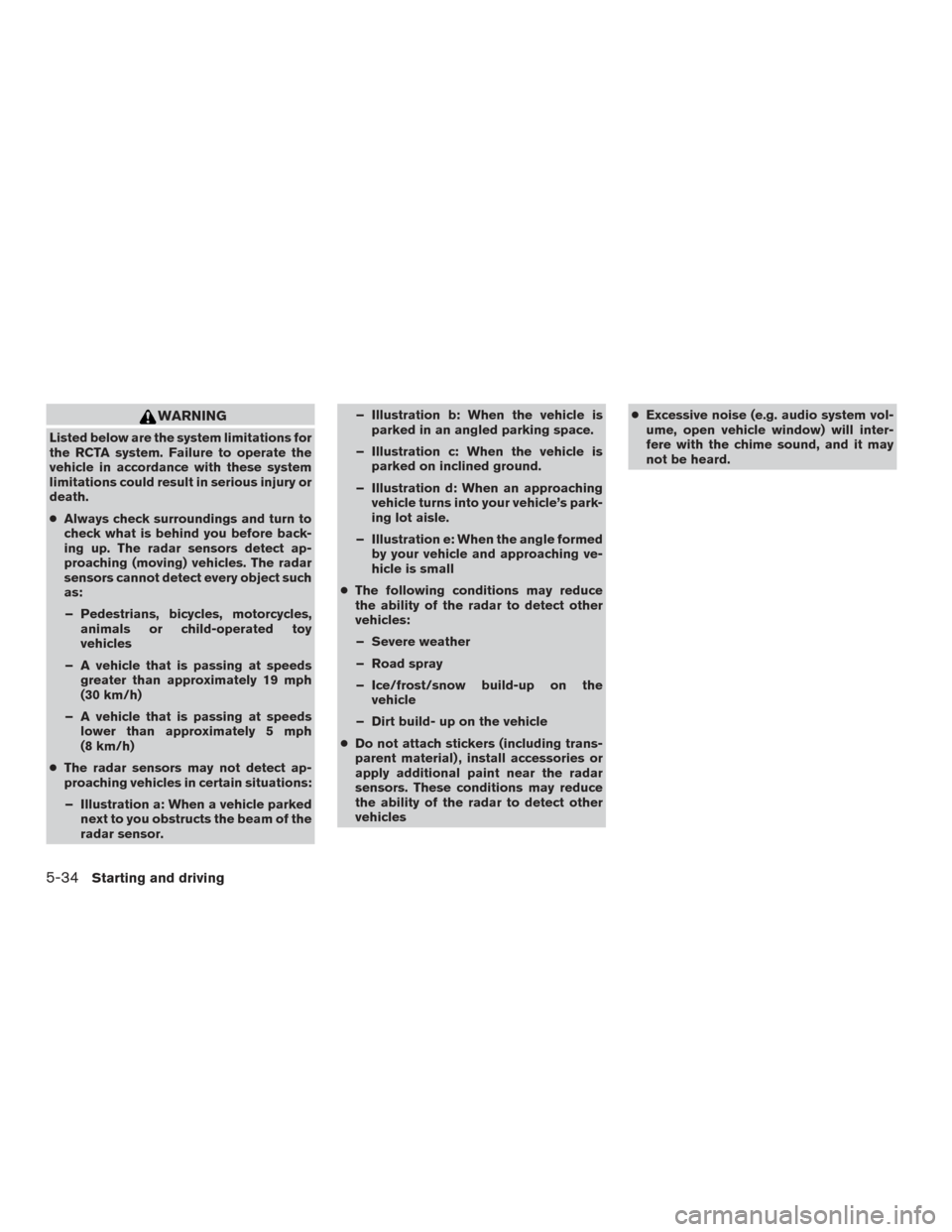
WARNING
Listed below are the system limitations for
the RCTA system. Failure to operate the
vehicle in accordance with these system
limitations could result in serious injury or
death.
●Always check surroundings and turn to
check what is behind you before back-
ing up. The radar sensors detect ap-
proaching (moving) vehicles. The radar
sensors cannot detect every object such
as:
– Pedestrians, bicycles, motorcycles, animals or child-operated toy
vehicles
– A vehicle that is passing at speeds greater than approximately 19 mph
(30 km/h)
– A vehicle that is passing at speeds lower than approximately 5 mph
(8 km/h)
● The radar sensors may not detect ap-
proaching vehicles in certain situations:
– Illustration a: When a vehicle parked next to you obstructs the beam of the
radar sensor. – Illustration b: When the vehicle is
parked in an angled parking space.
– Illustration c: When the vehicle is parked on inclined ground.
– Illustration d: When an approaching vehicle turns into your vehicle’s park-
ing lot aisle.
– Illustration e: When the angle formed by your vehicle and approaching ve-
hicle is small
● The following conditions may reduce
the ability of the radar to detect other
vehicles:
– Severe weather
– Road spray
– Ice/frost/snow build-up on the vehicle
– Dirt build- up on the vehicle
● Do not attach stickers (including trans-
parent material) , install accessories or
apply additional paint near the radar
sensors. These conditions may reduce
the ability of the radar to detect other
vehicles ●
Excessive noise (e.g. audio system vol-
ume, open vehicle window) will inter-
fere with the chime sound, and it may
not be heard.
5-34Starting and driving
Page 546 of 555
11 Index
2nd row bench seat adjustment......1-7,1-9
A
Air bag (See supplemental restraint
system) .....................1-49
Air bag system Front (See supplemental front impact
air bag system) ...............1-56
Airbagwarninglabels.............1-66
Airbagwarninglight...........1-67,2-14
Air bag warning light, supplemental . .1-67, 2-14
Aircleaner....................8-15
Air cleaner housing filter ............8-15
Air conditioner Air conditioner specification label ....10-12
Air conditioner system refrigerant and
oil recommendations ............10-7
Air conditioner system refrigerant
recommendations ..............10-7
Heater and air conditioner controls ....4-49
Servicing air conditioner ..........4-55
Alarm system
(See vehicle security system) .........2-30
Anchor point locations .............1-32
Antenna .....................4-70
Antifreeze ....................5-74
Anti-lock brake warning light ..........2-11
Anti-lock Braking System (ABS) ........5-68
Apps ......................4-129
APPS button ...................4-6
Armrests.....................1-10 AroundView®Monitor.............4-28
Audible reminders
...............2-17
Audio system ..................4-55
AMradioreception.............4-56
Bluetooth® streaming audio ........4-64
Compact disc (CD) player .........4-76
Digital Versatile Disc (DVD) Player
Operation ..................4-85
FM/AM radio with compact disc (CD)
player ....................4-68
FMradioreception.............4-56
iPod® Player .............4-61,4-80
iPod® player operation .......4-61,4-80
Radio ....................4-55
Steering wheel audio control
switch .................4-8,4-69
USB (Universal Serial Bus) Connection
Port..................4-61,4-77
Autolight switch .................2-37
Automatic Automatic drive positioner .....3-36,3-39
Automatic power window switch .....2-60
Automatic anti-glare inside mirror .......3-34
Automatic door locks ..............3-6
Automatic drive positioner .......3-36,3-39
AUXjack ....................4-87
B
Backbutton....................4-6
Battery ..................5-74,8-11
Chargewarninglight............2-12 Battery replacement
..............8-20
Keyfob ...................8-20
NISSAN Intelligent Key® ..........8-21
Before starting the engine ...........5-14
Belt (See drive belt) ..............8-13
Blind Spot Warning (BSW) ..........5-20
Block heater Engine ....................5-75
Bluetooth® hands-free phone system ....4-113
Boosterseats..................1-46
Brake Anti-lock Braking System (ABS) ......5-68
Brake fluid ..................8-10
Brakelight(Seestoplight).........8-23
Brake system ................5-67
Brakewarninglight.............2-11
Brakewearindicators........2-17,8-17
Parking brake operation ..........5-19
Self-adjusting brakes ............8-17
Brake assist ...................5-69
Brake fluid ....................8-10
Brakes ......................
8
-17
Brake system ..................5-67
Break-inschedule ...............5-60
Brightness/contrast button ...........4-6
Brightness control Instrument panel ..............2-39
Bulb check/instrument panel ..........2-10
Bulbreplacement................8-23
Page 547 of 555
C
Capacities and recommended
fuel/lubricants ..................10-2
Cargoareastoragebin.............2-56
Cargolight....................2-64
Cargo (See vehicle loading information) . . .10-13
Car phone or CB radio .............4-112
CD care and cleaning .............4-111
CD player (See audio system) .........4-76
Check tire pressure ...............2-28
Child restraints .......1-25,1-26,1-27,1-29
LATCH (Lower Anchors and Tethers for
CHildren) System ..............1-29
Precautions on child
restraints.........1-27,1-34,1-40,1-46
Top tether strap anchor point locations . .1-32
Child restraint with top tether strap .......1-32
Child safety rear door lock ............3-7
Chimes, audible reminders ...........2-17
Cleaningexteriorandinterior........7-2,7-4
Clock set/adjustment ..............4-17
C.M.V.S.S. certification label .........10-11
Cold weather driving ...............5-74
Compact disc (CD) player ...........4-76
Compass ......................2-7
Consolebox...................2-52
Continuously Variable Transmission (CVT) . . .5-15 Continuously Variable Transmission (CVT)
fluid .......................8-9
Driving with Continuously Variable
Transmission (CVT) .............5-15
Control panel buttons ...............4-5
Backbutton..................4-6
Brightness/contrast button ..........4-6 Clockset...................4-17
Enterbutton..................4-7
Setting button
.................4-6
Controls Audio controls ................4-68
Audio controls (steering wheel) ....4-8,4-69
Heater and air conditioner controls .....4-49
Coolant Capacities and recommended
fuel/lubricants ................10-2
Changingenginecoolant...........8-5
Checking engine coolant level ........8-5
Engine coolant temperature gauge .....2-5
Corrosion protection ...............7-7
Cruisecontrol ...........5-38,5-38,5-39
Cupholders...................2-54
D
Daytime Running Light System .........2-38
Defroster switch Rear window and outside mirror defroster
switch.....................2-35
Digital Versatile Disc (DVD) player .......4-85
Dimensionsandweights ............10-9
Dimmer switch for instrument panel ......2-39
Display controls
(seecontrolpanelbuttons).........4-6,4-9
Door locks .....................3-5
Drive belt .....................8-13
Drive positioner, Automatic ........3-36,3-39
Driving Cold weather driving .............5-74
Driving with Continuously Variable
Transmission (CVT) .............5-15 Precautions when starting and driving
....5-2
Driving the vehicle ................5-15
Dual panel moonroof ..............2-61
Dual power moonroof ..............2-61
E
Economy-fuel..................5-62
Emergency engine shutoff .........5-12,6-2
Emission control information label ......10-11
Emission control system warranty .......10-30
Engine Before starting the engine ..........
5
-14
Blockheater.................5-75
Capacities and recommended
fuel/lubricants ................10-2
Changing engine coolant ...........8-5
Changingengineoil..............8-7
Changing engine oil filter ...........8-8
Checking engine coolant level ........8-5
Checking engine oil level ...........8-6
Engine compartment check locations ....8-3
Engine coolant temperature gauge .....2-5
Engine cooling system ............8-4
Engineoil ...................8-6
Engine oil and oil filter recommendation . .10-6
Engine oil viscosity ..............10-7
Engine serial number ............10-11
Engine specifications ............10-8
Starting the engine .............5-14
Engine coolant temperature gauge .......2-5
Enter button ....................4-7
Event Data recorders .............10-32
Exhaust gas (Carbon monoxide) .........5-2
Explanation of maintenance items ........9-2
11-2
Page 550 of 555
MirrorAutomatic anti-glare inside mirror ......3-34
Outside mirrors ...............3-35
Rearview ...................3-33
Vanity mirror .................3-33
Mirrors ......................3-33
Mobile Entertainment System (MES) ......4-88
Moonroof ......................7-4
Moving Object Detection (MOD) ........4-42
N
NissanConnect
SM...............4-129
NISSAN Intelligent Key® ..........3-2,3-7
NISSAN Vehicle Immobilizer System . .2-31, 5-13
O
Octanerating(Seefueloctanerating).....10-5
Odometer .....................2-4
Oil Capacities and recommended
fuel/lubricants ................10-2
Changing engine oil ..............8-7
Changing engine oil filter ...........8-8
Checking engine oil level ...........8-6
Engine oil ...................8-6
Engine oil and oil filter recommendation . .10-6
Engine oil viscosity ..............10-7
Outside mirrors .................3-35
Overhead sunglasses holder ..........2-53
Overheat Ifyourvehicleoverheats...........6-11
Owner’s manual order form ..........10-32Owner’s manual/service manual order
information
...................10-32
P
Parking Parking brake operation ...........5-19
Parking/parking on hills ...........5-67
Parking brake ...................5-19
Phone, Bluetooth® hands-free system ....4-113
Power Front seat adjustment .............1-5
Power door locks ...............3-6
Power outlet ..............2-48,2-49
Power rear windows .............2-59
Power steering fluid ..............8-9
Power steering system ...........5-67
Power windows ...............2-58
Rear power windows ............2-59
Power inverter switch ..............2-47
Power outlet ................2-48,2-49
Power steering ..................5-67
Power steering fluid ................8-9
Precautions Maintenance precautions ...........8-2
On-pavement and off-road driving
precautions ..................5-6
Precautions on booster
seats...........1-27,1-34,1-40,1-46
Precautions on child
restraints .........1-27,1-34,1-40,1-46
Precautions on seat belt usage .......1-17
Precautions on supplemental restraint
system ....................1-49
Precautions when starting and driving ....5-2Push starting
...................6-11
R
Radio CarphoneorCBradio...........4-112
FM/AM radio with compact disc (CD)
player .....................4-68
Steering wheel audio control
switch..................4-8,4-69
Readiness for inspection maintenance (I/M)
test .......................10-31
Rear Cross Traffic Alert (RCTA) ........5-29
Rear power windows ..............2-59
Rear sonar system ................5-73
Rearview mirror .................3-33
RearView Monitor ................4-21
Rear window and outside mirror defroster
switch.......................2-35
Rear window
wiper and washer switches . . .2-34
Recommended Fluids ..............10-2
Recorders EventData .................10-32
Refrigerant recommendation ..........10-7
Registering a vehicle in another country . . .10-10
Remote controller
(See NISSAN mobile entertainment system). . .4-97
Remote engine start ...............5-15
Remote Start ...................3-18
Reporting safety defects (US only) ......10-30
Roof rack .....................2-57
11-5