2017 NISSAN PATHFINDER Ac power
[x] Cancel search: Ac powerPage 40 of 555
Fastening the seat belts
1. Adjust the seat. For additional information,refer to “Seats” in this section.
Manual front seat shown (if so equipped)
LRS2160
Power front seat shown (if so equipped)
LRS2662
Safety—Seats, seat belts and supplemental restraint system1-21
Page 89 of 555
2 Instruments and controls
Instrument panel...................................2-2
Meters and gauges ................................2-3
Speedometer and odometer .....................2-4
Tachometer ....................................2-5
Engine coolant temperature gauge ...............2-5
Fuel gauge ....................................2-6
Compass (if so equipped) ..........................2-7
Compass display ...............................2-7
Warning lights, indicator lights and audible
reminders ........................................ 2-10
Checking lights ............................... 2-10
Warning lights ................................ 2-11
Indicator lights ................................ 2-15
Audible reminders ............................. 2-17
Vehicle Information Display ........................2-18
How to use the vehicle information display .......2-19
Startup display ................................ 2-19
Resetting the trip computer .....................2-19
Settings ...................................... 2-19
Vehicle information display warnings and
indicators ..................................... 2-26
Security systems ................................. 2-30
Vehicle security system ......................... 2-30NISSAN vehicle immobilizer system
.............2-31
Wiper and washer switch ......................... 2-33
Switch operation .............................. 2-33
Rear switch operation .......................... 2-34
Rear window and outside mirror (if so equipped)
defroster switch .................................. 2-35
Headlight and turn signal switch ....................2-36
Headlight control switch ........................ 2-36
LED Daytime Running Lights (DRL) ..............2-38
Instrument brightness control ...................2-39
Turn signal switch ............................. 2-39
Fog light switch (if so equipped) ................2-40
Horn ............................................ 2-40
Climate controlled seat switches (if so equipped) ....2-40
Heated seat switches (if so equipped) ..............2-41
Heated 2nd row seat switches (if so equipped) ......2-42
Heated steering
wheel switch (if so equipped) .......2-44
Vehicle Dynamic Control (VDC) off switch ...........2-44
Hill descent control (HDC) switch (if so equipped) . . . 2-45
Warning systems switch (if so equipped) ............2-46
Tow mode switch ................................. 2-46
E-call (SOS) switch (if so equipped) ................2-47
Power inverter switch (if so equipped) ..............2-47
Page 90 of 555
Power outlets.................................... 2-48
12v outlets ................................... 2-48
120v outlet (if so equipped) ....................2-49
Extended storage switch .......................... 2-50
Storage ......................................... 2-51
Seatback pockets ............................. 2-51
Storage trays ................................. 2-51
Glove box .................................... 2-52
Console box .................................. 2-52
Overhead sunglasses storage ...................2-53
Cup holders .................................. 2-54
Cargo area storage bin ......................... 2-56
Luggage hooks ................................ 2-56
Roof rack (if so equipped) ......................2-57
Windows ........................................ 2-58
Power windows ............................... 2-58
Dual panel moonroof (if so equipped) ...............2-61Power moonroof
............................... 2-61
Interior lights ..................................... 2-63
Console light .................................. 2-63
Map lights .................................... 2-64
Personal lights ................................ 2-64
Cargo light ................................... 2-64
Homelink® Universal Transceiver (if so equipped) ....2-65
Programming HomeLink® ......................2-66
Programming HomeLink® for Canadian
customers and gate openers ....................2-67
Operating the HomeLink® Universal
Transceiver ................................... 2-68
Programming trouble-diagnosis .................2-68
Clearing the programmed information ............2-68
Reprogramming a single HomeLink® button ......2-68
If your vehicle is stolen ......................... 2-69
Page 92 of 555
17. Cruise control main/set switches(if so equipped) (P. 5-38)
Intelligent Cruise Control (ICC)
switches (if so equipped) (P. 5-40)
18. Tilt and telescopic steering wheel con-
trol (P. 3-31)
19. Control panel and vehicle information
display switches (P. 2-19)
Bluetooth® Hands-Free Phone System
(P. 4-113)
20. Hood release (P. 3-20)
21. Vehicle Dynamic Control (VDC) OFF
switch (P. 2-44)
Tow mode switch (P. 2-46)
Power liftgate main switch
(if so equipped) (P. 3-21)
Warning systems switch
(if so equipped) (P. 2-46)
Heated steering wheel switch
(if so equipped) (P. 2-44)
Power inverter switch (if so equipped)
(P. 2-47)
*: Refer to the separate Navigation System Own-
er’s Manual (if so equipped) .
Refer to the page number indicated in pa-
renthesis for operating details.1. Tachometer
2. Warning and indicator lights
3. Vehicle information displayOdometer
Twin trip odometer
4. Speedometer 5. Fuel gauge
6. Engine coolant temperature gauge
LIC3597
METERS AND GAUGES
Instruments and controls2-3
Page 99 of 555
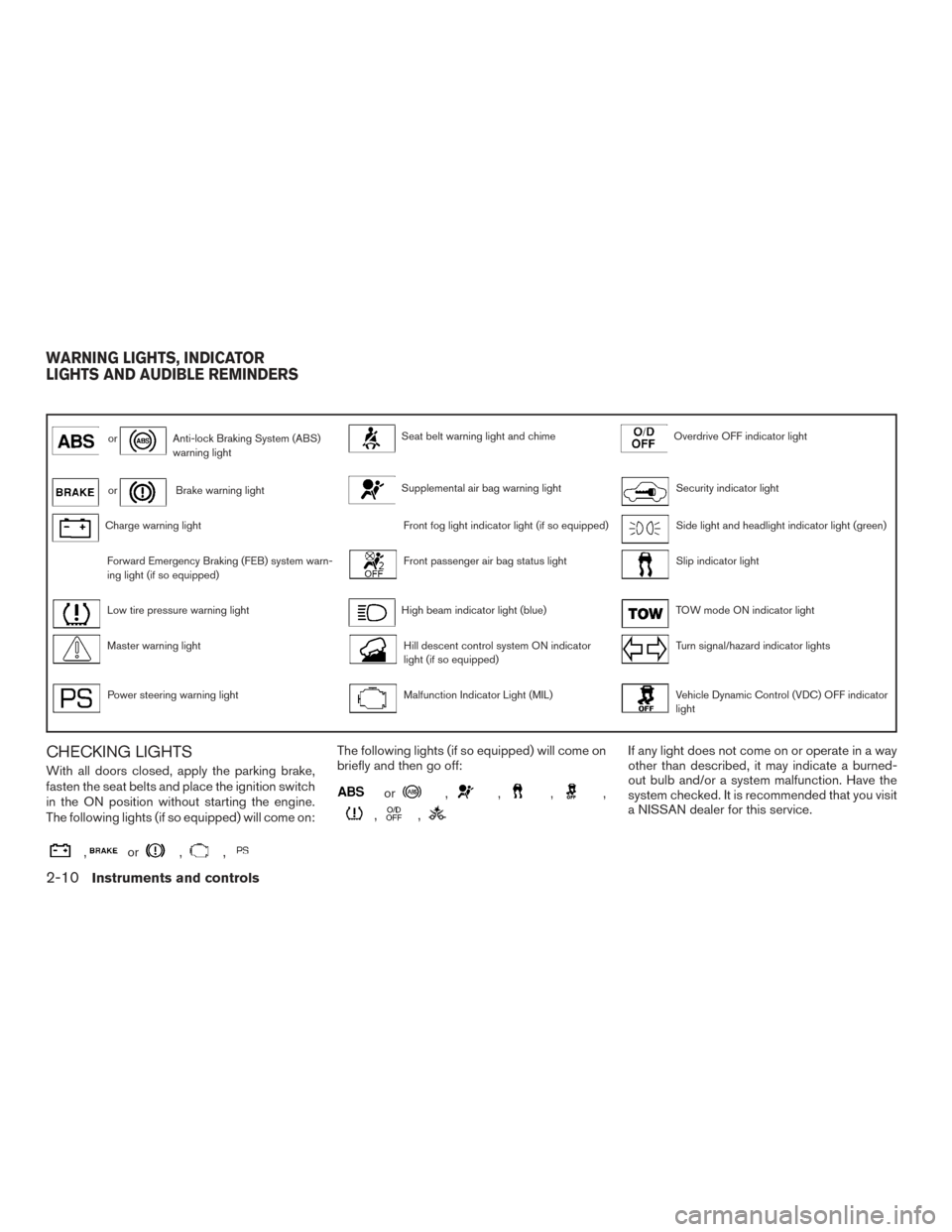
orAnti-lock Braking System (ABS)
warning lightSeat belt warning light and chimeOverdrive OFF indicator light
orBrake warning lightSupplemental air bag warning lightSecurity indicator light
Charge warning lightFront fog light indicator light (if so equipped)Side light and headlight indicator light (green)
Forward Emergency Braking (FEB) system warn-
ing light (if so equipped)Front passenger air bag status lightSlip indicator light
Low tire pressure warning lightHigh beam indicator light (blue)TOW mode ON indicator light
Master warning lightHill descent control system ON indicator
light (if so equipped)Turn signal/hazard indicator lights
Power steering warning lightMalfunction Indicator Light (MIL)Vehicle Dynamic Control (VDC) OFF indicator
light
CHECKING LIGHTS
With all doors closed, apply the parking brake,
fasten the seat belts and place the ignition switch
in the ON position without starting the engine.
The following lights (if so equipped) will come on:
,or,,
The following lights (if so equipped) will come on
briefly and then go off:
or,,,,
,,
If any light does not come on or operate in a way
other than described, it may indicate a burned-
out bulb and/or a system malfunction. Have the
system checked. It is recommended that you visit
a NISSAN dealer for this service.
WARNING LIGHTS, INDICATOR
LIGHTS AND AUDIBLE REMINDERS
2-10Instruments and controls
Page 103 of 555
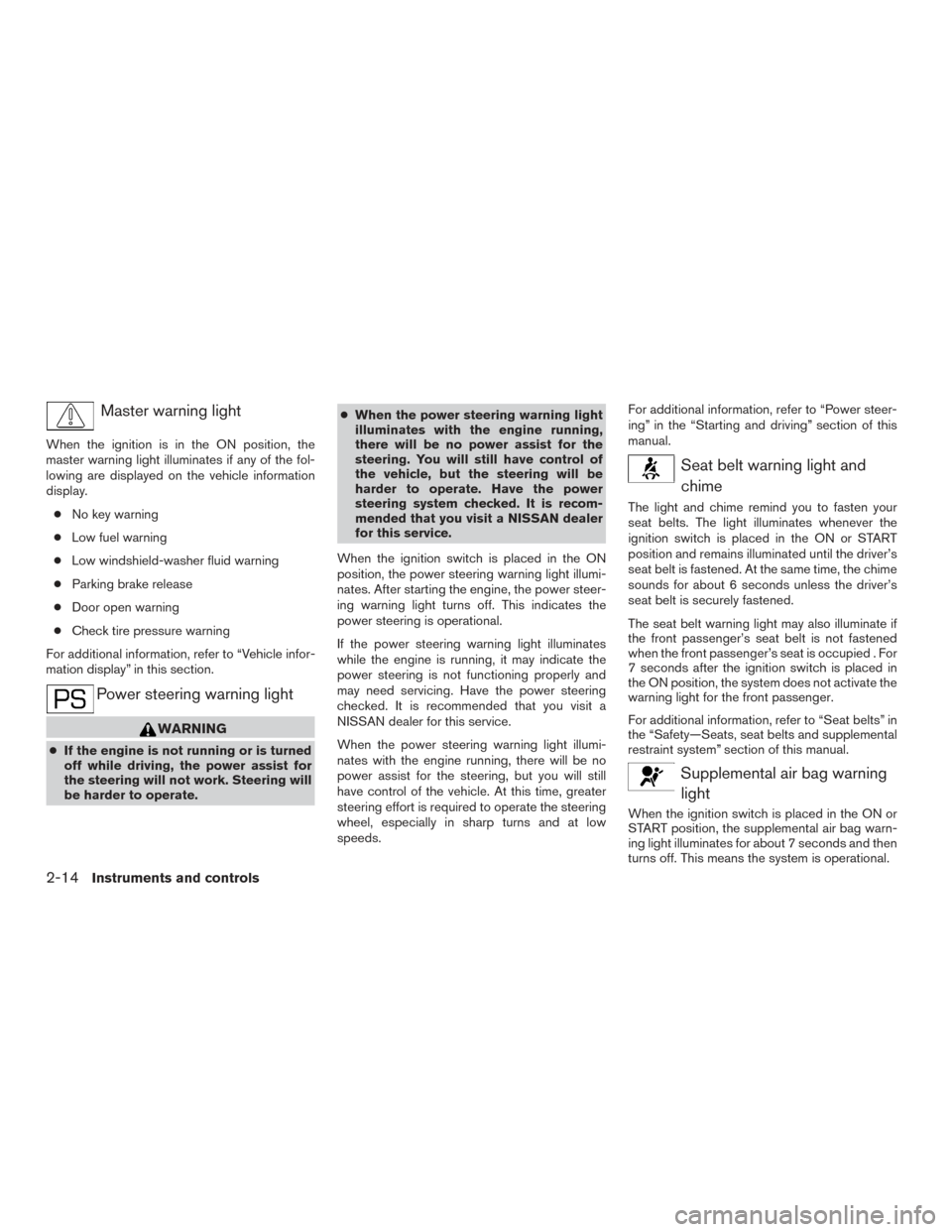
Master warning light
When the ignition is in the ON position, the
master warning light illuminates if any of the fol-
lowing are displayed on the vehicle information
display.● No key warning
● Low fuel warning
● Low windshield-washer fluid warning
● Parking brake release
● Door open warning
● Check tire pressure warning
For additional information, refer to “Vehicle infor-
mation display” in this section.
Power steering warning light
WARNING
● If the engine is not running or is turned
off while driving, the power assist for
the steering will not work. Steering will
be harder to operate. ●
When the power steering warning light
illuminates with the engine running,
there will be no power assist for the
steering. You will still have control of
the vehicle, but the steering will be
harder to operate. Have the power
steering system checked. It is recom-
mended that you visit a NISSAN dealer
for this service.
When the ignition switch is placed in the ON
position, the power steering warning light illumi-
nates. After starting the engine, the power steer-
ing warning light turns off. This indicates the
power steering is operational.
If the power steering warning light illuminates
while the engine is running, it may indicate the
power steering is not functioning properly and
may need servicing. Have the power steering
checked. It is recommended that you visit a
NISSAN dealer for this service.
When the power steering warning light illumi-
nates with the engine running, there will be no
power assist for the steering, but you will still
have control of the vehicle. At this time, greater
steering effort is required to operate the steering
wheel, especially in sharp turns and at low
speeds. For additional information, refer to “Power steer-
ing” in the “Starting and driving” section of this
manual.
Seat belt warning light and
chime
The light and chime remind you to fasten your
seat belts. The light illuminates whenever the
ignition switch is placed in the ON or START
position and remains illuminated until the driver’s
seat belt is fastened. At the same time, the chime
sounds for about 6 seconds unless the driver’s
seat belt is securely fastened.
The seat belt warning light may also illuminate if
the front passenger’s seat belt is not fastened
when the front passenger’s seat is occupied . For
7 seconds after the ignition switch is placed in
the ON position, the system does not activate the
warning light for the front passenger.
For additional information, refer to “Seat belts” in
the “Safety—Seats, seat belts and supplemental
restraint system” section of this manual.
Supplemental air bag warninglight
When the ignition switch is placed in the ON or
START position, the supplemental air bag warn-
ing light illuminates for about 7 seconds and then
turns off. This means the system is operational.
2-14Instruments and controls
Page 116 of 555
12. Loose Fuel Cap
13. Low Oil Pressure: See Owner’s Manual
14. Low Washer Fluid
15. Tire Pressure Low - Add Air
16. TPMS Error: See Owner’s Manual
17. 4x4–i indicators (if so equipped)
18. 4WD Error: See Owner’s Manual (if soequipped)
19. Door Open
20. Liftgate Open
21. Timer Alert – Have a break?
22. Low Outside Temperature
23. Power will turn off to save the battery
24. Turn off the lights
25. Headlight System Error: See Owner’s Manual (if so equipped)
26. Parking Sensor Error: See Owner’s Manual (if so equipped)
27. Blind Spot Warning (BSW) and Rear Cross Traffic Alert (RCTA) indicator (if so
equipped)
28. Malfunction: See Owner’s Manual (if so equipped) 29. Side Radar Obstruction (if so equipped)
30. Cruise control indicator (if so equipped)
31. Intelligent Cruise Control (ICC) indicator (if
so equipped)
32. Shipping Mode On Push Storage Fuse
33. Transmission Shift Position indicator
34. CVT Error: See Owner’s Manual
No Key Detected
This warning appears when the Intelligent Key is
left outside the vehicle with the ignition switch in
the ON position. Make sure the Intelligent Key is
inside the vehicle.
For additional information, refer to “NISSAN In-
telligent Key®” in the “Pre-driving checks and
adjustments” section of this manual.
Key ID Incorrect
This warning appears when the ignition switch is
placed from the OFF position and the Intelligent
Key is not recognized by the system. You cannot
start the engine with an unregistered key.
For additional information, refer to “NISSAN In-
telligent Key®” in the “Pre-driving checks and
adjustments” section of this manual. Key low battery
This indicator illuminates when the Intelligent Key
battery is running out of power.
If this indicator illuminates, replace the battery
with a new one. For additional information, refer
to “Battery replacement” in the “Do-it-yourself”
section of this manual.
I-Key System Error: See Owner’s Manual
After the ignition switch is pushed to the ON
position, this light comes on for a period of time
and then turns off.
The I-Key System Error message warns of a
malfunction with the Intelligent Key system. If the
light comes on while the engine is stopped, it may
be impossible to start the engine.
If the light comes on while the engine is running,
you can drive the vehicle. However in these
cases, have the system checked. It is recom-
mended that you visit a NISSAN dealer for this
service.
Key Registration Complete
This appears when a new Intelligent Key is regis-
tered to the vehicle.
Instruments and controls2-27
Page 118 of 555
“Low tire pressure warning light” in this section
and “Tire Pressure Monitoring System (TPMS)”
in the “Starting and driving” section of this
manual.
TPMS Error: See Owner’s Manual
This warning appears when there is an error with
your TPMS. If this warning comes on, have the
system checked. It is recommended that you visit
a NISSAN dealer for this service.
4x4–i indicators (if so equipped)
These indicators show the Intelligent 4WD sys-
tem status while the engine is running.
For additional information, refer to “Intelligent
4WD” in the “Starting and driving” section of this
manual.
4WD Error: See Owner’s Manual (if so
equipped)
This warning appears when the 4-wheel drive
system is not functioning properly. For additional
information, refer to “Intelligent 4WD” in the
“Starting and driving” section of this manual.
Door Open
This warning illuminates when a door has been
opened.Liftgate Open
This warning illuminates when the liftgate has
been opened.
Timer Alert — Have a break?
This indicator appears when the set time is
reached. The time can be set up to six hours. For
additional information, refer to “Settings” in this
section.
Low Outside Temperature
This warning appears if the outside temperature
is below 37°F (3°C) . The temperature can be
changed to display in Celsius or Fahrenheit. For
additional information, refer to “Settings” in this
section.
Power will turn off to save the battery
This message appears in the vehicle information
display after a period of time if the ignition switch
is in the ACC or the ON position and if the vehicle
is in P (Park) . For additional information, refer to
“Push-button ignition switch positions” in the
“Starting and driving” section of this manual.
Turn off the lights
This warning appears when the headlights are
left in the ON position when exiting the vehicle.
Place the headlight switch to OFF or AUTO po-sition. For additional information, refer to “Head-
light and turn signal switch” in this section.
Headlight System Error: See Owner’s
Manual (if so equipped)
This warning illuminates when there is an error
with the system. For additional information, refer
to “Headlight and turn signal switch” in this sec-
tion.
Parking Sensor Error: See Owner’s
Manual (if so equipped)
This warning illuminates when there is an error
with the system. For additional information, refer
to “Rear Sonar System (RSS)” in the “Starting
and driving” section of this manual.
Blind Spot Warning (BSW) and Rear Cross
Traffic Alert (RCTA) indicator (if so
equipped)
This indicator shows when the BSW and RCTA
systems are engaged.
For additional information, refer to “Blind Spot
Warning (BSW)” and “Rear Cross Traffic Alert
(RCTA)” in the “Starting and driving” section of
this manual.
Instruments and controls2-29