Page 286 of 555
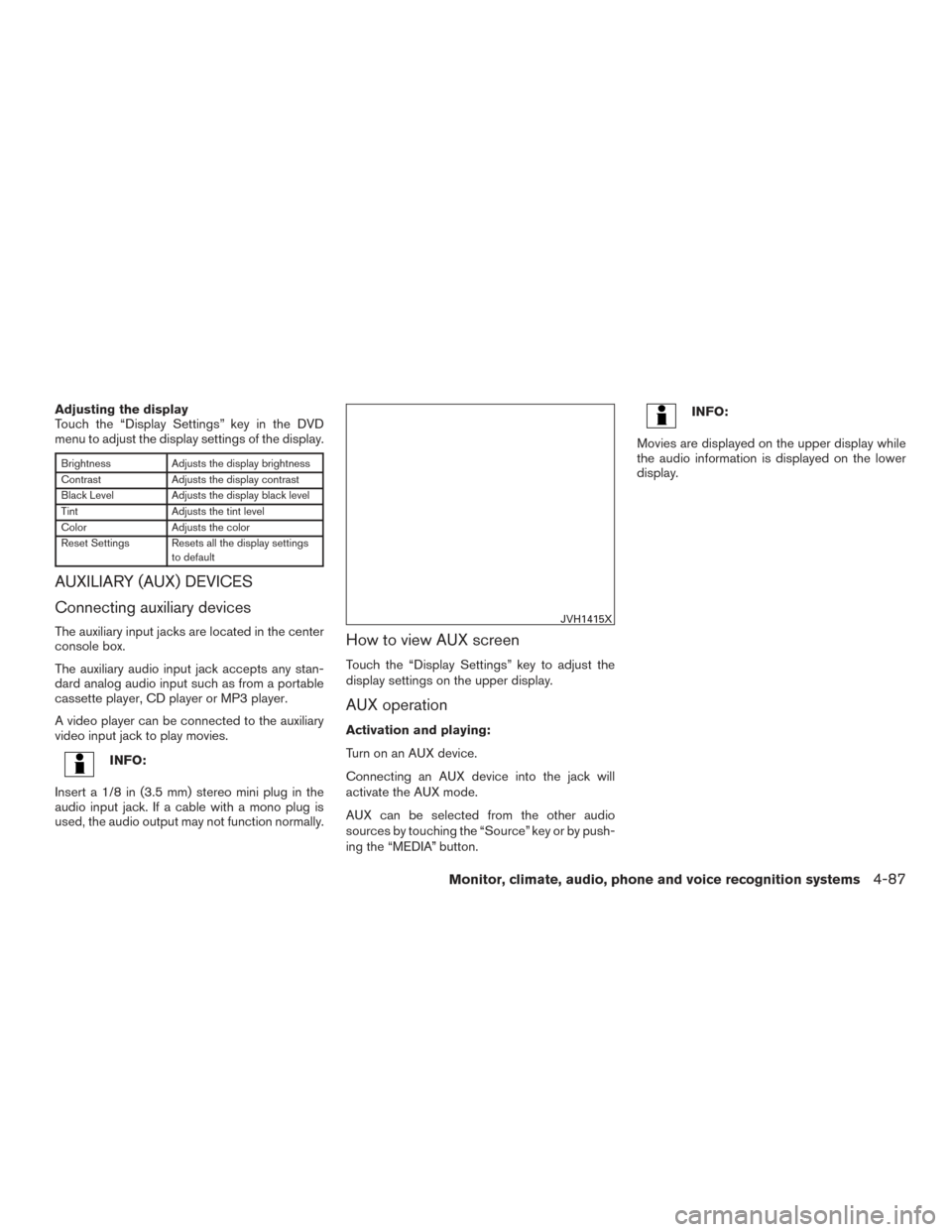
Adjusting the display
Touch the “Display Settings” key in the DVD
menu to adjust the display settings of the display.
BrightnessAdjusts the display brightness
Contrast Adjusts the display contrast
Black Level Adjusts the display black level
Tint Adjusts the tint level
Color Adjusts the color
Reset Settings Resets all the display settings to default
AUXILIARY (AUX) DEVICES
Connecting auxiliary devices
The auxiliary input jacks are located in the center
console box.
The auxiliary audio input jack accepts any stan-
dard analog audio input such as from a portable
cassette player, CD player or MP3 player.
A video player can be connected to the auxiliary
video input jack to play movies.
INFO:
Insert a 1/8 in (3.5 mm) stereo mini plug in the
audio input jack. If a cable with a mono plug is
used, the audio output may not function normally.
How to view AUX screen
Touch the “Display Settings” key to adjust the
display settings on the upper display.
AUX operation
Activation and playing:
Turn on an AUX device.
Connecting an AUX device into the jack will
activate the AUX mode.
AUX can be selected from the other audio
sources by touching the “Source” key or by push-
ing the “MEDIA” button.
INFO:
Movies are displayed on the upper display while
the audio information is displayed on the lower
display.
JVH1415X
Monitor, climate, audio, phone and voice recognition systems4-87
Page 287 of 555
If your vehicle is equipped with the Mobile Enter-
tainment System, you can enjoy playing audio
and movie files on the rear displays with images
and sound.
A DVD and an AUX device inserted/connected to
the audio system for the front seat audio unit as
well as the devices connected to the rear media
interface (USB and HDMI ports for the rear dis-
plays) can be played on the rear displays.
The front and left/right rear displays can show
different sources individually.
CD/DVD slot is on the instrument panel. For
additional information, refer to “Names and func-
tions of audio control buttons” in this section.
AUX jacks are located inside the center console
box.
The rear media interface (USB and HDMI con-
nection ports) is located behind the center con-
sole box. For additional information, refer to
“Connecting rear media interface” in this section.
WARNING
The driver must not attempt to operate the
Mobile Entertainment System while driv-
ing so full attention may be given to ve-
hicle operation.
CAUTION
●Do not attempt to use the system in
extremely high or low temperature con-
ditions [below -4°F (-20°C) or above
158°F (70°C)].
● To avoid draining the vehicle battery
(12V battery) , do not operate the system
for more that 15 minutes without start-
ing the engine.
The front display is designed not to show
images during driving, as the driver’s at-
tention must be given to vehicle operation
for safety. Sounds are still audible. To
show images on the front display, stop the
vehicle in a safe location, move the shift
lever to the “P” (Park) position and apply
the parking brake.
PRECAUTIONS
Start the engine when using the Mobile Enter-
tainment System.
WARNING
The driver must not attempt to operate the
Mobile Entertainment System or wear the
headphones while the vehicle is in motion
so that full attention may be given to ve-
hicle operation. Park the vehicle in a safe location and
apply the parking break to view the im-
ages on the front center display screen
using the DVD player.
CAUTION
●
Only operate the Mobile Entertainment
System while the engine is running. Op-
erating the Mobile Entertainment Sys-
tem for extended periods of time with
the engine turned off can discharge the
vehicle battery (12V battery) .
● Do not allow the system to get wet.
Excessive moisture such as spilled liq-
uids may cause the system to
malfunction.
● While playing VIDEO-CD media, this
DVD player does not guarantee com-
plete functionality of all VIDEO-CD
formats.
MOBILE ENTERTAINMENT SYSTEM
(MES) (if so equipped)
4-88Monitor, climate, audio, phone and voice recognition systems
Page 288 of 555
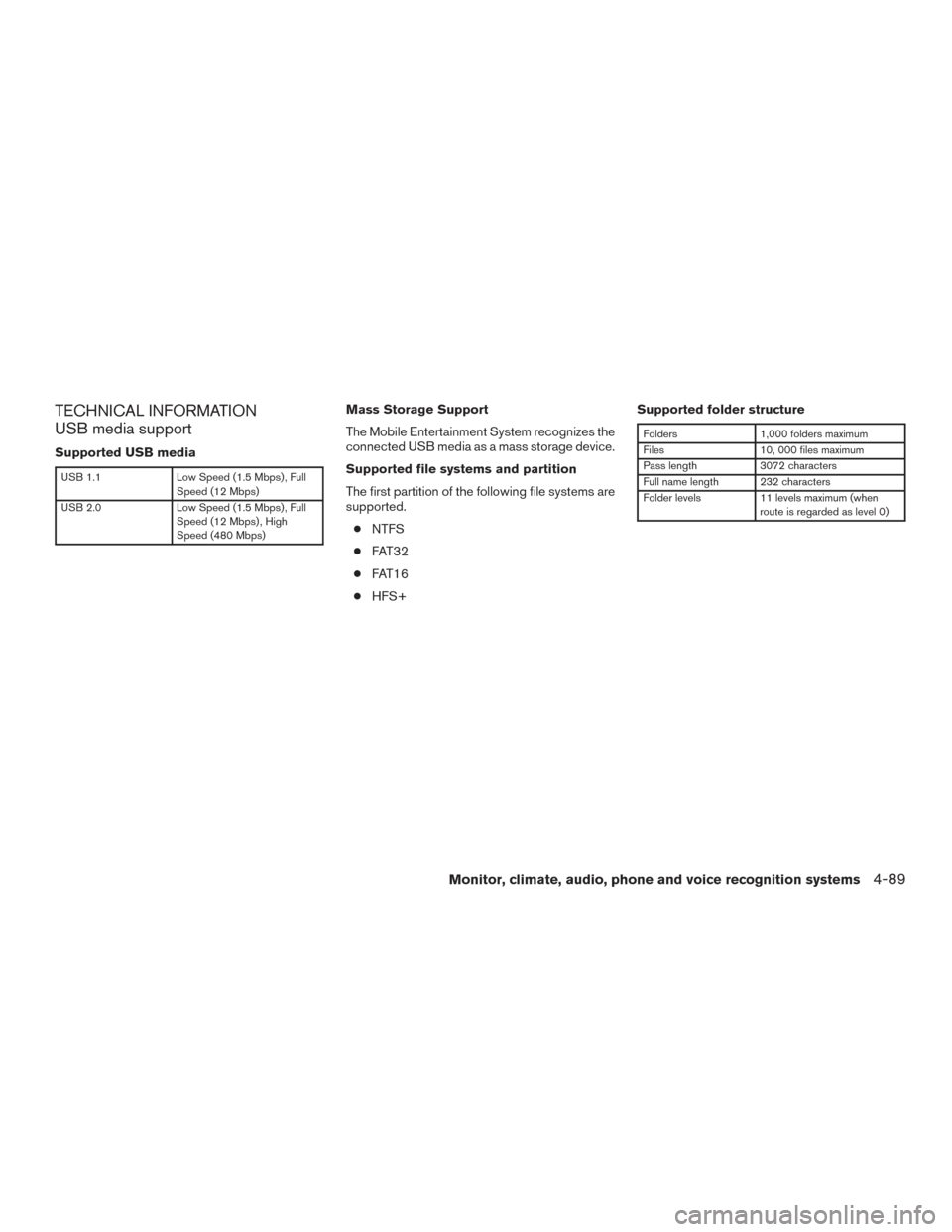
TECHNICAL INFORMATION
USB media support
Supported USB media
USB 1.1Low Speed (1.5 Mbps) , Full
Speed (12 Mbps)
USB 2.0 Low Speed (1.5 Mbps) , Full
Speed (12 Mbps) , High
Speed (480 Mbps)
Mass Storage Support
The Mobile Entertainment System recognizes the
connected USB media as a mass storage device.
Supported file systems and partition
The first partition of the following file systems are
supported.
● NTFS
● FAT32
● FAT16
● HFS+ Supported folder structure
Folders
1,000 folders maximum
Files 10, 000 files maximum
Pass length 3072 characters
Full name length 232 characters
Folder levels 11 levels maximum (when
route is regarded as level 0)
Monitor, climate, audio, phone and voice recognition systems4-89
Page 289 of 555
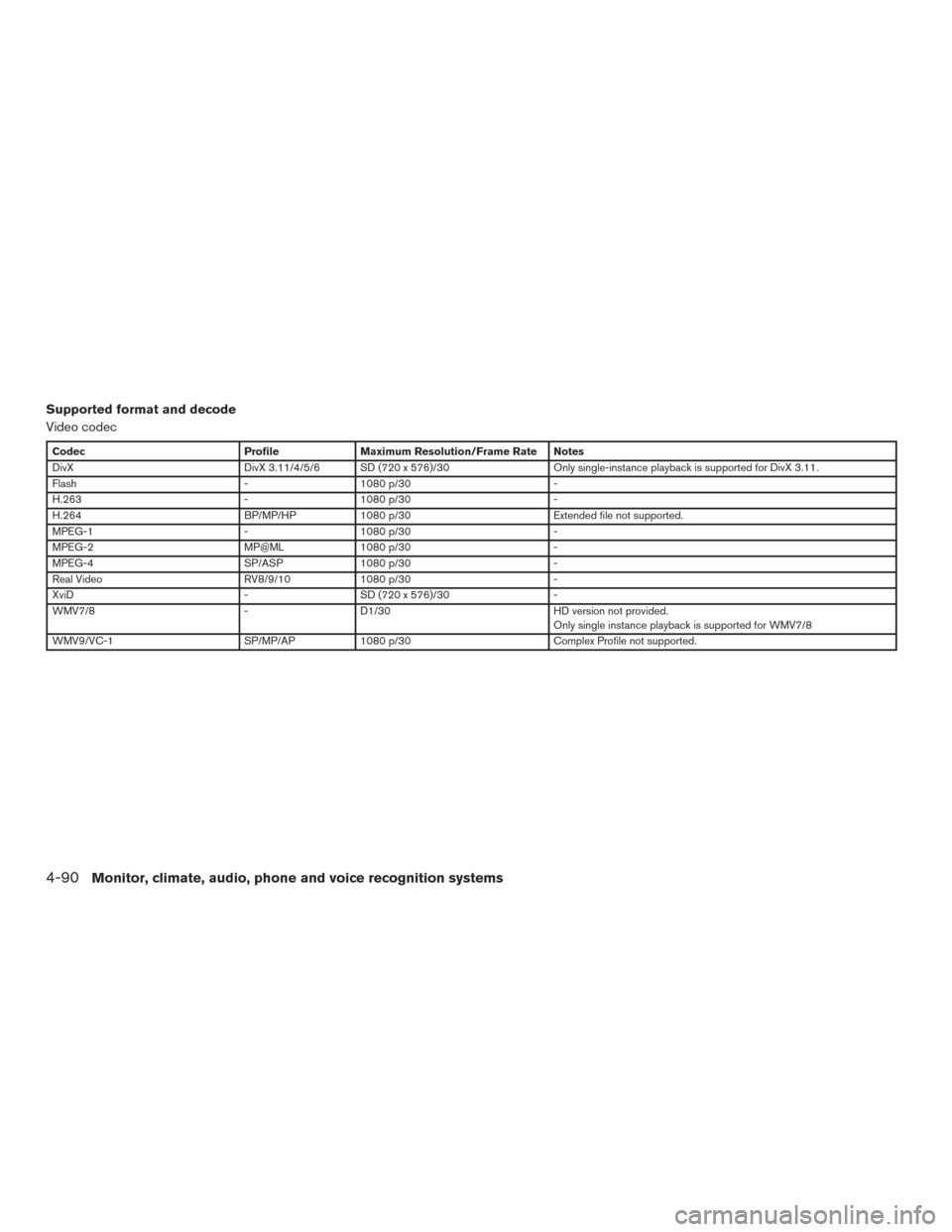
Supported format and decode
Video codec
CodecProfileMaximum Resolution/Frame Rate Notes
DivX DivX 3.11/4/5/6 SD (720 x 576)/30 Only single-instance playback is supported for DivX 3.11.
Flash -1080 p/30 -
H.263 -1080 p/30 -
H.264 BP/MP/HP1080 p/30 Extended file not supported.
MPEG-1 -1080 p/30 -
MPEG-2 MP@ML1080 p/30 -
MPEG-4 SP/ASP1080 p/30 -
Real Video RV8/9/101080 p/30 -
XviD -SD (720 x 576)/30 -
WMV7/8 -D1/30 HD version not provided.
Only single instance playback is supported for WMV7/8
WMV9/VC-1 SP/MP/AP1080 p/30 Complex Profile not supported.
4-90Monitor, climate, audio, phone and voice recognition systems
Page 290 of 555
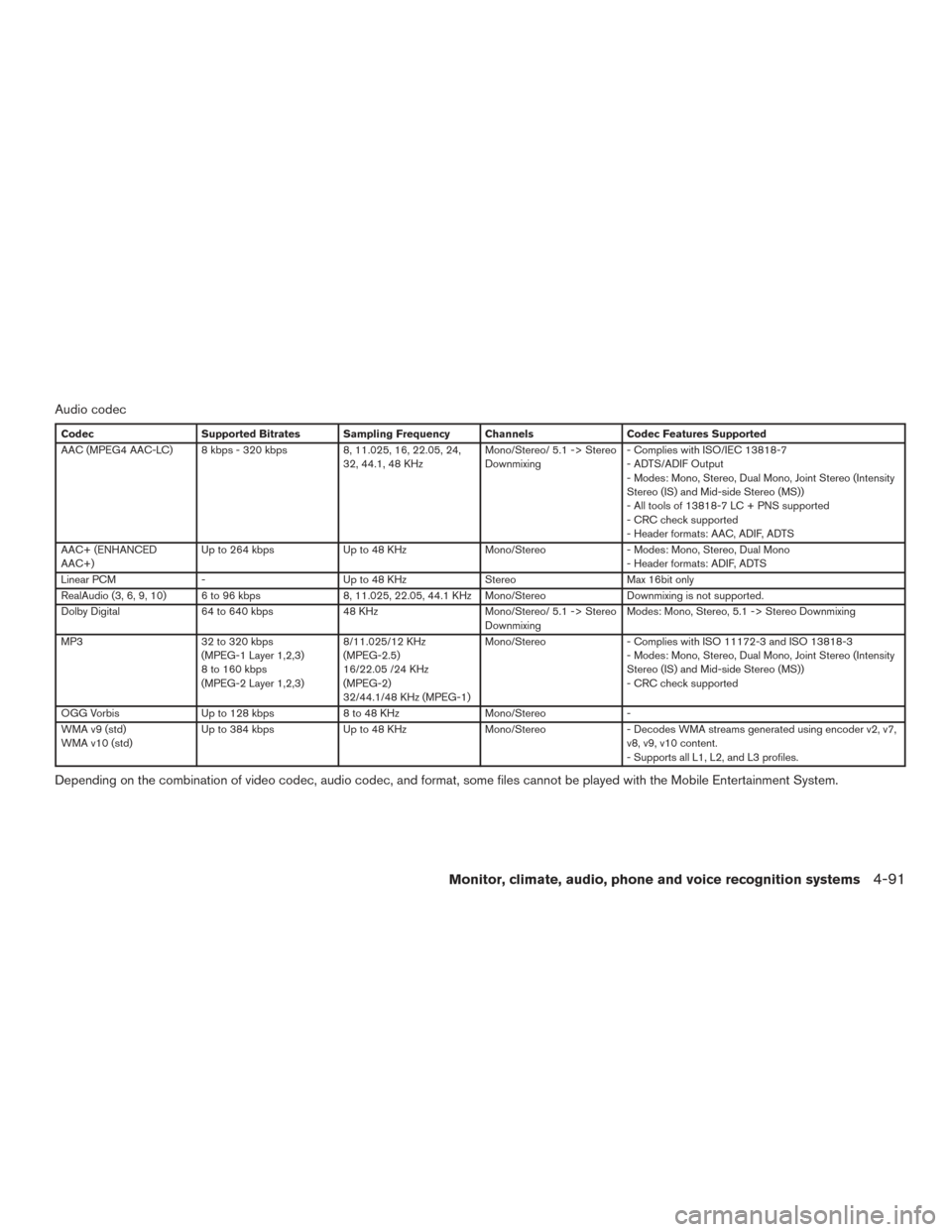
Audio codec
CodecSupported Bitrates Sampling Frequency Channels Codec Features Supported
AAC (MPEG4 AAC-LC) 8 kbps - 320 kbps 8, 11.025, 16, 22.05, 24,
32, 44.1, 48 KHz Mono/Stereo/ 5.1 -> Stereo
Downmixing- Complies with ISO/IEC 13818-7
- ADTS/ADIF Output
- Modes: Mono, Stereo, Dual Mono, Joint Stereo (Intensity
Stereo (IS) and Mid-side Stereo (MS))
- All tools of 13818-7 LC + PNS supported
- CRC check supported
- Header formats: AAC, ADIF, ADTS
AAC+ (ENHANCED
AAC+) Up to 264 kbps
Up to 48 KHzMono/Stereo- Modes: Mono, Stereo, Dual Mono
- Header formats: ADIF, ADTS
Linear PCM - Up to 48 KHzStereoMax 16bit only
RealAudio (3, 6, 9, 10) 6 to 96 kbps 8, 11.025, 22.05, 44.1 KHz Mono/Stereo Downmixing is not supported.
Dolby Digital 64 to 640 kbps 48 KHzMono/Stereo/ 5.1 -> Stereo
Downmixing Modes: Mono, Stereo, 5.1 -> Stereo Downmixing
MP3 32 to 320 kbps
(MPEG-1 Layer 1,2,3)
8 to 160 kbps
(MPEG-2 Layer 1,2,3) 8/11.025/12 KHz
(MPEG-2.5)
16/22.05 /24 KHz
(MPEG-2)
32/44.1/48 KHz (MPEG-1)Mono/Stereo
- Complies with ISO 11172-3 and ISO 13818-3
- Modes: Mono, Stereo, Dual Mono, Joint Stereo (Intensity
Stereo (IS) and Mid-side Stereo (MS))
- CRC check supported
OGG Vorbis Up to 128 kbps 8 to 48 KHzMono/Stereo-
WMA v9 (std)
WMA v10 (std) Up to 384 kbps
Up to 48 KHzMono/Stereo- Decodes WMA streams generated using encoder v2, v7,
v8, v9, v10 content.
- Supports all L1, L2, and L3 profiles.
Depending on the combination of video codec, audio codec, and format, some files cannot be played with the Mobile Entertainment System.
Monitor, climate, audio, phone and voice recognition systems4-91
Page 291 of 555
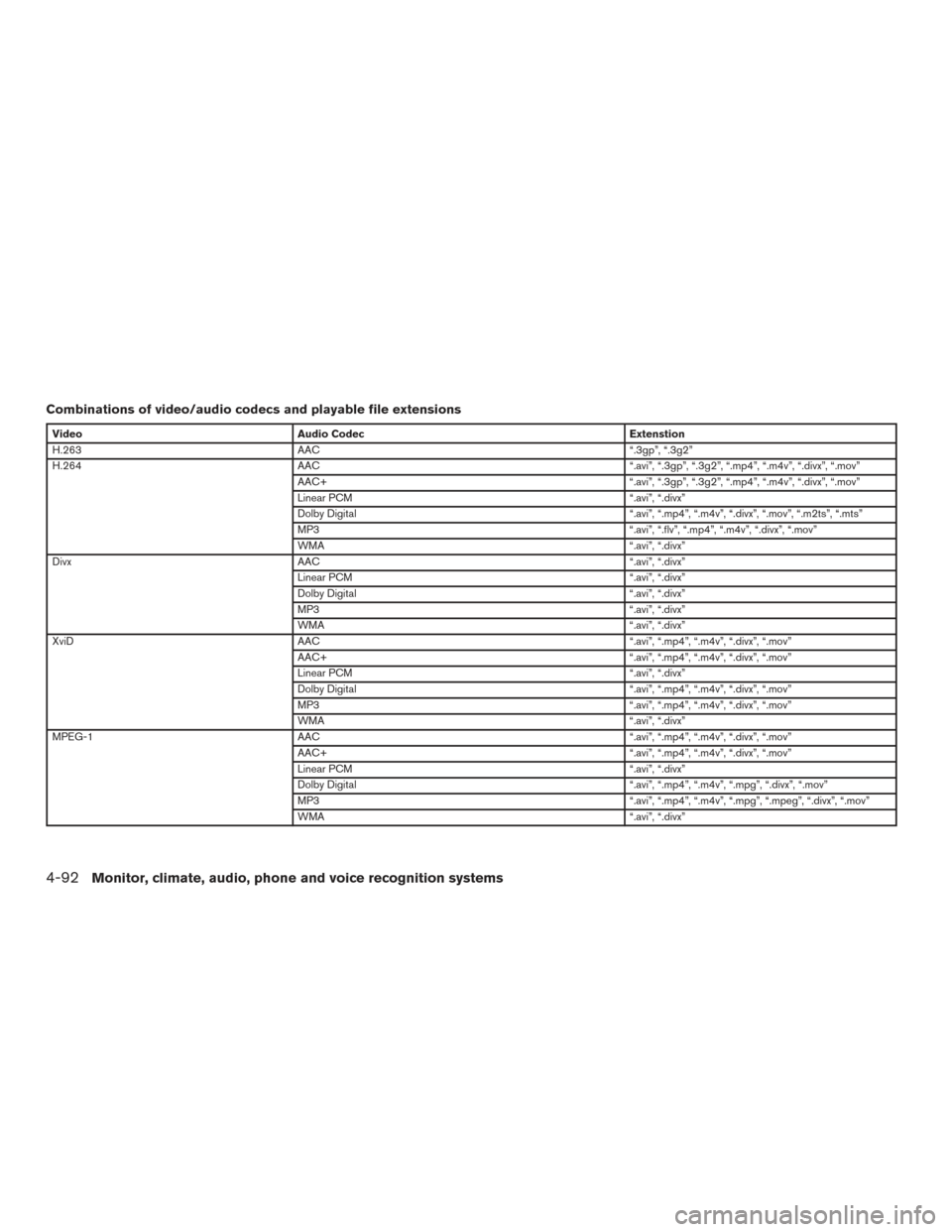
Combinations of video/audio codecs and playable file extensions
VideoAudio Codec Extenstion
H.263 AAC “.3gp”, “.3g2”
H.264 AAC “.avi”, “.3gp”, “.3g2”, “.mp4”, “.m4v”, “.divx”, “.mov”
AAC+ “.avi”, “.3gp”, “.3g2”, “.mp4”, “.m4v”, “.divx”, “.mov”
Linear PCM “.avi”, “.divx”
Dolby Digital “.avi”, “.mp4”, “.m4v”, “.divx”, “.mov”, “.m2ts”, “.mts”
MP3 “.avi”, “.flv”, “.mp4”, “.m4v”, “.divx”, “.mov”
WMA “.avi”, “.divx”
Divx AAC “.avi”, “.divx”
Linear PCM “.avi”, “.divx”
Dolby Digital “.avi”, “.divx”
MP3 “.avi”, “.divx”
WMA “.avi”, “.divx”
XviD AAC “.avi”, “.mp4”, “.m4v”, “.divx”, “.mov”
AAC+ “.avi”, “.mp4”, “.m4v”, “.divx”, “.mov”
Linear PCM “.avi”, “.divx”
Dolby Digital “.avi”, “.mp4”, “.m4v”, “.divx”, “.mov”
MP3 “.avi”, “.mp4”, “.m4v”, “.divx”, “.mov”
WMA “.avi”, “.divx”
MPEG-1 AAC “.avi”, “.mp4”, “.m4v”, “.divx”, “.mov”
AAC+ “.avi”, “.mp4”, “.m4v”, “.divx”, “.mov”
Linear PCM “.avi”, “.divx”
Dolby Digital “.avi”, “.mp4”, “.m4v”, “.mpg”, “.divx”, “.mov”
MP3 “.avi”, “.mp4”, “.m4v”, “.mpg”, “.mpeg”, “.divx”, “.mov”
WMA “.avi”, “.divx”
4-92Monitor, climate, audio, phone and voice recognition systems
Page 292 of 555
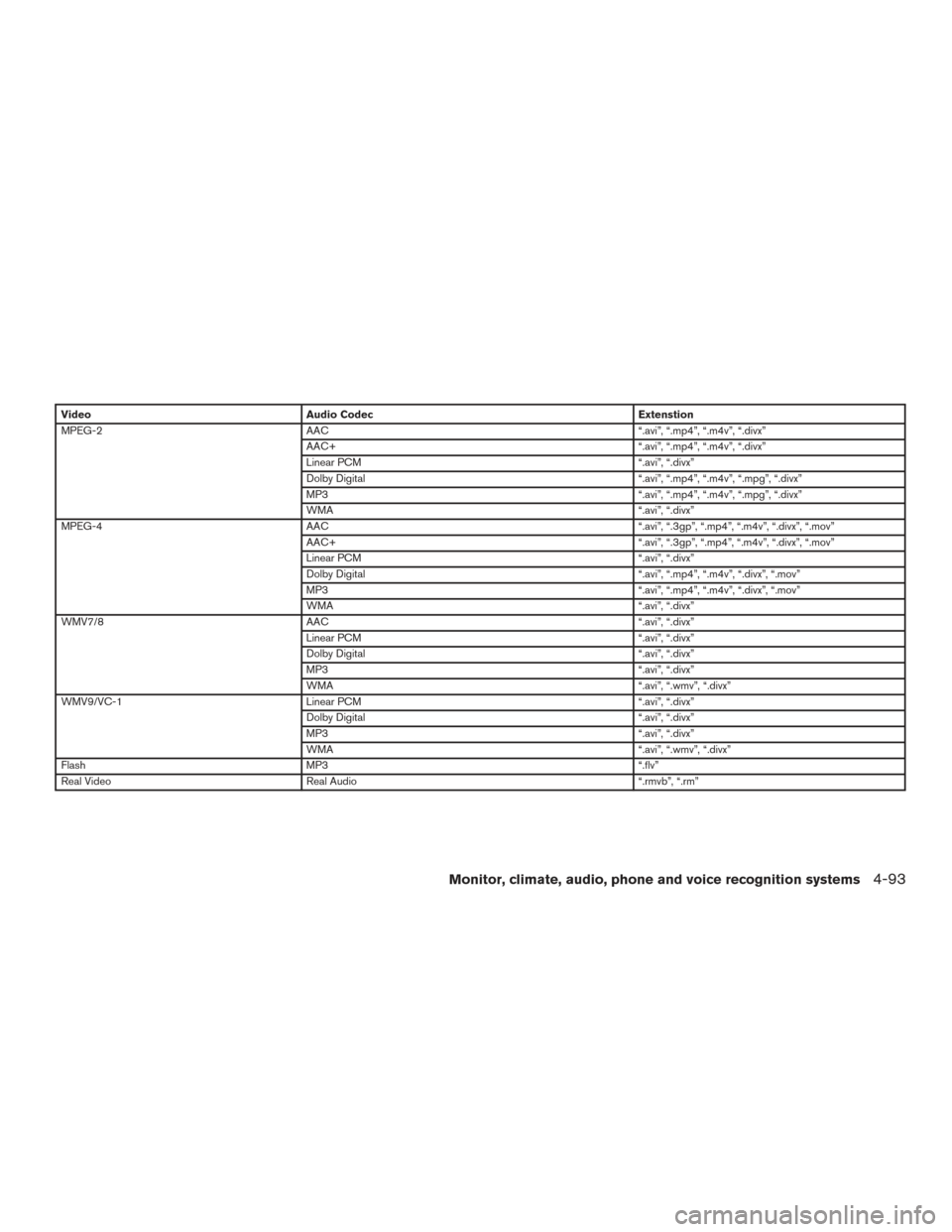
VideoAudio Codec Extenstion
MPEG-2 AAC “.avi”, “.mp4”, “.m4v”, “.divx”
AAC+ “.avi”, “.mp4”, “.m4v”, “.divx”
Linear PCM “.avi”, “.divx”
Dolby Digital “.avi”, “.mp4”, “.m4v”, “.mpg”, “.divx”
MP3 “.avi”, “.mp4”, “.m4v”, “.mpg”, “.divx”
WMA “.avi”, “.divx”
MPEG-4 AAC “.avi”, “.3gp”, “.mp4”, “.m4v”, “.divx”, “.mov”
AAC+ “.avi”, “.3gp”, “.mp4”, “.m4v”, “.divx”, “.mov”
Linear PCM “.avi”, “.divx”
Dolby Digital “.avi”, “.mp4”, “.m4v”, “.divx”, “.mov”
MP3 “.avi”, “.mp4”, “.m4v”, “.divx”, “.mov”
WMA “.avi”, “.divx”
WMV7/8 AAC “.avi”, “.divx”
Linear PCM “.avi”, “.divx”
Dolby Digital “.avi”, “.divx”
MP3 “.avi”, “.divx”
WMA “.avi”, “.wmv”, “.divx”
WMV9/VC-1 Linear PCM “.avi”, “.divx”
Dolby Digital “.avi”, “.divx”
MP3 “.avi”, “.divx”
WMA “.avi”, “.wmv”, “.divx”
Flash MP3 “.flv”
Real Video Real Audio “.rmvb”, “.rm”
Monitor, climate, audio, phone and voice recognition systems4-93
Page 293 of 555
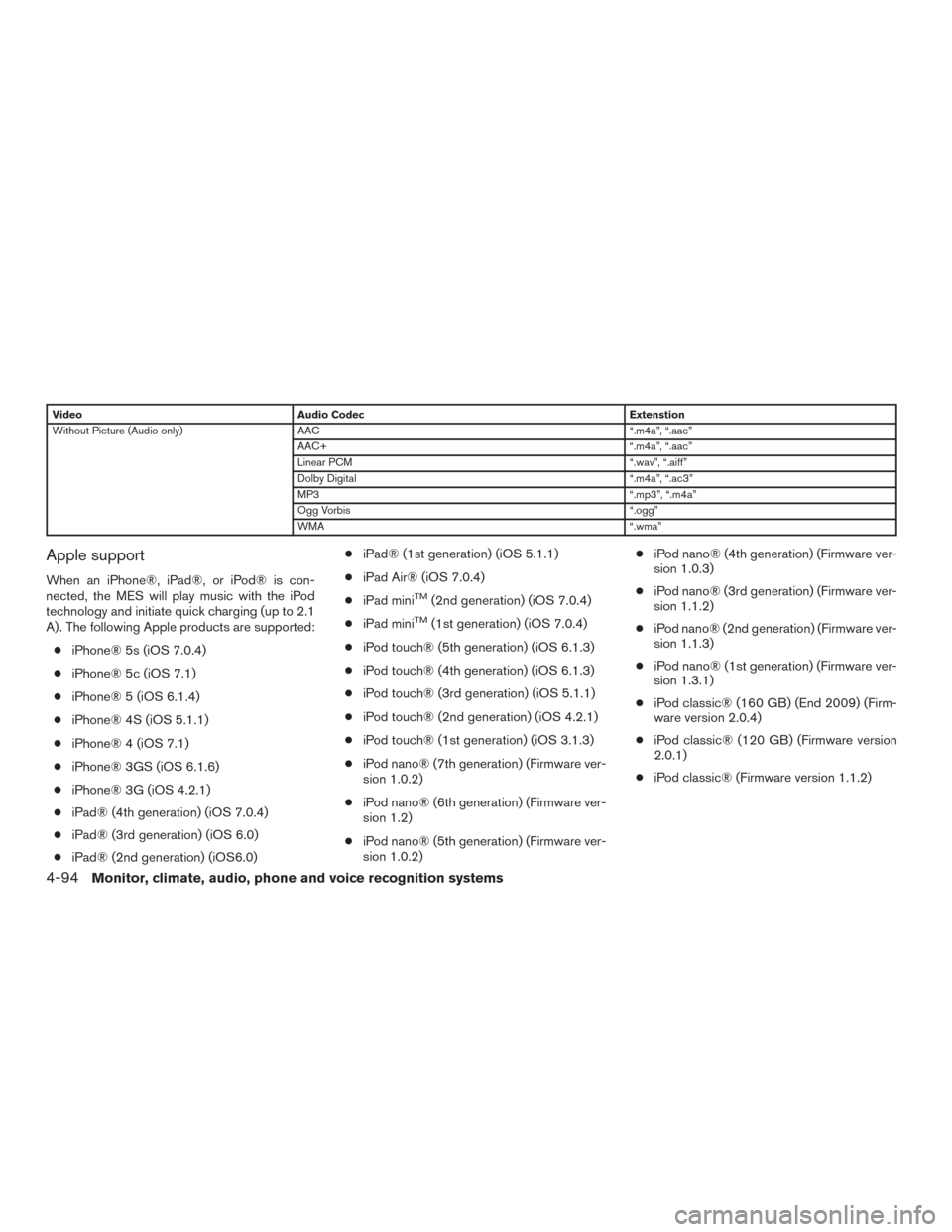
VideoAudio Codec Extenstion
Without Picture (Audio only) AAC “.m4a”, “.aac”
AAC+ “.m4a”, “.aac”
Linear PCM “.wav”, “.aiff”
Dolby Digital “.m4a”, “.ac3”
MP3 “.mp3”, “.m4a”
Ogg Vorbis “.ogg”
WMA “.wma”
Apple support
When an iPhone®, iPad®, or iPod® is con-
nected, the MES will play music with the iPod
technology and initiate quick charging (up to 2.1
A) . The following Apple products are supported:
● iPhone® 5s (iOS 7.0.4)
● iPhone® 5c (iOS 7.1)
● iPhone® 5 (iOS 6.1.4)
● iPhone® 4S (iOS 5.1.1)
● iPhone® 4 (iOS 7.1)
● iPhone® 3GS (iOS 6.1.6)
● iPhone® 3G (iOS 4.2.1)
● iPad® (4th generation) (iOS 7.0.4)
● iPad® (3rd generation) (iOS 6.0)
● iPad® (2nd generation) (iOS6.0) ●
iPad® (1st generation) (iOS 5.1.1)
● iPad Air® (iOS 7.0.4)
● iPad miniTM(2nd generation) (iOS 7.0.4)
● iPad mini
TM(1st generation) (iOS 7.0.4)
● iPod touch® (5th generation) (iOS 6.1.3)
● iPod touch® (4th generation) (iOS 6.1.3)
● iPod touch® (3rd generation) (iOS 5.1.1)
● iPod touch® (2nd generation) (iOS 4.2.1)
● iPod touch® (1st generation) (iOS 3.1.3)
● iPod nano® (7th generation) (Firmware ver-
sion 1.0.2)
● iPod nano® (6th generation) (Firmware ver-
sion 1.2)
● iPod nano® (5th generation) (Firmware ver-
sion 1.0.2) ●
iPod nano® (4th generation) (Firmware ver-
sion 1.0.3)
● iPod nano® (3rd generation) (Firmware ver-
sion 1.1.2)
● iPod nano® (2nd generation) (Firmware ver-
sion 1.1.3)
● iPod nano® (1st generation) (Firmware ver-
sion 1.3.1)
● iPod classic® (160 GB) (End 2009) (Firm-
ware version 2.0.4)
● iPod classic® (120 GB) (Firmware version
2.0.1)
● iPod classic® (Firmware version 1.1.2)
4-94Monitor, climate, audio, phone and voice recognition systems