2017 NISSAN MICRA USB port
[x] Cancel search: USB portPage 13 of 318
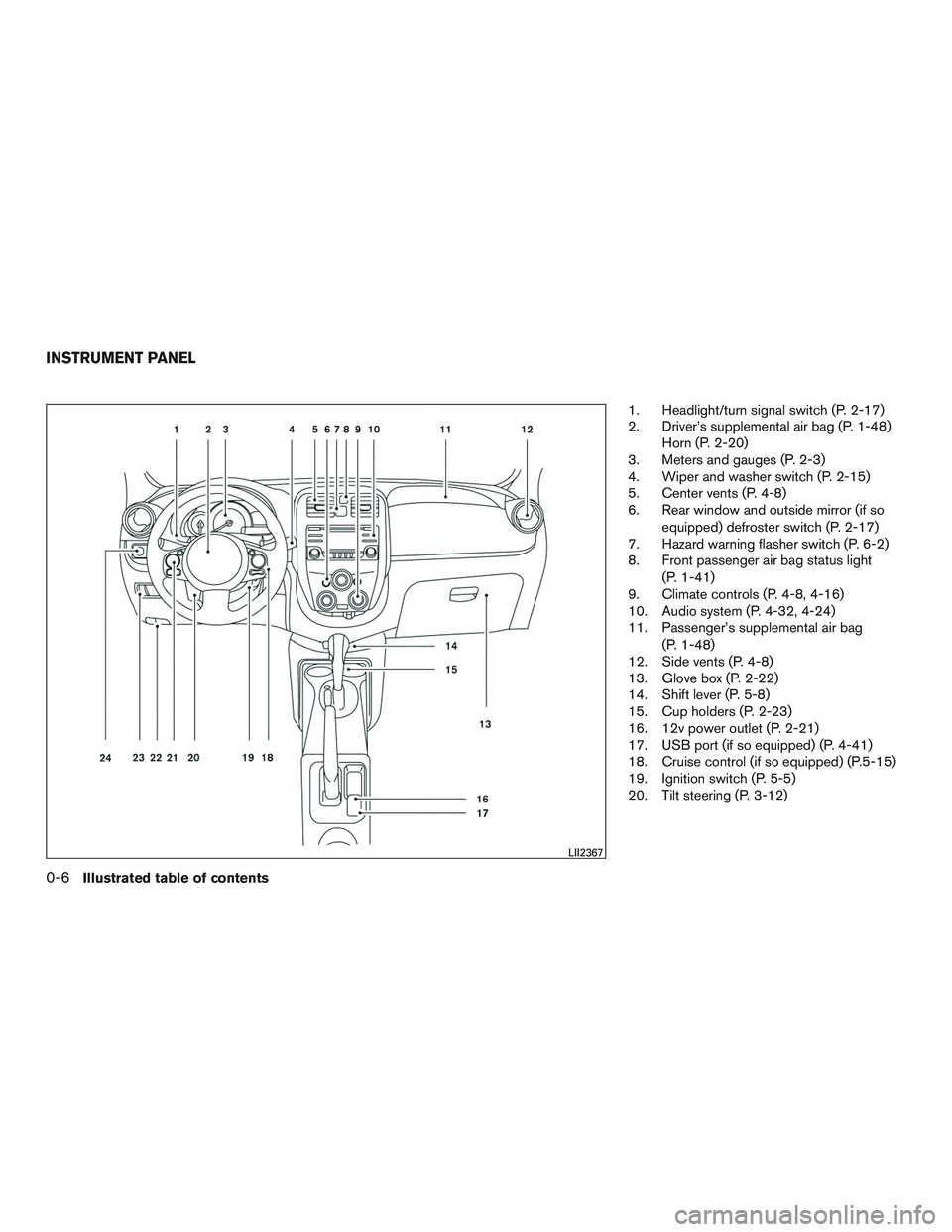
1. Headlight/turn signal switch (P. 2-17)
2. Driver’s supplemental air bag (P. 1-48)Horn (P. 2-20)
3. Meters and gauges (P. 2-3)
4. Wiper and washer switch (P. 2-15)
5. Center vents (P. 4-8)
6. Rear window and outside mirror (if so
equipped) defroster switch (P. 2-17)
7. Hazard warning flasher switch (P. 6-2)
8. Front passenger air bag status light
(P. 1-41)
9. Climate controls (P. 4-8, 4-16)
10. Audio system (P. 4-32, 4-24)
11. Passenger’s supplemental air bag
(P. 1-48)
12. Side vents (P. 4-8)
13. Glove box (P. 2-22)
14. Shift lever (P. 5-8)
15. Cup holders (P. 2-23)
16. 12v power outlet (P. 2-21)
17. USB port (if so equipped) (P. 4-41)
18. Cruise control (if so equipped) (P.5-15)
19. Ignition switch (P. 5-5)
20. Tilt steering (P. 3-12)
LII2367
INSTRUMENT PANEL
0-6Illustrated table of contents
Page 79 of 318
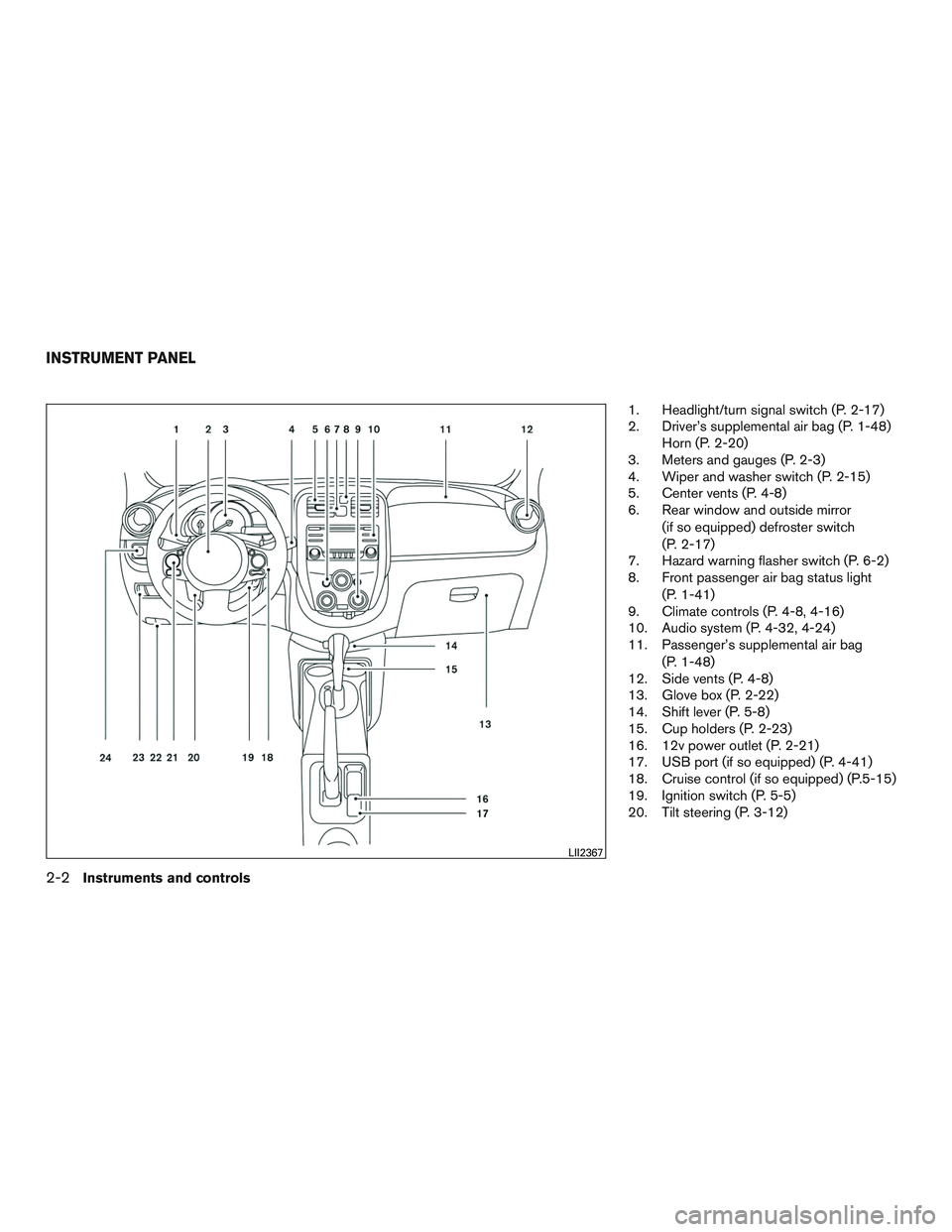
1. Headlight/turn signal switch (P. 2-17)
2. Driver’s supplemental air bag (P. 1-48)Horn (P. 2-20)
3. Meters and gauges (P. 2-3)
4. Wiper and washer switch (P. 2-15)
5. Center vents (P. 4-8)
6. Rear window and outside mirror
(if so equipped) defroster switch
(P. 2-17)
7. Hazard warning flasher switch (P. 6-2)
8. Front passenger air bag status light
(P. 1-41)
9. Climate controls (P. 4-8, 4-16)
10. Audio system (P. 4-32, 4-24)
11. Passenger’s supplemental air bag
(P. 1-48)
12. Side vents (P. 4-8)
13. Glove box (P. 2-22)
14. Shift lever (P. 5-8)
15. Cup holders (P. 2-23)
16. 12v power outlet (P. 2-21)
17. USB port (if so equipped) (P. 4-41)
18. Cruise control (if so equipped) (P.5-15)
19. Ignition switch (P. 5-5)
20. Tilt steering (P. 3-12)
LII2367
INSTRUMENT PANEL
2-2Instruments and controls
Page 124 of 318
4 Heater, air conditioner, audio and phone
systems
RearView Monitor (if so equipped)...................4-2
RearView Monitor system operation ..............4-3
How to read the displayed lines ..................4-3
Difference between predicted and actual
distances ......................................4-4
Adjusting the screen ............................4-6
RearView Monitor system limitations ..............4-6
System maintenance ............................4-7
Vents ............................................4-8
Heater and Air Conditioner (manual) (Type A)
(if so equipped) ...................................4-8
Controls .......................................4-9
Heater operation .............................. 4-10
Air conditioner operation (if so equipped) ........4-11
Air flow charts ................................. 4-12
Heater and Air Conditioner (manual) (Type B)
(if so equipped) .................................. 4-16
Controls ...................................... 4-17
Heater operation .............................. 4-18
Air conditioner operation .......................4-19
Air flow charts ................................. 4-20
Servicing air conditioner (if so equipped) ............4-24
Audio system .................................... 4-24Radio
........................................ 4-24
FM radio reception ............................ 4-24
AM radio reception ............................ 4-25
Audio operation precautions ....................4-25
FM/AM radio with compact disc (CD) player
(Type A) (if so equipped) .......................4-32
FM/AM radio with compact disc (CD) player
(Type B) (if so equipped) .......................4-36
USB (Universal Serial Bus) connection port
(if so equipped) ............................... 4-41
iPod®* player operation (if so equipped) .........4-43
CD care and cleaning .......................... 4-45
Steering wheel switch for audio control
(if so equipped) ............................... 4-45
Antenna ...................................... 4-46
Car phone or CB radio ............................ 4-47
Bluetooth® Hands-Free Phone System
(if so equipped) .................................. 4-47
Regulatory Information ......................... 4-49
Using the system .............................. 4-49
Control
buttons ............................... 4-51
Getting started ................................ 4-51
List of commands .............................. 4-52
Troubleshooting guide ......................... 4-57
Page 153 of 318
USB (Universal Serial Bus)
Connection Port (if so equipped)
WARNING
Do not connect, disconnect or operate the
USB device while driving. Doing so can be
a distraction. If distracted you could lose
control of your vehicle and cause an acci-
dent or serious injury.
CAUTION
●Do not force the USB device into the
USB port. Inserting the USB device
tilted or up-side-down into the port may
damage the port. Make sure that the
USB device is connected correctly into
the USB port.
● Do not grab the USB port cover (if so
equipped) when pulling the USB device
out of the port. This could damage the
port and the cover.
● Do not leave the USB cable in a place
where it can be pulled unintentionally.
Pulling the cable may damage the port.
The vehicle is not equipped with a USB device.
USB devices should be purchased separately as
necessary. This system cannot be used to format USB de-
vices. To format a USB device, use a personal
computer.
In some jurisdictions, the USB device for the front
seats plays only sound without images for regu-
latory reasons, even when the vehicle is parked.
This system supports various USB memory de-
vices, USB hard drives and iPod® players. Some
USB devices may not be supported by this sys-
tem.
● Partitioned USB devices may not play cor-
rectly.
● Some characters used in other languages
(Chinese, Japanese, etc.) may not appear
properly in the display. Using English lan-
guage characters with a USB device is rec-
ommended.
General notes for USB use: ● For additional information, refer to your de-
vice manufacturer’s owner information re-
garding the proper use and care of the de-
vice. Notes for iPod® use (if so equipped):
iPod® is a trademark of Apple Inc., registered in
the U.S. and other countries.
● Improperly plugging in the iPod® may cause
a checkmark to be displayed on and off
(flickering) . Always make sure that the
iPod® is connected properly.
● An iPod® nano (1st Generation) may remain
in fast forward or rewind mode if it is con-
nected during a seek operation. In this case,
please manually reset the iPod®.
● An iPod® nano (2nd Generation) will con-
tinue to fast-forward or rewind if it is discon-
nected during a seek operation.
● An incorrect song title may appear when the
Play Mode is changed while using an iPod®
nano (2nd Generation) .
● Audiobooks may not play in the same order
as they appear on an iPod®.
● Large video files cause slow responses in an
iPod®. The vehicle center display may mo-
mentarily black out, but will soon recover.
● If an iPod® automatically selects large video
files while in the shuffle mode, the vehicle
center display may momentarily black out,
but will soon recover.
4-30Heater, air conditioner, audio and phone systems
Page 164 of 318
Press the AUX button to play a compatible device
plugged into the AUX IN jack. The AUX button is
also used to switch the audio system to a source
plugged into the USB connection port in the
center console. When a device is plugged into
the AUX IN jack while another device is plugged
into the USB connection port, the AUX button is
used to toggle between the two functions.
For additional information about the USB con-
nection port, refer to “USB (Universal Serial Bus)
connection port” in this section.
EJECT button
When the
button is pressed with a com-
pact disc loaded, the compact disc will eject and
the last source will be played.
Additional features
For additional information about the iPod® player
available with this system, refer to “iPod® player
operation” in this section.
For additional information about the USB (Uni-
versal Serial Bus) connection port available with
this system, refer to “USB (Universal Serial Bus)
connection port” in this section.
USB (Universal Serial Bus)
CONNECTION PORT (if so equipped)
Connecting a device to the USB
connection port
WARNING
Do not connect, disconnect, or operate the
USB device while driving. Doing so can be
a distraction. If distracted you could lose
control of your vehicle and cause an acci-
dent or serious injury.
CAUTION
● To avoid damage and loss of function
when using a USB device, note the fol-
lowing precautions.
● Do not force the USB device into the
USB port. Inserting the USB device
tilted or up-side-down into the port may
damage the port. Make sure that the
USB device is connected correctly into
the USB port.
● Do not grab the USB port cover (if so
equipped) when pulling the USB device
out of the port. This could damage the
port and the cover.
● Do not leave the USB cable in a place
where it can be pulled unintentionally.
Pulling the cable may damage the port.
For additional information, refer to your device
manufacturer’s owner information regarding the
proper use and care of the device.
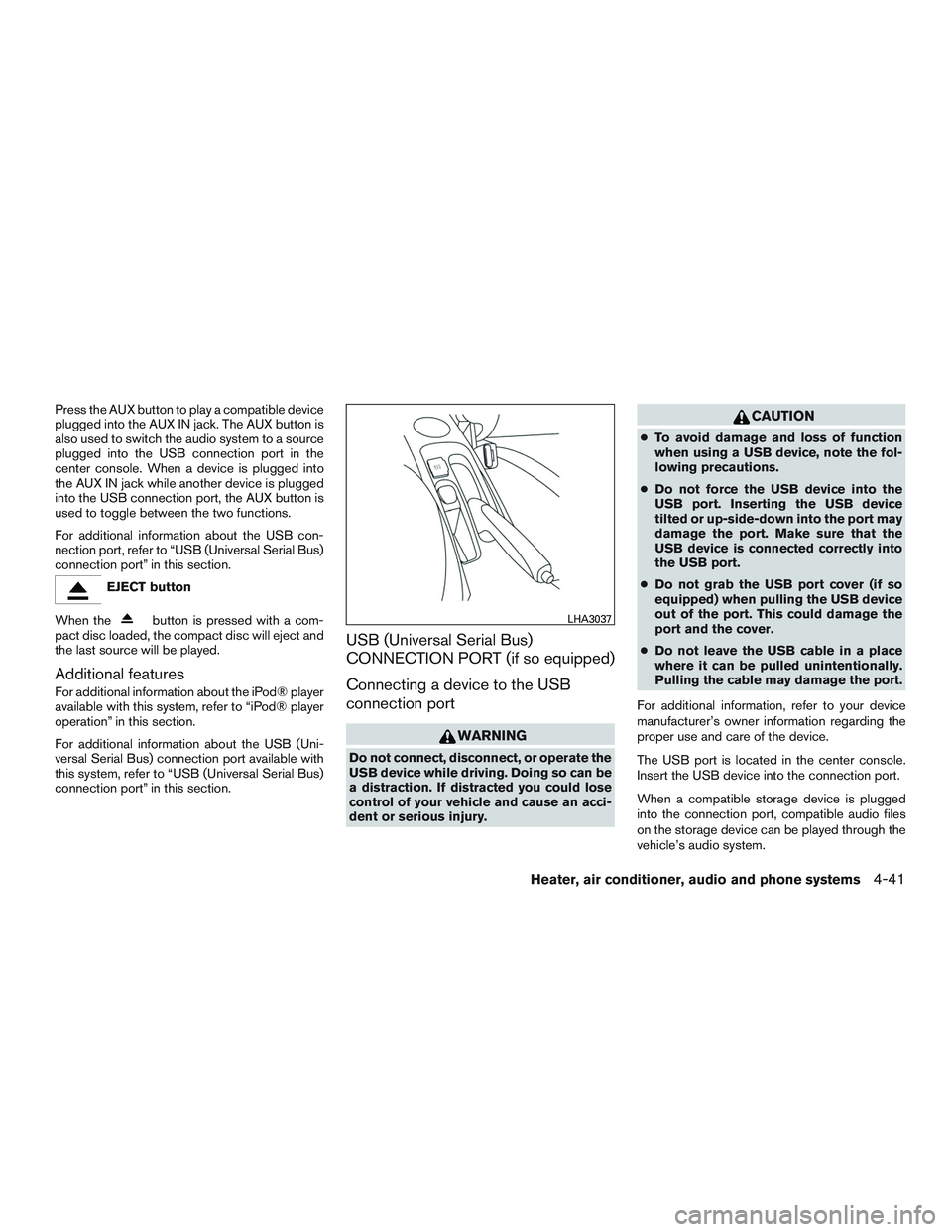
The USB port is located in the center console.
Insert the USB device into the connection port.
When a compatible storage device is plugged
into the connection port, compatible audio files
on the storage device can be played through the
vehicle’s audio system.
LHA3037
Heater, air conditioner, audio and phone systems4-41
Page 166 of 318
iPod®* PLAYER OPERATION (if so
equipped)
Connecting iPod®
WARNING
Do not connect, disconnect or operate the
USB device while driving. Doing so can be
a distraction. If distracted you could lose
control of your vehicle and cause an acci-
dent or serious injury.
CAUTION
●Do not force the USB device into the
USB port. Inserting the USB device
tilted or up-side-down into the port may
damage the port. Make sure that the
USB device is connected correctly into
the USB port.
● Do not grab the USB port cover (if so
equipped) when pulling the USB device
out of the port. This could damage the
port and the cover.
● Do not leave the USB cable in a place
where it can be pulled unintentionally.
Pulling the cable may damage the port.
For additional information, refer to your device
manufacturer’s owner information regarding the
proper use and care of the device.
To connect an iPod® to the vehicle so that the
iPod® can be controlled with the audio system
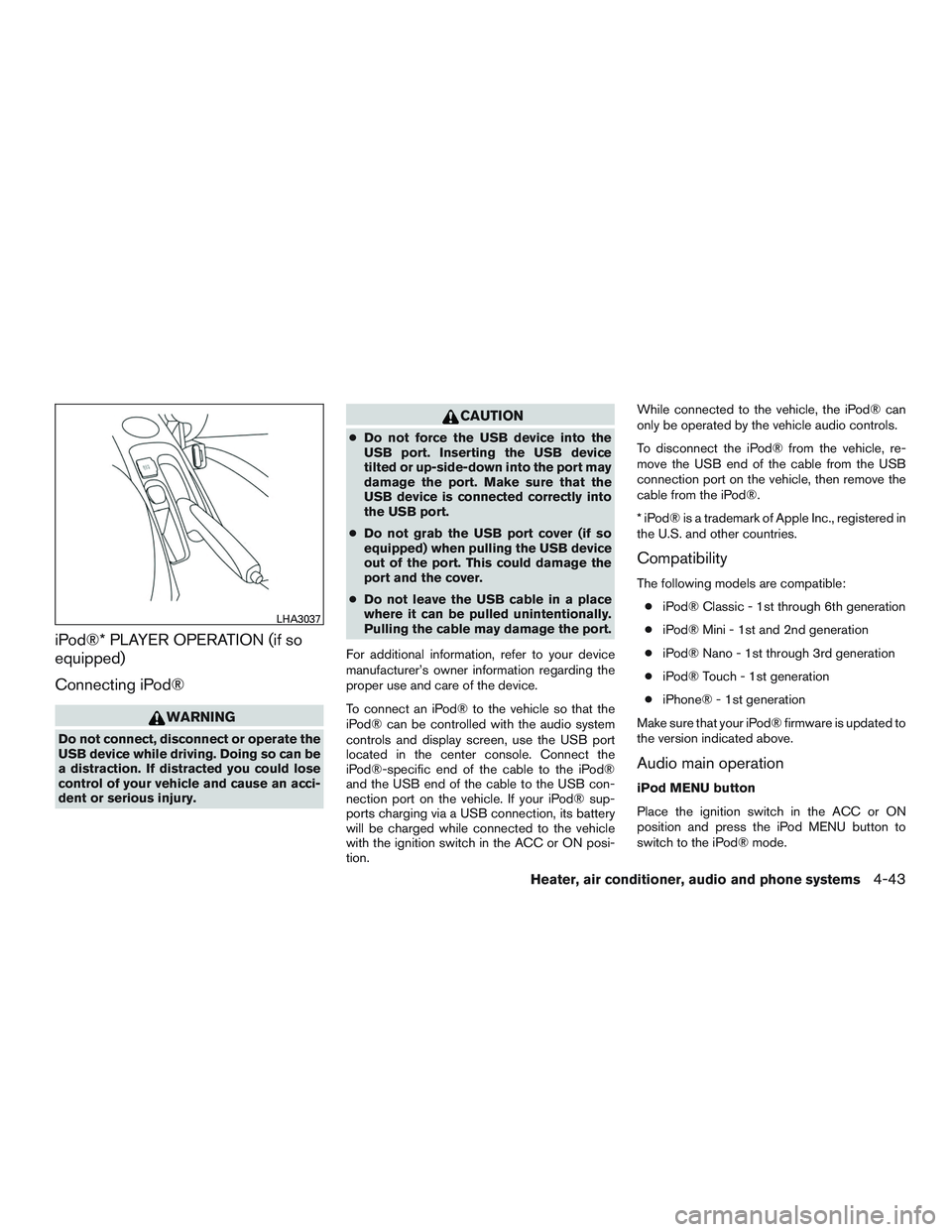
controls and display screen, use the USB port
located in the center console. Connect the
iPod®-specific end of the cable to the iPod®
and the USB end of the cable to the USB con-
nection port on the vehicle. If your iPod® sup-
ports charging via a USB connection, its battery
will be charged while connected to the vehicle
with the ignition switch in the ACC or ON posi-
tion. While connected to the vehicle, the iPod® can
only be operated by the vehicle audio controls.
To disconnect the iPod® from the vehicle, re-
move the USB end of the cable from the USB
connection port on the vehicle, then remove the
cable from the iPod®.
* iPod® is a trademark of Apple Inc., registered in
the U.S. and other countries.
Compatibility
The following models are compatible:
● iPod® Classic - 1st through 6th generation
● iPod® Mini - 1st and 2nd generation
● iPod® Nano - 1st through 3rd generation
● iPod® Touch - 1st generation
● iPhone® - 1st generation
Make sure that your iPod® firmware is updated to
the version indicated above.
Audio main operation
iPod MENU button
Place the ignition switch in the ACC or ON
position and press the iPod MENU button to
switch to the iPod® mode.
LHA3037
Heater, air conditioner, audio and phone systems4-43
Page 310 of 318
11 Index
A
Air bag (See supplemental restraint
system) .....................1-41
Air bag system Front (See supplemental front impact
air bag system) ...............1-48
Side and curtain (See supplemental
side air bag and curtain side-impact
air bag system) ...............1-55
Airbagwarninglabels.............1-58
Airbagwarninglight...........1-58,2-10
Air bag warning light, supplemental . .1-58, 2-10
Air cleaner housing filter ............8-14
Air conditioner Air conditioner operation ......4-11,4-19
Air conditioner service ...........4-24
Air conditioner specification label ....10-12
Air conditioner system refrigerant and
oil recommendations ............10-7
Air conditioner system refrigerant
recommendations ..............10-7
Heater and air conditioner
controls ................4-8,4-16
Servicing air conditioner ..........4-24
Airflowcharts..............4-12,4-20
Alarm system
(See vehicle security system) .........2-13
Anchor point locations .............1-25
Antenna .....................4-46
Anti-lock brake warning light ..........2-8
Anti-lock Braking System (ABS) ........5-22Audible reminders
...............2-13
Audio system ..................4-24
AMradioreception.............4-25
Compact disc (CD) player .....4-35,4-39
FM/AM radio with compact disc (CD)
player.................4-32,4-36
FMradioreception.............4-24
iPod® Player ................4-43
iPod® player operation ...........4-43
Radio ....................4-24
Steering wheel audio control switch . . .4-45
USB interface ................4-41
USB (Universal Serial Bus) Connection
Port .....................4-41
Automatic Automatic power window switch .....2-27
Automatic transmission fluid (ATF) .....8-8
Automatic transmission position indicator
light .....................2-10
Driving with automatic transmission .....5-8
Transmission shift lever lock release ....5-11
Automatic door locks ..............3-5
AUXjack.................4-36,4-40
B
Battery ..................5-25,8-10
Chargewarninglight.............2-8
Battery replacement ..............8-20
Keyfob................8-20,8-20
Before starting the engine ............5-7
Belt (See drive belt) ..............8-12 Block heater
Engine ....................5-26
Bluetooth® hands-free phone system ....4-47
Boosterseats..................1-38
Brake Anti-lock Braking System (ABS) ......5-22
Brake assist (for Intelligent cruise control
system) ...................5-23
Brake fluid ..................8-9
Brakelight(Seestoplight).........8-26
Brake system ................5-21
Brakewarninglight..............2-8
Brakewearindicators........2-13,8-16
Parking brake operation ..........5-14
Self-adjusting brakes ............8-16
Brake fluid ....................8-9
Brakes ......................8-16
Brake system ..................5-21
Break-inschedule ...............5-17
Brightness control Instrument panel ..............2-19
Bulb check/instrument panel ..........2-7
Bulbreplacement................8-26
C
Capacities and recommended
fuel/lubricants ..................
10-2
Cargo (See vehicle loading information). . .10-13
Car phone or CB radio .............4-47
CDcareandcleaning .............4-45
CD player (See audio system) .....4-35,4-39