Page 110 of 318
cess, these components will only recognize keys
coded into the NISSAN Vehicle Immobilizer Sys-
tem during registration. Any key that is not given
to the dealer at the time of registration will no
longer be able to start your vehicle.
CAUTION
Do not allow the immobilizer system key,
which contains an electrical transponder,
to come into contact with water or salt
water. This could affect system function.When the doors are locked using one of the
following methods, the doors cannot be opened
using the inside or outside door handles. The
doors must be unlocked to open the doors.
WARNING
●
Before opening any door, always look
for and avoid oncoming traffic.
● To help avoid risk of injury or death
through unintended operation of the
vehicle and or its systems, including
entrapment in windows or inadvertent
door lock activation, do not leave chil-
dren, people who require the assistance
of others or pets unattended in your
vehicle. Additionally, the temperature
inside a closed vehicle on a warm day
can quickly become high enough to
cause a significant risk of injury or
death to people and pets.
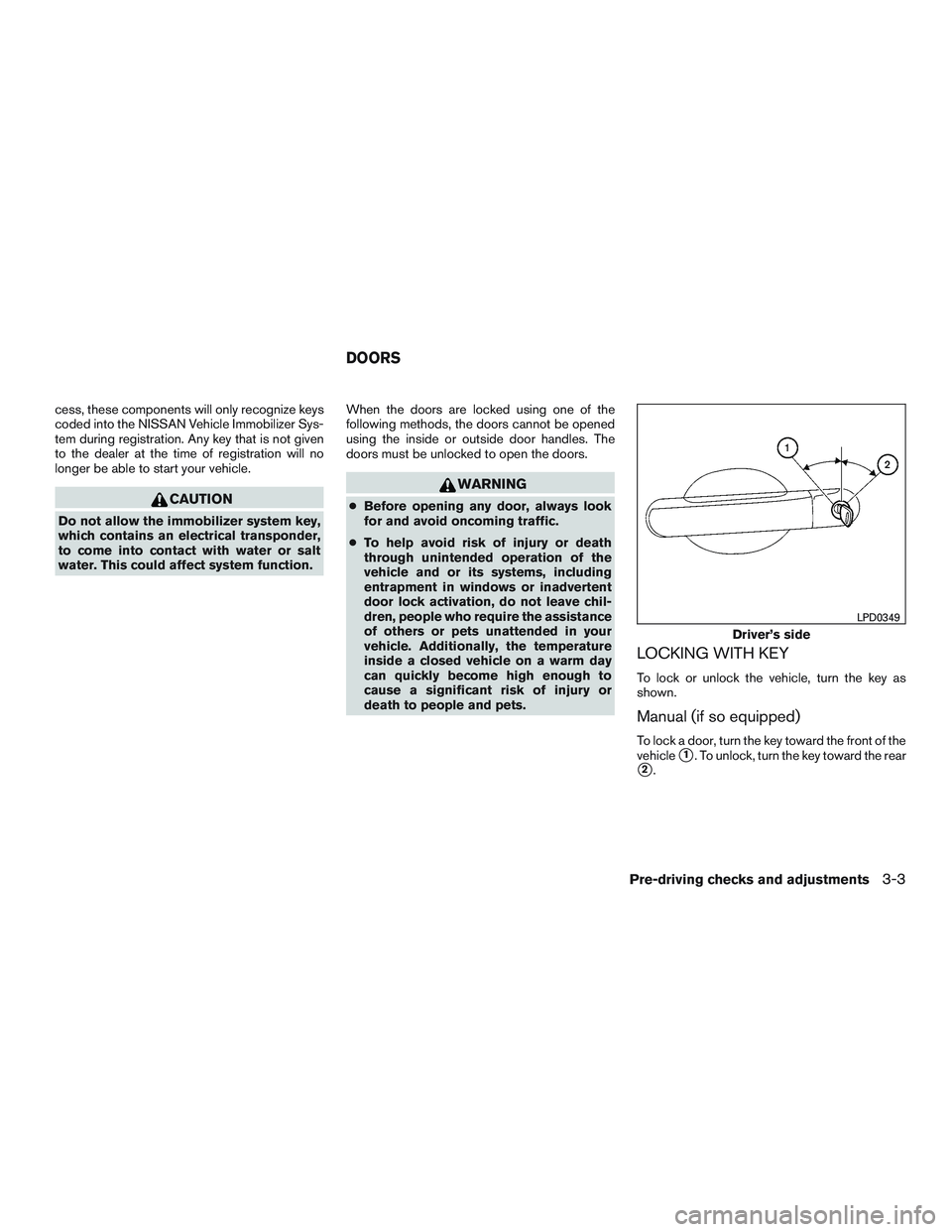
LOCKING WITH KEY
To lock or unlock the vehicle, turn the key as
shown.
Manual (if so equipped)
To lock a door, turn the key toward the front of the
vehicle
�1. To unlock, turn the key toward the rear
�2.
Driver’s side
LPD0349
DOORS
Pre-driving checks and adjustments3-3
Page 111 of 318
Selective open (if so equipped)
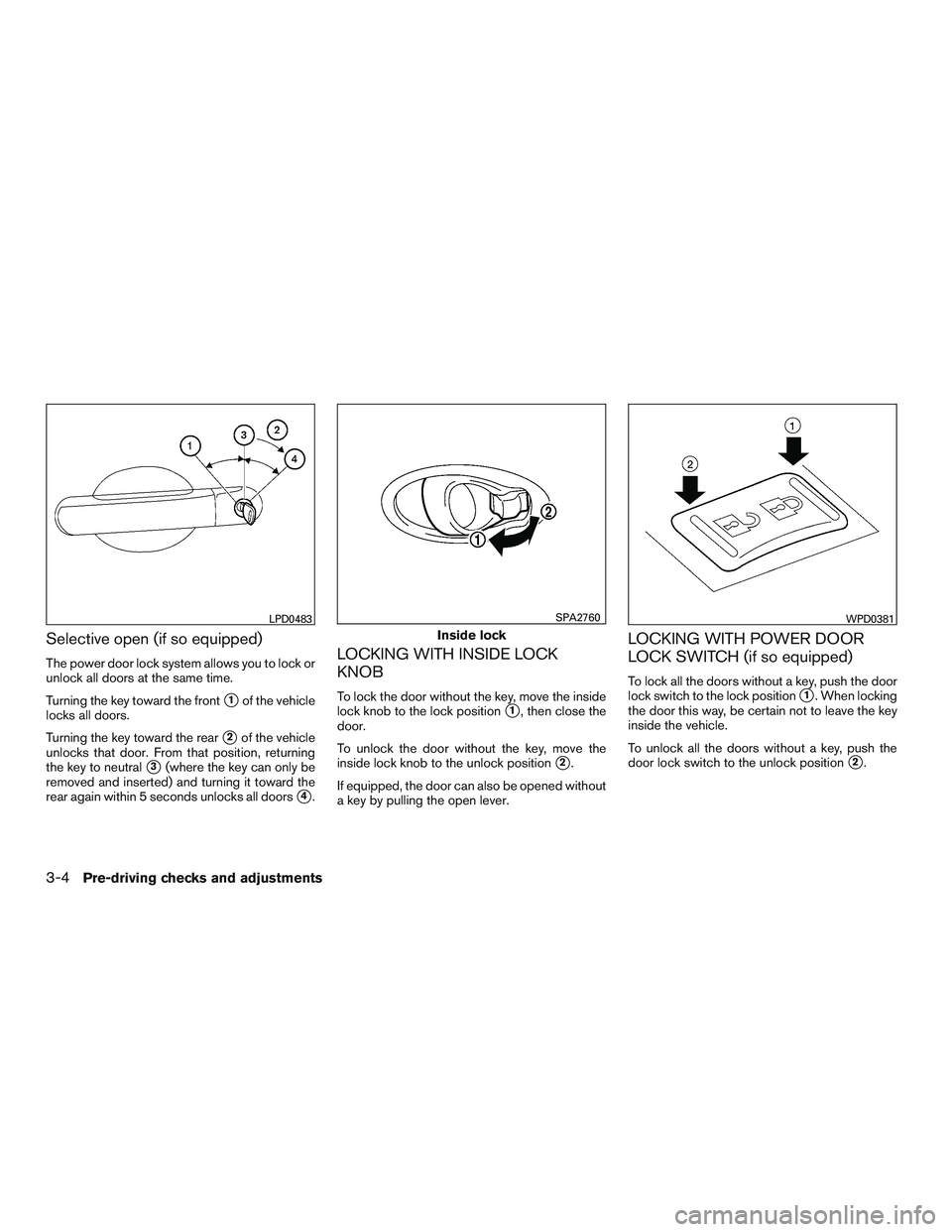
The power door lock system allows you to lock or
unlock all doors at the same time.
Turning the key toward the front
�1of the vehicle
locks all doors.
Turning the key toward the rear
�2of the vehicle
unlocks that door. From that position, returning
the key to neutral
�3(where the key can only be
removed and inserted) and turning it toward the
rear again within 5 seconds unlocks all doors
�4.
LOCKING WITH INSIDE LOCK
KNOB
To lock the door without the key, move the inside
lock knob to the lock position
�1, then close the
door.
To unlock the door without the key, move the
inside lock knob to the unlock position
�2.
If equipped, the door can also be opened without
a key by pulling the open lever.
LOCKING WITH POWER DOOR
LOCK SWITCH (if so equipped)
To lock all the doors without a key, push the door
lock switch to the lock position
�1. When locking
the door this way, be certain not to leave the key
inside the vehicle.
To unlock all the doors without a key, push the
door lock switch to the unlock position
�2.
LPD0483
Inside lock
SPA2760WPD0381
3-4Pre-driving checks and adjustments
Page 112 of 318
AUTOMATIC DOOR LOCKS (if so
equipped)
●All doors lock automatically when the vehicle
speed reaches 15 mph (24 km/h).
● All doors unlock automatically when the ig-
nition is placed in the OFF position or when
the key is removed from the ignition switch.
CHILD SAFETY REAR DOOR LOCK
Child safety locks help prevent the rear doors
from being opened accidentally, especially when
small children are in the vehicle.
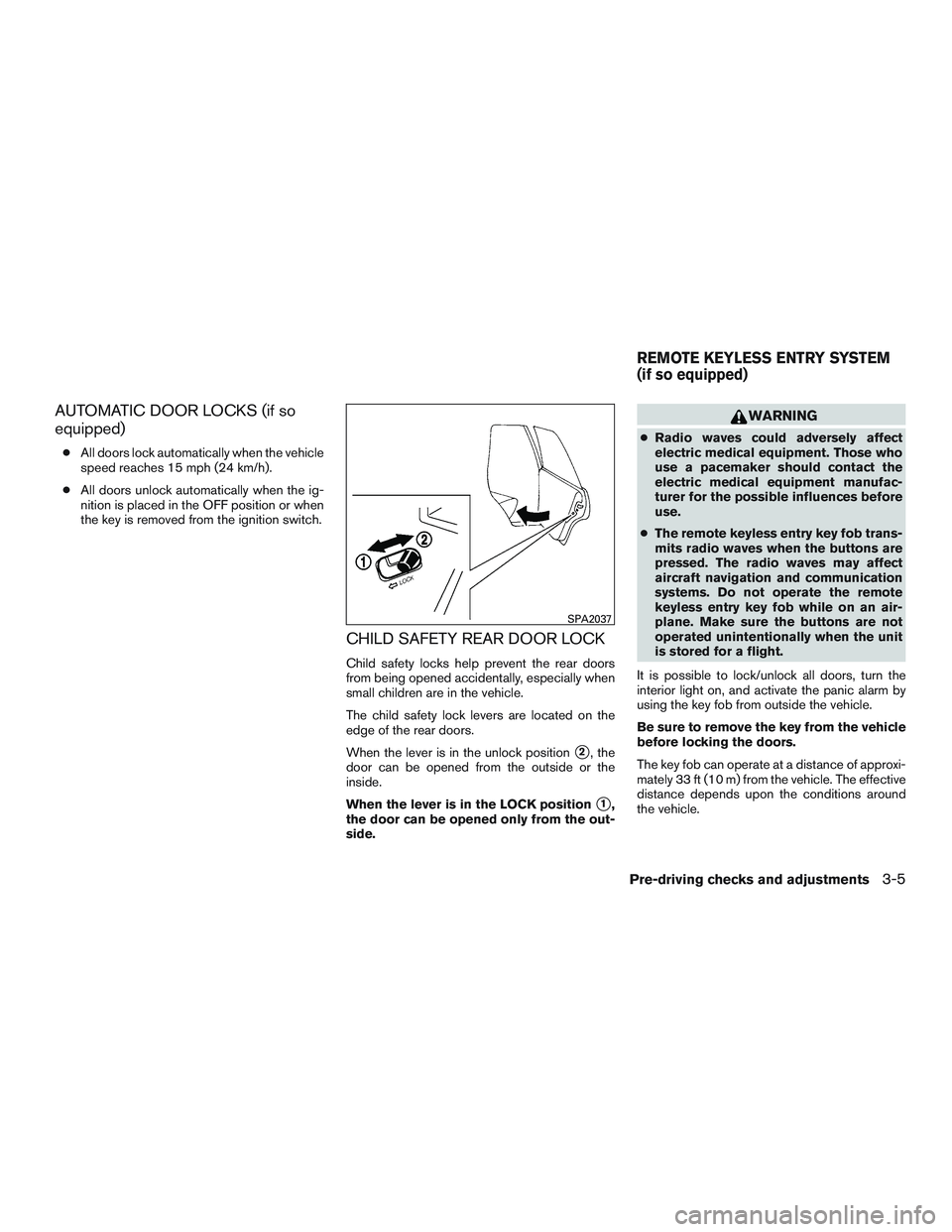
The child safety lock levers are located on the
edge of the rear doors.
When the lever is in the unlock position
�2, the
door can be opened from the outside or the
inside.
When the lever is in the LOCK position
�1,
the door can be opened only from the out-
side.
WARNING
● Radio waves could adversely affect
electric medical equipment. Those who
use a pacemaker should contact the
electric medical equipment manufac-
turer for the possible influences before
use.
● The remote keyless entry key fob trans-
mits radio waves when the buttons are
pressed. The radio waves may affect
aircraft navigation and communication
systems. Do not operate the remote
keyless entry key fob while on an air-
plane. Make sure the buttons are not
operated unintentionally when the unit
is stored for a flight.
It is possible to lock/unlock all doors, turn the
interior light on, and activate the panic alarm by
using the key fob from outside the vehicle.
Be sure to remove the key from the vehicle
before locking the doors.
The key fob can operate at a distance of approxi-
mately 33 ft (10 m) from the vehicle. The effective
distance depends upon the conditions around
the vehicle.
SPA2037
REMOTE KEYLESS ENTRY SYSTEM
(if so equipped)
Pre-driving checks and adjustments3-5
Page 113 of 318
As many as five key fobs can be used with one
vehicle. For information concerning the purchase
and use of additional key fobs, it is recommended
that you visit a NISSAN dealer.
The key fob will not function when:● the battery is discharged
● the distance between the vehicle and the
key fob is over 33 ft (10 m)
The panic alarm will not activate when the
key is in the ignition switch.
CAUTION
Listed below are conditions or occur-
rences which will damage the key fob:
● Do not allow the key fob, which con-
tains electrical components, to come
into contact with water or salt water.
This could affect the system function.
● Do not drop the key fob.
● Do not strike the key fob sharply
against another object.
● Do not change or modify the key fob.
● Wetting may damage the key fob. If the
key fob gets wet, immediately wipe until
it is completely dry. ●
Do not place the key fob for an ex-
tended period in an area where tem-
peratures exceed 140°F (60°C) .
● Do not attach the key fob with a key
holder that contains a magnet.
● Do not place the key fob near equip-
ment that produces a magnetic field,
such as a TV, audio equipment and per-
sonal computers.
If a key fob is lost or stolen, NISSAN rec-
ommends erasing the ID code of that key
fob. This will prevent the key fob from
unauthorized use to unlock the vehicle.
For information regarding the erasing
procedure, it is recommended that you
visit a NISSAN dealer.HOW TO USE REMOTE KEYLESS
ENTRY SYSTEM
Locking the doors
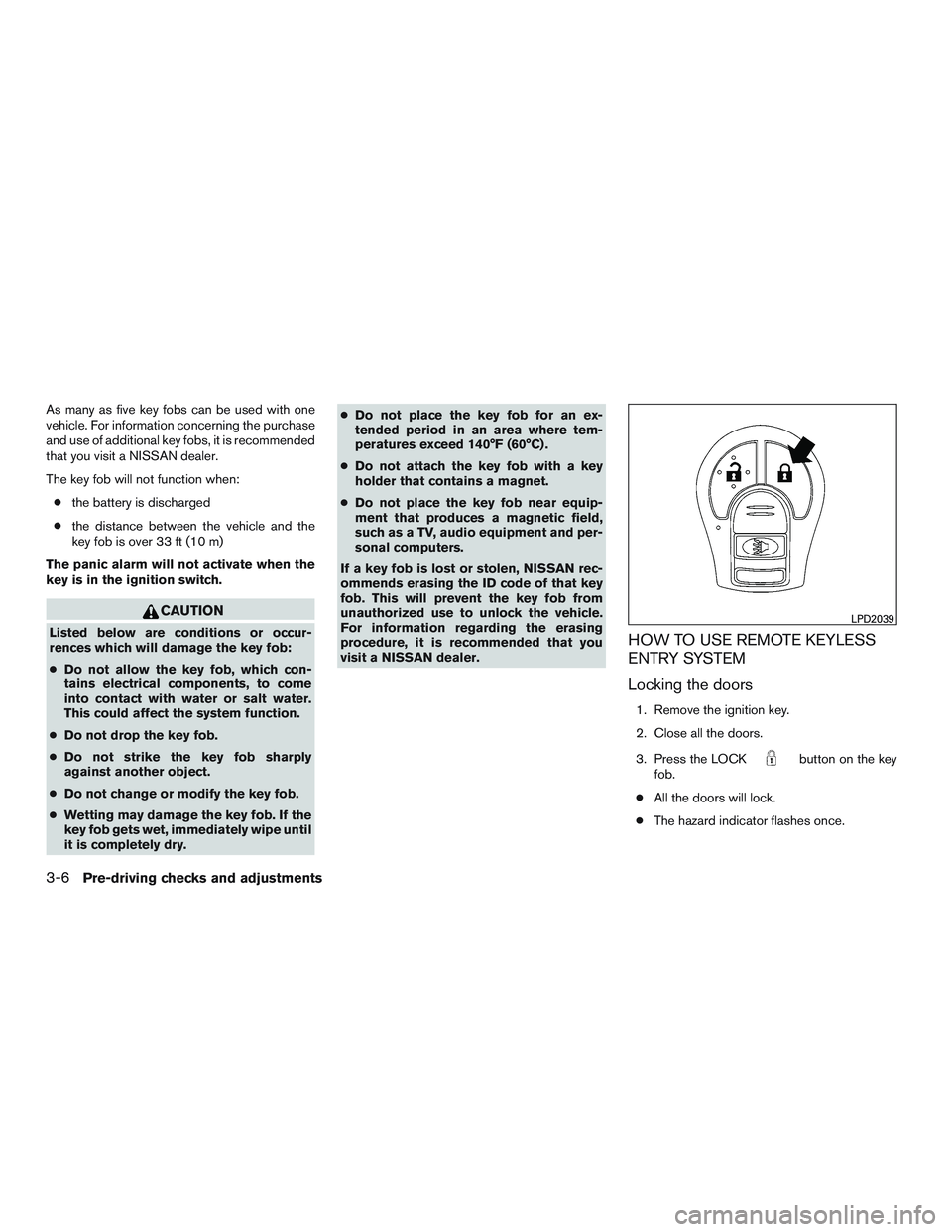
1. Remove the ignition key.
2. Close all the doors.
3. Press the LOCK
button on the key
fob.
● All the doors will lock.
● The hazard indicator flashes once.
LPD2039
3-6Pre-driving checks and adjustments
Page 114 of 318
NOTE:
An auto-relock function will operate after a
full or partial unlock, when no further user
action occurs. The relock will operate ap-
proximately 30 seconds after full or partial
unlock. The auto-relock function is can-
celed when any door is opened or the key is
inserted into the ignition.
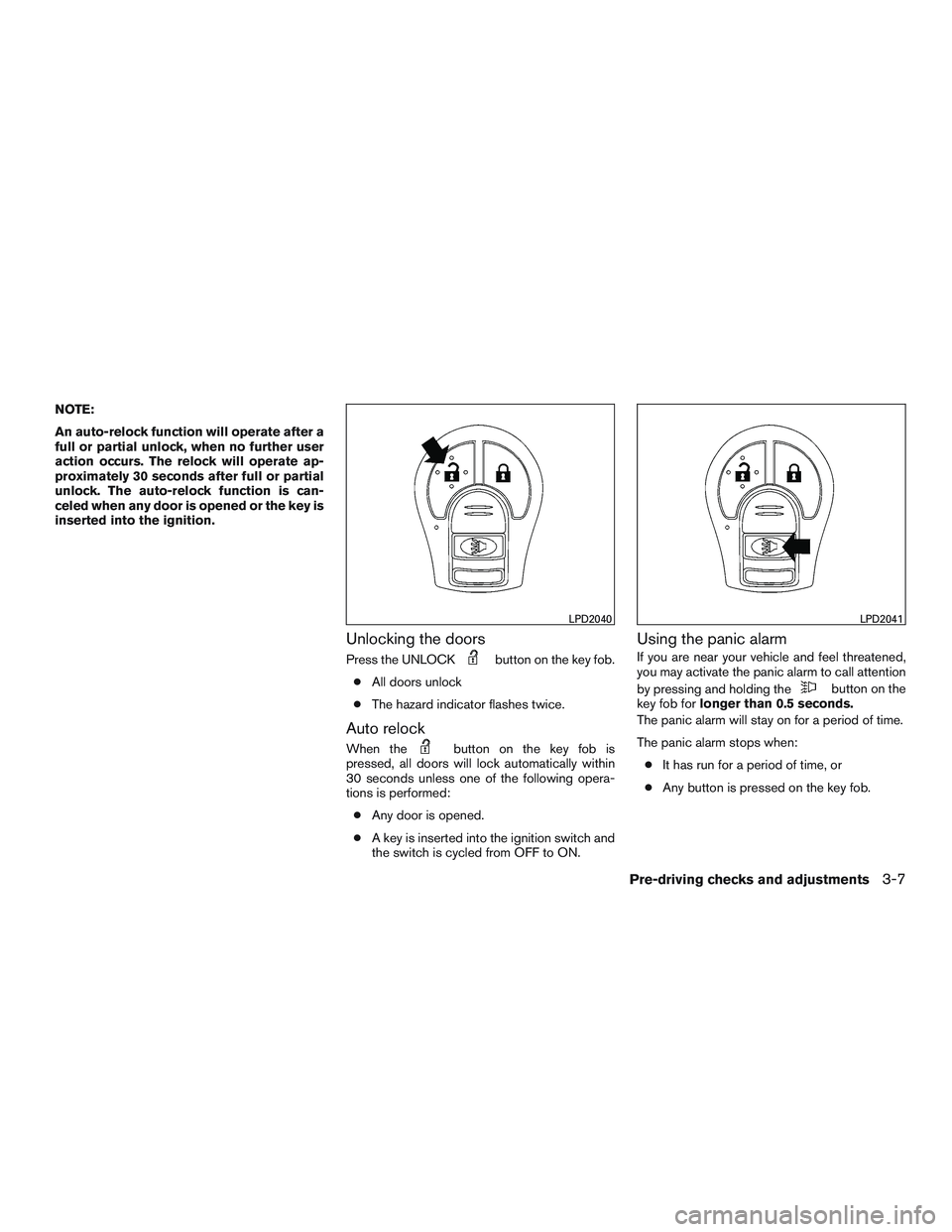
Unlocking the doors
Press the UNLOCKbutton on the key fob.
● All doors unlock
● The hazard indicator flashes twice.
Auto relock
When thebutton on the key fob is
pressed, all doors will lock automatically within
30 seconds unless one of the following opera-
tions is performed:
● Any door is opened.
● A key is inserted into the ignition switch and
the switch is cycled from OFF to ON.
Using the panic alarm
If you are near your vehicle and feel threatened,
you may activate the panic alarm to call attention
by pressing and holding the
button on the
key fob for longer than 0.5 seconds.
The panic alarm will stay on for a period of time.
The panic alarm stops when:
● It has run for a period of time, or
● Any button is pressed on the key fob.
LPD2040LPD2041
Pre-driving checks and adjustments3-7
Page 115 of 318
Using the interior light
Press thebutton on the key fob once to
turn on the interior lights.
For additional information, refer to “Interior light”
in the “Instruments and controls” section of this
manual.
1. Pull the hood lock release handle
�1located
below the instrument panel until the hood
springs up slightly.
2. Locate the lever
�2in between the hood and
grille and push the lever sideways with your
fingertips.
3. Raise the hood
�3.
4. Remove the support rod
�4and insert it into
the slot
�5. Hold the coated parts
�Awhen removing or
resetting the support rod. Avoid direct con-
tact with the metal parts, as they may be
hot immediately after the engine has been
stopped.
When closing the hood, return the support rod to
its original position, lower the hood to approxi-
mately 30 cm (12 in) above the latch and release
it. This allows proper engagement of the hood
latch.
LPD2023
HOOD
3-8Pre-driving checks and adjustments
Page 116 of 318
WARNING
●Make sure the hood is completely
closed and latched before driving. Fail-
ure to do so could cause the hood to fly
open and result in an accident.
● If you see steam or smoke coming from
the engine compartment, to avoid injury
do not open the hood.
WARNING
The rear hatch must be closed securely
before driving. An open rear hatch could
allow dangerous exhaust gases to be
drawn inside the vehicle. For additional
information, refer to “Exhaust gas (carbon
monoxide)” in the “Starting and driving”
section of this manual.
OPENING THE REAR HATCH
To open the rear hatch, unlock it with one of the
following operations, then pull on the handle.
● Push the power door lock switch to the
unlock position.
● Unlock all doors using the key
�A(if so
equipped) .
● Press the
button on the remote con-
trol once. For additional information, refer to
“Remote keyless entry system” in this sec-
tion.
LPD2155
REAR HATCH (Hatchback)
Pre-driving checks and adjustments3-9
Page 175 of 318
2. Press thebutton again to connect
phone. If phone is already connected push
the tuning switch (
or) to find
the desired command.
3. The system acknowledges the command and announces the next set of available
commands. Then asks you to initiate con-
necting from the phone handset.
The connecting procedure of the cellular
phone varies according to each cellular
phone model. For additional information, re-
fer to the cellular phone Owner’s Manual for
details.
When prompted for a Passkey code, enter
“1234” from the handset. The Passkey code
“1234” has been assigned by NISSAN and
cannot be changed.
Making a call by entering a phone
number
Main Menu “Call”
�A
“Phone Number”�B
Speak the digits�C
“Dial”�D
1. Press thebutton on the steering
wheel. A tone will sound.
2. Say: “Call”
�A. The system acknowledges
the command and announces the next set of
available commands.
3. Say “Phone Number”
�B. The system ac-
knowledges the command and announces
the next set of available commands.
Say: “Special Number” to dial more than 10
digits or any special characters.
4. Say the number you wish to call starting with the area code in single digit format
�C.Ifthe
system has trouble recognizing the correct
phone number, try entering the number in
the following groups: 3-digit area code,
3-digit prefix and the last 4-digits. For ex-
ample, 555-121-3354 can be said as “five
five five” as the 1st group, then “one two
one” as the 2nd group, and “three three five
four” as the 3rd group. For dialing more than
10 digits or any special characters, say
“Special Number”.
5. When you have finished speaking the phone number, the system repeats it back and an-
nounces the available commands.
6. Say: “Dial”
�D. The system acknowledges
the command and makes the call. For additional information, refer to “List of com-
mands” in this section.
Receiving a call
When you hear the ring tone, press thebutton on the steering wheel.
Once the call has ended, press the
button
on the steering wheel.
NOTE:
If you do not wish to take the call when you
hear the ring tone, press the
button
on the steering wheel.
For additional information, refer to “List of com-
mands” in this section.
LIST OF COMMANDS
Main Menu
“Call”
“Phonebook”
“Recent Calls”
“Connect Phone”
“Help”
4-52Heater, air conditioner, audio and phone systems