2017 NISSAN MAXIMA ECU
[x] Cancel search: ECUPage 69 of 406
In addition to the above, certain objects placed
on the front passenger seat may also cause the
light to operate as described above depending
on their weight.
For additional information related to the normal
operation and troubleshooting of this occupant
classification sensor system, please refer to
“Normal operation” and “Troubleshooting” in this
section.
Front passenger air bag
The front passenger air bag is designed to auto-
matically turn OFF when the vehicle is operated
under some conditions as described below in
accordance with U.S. regulations. If the front
passenger air bag is OFF, it will not inflate in a
crash. The driver air bag and other air bags in your
vehicle are not part of this system.
The purpose of the regulation is to help reduce
the risk of injury or death from an inflating air bag
to certain front passenger seat occupants, such
as children, by requiring the air bag to be auto-
matically turned OFF. Certain sensors are used to
meet the requirements.
The occupant classification sensor in this vehicle
is a weight sensor. It is designed to detect an
occupant and objects on the seat by weight. For
example, if a child is in the front passenger seat,
the NISSAN Advanced Air Bag System is de-signed to turn the front passenger air bag OFF in
accordance with the regulations. Also, if a child
restraint of the type specified in the regulations is
on the seat, its weight and the child’s weight can
be detected and cause the air bag to turn OFF.
Front passenger seat adult occupants who are
properly seated and using the seat belt as out-
lined in this manual should not cause the front
passenger air bag to be automatically turned
OFF. For small adults it may be turned OFF,
however if the occupant takes his/her weight off
the seat cushion (for example, by not sitting up-
right, by sitting on an edge of the seat, or by
otherwise being out of position) , this could cause
the sensor to turn the air bag OFF. Always be
sure to be seated and wearing the seat belt
properly for the most effective protection by the
seat belt and supplemental air bag.
NISSAN recommends that pre-teens and chil-
dren be properly restrained in a rear seat.
NISSAN also recommends that appropriate child
restraints and booster seats be properly installed
in a rear seat. If this is not possible, the occupant
classification sensor is designed to operate as
described above to turn the front passenger air
bag OFF for specified child restraints as required
by the regulations. Failing to properly secure
child restraints and to use the ALR mode may
allow the restraint to tip or move in a collision or
sudden stop. This can also result in the passen-ger air bag inflating in a crash instead of being
OFF. For additional information about proper use
and installation, refer to “Child restraints” in this
section.
If the front passenger seat is not occupied, the
front passenger air bag is designed not to inflate
in a crash. However, heavy objects placed on the
seat could result in air bag inflation, because of
the object’s weight detected by the occupant
classification sensor. Other conditions could also
result in air bag inflation, such as if a child is
standing on the seat, or if two children are on the
seat, contrary to the instructions in this manual.
Always be sure that you and all vehicle occupants
are seated and restrained properly.
Using the front passenger air bag status light, you
can monitor when the front passenger air bag is
automatically turned OFF.
If an adult occupant is in the seat but the front
passenger air bag status light is illuminated (indi-
cating that the air bag is OFF) , it could be that the
person is a small adult, or is not sitting on the seat
properly or not using the seat belt properly.
If a child restraint must be used in the front seat,
the front passenger air bag status light may or
may not be illuminated, depending on the size of
the child and the type of child restraint being
used. If the air bag status light is not illuminated
(indicating that the air bag might inflate in a
1-52Safety—Seats, seat belts and supplemental restraint system
Page 79 of 406
2 Instruments and controls
Instrument Panel..................................2-2
Meters and gauges ................................2-3
Speedometer and odometer .....................2-4
Tachometer ....................................2-5
Engine coolant temperature gauge ...............2-5
Fuel gauge ....................................2-6
Warning lights, indicator lights and audible
reminders .........................................2-7
Checking lights ................................2-7
Warning lights .................................2-7
Indicator lights ................................ 2-12
Audible reminders ............................. 2-14
Vehicle information display ......................... 2-15
How to use the vehicle information display .......2-16
Startup display ................................ 2-16
Drive computer ................................ 2-17
Settings ...................................... 2-17
Vehicle information display warnings and
indicators ..................................... 2-25
Control Panel and vehicle information display
Interaction ....................................... 2-29
Audio ........................................ 2-29
Receiving a call ............................... 2-30
Text Messaging ............................... 2-31Navigation System
............................. 2-33
Navigation Swipe to Meter ......................2-36
Security systems ................................. 2-36
Vehicle security system ......................... 2-36
NISSAN vehicle immobilizer system .............2-37
Wiper and washer switch ......................... 2-39
Switch operation .............................. 2-39
Rain-sensing auto wiper system
(if so equipped) ............................... 2-40
Rear window and outside mirror (if so equipped)
defroster switch .................................. 2-41
Headlight and turn signal switch ....................2-42
Headlight control switch ........................ 2-42
Daytime running light system ....................2-44
Instrument brightness control ...................2-45
Turn signal switch ............................. 2-45
Fog light switch ............................... 2-46
Horn ............................................ 2-46
Climate
controlled seat switches (if so equipped) ....2-46
Heated seat switches (if so equipped) ..............2-47
Heated steering wheel switch (if so equipped) .......2-48
Vehicle Dynamic Control (VDC) off switch ...........2-49
E-call (SOS) switch (if so equipped) ................2-49
Page 86 of 406
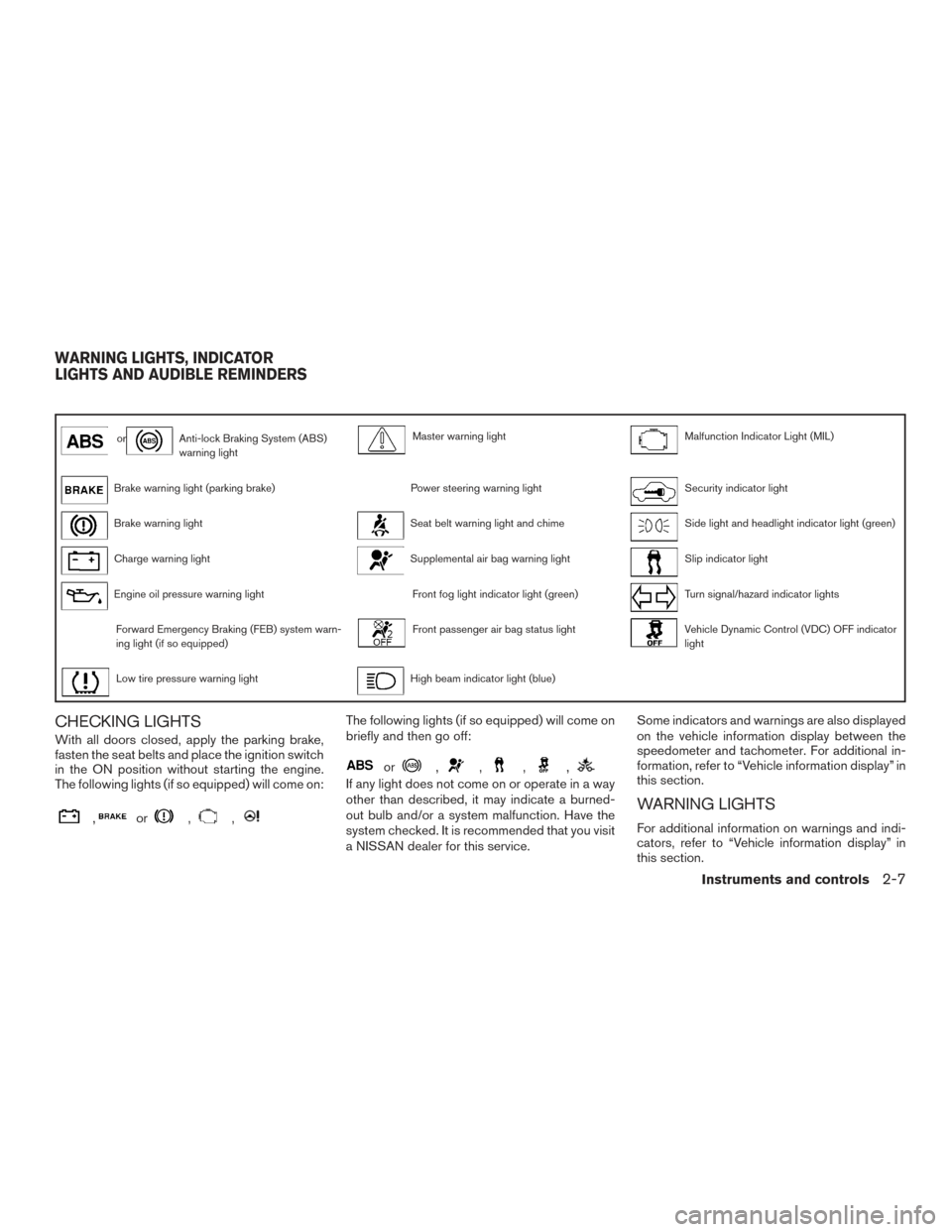
orAnti-lock Braking System (ABS)
warning lightMaster warning lightMalfunction Indicator Light (MIL)
Brake warning light (parking brake)Power steering warning lightSecurity indicator light
Brake warning lightSeat belt warning light and chimeSide light and headlight indicator light (green)
Charge warning lightSupplemental air bag warning lightSlip indicator light
Engine oil pressure warning lightFront fog light indicator light (green)Turn signal/hazard indicator lights
Forward Emergency Braking (FEB) system warn-
ing light (if so equipped)Front passenger air bag status lightVehicle Dynamic Control (VDC) OFF indicator
light
Low tire pressure warning lightHigh beam indicator light (blue)
CHECKING LIGHTS
With all doors closed, apply the parking brake,
fasten the seat belts and place the ignition switch
in the ON position without starting the engine.
The following lights (if so equipped) will come on:
,or,,
The following lights (if so equipped) will come on
briefly and then go off:
or,,,,
If any light does not come on or operate in a way
other than described, it may indicate a burned-
out bulb and/or a system malfunction. Have the
system checked. It is recommended that you visit
a NISSAN dealer for this service.Some indicators and warnings are also displayed
on the vehicle information display between the
speedometer and tachometer. For additional in-
formation, refer to “Vehicle information display” in
this section.
WARNING LIGHTS
For additional information on warnings and indi-
cators, refer to “Vehicle information display” in
this section.
WARNING LIGHTS, INDICATOR
LIGHTS AND AUDIBLE REMINDERS
Instruments and controls2-7
Page 91 of 406
For additional information, refer to “Power steer-
ing” in the “Starting and driving” section of this
manual.
Seat belt warning light andchime
The light and chime remind you to fasten your
seat belts. The light illuminates whenever the
ignition switch is placed in the ON or START
position and remains illuminated until the driver’s
seat belt is fastened. At the same time, the chime
sounds for about 6 seconds unless the driver’s
seat belt is securely fastened.
The seat belt warning light may also illuminate if
the front passenger’s seat belt is not fastened
when the front passenger’s seat is occupied . For
7 seconds after the ignition switch is placed in
the ON position, the system does not activate the
warning light for the front passenger.
For additional information, refer to “Seat belts” in
the “Safety—Seats, seat belts and supplemental
restraint system” section of this manual.
Supplemental air bag warninglight
When the ignition switch is placed in the ON or
START position, the supplemental air bag warn-
ing light illuminates for about 7 seconds and then
turns off. This means the system is operational. If any of the following conditions occur, the front
air bag, side air bag, curtain air bag, and preten-
sioner seat belt systems need servicing:
● The supplemental air bag warning light re-
mains on after approximately 7 seconds.
● The supplemental air bag warning light
flashes intermittently.
● The supplemental air bag warning light does
not come on at all.
It is recommended that you visit a NISSAN dealer
for these services.
Unless checked and repaired, the supplemental
restraint system (air bag system) and/or the pre-
tensioner(s) may not function properly. For addi-
tional information, refer to “Supplemental Re-
straint System (SRS)” in the “Safety—Seats, seat
belts and supplemental restraint system” section
of this manual.
WARNING
If the supplemental air bag warning light
is on, it could mean that the front air bag,
side air bag, curtain air bag and/or preten-
sioner systems will not operate in an acci-
dent. To help avoid injury to yourself or
others, have your vehicle checked as soon
as possible. It is recommended that you
visit a NISSAN dealer for this service.
INDICATOR LIGHTS
For additional information, refer to “Vehicle infor-
mation display” in this section.
Front fog light indicator light (green)
The front fog light indicator light illuminates when
the front fog lights are on. For additional informa-
tion, refer to “Fog light switch” in this section.
Front passenger air bag statuslight
The front passenger air bag status light will be lit
and the passenger front air bag will be off de-
pending on how the front passenger seat is being
used.
2-12Instruments and controls
Page 93 of 406
Security indicator light
This light blinks when the ignition switch is
placed in the OFF, LOCK or ACC (if so
equipped) position.
The blinking security indicator light indicates that
the security systems equipped on the vehicle are
operational.
For additional information, refer to “Security sys-
tems” in this section.
Side light and headlightindicator light (green)
The side light and headlight indicator light illumi-
nates when the side light or headlights are on
(not including daytime running or signature
lights) . If the headlight switch is in the AUTO
position, the side light and headlight indicator
light will illuminate when the headlights turn on.
For additional information, refer to “Headlight and
turn signal switch” in this section.
Slip indicator light
This indicator will blink when the VDC system is
operating, thus alerting the driver to the fact that
the road surface is slippery and the vehicle is
nearing its traction limits. You may feel or hear the system working; this is
normal.
The light will blink for a few seconds after the
VDC system stops limiting wheel spin.
The
indicator light also comes on when
you place the ignition switch in the ON position.
The light will turn off after approximately 2 sec-
onds if the system is operational. If the light does
not come on have the system checked. It is
recommended that you visit a NISSAN dealer for
this service.
Turn signal/hazard indicator
lights
The appropriate light flashes when the turn signal
switch is activated.
Both lights flash when the hazard switch is turned
on.
Vehicle Dynamic Control(VDC) OFF indicator light
This indicator light comes on when the VDC OFF
switch is pushed to off. This indicates the VDC
system has been turned off.
Push the VDC OFF switch again or restart the
engine and the system will operate normally. For
additional information, refer to “Vehicle Dynamic Control (VDC) system” in the “Starting and driv-
ing” section of this manual.
The VDC indicator light also comes on when you
place the ignition switch in the ON position. The
light will turn off after about 2 seconds if the
system is operational. If the light stays on or
comes on along with the
indicator light
while you are driving, have the VDC system
checked. It is recommended that you visit a
NISSAN dealer for this service.
While the VDC system is operating, you might
feel a slight vibration or hear the system working
when starting the vehicle or accelerating, but this
is normal.
AUDIBLE REMINDERS
Brake pad wear warning
The disc brake pads have audible wear warnings.
When a disc brake pad requires replacement, it
makes a high pitched scraping sound when the
vehicle is in motion, whether or not the brake
pedal is depressed. Have the brakes checked as
soon as possible if the warning sound is heard. It
is recommended that you visit a NISSAN dealer
for this service.
2-14Instruments and controls
Page 115 of 406
NAVIGATION SWIPE TO METER
Turn-by-turn route guidance can also be viewed
in the vehicle information display by using Navi-
gation Swipe to Meter. This can be done by
programming a route, touching the turn-by-turn
route icon on the center display, and swiping
towards the general direction of the vehicle infor-
mation display.
The turn-by-turn route icon will move across the
center display and transfer the route information
to the vehicle information display when the ve-
hicle is not moving.The icon will not move across the screen if the
vehicle is moving over speeds of 4 mph (7 km/h),
yet the information will still transfer to the vehicle
information display.
The turn-by-turn route guidance cannot be trans-
ferred to the vehicle information display if the
navigation screen is already shown or if a warning
is present.
For additional information, refer to the separate
Navigation Owner’s Manual.
Your vehicle has two types of security systems:● Vehicle security system
● NISSAN Vehicle Immobilizer System
VEHICLE SECURITY SYSTEM
The vehicle security system provides visual and
audible alarm signals if someone opens the
doors, trunk, or hood when the system is armed. It
is not, however, a motion detection type system
that activates when a vehicle is moved or when a
vibration occurs.
LIC3234LIC2930
SECURITY SYSTEMS
2-36Instruments and controls
Page 116 of 406
The system helps deter vehicle theft but cannot
prevent it, nor can it prevent the theft of interior or
exterior vehicle components in all situations. Al-
ways secure your vehicle even if parking for a
brief period. Never leave your Intelligent Key in
the vehicle, and always lock the vehicle when
unattended. Be aware of your surroundings, and
park in secure, well-lit areas whenever possible.
Many devices offering additional protection, such
as component locks, identification markers, and
tracking systems, are available at auto supply
stores and specialty shops. A NISSAN dealer
may also offer such equipment. Check with your
insurance company to see if you may be eligible
for discounts for various theft protection features.
How to arm the vehicle security
system
1. Close all windows.(The system can be
armed even if the windows are open.)
2. Remove the Intelligent Key from the vehicle.
3. Close all doors, hood and trunk. Lock all doors. The doors can be locked with the
Intelligent Key, door handle request switch,
or mechanical key.
4. Confirm that the
security indicator
light stays on for about 30 seconds. The
vehicle security system is now pre-armed. The vehicle security system will automati-
cally shift into the armed phase. The
security light begins to flash once every
three seconds. If during the pre-armed
phase one of the following occurs, the sys-
tem will not arm:
● Any door is unlocked with the mechanical
key, the Intelligent Key or door request
switch.
● Ignition switch is placed in ACC or ON
position.
● Even when the driver and/or passen-
gers are in the vehicle, the system will
activate with all the doors, hood and
trunk lid locked with the ignition switch
placed in the LOCK position. When
placing the ignition switch in the ACC
or ON position, the system will be re-
leased.
Vehicle security system activation
The vehicle security system will give the following
alarm:
● The headlights blink and the horn sounds
intermittently but synchronously.
● The alarm automatically turns off after a pe-
riod of time. However, the alarm reactivates if
the vehicle is tampered with again. The alarm is activated by:
● opening any door or hood without using the
key or Intelligent Key (even if the door is
unlocked by releasing the door inside lock
knob) .
How to stop an activated alarm
The alarm stops only by unlocking a door or the
trunk with the mechanical key, pushing the
button on the Intelligent Key, or pushing the re-
quest switch on the driver’s or passenger’s door
with the Intelligent Key in range of the door
handle.
NISSAN VEHICLE IMMOBILIZER
SYSTEM
The NISSAN Vehicle Immobilizer System will not
allow the engine to start without the use of a
registered key.
If the engine fails to start using a registered key
(for example, when interference is caused by
another registered key, an automated toll road
device or automatic payment device on the key
ring) , restart the engine using the following pro-
cedures:
1. Leave the ignition switch in the ON position for approximately 5 seconds.
Instruments and controls2-37
Page 117 of 406
2. Place the ignition switch in the OFF orLOCK position and wait approximately
10 seconds.
3. Repeat steps 1 and 2.
4. Restart the engine while holding the device (which may have caused the interference)
separate from the registered key.
If the no start condition re-occurs, NISSAN rec-
ommends placing the registered key on a sepa-
rate key ring to avoid interference from other
devices.
Never leave these keys in the vehicle.
FCC Notice:
For USA:
This device complies with Part 15 of the
FCC Rules. Operation is subject to the fol-
lowing two conditions: (1) This device may
not cause harmful interference, and (2) this
device must accept any interference re-
ceived, including interference that may
cause undesired operation. NOTE:
Changes or modifications not expressly ap-
proved by the party responsible for compli-
ance could void the user’s authority to op-
erate the equipment.
For Canada:
This device complies with Industry Canada
license-exempt RSS standard(s) . Opera-
tion is subject to the following two condi-
tions: (1) this device may not cause inter-
ference, and (2) this device must accept any
interference received, including interfer-
ence that may cause undesired operation
of the device.
Security indicator light
This light blinks when the ignition switch is
placed in the LOCK position with the key re-
moved from the ignition switch.
This function indicates the NISSAN Vehicle Im-
mobilizer System is operational.
If the NISSAN Vehicle Immobilizer System is mal-
functioning, the light will remain on while the
ignition switch is placed in the ON position.
LIC0474
2-38Instruments and controls