2017 NISSAN JUKE wiper
[x] Cancel search: wiperPage 2 of 28
2
3
14
5
9
16
13
1718
19
20
21
14
15
12
11
7
6
8
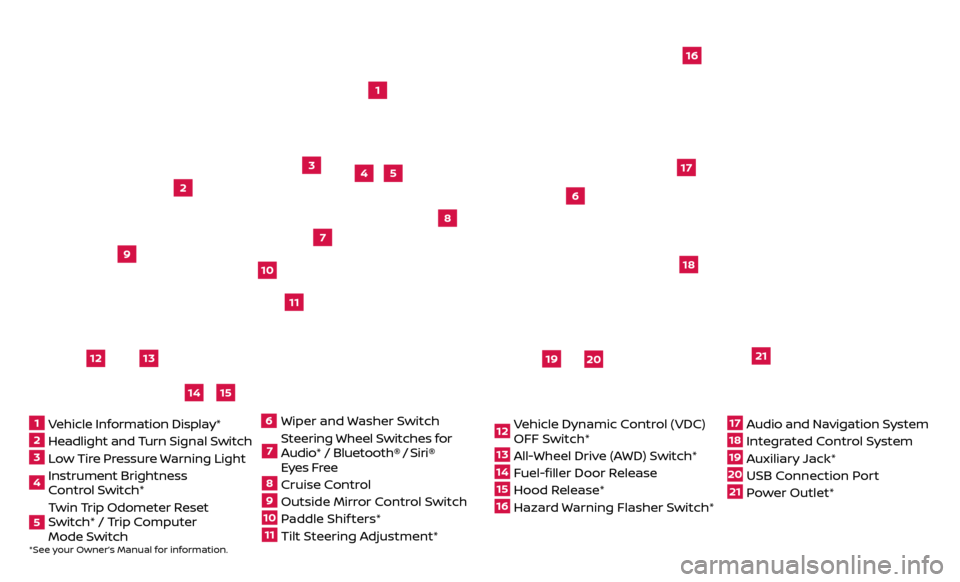
*See your Owner’s Manual for information.1 Vehicle Information Display*2 Headlight and Turn Signal Switch3 Low Tire Pressure Warning Light4 Instrument Brightness
Control Switch*5 Twin Trip Odometer Reset
Switch* / Trip Computer
Mode Switch
Wiper and
Washer Switch7 Steering Wheel Switches for
Audio* / Bluetooth®
/ Siri®
Eyes Free
8 Cruise Control9 Outside Mirr or Control Switch10 Paddle Shif ters*11 Tilt Steering Adjustment*
12 Vehicle Dynamic Control (VDC)
OFF Switch*13 All-Wheel Drive (AWD) Switch*14 Fuel-filler Door Release15 Hood Release*16 Hazard Warning Flasher Switch*
17 Audio and Navigation System18 Integrated Control System19 Auxiliary Jack*20 USB Connection Port21 Power Outlet*
610
Page 3 of 28
NEW SYSTEM FEATURESAround View® Monitor (AVM) with Moving Object Detection (MOD) (if so equipped)..2
SiriusXM Travel Link and SiriusXM Traffic (if so equipped) .............................4
Siri® E
yes Free
........................................................................\
..4
ESSENTIAL INFORMATIONFuel Efficient Driving ...................................................................5
Tir e Pressure Monitoring System (TPMS) ..............................................5
L
oose Fuel Cap
........................................................................\
.6
F
uel-filler Door .......................................................................\
..
6
T
owing Your Vehicle
....................................................................6
USB (Universal Serial Bus) Connection Port/Aux Jack and iPod® Interface
...........
7
Set
ting Display Brightness and Button Brightness
....................................7
Clock Set/A
djustment .................................................................
7
FIRST DRIVE FEATURESNissan Intelligent Key® System ........................................................9
Lif tgate Release.......................................................................10
He
ated Seats (if so equipped)
.........................................................10
Outside Mirr
or Control Switch .........................................................
11
S
tarting/Stopping the Engine .........................................................
11
He
adlight Control Switch .............................................................
12
Wiper and
Washer Switch
.............................................................13
He
ater and Air Conditioner (automatic) (with Integrated Control System)
(if so equipped)
........................................................................\
14
Driv
e Mode (with Integrated Control System) (if so equipped) .......................
15
FM/AM/SiriusXM® Satel
lite Radio with CD Player (if so equipped)
....................16
Cruise C
ontrol
........................................................................\
.17
Se
at Adjustments
.....................................................................17
SYSTEM GUIDE
Trip Computer .......................................................................\
.18
T ext Messaging .......................................................................\
18
NissanC
onnect
SM Mobile Apps (if so equipped).......................................19
Bluetooth® Hands-free Phone System ...............................................20
• S
ystem Operating Tips ...........................................................
20
Bluetooth® S
ystem without Navigation (if so equipped) .............................
20
Bluetooth® S
ystem with Navigation (if so equipped)
.................................22
Na
vigation System (if so equipped)
...................................................24
TABLE OF CONTENTS
Additional information about your vehicle is also available in your Owner’s Manual,
Navigation System Owner’s Manual and at www.NissanUSA.com.
Please see your Owner’s Manual for important safety information and system operation limitations.
• A c ellular telephone should not be used for any purpose while driving so full attention may be
given to vehicle operation.
•
A
lways wear your seat belt.
•
Supplemental air bags do not r
eplace proper seat belt usage.
•
Childr
en 12 and under should always ride in the rear seat properly secured in child restraints or
seat belts according to their age and weight.
•
Do not drink and driv
e.
F
or more information, refer to the “Safety — Seats, seat belts and supplemental restraint
system (section 1)”, the “Heater, air conditioner, audio and phone systems (section 4)” and the
“Starting and driving (section 5)” of your Owner’s Manual.
Page 15 of 28
13
WIPER AND WASHER SWITCH
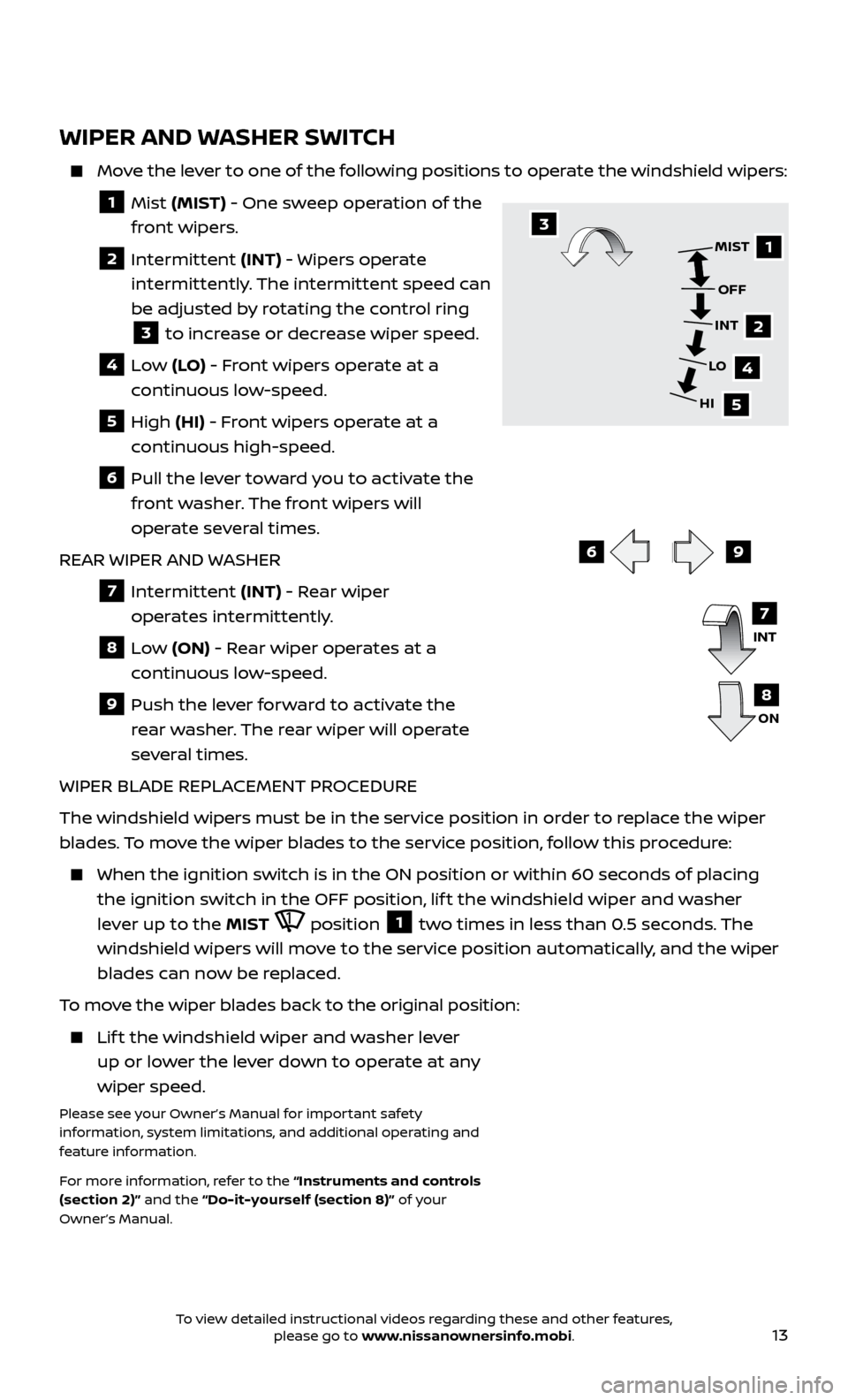
Move the lever to one of the following positions to operate the windshield wipers:
1 Mist (MIST) - One sweep operation of the
front wipers.
2 Intermittent (INT) - Wipers operate
intermittently. The intermittent speed can
be adjusted by rotating the control ring
3 to increase or decrease wiper speed.
4 Low (LO) - Front wipers operate at a
continuous low-speed.
5 High (HI) - Front wipers operate at a
continuous high-speed.
6 Pull the lever toward you to activate the front washer. The front wipers will
operate several times.
REAR WIPER AND WASHER
7 Intermittent (INT) - Rear wiper
operates intermittently.
8 Low (ON) - Rear wiper operates at a
continuous low-speed.
9 Push the lev er forward to activate the
rear washer. The rear wiper will operate
several times.
WIPER BLADE REPLACEMENT PROCEDURE
The windshield wipers must be in the service position in order to replace the wiper
blades. To move the wiper blades to the service position, follow this procedure:
When the ignition switch is in the ON position or within 60 sec onds of placing
the ignition switch in the OFF position, lif t the windshield wiper and washer
lever up to the MIST
position 1 two times in less than 0.5 seconds. The
windshield wipers will move to the service position automatically, and the wiper
blades can now be replaced.
To move the wiper blades back to the original position:
Lift the windshield wiper and washer lever up or lower the lever down to operate at any
wiper speed.
Please see your Owner’s Manual for important safety
information, system limitations, and additional operating and
feature information.
For more information, refer to the “Instruments and controls
(section 2)” and the “Do-it-yourself (section 8)” of your
Owner’s Manual.
69
1
2
4
5
MIST
OFF
INT
LO
HI3
INT
ON7
8
To view detailed instructional videos regarding these and other features, please go to www.nissanownersinfo.mobi.