2017 NISSAN JUKE trip computer
[x] Cancel search: trip computerPage 91 of 416

2-12Instruments and controls
SIC4531
VEHICLE INFORMATION DISPLAY
(Type B) (if so equipped)
When the ignition switch is placed in the ON
position, the vehicle information display shows
the following information:
1. Outside air temperature
2. Continuously Variable Transmission (CVT) posi-tion indicator (if so equipped)
3. Odometer/Instrument brightness control display
4. Twin trip odometer/Trip computer
OUTSIDE AIR TEMPERATURE
The outside air temperature is displayed in 8For
8C.
When the outside air temperature becomes
378F(3 8C) or lower, the outside air temperature
display blinks to give a warning. The display will
stop blinking after 1 minute or when the outside
air temperature becomes 398F(4 8C) or above.
The display may differ from the actual outside
temperature displayed on various signs or bill-
boards.
CONTINUOUSLY VARIABLE TRANS-
MISSION (CVT) POSITION INDICATOR
(if so equipped)
The Continuously Variable Transmission (CVT)
position indicator indicates the shift lever posi-
tion when the ignition switch is in the ON
position.
JVI1326X
Type A (if so equipped)
SIC4532Type B (if so equipped)
Page 92 of 416

TRIP COMPUTER
The switch for the trip computer is located on
the meter panel.
When the ignition switch is placed in the ON
position, modes of the trip computer can be
selected by pushing the trip computer mode
switch
*A.
Each time the trip computer mode switch
*Ais
pushed, the display will change as follows:
For Type A (if so equipped):
ODO ?(TRIP A ?TRIP B) ?Current fuel
consumption ?Distance to empty (dte) ?
Average fuel consumption ?Torque vectoring
AWD (AWD model) ?ODO
For Type B (if so equipped):
(TRIP A ?TRIP B) ?Current fuel consumption
? Distance to empty (dte) ?Average fuel
consumption ?Elapsed time ?Torque vector-
ing AWD (AWD model) (? TRIP A)
Current fuel consumption
The current fuel consumption mode shows the
current fuel consumption.
Distance to empty (dte — mls or km)
The distance to empty (dte) mode provides you
with an estimation of the distance that can be
driven before refueling. The dte is constantly
being calculated, based on the amount of fuel in
the fuel tank and the actual fuel consumption.
The display is updated every 30 seconds.
The dte mode includes a low range warning
feature. When the fuel level is low, the dte mode
is automatically selected and the dte display will
blink. Push the trip computer mode switch
*A
to return to the mode that was selected before
the warning occurred.
When the fuel level drops even lower, the dte
display will change to “----”.
.If the amount of fuel added is small, the
display just before the ignition switch is
turned off may continue to be displayed.
. When driving uphill or rounding curves, the
fuel in the tank shifts, which may momenta-
rily change the display.
Average fuel consumption (mpg or l
(liter)/100 km)
The average fuel consumption mode shows the
average fuel consumption since the last reset.
Resetting is done by pushing the trip computer
mode switch
*Afor approximately 1 second. The display is updated every 30 seconds. At
about the first 1/3 mile (500 m) after a reset, the
display shows “---”.
Elapsed time (Type B) (if so equipped)
The elapsed time mode shows the time since
the last reset. The displayed time can be reset
by pushing the trip computer mode switch
*A
for approximately 1 second.
Instruments and controls2-13
Page 93 of 416

2-14Instruments and controls
JVI1327X
Type A (if so equipped)
SIC4600Type B (if so equipped)
Torque vectoring AWD (AWD model)
The Torque vectoring mode shows the current
amount of torque distributed to each wheel.
Each torque indicator is displayed as a bar
graph
*1divided into 3 segments. The upper
indicator displays the current amount of torque
distribution (left and right) for the front wheels.
The lower indicator displays the current amount
of torque distribution (left and right) for the rear
wheels. The number of segments shows the
amount of torque currently distributed to each
wheel.
Resetting displays
For Type A (if so equipped):
When the average fuel consumption or TRIP B
is displayed, push the trip computer mode
switch
*Afor longer than 3 seconds. The
average fuel consumption and trip odometer
(TRIP B only) displays will be reset at the same
time.
For Type B (if so equipped):
When the average fuel consumption, elapsed
time or TRIP B is displayed, push the trip
computer mode switch
*Afor longer than 3
seconds. The average fuel consumption,
elapsed time and trip odometer (TRIP B only)
displays will be reset at the same time.
Page 154 of 416
.Do not fill a portable fuel container
in the vehicle or trailer. Static elec-
tricity can cause an explosion of
flammable liquid, vapor or gas in
any vehicle or trailer. To reduce the
risk of serious injury or death when
filling portable fuel containers:
— Always place the container on
the ground when filling.
— Do not use electronic devices when filling.
— Keep the pump nozzle in contact with the container while you are
filling it.
— Use only approved portable fuel containers for flammable liquid.
CAUTION
. If fuel is spilled on the vehicle body,
flush it away with water to avoid
paint damage.
. Insert the cap straight into the fuel-
filler tube, then tighten until the
fuel-filler cap clicks. Failure to tight-
en the fuel-filler cap properly may cause the
malfunction indicator
light (MIL) to illuminate. If the
light illuminates because the fuel-
filler cap is loose or missing, tighten
or install the cap and continue to
drive the vehicle. The
light
should turn off after a few driving
trips. If the
light does not turn
off after a few driving trips, have the
vehicle inspected. It is recom-
mended you visit a NISSAN dealer
for this service.
For additional information, see
“Malfunction Indicator Light (MIL)”
(P.2-22) .
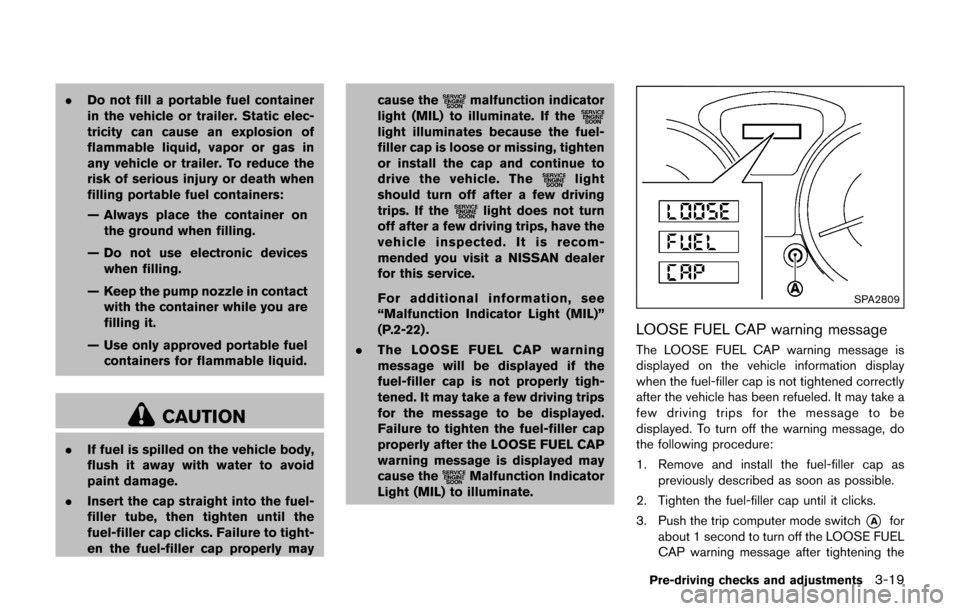
. The LOOSE FUEL CAP warning
message will be displayed if the
fuel-filler cap is not properly tigh-
tened. It may take a few driving trips
for the message to be displayed.
Failure to tighten the fuel-filler cap
properly after the LOOSE FUEL CAP
warning message is displayed may
cause the
Malfunction Indicator
Light (MIL) to illuminate.
SPA2809
LOOSE FUEL CAP warning message
The LOOSE FUEL CAP warning message is
displayed on the vehicle information display
when the fuel-filler cap is not tightened correctly
after the vehicle has been refueled. It may take a
few driving trips for the message to be
displayed. To turn off the warning message, do
the following procedure:
1. Remove and install the fuel-filler cap as
previously described as soon as possible.
2. Tighten the fuel-filler cap until it clicks.
3. Push the trip computer mode switch
*Afor
about 1 second to turn off the LOOSE FUEL
CAP warning message after tightening the
Pre-driving checks and adjustments3-19
Page 410 of 416

Odometer ................................................................. 2-7
Speedometer ........................................................... 2-7
Tachometer ............................................................... 2-9
Trip computer ....................................................... 2-13
General maintenance .................................................. 9-2
Giving voice commands ........................................... 4-97
Glove box ..................................................................... 2-48
H
Hazard warning flasher switch .................................. 6-2
Head restraints/headrests .......................................... 1-5
Headlights Bulb replacement ................................................ 8-23
Headlight switch .................................................. 2-40
Xenon headlights ................................................. 2-39
Heated seats ............................................................... 2-45
Heater Engine block heater ............................................ 5-40
Heater and air conditioner operation ............. 4-28
Help voice commands ........................................... 4-100
High temperature warning light .............................. 2-18
Hood release ............................................................... 3-15
Horn ............................................................................... 2-44
How to say numbers ................................................. 4-98
How to use brightness control button .................... 4-8
How to use the APPS·i button ................................. 4-5
How to use the back button ..................................... 4-5
How to use the CAMERA button ............................ 4-8
How to use the ON·OFF button/Volume
control knob ................................................................... 4-8
I
Ignition switch ............................................................... 5-9
Immobilizer system ..................................................... 2-34
In-cabin microfilter ...................................................... 4-35 Indicator lights ............................................................. 2-21
Inside mirror ................................................................. 3-21
Inspection/maintenance (I/M) test ....................... 10-21
Instrument brightness control .................................. 2-43
Instrument panel ........................................................... 2-4
Integrated control system ............................. 2-24, 5-21
Intelligent Key system .................................................. 3-6
Intelligent Key system warning light ............... 2-18
Key operating range .............................................. 3-8
Key operation ........................................................... 3-9
P position selecting warning light ................... 2-20
Remote keyless operation ................................. 3-12
Interior light replacement .......................................... 8-26
Interior lights ................................................................ 2-54
iPod
Šplayer operation .............................................. 4-68
ISOFIX child restraint ................................................ 1-20
J
Jump starting ................................................................. 6-9
K
Keyless entry With Intelligent Key system (See Intelligent
Key system) .......................................................... 3-12
Keys ................................................................................. 3-2 For Intelligent Key system .................................... 3-6
L
LabelsAir bag warning labels ....................................... 1-54
Air conditioner specification label ................. 10-13
Emission control information label ................ 10-12
Engine serial number ........................................ 10-11
F.M.V.S.S./C.M.V.S.S. certification label ...... 10-12 Tire and Loading information label .... 8-30, 10-12
Vehicle identification number (VIN) .............. 10-11
LATCH system ............................................................ 1-20
License plate, Installing front license plate ....... 10-13
Liftgate .......................................................................... 3-16
Light Air bag warning light .......................................... 1-54
Bulb replacement ................................................ 8-23
Fog light switch ................................................... 2-44
Headlight switch .................................................. 2-40
Headlights bulb replacement ........................... 8-23
Indicator lights ...................................................... 2-21
Interior lights ......................................................... 2-54
Map lights .............................................................. 2-54
Replacement ......................................................... 8-23
Warning/indicator lights and
audible reminders ................................................ 2-16
Xenon headlights ................................................. 2-39
Lights, Exterior and interior light replacement .... 8-26
Loading information (See vehicle
loading information) ................................................ 10-15
Lock Automatic door locks ............................................ 3-5
Door locks ................................................................ 3-4
Liftgate lock .......................................................... 3-16
Power door lock ..................................................... 3-4
Loose fuel cap warning ................................... 2-8, 3-19
Low fuel warning light ............................................... 2-18
Low tire pressure warning light .............................. 2-18
Low tire pressure warning system (See tire
pressure monitoring system (TPMS)) ..................... 5-3M
Maintenance Battery .................................................................... 8-10
General maintenance ............................................ 9-2
11-3
Page 411 of 416

11-4
Inside the vehicle .................................................... 9-3
Maintenance log .................................................. 9-15
Maintenance precautions ..................................... 8-2
Maintenance requirements ................................... 9-2
Maintenance schedules ........................................ 9-7
Maintenance under severe
driving conditions ................................................ 9-14
Outside the vehicle ................................................ 9-2
Seat belt maintenance ....................................... 1-15
Standard maintenance .......................................... 9-7
Maintenance schedules .............................................. 9-7
Making a call ................................................................ 4-92
Malfunction indicator light (MIL) ............................. 2-22
Manual air conditioner ............................................... 4-29
Manual front seat adjustment .................................... 1-3
Map lights ..................................................................... 2-54
Mechanical key (Intelligent Key system) ................. 3-3
Meter Trip computer ....................................................... 2-13
Meters and gauges ...................................................... 2-5 Instrument brightness control ........................... 2-43
Mirror Inside mirror .......................................................... 3-21
Outside mirrors .................................................... 3-22
Vanity mirror .......................................................... 3-23
Monitor, RearView Monitor ........................................ 4-8
Moonroof ...................................................................... 2-52
Moving Object Detection (MOD) ........................... 4-24
N
Navigation system voice commands ..................... 4-99
New vehicle break-in ................................................. 5-27
NISSAN Vehicle Immobilizer System .................... 2-34
NISSAN Voice Recognition System ...................... 4-96
NissanConnect App smartphone integration ...... 4-75
O
Odometer ....................................................................... 2-7
Off-road recovery ......................................................... 5-6
Oil Capacities and
recommended fluids/lubricants ........................ 10-2
Changing engine oil and filter ............................. 8-6
Checking engine oil level ..................................... 8-5
Engine oil .................................................................. 8-5
Engine oil viscosity .............................................. 10-8
One Shot Call ............................................................. 4-91
Outside air temperature display.............................. 2-12
Outside mirrors ........................................................... 3-22
Overheat, If your vehicle overheats ....................... 6-11
Owner’s Manual/Service Manual
order information ...................................................... 10-22
P
Panic alarm .................................................................. 3-13
Parking Brake break-in ...................................................... 5-35
Parking brake operation ..................................... 5-25
Parking on hills ..................................................... 5-33
Phone Car phone or CB radio ...................................... 4-80
Phone settings ............................................................ 4-96
Power Electric power steering ...................................... 5-34
Moonroof ............................................................... 2-52
Power door lock ..................................................... 3-4
Power outlet .......................................................... 2-46
Power windows .................................................... 2-50
Precautions Audio operation .................................................... 4-35
Braking precautions ............................................ 5-35 Child restraints ..................................................... 1-19
Cruise control ....................................................... 5-26
Driving safety ........................................................... 5-7
Maintenance ............................................................. 8-2
Seat belt usage .................................................... 1-10
Supplemental restraint system ......................... 1-38
When starting and driving .................................... 5-2
Push starting ................................................................ 6-11
Push-button ignition switch ............................ 5-9, 5-10
R
Radio ............................................................................. 4-35 Car phone or CB radio ...................................... 4-80
Steering wheel audio controls ......................... 4-73
Rapid air pressure loss ............................................... 5-6
Readiness for inspection/maintenance
(I/M) test .................................................................... 10-21
Rear door lock, Child safety rear door lock .......... 3-6
Rear seats ...................................................................... 1-4
Rear window and outside mirror
defroster switch .......................................................... 2-38
Rear window wiper and washer switch ............... 2-37
RearView Monitor ......................................................... 4-8
Recorders, Event data ............................................ 10-22
Registering in another country ............................. 10-10
Registering with NissanConnect App ................... 4-75
Remote keyless entry function, For Intelligent
Key system ................................................................... 3-12
Reporting safety defects ....................................... 10-20
Roadside assistance program ................................... 6-2
Rollover ........................................................................... 5-6
Roof, Moonroof ........................................................... 2-53
Page 413 of 416

11-6
TPMS, Tire pressure monitoring system ................ 5-3
TPMS, Tire pressure warning system ..................... 6-3
Trailer towing ............................................................ 10-18
TransmissionContinuously Variable Transmission
(CVT) fluid ................................................................ 8-8
Driving with CVT (Continuously
Variable Transmission) ....................................... 5-14
Driving with manual transmission .................... 5-19
Transmission shift lever lock release .............. 5-18
Transmitter, With Intelligent Key system
(See Intelligent Key system) .................................... 3-12
Traveling or registering in another country........ 10-10
Trip computer .............................................................. 2-13
Turn signal switch ....................................................... 2-43
U
Underbody cleaning ..................................................... 7-3
Uniform tire quality grading ................................... 10-19
USB (Universal Serial Bus)
connection port ............................................... 4-57, 4-67
V
Vanity mirror ................................................................. 3-23
Variable voltage control system .............................. 8-12
Vehicle Dimensions and weights ................................. 10-10
Identification number (VIN) ............................. 10-11
Information display.................................... 2-11, 2-12
Loading information .......................................... 10-15
Recovery (freeing a stuck vehicle) .................. 6-15
Security system .................................................... 2-33
Vehicle dynamic control (VDC) off switch .... 2-44
Vehicle dynamic control (VDC) system ......... 5-37
Ventilators ..................................................................... 4-27 Voice command .......................................................... 4-91
Voice Prompt Interrupt .............................................. 4-91
W
Warning
Hazard warning flasher switch ............................ 6-2
Lights ...................................................................... 2-16
Tire pressure monitoring
system (TPMS) .............................................. 5-3, 6-3
Warning lights, indicator lights and
audible reminders ................................................ 2-15
Warning labels, Air bag warning labels ................ 1-54
Warning light Air bag warning light ............................... 1-54, 2-20
Anti-lock braking system (ABS)
warning light ......................................................... 2-16
AWD warning light .............................................. 5-31
Brake warning light ............................................. 2-16
Door open warning light .................................... 2-17
Electric power steering warning light ............. 2-17
Intelligent Key system warning light ............... 2-18
Low fuel warning light ........................................ 2-18
Low tire pressure warning light ....................... 2-18
Seat belt warning light ....................................... 2-20
Warranty, Emission control system warranty .... 10-20
Washer switch Rear window wiper and washer switch ........ 2-37
Wiper and washer switch ................................. 2-36
Washing .......................................................................... 7-2
Waxing ............................................................................ 7-3
Weights (See dimensions and weights) ........... 10-10
Wheel/tire size ............................................................ 10-9
Wheels and tires ........................................................ 8-28 Care of wheels ........................................................ 7-4
Cleaning aluminum alloy wheels ......................... 7-4
Window washer fluid ................................................... 8-9 Window(s)
Cleaning .................................................................... 7-3
Power windows .................................................... 2-50
Wiper Rear window wiper and washer switch ........ 2-37
Rear window wiper blade ................................. 8-16
Wiper and washer switch ................................. 2-36
Wiper blades ........................................................ 8-15
Wiper and washer switch ........................................ 2-36
X
Xenon headlights ........................................................ 2-39