2017 NISSAN JUKE light
[x] Cancel search: lightPage 176 of 416
eye view is displayed.
In addition, the non-viewable corners are dis-
played in red (blink for the first 3 seconds)
*3
to remind the drivers to be cautious.
WARNING
.Objects in the bird’s-eye view will
appear farther than the actual dis-
tance because the bird’s-eye view is
a pseudo view that is processed by
combining the views from the cam-
eras on the outside mirrors, the
front and the rear of the vehicle.
. Tall objects, such as a curb or
vehicle, may be misaligned or not
displayed at the seam of the views.
. Objects that are above the camera
cannot be displayed.
. The view for the bird’s-eye view may
be misaligned when the camera
position alters.
. A line on the ground may be mis-
aligned and is not seen as being
straight at the seam of the views.
The misalignment will increase as
the line proceeds away from the
vehicle.
SAA3571
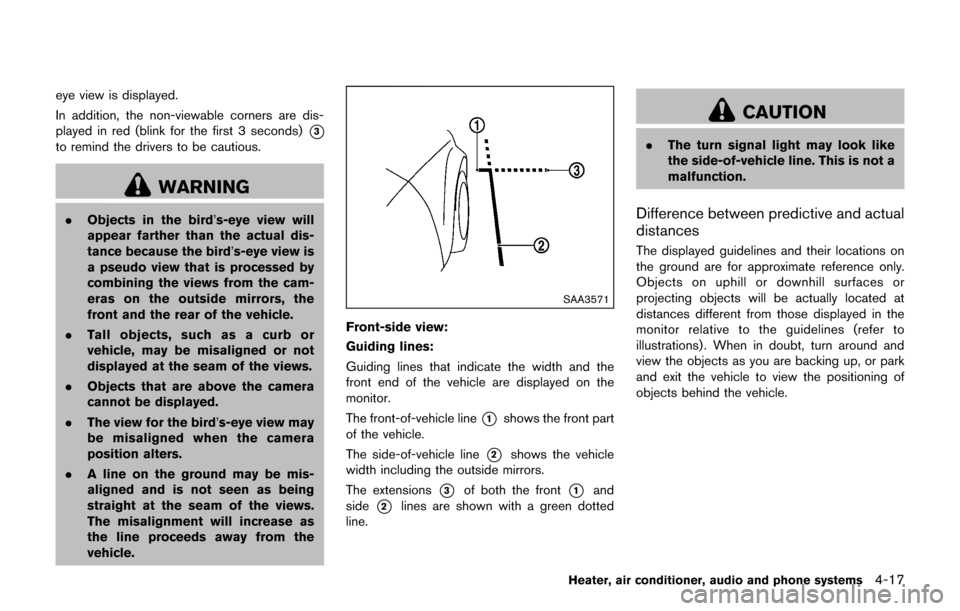
Front-side view:
Guiding lines:
Guiding lines that indicate the width and the
front end of the vehicle are displayed on the
monitor.
The front-of-vehicle line
*1shows the front part
of the vehicle.
The side-of-vehicle line
*2shows the vehicle
width including the outside mirrors.
The extensions
*3of both the front*1and
side
*2lines are shown with a green dotted
line.
CAUTION
. The turn signal light may look like
the side-of-vehicle line. This is not a
malfunction.
Difference between predictive and actual
distances
The displayed guidelines and their locations on
the ground are for approximate reference only.
Objects on uphill or downhill surfaces or
projecting objects will be actually located at
distances different from those displayed in the
monitor relative to the guidelines (refer to
illustrations) . When in doubt, turn around and
view the objects as you are backing up, or park
and exit the vehicle to view the positioning of
objects behind the vehicle.
Heater, air conditioner, audio and phone systems4-17
Page 180 of 416

the lens, a malfunction, fire or an
electric shock.
. Do not strike the cameras. They are
precision instruments. Doing so
could cause a malfunction or cause
damage resulting in a fire or an
electric shock.
The following are operating limitations and do
not represent a system malfunction:
. The screen displayed on the Around View
Š
Monitor will automatically return to the
previous screen 3 minutes after the CAM-
ERA button has been pushed while the shift
lever is in a position other than the R
(Reverse) position.
. When the view is switched, the display
images on the screen may be displayed with
some delay.
. When the temperature is extremely high or
low, the screen may not display objects
clearly.
. When strong light is shining directly on the
camera, objects may not be displayed
clearly.
. The screen may flicker under fluorescent
light. .
The colors of objects on the Around View
Š
Monitor may differ somewhat from the actual
color of objects.
. Objects on the monitor may not be clear and
the color of the object may differ in a dark
environment.
. There may be differences in sharpness
between each camera view of the bird’s-
eye view.
. If dirt, rain or snow accumulates on the
camera, the Around View
ŠMonitor may not
display objects clearly. Clean the camera.
. Do not use wax on the camera lens. Wipe off
any wax with a clean cloth that has been
dampened with a mild detergent diluted with
water.
JVH1036X
There are some areas where the system will not
show objects and the system does not warn of
moving objects. When in the front or the rear
view display, an object below the bumper or on
the ground may not be viewed
*1. When in the
bird’s-eye view, a tall object near the seam
*3
of the camera viewing areas will not appear in
Heater, air conditioner, audio and phone systems4-21
Page 185 of 416
4-26Heater, air conditioner, audio and phone systems
JVH1257X
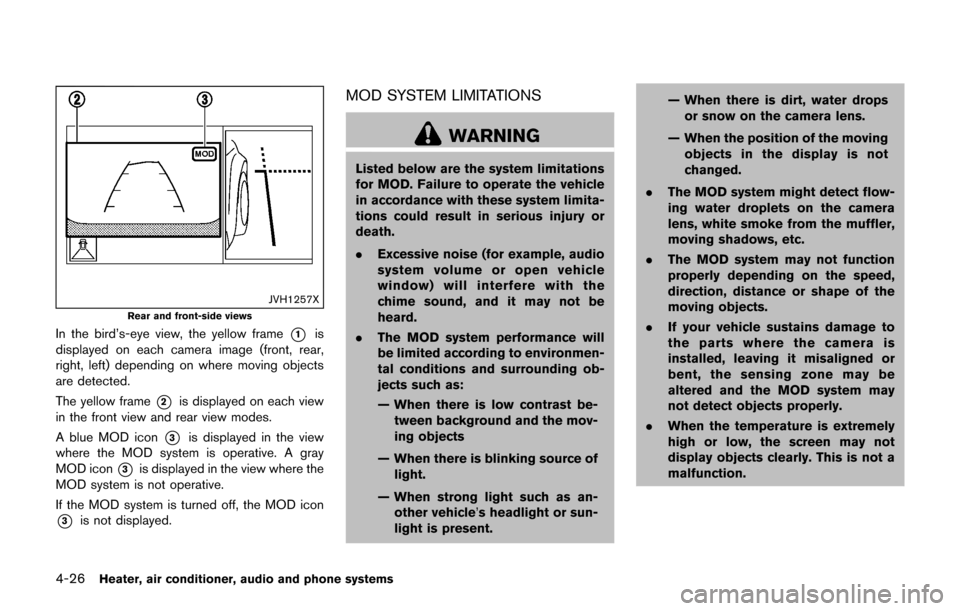
Rear and front-side views
In the bird’s-eye view, the yellow frame*1is
displayed on each camera image (front, rear,
right, left) depending on where moving objects
are detected.
The yellow frame
*2is displayed on each view
in the front view and rear view modes.
A blue MOD icon
*3is displayed in the view
where the MOD system is operative. A gray
MOD icon
*3is displayed in the view where the
MOD system is not operative.
If the MOD system is turned off, the MOD icon
*3is not displayed.
MOD SYSTEM LIMITATIONS
WARNING
Listed below are the system limitations
for MOD. Failure to operate the vehicle
in accordance with these system limita-
tions could result in serious injury or
death.
. Excessive noise (for example, audio
system volume or open vehicle
window) will interfere with the
chime sound, and it may not be
heard.
. The MOD system performance will
be limited according to environmen-
tal conditions and surrounding ob-
jects such as:
— When there is low contrast be-
tween background and the mov-
ing objects
— When there is blinking source of light.
— When strong light such as an- other vehicle’s headlight or sun-
light is present. — When there is dirt, water drops
or snow on the camera lens.
— When the position of the moving objects in the display is not
changed.
. The MOD system might detect flow-
ing water droplets on the camera
lens, white smoke from the muffler,
moving shadows, etc.
. The MOD system may not function
properly depending on the speed,
direction, distance or shape of the
moving objects.
. If your vehicle sustains damage to
the parts where the camera is
installed, leaving it misaligned or
bent, the sensing zone may be
altered and the MOD system may
not detect objects properly.
. When the temperature is extremely
high or low, the screen may not
display objects clearly. This is not a
malfunction.
Page 189 of 416

4-30Heater, air conditioner, audio and phone systems
Fan speed control:
Turn the fan speed control
dial clockwise to
increase the fan speed.
Turn the fan speed control
dial counter-
clockwise to decrease the fan speed.
A/C (Air Conditioner) operation:
Push the A/C button to turn on or off the air
conditioner. When the air conditioner is on, the
A/C indicator light on the button illuminates.
Temperature control:
Turn the temperature control dial to set the
desired temperature. Turn the dial between the
middle and the right position to select the hot
temperature. Turn the dial between the middle
and the left position to select the cool tempera-
ture.
Heater operation
Heating:
This mode is used to direct heated air to the foot
outlets.
1. Move the air intake lever to the
position.
2. Turn the air flow control dial to the
position.
3. Turn the fan speed control
dial to the
desired position. 4. Turn the temperature control dial to the
desired position between the middle and the
hot (right) position.
Ventilation:
This mode directs outside air to the side and
center ventilators.
1. Move the air intake lever to the
position.
2. Turn the air flow control dial to the
position.
3. Turn the fan speed control
dial to the
desired position.
Defrosting or defogging:
This mode directs the air to the defroster outlets
to defrost/defog the windows.
1. Move the air intake lever to the
position.
2. Turn the air flow control dial to the
position.
3. Turn the fan speed control
dial to the
desired position.
4. Turn the temperature control dial to the desired position between the middle and the
hot (right) position.
. To remove frost from the outside surface of
the windshield quickly, turn the temperature
control dial to the maximum hot position and
the fan speed control
dial to the
maximum position. .
When the
position is selected, the air
conditioner will automatically turn on. This
will dehumidify the air and help to defog the
windows.
Bi-level heating:
This mode directs cool air from the side and
center vents and warm air from the foot outlets.
When the temperature control dial is turned to
the maximum hot or cool position, the air
between the ventilators and the foot outlets is
the same temperature.
1. Move the air intake lever to the
position.
2. Turn the air flow control dial to the
position.
3. Turn the fan speed control
dial to the
desired position.
4. Turn the temperature control dial to the desired position.
Heating and defogging:
This mode heats the interior and defogs the
windows.
1. Move the air intake lever to the
position.
2. Turn the air flow control dial to the
position.
3. Turn the fan speed control
dial to the
desired position.
Page 190 of 416

4. Turn the temperature control dial to thedesired position.
When the
position is selected, the air
conditioner will automatically turn on. This will
dehumidify the air and help to defog the
windows.
Air conditioner operation
The air conditioner system should be operated
for approximately 10 minutes at least once a
month. This helps prevent damage to the air
conditioner system due to the lack of lubrication.
Cooling:
This mode is used to cool and dehumidify the air.
1. Move the air intake lever to the
position.
2. Turn the air flow control dial to the
position.
3. Turn the fan speed control
dial to the
desired position.
4. Push the A/C button on. (The A/C indicator light will illuminate.)
5. Turn the temperature control dial to the desired position between the middle and the
cool (left) position.
. For quick cooling when the outside tem-
perature is high, move the air intake lever to
the
position. Be sure to move the air
intake lever to theposition for normal cooling.
. A visible mist may be seen coming from the
ventilators in hot, humid conditions as the air
is cooled rapidly. This does not indicate a
malfunction.
Dehumidified heating:
This mode is used to heat and dehumidify the
air.
1. Move the air intake lever to the
position.
2. Turn the air flow control dial to the
position.
3. Turn the fan speed control
dial to the
desired position.
4. Push the A/C button on. (The A/C indicator light will illuminate.)
5. Turn the temperature control dial to the desired position between the middle and the
hot (right) position.
Dehumidified defogging:
This mode is used to defog the windows and
dehumidify the air.
1. Move the air intake lever to the
position.
2. Turn the air flow control dial to the
position.
3. Turn the fan speed control
dial to the
desired position. 4. Turn the temperature control dial to the
desired position.
When the
position is selected, the air
conditioner will automatically turn on. This will
dehumidify the air and help to defog the
windows.
Heater, air conditioner, audio and phone systems4-31
Page 191 of 416

4-32Heater, air conditioner, audio and phone systems
SAA3443
1. AUTO button/Temperature control dial
2. OFF button
3. A/C button
4. CLIMATE button
5. Display screen*
6. Air flow control buttons
7. Fan speed control
dial8. Front defroster
button
9. Air intake button (Outside air circulation/Air
recirculation)
10. Rear window defroster
button (See “Rear
window and outside mirror defroster switch”
(P.2-38) .)
*: Temperature is displayed in 8F (US) or 8C
(Canada) .
AUTOMATIC AIR CONDITIONER (with
Integrated Control System)
Automatic operation (AUTO)
The AUTO mode may be used year-round as the
system automatically controls constant tempera-
ture, air flow distribution and fan speed.
To turn off the heater and air conditioner, push
the CLIMATE button to change to the Climate
Control Mode, then push the OFF button.
Cooling and dehumidified heating:
1. Push the AUTO button. (The AUTO indicator will be displayed.)
2. Turn the temperature control dial to set the preferred temperature. The temperature
range is between 608F (188C) and 908F
(328C) .
A visible mist may be seen coming from the
ventilators in hot, humid conditions as the air is
cooled rapidly. This does not indicate a mal-
function.
Dehumidified defrosting/defogging:
1. Push the front defroster
button. (The
indicator light will illuminate.)
2. Turn the temperature control dial to set the preferred temperature.
Page 192 of 416

.To remove moisture or fog on the frontwindow quickly, set the temperature to
the high temperature and the fan speed
to their maximum level.
.After the windshield is cleared, push the
front defrosterbutton again. (The
indicator light will turn off.)
.When the front defrosterbutton is
pushed, the air conditioner will automa-
tically turn on to defog the windshield.
The outside air circulation mode will be
selected to improve the defogging per-
formance.
.When theposition is selected, the
air recirculation mode cannot be turned
on to prevent the windows from being
fogged up.
Manual operation
The manual mode can be used to control the
heater and air conditioner to your desired
settings.
To turn off the heater and air conditioner, push
the OFF button.
If the Drive Mode is indicated on the screen,
push the CLIMATE button to change to the
Climate Control Mode, then push the OFF
button. Fan speed control:
Turn the fan speed control
dial to adjust the
fan speed.
Air flow control:
Push the air flow control buttons to change the
air flow mode:
— Air flows from the center and side ventilators.
— Air flows from the center and sideventilators and foot outlets.
— Air flows mainly from the foot outlets.
— Air flows from the defroster outlets andfoot outlets.
Temperature control:
Turn the temperature control dial to set the
preferred temperature.
The temperature range is between 608F (188C)
and 908F (328C) .
Air intake control:
.Push the air intake button to change the air
circulation mode. When the indicator light
on “
” side illuminates, the flowing air is
recirculated inside the vehicle.
When the
orposition is selected,
the air recirculation mode cannot be turned
on to prevent the windows from being
fogged up. .
Push the air intake button to change the air
circulation mode. When the indicator light
on “
” side illuminates, the flowing air is
drawn from outside the vehicle.
. Push and hold the air intake button for more
than 1.5 seconds to set the automatic
control between the outside air circulation
and air recirculation modes.
When the “
”or“” position is
selected, the air recirculation mode does
not activate.
When setting the automatic control mode,
the indicator lights “
” and “” will
blink twice indicating that the system is in
the automatic control mode.
Heater, air conditioner, audio and phone systems4-33
Page 195 of 416

4-36Heater, air conditioner, audio and phone systems
function in your vehicle radio system.
Reception conditions will constantly change
because of vehicle movement. Buildings, terrain,
signal distance and interference from other
vehicles can work against ideal reception.
Described below are some of the factors that
can affect your radio reception.
Some cellular phones or other devices may
cause interference or a buzzing noise to come
from the audio system speakers. Storing the
device in a different location may reduce or
eliminate the noise.
SAA0306
FM radio reception:
Range: FM range is normally limited to 25 to 30
miles (40 to 48 km) , with monaural (single
station) FM having slightly more range than
stereo FM. External influences may sometimes
interfere with FM station reception even if the
FM station is within 25 miles (40 km). The
strength of the FM signal is directly related to the
distance between the transmitter and receiver.
FM signals follow a line-of-sight path, exhibiting
many of the same characteristics as light. For
example they will reflect off objects.
Fade and drift: As your vehicle moves away from
a station transmitter, the signals will tend to fade
and/or drift.Static and flutter: During signal interference from
buildings, large hills or due to antenna position,
usually in conjunction with increased distance
from the station transmitter, static or flutter can
be heard. This can be reduced by lowering the
treble setting to reduce the treble response.
Multipath reception: Because of the reflective
characteristics of FM signals, direct and re-
flected signals reach the receiver at the same
time. The signals may cancel each other,
resulting in momentary flutter or loss of sound.
AM radio reception:
AM signals, because of their low frequency, can
bend around objects and skip along the ground.
In addition, the signals can be bounced off the
ionosphere and bent back to earth. Because of
these characteristics. AM signals are also
subject to interference as they travel from
transmitter to receiver.
Fading: Occurs while the vehicle is passing
through freeway underpasses or in areas with
many tall buildings. It can also occur for several
seconds during ionospheric turbulence even in
areas where no obstacles exist.
Static: Caused by thunderstorms, electrical
power lines, electric signs and even traffic lights.