Page 198 of 248

8. Multi function meter
3. Touch the preferred item. The panel will bereplaced to show the selected item.
Panel list
Available items for large panels and small
panels:
Item Larg-
e pa- nel Small
panel
Engine Coolant Temperature X X
Engine Oil Temperature X X
Engine Oil Pressure X X
Transmission Oil Temperature X X
Transmission Oil Pressure X X
Boost X X
Speed X
Fuel/Range X X
Fuel Flow X X
Recent Fuel Economy X X
Torque Split X
Accel Pedal X
Brake Pedal X
Steering X
Accelerating G-Force X
Braking G-Force X
Cornering G-Force X X
Accel/Braking G-Force X XItem
Larg-
e pa- nel Small
panel
Total G-Force X X
Clock X
Reset the CUSTOM VIEW #(1-5)
to Default XX
INFO:
. Each panel selected will be saved.
. Panels will remain saved in the system even
after the engine is turned off.
. Two of the same panels cannot be displayed
at the same time.
. Two of the same panels of different sizes
cannot be displayed at the same time.
. Panels that have not been assigned a display
item remain empty.
Initializing display
The customized performance/vehicle information
screens can be initialized to return to the default
view.
8-6
Page 201 of 248
.After first starting the engine, it may take a
while for the oil temperature to stabilize. This
is not a malfunction.
. When screens other than the multi function
meter screen are displayed, warnings will not
be provided, even if the meter values register
red zone readings.
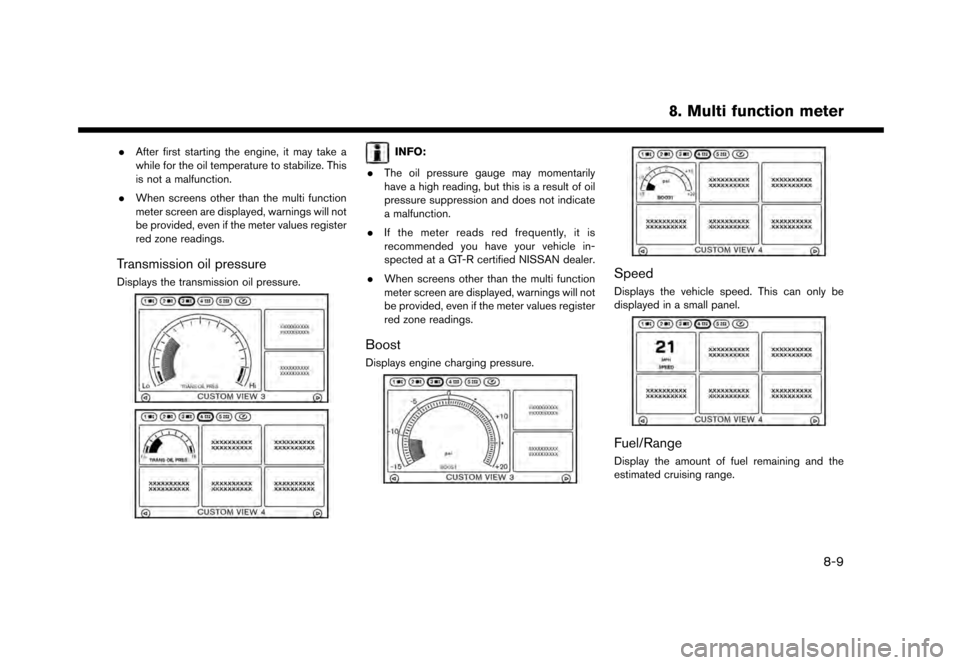
Transmission oil pressure
Displays the transmission oil pressure.
INFO:
. The oil pressure gauge may momentarily
have a high reading, but this is a result of oil
pressure suppression and does not indicate
a malfunction.
. If the meter reads red frequently, it is
recommended you have your vehicle in-
spected at a GT-R certified NISSAN dealer.
. When screens other than the multi function
meter screen are displayed, warnings will not
be provided, even if the meter values register
red zone readings.
Boost
Displays engine charging pressure.
Speed
Displays the vehicle speed. This can only be
displayed in a small panel.
Fuel/Range
Display the amount of fuel remaining and the
estimated cruising range.
8. Multi function meter
8-9
Page 208 of 248
8. Multi function meter
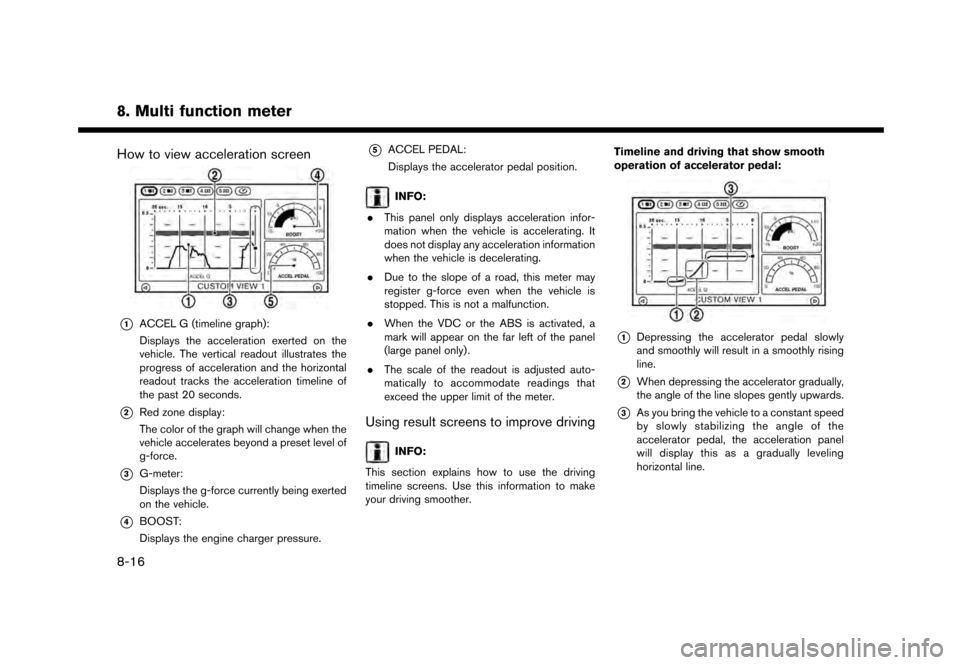
How to view acceleration screen
*1ACCEL G (timeline graph):
Displays the acceleration exerted on the
vehicle. The vertical readout illustrates the
progress of acceleration and the horizontal
readout tracks the acceleration timeline of
the past 20 seconds.
*2Red zone display:
The color of the graph will change when the
vehicle accelerates beyond a preset level of
g-force.
*3G-meter:
Displays the g-force currently being exerted
on the vehicle.
*4BOOST:
Displays the engine charger pressure.
*5ACCEL PEDAL:
Displays the accelerator pedal position.
INFO:
. This panel only displays acceleration infor-
mation when the vehicle is accelerating. It
does not display any acceleration information
when the vehicle is decelerating.
. Due to the slope of a road, this meter may
register g-force even when the vehicle is
stopped. This is not a malfunction.
. When the VDC or the ABS is activated, a
mark will appear on the far left of the panel
(large panel only) .
. The scale of the readout is adjusted auto-
matically to accommodate readings that
exceed the upper limit of the meter.
Using result screens to improve driving
INFO:
This section explains how to use the driving
timeline screens. Use this information to make
your driving smoother. Timeline and driving that show smooth
operation of accelerator pedal:
*1Depressing the accelerator pedal slowly
and smoothly will result in a smoothly rising
line.
*2When depressing the accelerator gradually,
the angle of the line slopes gently upwards.
*3As you bring the vehicle to a constant speed
by slowly stabilizing the angle of the
accelerator pedal, the acceleration panel
will display this as a gradually leveling
horizontal line.
8-16