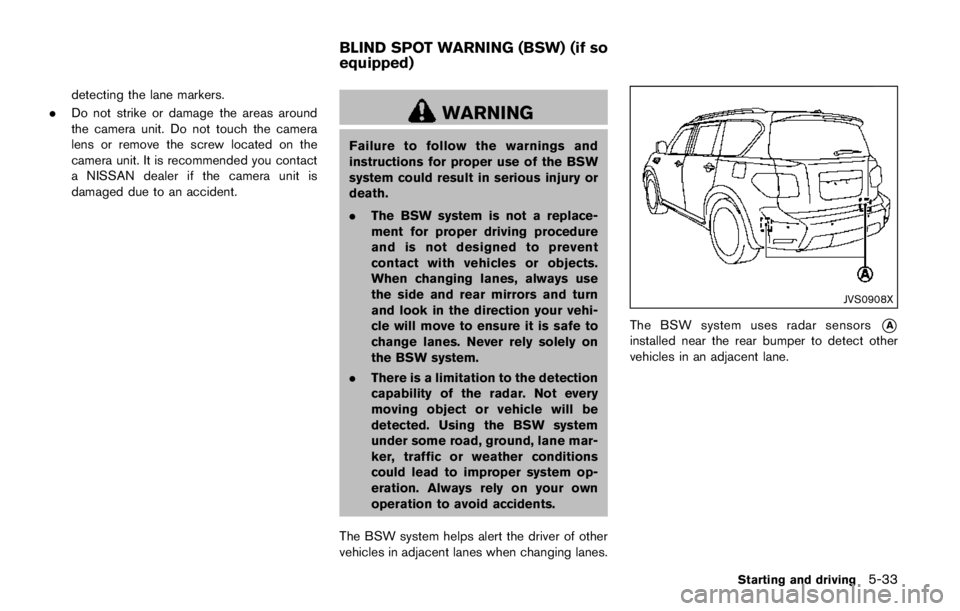
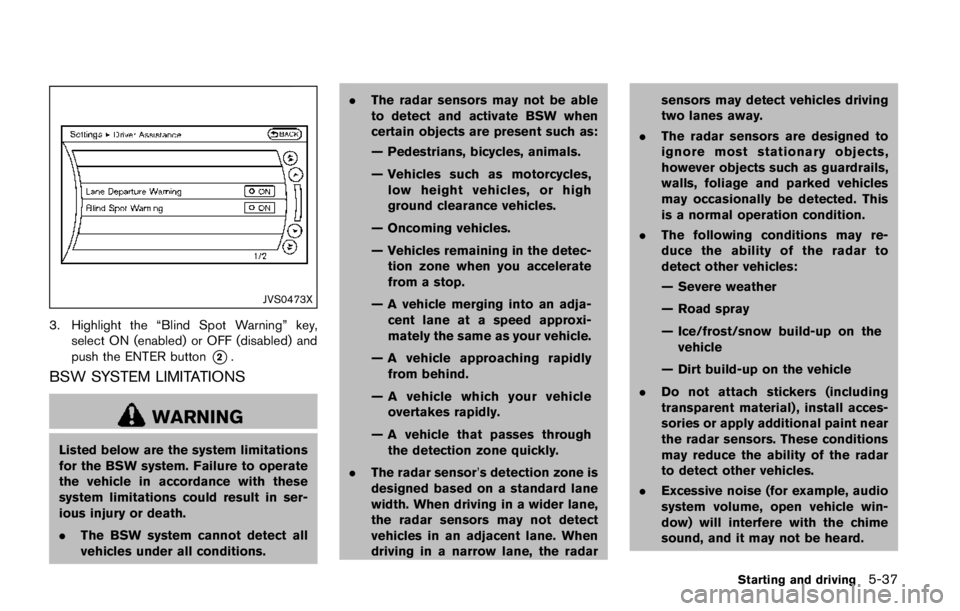
Page 281 of 2472
COLD pressure:
After the vehicle has been parked
for three hours or more or driven
less than 1 mile (1.6 km) .
COLD tire pressures are shown on
the Tire and Loading Information
label affixed to the driver side center
pillar.
After adjusting tire pressure to the COLD tire
pressure, the display of the tire pressure
information may show higher pressure than the
COLD tire pressure after the vehicle has been
driven more than 1 mile (1.6 km). This is
because the tire pressurizes as the tire tem-
perature rises. This does not indicate a system
malfunction.
Stowing the damaged tire and tools
1. Securely store the damaged tire, jack and tools in the storage area.
2. Close the cargo floor cover.
3. Replace the cargo floor board.
4. Close the liftgate.
Page 307 of 2472

SSD0969
Operating conventional (fixed speed)
cruise control mode
To turn on the conventional (fixed speed)
cruise control mode,push and hold the MAIN
switch
*Afor longer than about 1.5 seconds.
When pushing the MAIN switch on, the con-
ventional (fixed speed) cruise control mode
display and the MAIN switch indicator are
displayed on the vehicle information display.
After you hold the MAIN switch on for longer
than about 1.5 seconds, the ICC system display
goes out. The MAIN switch indicator stays lit.
You can now set your desired cruising speed.
Pushing the MAIN switch again will turn the
system completely off. When the ignition switch is pushed to the OFF
position, the system is also automatically turned
off.
To use the ICC system again, quickly push and
release the MAIN switch (vehicle-to-vehicle
distance control mode) or push and hold it
(conventional cruise control mode) again to turn
it on.
When the Distance Control Assist (DCA)
system is on, the conventional (fixed speed)
cruise control mode cannot be turned on even
though the MAIN switch is pushed and held.
To turn on the conventional (fixed speed) cruise
control mode, turn off the DCA system. See
“Distance Control Assist (DCA)” (P.5-91) .
Page 318 of 2472

.The chime sounds.
. The vehicle ahead detection and set dis-
tance indicator blink.
The warning chime may not sound in some
cases when there is a short distance between
vehicles. Some examples are:
. When the vehicles are traveling at the same
speed and the distance between vehicles is
not changing
. When the vehicle ahead is traveling faster
and the distance between vehicles is
increasing
. When a vehicle cuts in near your vehicle
The warning chime will not sound when:
. Your vehicle approaches other vehicles that
are parked or moving slowly.
. The accelerator pedal is depressed, over-
riding the system.
NOTE:
The approach warning chime may sound
and the system display may blink when the
radar sensor detects objects on the side of
the vehicle or on the side of the road. This
may cause the ICC system to decelerate or
accelerate the vehicle. The radar sensor
may detect these objects when the vehicle
is driven on winding roads, narrow roads,
hilly roads or when entering or exiting a curve. In these cases you will have to
manually control the proper distance
ahead of your vehicle.
Also, the sensor sensitivity can be affected by
vehicle operation (steering maneuver or driving
position in the lane) or traffic or vehicle condition
(for example, if a vehicle is being driven with
some damage) .
Automatic cancellation
A chime sounds under the following conditions
and the control is automatically canceled.
.
When the vehicle ahead is not detected and
your vehicle is traveling below the speed of
15 MPH (24 km/h)
. When the system judges the vehicle is at
standstill
. When the shift lever is not in the D (Drive) or
manual shift mode
. When the parking brake is applied
. When the SNOW mode switch is pushed
on.
. When the 4WD shift switch is in the 4H or
4L position (for 4WD models)
. When the VDC system is turned off
. When ABS or VDC (including the traction
control system) operates .
When distance measurement becomes im-
paired due to adhesion of dirt or obstruction
to the sensor
. When a wheel slips
. When the radar signal is temporarily inter-
rupted
Vehicle-to-vehicle distance control mode
limitations
Page 327 of 2472

SSD0969
Operating conventional (fixed speed)
cruise control mode
To turn on the conventional (fixed speed)
cruise control mode,push and hold the MAIN
switch
*Afor longer than about 1.5 seconds.
When pushing the MAIN switch on, the con-
ventional (fixed speed) cruise control mode
display and the MAIN switch indicator are
displayed on the vehicle information display.
After you hold the MAIN switch on for longer
than about 1.5 seconds, the ICC system display
goes out. The MAIN switch indicator stays lit.
You can now set your desired cruising speed.
Pushing the MAIN switch again will turn the
system completely off. When the ignition switch is pushed to the OFF
position, the system is also automatically turned
off.
To use the ICC system again, quickly push and
release the MAIN switch (vehicle-to-vehicle
distance control mode) or push and hold it
(conventional cruise control mode) again to turn
it on.
When the Distance Control Assist (DCA)
system is on, the conventional (fixed speed)
cruise control mode cannot be turned on even
though the MAIN switch is pushed and held.
To turn on the conventional (fixed speed) cruise
control mode, turn off the DCA system. See
“Distance Control Assist (DCA)” (P.5-91) .
Page 331 of 2472
JVS0890X
*1Indicators (on the vehicle information display)
*2Center display
*3Dynamic driver assistance switch
*4Center multi-function control panel
DCA SYSTEM OPERATION
Page 363 of 2472

SDI2704
Extended storage fuse switch (if so
equipped)
To reduce battery drain, the extended storage
fuse switch comes from the factory switched off.
Prior to delivery of your vehicle, the switch is
pushed in (switched on) and should always
remain on.
If the extended storage fuse switch is not
pushed in (switched on), the “SHIPPING MODE
ON, PUSH STORAGE FUSE” warning may
appear on the vehicle information display (if so
equipped) . See “Vehicle information display”
(P.2-20) .
If any electrical equipment does not operate,remove the extended storage fuse switch and
check for an open fuse.
NOTE:
If the extended storage fuse switch mal-
functions or if the fuse is open, it is not
necessary to replace the switch. In this
case, remove the extended storage fuse
switch and replace it with a new fuse of the
same rating.
How to remove the extended storage fuse
switch:
1. To remove the extended storage fuse switch, be sure the ignition switch is in the OFF or
LOCK position.
2. Be sure the headlight switch is in the OFF position.
3. Remove the fuse box cover.
4. Pinch the locking tabs
*1found on each
side of the storage fuse switch.
5. Pull the storage fuse switch straight out from the fuse box
*2.
Page 376 of 2472
WARNING
Failure to follow the warnings and
instructions for proper use of the sonar
function as outlined in this section
could result in serious injury or death.
.The sonar is a convenience feature.
It is not a substitute for proper
parking.
. This function is designed as an aid
to the driver in detecting large
stationary objects to help avoid
damaging the vehicle.
. The driver is always responsible for
safety during parking and other
maneuvers.
. Always look around and check that
it is safe to move before parking.
. Read and understand the limita-
tions of the sonar as contained in
this section.
When the corner of the vehicle moves closer to
the object while the Around View
ŠMonitor is
displayed, an indicator is displayed and a tone is
sounded by the sonar function to warn the
driver.
Page 380 of 2472
.Objects in the monitor will appear
visually opposite compared to when
viewed in the rearview and outside
mirrors.
. Use the mirrors or actually look to
properly judge distances to other
objects.
. The distance between objects
viewed in the rear view differs from
actual distance because a wide-
angle lens is used.
. On a snow-covered or slippery road,
there may be a difference between
the predictive course line and the
actual course line.
. The vehicle width and predictive
course lines are wider than the
actual width and course.
. The displayed lines on the rear view
will appear slightly off to the right
because the rearview camera is not
installed in the rear center of the
vehicle.