Voice Prompt Interrupt
In most cases you can interrupt the voice feed-
back to speak the next command by pressing
the
button on the steering wheel. After
interrupting the system, wait for a beep before
speaking your command.
One Shot Call
To use the system faster, you may speak the
second level commands with the main menu
command on the main menu. For example, press
the
button and after the tone say, “Call
Redial”.
CONTROL BUTTONS
The control buttons for the Bluetooth® Hands-
Free Phone System are located on the steering
wheel.
PHONE/SEND
Press the
button to initiate a
Voice Recognition session or answer
an incoming call. If the operation of “Siri” is set to
“Short Press” on the Bluetooth®
setting menu, pressing and holding
the
button initiates a Voice
Recognition session for the Hands-
Free Phone operation. For additional
information, refer to “Bluetooth®
settings” in this section.
You can also use the
button to
interrupt the system feedback and
give a command at once. For addi-
tional information, refer to “Voice
Commands” and “During a call” in
this section.
PHONE/END
While the voice recognition system is
active, press and hold the
but-
ton for 5 seconds to quit the voice
recognition system at any time.
Tuning switch
While using the voice recognition
system, tilt the tuning switch up or
down to manually control the phone
system.
LHA4349
Monitor, climate, audio, phone and voice recognition systems4-93
NISSAN INTELLIGENT KEY®
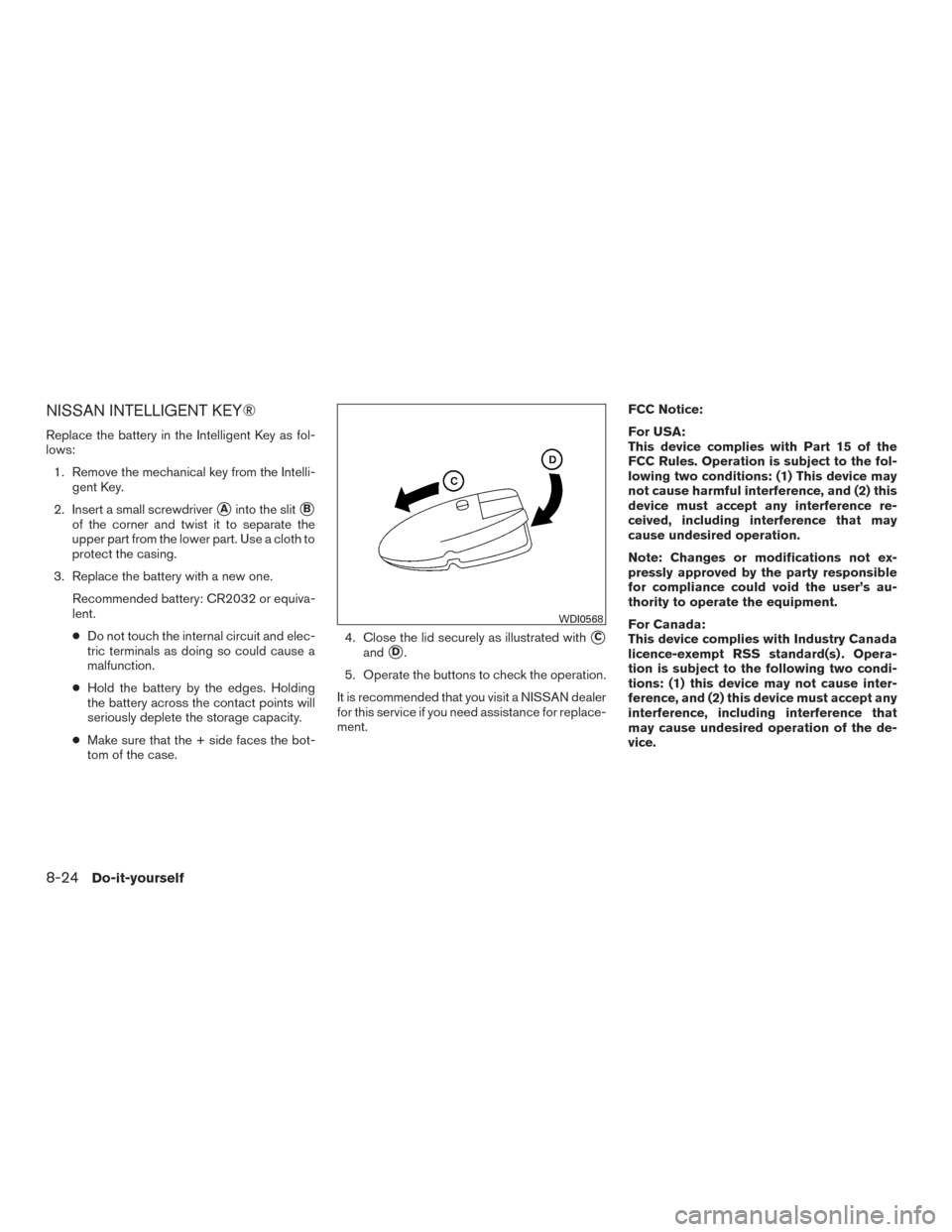
Replace the battery in the Intelligent Key as fol-
lows:1. Remove the mechanical key from the Intelli- gent Key.
2. Insert a small screwdriver
�Ainto the slit�B
of the corner and twist it to separate the
upper part from the lower part. Use a cloth to
protect the casing.
3. Replace the battery with a new one. Recommended battery: CR2032 or equiva-
lent.
●Do not touch the internal circuit and elec-
tric terminals as doing so could cause a
malfunction.
● Hold the battery by the edges. Holding
the battery across the contact points will
seriously deplete the storage capacity.
● Make sure that the + side faces the bot-
tom of the case. 4. Close the lid securely as illustrated with
�C
and�D.
5. Operate the buttons to check the operation.
It is recommended that you visit a NISSAN dealer
for this service if you need assistance for replace-
ment. FCC Notice:
For USA:
This device complies with Part 15 of the
FCC Rules. Operation is subject to the fol-
lowing two conditions: (1) This device may
not cause harmful interference, and (2) this
device must accept any interference re-
ceived, including interference that may
cause undesired operation.
Note: Changes or modifications not ex-
pressly approved by the party responsible
for compliance could void the user’s au-
thority to operate the equipment.
For Canada:
This device complies with Industry Canada
licence-exempt RSS standard(s) . Opera-
tion is subject to the following two condi-
tions: (1) this device may not cause inter-
ference, and (2) this device must accept any
interference, including interference that
may cause undesired operation of the de-
vice.
WDI0568
8-24Do-it-yourself
C
Capacities and recommended
fuel/lubricants ..................10-2
Cargonet.....................2-48
Cargo (See vehicle loading information) . . .10-13
Car phone or CB radio .............4-75
CD care and cleaning ..............4-68
CD player
(See audio system) .....4-37,4-41,4-47,4-54
Check tire pressure ...............2-27
Child restraints .......1-19,1-20,1-22,1-24
LATCH (Lower Anchors and Tethers for
CHildren) System ..............1-24
Precautions on child
restraints.........1-22,1-28,1-34,1-39
Top tether strap anchor point locations . .1-26
Child safety rear door lock ............3-7
Chimes, audible reminders ...........2-17
Cleaningexteriorandinterior........7-2,7-4
Clock setting
(models with Navigation System) ........4-7
Clock setting (models without Navigation
System) ...............4-36,4-40,4-44
C.M.V.S.S. certification label .........10-11
Cold weather driving ...............5-87
Compact disc (CD)
player ............4-37,4-41,4-47,4-54
Compass ......................2-7
Connect phone .................4-70
Consolebox...................2-45
Consolelight...................2-53
Continuously Variable Transmission (CVT) . . .5-13 Continuously Variable Transmission (CVT)
fluid ......................8-11 Driving with Continuously Variable
Transmission (CVT)
.............5-13
Control panel buttons ...............4-4
Brightness/contrast button ..........4-9
Enterbutton..................4-4
Controls Heater and air conditioner
controls................4-17,4-25
Coolant Capacities and recommended
fuel/lubricants ................10-2
Changingenginecoolant...........8-6
Checking engine coolant level ........8-6
Engine coolant temperature gauge .....2-5
Corrosion protection ...............7-7
Cruisecontrol..................5-39
Cupholders................2-46,2-47
D
Daytime Running Light System .....2-36,2-37
Defroster switch Rear window and outside mirror defroster
switch.....................2-33
Dimensionsandweights ............10-9
Dimmer switch for instrument panel ......2-37
Display controls (see control panel buttons) . .4-4
Door locks ..................3-4,3-5
Drive belt .....................8-16
Driving Cold weather driving .............5-87
Driving with Continuously Variable
Transmission (CVT) .............5-13
Precautions when starting and driving ....5-2
Driving the vehicle ................5-13 E
Economy-fuel..................5-76
Emergency engine shutoff .........5-10,6-2
Emission control information label ......10-12
Emission control system warranty .......10-18
Engine Before starting the engine ..........5-12
Blockheater.................5-88
Capacities and recommended
fuel/lubricants ................10-2
Changing engine coolant ...........8-6
Changingengineoil..............8-8
Changing engine oil filter ..........8-10
Checking engine coolant level ........8-6
Checking engine oil level ...........8-7
Engine compartment check locations ....8-3
Engine
coolant temperature gauge .....2-5
Engine cooling system ............8-5
Engineoil ...................8-7
Engine oil and oil filter recommendation . .10-6
Engine oil viscosity ..............10-7
Engine serial number ............10-11
Engine specifications ............10-8
Starting the engine .............5-12
Engine coolant temperature gauge .......2-5
Enter button ....................4-4
Event Data recorders .............10-20
Exhaust gas (Carbon monoxide) .........5-2
Explanation of maintenance items ........9-2
Explanation of scheduled maintenance items . .9-5
Extended storage switch ............2-43
Eyeglass case ..................2-46
11-2