2017 MITSUBISHI OUTLANDER SPORT warning light
[x] Cancel search: warning lightPage 142 of 399
Tire pressure monitoring system
Features and controls 5-79
5
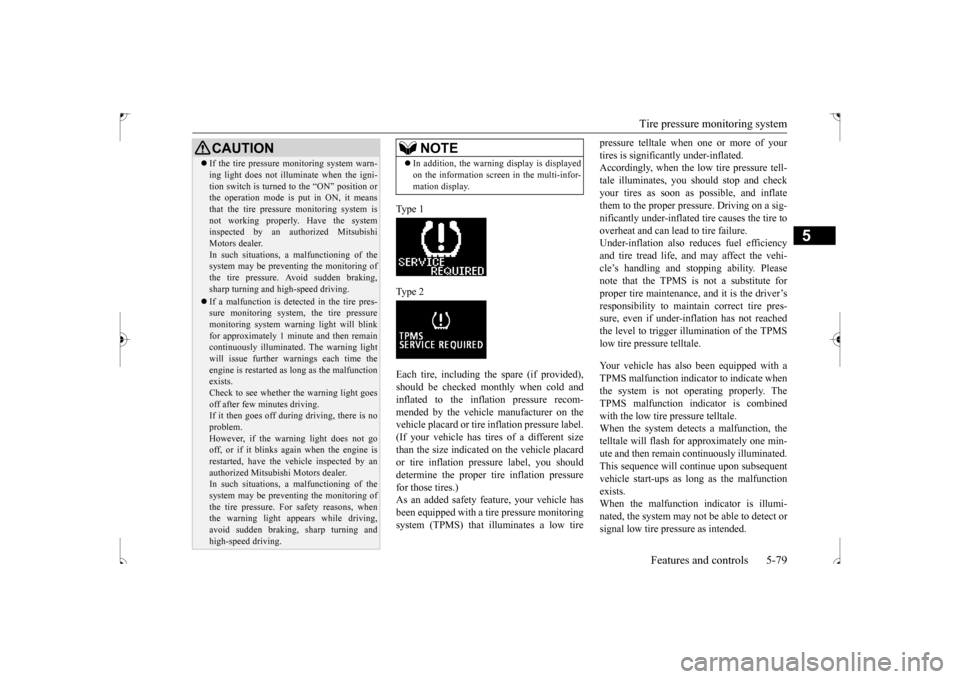
Type 1 Type 2Each tire, including the spare (if provided), should be checked monthly when cold and inflated to the inflation pressure recom-mended by the vehicle manufacturer on the vehicle placard or tire inflation pressure label. (If your vehicle has tires of a different sizethan the size indicated on the vehicle placard or tire inflation pressure label, you should determine the proper tire inflation pressurefor those tires.) As an added safety feature, your vehicle has been equipped with a ti
re pressure monitoring
system (TPMS) that illuminates a low tire
pressure telltale when one or more of your tires is significantly under-inflated. Accordingly, when the low tire pressure tell- tale illuminates, you should stop and checkyour tires as soon as possible, and inflate them to the proper pres
sure. Driving on a sig-
nificantly under-inflated tire causes the tire tooverheat and can lead to tire failure. Under-inflation also reduces fuel efficiency and tire tread life, and may affect the vehi-cle’s handling and stopping ability. Pleasenote that the TPMS is not a substitute for proper tire maintenance, and it is the driver’s responsibility to maintain correct tire pres-sure, even if under-inflation has not reached the level to trigger illumination of the TPMS low tire pressure telltale. Your vehicle has also been equipped with a TPMS malfunction indicator to indicate when the system is not operating properly. The TPMS malfunction indicator is combinedwith the low tire pressure telltale. When the system detects a malfunction, the telltale will flash for approximately one min-ute and then remain continuously illuminated. This sequence will continue upon subsequent vehicle start-ups as long as the malfunctionexists. When the malfunction indicator is illumi- nated, the system may not be able to detect orsignal low tire pressure as intended.
CAUTION If the tire pressure monitoring system warn- ing light does not illuminate when the igni- tion switch is turned to the “ON” position or the operation mode is put in ON, it means that the tire pressure monitoring system isnot working properly. Have the system inspected by an authorized Mitsubishi Motors dealer.In such situations,
a malfunctioning of the
system may be preventing the monitoring of the tire pressure. Avoid sudden braking,sharp turning and high-speed driving. If a malfunction is detected in the tire pres- sure monitoring system, the tire pressure monitoring system warning light will blink for approximately 1 minute and then remaincontinuously illuminated. The warning light will issue further warnings each time the engine is restarted as long as the malfunctionexists. Check to see whether the warning light goes off after few minutes driving.If it then goes off during driving, there is no problem. However, if the warning light does not gooff, or if it blinks again when the engine is restarted, have the vehicle inspected by an authorized Mitsubishi Motors dealer. In such situations,
a malfunctioning of the
system may be preventing the monitoring ofthe tire pressure. For safety reasons, when the warning light appears while driving, avoid sudden braking, sharp turning andhigh-speed driving.
NOTE
In addition, the warning display is displayed on the information screen in the multi-infor- mation display.
BK0239500US.bo
ok 79 ページ 2016年5月13日 金曜日 午前8時53分
Page 143 of 399
Tire pressure monitoring system 5-80 Features and controls
5
TPMS malfunctions may occur for a variety of reasons, including the installation of replacement or alternate tires or wheels on the vehicle that prevent the TPMS from function-ing properly. Always check the TPMS mal- function telltale after replacing one or more tires or wheels on your vehicle to ensure thatthe replacement or alternate tires and wheels allow the TPMS to continue to function prop- erly.
N00532801524
1. If the tire pressure monitoring systemwarning light illuminates, avoiding hardbraking, sharp steering maneuvers and high speeds. You should stop and adjust the tires to the proper inflation pressure assoon as possible. Adjust the spare tire at the same time. Refer to “Tires” on page 9-14.
2. If the tire pressure monitoring system warning light remains illuminated after you have been driving for about 20 min- utes after you adjust the tire inflation pres-sure, one or more of the tires may have a puncture. Inspect the tire and if it has a puncture, have it repaired by an autho-rized Mitsubishi Motors dealer as soon as possible.
The tire pressure monitoring system may not work normally in the following circum- stances: A wireless facility or device using the same frequency is near the vehicle. Snow or ice is stuck inside the fenders and/or on the wheels. The tire inflation pressure sensor’s battery is dead.
If the warning light/display illu- minates while driving
NOTE
In addition, the warning display is displayed on the information screen in the multi-infor- mation display. When inspecting or adjusting the tire pres- sure, do not apply excessive force to the valve stem to avoid breakage.
After inspecting or adjusting the tire pres- sure, always reinstall the valve cap on the valve stem. Without the valve cap, dirt or moisture could get into the valve, resulting in damage to thetire inflation pressure sensor. Do not use metal valve caps, which may cause a metal reaction, resulting in corrosion and damage of the tire inflation pressure sen- sors. Once adjustments have been made, the warn- ing light will go off after a few minutes ofdriving.WA R N I N G If the warning light/display illuminates while you are driving, avoid hard braking, sharp steering maneuvers and high speeds.Driving with an under-inflated tire adversely affects vehicle performance and can result in an accident.NOTE
CAUTION If a tire has a puncture, replace that tire with the spare tire. Driving on a punctured tire could lead to an accident. The warning light/display may not illuminate immediately in the event of a tire blowout or rapid leak.NOTE
To avoid the risk of damage to the tire infla- tion pressure sensors, have any punctured tire repaired by an authorized Mitsubishi Motors dealer. If the tire repair is not done byan authorized Mitsubishi Motors dealer, it is not covered by your warranty. Do not use an aerosol puncture-repair spray on any tire. Such a spray could damage the tire inflationpressure sensors. Have any puncture repaired by an authorized Mitsubishi Motors dealer.
BK0239500US.bo
ok 80 ページ 2016年5月13日 金曜日 午前8時53分
Page 144 of 399
Rear-view camera (if so equipped)
Features and controls 5-81
5
Wheels other than Mitsubishi genuine wheels are being used. Wheels that are not fitted with tire infla- tion pressure sensors are being used. Wheels whose ID codes are not memo- rized by the vehicle are used. Compact spare tire is fitted on a road wheel. A window tint that affects the radio wave signals is installed.
N00532901192
If new wheels with new tire inflation pressure sensors are installed, their ID codes must be programmed into the tire pressure monitoringsystem. Have the tire and wheel replacement performed by an authorized Mitsubishi Motors dealer to avoid the risk of damagingthe tire inflation pressure sensors. If the
wheel replacement is not done by an autho- rized Mitsubishi Motors dealer, it is not cov- ered by your warranty.
N00533001246
Your tire pressure monitoring system oper- ates on a radio frequency subject to Federal Communications Commission (FCC) Rules (For vehicles sold in U.S.A.) and IndustryCanada Rules (For vehicles sold in Canada). This device complies with part 15 of FCC Rules and Industry Canada licence-exemptRSS standard(s). Operation is subject to
the following two con-
ditions. This device may not cause harmful inter- ference. This device must accept any interference received, including interference that maycause undesired operation.
N00546201183
When the gearshift lever or the selector lever is in the “R” position with the ignition switch or the operation mode is in ON, the rear-viewimage will be displayed on the screen of the Mitsubishi Multi-Communication System or the DISPLAY AUDIO in the center panel.When the gearshift lever or the selector lever is shifted out of the “R” position, the rear- view image will go off.
NOTE
Tire inflation pressures vary with the ambi- ent temperature. If the
vehicle is subjected to
large variations in ambient temperature, the tire inflation pressures may be under-inflated (causing the warning light/display to comeon) when the ambient temperature is rela- tively low. If the warning light/display comes on, adjust the tire inflation pressure.
Whenever the tires and wheels are replaced with new ones
CAUTION The use of non-genuine wheels will prevent the proper fit of the tire inflation pressure sensors, resulting air leakage or damage of the sensors.
General information
CAUTION Changes or modifications not expressly approved by the manufacturer for compli- ance could void the user’s authority to oper- ate the equipment.
Rear-view camera (if so equipped)
WA R N I N G Never rely solely on the rear-view camera to clear the area behind your vehicle. Always check visually behind and all around your vehicle for persons, animals, obstructions or other vehicles. Failure todo so can result in vehicle damage, serious injury or death. The rear-view camera is an aid system for backing up, but it is not a substitute for your visual confirmation.
BK0239500US.bo
ok 81 ページ 2016年5月13日 金曜日 午前8時53分
Page 150 of 399
Multi-information display
Features and controls 5-87
5
N00555100149
The multi-information meter switch is a but- ton marked “INFO” on the left side of thedash. Each time the multi-information meter switch is operated, a sound is emitted and the multi-information display changes between infor- mation such as warnings, Odometer (Type1), trip odometer, service reminder, engine cool-ant temperature (Type 1), average and
momentary fuel consumption, driving range, and average speed. It is also possible to change elements such as the language and units used on the multi-information display by operating the multi- information meter switch.
N00555200179
If you press the multi-information meter switch and return from the warning display screen to the previous screen, the warning is displayed. Refer to “Returning to the display screenfrom before the warning display” on page5-89.
This mark is also displayed if there is another warning other than the one displayed. When the cause of the warning display is elimi- nated, the warning goes out automatically.
N00555301180
Each time you lightly press the multi-infor- mation meter switch, the display screenswitches in the following order.
The display screen is different depending on whether the ignition switch or the operation mode in OFF or ON. Refer to “Information screen (With ignition switch or operation mode in OFF)” on page5-87. Refer to “Warning displa
y list (With ignition
switch or operation mode in OFF)” on page5-107. Refer to “Information screen (With ignition switch turned from the “OFF” position to the“ON” position or operation mode changed from OFF to ON)” on page 5-90. Refer to “Information screen (With ignitionswitch or operation mode in ON)” on page 5-91. Refer to “Warning displa
y list (With ignition
switch or operation mode in ON)” on page 5-110.
Multi-information meter switch
NOTE
Warning display screen (With ignition switch or opera- tion mode in OFF)
NOTE
When the warning is displayed, the warn- ing display screen can be redisplayed on the information screen.Refer to “Information screen (With ignition switch or operation mode in OFF)” on page 5-87.Refer to “Information screen (With ignition switch or operation mode in ON)” on page 5-91.
Information screen (With igni- tion switch or operation mode in OFF)
BK0239500US.bo
ok 87 ページ 2016年5月13日 金曜日 午前8時53分
Page 151 of 399
Multi-information display 5-88 Features and controls
5
N00555400113
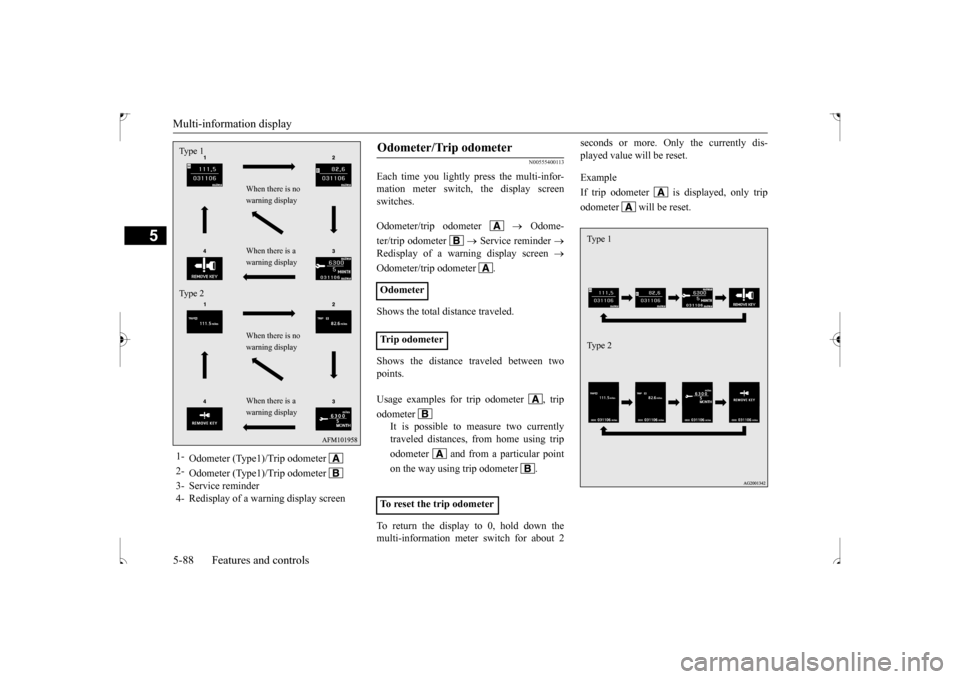
Each time you lightly press the multi-infor- mation meter switch, the display screenswitches. Odometer/trip odometer
Odome-
ter/trip odometer
Service reminder
Redisplay of a warning display screen
Odometer/trip odometer . Shows the total distance traveled. Shows the distance traveled between two points. To return the display to 0, hold down the multi-information meter switch for about 2
seconds or more. Only the currently dis- played value will be reset. Example If trip odometer is displayed, only tripodometer will be reset.
1-
Odometer (Type1)/Trip odometer
2-
Odometer (Type1)/Trip odometer
3- Service reminder4- Redisplay of a warning display screenType 1 Type 2
When there is no warning display When there is a warning display When there is no warning display When there is a warning display
Odometer/Trip odometer Odometer Trip odometer Usage examples for trip odometer , trip odometer
It is possible to measure two currently traveled distances, from home using trip odometer and from a particular pointon the way using trip odometer . To reset the trip odometer
Ty p e 1 Ty p e 2
BK0239500US.bo
ok 88 ページ 2016年5月13日 金曜日 午前8時53分
Page 152 of 399
Multi-information display
Features and controls 5-89
5
N00555500042
Shows the distance and number of months until the next periodic inspection. Refer to “Service reminder” on page 5-97.
N00559600201
When there is information to be announced, such as a key reminder, the buzzer sounds andswitches to the warning display screen. Refer
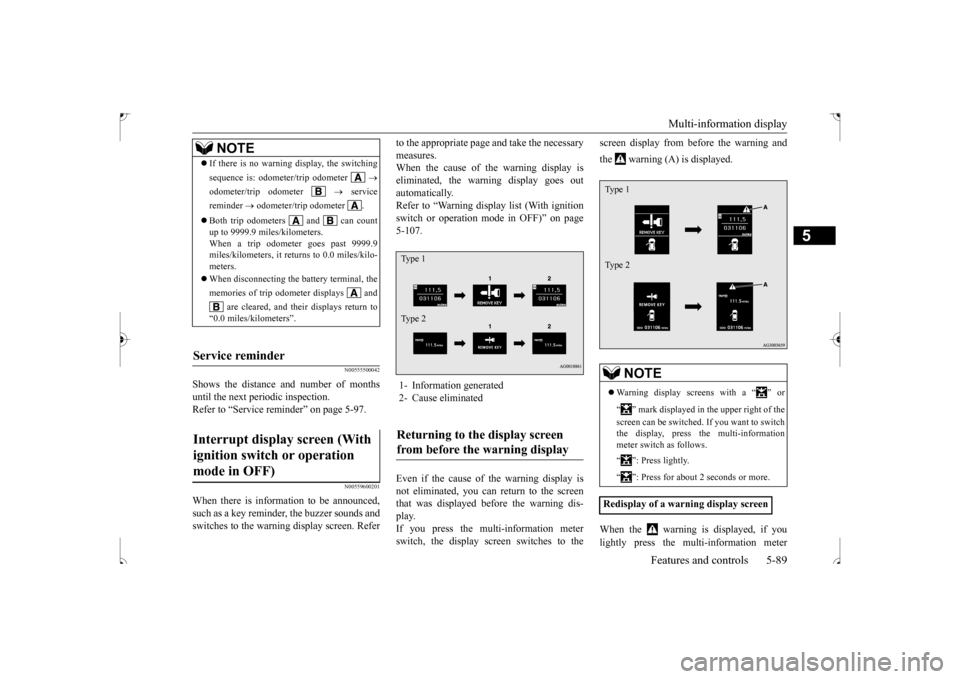
to the appropriate page and take the necessary measures. When the cause of the warning display is eliminated, the warning display goes outautomatically. Refer to “Warning display list (With ignition switch or operation mode in OFF)” on page5-107. Even if the cause of the warning display is not eliminated, you can return to the screen that was displayed before the warning dis- play.If you press the multi-information meter switch, the display screen switches to the
screen display from before the warning and the warning (A) is displayed. When the warning is displayed, if you lightly press the multi-information meter
NOTE
If there is no warning display, the switching sequence is: odometer/trip odometer
odometer/trip odometer
service
reminder
odometer/trip odometer .
Both trip odometers and can count up to 9999.9 miles/kilometers. When a trip odometer goes past 9999.9 miles/kilometers, it returns to 0.0 miles/kilo-meters. When disconnecting the battery terminal, the memories of trip odometer displays and
are cleared, and their displays return to
“0.0 miles/kilometers”.
Service reminder Interrupt display screen (With ignition switch or operation mode in OFF)
1- Information generated 2- Cause eliminatedReturning to the display screen from before the warning display Ty p e 1 Ty p e 2
NOTE
Warning display screens with a “ ” or “ ” mark displayed in the upper right of the screen can be switched. If you want to switch the display, press the multi-information meter switch as follows. “ ”: Press lightly. “ ”: Press for about 2 seconds or more.
Redisplay of a warning display screenType 1 Type 2
BK0239500US.bo
ok 89 ページ 2016年5月13日 金曜日 午前8時53分
Page 154 of 399

Multi-information display
Features and controls 5-91
5
When the time for periodic inspection arrives, the warning display is displayed for a fewseconds after the screen
that is initially dis-
played when the ignition switch is turned “ON” or the operation mode is changed toON. Refer to “Service reminder” on page 5-97. Type 1 Type 2
N00555900020
Shows the 4WD drive status. Refer to “Drive mode-selector” on page 5-58.
N00555200182
This is displayed when you press the multi- information meter switch and switch the warning display screen.This mark is also displayed if there is another warning other than the one displayed. When the cause of the warning display is eliminated, the warning goes out automat- ically.
N00556100117
This is displayed when the Active stability control (ASC) is turned “OFF” with the“ASC OFF” switch. Also, if an abnormal condition is occurred in the ASC while driving, the “ASC OFF” dis-play illuminates.Refer to “ASC OFF switch” on page 5-71.
N00556201245
Each time you lightly press the multi-infor-mation meter switch, the display screenswitches in the following order.
Service reminder Drive mode indicator display screen
(if so equipped)
Warning display screen (With ignition switch or opera- tion mode in ON)
NOTE
When the warning is displayed, the warn- ing display screen can be redisplayed on the information screen. Refer to “Information screen (With ignition switch or operation mode in OFF)” on page5-87. Refer to “Information screen (With ignition switch or operation mode in ON)” on page 5-91.
“Active stability control (ASC) OFF” display screen
(if so
equipped)Information screen (With igni- tion switch or operation mode in ON)
BK0239500US.bo
ok 91 ページ 2016年5月13日 金曜日 午前8時53分
Page 159 of 399
Multi-information display 5-96 Features and controls
5
When the warning is displayed, if you lightly press the multi-information meter switch a few times, the warning displayscreen you switched from is redisplayed. The operation status of each system is dis- played on the information screen. For further details, refer to the appropriate page in the warning display list.Refer to “Other interrupt displays” on page 5-117.
N00556400064
Shows the position of the selector lever.Refer to “Selector lever operation” on page 5-51.
N00556500065
Shows the temperature outside the vehicle.
N00568700019
This indicator will be displayed when fuel- efficient driving is achieved.
N00556600170
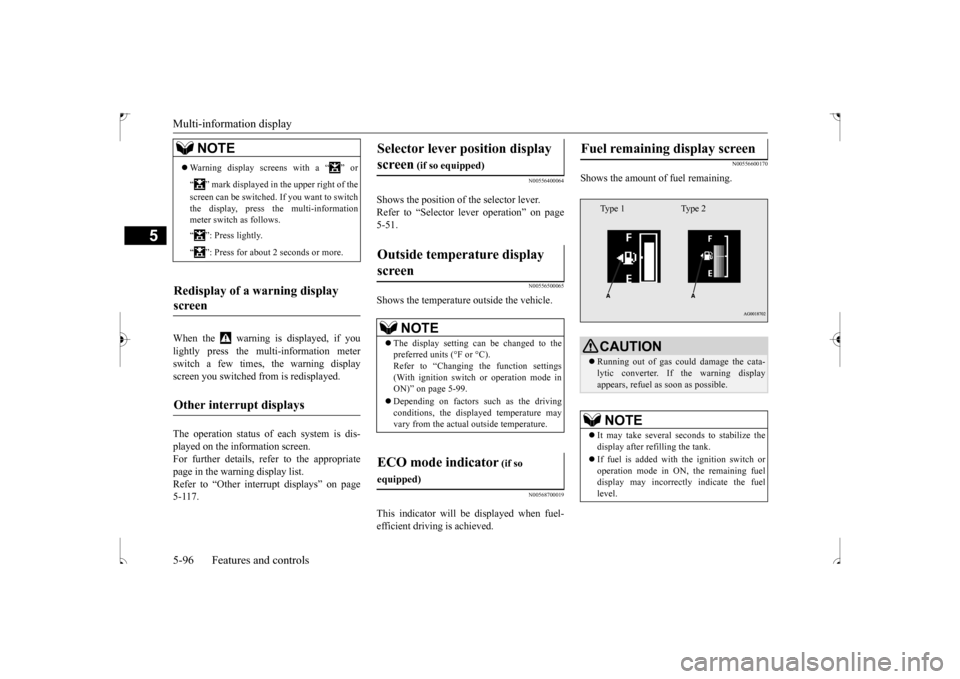
Shows the amount of fuel remaining.
NOTE
Warning display screens with a “ ” or “ ” mark displayed in the upper right of the screen can be switched. If you want to switch the display, press the multi-information meter switch as follows. “ ”: Press lightly. “ ”: Press for about 2 seconds or more.
Redisplay of a warning display screen Other interrupt displays
Selector lever position display screen
(if so equipped)
Outside temperature display screen
NOTE
The display setting can be changed to the preferred units (°F or °C).Refer to “Changing the function settings (With ignition switch or operation mode in ON)” on page 5-99. Depending on factors such as the driving conditions, the displayed temperature mayvary from the actual outside temperature.
ECO mode indicator
(if so
equipped)
Fuel remaining display screen
CAUTION Running out of gas could damage the cata- lytic converter. If the warning displayappears, refuel as soon as possible.NOTE
It may take several seconds to stabilize the display after refilling the tank. If fuel is added with the ignition switch or operation mode in ON, the remaining fueldisplay may incorrectly indicate the fuel level.Type 1 Type 2
BK0239500US.bo
ok 96 ページ 2016年5月13日 金曜日 午前8時53分