2017 MITSUBISHI OUTLANDER SPORT ignition
[x] Cancel search: ignitionPage 53 of 399
Supplemental Restraint System (SRS) - airbag 4-32 Seat and restraint systems
4
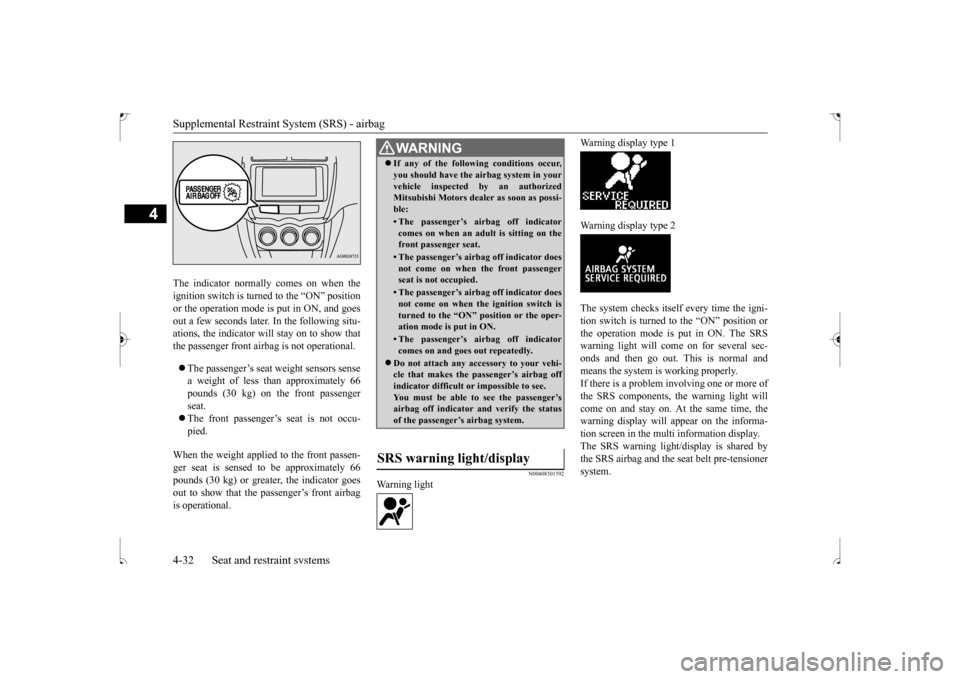
The indicator normally comes on when the ignition switch is turned to the “ON” position or the operation mode is put in ON, and goesout a few seconds later. In the following situ- ations, the indicator will stay on to show that the passenger front airbag is not operational. The passenger’s seat weight sensors sense a weight of less than approximately 66pounds (30 kg) on the front passenger seat. The front passenger’s seat is not occu- pied.
When the weight applied to the front passen- ger seat is sensed to be approximately 66 pounds (30 kg) or greater, the indicator goesout to show that the passenger’s front airbag is operational.
N00408301592
Warning light
Warning display type 1 Warning display type 2The system checks itself every time the igni- tion switch is turned to the “ON” position orthe operation mode is put in ON. The SRS warning light will come on for several sec- onds and then go out. This is normal andmeans the system is working properly. If there is a problem involving one or more of the SRS components, the warning light willcome on and stay on. At the same time, the warning display will appear on the informa- tion screen in the multi information display.The SRS warning light/display is shared bythe SRS airbag and the seat belt pre-tensioner system.
WA R N I N G If any of the following conditions occur, you should have the airbag system in your vehicle inspected by an authorized Mitsubishi Motors dealer as soon as possi- ble:• The passenger’s airbag off indicatorcomes on when an adult is sitting on thefront passenger seat.• The passenger’s airbag off indicator doesnot come on when the front passenger seat is not occupied.• The passenger’s airbag off indicator doesnot come on when the ignition switch is turned to the “ON” position or the oper-ation mode is put in ON.• The passenger’s airbag off indicatorcomes on and goes out repeatedly.
Do not attach any accessory to your vehi- cle that makes the passenger’s airbag off indicator difficult or impossible to see. You must be able to see the passenger’sairbag off indicator and verify the status of the passenger’s airbag system.
SRS warning light/display
BK0239500US.bo
ok 32 ページ 2016年5月13日 金曜日 午前8時53分
Page 54 of 399
Supplemental Restraint System (SRS) - airbag
Seat and restraint systems 4-33
4
N00407900291
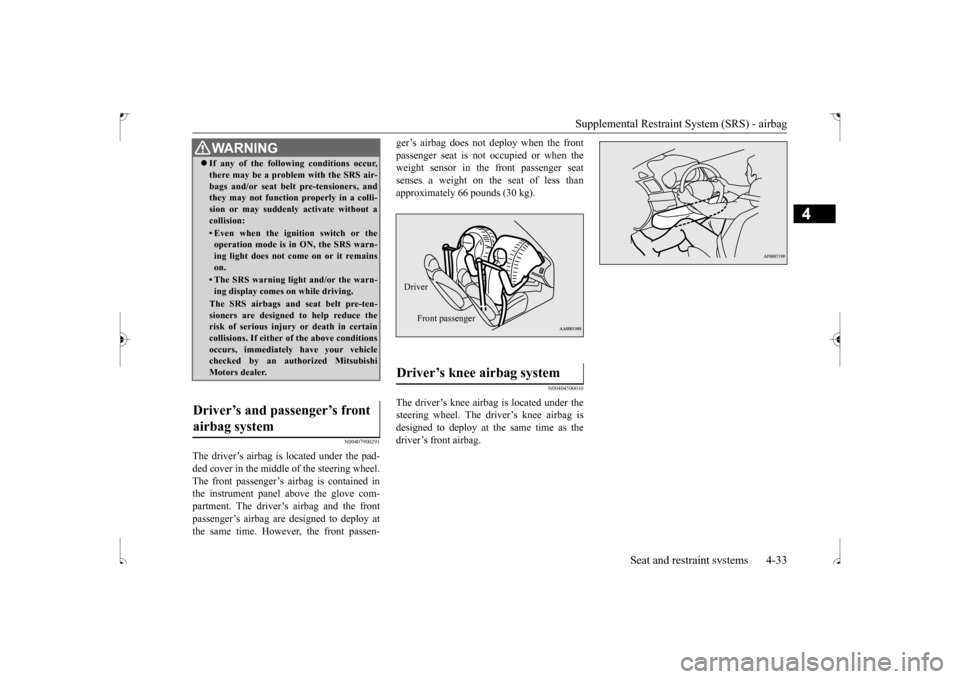
The driver’s airbag is located under the pad- ded cover in the middle of the steering wheel.The front passenger’s airbag is contained in the instrument panel above the glove com- partment. The driver’s airbag and the frontpassenger’s airbag are designed to deploy at the same time. However, the front passen-
ger’s airbag does not deploy when the front passenger seat is not occupied or when the weight sensor in the front passenger seat senses a weight on the seat of less thanapproximately 66 pounds (30 kg).
N00404500010
The driver’s knee airbag is located under thesteering wheel. The driver’s knee airbag isdesigned to deploy at the same time as the driver’s front airbag.
WA R N I N G If any of the following conditions occur, there may be a problem with the SRS air- bags and/or seat belt pre-tensioners, and they may not function properly in a colli- sion or may suddenly activate without acollision:• Even when the ignition switch or theoperation mode is in ON, the SRS warn- ing light does not come on or it remains on.• The SRS warning light and/or the warn-ing display comes on while driving.The SRS airbags and seat belt pre-ten-sioners are designed to help reduce therisk of serious injury or death in certain collisions. If either of the above conditions occurs, immediately have your vehiclechecked by an authorized Mitsubishi Motors dealer.
Driver’s and passenger’s front airbag system
Driver’s knee airbag system Driver
Front passenger
BK0239500US.bo
ok 33 ページ 2016年5月13日 金曜日 午前8時53分
Page 57 of 399
Supplemental Restraint System (SRS) - airbag 4-36 Seat and restraint systems
4
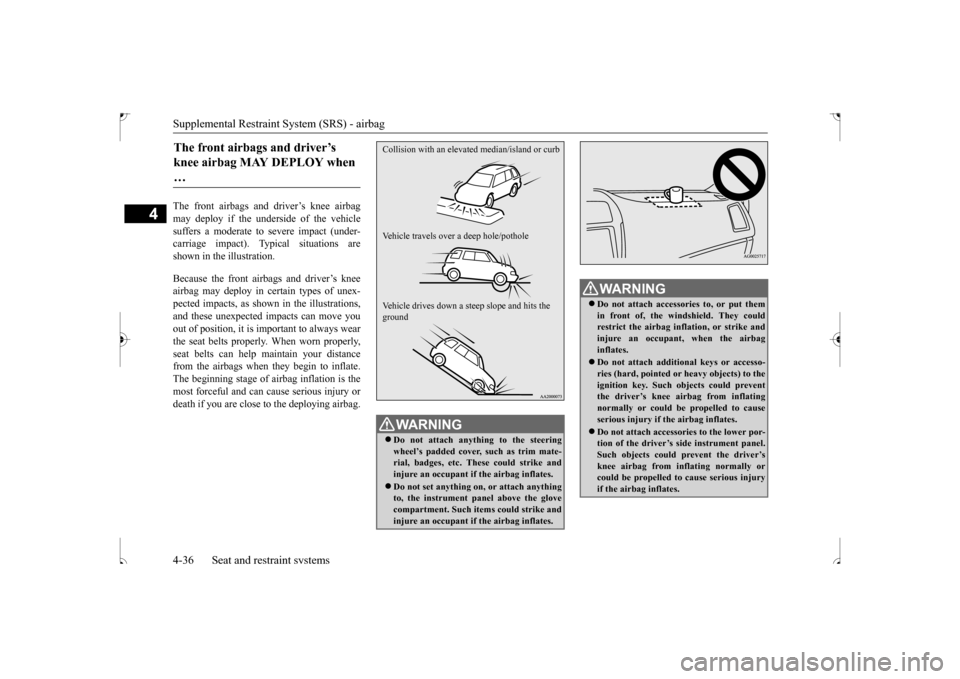
The front airbags and driver’s knee airbag may deploy if the underside of the vehicle suffers a moderate to severe impact (under- carriage impact). Typical situations areshown in the illustration. Because the front airbags and driver’s knee airbag may deploy in certain types of unex- pected impacts, as shown in the illustrations, and these unexpected impacts can move youout of position, it is important to always wear the seat belts properly. When worn properly, seat belts can help maintain your distancefrom the airbags when they begin to inflate. The beginning stage of airbag inflation is the most forceful and can cause serious injury ordeath if you are close to the deploying airbag.The front airbags and driver’s knee airbag MAY DEPLOY when …
WA R N I N G Do not attach anything to the steering wheel’s padded cover, such as trim mate- rial, badges, etc. These could strike and injure an occupant if the airbag inflates. Do not set anything on, or attach anything to, the instrument panel above the glovecompartment. Such items could strike and injure an occupant if the airbag inflates.Collision with an elevat
ed median/island or curb
Vehicle travels over a deep hole/pothole Vehicle drives down a st
eep slope and hits the
ground
WA R N I N G Do not attach accessories to, or put them in front of, the windshield. They could restrict the airbag inflation, or strike andinjure an occupant, when the airbag inflates. Do not attach additional keys or accesso- ries (hard, pointed or heavy objects) to the ignition key. Such objects could preventthe driver’s knee airbag from inflating normally or could be propelled to cause serious injury if the airbag inflates. Do not attach accessories to the lower por- tion of the driver’s side instrument panel.Such objects could prevent the driver’s knee airbag from inflating normally or could be propelled to cause serious injuryif the airbag inflates.
BK0239500US.bo
ok 36 ページ 2016年5月13日 金曜日 午前8時53分
Page 64 of 399
5
Features and controlsBreak-in recommendation
s ..............................................................5-3
Keys ..........................................
.......................................................5-3
Electronic immobilizer (Anti-thef
t starting system) ........................5-4
Keyless entry system (if so equipped) ..............................................5-7Free-hand Advanced Security Transmitter (F.A.S.T.-key) (if so equipped)
.................................................
........................5-12
Door locks .......................
...............................................................5-28
Power door locks ............
...............................................................5-30
Child safety locks for r
ear door .....................................................5-31
Liftgate ......................................
.....................................................5-32
Inside liftgate releas
e .............................................
........................5-33
Theft-alarm system
................................................
........................5-34
Power window control
...........................................
........................5-37
Sunshade (if so equi
pped)..............................................................5-39
Parking brake ..................
...............................................................5-40
Steering wheel height and reach adjustment ..................................5-41Inside rearview mirro
r ...........................................
........................5-42
Outside rearview mirr
ors ...............................................................5-44
Ignition switch ......
.................................................
........................5-46
Starting the engine
.................................................
........................5-47
Manual transaxle (if so equipped) .................................................5-49 Continuously variable transmission
(CVT) (if so equipped).........5-51
Electronically controlled 4WD system (if so equipped)................5-584-wheel drive operation
.........................................
........................5-60
Inspection and maintenance following rough road operation ........5-63 Cautions on the handling of 4-wheel drive vehicles ......................5-63Service brake ..................
...............................................................5-64
Hill start assist .......
.................................................
........................5-65
Brake assist system
...............................................
......................... 5-66
Anti-lock braking syst
em .....................................
......................... 5-67
Electric power steering syst
em (EPS) ........................................... 5-69
Active stability control
(ASC) ....................
................................... 5-70
Cruise control (if so eq
uipped) ...................................................... 5-73
Tire pressure monitoring
system ................................................... 5-77
Rear-view camera (if so eq
uipped) ................................................ 5-81
Instrument cluster
.................................................
......................... 5-83
Multi-information disp
lay ....................................
......................... 5-85
Indicator light, warning light, and information screen disp
lay list ................................................. 5-106
Indicators .................................
.................................................... 5-119
Warning lights ................
.................................................
............. 5-120
Information screen disp
lay ...................................
....................... 5-121
Combination headlights and dimmer switch ............................... 5-123 Headlight leveling switch (if so equipped).................................. 5-129Turn signal lever ..
.................................................
....................... 5-129
Hazard warning flasher
switch .................................................... 5-130
Front fog light switch (if
so equipped) ........................................ 5-130
Wiper and washer swit
ch ......................................
....................... 5-130
Electric rear window def
ogger switch ......................................... 5-136
Horn switch .............................
.................................................... 5-136
Link System (if so equi
pped) .....................
................................. 5-137
Bluetooth
® 2.0 interface (if so
equipped)..................................... 5-137
USB input terminal (if so
equipped) ........................................... 5-160
Sun visors ......................
.................................................
............. 5-163
12 V power outlets .........
.................................................
............. 5-164
HomeLink
® Wireless Control System (if so equipped) ............... 5-165
BK0239500US.bo
ok 1 ページ 2016年5月13日 金曜日 午前8時53分
Page 69 of 399
Electronic immobilizer (Anti-theft starting system) 5-6 Features and controls
5
N00562201181
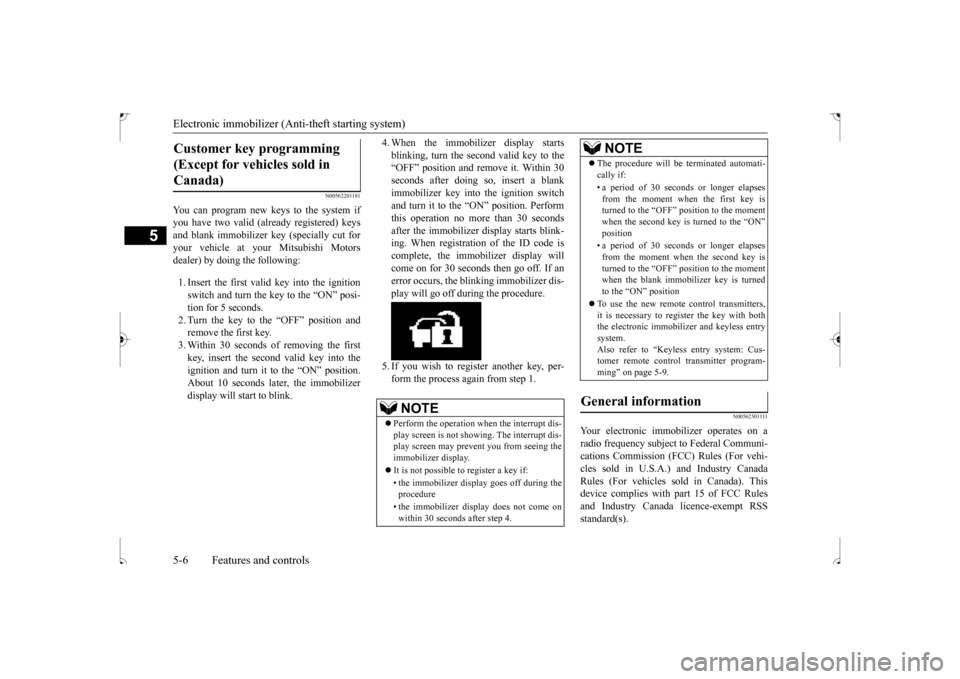
You can program new keys to the system if you have two valid (already registered) keys and blank immobilizer key (specially cut foryour vehicle at your Mitsubishi Motors dealer) by doing the following: 1. Insert the first valid key into the ignition switch and turn the key to the “ON” posi- tion for 5 seconds.2. Turn the key to the “OFF” position and remove the first key. 3. Within 30 seconds of removing the firstkey, insert the second valid key into the ignition and turn it to the “ON” position. About 10 seconds later, the immobilizerdisplay will start to blink.
4. When the immobilizer display starts blinking, turn the second valid key to the “OFF” position and remove it. Within 30 seconds after doing so, insert a blankimmobilizer key into the ignition switch and turn it to the “ON” position. Perform this operation no more than 30 secondsafter the immobilizer display starts blink- ing. When registration of the ID code is complete, the immobilizer display willcome on for 30 seconds then go off. If anerror occurs, the blinking immobilizer dis- play will go off during the procedure. 5. If you wish to register another key, per- form the process again from step 1.
N0056230
1111
Your electronic immobilizer operates on a radio frequency subject to Federal Communi- cations Commission (FCC) Rules (For vehi- cles sold in U.S.A.) and Industry CanadaRules (For vehicles sold in Canada). This device complies with part 15 of FCC Rules and Industry Canada licence-exempt RSSstandard(s).
Customer key programming (Except for vehicles sold in Canada)
NOTE
Perform the operation when the interrupt dis- play screen is not showing. The interrupt dis- play screen may prevent you from seeing the immobilizer display. It is not possible to register a key if: • the immobilizer display goes off during the procedure • the immobilizer display does not come on within 30 seconds after step 4.
The procedure will be terminated automati- cally if: • a period of 30 seconds or longer elapses from the moment when the first key isturned to the “OFF” position to the moment when the second key is turned to the “ON” position • a period of 30 seconds or longer elapses from the moment when the second key isturned to the “OFF” position to the moment when the blank immobilizer key is turned to the “ON” position
To use the new remote control transmitters, it is necessary to regi
ster the key with both
the electronic immobilizer and keyless entry system. Also refer to “Keyless entry system: Cus-tomer remote control transmitter program- ming” on page 5-9.
General information
NOTE
BK0239500US.bo
ok 6 ページ 2016年5月13日 金曜日 午前8時53分
Page 70 of 399
Keyless entry system (if so equipped)
Features and controls 5-7
5
Operation is subject to the following two con- ditions. This device may not cause harmful inter- ference. This device must accept any interference received, including interference that may cause undesired operation.
N00509001988
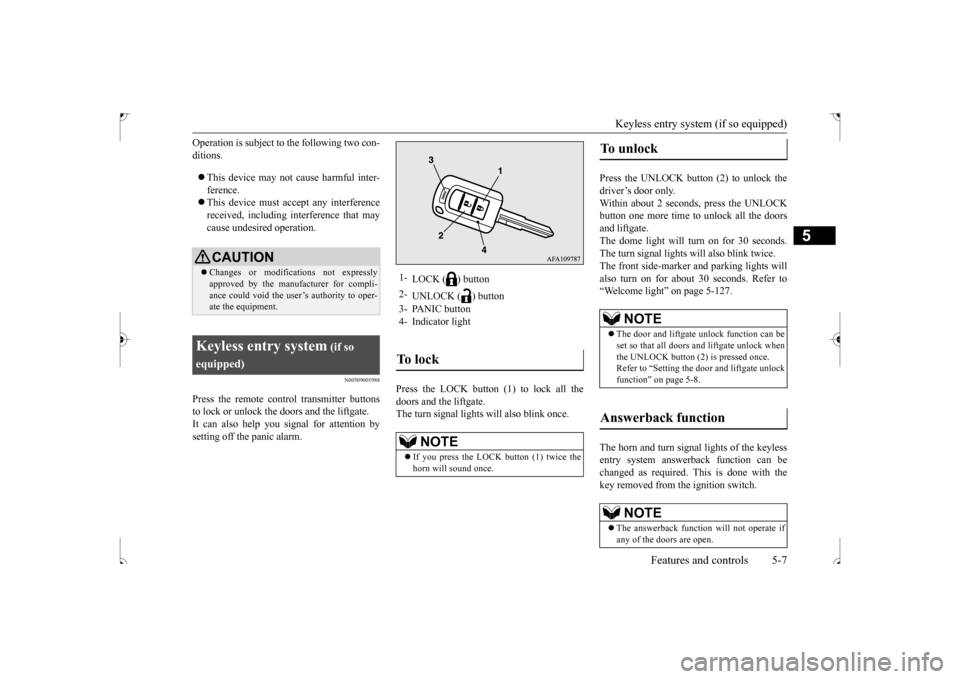
Press the remote control transmitter buttonsto lock or unlock the doors and the liftgate. It can also help you signal for attention bysetting off the panic alarm.
Press the LOCK button (1) to lock all the doors and the liftgate.The turn signal lights will also blink once.
Press the UNLOCK button (2) to unlock the driver’s door only.Within about 2 seconds, press the UNLOCK button one more time to unlock all the doors and liftgate.The dome light will turn on for 30 seconds. The turn signal lights will also blink twice. The front side-marker and parking lights willalso turn on for about 30 seconds. Refer to“Welcome light” on page 5-127. The horn and turn signal lights of the keyless entry system answerback function can bechanged as required. This is done with the key removed from the ignition switch.
CAUTION Changes or modifications not expressly approved by the manufacturer for compli- ance could void the user’s authority to oper- ate the equipment.
Keyless entry system
(if so
equipped)
1-
LOCK ( ) button
2-
UNLOCK ( ) button
3- PANIC button 4- Indicator lightTo l o c k
NOTE
If you press the LOCK button (1) twice the horn will sound once.
To u n l o c k
NOTE
The door and liftgate unlock function can be set so that all doors and liftgate unlock when the UNLOCK button (2) is pressed once. Refer to “Setting the door and liftgate unlockfunction” on page 5-8.
Answerback function
NOTE
The answerback function will not operate if any of the doors are open.
BK0239500US.bo
ok 7 ページ 2016年5月13日 金曜日 午前8時53分
Page 71 of 399
Keyless entry system (if so equipped) 5-8 Features and controls
5
The answerback function can be set in the following three ways.Each time the answerback function is set, a chime will sound to tell
you the condition of
the answerback function. 1. Remove the key from the ignition switch. 2. Open the driver’s door and turn the com- bination headlights and dimmer switch tothe “OFF” position. 3. Press and hold the LOCK button (1) for 4 to 10 seconds and then press and hold theUNLOCK button (2) during this time. 4. Within 10 seconds of pressing the UNLOCK button in step 3, release theUNLOCK button first, and then release the LOCK button.
The answerback function can be turned ON or OFF separately. 1. Remove the key from the ignition switch. 2. Open the driver’s door and turn the com-bination headlights and dimmer switch to the “OFF” position. 3. Press and hold the UNLOCK button (2)for 4 to 10 seconds and then press andhold the LOCK button (1) during this time. 4. Within 10 seconds of pressing the LOCKbutton in step 3, release the UNLOCK button first, and then release the LOCK button.
N00543601128
The door and liftgate unlock function can beset to the following two conditions. Each time the door and liftgate unlock func- tion is set, a chime will sound to tell you thecondition of the door and liftgate unlock function. 1. Remove the key from the ignition switch. 2. Open the driver’s door and turn the com- bination headlights and dimmer switch to the “OFF” position.3. Press and hold the LOCK button (1) for 4 to 10 seconds and then press and hold the UNLOCK button (2) during this time.4. Within 10 seconds of pressing the UNLOCK button in step 3, release the LOCK button first, and then release theUNLOCK button.
Horn deactivation/reactivation
Onechime:
The horn will not sound.
Tw o chimes:
The horn will sound.
Four chimes:
The horn will sound if the LOCK button is pressed twice within 1second.
Turn signal lights deactiva- tion/reactivation
Number of chimes
To l o c k
To u n l o c k
One chime One flash Two flashes Two chimes One flash No flashThree chimes No flash Two flashesFour chimes Two flashes One flashFive chimes No flash One flashSix chimes Two flashes No flashSeven chimes
No flash No flash
Setting the door and liftgate unlock function
Number of chimes
Condition
One chime
All doors and the liftgate unlock
Tw o chimes
Driver’s door unlock only
BK0239500US.bo
ok 8 ページ 2016年5月13日 金曜日 午前8時53分
Page 73 of 399
Keyless entry system (if so equipped) 5-10 Features and controls
5
5. To register the ID codes of additional remote control transmitters, repeat step 4 within 60 seconds after step 4. 6. If no ID code of a remote control trans-mitter is registered within 60 seconds after step 4, the registration mode is can- celed and the normal mode returns.
N00546101137
Your keyless entry system operates on a radiofrequency subject to Federal Communica- tions Commission (FCC) Rules (For vehicles sold in U.S.A.) and Industry Canada Rules(For vehicles sold in Canada). This device complies with part 15 of FCC Rules and Industry Canada licence-exempt RSS stan-dard(s).
Operation is subject to the following two con- ditions. This device may not cause harmful inter- ference. This device must accept any interference received, including interference that may cause undesired operation.
N00544101162
1. Before replacing the battery, remove static electricity from your body by touching ametal grounded object. 2. Remove the screw (A) from the remote control transmitter.
NOTE
For verification purposes, try to lock and unlock the doors with the re-coded remotecontrol transmitters after the registration is completed. The indicator light (4) comes on each time a button is pressed. The keyless entry system does not work if the key is in the ignition switch. The remote control transmitter can be used from about 40 feet (12 m) away. However, this distance may change if your vehicle isnear a TV transmitting tower, a power sta- tion, or a radio station. If the UNLOCK button (2) is pressed when all doors and the liftgate are locked and no doors or the liftgate are opened within about30 seconds, the doors and the liftgate will automatically re-lock. If the following conditions are observed after pressing the LOCK (1) or UNLOCK (2) but-ton on the remote control transmitter, the battery in the remote control transmitter may need to be replaced.
• The doors and the liftgate cannot be locked or unlocked. • The panic alarm cannot be operated. • The indicator light (4) is dim or does not come on.
If you lose your remote control transmitter, please contact an authorized Mitsubishi Motors dealer for a replacement. If you wish to obtain an additional remote control transmitter, please contact an autho-rized Mitsubishi Motors dealer. A maximum of 8 remote control transmitters can be pro- grammed for your vehicle. To use the new remote control transmitters, it is necessary to regi
ster the key with both
the electronic immobilizer and keyless entry system. Also refer to “Electr
onic immobilizer (Anti-
theft starting system): Customer key pro- gramming” on page 5-6.
General information
NOTE
CAUTION Changes or modifications not expressly approved by the manufacturer for compli- ance could void the user’s authority to oper- ate the equipment.
Procedure for replacing the remote control transmitter bat- tery
BK0239500US.bo
ok 10 ページ 2016年5月13日 金曜日 午前8時53分