2017 MITSUBISHI OUTLANDER SPORT buttons
[x] Cancel search: buttonsPage 232 of 399
HomeLink® Wireless Control System (if so equipped)
Features and controls 5-169
5
3. Once the door has stopped, press and release the “Learn” or “Smart” button on the garage door opener (refer to your garage door opener owner’s manual forthe location of the “Learn” button). Both the HomeLink
® garage door operation
indicators will flash rapidly green uponsuccessful synchronization with the door opener (within 5 seconds).
N00585000033
To operate, simply press and release the pro- grammed HomeLink
® button. Activation will
now occur for the trained device (i.e. garage door opener, gate operator, security system,entry door lock, home/office lighting, etc.). For convenience, the hand-held transmitter of the device may also be used at any time.
N00585200035
The HomeLink
® has the capability of receiv-
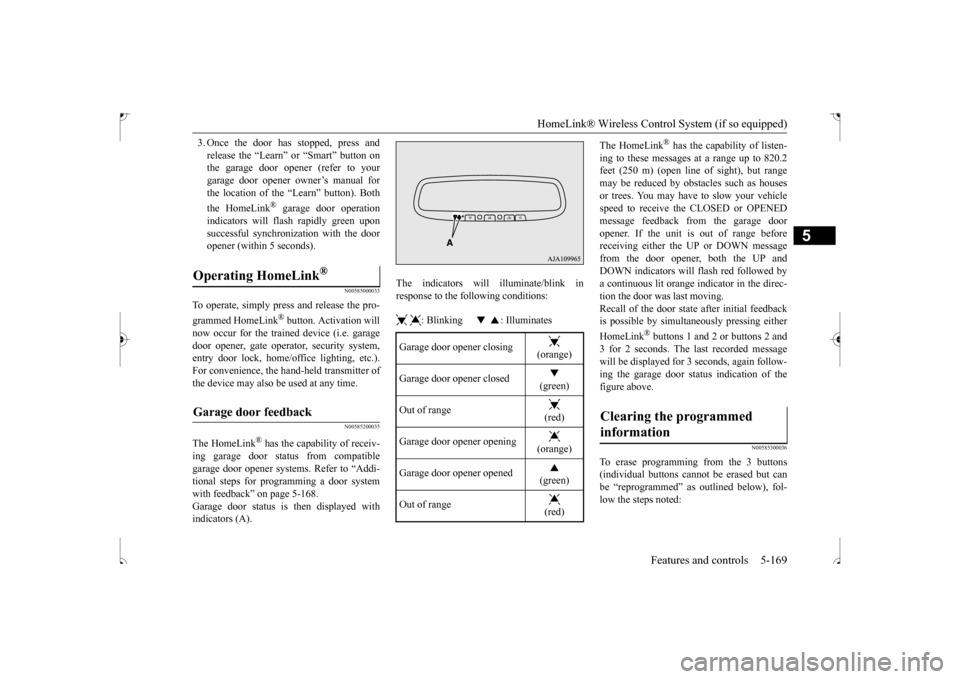
ing garage door status from compatiblegarage door opener systems. Refer to “Addi- tional steps for programming a door system with feedback” on page 5-168.Garage door status is then displayed with indicators (A).
The indicators will illuminate/blink in response to the following conditions: : Blinking : Illuminates
The HomeLink
® has the capability of listen-
ing to these messages at a range up to 820.2 feet (250 m) (open line
of sight), but range
may be reduced by obstacles such as housesor trees. You may have to slow your vehicle speed to receive the CLOSED or OPENED message feedback from the garage dooropener. If the unit is out of range before receiving either the UP or DOWN message from the door opener, both the UP andDOWN indicators will flash red followed bya continuous lit orange indicator in the direc- tion the door was last moving. Recall of the door state after initial feedbackis possible by simultaneously pressing either HomeLink
® buttons 1 and 2 or buttons 2 and
3 for 2 seconds. The last recorded messagewill be displayed for 3 seconds, again follow- ing the garage door status indication of the figure above.
N00585300036
To erase programming from the 3 buttons(individual buttons cannot be erased but can be “reprogrammed” as outlined below), fol- low the steps noted:
Operating HomeLink
®
Garage door feedback
Garage door opener closing
(orange)
Garage door opener closed
(green)
Out of range
(red)
Garage door opener opening
(orange)
Garage door opener opened
(green)
Out of range
(red)
Clearing the programmed information
BK0239500US.book
169 ページ 2016年5月13日 金曜日 午前8時53分
Page 233 of 399
Interior lights 5-170 Features and controls
5
1. Press and hold the 2 outer HomeLink
®
buttons for at least 10 seconds. The indi- cator will change from continuous yellow to rapidly flashing green.2. Release both buttons. 3. HomeLink
® is now in the train (or learn-
ing) mode and can be programmed at any time beginning with “Programming a new HomeLink
®” step 1.
N00585400037
To reprogram a HomeLink
® button, complete
the following. 1. Press and hold the desired HomeLink
®
button. Do not release the button. 2. The indicator light will begin to slowlyflash orange after 20 seconds. The Home- Link
® button can be released at this point.
Proceed with “Programming a new HomeLink
®” step 2.
N00585600039
Your HomeLink
® system operates on a radio
frequency subject to Federal Communica- tions Commission (FCC) Rules (For vehiclessold in U.S.A.) and Industry Canada Rules (For vehicles sold in Canada). This device complies with Part 15 of the FCC Rules andRSS- 210 of the Industry Canada Rules. Operation is subject to the following two con- ditions. This device may not cause harmful inter- ference. This device must accept any interference that may be received, including interfer-ence that may cause undesired operation.
This equipment complies with FCC radiation exposure limits set forth for an uncontrolledenvironment. End Users must follow the spe-cific operating instructions for satisfying RF exposure compliance. This transmitter must be at least 12 inches (20 cm) from the userand must not be co-located or operating in conjunction with any other antenna or trans- mitter.The term “IC:” before the certification/regis- tration number only signifies that Industry Canada technical specifications were met.
N00525300562
NOTE
Do not hold for longer than 20 seconds.
Reprogramming a single HomeLink
® button
NOTE
If you do not complete the programming of a new device to the button, it will revert to the previously stored programming. For questions or comments, visit www.homelink.com,www.youtube.com/HomeLinkGentex, or by calling the HomeLink
® Hotline.
General information
CAUTION The transmitter has been tested and complies with FCC and IC rules. Changes or modifications not expressly approved by the party responsible for com- pliance could void the user’s authority tooperate the device.
Interior lights
NOTE
Be aware that leaving the light illuminated with the engine off may run the battery down. Never leave the vehicle without checkingthat the light is off.
BK0239500US.book
170 ページ 2016年5月13日 金曜日 午前8時53分
Page 294 of 399
Operation Keys
Comfort controls 7-37
7
N00716700100
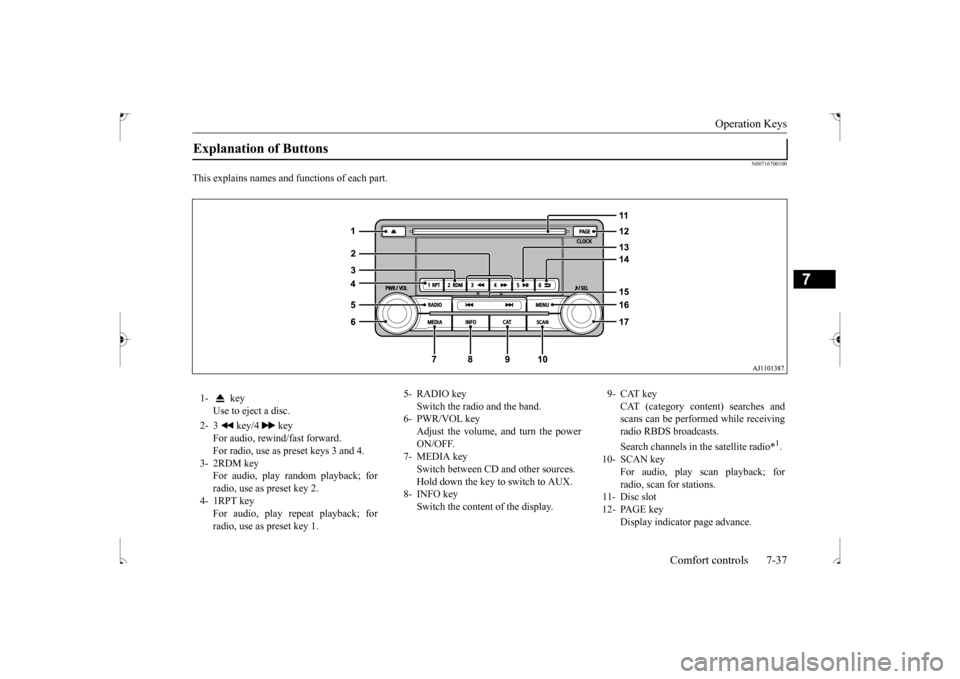
This explains names and functions of each part.Explanation of Buttons 1- key
Use to eject a disc.
2- 3 key/4 key
For audio, rewind/fast forward. For radio, use as preset keys 3 and 4.
3- 2RDM key
For audio, play random playback; for radio, use as preset key 2.
4- 1RPT key
For audio, play repeat playback; forradio, use as preset key 1.
5- RADIO key
Switch the radio and the band.
6- PWR/VOL key
Adjust the volume, and turn the power ON/OFF.
7- MEDIA key
Switch between CD and other sources. Hold down the key to switch to AUX.
8- INFO key
Switch the content of the display.
9- CAT key
CAT (category content) searches andscans can be performed while receiving radio RBDS broadcasts. Search channels in the satellite radio*
1.
10- SCAN key
For audio, play scan playback; for radio, scan for stations.
11- Disc slot 12- PAGE key
Display indicator page advance.
BK0239500US.bo
ok 37 ページ 2016年5月13日 金曜日 午前8時53分
Page 302 of 399
Listen to an iPod
Comfort controls 7-45
7
Press the MEDIA key to set the iPod as the source. The selected source is indicated on the dis- play. Press the key or key to select the track. This enables selection of the next or previous track. Hold down the 3 key or the 4 key. Fast forward/rewind is possible.
Repeat playback and shuffle playback are possible. Press the 1RPT key. Repeat playback of th
e track currently being
played. Press the 2RDM key. Play tracks in the category currently being played in a random order. Hold down the 2RDM key.
Set up the device in order that no unsafe actions, such as plugging in the connection cable are taken while driving. When inserting and removing the iPod/iPhone, for safety’s sake first stop the vehicle. Depending on the status of the iPod/iPhone, it may take some time until the device is rec- ognized, or playback starts. Buttons on the product will not operate while the iPod/iPhone is connected. iPod/iPhone specifications and settings may mean that a connection is not possible, orresult in differences in operation or display. Depending on audio data in the iPod/iPhone, track information may not be displayed cor- rectly. Depending on the status of the vehicle and device, the iPod/iPhone may not play back after starting the engine. Data containing copyright information may not play back. It is recommended that the iPod/iPhone equalizer settings be set to flat. Operate the iPod/iPhone while connected to this product. If the iPod/iPhone is connected via Bluetooth as a Bluetooth-capable audio device, then do not connect the iPod/iPhone using an iPod cable. Connection using both methods willresult in erroneous operation.NOTE
If an iPod/iPhone does not operate correctly, then remove the iPod/iPhone from the prod- uct, reset, then reconnect.
Play iPod Select the Track (File) Fast Forward or Rewind
NOTE
Switch Playback Mode Repeat Playback (RPT)
NOTE
Pressing again will cancel.
Shuffle Playback (RDM)
NOTE
Pressing again will cancel.
Album Shuffle Playback
BK0239500US.bo
ok 45 ページ 2016年5月13日 金曜日 午前8時53分
Page 304 of 399
Listen to Audio Files on a USB Device
Comfort controls 7-47
7
Press the MEDIA key to set USB as the source. The selected source is indicated on the dis- play. Press the key or key to select the track. This enables selection of the next or previous track.
Hold down the 3 key or the 4 key. Fast forward/rewind is possible. Repeat playback, random playback, and scan playback are possible. Press the 1RPT key. Repeat playback of th
e track currently being
played. Hold down the 1RPT key.
When connecting a USB device, use a con- nection cable. Failure to use a connection cable when connecting may place undue load on, or damage the USB connector. Set up the device in order that no unsafe actions, such as plugging in the connection cable are taken while driving. When inserting and removing the USB device, for safety’s sake first stop the vehi-cle. Do not insert non audio devices into the USB port. Damage to the device or equipment may result. Depending on the status of the USB device, it may take some time until the device is rec- ognized, or playback starts. Depending on USB devices, buttons on the product will not operate while the USBdevice is connected. USB device specifications and settings may mean that connection is not possible, or result in differences in operation or display. Depending on the audio data in the USB device, track information may not be dis- played correctly. Depending on the status of the vehicle and device, the iPod/iPhone may not play back after starting the engine. Data containing copyright information may not play back. This product can play back MP3, WMA, and AAC format audio files.NOTE
Depending on the type of USB device, usage may not be possible, or functions that can be used may be restricted. The recommended file system for USB memory is FAT32. The maximum supported capacity for USB memory is 32GB. Operate the USB device containing recorded audio files while connected to this product.
Play Back of Audio Files on a USB Device Select the Track (File)
NOTE
Fast Forward or Rewind Switch Playback Mode Repeat Playback (RPT)
NOTE
Pressing again will cancel. Selecting a file will cancel this. However, it will not be cancelled in vehicles with a Bluetooth
® 2.0 interface.
Folder Repeat Playback
BK0239500US.bo
ok 47 ページ 2016年5月13日 金曜日 午前8時53分