2017 MITSUBISHI OUTLANDER SPORT display
[x] Cancel search: displayPage 225 of 399
USB input terminal (if so equipped) 5-162 Features and controls
5
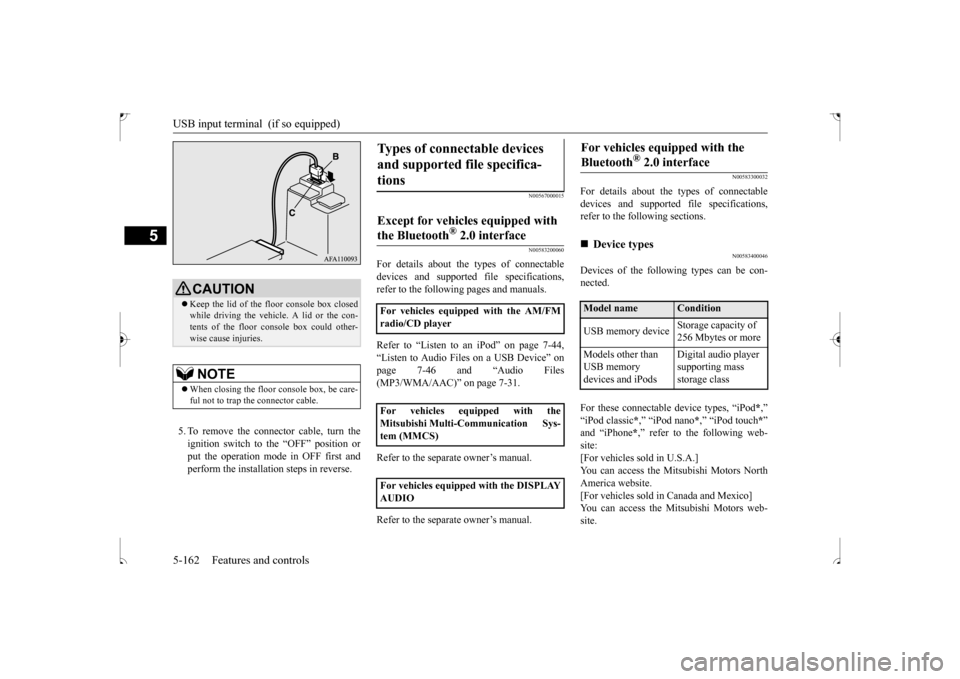
5. To remove the connector cable, turn the ignition switch to the “OFF” position orput the operation mode in OFF first and perform the installation steps in reverse.
N00567000015 N00583200060
For details about the types of connectable devices and supported file specifications,refer to the following pages and manuals. Refer to “Listen to an iPod” on page 7-44, “Listen to Audio Files on a USB Device” on page 7-46 and “Audio Files (MP3/WMA/AAC)” on page 7-31. Refer to the separate owner’s manual. Refer to the separate owner’s manual.
N00583300032
For details about the types of connectable devices and supported file specifications, refer to the following sections.
N00583400046
Devices of the following types can be con-nected. For these connectable device types, “iPod
*,”
“iPod classic
*,” “iPod nano
*,” “iPod touch
*”
and “iPhone
*,” refer to the following web-
site:[For vehicles sold in U.S.A.] You can access the Mitsubishi Motors North America website.[For vehicles sold in Canada and Mexico] You can access the Mitsubishi Motors web- site.
CAUTION Keep the lid of the floor console box closed while driving the vehicle. A lid or the con- tents of the floor console box could other- wise cause injuries.NOTE
When closing the floor console box, be care- ful not to trap the connector cable.
Types of connectable devices and supported file specifica- tions
Except for vehicles equipped with the Bluetooth
® 2.0 interface
For vehicles equipped with the AM/FM radio/CD player For vehicles equipped with the Mitsubishi Multi-Communication Sys- tem (MMCS) For vehicles equipped with the DISPLAY AUDIO
For vehicles equipped with the Bluetooth
® 2.0 interface
Device types Model name
Condition
USB memory device
Storage capacity of 256 Mbytes or more
Models other than USB memory devices and iPods
Digital audio player supporting mass storage class
BK0239500US.book
162 ページ 2016年5月13日 金曜日 午前8時53分
Page 232 of 399
HomeLink® Wireless Control System (if so equipped)
Features and controls 5-169
5
3. Once the door has stopped, press and release the “Learn” or “Smart” button on the garage door opener (refer to your garage door opener owner’s manual forthe location of the “Learn” button). Both the HomeLink
® garage door operation
indicators will flash rapidly green uponsuccessful synchronization with the door opener (within 5 seconds).
N00585000033
To operate, simply press and release the pro- grammed HomeLink
® button. Activation will
now occur for the trained device (i.e. garage door opener, gate operator, security system,entry door lock, home/office lighting, etc.). For convenience, the hand-held transmitter of the device may also be used at any time.
N00585200035
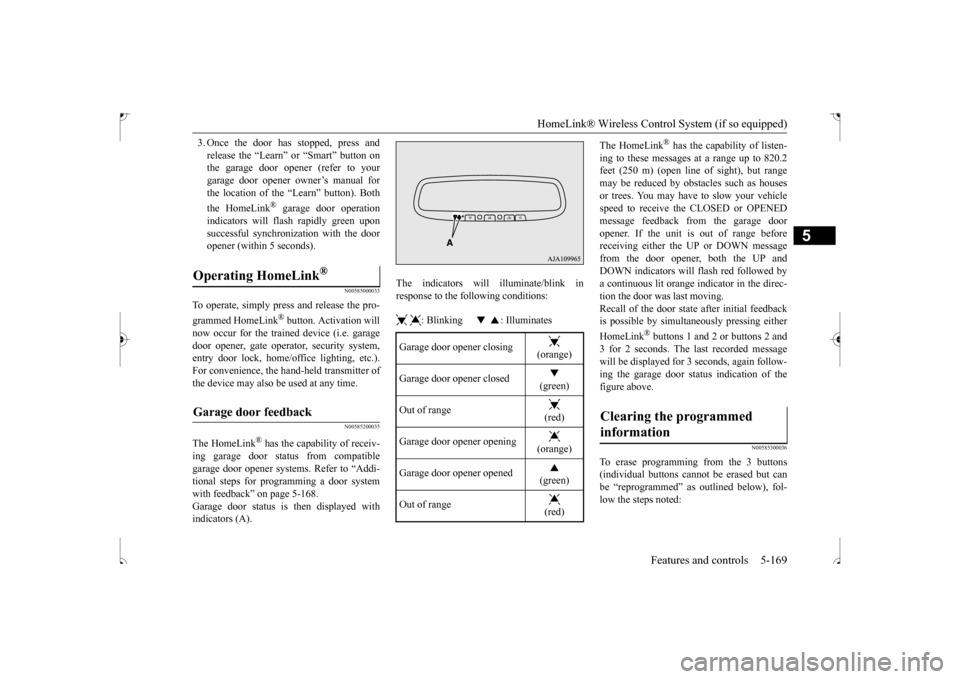
The HomeLink
® has the capability of receiv-
ing garage door status from compatiblegarage door opener systems. Refer to “Addi- tional steps for programming a door system with feedback” on page 5-168.Garage door status is then displayed with indicators (A).
The indicators will illuminate/blink in response to the following conditions: : Blinking : Illuminates
The HomeLink
® has the capability of listen-
ing to these messages at a range up to 820.2 feet (250 m) (open line
of sight), but range
may be reduced by obstacles such as housesor trees. You may have to slow your vehicle speed to receive the CLOSED or OPENED message feedback from the garage dooropener. If the unit is out of range before receiving either the UP or DOWN message from the door opener, both the UP andDOWN indicators will flash red followed bya continuous lit orange indicator in the direc- tion the door was last moving. Recall of the door state after initial feedbackis possible by simultaneously pressing either HomeLink
® buttons 1 and 2 or buttons 2 and
3 for 2 seconds. The last recorded messagewill be displayed for 3 seconds, again follow- ing the garage door status indication of the figure above.
N00585300036
To erase programming from the 3 buttons(individual buttons cannot be erased but can be “reprogrammed” as outlined below), fol- low the steps noted:
Operating HomeLink
®
Garage door feedback
Garage door opener closing
(orange)
Garage door opener closed
(green)
Out of range
(red)
Garage door opener opening
(orange)
Garage door opener opened
(green)
Out of range
(red)
Clearing the programmed information
BK0239500US.book
169 ページ 2016年5月13日 金曜日 午前8時53分
Page 247 of 399
Vehicle preparation before driving 6-4 Driving safety
6
N00629000669
For a safer and more enjoyable trip, always check for the following: Before starting the vehicle, make certain that you and all passengers are seated and wearing their seat belts properly (with children in the rear seat, in appropriaterestraints), and that all the doors and lift- gate are locked. Move the driver’s seat as far backward as possible, while still keeping good visibil- ity, and good control of the steering wheel, brakes, accelerator, and controls.Check the instrument panel indicators and multi-information display for any possible problem. In the same way, the front passenger seat should also be moved as far back as possi- ble. Make sure that infants and small children are properly restrained in accordance with all laws and regulations.
Check these by selecting the defroster mode, and set the blower switch on high. Youshould be able to feel the air blowing against the windshield. Refer to “Defrosting or defogging (wind-shield, door windows)” on page 7-8, 7-13, 7-18, 7-24. Check all the tires for heavy tread wear or uneven wear patterns. Look for stones, nails, glass, or other objects stuck in the tread. Look for any tread cuts or sidewall cracks. Checkthe wheel nuts for tightness, and the tires (including spare tire) for proper pressure. Replace your tires before they are heavilyworn out. As your vehicle is equipped with a tire pres- sure monitoring system, there is a risk ofdamage to the tire inflation pressure sensors when the tire is replaced on the rim. Tire replacement should, therefore, be performedonly by an authorized Mitsubishi Motors dealer.
Have someone watch while you turn all the exterior lights on and off. Also check the turnsignal indicators and high-beam indicators on the instrument panel. Check the ground under the vehicle after parking overnight, for fuel, water, oil, or other leaks. Make sure all the fluid levels are correct. Also, if you can smell fuel, you needto find out why immediately and have it fixed.
N00629200094
Even this vehicle’s safety equipment, andyour safest driving, cannot guarantee that you can avoid an accident or injury. However, ifyou give extra attention to the following areas, you can better protect yourself and your passengers: Drive defensively. Be aware of traffic, road and weather conditions. Leave plenty of stopping distance between your vehicle and the vehicle ahead.
Vehicle preparation before driving Seat belts and seats
Defrosters Tires
Lights Fluid leaks Safe driving techniques
BK0239500US.bo
ok 4 ページ 2016年5月13日 金曜日 午前8時53分
Page 258 of 399
7
Comfort controlsVents .........................................
.......................................................7-2
Manual air conditioning-Type 1
(if so equipped) ............................7-4
Manual air conditioning-Type 2
(if so equipped) ............................7-9
Automatic air conditioning-Type1 (if so equipped) ......................7-14Automatic air conditioning-Type2 (if so equipped) ......................7-19 Important air conditioning op
erating tips ......................................7-24
Air purifier ......................
...............................................................7-25
AM/FM radio/CD player (if so equipped) .....................................7-25 Handling of Discs .
.................................................
........................7-29
Audio Files (MP3/WMA/
AAC) ....................................................7-31
Important Points on Safety fo
r the Customer ................................7-35
Operation Keys ...............
...............................................................7-35
Listen to Radio ......
.................................................
........................7-38
Listen to Satellite Radio (if so equipped) .......................................7-40 Listen to CDs ..................
...............................................................7-42
Listen to MP3s ......
.................................................
........................7-43
Listen to an iPod ...
.................................................
........................7-44
Listen to Audio Files on
a USB Device .........................................7-46
To play iPod/USB memory device tracks via voice operation (vehicles with Bluetooth
® 2.0 interface)
...................................7-49
Listen to Bluetooth Audio (i
f so equipped) ....................................7-52
Display Indicator ..
.................................................
........................7-54
Audio Quality and Volume Balance Adjustment ...........................7-55System Settings .....
.................................................
........................7-56
Troubleshooting ..............
...............................................................7-60
Clock (if so equipped)
............................................
........................7-62
General information about
your radio ...........................................7-63
BK0239500US.bo
ok 1 ページ 2016年5月13日 金曜日 午前8時53分
Page 288 of 399
Audio Files (MP3/WMA/AAC)
Comfort controls 7-31
7
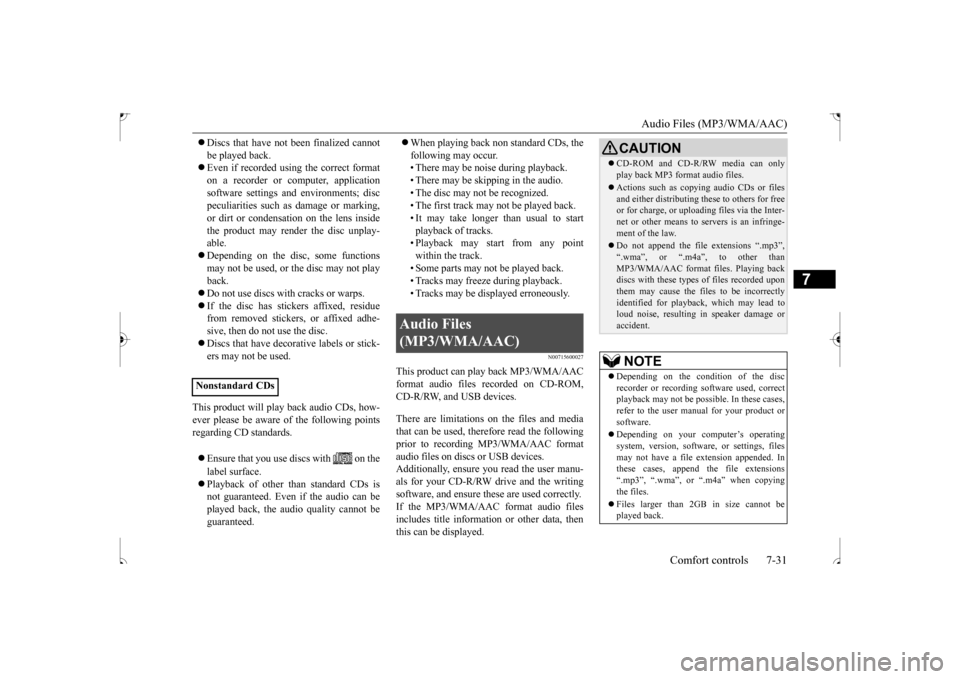
Discs that have not been finalized cannot be played back. Even if recorded using the correct format on a recorder or computer, applicationsoftware settings and environments; disc peculiarities such as damage or marking, or dirt or condensation on the lens insidethe product may render the disc unplay- able. Depending on the disc, some functions may not be used, or the disc may not playback. Do not use discs with cracks or warps. If the disc has stickers affixed, residue from removed stickers, or affixed adhe- sive, then do not use the disc. Discs that have decorative labels or stick- ers may not be used.
This product will play back audio CDs, how- ever please be aware of the following points regarding CD standards. Ensure that you use discs with on the label surface. Playback of other than standard CDs is not guaranteed. Even if the audio can be played back, the audio quality cannot beguaranteed.
When playing back non standard CDs, the following may occur. • There may be noise during playback. • There may be skipping in the audio.• The disc may not be recognized. • The first track may not be played back. • It may take longer than usual to startplayback of tracks. • Playback may start from any point within the track.• Some parts may not be played back.• Tracks may freeze during playback. • Tracks may be displayed erroneously.
N00715600027
This product can play back MP3/WMA/AACformat audio files recorded on CD-ROM, CD-R/RW, and USB devices. There are limitations on the files and media that can be used, therefore read the following prior to recording MP3/WMA/AAC format audio files on discs or USB devices.Additionally, ensure you read the user manu- als for your CD-R/RW drive and the writing software, and ensure these are used correctly.If the MP3/WMA/AAC format audio files includes title information or other data, then this can be displayed.
Nonstandard CDs
Audio Files (MP3/WMA/AAC)
CAUTION CD-ROM and CD-R/RW media can only play back MP3 format audio files. Actions such as copying audio CDs or files and either distributing these to others for freeor for charge, or uploading files via the Inter- net or other means to servers is an infringe- ment of the law. Do not append the file extensions “.mp3”, “.wma”, or “.m4a”, to other thanMP3/WMA/AAC format files. Playing back discs with these types of files recorded upon them may cause the files to be incorrectlyidentified for playback, which may lead to loud noise, resulting in speaker damage or accident.NOTE
Depending on the condition of the disc recorder or recording software used, correct playback may not be possible. In these cases,refer to the user manual for your product or software. Depending on your computer’s operating system, version, software, or settings, files may not have a file extension appended. In these cases, append the file extensions “.mp3”, “.wma”, or “.m4a” when copyingthe files. Files larger than 2GB in size cannot be played back.
BK0239500US.bo
ok 31 ページ 2016年5月13日 金曜日 午前8時53分
Page 290 of 399
Audio Files (MP3/WMA/AAC)
Comfort controls 7-33
7
N00715900033
MP3 is an abbreviation of “MPEG-1 Audio Layer 3”. MPEG is an abbreviation of“Motion Picture Experts Group”, and this is a video compression stan
dard used in video
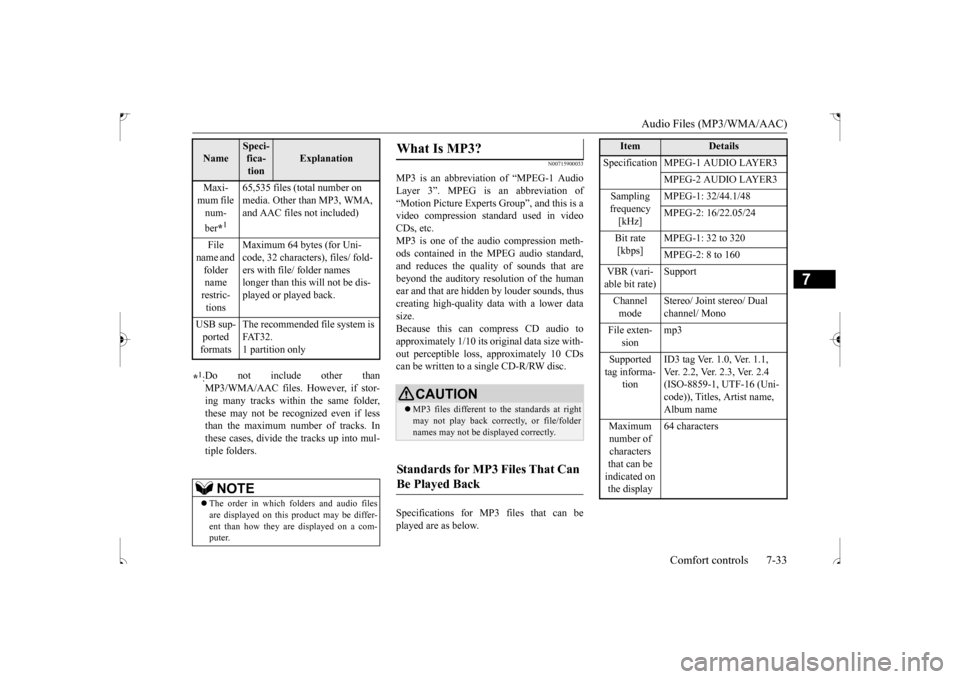
CDs, etc.MP3 is one of the audio compression meth- ods contained in the MPEG audio standard, and reduces the quality of sounds that arebeyond the auditory resolution of the humanear and that are hidden by louder sounds, thus creating high-quality data with a lower data size.Because this can compress CD audio to approximately 1/10 its original data size with- out perceptible loss, approximately 10 CDscan be written to a single CD-R/RW disc. Specifications for MP3 files that can be played are as below.
Maxi- mum file num- ber
*1
65,535 files (total number on media. Other than MP3, WMA, and AAC files not included)
File
name and folder name restric- tions
Maximum 64 bytes (for Uni- code, 32 characters), files/ fold- ers with file/ folder names longer than this will not be dis-played or played back.
USB sup- ported formats
The recommended file system is FAT32.1 partition only
*1: Do not include other than MP3/WMA/AAC files. However, if stor- ing many tracks within the same folder, these may not be recognized even if lessthan the maximum number of tracks. In these cases, divide the tracks up into mul- tiple folders.
NOTE
The order in which folders and audio files are displayed on this product may be differ-ent than how they are displayed on a com- puter.Name
Speci- fica- tion
Explanation
What Is MP3?
CAUTION MP3 files different to the standards at right may not play back correctly, or file/folder names may not be displayed correctly.
Standards for MP3 Files That Can Be Played Back
Item
Details
Specification MPEG-1 AUDIO LAYER3
MPEG-2 AUDIO LAYER3
Sampling frequency [kHz]
MPEG-1: 32/44.1/48 MPEG-2: 16/22.05/24
Bit rate [kbps]
MPEG-1: 32 to 320 MPEG-2: 8 to 160
VBR (vari- able bit rate)
Support
Channel mode
Stereo/ Joint stereo/ Dual channel/ Mono
File exten-
sion
mp3
Supported tag informa-
tion
ID3 tag Ver. 1.0, Ver. 1.1, Ver. 2.2, Ver. 2.3, Ver. 2.4 (ISO-8859-1, UTF-16 (Uni- code)), Titles, Artist name, Album name
Maximum number of characters that can be indicated on the display
64 characters
BK0239500US.bo
ok 33 ページ 2016年5月13日 金曜日 午前8時53分
Page 291 of 399
Audio Files (MP3/WMA/AAC) 7-34 Comfort controls
7
N00716000031
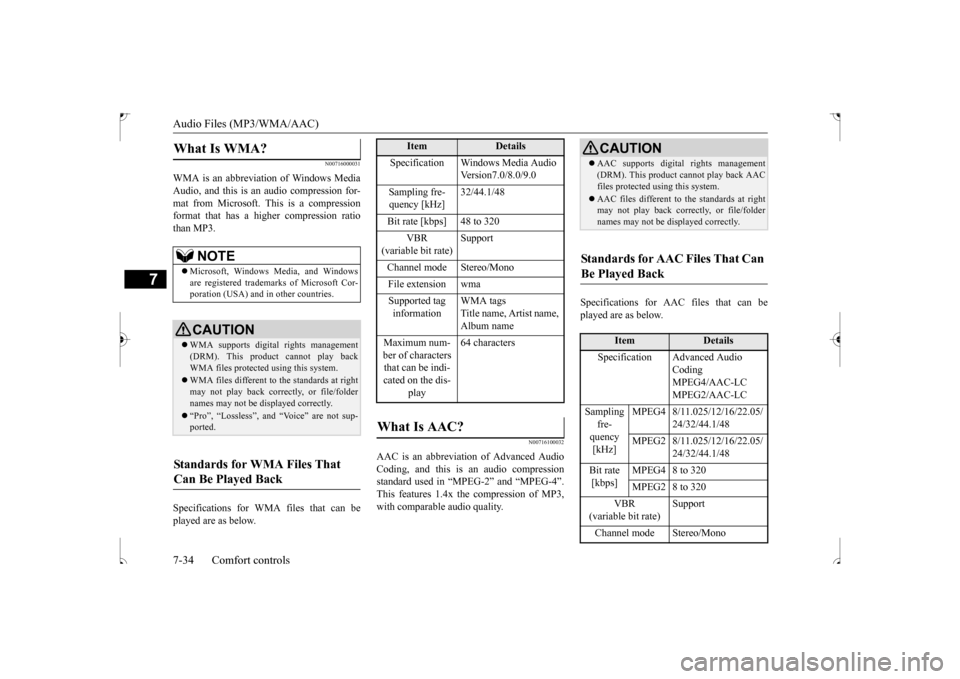
WMA is an abbreviation of Windows Media Audio, and this is an audio compression for-mat from Microsoft. This is a compression format that has a higher compression ratio than MP3. Specifications for WMA files that can be played are as below.
N00716100032
AAC is an abbreviation of Advanced AudioCoding, and this is an audio compression standard used in “MPEG-2” and “MPEG-4”. This features 1.4x the compression of MP3,with comparable audio quality.
Specifications for AAC files that can be played are as below.
What Is WMA?
NOTE
Microsoft, Windows Media, and Windows are registered trademarks of Microsoft Cor-poration (USA) and in other countries.CAUTION WMA supports digital rights management (DRM). This product cannot play backWMA files protected using this system. WMA files different to the standards at right may not play back correctly, or file/folder names may not be displayed correctly. “Pro”, “Lossless”, and “Voice” are not sup- ported.
Standards for WMA Files That Can Be Played Back
Item
Details
Specification Windows Media Audio
Version7.0/8.0/9.0
Sampling fre- quency [kHz]
32/44.1/48
Bit rate [kbps] 48 to 320
VBR
(variable bit rate)
Support
Channel mode Stereo/Mono File extension wmaSupported tag information
WMA tags Title name, Artist name, Album name
Maximum num- ber of characters that can be indi- cated on the dis-
play
64 characters
What Is AAC?
CAUTION AAC supports digital rights management (DRM). This product cannot play back AAC files protected using this system. AAC files different to the standards at right may not play back correctly, or file/folder names may not be displayed correctly.
Standards for AAC Files That Can Be Played Back
Item
Details
Specification Advanced Audio
Coding MPEG4/AAC-LC MPEG2/AAC-LC
Sampling
fre- quency [kHz]
MPEG4 8/11.025/12/16/22.05/
24/32/44.1/48
MPEG2 8/11.025/12/16/22.05/
24/32/44.1/48
Bit rate [kbps]
MPEG4 8 to 320 MPEG2 8 to 320
VBR
(variable bit rate)
Support
Channel mode Stereo/Mono
BK0239500US.bo
ok 34 ページ 2016年5月13日 金曜日 午前8時53分
Page 292 of 399
Important Points on Safety for the Customer
Comfort controls 7-35
7
N00716200020
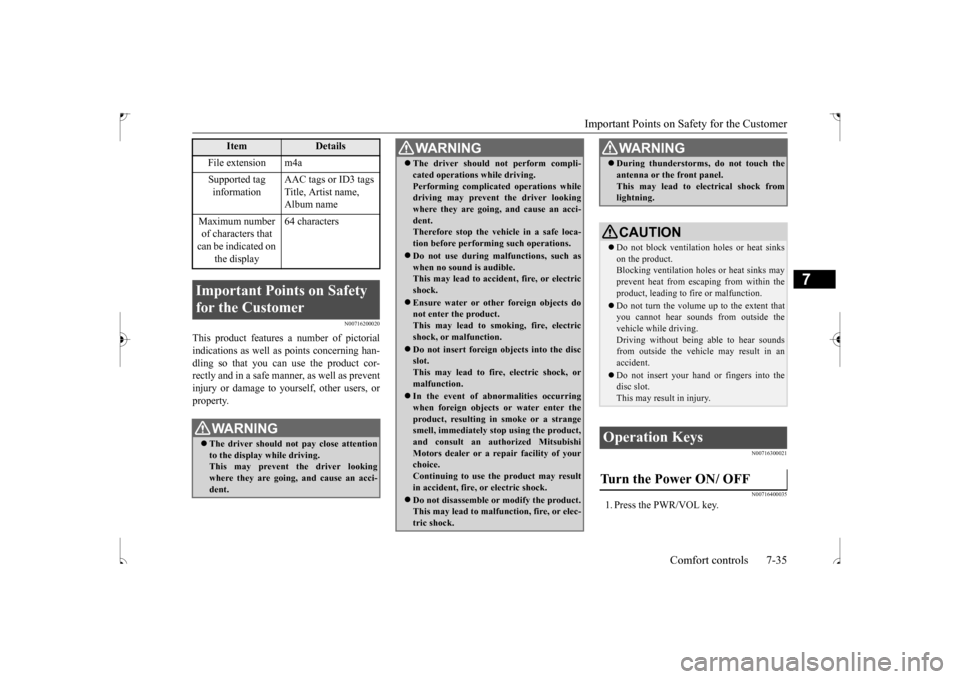
This product features a number of pictorial indications as well as points concerning han-dling so that you can use the product cor- rectly and in a safe manner, as well as prevent injury or damage to yourself, other users, orproperty.
N00716300021 N00716400035
1. Press the PWR/VOL key.
File extension m4a Supported tag information
AAC tags or ID3 tags Title, Artist name, Album name
Maximum number of characters that can be indicated on
the display
64 characters
Important Points on Safety for the Customer
WA R N I N G The driver should not pay close attention to the display while driving. This may prevent the driver looking where they are going, and cause an acci-dent.
Item
Details
The driver should not perform compli- cated operations while driving. Performing complicated operations while driving may prevent the driver looking where they are going, and cause an acci-dent. Therefore stop the vehicle in a safe loca- tion before performing such operations. Do not use during malfunctions, such as when no sound is audible.This may lead to accident, fire, or electric shock. Ensure water or other foreign objects do not enter the product. This may lead to smoking, fire, electricshock, or malfunction. Do not insert foreign objects into the disc slot. This may lead to fire, electric shock, or malfunction. In the event of abnormalities occurring when foreign objects or water enter theproduct, resulting in smoke or a strange smell, immediately stop using the product, and consult an authorized MitsubishiMotors dealer or a repair facility of your choice. Continuing to use the product may result in accident, fire, or electric shock. Do not disassemble or modify the product. This may lead to malfunction, fire, or elec- tric shock.WA R N I N G
During thunderstorms, do not touch the antenna or the front panel. This may lead to electrical shock from lightning.CAUTION Do not block ventilation holes or heat sinks on the product.Blocking ventilation holes or heat sinks may prevent heat from escaping from within the product, leading to fire or malfunction. Do not turn the volume up to the extent that you cannot hear sounds from outside thevehicle while driving. Driving without being able to hear sounds from outside the vehicle may result in anaccident. Do not insert your hand or fingers into the disc slot. This may result in injury.
Operation Keys Turn the Power ON/ OFF
WA R N I N G
BK0239500US.bo
ok 35 ページ 2016年5月13日 金曜日 午前8時53分