2017 MITSUBISHI OUTLANDER PHEV Aux port
[x] Cancel search: Aux portPage 42 of 548

Installation of accessoriesE00200302361
We recommend you to consult your MITSUBISHI MOTORS Authorized Service
Point.CAUTIONl Your vehicle is equipped with a diagnosis
connector for checking and servicing theelectronic control system.
Do not connect a device other than a diagno-
sis tool for inspections and service to this connector. Otherwise, the auxiliary battery
could be discharged, the electronic devices
of the vehicle could malfunction, or other unexpected problems could result.
In addition, malfunctions caused by connect-
ing a device other than a diagnosis tool may not be covered under warranty.
l The installation of accessories, optional
parts, etc., should only be carried out
within the limits prescribed by law in your country, and in accordance with the
guidelines and warnings contained with-
in the documents accompanying this ve- hicle.
l Installing electric components incorrect-
ly could lead to a fire. Refer to the “Modification/alterations to the electri-
cal or fuel systems” section within this
owner’s manual.
l When installing the radio, for the re-
quired information (frequency, transmis-
sion output, installing procedure), con- sult a MITSUBISHI MOTORS Author-
ized Service Point.
If the frequency, transmission output and installing condition are not appropriate,
it can adversely affect the electronic de- vices and could lead to unsafe vehicle operation.
l Using a cellular phone or radio set inside
the vehicle without an external antenna
may cause electrical system interference,
which could lead to unsafe vehicle oper-ation.
l Tyres and wheels which do not meet
specifications must not be used.
Refer to the “Specifications” section for information regarding wheel and tyre
sizes.
Important points!
Due to large number of accessory and re- placement parts of different manufactures available in the market, it is not possible, not
only for MITSUBISHI MOTORS , but also
for a MITSUBISHI MOTORS Authorized
Service Point, to check whether the attach- ment or installation of such parts affects the
overall safety of your MITSUBISHI-vehicle.
Even when such parts are officially author-
ized, for example by a “general operators
permit” (an appraisal for the part) or through the execution of the part in an officially ap-
proved manner of construction, or when a single operation permit following the attach- ment or installation of such parts, it cannot be
deduced from that alone, that the driving safety of your vehicles has not been affected.
Consider also that there basically exists no li- ability on the part of the appraiser or the offi-
cial. Maximum safety can only be ensured
with parts recommended, sold and fitted or
installed by a MITSUBISHI MOTORS au-
thorized Service Point ( MITSUBISHI
MOTORS GENUINE replacement parts and
MITSUBISHI MOTORS accessories). The
same also pertains to modifications of
MITSUBISHI vehicles with respect to the
production specifications. For safety reasons, do not attempt any modifications other than
those that follow the recommendations of a MITSUBISHI MOTORS authorized Service
Point.
Installation of accessories
2-17OGGE17E1General information2
Page 48 of 548

WARNINGlTo reduce the risk of electric shock or fire
due to electric leak, always use an earthed
outlet protected by a residual current de-
tector, rated for amperage equal to or greater than the value specified by MITSUBISHI MOTORS , and that is con-
nected to a dedicated branch circuit. If
the circuit is shared, and another electri- cal device is being used at the same time
the vehicle is charging, the circuit may heat abnormally, the breaker may trip
and the circuit may cause adverse inter-
ference on the household electrical appli- ances such as TVs and audio systems.
l It is possible to charge even in rain or
snow. However, be sure to pay attention
to the following:
• Do not touch normal charge port, nor-
mal charge connector, outlet and plug with wet hands.
• Keep away from water when connect-
ing the normal charge port, normal
charge connector, outlet and plug.
• Do not perform the charging in the out
of doors when heavy rain, heavy snow, strong winds, and when bad weather is
expected.
• Do not charge if there is possibility a
lightning strike. When thunder rum-
bling begins suddenly during normal charging, do not touch the vehicle andthe EV charging cable and turn off the
breaker.WARNINGl If water goes into the normal charge port
or the normal charge connector, it couldcause a short circuit, a fire and an electric shock.
Be sure to completely close the charging
lid and the inner lid and do not leave the EV charging cable in an outdoors.
l If the connected part of the charging plug
has been buried in snow while charging, turn off the hand switch or the breaker
connected with the outlet first, then re- move the snow and disconnect the charg-
ing plug. If your vehicle body has been buried in snow while charging, remove
the snow and then disconnect the charge connector.
l When you perform the normal charging
at away from home, some normal charg-
ers may not correspond to your vehicle. Consult an administrator or a maker of
the normal charger that it corresponds to your vehicle before using it. Also perform
normal charging according to the operat-
ing procedure indicated on the body of
normal charger.
l Do not open the charging lid for anything
other than charging and using the exter-
nal power feed.CAUTIONl Do not attempt to perform a jump start on
the auxiliary battery at the same time that the
drive battery is being charged. Doing so may
damage the vehicle or charging cable and
could cause injury.
Refer to “Emergency starting” on page 9-07.NOTEl If you open the charging lid with the opera-
tion mode of the power switch is ON, a buz- zer sounds approximately 10 minutes inter-mittently to alert the charging cannot be star- ted. If you close the charging lid or put theoperation mode in OFF, the buzzer stops.
l If you insert the charge connector to the
charge port with the operation mode is ON,
a buzzer sounds continuously approximately
10 minutes to alert the charging cannot be started.
If you pull the charge connector out or put the operation mode in OFF, the buzzer stops.
l Repeatedly performing only quick charging
may reduce the battery capacity.
In usual charge, normal charging is recom-
mended.
l To maintain the capacity of the drive battery,
the following is recommended:
• If you repeatedly perform only the quick
charging, fully charge the vehicle in nor- mal charging every 2 weeks.
Basic knowledge for charging
3-05OGGE17E1Charging3
Page 54 of 548

WARNING•Do not open the tailgate, for example to
remove or place an item in the cargo area.
Charging may affect the operation of elec-
tric medical devices and result in serious personal injury or death.
l Do not charge when the EV charging ca-
ble is coiled up.
Doing so the cable may be heated and this might result in fire.
l Before charging, make sure that there is
no foreign matter such as dust at the nor- mal charge port and the normal charge
connector.
At this time, do not touch the normal charge port.
l When the normal charge connector is
connected to the charge port, prevent for- eign matter such as water or dust from
entering in the connection.
Connection with foreign matter such as
water or dust may cause fire or an electric shock. Do not perform charging if there
might be strong exposure to water at the
connection.
l Never pull the cable to remove the plug.
And never submerge the EV charging connector, control box or plug in water.
l Please observe the following in order to
prevent accidents during charging such as
electrocution.
• Only use the EV charging cable that is
supplied with the vehicle.WARNING• Do not charge another vehicle by the
EV charging cable. The cable may overheat and this may result in a fire.
• When charging outdoors, make sure to
use an outlet that is protected from wa-
ter entering.
• Do not perform charging with the vehi-
cle coverd by a car cover, except for the
MITSUBISHI MOTORS GENUINE
car cover.
• Do not connect or disconnect the plug
and connector with wet hands.
l While it is normal for the connector and
charging cable to become warm during
charging, discontinue use immediately if
the connector or charging cable becomes hot to the touch.
l While it is normal for the control box to
become warm during charging, discontin- ue use immediately if the control box be-
comes hot to the touch.
l If abnormal smells are detected or the ve-
hicle produces smoke, quickly stop charg-
ing.
l Do not perform charging in a poorly ven-
tilated area or in an enclosed area. Keep sparks, cigarettes, and flames away from
the auxiliary battery.
Flammable gas generated from the auxili- ary battery during charging may be trap-
ped, resulting in explosion.
If charging is inevitably required, venti- late the area well.WARNINGl Grasp the normal charge connector when
connecting or disconnecting the EVcharging cable.
Grasping the cable may damage the cable
and could cause an electric shock, short circuit, and/or fire.CAUTIONl During charging, the cooling fans inside the
engine compartment may automatically be operated even if the operation mode of the
power switch is in OFF.
Keep your hands away from the cooling fan during charging.
l Do not perform charging from other power
source like a generator. Doing so could cause a malfunction.NOTEl If the charge connector is not easily connec-
ted to the charge port due to foreign materialentering, never force the connection. Doing so could damage the charging equipment or
the vehicle. Please contact a MITSUBISHI
MOTORS Authorized Service Point.
l The on board charger is only for rated AC
220-240V outlets.
Normal charging (charging method with rated AC 220-240V outlet)
3-11OGGE17E1Charging3
Page 209 of 548

2- Lane-change signalsWhen moving the lever to (2) slightly tochange a lane, the turn-signal lamps and
indication lamp in the instrument cluster will only flash while the lever is operat- ed.
Also, when you move the lever to (2) slightly then release it, the turn-signal lamps and indication lamp in the instru-
ment cluster will flash 3 times.NOTEl If the lamp flashes unusually quickly, the
bulb in a turn-signal lamp may have burned out. We recommend you to have the vehicle
inspected.
l It is possible to activate the following func-
tions.
• Flashing of the turn-signal lamps when
the lever is operated with the operation
mode is in ACC.
• Deactivate the turn-signal lamp 3-flash
function for lane changes.
• The time required to operate the lever for
the 3-flash function can be adjusted.
For further information, we recommend you
to consult a MITSUBISHI MOTORS Au-
thorized Service Point.
On vehicles equipped with the Smartphone
Link Display Audio or the MITSUBISHI
Multi-Communication System (MMCS),
screen operations can be used to make theNOTEadjustment. Refer to the separate owner’s
manual for details.
l It is possible to change the tone of a sound-
ing buzzer as the turn-signal lamps flash.
Refer to “Changing the turn-signal sound” on page 6-21.Hazard warning flasher
switch E00506602301
Use the hazard warning flasher switch when
the vehicle has to be parked on the road for
any emergency.
The hazard warning flashers can always be operated, regardless of the operation mode.
Push the switch to turn on the hazard warning flashers, all turn-signal lamps flash continu-
ously. To turn them off, push the switch
again.
NOTEl If the switch is used for a long period while
the ready indicator is not illuminated, theauxiliary battery could go flat and the Plugin
Hybrid EV System could be impossible to start.
l While the hazard warning lamps are blinking
due to having manually pushed the switch,
the emergency stop signal system does not
operate.
Refer to “Emergency stop signal system” on page 7-36.ECO mode switch
E00531801111
ECO mode is an eco-driving support system
which automatically controls the Plug-in Hy- brid EV System and air conditioning system to improve fuel efficiency.
When the ECO mode is active, your vehicle
will slowly accelerate even when you press the accelerator pedal.
Refer to “Automatic climate control air con-
ditioner” on page 8-04.
The ECO mode starts working by pressing
the ECO mode switch when the operation mode of the power switch is in ON. Push the
switch again and the ECO mode will cancel.
Hazard warning flasher switch
6-62OGGE17E1Instruments and controls6
Page 218 of 548

Heated steering wheel
switch* E00532100042
The heated steering wheel will warm the grip portions of the left and right on the steering
wheel by internal heater.
: Heating range
The heated steering wheel can be operated
when the operation mode of the power switch
is in ON.
Push the switch to turn on the heated steering
wheel. It will be turned off automatically in about 30 minutes. To turn off the heated
steering wheel while operating, push the
switch again.
The indication lamp (A) will illuminate while
the heated steering wheel is on.CAUTIONl If the following types of persons use the
heated steering wheel, they might become too hot or receive minor burns (red skin,
heat blisters, etc.):
• Elderly or ill people.
• People with sensitive skin.
• Excessively tired people.
• People under the influence of sleep induc-
ing medication (cold medicine, etc.).
l If water or any other liquid is spilled on the
steering wheel, allow it to dry thoroughly
before attempting to use the heated steering
wheel. Turn the heated steering wheel off
immediately if it appears to be malfunction- ing during use.CAUTIONl Long use of the heated steering wheel when
the ready indicator is not illuminated may run down the auxiliary battery.Horn switch
E00508001735
Press the steering wheel on or around the
“
” mark.
Heated steering wheel switch*
6-71OGGE17E1Instruments and controls6
Page 410 of 548
NOTElDepending on the type of the USB memory
device or other device connected, the con-
nected device may not function properly or the available functions may be limited.
l It is recommended to use an iPod with firm-
ware updated to the latest version.
l You can charge your iPod by connecting it
to the USB input terminal when the opera- tion mode is in ON or ACC.
l Do not keep your USB memory device or
iPod in your vehicle.
l It is recommended that you back up files in
case of data damage.
l Do not connect to the USB input terminal
any device (hard disk, card reader, memory reader, etc.) other than the connectable devi-
ces specified in the previous section. The de- vice and/or data may be damaged. If any of these devices was connected by mistake, re-
move it after putting the operation mode in OFF.File specifications
E00762401056
You can play music files of the following
specifications that are saved in a USB memo-ry device or other device supporting mass
storage class. When you connect your iPod, playable file specifications depend on the connected iPod.
ItemConditionFile formatMP3, WMA, AAC,
WAVMaximum number of levels
(including the root)
Level 8
Number of folders700Number of files65,535Sun visors
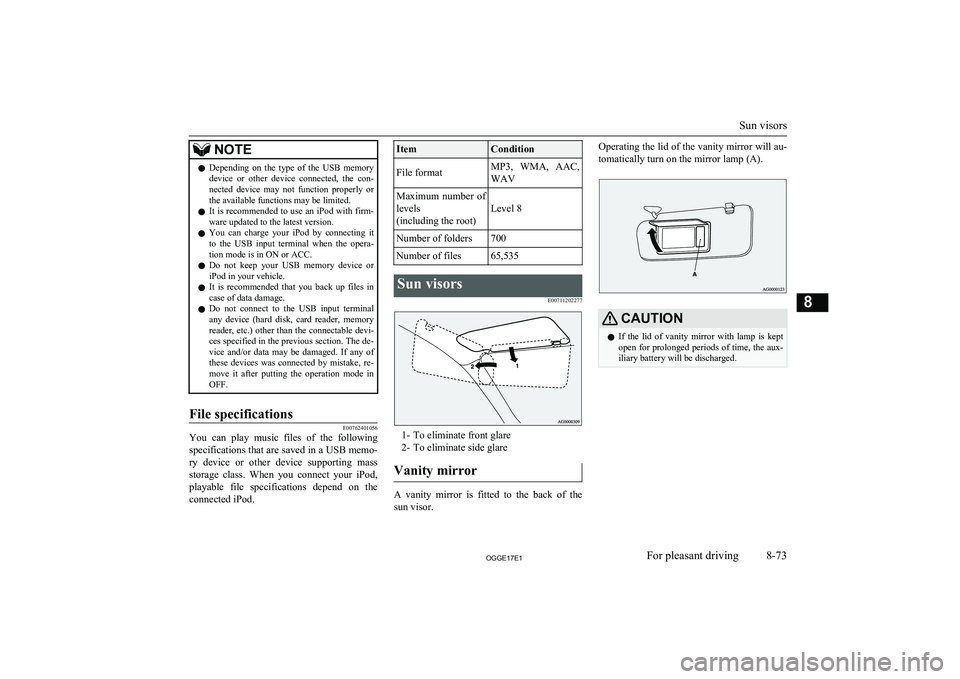
E00711202277
1- To eliminate front glare2- To eliminate side glare
Vanity mirror
A vanity mirror is fitted to the back of the sun visor.
Operating the lid of the vanity mirror will au-
tomatically turn on the mirror lamp (A).CAUTIONl If the lid of vanity mirror with lamp is kept
open for prolonged periods of time, the aux-
iliary battery will be discharged.
Sun visors
8-73OGGE17E1For pleasant driving8
Page 462 of 548

WARNINGlIf it is necessary to do work in the engine
compartment with the plug-in hybrid EV
system starting, be especially careful that
your clothing, hair, etc., does not become caught by the cooling fans, drive belts, orother moving parts.
l After performing the maintenance, make
sure that no tools or cloths are left behind in the engine compartment. If they are left
behind, a fire or damage to the vehicle
may occur.
l The cooling fans can turn on automatical-
ly even if the plug-in hybrid EV system is
stopping. Put the operation mode of the
power switch in OFF to be safe while you work in the engine compartment.
l Make sure that the engine and Plug-in
Hybrid EV system has cooled down be- fore removing the radiator cap and EV cooling system reserve tank cap, because
hot steam or boiling water will otherwise
gush from the filler port and may scald you.
l Do not smoke, cause sparks or allow open
flames around fuel or auxiliary battery.
The fumes are flammable.
l Be extremely cautious when working
around the auxiliary battery. It contains
poisonous and corrosive sulphuric acid.
l Do not get under your vehicle with just
the body jack supporting it. Always use
automotive jack stands.WARNINGl Improper handling of components and
materials used in the vehicle can endangeryour personal safety. We recommend you to consult a specialist for necessary infor- mation.
l The components inside the engine room
might be very hot to the touch.
To avoid being burnt, make sure all com- ponents have sufficiently cooled before beginning an inspection. These compo-
nents are affixed with the label indicating precautions for handling. Follow the in-
structions on the label.
1- Brake fluid reservoir (RHD)
2- Engine oil level dipstick
3- Engine oil cap
4- Brake fluid reservoir (LHD)
5- Washer fluid reservoir
6- EV cooling system reservoir
7- Engine coolant reservoir
Catalytic converter
E01000202495
The exhaust gas scavenging devices used with the catalytic converter are extremely ef- ficient for the reduction of noxious gases.
The catalytic converter is installed in the ex- haust system.
It is important to keep the engine properly
tuned to ensure proper catalyst operation and prevent possible catalyst damage.WARNINGl As with any vehicle, do not park or oper-
ate this vehicle in areas where combusti- ble materials such as dry grass or leaves
can come in contact with a hot exhaust
since a fire could occur.
l Paint should not be applied to the catalyt-
ic converter.NOTEl Use fuel of the type recommended in
“Fuel
selection” on page 2-14.
Catalytic converter
11-03OGGE17E1Maintenance11
Page 468 of 548

Fluid type
Use brake fluid conforming to DOT3 or
DOT4 from a sealed container. The brake fluid is hygroscopic. Too much moisture in
the brake fluid will adversely affect the brake system, reducing the performance.
CAUTIONl Take care in handling brake fluid as it is
harmful to the eyes, may irritate your skin
and also damage painted surfaces.
l Use only the specified brake fluid.
Do not mix or add different brands of brake fluid to prevent chemical reactions.
Do not let any petroleum-based fluid touch, mix with, or get into the brake fluid.
This will damage the seals.
l Keep the reservoir tank cap closed to pre-
vent the brake fluid from deteriorating ex- cept maintenance.
l Clean the filler cap before removing and
close the cap securely after maintenance.Auxiliary battery
E01001203705
The condition of the auxiliary battery is very
important for quick starting of the plug-in hy-
brid EV system and proper functioning of the vehicle’s electrical system. Regular inspec- tion is especially important in cold weather.
Be sure to have a MITSUBISHI MOTORS
Authorized Service Point check the auxiliary battery.WARNINGl Be sure to have a
MITSUBISHI
MOTORS Authorized Service Point
charge the battery. Do not charge the bat- tery yourself. Flammable gases may leak
and explode.CAUTIONl There is a type of auxiliary battery is not
properly installed in the vehicle, even if thesame specification.
When replacing the auxiliary battery, please
contact a MITSUBISHI MOTORS Author-
ized Service Point.NOTEl When the auxiliary battery is removed, the
controlling timer for forcibly starting the en-
gine may be reset.
Since a fuel injection device may cause a clogging if the state where the engine does
not operate continues after reset of the timer,
please press the battery charge switch in or-
der to start the engine. However, when the drive battery is near full charge, even if the
battery charge switch is pressed, the engine
may not start. In that case, press the battery charge switch again after the drive battery
quantity decreases. Refer to “Battery charge
mode switch” on page 7-28.
l When the auxiliary battery is removed, since
the timer control of the MITSUBISHI Re-
mote Control is reset and the drive battery temperature control cannot be used, commu-
nicate the wireless LAN device and your ve-
hicle again.
l When the auxiliary battery is removed, the
timer control of the MITSUBISHI Remote
Control is reset and each function of the MITSUBISHI Remote Control cannot be
used. Also the drive battery cannot be
warmed up.
Communicate the wireless LAN device and your vehicle again.
Auxiliary battery
11-09OGGE17E1Maintenance11