2017 MITSUBISHI OUTLANDER parking brake
[x] Cancel search: parking brakePage 180 of 521

Electric power steering system (EPS)
Features and controls 5-99
5
Avoid hard braking and high-speed driving. Stop the vehicle in a safe place and contact anauthorized Mitsubishi Mo
tors dealer or repair
facility of your choice.
N00529201090
After driving on snow or icy roads, remove any snow and ice which may have be leftaround the wheels. On vehicles that have an anti-lock braking syst
em, be careful not to
damage the wheel spee
d sensors (A) or the
cables located at each wheel.
N00568401084
The power steering system operates while the engine is running. It helps reduce the effort needed to turn the steering wheel.The power steering sy
stem has mechanical
steering capability in case the power assist is lost. If the power assist is lost for some rea-son, you will still be able to steer your vehi- cle, but you will notice it takes much more effort to steer. If this happens, have your vehi- cle inspected at an authorized Mitsubishi Motors dealer or a repair facility of yourchoice.
Warning lamp Warning display
NOTE
The anti-lock braking
system warning light
and brake warning light illuminate at the same time and the wa
rning displays appear
alternately on the information screen in the multi-information display.
After driving on icy roads Front Rear
Electric power steering sys- tem (EPS)
WA R N I N G Do not stop the engine while the vehicle is moving. Stopping the engine would make the steering wheel extremely hard to turn, possibly resulting
in an ac
cident.
NOTE
During repeated full-lock turning of the steering wheel (for example, while you aremanoeuvring the vehicle into a parkingspace), a protection f
unction may be acti-
vated to prevent overheating of the power steering system. This f
unction will make the
steering wheel graduall
y harder to turn. In
this event, limit your turning of the steering wheel for a while. When the system hascooled down, the steering effort will return to normal. If you turn the steering wheel while the vehi- cle is stationary with the headlights on, the headlights may become
dim. This behavior
is not abnormal. The he
adlights will return to
their original brightness after a short while.
Electric power steering system warning display
BK0239700US.book 99 ページ 2016年6月16日 木曜日 午前10時58分
Page 196 of 521

Adaptive Cruise Control System (ACC) (if so equipped)
Features and controls 5-115
5
When the ACC is canceled, the “SET” indi- cator goes off and the following distance indi- cator turns to the ‘standby’ display. The front vehicle indicator also turns to the ‘standby’display when a front vehicle is detected.
In any of the situations listed below, the ACC control is automatically canceled, a buzzersounds and a message is shown in the multi- information display. When your vehicle stops. When the ASC is turned off. While ABS, ASC or TCL is activated. When the selector lever is in a position other than “D” (DRIVE) and “Ds” When the parking brake is applied.
When the ACC system determines that its performance has been degraded, a buzzer willsound and a message will
be displayed in the
multi information display. This can occur when Foreign objects, such as dirt, snow or ice, adhere to the surface
of the radar sensor.
In adverse weather conditions, such as rain, snow or sand storms, etc. A front vehicle or an oncoming vehicle is splashing water, snow or dirt. Driving on a nonbusy road with a few vehicles and obsta
cles in front.
The brake system is overheating due to continuous brake control on long down-hill slope.
NOTE
You can also cancel the ACC control by pressing the “ACC ON/OFF” switch. If thisswitch is pressed while the ACC is “ON”,the ACC will be turned off.
BK0239700US.book 115 ページ 2016年6月16日 木曜日 午前10時58分
Page 202 of 521

Forward Collision Mitigation System (FCM) (if so equipped)
Features and controls 5-121
5
• When driving on a curve.• When there is a road
side object (B) that
reflects the radar sensor signal, such as a road sign.• When approaching a gate, a railroad crossing, an underpa
ss, a narrow bridge,
manhole lid or
a speed bump.
• When driving unde
r an overpass or
pedestrian bridge.• When driving in
a narrow tunnel.
• When driving in a parking structure.• When approaching a slope where the incline changes
significantly.
• When trying to stop your vehicle very close to a vehicle or
an object in front.
• When passing a vehicle, a pedestrian or an object closely.WA R N I N G
• When a vehicle in the next lane becomespositioned directly in
front of your vehi-
cle due to winding road conditions.• When passing through an area that objects may contact the vehicle, such as thick grass, tree br
anches, or a banner.
• When there are patterns on the road that may be mistaken for
a vehicle or a pedes-
trian.• When a vehicle cuts in
to your path in the
detecting range of the sensor.• When an oncoming vehicle is positionedstraight ahead of your vehicle on a curved road.• When the FCM detects a long object car-ried on your vehicle, such as skies or a roof carrier.• When driving through fog, steam, smokeor dust.
The FCM should be tuned off if any of fol- lowing situations occur:• When using an automatic car wash.• When the tires are not properly inflated. • When the emergency spare tire is used.WA R N I N G
• When your vehicle is
towed or
your vehi-
cle tows another vehicle.• When your vehicle is
carried on a truck.
• When your vehicle is on a chassis dyna- mometer or free rollers.• If the windshield on or surrounding thesensor is cracke
d or scratched.
NOTE
When depressing the brake pedal while auto- matic braking is applie
d, the brake pedal will
feel firm. This is normal. Depress the brake pedal harder to apply
greater braking force.
During the automatic braking, operating sounds may be heard. This is normal. WA R N I N G
BK0239700US.book 121 ページ 2016年6月16日 木曜日 午前10時58分
Page 211 of 521

Ultrasonic misacceleration Miti
gation System (if so equipped)
5
• When a vehicle ahea
d or behind is a
truck loaded with fr
eight that protrudes
rearward from the cargo bed.• If the height of an object is low. • If the ground clearance of an object is extremely high.• When an object is covered by snow.• When the shape of an object is rounded, such as a pole.• When ultrasonic waves are absorbed byan object, such as snow or a spongy material.• When an obstacle
is a chain fence.
• When an object is moving.• If an aftermarket el
ectrical device, such
as a radio antenna, is
installed near the
sensor
The Ultrasonic misacc
eleration Mitigation
System operation may be cancelled when the system recognizes evasive actions by the driver to avoid a co
llision or
when the
obstacle moves out of
the detection range
of the sensor. In certain situations,
though there is little
or no risk of a col
lision, the Ultrasonic
misacceleration Mitigation System mayactivate. Examples include:• When a vehicle ahea
d or an oncoming
vehicle is splashing wa
ter, snow or dirt.
• When a bump or step
is ahead of the
vehicle.WA R N I N G
• When a parking gate or crossing gate isnot fully opened.• When the vehicle is in smoke, fog or steam.• When attempting to park the vehiclevery close to another
vehicle or
an object.
• When the vehicle is exiting from parallel parking.• When the system detects ultrasonicnoise, such as the noise from motorcycle engines, brakes, radios, pouring rain,splashing water, tire chains or a ultra- sonic wave from a sonar sensor on another vehicle.• If an aftermarket el
ectrical device, such
as a radio antenna, is
installed near the
sensor.• When the vehicle is
on a gravel road.
• When the vehicle is in a tall grass area.The Ultrasonic misacc
eleration Mitigation
System should be tuned off if any of fol- lowing situations occur:• When attempting to get out of a roadgroove or a mud.• When using an automatic car wash.• When the vehicle is entering or exiting a car elevator.• When your vehicle is on a chassis dyna-mometer or free rollers.• When your vehicle is
towed or
your vehi-
cle tows another vehicle.• When your vehicle is
carried on a truck.
WA R N I N G
• When driving on a circuit.• When the tires are not properly inflated.• When the ultrasonic sensor and its sur- rounding area is damaged or deformed.CAUTION To maintain proper perf
ormance of the Ultra-
sonic misaccelerati
on Mitigation System,
follow the instructions below.• Do not hit or apply load to the sensors.• Wipe the sensors and surrounding areas ifan object, such as dirt, adheres.• Do not cover the sensors.• Do not modify the suspension of your vehi- cle.
If the bumper has experienced an impact, the sensor area may have
been damaged and the
Ultrasonic misacceleration Mitigation Sys-tem may not function
properly. Have the
vehicle inspected at an
authorized Mitsubishi
Motors dealer or a repair facility of yourchoice.WA R N I N G
BK0239700US.book 130 ページ 2016年6月16日 木曜日 午前10時58分
Page 229 of 521

Parking sensors (Front/Rear) (if so equipped) 5-148 Features and controls
5
“Normal mode” and “Tow
ing hitch mode” for
a vehicle equipped with a towing hitch can beselected.
The detection areas are within approximately 24 inches (60 cm) (A) from the front and cor-ner sensors and 49 inches (125 cm) (B) from the back sensors.
• When the ambient temp
erature has rapidly
changed.• When the sensor is frozen.• When the system detects ultrasonic noise,such as the noise from motorcycle engines, brakes, radios, pouring rain, splashing water or tire chains.• When the sensor is extremely hot or cold(after the vehicle has
been parked for a long
period of time under
a blazing sun or in
cold weather).• When the vehicle is driven on a rough roadincluding a bumpy, gravel, hilly, or grassy surface.• When the vehicle is too close to an object.• Immediately after the engine switch is turned on.
The parking sensors may not properly detect certain objects including;• A thin object such as a wire net or rope.• An object that absorbs ultrasonic sound waves, such as snow.• An object with sharp angles.• An object with a sm
ooth surface, such as
glass.• A low height object such as a curb. If the bumper has experienced an impact, the sensor area may have
damage and the park-
ing sensors may not f
unction properly. Have
the vehicle inspected at an authorized Mit- subishi Motors dealer or a repair facility of your choice.CAUTION
Detection areas
WA R N I N G The detection areas described below are for reference only. The actual detectionareas may vary depend
ing on the shape,
size and position of
the object being
detected. Certain objects may not bedetected, even if the object is within the detection area described below. Also false alerts may sound de
pending on the sur-
rounding environment.
Normal mode
BK0239700US.book 148 ページ 2016年6月16日 木曜日 午前10時58分
Page 258 of 521
![MITSUBISHI OUTLANDER 2017 3.G Owners Manual Multi Information display - Type 1
Features and controls 5-177
5
[When the ignition switch is turned to the “OFF” or “LOCK” position or the operationmode is put in OFF] The display shows the](/manual-img/19/7536/w960_7536-257.png "MITSUBISHI OUTLANDER 2017 3.G Owners Manual Multi Information display - Type 1
Features and controls 5-177
5
[When the ignition switch is turned to the “OFF” or “LOCK” position or the operationmode is put in OFF] The display shows the")
Multi Information display - Type 1
Features and controls 5-177
5
[When the ignition switch is turned to the “OFF” or “LOCK” position or the operationmode is put in OFF] The display shows the overall ECO score the function has counted from the time when theignition switch is turn
ed to the “ON” position
to the time when it is turned to the “OFF” or “LOCK” or “ACC” position, or from the timewhen the operation mode is set to “ON” to the time when it is set to “OFF”.
N00556801270
1. Park your vehicle in a safe place.Firmly apply the parking brake and move the selector lever into the “P” (PARK)position.
2. When you lightly press the multi informa- tion meter switch, the information screenswitches to the function setting screen. Refer to “Information screen” on page 5-169. 3. Press and hold the multi information dis- play switch (for about 2 seconds or more) to switch from the setting mode screen to the menu screen.
4. Select the item to change on the menu screen and change to
the desired setting.
For further details on the operation meth- ods, refer to the following sections. Refer to “Changing the reset mode for average fuel consumption and average speed” on page 5-178.Refer to “Changing the fuel consumption display unit” on page 5-179. Refer to “Changing the temperature unit”on page 5-180. Refer to “Changing the display language” on page 5-180.Refer to “Changing the language on other system to match the multi information display” on page 5-181.Refer to “Operation
sound setting” on
page 5-181.
Changing the function settings
ECO drive level
Low High
CAUTION For safety, stop the vehicle before operating. While driving, even if you operate the multi information display switch, the function set- ting screen is not displayed.
NOTE
To return the menu screen to the function set- ting screen, press and hold the multi infor-mation display switch
(for about 2 seconds
or more). If no operations are made within about 30 seconds of the menu screen being displayed, the display returns to the function setting screen.
BK0239700US.book 177 ページ 2016年6月16日 木曜日 午前10時58分
Page 272 of 521

Indicator light, warning light, and information screen display list (multi information display - Type 1)
Features and controls 5-191
5
N00557701074 N00557801349
Indicator light, warning light, and information
screen display list (multi information display -
Type 1) Indicator and warning light list 1- Position indicator
P.5-215
2- Front fog light indicator (if so
equipped)
P.5-215
3- Turn signal indicators/hazard warning
lights
P.5-215
4- High beam indicator
P.5-215
5- Charging system warning light
P.5-217
6- Blind Spot Warning (BSW) indicator
light (if so equipped)
P.5-131
7- Automatic high beam system indicator
(if so equipped)
P.5-224
8- LED headlight warning light (if so
equipped)
P.5-223
9- Active stability control (ASC) indicator
P.5-101
10- Active stability
control (ASC) OFF
indicator
P.5-101
11- Anti-lock braking
system warning light
P.5-98
12- Supplemental Restra
int System (SRS)
warning light
P. 4 - 4 0
13- Engine malfuncti
on indicator (“SER-
VICE ENGINE SOON” or “Check engine light”)
P.5-217
14- Electric parking
brake warning light
(yellow) (if so equipped)
P.5-216
BK0239700US.book 191 ページ 2016年7月1日 金曜日 午後3時15分
Page 279 of 521
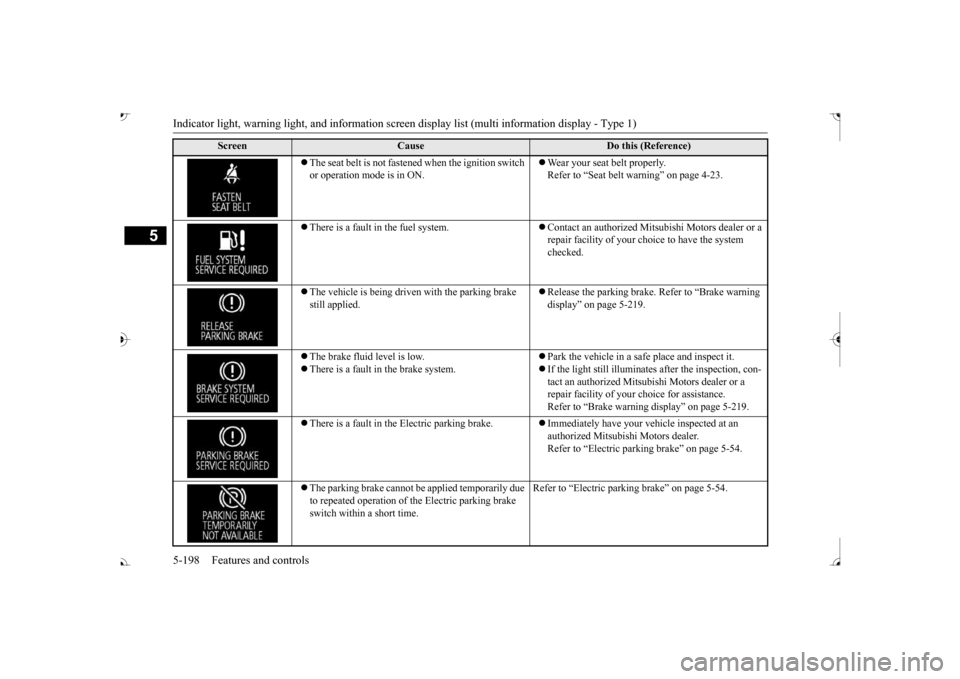
Indicator light, warning light, and information screen display list (multi information display - Type 1)
5
The seat belt is not fasten
ed when the ignition switch
or operation mode is in ON.
Wear your seat belt properly. Refer to “Seat belt
warning” on page 4-23.
There is a fault in the fuel system.
Contact an authorized Mits
ubishi Motors dealer or a
repair facility of your c
hoice to have the system
checked.
The vehicle is being driven with the parking brake still applied.
Release the parking brake. Refer to “Brake warning display” on page 5-219.
The brake fluid level is low. There is a fault in the brake system.
Park the vehicle in a safe place and inspect it. If the light still illuminates after the inspection, con- tact an authorized Mitsub
ishi Motors dealer or a
repair facility of your
choice for assistance.
Refer to “Brake warning
display” on page 5-219.
There is a fault in the Electric parking brake.
Immediately have your ve
hicle inspected at an
authorized Mitsubishi Motors dealer. Refer to “Electric parking brake” on page 5-54.
The parking brake cannot be
applied temporarily due
to repeated operation of the Electric parking brake switch within a short time.
Refer to “Electric parkin
g brake” on page 5-54.
Screen
Cause
Do this (Reference)
BK0239700US.book 198 ページ 2016年6月16日 木曜日 午前10時58分