Page 147 of 521
![MITSUBISHI OUTLANDER 2017 3.G Owners Manual Starting the engine 5-66 Features and controls
5
N00512601845
[For vehicles equipped with the Free-hand Advanced Security Transmitter (F.A.S.T.-key).] For information on operation for vehicles equippe](/manual-img/19/7536/w960_7536-146.png "MITSUBISHI OUTLANDER 2017 3.G Owners Manual Starting the engine 5-66 Features and controls
5
N00512601845
[For vehicles equipped with the Free-hand Advanced Security Transmitter (F.A.S.T.-key).] For information on operation for vehicles equippe")
Starting the engine 5-66 Features and controls
5
N00512601845
[For vehicles equipped with the Free-hand Advanced Security Transmitter (F.A.S.T.-key).] For information on operation for vehicles equipped with the Free-hand Advanced Secu-rity Transmitter (F.A.S.T.-key), refer to “Free-hand Advanced Se
curity Transmitter
(F.A.S.T.-key): Starting” on page 5-13. [Except for vehicles equipped with the Free-hand Advanced Security Transmit- ter (F.A.S.T.-key).]
Do not operate the starter motor continu- ously for longer than 15 seconds as this could run the battery
down or damage the
starter motor. If the engine does not start,turn the ignition switch back to the “OFF” or “LOCK” position, wait a few seconds, and then try again. Trying repeatedly withthe engine or starter motor still turning will damage the starter mechanism. If the engine will not
start because the bat-
tery is weak or discharged, refer to “Jump-starting the engine” (on page 8-2)for instructions. A longer warm up period will only con- sume extra fuel. The engine is warmed upenough for driving when the bar graph of engine coolant temper
ature display starts
to move or the low coolant temperatureindicator goes out. Refer to “Engine cool- ant temperature display” on page 5-171 or “Low coolant temper
ature indicator” on
page 5-215.
This model is equipped with an electronically controlled fuel injection system. This is a sys- tem that automatically controls fuel injection.There is usually no need to depress the accel- erator pedal when starting the engine. The starter should not be run for more than 15seconds at a time. To prevent battery drain, wait a few seconds between attempts to restart the engine. 1. Make sure all occupants are properly seated with seat belts fastened. 2. Insert the ignition key. 3. Press and hold the brake pedal down withyour right foot. 4. Make sure the selector
lever is in the “P”
NOTE
If the front wheels are turned, the anti-theft lock may sometimes make it difficult to turnthe key from “LOCK” to “ACC”. Firmlyturn the steering wheel to the left or to the right as you turn the key.
Starting the engine
Tips for starting
WA R N I N G Never run the engine in
a closed or poorly
ventilated area any longer than is needed to move your vehicle out of the area. Car- bon monoxide gas, which is odorless andextremely poisonous, could build up and cause serious injury or death.
CAUTION Do not push-start the vehicle.Do not run the engine at high rpms or drive at high speeds until
the engine has had a
chance to warm up. Release the ignition sw
itch as soon as the
engine starts. Otherwis
e, the starter motor
will be damaged
Starting the engine
BK0239700US.book 66 ページ 2016年6月16日 木曜日 午前10時58分
Page 259 of 521
Multi Information display - Type 1 5-178 Features and controls
5
Refer to “Changing the time until “REST REMINDER” is displayed” on page 5-182.Refer to “Changing the turn signal sound” on page 5-182. Refer to “Changing the momentary fuelconsumption display” on page 5-182. Refer to “Tire ID set change” on page 5-146.Refer to “Returning to the factory set- tings” on page 5-183.
N00557001240
You can change the mode condition for theaverage fuel consumption and average speed display to “Auto reset”
or “Manual reset.”
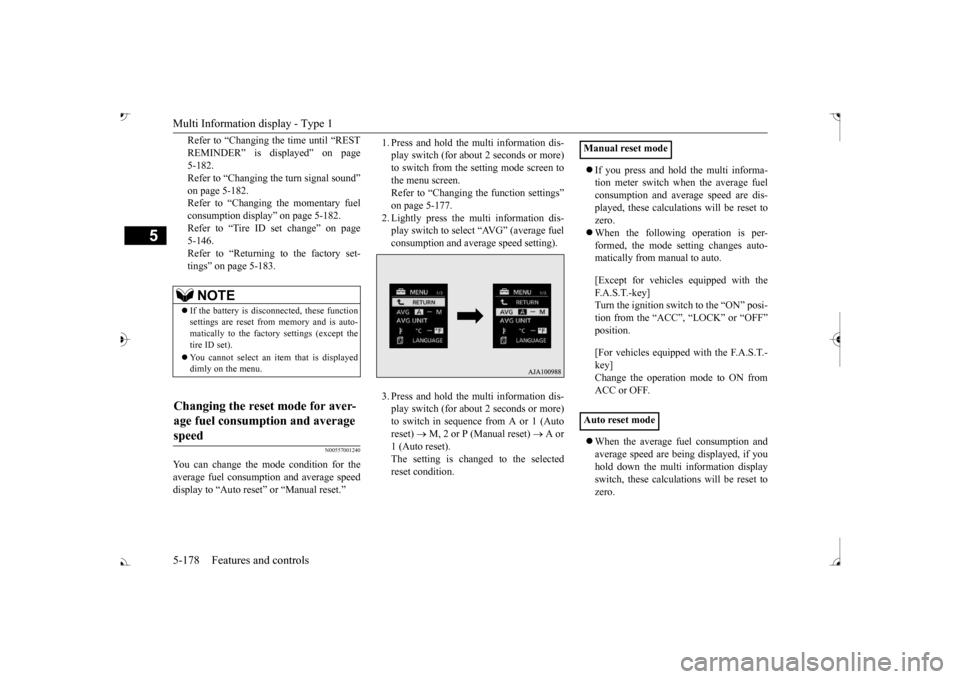
1. Press and hold the mu
lti information dis-
play switch (for about 2 seconds or more)to switch from the setting mode screen to the menu screen. Refer to “Changing th
e function settings”
on page 5-177. 2. Lightly press the multi information dis- play switch to select “AVG” (average fuelconsumption and average speed setting). 3. Press and hold the mu
lti information dis-
play switch (for about 2 seconds or more)to switch in sequence from A or 1 (Auto reset)
M, 2 or P (Manual reset)
A or
1 (Auto reset).The setting is changed to the selected reset condition.
If you press and hold the multi informa- tion meter switch when the average fuelconsumption and average speed are dis- played, these calculati
ons will be reset to
zero. When the following operation is per- formed, the mode setting changes auto- matically from manual to auto. [Except for vehicles
equipped with the
F. A . S . T. - k e y ] Turn the ignition switch to the “ON” posi-tion from the “ACC”, “LOCK” or “OFF” position. [For vehicles equipped
with the F.A.S.T.-
key]Change the operation mode to ON from ACC or OFF. When the average fuel consumption and average speed are being displayed, if youhold down the multi in
formation display
switch, these calculations will be reset to zero.
NOTE
If the battery is disc
onnected, these function
settings are reset from
memory and is auto-
matically to the factory settings (except thetire ID set). You cannot select an it
em that is displayed
dimly on the menu.
Changing the reset mode for aver- age fuel consumption and average speed
Manual reset mode Auto reset mode
BK0239700US.book 178 ページ 2016年6月16日 木曜日 午前10時58分
Page 260 of 521
Multi Information display - Type 1
Features and controls 5-179
5
When the engine switch or the operation mode is in the following conditions, theaverage fuel consumption display and the average speed display will automatically reset. [Except for vehicles equipped with the F. A . S . T. - k e y ] The ignition switch has been set to the “ACC”, “LOCK” or
“OFF” position for
about 4 hours or more. [For vehicles equipped with the F.A.S.T.- key]The operation mode has been in ACC or OFF for about 4 hours or more.
N00557101166
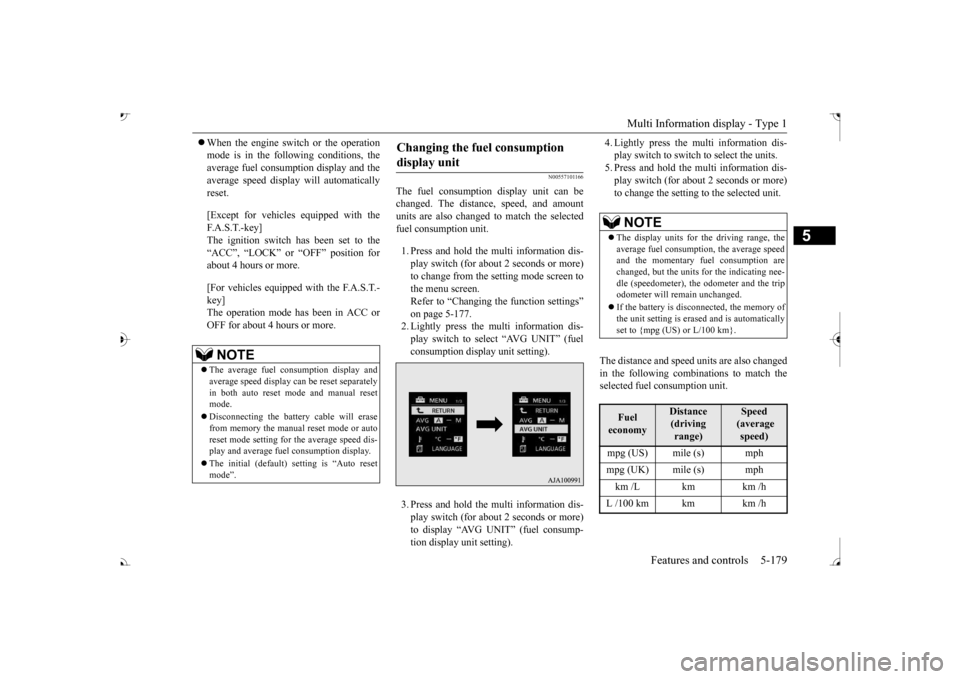
The fuel consumption display unit can be changed. The distan
ce, speed, and amount
units are also changed to match the selected fuel consumption unit. 1. Press and hold the multi information dis- play switch (for about 2 seconds or more) to change from the setting mode screen to the menu screen. Refer to “Changing the function settings” on page 5-177.2. Lightly press the multi information dis- play switch to select “AVG UNIT” (fuel consumption display unit setting). 3. Press and hold the multi information dis- play switch (for about 2 seconds or more) to display “AVG UNIT” (fuel consump- tion display unit setting).
4. Lightly press the multi information dis- play switch to switch to select the units.5. Press and hold the multi information dis- play switch (for about 2 seconds or more) to change the setting to the selected unit.
The distance and speed units are also changed in the following combinations to match theselected fuel consumption unit.
NOTE
The average fuel consumption display and average speed display ca
n be reset separately
in both auto reset mode and manual reset mode. Disconnecting the batter
y cable wi
ll erase
from memory the manual reset mode or auto reset mode setting for
the average speed dis-
play and average fuel consumption display. The initial (default) setting is “Auto reset mode”.
Changing the fuel consumption display unit
NOTE
The display units for the driving range, the average fuel consumption, the average speed and the momentary fuel consumption are changed, but the units
for the indicating nee-
dle (speedometer), the odometer and the trip odometer will remain unchanged. If the battery is disconnected, the memory of the unit setting is erased and is automatically set to {mpg (US) or L/100 km}.Fuel economy
Distance (driving range)
Speed (average speed)
mpg (UK) mile (s) mph km /L km km /h L /100 km km km /h
BK0239700US.book 179 ページ 2016年6月16日 木曜日 午前10時58分
Page:
< prev 1-8 9-16 17-24