2017 MITSUBISHI OUTLANDER tire type
[x] Cancel search: tire typePage 193 of 521

Adaptive Cruise Control System (ACC) (if so equipped) 5-112 Features and controls
5
N00581500027
There are two ways to increase the set speed. The set speed will increase by 1 mph (1 km/h) every time you push up the “RES +” switch while the ACC is activated. If youhold the switch pushed up, the set speed increases in 5 mph (5 km/h) increments.
• When the height of a vehicle in front is extremely low or the road clearance ofthe vehicle is extremely high.• When driving on a r
oad with alternating
up and down surfaces.• When driving on a curve.• When driving on a bumpy or rough road.• When driving in a tunnel.• When driving in construction zones.• When the rear of your vehicle is weighed down with the weight of passengers and luggage• For up to two minutes after starting driv-ing.• When driving in curved sections of roadincluding their entrance/outlet or run-ning beside a closed lane in a traffic work or similar zone.• When the surface of th
e sensor is covered
with dirt, snow, ice, etc.• When a front vehicle or an oncomingvehicle is splashing wa
ter, snow or dirt.
WA R N I N G
• When driving on
a winding road.
Never use the ACC in the following situa- tions:• In heavy traffic.• On winding roads.• On slippery roads, such as icy, snow-cov-ered or dirt roads.• In adverse weather conditions, such asrain, snow or sand storms, etc.• On steep downslopes.• When the inclination of a road fre-quently changes.• When the approach alarm frequentlysounds.• When your vehicle is towed or is towinganother vehicle.• When your vehicle is on a chassis dyna-mometer or free rollers.• When tire inflation pressures are notadequate.• When the temporary sp
are tire is being
used.• When the radar sensor and/or its sur-rounding area are damaged or deformed.WA R N I N G
CAUTION To maintain proper performance of the ACC:• Always clean the surface of the radar sen- sor.• Avoid impacting the radar sensor or its sur-rounding area.• Do not put a sticker on the radar sensor orits surrounding area.• Do not paint the radar sensor.• Do not install a grill guard.• Do not modify the radar sensor or its sur- rounding area.• Always use tires of the same size, sametype, and same brand, and which have no significant wear differences.• Do not modify the vehicle’s suspension.
To increase the set speed
By using the “RES +” switch:
BK0239700US.book 112 ページ 2016年6月16日 木曜日 午前10時58分
Page 206 of 521

Forward Collision Mitigation System (FCM) (if so equipped)
Features and controls 5-125
5
N00593400036
The sensor (A) is located inside the wind- shield as shown in the illustration. The sensor is shared in the following sys-tems: FCM Lane Departure Warning (LDW) Automatic high beam system
NOTE
If the sensor or its surrounding area becomes extremely high temperature when parkingthe vehicle under a blazing sun, the “FCMSERVICE REQUIRED” message may appear. After the temperature of the sensor or its sur-rounding area has been in range, if the mes- sage remains even afte
r restarting the engine,
please contact an au
thorized Mitsubishi
Motors dealer.
Handling of the sensor
CAUTION To maintain proper performance of the FCM, LDW and Automatic high beam system;• Always keep clea
n the windshield.
If the inside of the windshield where the sensor is installed be
comes dirty or fogged,
contact an authorized Mitsubishi Motors dealer.• Do not apply an impact or load on the sen-sor or its surrounding area.
• Do not put anything including a sticker or film on the windshield in front of or sur-rounding the area of the sensor.• Do not attempt to deta
ch or disassemble the
sensor.• If the windshield is misted, remove the mistfrom the windshield by using the defogger switch.• Maintain the wiper blades in good condi-tion. Refer to “Wiper blades” on page 9-44.When replacing the wi
per blades, use only
Mitsubishi Motors Genui
ne parts or equiva-
lent.• Do not dirty or da
mage the sensor.
• Do not spray glass cleaner on the sensor. Also, do not spill liqui
d, such as a bever-
age, to the sensor.• Do not install an electronic device, such asantenna, or a device th
at emits strong elec-
tric waves, near the sensor.• Always use tires of the same size, sametype and same brand,
and which have no
significant wear differences.• Do not modify the vehicle’s suspensions.CAUTION
BK0239700US.book 125 ページ 2016年6月16日 木曜日 午前10時58分
Page 223 of 521

Tire pressure monitoring system 5-142 Features and controls
5
If the LDW is deactivated due to a malfunc- tion in the system, the either alarm shown below is displayed. Contact your authorized Mitsubishi Motors dealer for inspection of thesystem.
N00530201638
The tire pressure monitoring system uses tire inflation pressure sensors (A) on the wheels to monitor the tire inflation pressures. Thesystem only indicates when a tire is signifi- cantly under-inflated.
LDW deactivation due to fault
NOTE
If the sensor or its surrounding area becomes extremely high temperature when parking the vehicle under a bl
azing sun, the “LDW
SERVICE REQUIRED” message may appear. If the message remains even after the tem-perature of the sensor or its surrounding area has been in range, plea
se contact an autho-
rized Mitsubishi Motors dealer.
Tire pressure monitoring system
WA R N I N G The compact spare whee
l does not have a
tire inflation pressure sensor.When the spare tire is used, the tire pres- sure monitoring system will not work properly.See an authorized Mitsubishi Motors dealer as soon as possible to replace or repair the original tire.
NOTE
The tire pressure monitoring system is not a substitute for regularly
checking tire infla-
tion pressures.Be sure to check the tire inflation pressures as described in “Tires” on page 9-15. The tire inflation pressure sensor (B) is installed in the illustrated location. • On vehicles with Type 1 sensor which has the metallic air valve (C), replace grommet and washer (D) with the new ones when thetire is replaced. • On vehicles with Type 2 sensor which has the rubber air valve (E
), replace rubber air
valve (E) with new one when the tire is replaced.
BK0239700US.book 142 ページ 2016年6月16日 木曜日 午前10時58分
Page 224 of 521

Tire pressure monitoring system
Features and controls 5-143
5
N00532701334
When the ignition switch is turned to the “ON” position or the operation mode is put inON, the tire pressure monitoring system
warning light normally
illuminates and goes
off a few seconds later. If one or more of the vehicle tires (except for the spare tire) is signi
ficantly under-inflated,
the warning light will remain illuminated while the ignition switch is in the “ON” posi-tion or the operation mode is put in ON. Refer to “If the warning light / display illumi- nates while driving” on page 5-144 and takethe necessary measures.
For details, please
contact your authorized
Mitsubishi Motors dealer.
Tire pressure monitoring sys- tem warning light / display
NOTE
Type 1Type 2
NOTE
In addition, the warni
ng display is displayed
on the information screen in the multi-infor-mation display.
CAUTION If the tire pressure monitoring system warn- ing light does not illumi
nate when the igni-
tion switch is turned to the “ON” position orthe operation mode is put in ON, it means that the tire pressure monitoring system is not working properly. Have the systeminspected by an authorized Mitsubishi Motors dealer. In such situations, a malfunctioning of thesystem may be preventing the monitoring of the tire pressure. Avoid sudden braking, sharp turning and high-speed driving. If a malfunction is detected in the tire pres- sure monitoring system, the tire pressuremonitoring system warning light will blink for approximately 1 mi
nute and then remain
continuously illuminate
d. The warning light
will issue further warnings each time the engine is restarted as
long as the malfunction
exists.Check to see whether the warning light goes off after few minutes driving. If it then goes off during driving, there is noproblem. However, if the warning light does not go off, or if it blinks again when the engine isrestarted, have the
vehicle inspected by an
authorized Mitsubish
i Motors dealer.
In such situations, a malfunctioning of thesystem may be preventing the monitoring of the tire pressure. For safety reasons, when the warning light appears while driving,avoid sudden braking, sharp turning and high-speed driving.
BK0239700US.book 143 ページ 2016年6月16日 木曜日 午前10時58分
Page 259 of 521
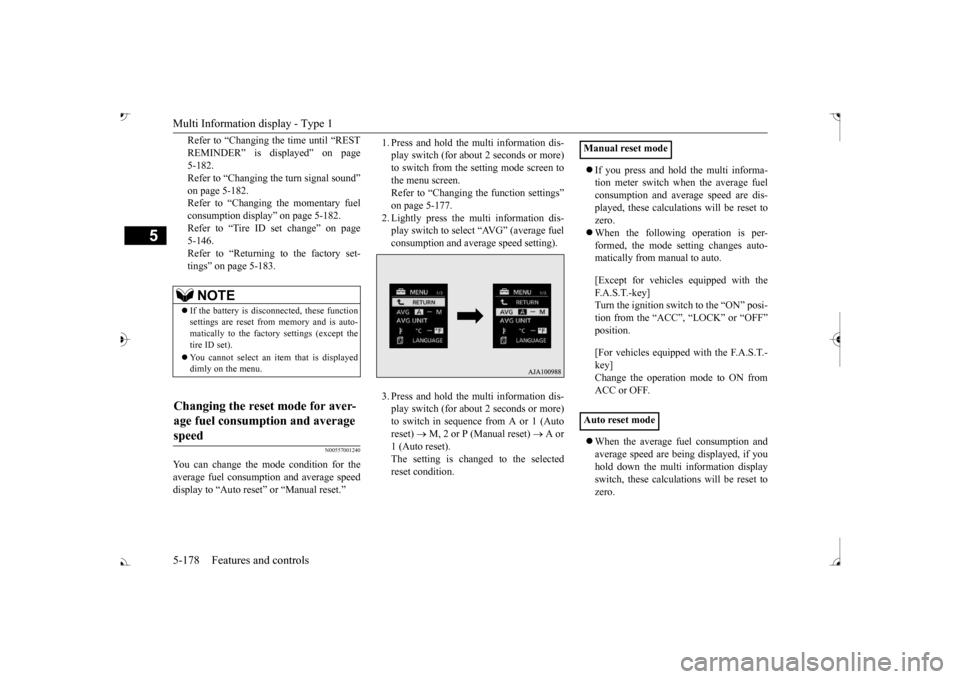
Multi Information display - Type 1 5-178 Features and controls
5
Refer to “Changing the time until “REST REMINDER” is displayed” on page 5-182.Refer to “Changing the turn signal sound” on page 5-182. Refer to “Changing the momentary fuelconsumption display” on page 5-182. Refer to “Tire ID set change” on page 5-146.Refer to “Returning to the factory set- tings” on page 5-183.
N00557001240
You can change the mode condition for theaverage fuel consumption and average speed display to “Auto reset”
or “Manual reset.”
1. Press and hold the mu
lti information dis-
play switch (for about 2 seconds or more)to switch from the setting mode screen to the menu screen. Refer to “Changing th
e function settings”
on page 5-177. 2. Lightly press the multi information dis- play switch to select “AVG” (average fuelconsumption and average speed setting). 3. Press and hold the mu
lti information dis-
play switch (for about 2 seconds or more)to switch in sequence from A or 1 (Auto reset)
M, 2 or P (Manual reset)
A or
1 (Auto reset).The setting is changed to the selected reset condition.
If you press and hold the multi informa- tion meter switch when the average fuelconsumption and average speed are dis- played, these calculati
ons will be reset to
zero. When the following operation is per- formed, the mode setting changes auto- matically from manual to auto. [Except for vehicles
equipped with the
F. A . S . T. - k e y ] Turn the ignition switch to the “ON” posi-tion from the “ACC”, “LOCK” or “OFF” position. [For vehicles equipped
with the F.A.S.T.-
key]Change the operation mode to ON from ACC or OFF. When the average fuel consumption and average speed are being displayed, if youhold down the multi in
formation display
switch, these calculations will be reset to zero.
NOTE
If the battery is disc
onnected, these function
settings are reset from
memory and is auto-
matically to the factory settings (except thetire ID set). You cannot select an it
em that is displayed
dimly on the menu.
Changing the reset mode for aver- age fuel consumption and average speed
Manual reset mode Auto reset mode
BK0239700US.book 178 ページ 2016年6月16日 木曜日 午前10時58分
Page 264 of 521
Multi Information display - Type 2
Features and controls 5-183
5
N00557601217
Many of the function set
tings can be returned
to their factory settings. 1. Press and hold the mu
lti information dis-
play switch (for about 2 seconds or more)to switch from the setting mode screen to the menu screen. Refer to “Changing th
e function settings”
on page 5-177. 2. Lightly press the multi information dis- play switch to select “RESET” (return to the factory settings). 3. Press and hold the mu
lti information dis-
play switch (for about 5 seconds or more), the buzzer sounds and all of the function settings are returned to the factory set-tings.
N00555001291
The multi information display displays theodometer, trip odometer, service reminder, fuel remaining, outside
temperature, selector
lever position, averag
e fuel consumption,
driving range, etc. It is also possible to change elements such as the units used on the multi information dis- play.
Returning to the
factory settings
NOTE
The factory settings are as follows. • Average fuel consumption and average speed reset mode: A (Auto reset) • Fuel consumption di
splay unit: mpg (US)
or (L/100 km) • Temperature unit: °F (Fahrenheit) or {°C (Celsius)} • Display language: ENGLISH • Cooperative language
setting: A (language
cooperation: enabled)
• Operation sounds: ON (Operation sound on) • “REST REMINDER” display: OFF • Turn signal sound: Turn signal sound 1• Momentary fuel consumption with the green bar graph: ON
The tire ID set cannot be returned to the fac- tory settings.
Multi Information display - Type 2
NOTE
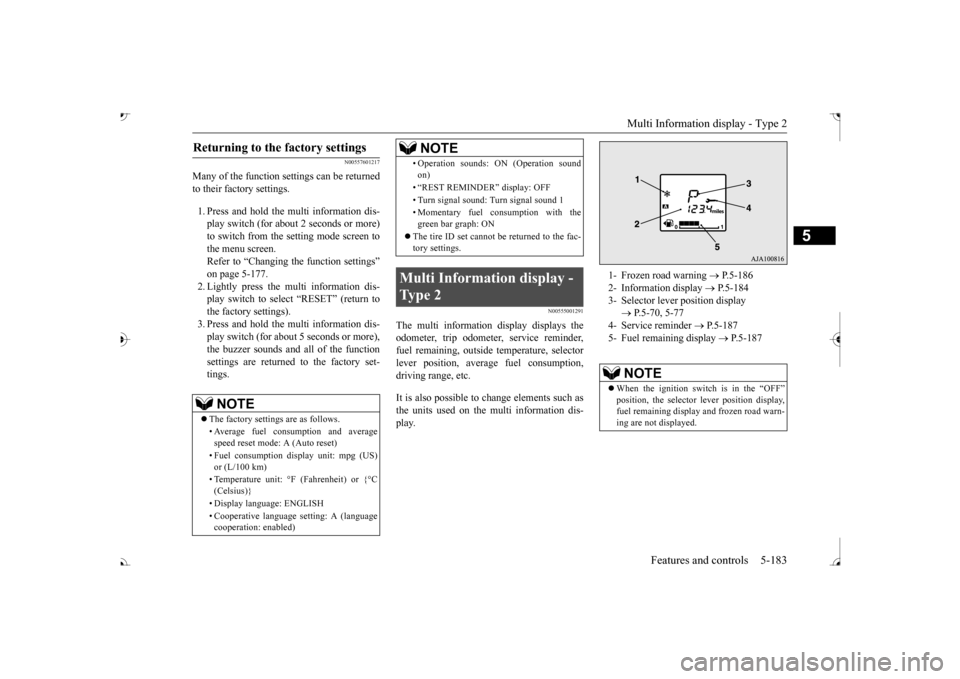
1- Frozen road warning
P.5-186
2- Information display
P.5-184
3- Selector lever position display
P.5-70, 5-77
4- Service reminder
P.5-187
5- Fuel remaining display
P.5-187
NOTE
When the ignition switch is in the “OFF”
lever position display,
fuel remaining display and frozen road warn-ing are not displayed.
BK0239700US.book 183 ページ 2016年6月16日 木曜日 午前10時58分
Page 265 of 521
Multi Information display - Type 2 5-184 Features and controls
5
N00574801067
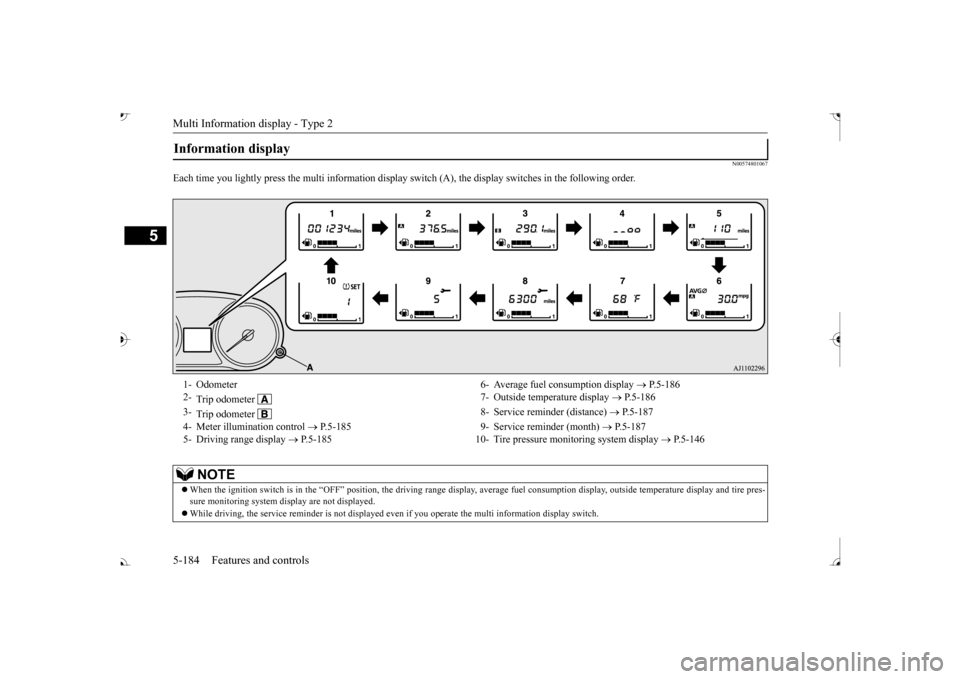
Each time you lightly press th
e multi information display switch (A), th
e display switches in
the following order.
Information display 1- Odometer 6- Average fuel
consumption display
P.5-186
2-
Trip odometer
7- Outside temperature display
P.5-186
3-
Trip odometer
8- Service reminder (distance)
P.5-187
4- Meter illumination control
P.5-185 9- Service reminder (month)
P.5-187
5- Driving range display
P.5-185 10- Tire pressure monitoring system display
P.5-146
NOTE
When the ignition switch is in the “OFF” position, the driving ra
nge display, average fuel consum
ption display, outside tempera
ture display and tire pres-
sure monitoring system di
splay are not displayed.
While driving, the service reminder is
not displayed even if you operate th
e multi information display switch.
BK0239700US.book 184 ページ 2016年6月16日 木曜日 午前10時58分
Page 273 of 521

Indicator light, warning light, and information screen display list (multi information display - Type 1)
5
N00557901092
When there is information to be announced,
such as light reminder, the
tone sounds and the screen sw
itches to the displays show
n below. Refer to
the appropriate page and ta
ke the necessary measures.
When the cause of the warning display is elimin
ated, the warning displa
y goes out automatically.
Refer to Warning disp
lay list on page 5-193.
Refer to Navigation informat
ion display on page 5-209.
Refer to Other interrupt displays on page 5-210. 15- Seat belt remi
nder/warning light
P.4-23
16- Tire pressure monitoring system warn-
ing light
P.5-143
17- Brake auto hold indicator (if so
equipped)
P.5-93
18- Brake warning light (red)
P.5-216
19- Information screen display list
P.5-192
Information screen display list
NOTE
In the following cases, a warning may be
displayed on the information screen and th
e buzzer may sound for a
few seconds, at tim
es.
This is caused by the system picking up in
terference such as strong el
ectromagnetic waves
or noise, and is not a functional pro
blem.
• An extremely strong electrom
agnetic wave is received from a s
ource such as an illegal radio se
t, a spark from a wire, or a rad
ar station.
• Abnormal voltage or a static
electricity disc
harge is generated by the operation of
your vehicle’s electr
onics (including afte
r-market parts).
If the warning display has oc
curred a number of times, take your
vehicle to an author
ized Mitsubishi Motors
dealer or a repair
facility of your choice and
have the system checked.
BK0239700US.book 192 ページ 2016年6月16日 木曜日 午前10時58分