2017 MITSUBISHI OUTLANDER III air condition
[x] Cancel search: air conditionPage 312 of 521
Hazard warning flasher switch Features and controls 5-231
5
N00522701328
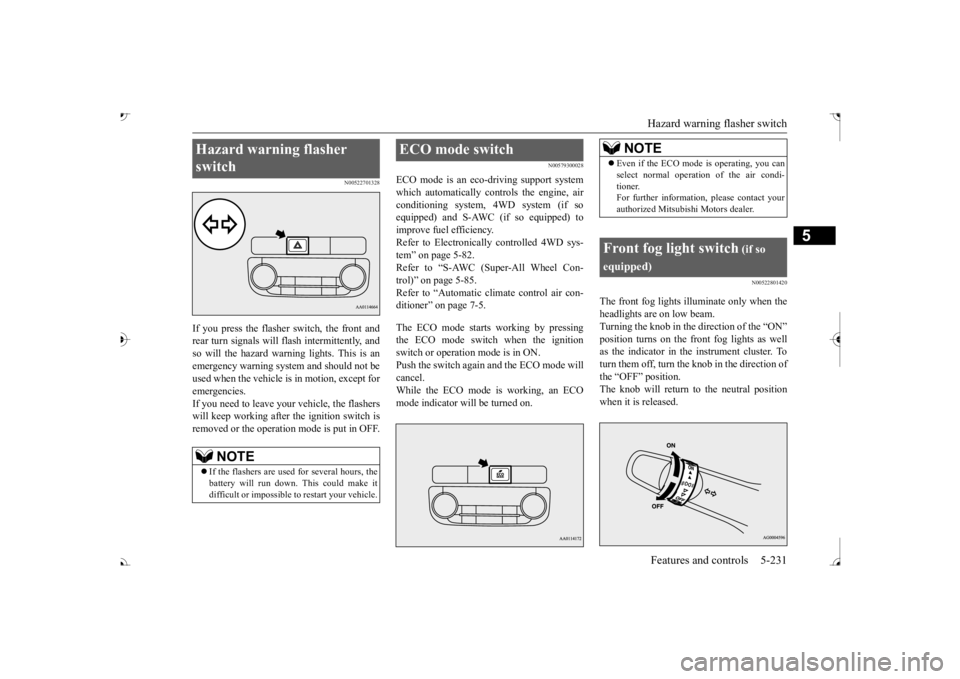
If you press the flasher switch, the front and rear turn signals will flash intermittently, and so will the hazard warning lights. This is an emergency warning system and should not beused when the vehicle is in motion, except for emergencies. If you need to leave your
vehicle, the flashers
will keep working after the ignition switch is removed or the operation mode is put in OFF.
N00579300028
ECO mode is an eco-driving support systemwhich automatically controls the engine, air conditioning system,
4WD system (if so
equipped) and S-AWC (if so equipped) to improve fuel efficiency. Refer to Electronically controlled 4WD sys-tem” on page 5-82. Refer to “S-AWC (Super-All Wheel Con- trol)” on page 5-85. Refer to “Automatic climate control air con- ditioner” on page 7-5. The ECO mode starts working by pressing the ECO mode switch when the ignition switch or operation mode is in ON. Push the switch again
and the ECO mode will
cancel. While the ECO mode is working, an ECO mode indicator will be turned on.
N00522801420
The front fog lights illuminate only when theheadlights are on low beam. Turning the knob in the direction of the “ON”as the indicator in the instrument cluster. To turn them off, turn the knob in the direction of the “OFF” position.The knob will return to the neutral position when it is released.
Hazard warning flasher switch
NOTE
If the flashers are used for several hours, the battery will run down.
This could make it
difficult or impossible
to restart your vehicle.
ECO mode switch
NOTE
Even if the ECO mode is operating, you can select normal operati
on of the air condi-
tioner.For further informati
on, please contact your
authorized Mitsubish
i Motors dealer.
Front fog light switch
(if so
equipped)
BK0239700US.book 231 ページ 2016年6月16日 木曜日 午前10時58分
Page 367 of 521
Driving precaution 6-2 Driving safety
6
N00629301092
Your vehicle has been designed for both nor- mal and occasional off-road use. However, avoid driving the vehicle through areas wherethe tires may get stuck in deep sand or mud as your vehicle is designe
d primarily for use on
pavement, unlike a conventional off-roadvehicle. Keep in mind that 2-wheel drive vehicles are less capable than 4-wh
eel drive vehicles for
driving on muddy, slippery, wet or snow-cov- ered roads. Utility vehicles have
higher ground clearance
and a narrower track, which enables them toperform in a wide variety of off-road situa- tions. Because of the higher ground clear- ance, these vehicles have a higher center ofgravity, which makes them handle differently than ordinary vehicles when driving on pave- ment. They are not designed to maneuver orcorner at the same speed on pavement as con- ventional 2-wheel driv
e passenger cars any
more than low-slung sports cars are designed
to perform satisfactorily in off-road condi- tions.Always drive safely
and steer the vehicle
carefully. Avoid operating the vehicle in a manner that might require sharp turns orabrupt maneuvers. As wi
th other vehicles of
this type, failure to operate this vehicle cor- rectly can result in lo
ss of control or vehicle
rollover. In a rollover crash, an unbelted person is sig- nificantly more likely to die than a person wearing a seat belt. Be
fore starting the vehi-
cle, always make cert
ain that you and all your
passengers are properly wearing their seat belts (with children in the rear seat, in appro- priate restraints).
N00628801191
Fuel economy is depe
ndent on many factors.
Your personal driving habits can have a sig-nificant effect on your fuel consumption. Several recommendations
for achieving the
greatest fuel economy are listed below. Whenever accelerating from a stop, always accelerate
slowly and smoothly.
When parked for even a short period, do not idle the engine. Shut it off. Plan your trips to avoid unnecessary stops.
Keep your tires inflated to the recom- mended pressures. When driving a 4-wheel drive vehicle on highways or dry improved roads, set the drive mode to “4WD ECO” or “4WDAUTO” (Electronically controlled 4WD), or “AWC ECO” or “NORMAL” (S- AW C ) . For freeway driving, maintain a speed of approximately 50 mph (80 km/h) when traffic, roadway and weather conditions safely permit. Keep your air filter clean and your vehicle lubricated according
to the recommenda-
tions in this manual. Always keep your ve
hicle well main-
tained. A poorly maintained engine wastes fuel and costs money. Never overload your vehicle.
N00628900049
Drunk driving is one of the most frequent causes of accidents.Your driving ability ca
n be seriously impaired
even with blood alcohol levels far below the legal minimum. If you
have been drinking,
don’t drive. Ride with a designated non- drinking driver, call a cab or a friend, or use public transportation. Drinking coffee or tak-ing a cold shower will not make you sober.
Driving precaution
WA R N I N G Utility vehicles have
a significantly higher
rollover rate than othe
r types of vehicles.
Avoid abrupt maneuvers and excessive speed. Always buckle up.
Fuel economy
Driving, alcohol and drugs
BK0239700US.book 2 ページ 2016年6月16日 木曜日 午前10時58分
Page 368 of 521
Floor mat
Driving safety 6-3
6
Similarly, prescription and nonprescription drugs affect your alertness, perception andreaction time. Consu
lt with your doctor or
pharmacist before driving while under the influence of any of these medications.
N00628600033
The original equipment floor mat provided with your vehicle was
specifically designed
for your vehicle.Always properly positio
n the floor mat and
assure it does not inte
rfere with operation of
the pedals. Always use the retaining clip onthe driver’s floorboard to secure the floor mat. When used, this clip will help prevent the floor mat from moving forward and possi-bly interfering with the operation of the ped- als. To prevent the floor mat from moving forward and possibly interfering with theoperation of the pedals, Mitsubishi genuine floor mats are recommended.
N00628700050
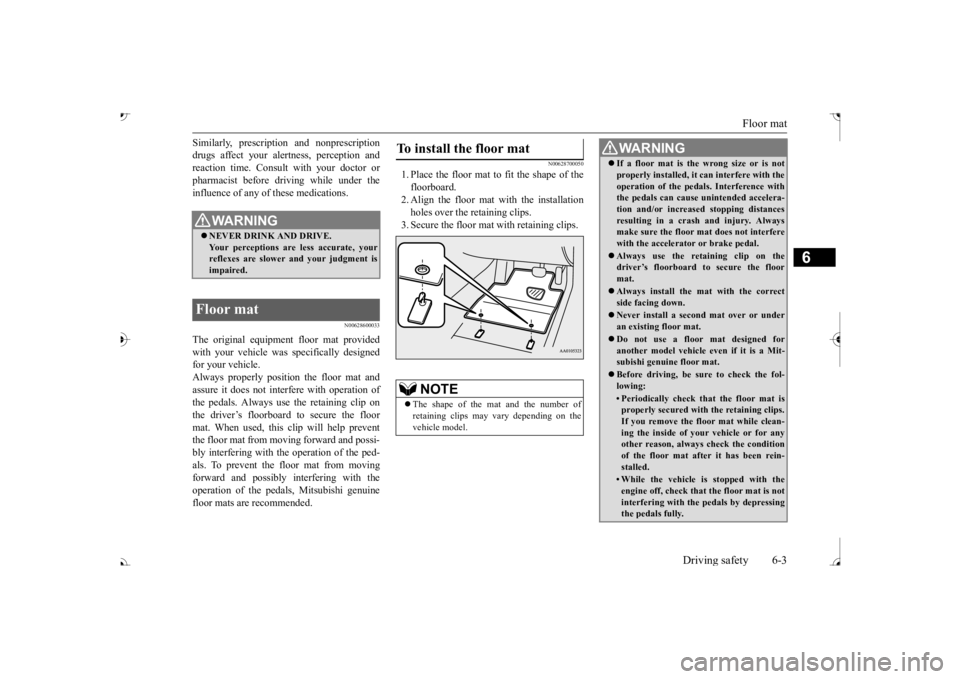
1. Place the floor mat to fit the shape of thefloorboard. 2. Align the floor mat with the installationholes over the retaining clips. 3. Secure the floor mat with retaining clips.
WA R N I N G NEVER DRINK AND DRIVE. Your perceptions are
less accurate, your
reflexes are slower and your judgment is impaired.
Floor mat
To install the floor mat
NOTE
The shape of the mat and the number of retaining clips may vary depending on the vehicle model.
WA R N I N G If a floor mat is the wrong size or is not properly installed, it can interfere with theoperation of the pedals. Interference withthe pedals can cause unintended accelera- tion and/or increase
d stopping distances
resulting in a cras
h and injury. Always
make sure the floor mat does not interfere with the accelerator or brake pedal. Always use the retaining clip on the driver’s floorboard to secure the floor mat. Always install the mat with the correct side facing down. Never install a second mat over or under an existing floor mat. Do not use a floor mat designed for another model vehicle ev
en if it is a Mit-
subishi genuine floor mat. Before driving, be sure to check the fol- lowing:• Periodically check that the floor mat isproperly secured with the retaining clips. If you remove the fl
oor mat while clean-
ing the inside of you
r vehicle or for any
other reason, always
check the condition
of the floor mat afte
r it has been rein-
stalled.• While the vehicle is stopped with theengine off, check that
the floor mat is not
interfering with the pedals by depressing the pedals fully.
BK0239700US.book 3 ページ 2016年6月16日 木曜日 午前10時58分
Page 380 of 521
Trailer towing
Driving safety 6-15
6
You’ll need more passing distance up ahead when you’re towing a trailer. And, because you’re a good deal longer, you’ll need to gomuch farther beyond the passed vehicle before you can return to your lane. Hold the bottom of the steering wheel with one hand. Then, to move the trailer to the left,just move that hand to the left. To move the trailer to the right, move your hand to the right. Always back up sl
owly and, if possible,
have someone guide you. When you’re turning with a trailer, make wider than normal turns to help prevent the trailer from striking shoulders, curbs, roadsigns, trees or other objects.
Avoid jerky or sudden maneuvers. Signal well in advance. Towing a trailer puts additional burden on the engine and transaxle,
which may cause over-
heating. Following ar
e some suggestions to
reduce overheating: When towing at high al
titudes, engine coolant
and automatic transaxle oil will overheat at a lower temperature than at normal altitudes. If you turn your engine off immediately aftertowing at high altitude
on steep uphill grades,
your vehicle may show
signs similar to over-
heating. To avoid this
, let the engine run
while parked (preferably on level ground) with the automatic transaxle in the “P”turning the engine off.
If the engine coolant temperature indica- tor flashes on the information screen in the multi-information display or the engine power drops suddenly, refer to “Engine overheati
ng” on page 8-4.
If the warning display or warning display illuminates, re
fer to “Warning dis-
play” on page 5-70, 5-78.
Reduce speed and downshift before you start down a long or steep downgrade. If you don’t downshift, over using the brakes can cause reduced brake efficiency. You can tow in “D” (DRIVE) position. You may want to shift the selector lever to the 3rd or a lower position, under heavy loads or hilly conditions. Always place chocks or blocks under both the vehicle and trailer wheels when parking. Besure that the parking brake is firmly set and that the selector lever is in the “P” (PARK) position. Avoid parki
ng on a hill with a
trailer, but if it cannot be avoided, do so only after performing the following:
Passing Backing up Making turns
CAUTION Making sharp turns while towing a trailer could cause the
trailer to come in contact
with the vehicle. Your
vehicle could be dam-
aged. Avoid making sharp turns while tow- ing a trailer.
Overheating Cause of overheating
Solution
Air conditioning on Turn off Highway speeds Reduce speed Going up hills Select lower gear posi-
tion
Stop-and-go city traf- fic
With the vehicle stopped, shift to the “N” (NEUTRAL) position and idle the engine at high idle.
Driving on hills Parking
BK0239700US.book 15 ページ 2016年6月16日 木曜日 午前10時58分
Page 384 of 521
7
Comfort controlsVents ................................................................................................7-2 Dual-zone automatic climate control air conditioner ......................7-5 Important air conditioning operating tips ..
...........
...........
.........
.....7-13
Air purifier .....................................................................................7-14 AM/FM radio/CD player (if so equipped) .....................................7-14 Handling of Discs ..........................................................................7-18Audio Files (MP3/WMA/AAC) ....................................................7-19 Important Points on Safety for the Customer ................................7-23 Operation Keys ..............................................................................7-24Listen to Radio ...............................................................................7-26 Listen to Satellite Radio (if so equipped) .......................................7-28 Listen to CDs .................................................................................7-30Listen to MP3s ...............................................................................7-31 Listen to an iPod ............................................................................7-32 Listen to Audio Files on a USB Device .........................................7-34To play iPod/USB memory device tr
acks via voice ope
ration ......7-37
Listen to Bluetooth Audio .............................................................7-40 Display Indicator ...........................................................................7-42Audio Quality and Volume Balance Adjustment ...........................7-44 System Settings ..............................................................................7-44 Troubleshooting ..........
...........
...........
...........
...........
.........
.........
.....7-47
Clock (if so equipped) ....................................................................7-49 General information about your radio .....
...........
...........
...........
.....7-50
BK0239700US.book 1 ページ 2016年6月16日 木曜日 午前10時58分
Page 385 of 521
Vents 7-2 Comfort controls
7
N00729901288
N00730201340
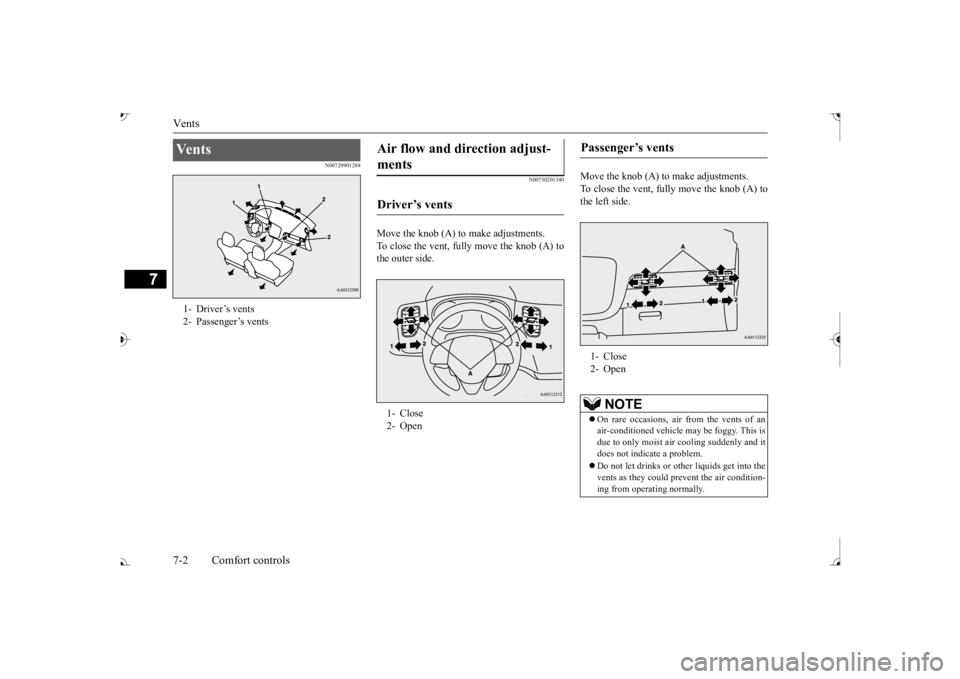
Move the knob (A) to make adjustments. To close the vent, fully move the knob (A) tothe outer side.
Move the knob (A) to make adjustments. To close the vent, fully move the knob (A) to the left side.
Ve n t s 1- Driver’s vents2- Passenger’s vents
Air flow and direction adjust- ments Driver’s vents 1- Close 2- Open
Passenger’s vents 1- Close 2- Open
NOTE
On rare occasions, air from the vents of an air-conditioned vehicle
may be foggy. This is
due to only moist air
cooling suddenly and it
does not indica
te a problem.
Do not let drinks or ot
her liquids get into the
vents as they could pr
event the air condition-
ing from operating normally.
BK0239700US.book 2 ページ 2016年6月16日 木曜日 午前10時58分
Page 388 of 521
Dual-zone automatic climat
e control air conditioner Comfort controls 7-5
7
N00731501412
The air conditioner can only be us
ed while the engine is running.
N00711801682
Dual-zone automatic climat
e control air conditioner
CAUTIONThe engine speed may increase when
the air conditioner is operating.
With an increased engine speed, an A/T or
CVT vehicle will creep to a gr
eater degree than with a lo
wer engine speed. Fully depr
ess the brake pedal to pre-
vent the vehicl
e from creeping.
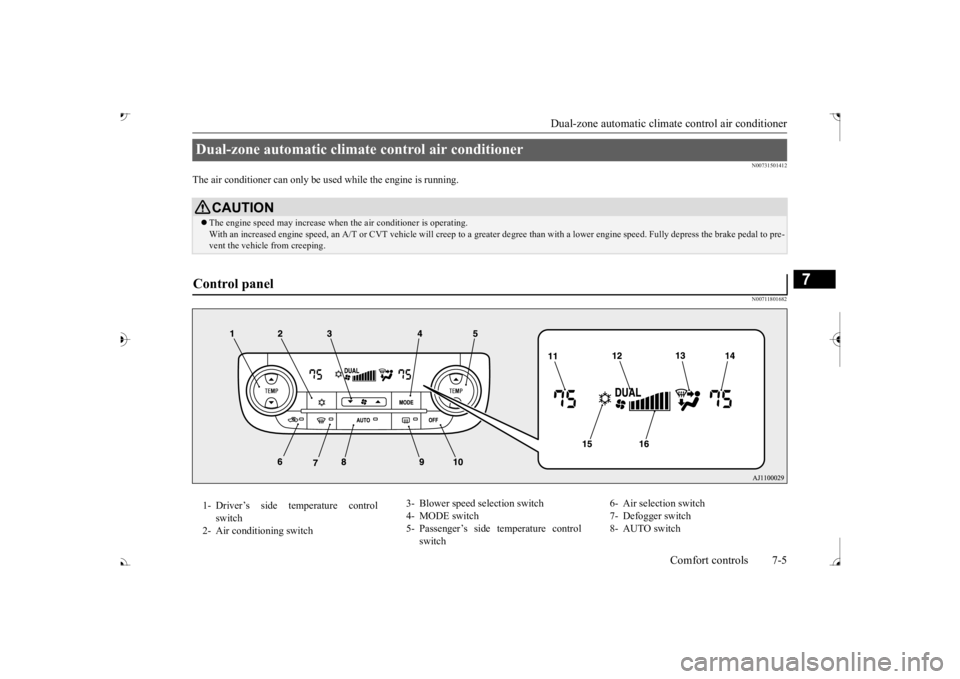
Control panel 1- Driver’s side temperature control
switch
2- Air conditioning switch
3- Blower speed
selection switch
4- MODE switch 5- Passenger’s side temperature control
switch
6- Air selection switch 7- Defogger switch 8- AUTO switch
BK0239700US.book 5 ページ 2016年6月16日 木曜日 午前10時58分
Page 389 of 521

Dual-zone automatic climate
control air conditioner
7-6 Comfort controls
7
N00736901206
Press of the blower speed selection switch to increase the blower speed. Press of the blower speed selection switch to decrease the blower speed. The selected blower sp
eed will be shown in
the display (A).
9- Electric rear window
defogger switch
P.5-237
10- OFF switch11- Driver’s side temperature display
P.7-7
12- DUAL indicator13- Mode selection display 14- Passenger’s side temperature display
P.7-7
15- Air conditioning indicator 16- Blower speed display
NOTE
There is an interior air temperature sensor (A) in the illustrated position. Never place anything ove
r the sensor, since
doing so will prevent it from functioning properly.
NOTE
Since the air conditi
oning operation is con-
trolled while the ECO mode is operating,you may feel that effectiveness of the airconditioner is insufficient. ECO mode switch P.5-231
Even during ECO mode operation, you can select normal operati
on of the air condi-
tioner.On vehicles equipped
with Mitsubishi Multi-
Communication System,
screen operations
can be used to change
the setting. Refer to
the separate owner’ In extreme cold, the air conditioning control panel screen may ope
rate sluggishly. This
does not indicate a problem. It will disappear when the vehicle interiortemperature rises to a normal temperature.
Blower speed selection switch 1- Increase 2- Decrease
BK0239700US.book 6 ページ 2016年6月16日 木曜日 午前10時58分