2017 MITSUBISHI OUTLANDER III lock
[x] Cancel search: lockPage 204 of 521

Forward Collision Mitigation System (FCM) (if so equipped)
Features and controls 5-123
5
To change the distan
ce mode, push the FCM
and Ultrasonic misacc
eleration
Mitigation
System ON/OFF switch. Every time the switch is pushed, the
distance mode will be
switched. The selected distance mode isshown on the information screen of the multi- information display. When “FAR” is selected When “MIDDLE” is selected When “NEAR” is selected
N00593300035
When the FCM system determines that its performance has been degraded, the FCMwill become inoperative. This can occur when Foreign objects, such as dirt, snow, ice, mist or dew condensation adhere to thewindshield of the sensor portion. In adverse weather
conditions, such as
rain, snow, sand storms, etc. A front vehicle or an oncoming vehicle is splashing water, snow or dirt.
“DRIVER ASSISTANCE CAMERA BLOCKED” message will appear and the indicator will appear
on the information
screen of the multi-information display. When the sensor performance returns, the FCM functions will resume operation.If the message continue
s showing, there is a
possibility that the sensor has a malfunction. Contact an authorized Mitsubishi Motorsdealer for inspection of the sensor.
NOTE
Actual distance which
triggers the forward
collision warnings will vary depending onyour vehicle speed a
nd the front vehicle
speed. The distance
will become longer
when the vehicle speeds are higher. The distance which will trigger the FCM braking function cannot be adjusted.
When a problem is detected
NOTE
The “DRIVER ASSISTANCE CAMERA BLOCKED” message
may temporarily
appear on the information screen when the sensor cannot detect a
vehicle, a pedestrian
or an object within range. This is not a mal- function. When a vehicle or an object comes within range, the FCM function will resumeand the message will go off.
BK0239700US.book 123 ページ 2016年6月16日 木曜日 午前10時58分
Page 205 of 521

Forward Collision Mitigation System (FCM) (if so equipped) 5-124 Features and controls
5
If the system becomes temporarily unavail- able for some reason, the following message may appear. The indicator will appear on the informa- tion screen of the mu
lti-information display
and the FCM will automa
tically be turned off.
If the message continues
showing, there is a
possibility that the FCM has a malfunction.Contact an authoriz
ed Mitsubishi Motors
dealer for inspection of the system.
If the system becomes temporarily unavail- able due to the high or low temperature of thesensor, the following
message will appear.
The indicator will appear on the informa- tion screen of the multi-information display and the FCM will automatically be turned off.After the temperature of
the sensor has been
in range, the system will automatically return to operation.If the message continues showing, there is a possibility that the
FCM has a malfunction.
Contact an authorized Mitsubishi Motors dealer for inspection of the sensor.
If the FCM detects a malfunction in the sys- tem, either of the following messages will appear, the indicator will appear on the information screen of the multi-information display and the FCM will automatically be turned off.If the message remains even after the opera- tion mode is put in “OFF” and then turned back to “ON”, please
contact your authorized
Mitsubishi Motors dealer.
The “DRIVER ASSI
STANCE CAMERA
BLOCKED” message
may appear on the
information screen when driving on a non-busy road with a few vehicles and obstacles in front.NOTE
BK0239700US.book 124 ページ 2016年6月16日 木曜日 午前10時58分
Page 218 of 521

Rear Cross Traffic Alert
(RCTA) (if so equipped)
Features and controls 5-137
5
The detection area is shown as illustrated.
Never rely solely on the RCTA when back- ing up. The RCTA is an aid system. It isnot a substitute for your safe and carefuldriving. Always check
visually behind and
all around your vehicl
e for other vehicles,
persons, animals
or obstructions.
The performance of the RCTA may vary depending on driving,
traffic and/or sur-
rounding conditions.NOTE
The Blind Spot Warning lights in the outside rearview mirrors on bot
h sides will blink,
even when only one vehicle is approaching from one side.WA R N I N G
Detection areas
CAUTION In certain situations, the RCTA may not detect a vehicle in the detection areas. Some of these situations include;• When the reversing sp
eed of your vehicle is
approximately 5 mph (18 km/h) or higher.
• If the sensor detection area is blocked by a nearby object, such as
wall or parked vehi-
cle.• When a vehicle is approaching fromstraight behind your vehicle.• When your vehicle is exiting from anangled parking spot.• Immediately after the RCTA has been turned on.• Immediately after the operation mode hasbeen put in ON.• When the bumper surface around the sensoris covered with dirt
, snow and ice, etc.
• When the sensor becomes extremely hot or cold, such as after the vehicle has been parked for a prolonged time under the blaz-ing sun or in cold weather.
If the bumper has experienced an impact, the sensor may have be
en damaged and the
RCTA may not function properly. Have the vehicle inspected at an
authorized Mitsubishi
Motors dealer.CAUTION
BK0239700US.book 137 ページ 2016年6月16日 木曜日 午前10時58分
Page 245 of 521
Multi Information display - Type 1 5-164 Features and controls
5
N00554901248
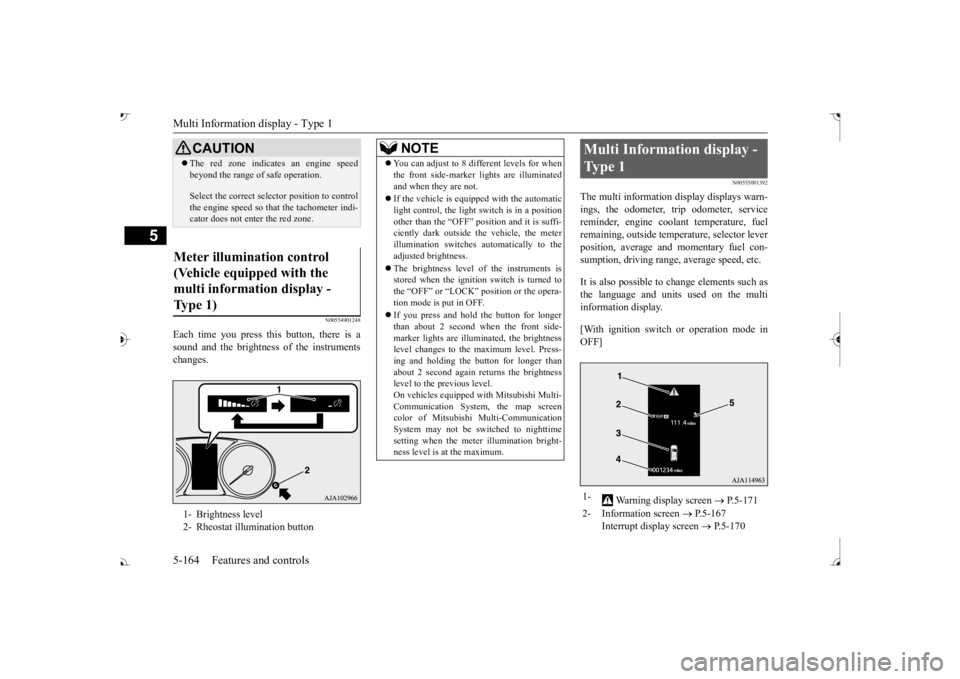
Each time you press this button, there is a sound and the brightness of the instruments changes.
N00555001392
The multi information display displays warn- ings, the odometer, trip odometer, service reminder, engine cool
ant temperature, fuel
remaining, outside temper
ature, selector lever
position, average and momentary fuel con- sumption, driving range, average speed, etc. It is also possible to change elements such as the language and units used on the multi information display. [With ignition switch or operation mode in OFF]
CAUTION The red zone indicate
s an engine speed
beyond the range of
safe operation.
Select the correct selector position to control the engine speed so that
the tachometer indi-
cator does not ente
r the red zone.
Meter illumination control (Vehicle equipped with the multi information display - Type 1) 1- Brightness level 2- Rheostat illumination button
NOTE
You can adjust to 8 different levels for when the front side-marker
lights are illuminated
and when they are not. If the vehicle is equi
pped with the automatic
light control, the light switch is in a positionother than the “OFF” position and it is suffi- ciently dark outside th
e vehicle, the meter
illumination switches automatically to theadjusted brightness. The brightness level of the instruments is stored when the ignition switch is turned to the “OFF” or “LOCK”
position or the opera-
tion mode is put in OFF. If you press and hold the button for longer than about 2 second when the front side-marker lights are illumi
nated, the brightness
level changes to the maximum level. Press- ing and holding the button for longer thanabout 2 second again returns the brightness level to the previous level. On vehicles equipped
with Mitsubishi Multi-
Communication System
, the map screen
color of Mitsubishi Multi-Communication System may not be sw
itched to nighttime
setting when the meter illumination bright- ness level is at the maximum.
Multi Information display - Type 1 1-
Warning display screen
P.5-171
2- Information screen
P.5-167
Interrupt display screen
P.5-170
BK0239700US.book 164 ページ 2016年6月16日 木曜日 午前10時58分
Page 248 of 521
Multi Information display - Type 1
Features and controls 5-167
5
N00555101205
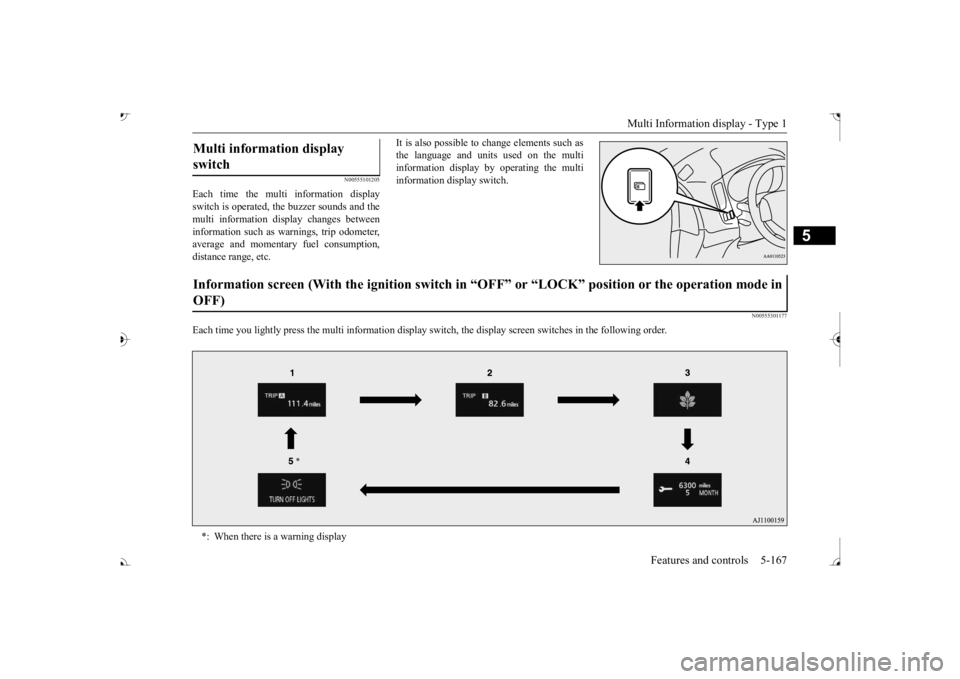
Each time the multi information display switch is operated, th
e buzzer sounds and the
multi information disp
lay changes between
information such as wa
rnings, trip odometer,
average and momentary fuel consumption,distance range, etc.
It is also possible to change elements such as the language and units used on the multiinformation display by operating the multi information display switch.
N00555301177
Each time you lightly press the multi in
formation display switch, th
e display screen switches
in the following order.
Multi information display switch Information screen (With the igniti
on switch in “OFF” or “LOCK” po
sition or the operation mode in
OFF) *: When there is a warning display
BK0239700US.book 167 ページ 2016年6月16日 木曜日 午前10時58分
Page 249 of 521
Multi Information display - Type 1 5-168 Features and controls
5
N00555801244
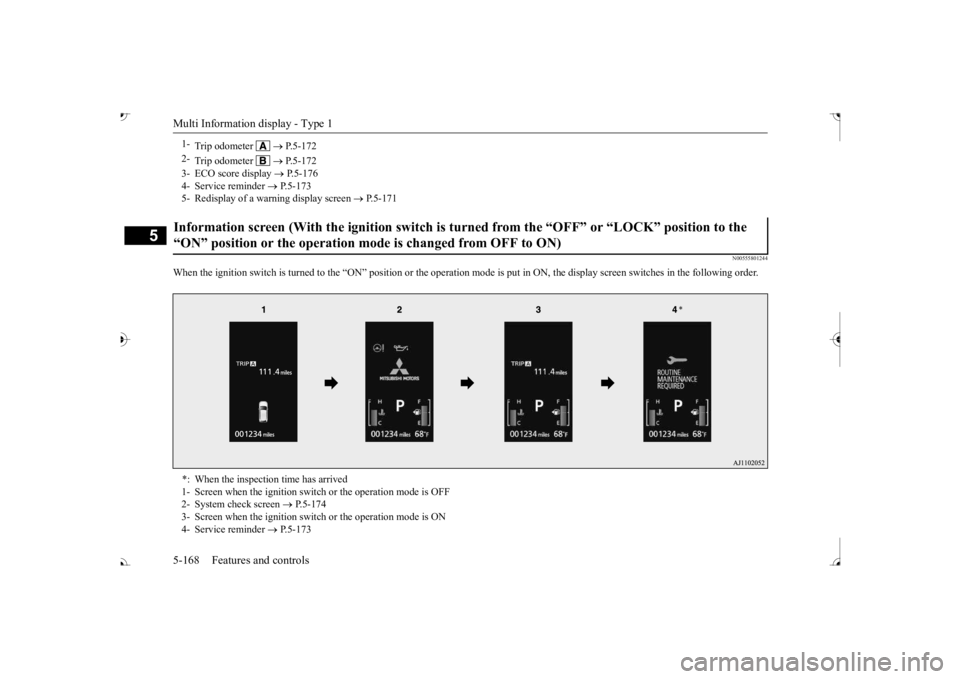
When the ignition switch is turned to the “ON” position or the
operation mode is put in ON, the
display screen switches in the
following order.
1-
Trip odometer
P.5-172
2-
Trip odometer
P.5-172
3- ECO score display
P.5-176
4- Service reminder
P.5-173
5- Redisplay of a warning display screen
P.5-171
Information screen (With the ignition switch is tu
rned from the “OFF” or
“LOCK” position to the
“ON” position or the operation mode is changed from OFF to ON) *: When the inspection time has arrived 1- Screen when the ignition switc
h or the operation mode is OFF
2- System check screen
P.5-174
3- Screen when the ignition switch or the operation mode is ON 4- Service reminder
P.5-173
BK0239700US.book 168 ページ 2016年6月16日 木曜日 午前10時58分
Page 252 of 521
Multi Information display - Type 1
Features and controls 5-171
5
Warning display screens with a “ ” or “ ” screen can be switched. If you want to switch the display, press the multi information dis- play switch as follows. “ ”: Press lightly. “ ”: Press for approximately 2 seconds or more.
N00579600021
When the warning is displayed, if youlightly press the multi information display switch a few times, the warning display screen you switched
from is redisplayed.
N00579700022
The operation status of each system is dis- played on the information screen. For further details, re
fer to the appropriate
page in the warn
ing display list.
Refer to “Other interrupt displays” on page 5-210.
N00555201222
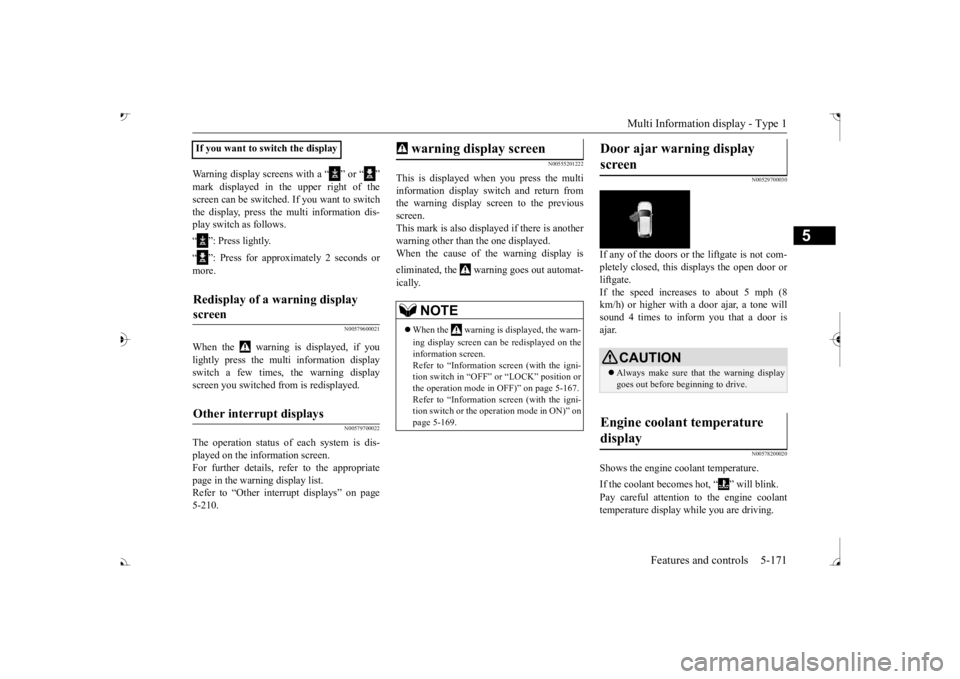
This is displayed when you press the multiinformation display switch and return from the warning display screen to the previousscreen. This mark is also displa
yed if there is another
warning other than the one displayed.When the cause of the warning display is eliminated, the warning goes out automat- ically.
N00529700030
If any of the doors or the liftgate is not com- pletely closed, this displays the open door orliftgate. If the speed increases to about 5 mph (8 km/h) or higher with a door ajar, a tone willsound 4 times to inform you that a door is ajar.
N00578200020
Shows the engine coolant temperature. If the coolant becomes hot, “ ” will blink. Pay careful attention to the engine coolant temperature display while you are driving.
If you want to switch the displayRedisplay of a warning display screen Other interrupt displays
warning display screen
NOTE
When the warning is displayed, the warn- ing display screen can be redisplayed on the information screen.Refer to “Information sc
reen (with the igni-
tion switch in “OFF” or
“LOCK” position or
the operation mode in
OFF)” on page 5-167.
Refer to “Information sc
reen (with the igni-
tion switch or the operation mode in ON)” on page 5-169.
Door ajar warning display screen
CAUTION Always make sure that
the warning display
goes out before beginning to drive.
Engine coolant temperature display
BK0239700US.book 171 ページ 2016年6月16日 木曜日 午前10時58分
Page 254 of 521
Multi Information display - Type 1
Features and controls 5-173
5
To return the display to 0, hold down the multi information display switch for about 2 seconds or more. Only the currently dis- played value wi
ll be reset.
Example If trip odometer is displayed, only tripodometer will be reset. Both trip odometers and can count up to 9999.9 miles/kilometers.When a trip odometer goes past 9999.9 miles/kilometers, it returns to 0.0 miles/ kilometers. When disconnecting th
e battery terminal,
the memories of trip odometer displays
and are cleared, and their displays
return to “0.0 miles/kilometers”.
N00556701237
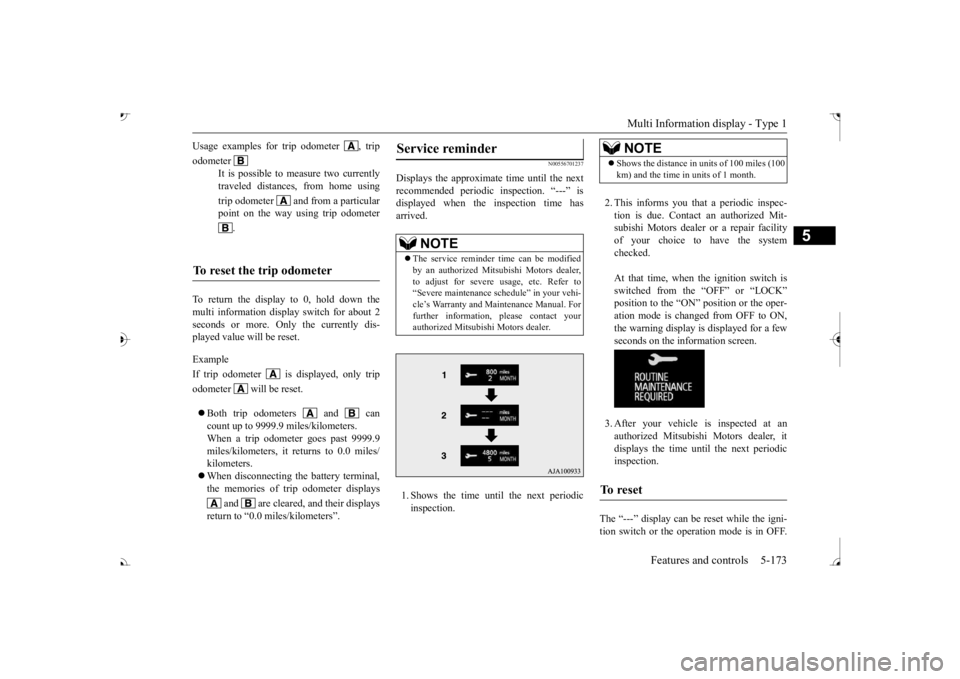
Displays the approximate time until the next recommended periodic
inspection. “---” is
displayed when the inspection time hasarrived. 1. Shows the time until
the next periodic
inspection.
2. This informs you that a periodic inspec- tion is due. Contact
an authorized Mit-
subishi Motors dealer or a repair facilityof your choice to have the system checked. At that time, when the ignition switch is switched from the “OFF” or “LOCK” position to the “ON” position or the oper-ation mode is changed from OFF to ON, the warning display is displayed for a few seconds on the information screen. 3. After your vehicle
is inspected at an
authorized Mitsubishi Motors dealer, it displays the time unt
il the next periodic
inspection.
The “---” display can be
reset while the igni-
tion switch or the operation mode is in OFF.
Usage examples for trip odometer , trip odometer
It is possible to
measure two currently
traveled distances, from home using trip odometer and from a particular point on the way using trip odometer
.
To reset the trip odometer
Service reminder
NOTE
The service reminder time can be modified by an authorized Mitsubishi Motors dealer,to adjust for severe usage, etc. Refer to “Severe maintenance sc
hedule” in your vehi-
cle’s Warranty and Ma
intenance Manual. For
further information,
please contact your
authorized Mitsubishi Motors dealer.
NOTE
Shows the distance in units of 100 miles (100 km) and the time in units of 1 month.
To reset
BK0239700US.book 173 ページ 2016年6月16日 木曜日 午前10時58分