2017 MITSUBISHI OUTLANDER III warning light
[x] Cancel search: warning lightPage 299 of 521
Warning lights 5-218 Features and controls
5
tion switch is turned to the “ON” position (engine off) or the operation mode is put inON. On vehicle equipped with the multi information display - Type 1, a warning is also displayed in the multi information dis-play. When the engine is started, the light should go out. Check to make sure that the light has gone out before driving.
N00520701278
This light comes on when the engine oil pres-sure is below normal. If the light stays on while driving, stop the
engine as soon as pos-
sible. Do not run the engine until the cause ofthe low oil pressure is corrected.
N00575701021
This light comes on in red if the coolant tem- perature becomes excessively high.
N00520901339
This light comes on when any door or the lift- gate is open or not completely closed. When the vehicle is moving at more than 5 mph (8 km/h) and any door or the liftgate isopen or ajar, a tone will sound 4 times to inform the driver that any door or the liftgate is not properly shut.
CAUTION If the warning light stays on while the engine is running, park your ve
hicle in a safe place
as soon as possible and
contact an authorized
Mitsubishi Motors dealer
or a repair facility
of your choice to have the system checked.
Oil pressure warning light (Vehicle equipped with the multi information display - Type 2)
CAUTION If this light comes on when the engine oil level is not low, have
your vehicle checked at
an authorized Mitsubish
i Motors dealer or a
repair facility of your choice. This warning light does not show the amount of oil in the crankcase. This can only be determined by checking the oil level with the dipstick with the engine turned off.
High coolant temperature warning light - red (Vehicle equipped with the multi infor- mation display - Type 2)
CAUTION If the light comes on during vehicle opera- tion, it indicates that
the engine is possibly
overheating. Continue
d driving could make
the engine fail. Immedi
ately stop the vehicle
in a safe place and ta
ke appropriate action.
(Refer to
Page 300 of 521
Information screen display (Vehicle equipped with the multi information display - Type 1)
Features and controls 5-219
5
N00590300034
This light comes on when the washer fluid is running low.If the light comes on, replenish the container with washer fluid. Refer to “Washer fluid” on page 9-12.Refer to “Capacity” on page 11-7.
N00558301064 N00558401179
This warning is displayed if the vehicle is being driven with the parking brake stillapplied. The warning light in the instrument cluster only comes on when the parking brake is applied.
When the ignition switch is turned to the “ON” position or the operation mode is put inON, if the brake fluid is low, this warning is displayed. The warning light in the instrument cluster also illuminates.
NOTE
When the interior light
auto-cutout function
is been activated, th
e light goes out automat-
ically after about 30 minutes.Refer to “Interior light
auto-cutout function
(dome light and other
lights)” on page 5-275.
Washer fluid level warning light (Vehicle equipped with the multi information display - Type 2)
Information screen display (Vehicle equipped with the multi information display - Type 1) Brake warning display
CAUTION If a vehicle is driven
without releasing the
parking brake, the brakes will overheat, resulting in ineffectiv
e braking and possible
brake failure. If this warning is displayed, release the park- ing brake.
CAUTION If this warning stays on and does not go out while driving, there is
a danger of ineffective
braking. If this happens, park the vehicle in a safe place, and contac
t an authorized Mit-
subishi Motors dealer or
a repair facility of
your choice. If the brake warning display, brake warning light, and the Anti-lock braking system warning light are illuminated at the same time, the braking forc
e distribution function
will not operate, so the
vehicle may be desta-
bilized during sudden braking. Avoid sudden braking and high-speed driving. Park thevehicle in a safe place, and contact an autho- rized Mitsubishi Motors dealer or a repair facility of your choice. The vehicle should be br
ought to a halt in the
following manner when
brake performance
is deteriorated.
BK0239700US.book 219 ページ 2016年6月16日 木曜日 午前10時58分
Page 301 of 521
Combination headlights and dimmer switch 5-220 Features and controls
5
N00558601113
If there is a fault in the charging system, the warning display is displayed on the informa- tion screen in the multi information display.The warning light in the instrument cluster also illuminates.
N00558701101
If the engine oil pressure drops while the engine is running, the warning display is dis-played on the information screen in the multi information display.
N00522501892
• Confirm that the vehicle slows down when you press down on the brake pedal harderthan usual. In some cases, the brake pedalmay go all the way to the floor.• Should the brakes fail, use engine brakingto reduce your speed and observe the fol- lowings. [Vehicles with the parking brake of thelever type] Carefully pull the parking brake lever. [Vehicles with the Electric parking brake]Keep pulling the Electric parking brake switch. (Refer to “Electric parking brake” Depress the brake peda
l to illuminate the
stop lights to alert th
e vehicles behind you.
Charging system warning dis- play
CAUTION
CAUTION If warnings are displa
yed while the engine is
running, park your vehicl
e in a safe place as
soon as possible and c
ontact an authorized
Mitsubishi Motors dealer
or a repair facility
of your choice to have the system checked.
Oil pressure warning display
CAUTION If the vehicle is driven while the engine oil is low, or the oil level is normal but the warn-ing is displayed, th
e engine may overheat
and damage may result. If the warning is displayed while the engine is running, park your ve
hicle in a safe place
as soon as possible and
check the engine oil
level.
If this warning display comes on when the engine oil level is pr
oper, have your vehicle
checked at an authorized Mitsubishi Motorsdealer or a repair fa
cility of your choice.
NOTE
The oil pressure wa
rning display does not
show the amount of oil. The oil level must be checked using the dipstick.
Combination headlights and dimmer switch Headlights
NOTE
Do not leave the headli
ghts and other lights
on for a long period of time when the engine is not running. The battery will run down.CAUTION
BK0239700US.book 220 ページ 2016年6月16日 木曜日 午前10時58分
Page 304 of 521
![MITSUBISHI OUTLANDER III 2017 Owners Manual Combination headlights and dimmer switch
Features and controls 5-223
5
[For vehicles equipped with the F.A.S.T.- key]The operation mode is changed to OFF or ACC and the driver’s door is not opened.](/manual-img/19/58146/w960_58146-303.png "MITSUBISHI OUTLANDER III 2017 Owners Manual Combination headlights and dimmer switch
Features and controls 5-223
5
[For vehicles equipped with the F.A.S.T.- key]The operation mode is changed to OFF or ACC and the driver’s door is not opened.")
Combination headlights and dimmer switch
Features and controls 5-223
5
[For vehicles equipped with the F.A.S.T.- key]The operation mode is changed to OFF or ACC and the driver’s door is not opened.
If the combination
headlights and dimmer
switch is turned to the “ ” or “ ” posi- tion again after the engine is turned off, the about 3-minute auto
-cutout function
described above will not
work. The lights (the
parking lights, tail lig
hts and license plate
lights) will stay on and will not turn off auto- matically.
N00584500028
This warning light will illuminate when thereis a malfunction in the LED headlights.
N00549801236
[When using a key to
start the engine]
If the driver’s door is opened with the key in the “OFF” or “LOCK” or “ACC” position orremoved from the ignition switch while the lights are on, the tone will sound to remind you to turn off the lights. [When using the F.A.S.T.-key to start the engine] If the driver’s door is opened with the opera-tion mode is put in OFF or ACC, or if the operation mode is changed to OFF while the lights are on, the tone will sound to remindyou to turn off the lights. In either case, the lights will turn off automat- ically and so will the tone. Or you can turn the light switch to th
e “OFF” position to stop
the tone.
N00549901178
To change the headlights from high beam to low beam and vice vers
a, pull the turn signal
lever to (1). Switch the headlights to lowbeam as a courtesy whenever there are oncoming vehicles, or when there is traffic moving ahead of you. An illuminated blue
NOTE
The light auto-cutout f
unction can be deacti-
vated. See your authorized Mitsubishi Motorsdealer for details. For vehicles equipped
with the Mitsubishi
Multi-Communication System, adjustmentscan be made using screen operations. For further details, refer to the separate owner’s manual.
When you want to keep the lights on:
LED headlight warning light
(if
so equipped)
NOTE
If the warning light illuminates, there may be a malfunction in the unit. Contact an autho- rized Mitsubishi Motors
dealer or a repair
facility of your choice
to have the system
checked.Type 1 Type 2
Headlight reminder buzzer Dimmer (high/low beam change)
BK0239700US.book 223 ページ 2016年6月16日 木曜日 午前10時58分
Page 307 of 521

Combination headlights and dimmer switch 5-226 Features and controls
5
The sensitivity of the se
nsor can be temporar-
ily lowering in the following ways. 1. Park your vehicle in a safe place and the ignition switch is turned to the “OFF” or “LOCK” position or the operation mode is put in OFF.2. Press the automatic high beam system switch more than 15 times within 5 sec- onds after operation mode is turned on.
• A vehicle in front
or oncoming vehicle is
hindered by any object
such as continuous
bends, elevated median/i
sland, traffic signs,
roadside trees. • Your vehicle passes
an oncoming vehicle
suddenly on a bend with poor visibility. • Another vehicle crosse
s ahead of your vehi-
cle.
The headlights may remain at low beam (or be switched from high beam to low beam) when a reflective object (e.g. street light, traffic signal, noticeboard and signboard) Any of the following factors may influence the headlight beam switching timing: • How brightly the exteri
or lights of a vehicle
in front or oncoming
vehicle il
luminate.
• Movement or direction
of a vehicle in front
or oncoming vehicle. • Only right or left exte
rior light of a vehicle
in front or oncoming
vehicle is illuminat-
ing. • A vehicle in front or
oncoming vehicle is a
motorcycle. • Road conditions (gradient, bends and road surface). • The number of occupa
nts and luggage load.
The automatic high beam
system recognises
environmental conditi
ons by sensing a light
source ahead of your ve
hicle. Therefore, you
may feel like someth
ing is not quite right
when the headlight beams are switched auto- matically.NOTE
The system may not de
tect a light vehicle
such as a bicycle. The system may not detect an ambient brightness precisely. Th
is causes the traffic
to be dazzled by high beam or the low beamto be maintained. In such cases, you should switch the headli
ght beams manually.
• In bad weather (heavy
rain, fog, snow or
sandstorm). • The windshield is dirty or fogged up. • The windshield is cracked or broken.• The sensor is deformed or dirty. • A light, which is simila
r to the headlights or
tail lights, is shining around your vehicle. • A vehicle in front
or oncoming vehicle is
driven without lights, the exterior lights are dirty or discoloured, or the direction of theheadlight beams is adjusted improperly. • It becomes dark and bright suddenly and continuously around your vehicle. • Your vehicle is driven on uneven surfaces.• Your vehicle is driven on a winding road. • A reflective object such as a noticeboard or a mirror reflects a li
ght ahead of your vehi-
cle. • When lights of the vehicle in front or head- lights of an oncoming ve
hicle blend into the
other lights. • The rear end of a vehicle in front (such as a container truck) re
flect a strong light.
• Your vehicle's headlight
is broken or dirty.
NOTE
• Your vehicle is inclined due to a flat tire or towing. • The warning display appears. (Refer to “System
problem warning” on
page 5-227.)
Observe the precautions below to maintain good usage conditions: • Do not attempt to di
sassemble the sensor.
• Do not affix a sticker or label on the wind- shield near the sensor. • Avoid overload. • Do not modify your vehicle.• When the windshield is replaced, use the Mitsubishi Motors
genuine parts.
To adjust the sensitivity of the sensor
NOTE
BK0239700US.book 226 ページ 2016年6月16日 木曜日 午前10時58分
Page 308 of 521

Combination headlights and dimmer switch
Features and controls 5-227
5
N00593800027
If a problem occurs with the system, the fol- lowing warning display will appear to the type of the problem. If a failure is detected in the system, the fol- lowing warning display will appear and the automatic high beam system will automati- cally be turned off. If the warning display remains even after theignition switch is turned to the “OFF” or “LOCK” position or the operation mode is put in OFF and then turned back to ON,please contact an au
thorized Mitsubishi
Motors dealer. [When the automatic high beam system is malfunctioning]
[When the sensor is malfunctioning]
If the system becomes temporarily unavail- able due to the high or low temperature of thesensor, the following warning display will appear. After the temperature of the sensor has beenin range, the system will automatically return to operation. If the warning display does not disappearafter waiting for a while, there is a possibility that the automatic high beam system has a malfunction. Contact an
authorized Mitsubi-
shi Motors dealer for inspection of the sys- tem.
System problem warning
The automatic high beam system deactivation due to fault
NOTE
If the sensor or its surrounding area becomes extremely high temperature when parking the vehicle under a blazing sun, the “AHB SERVICE REQUIRED” warning displaymay appear. If the message remains even after the tem- perature of the sensor or its surrounding areahas been in range, plea
se contact an autho-
rized Mitsubishi Motors dealer.
Sensor is too hot or cold
BK0239700US.book 227 ページ 2016年6月16日 木曜日 午前10時58分
Page 309 of 521

Combination headlights and dimmer switch 5-228 Features and controls
5
If the automatic high beam system determines that its performance has been degraded, the warning display will appear.This can occur when Foreign objects, such as dirt, snow or ice, adhere to the windshield of the sensor portion. In adverse weather
conditions, such as
rain, snow, sand storms, etc. A front vehicle or an oncoming vehicle is splashing water, snow or dirt.
When the sensor performance returns, the automatic high beam system will resumeoperation. If the warning display does not disappear after waiting for a while, there is a possibilitythat the sensor has a malfunction. Contact an authorized Mitsubishi Motors dealer for inspection of the sensor.
N00563201234
This function turns on
the front side-marker
and parking lights for
about 30 seconds after
the UNLOCK button on the remote controltransmitter is pressed when the combination headlights and dimmer sw
itch is in the “OFF” ehicles equipped with
the automatic light control). The welcome light function will ope
rate only when it is
dark outside the vehicle.
N00547301178
This function turns on the headlights in thelow beam setting for a
bout 30 seconds after
the ignition switch is turned to the “OFF” or “LOCK” position or the operation mode is put in OFF. 1. Turn the combination headlights and dim- mer switch to the “OFF” or “AUTO” matic light control).2. Turn the ignition switch to the “OFF” or “LOCK” position or put the operation mode in OFF. Also, if a key was used tostart the engine, remove the key from the ignition switch.
Windshield is dirty
Welcome light
NOTE
While the welcome light
function is operat-
ing, perform one of th
e following operations
to cancel the function. • Push the LOCK button on the remote con- trol transmitter. • Turn the combination headlights and dim- mer switch to the “ ” or “ ” position. • Turn the ignition switch to the “ON” posi- tion or put the opera
tion mode in ON.
It is possible to modify functions as follows: • The headlights can be set to come on in the low beam setting. • The welcome light fu
nction can be deacti-
vated.
For details, consult a Mitsubishi Motorsdealer.On vehicles e
quipped with Mitsubishi Multi-
Communication System, screen operations can be used to ma
ke the adjustment.
Refer to the separate
owner’s manual for
details.
Coming home light
NOTE
BK0239700US.book 228 ページ 2016年6月16日 木曜日 午前10時58分
Page 312 of 521
Hazard warning flasher switch Features and controls 5-231
5
N00522701328
If you press the flasher switch, the front and rear turn signals will flash intermittently, and so will the hazard warning lights. This is an emergency warning system and should not beused when the vehicle is in motion, except for emergencies. If you need to leave your
vehicle, the flashers
will keep working after the ignition switch is removed or the operation mode is put in OFF.
N00579300028
ECO mode is an eco-driving support systemwhich automatically controls the engine, air conditioning system,
4WD system (if so
equipped) and S-AWC (if so equipped) to improve fuel efficiency. Refer to Electronically controlled 4WD sys-tem” on page 5-82. Refer to “S-AWC (Super-All Wheel Con- trol)” on page 5-85. Refer to “Automatic climate control air con- ditioner” on page 7-5. The ECO mode starts working by pressing the ECO mode switch when the ignition switch or operation mode is in ON. Push the switch again
and the ECO mode will
cancel. While the ECO mode is working, an ECO mode indicator will be turned on.
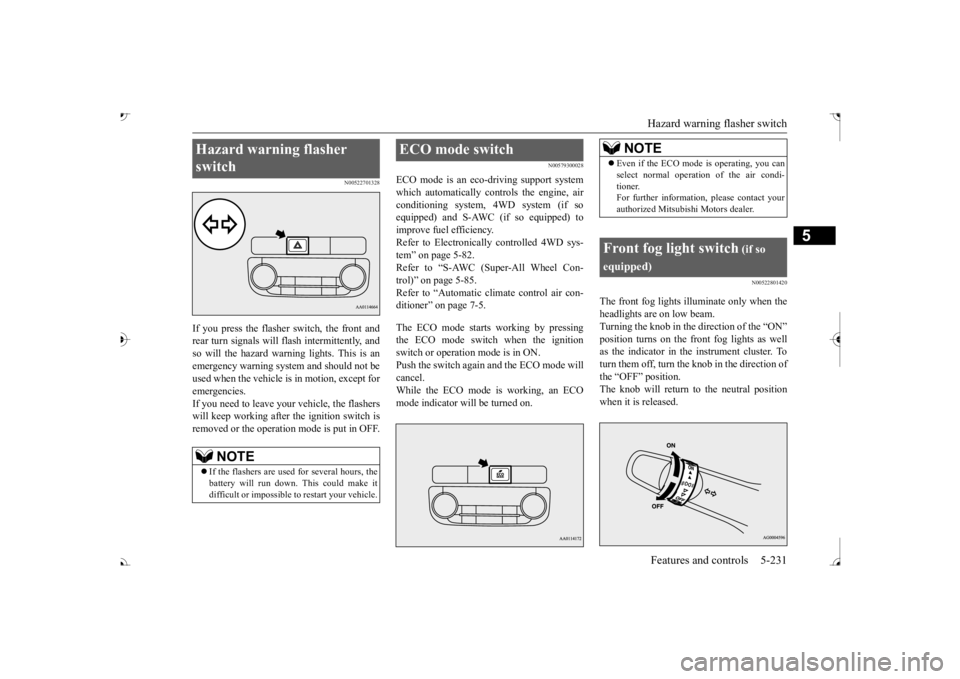
N00522801420
The front fog lights illuminate only when theheadlights are on low beam. Turning the knob in the direction of the “ON”as the indicator in the instrument cluster. To turn them off, turn the knob in the direction of the “OFF” position.The knob will return to the neutral position when it is released.
Hazard warning flasher switch
NOTE
If the flashers are used for several hours, the battery will run down.
This could make it
difficult or impossible
to restart your vehicle.
ECO mode switch
NOTE
Even if the ECO mode is operating, you can select normal operati
on of the air condi-
tioner.For further informati
on, please contact your
authorized Mitsubish
i Motors dealer.
Front fog light switch
(if so
equipped)
BK0239700US.book 231 ページ 2016年6月16日 木曜日 午前10時58分