2017 MITSUBISHI LANCER engine
[x] Cancel search: enginePage 251 of 385

Automatic air conditioning with
Fahrenheit scale (if so equipped)
7-4 Comfort controls
7
Air flows mainly to the windshield and the door windows.
N00731501382
The air conditioning can only be used whilethe engine is running.
N00711801653
N00736900094
When the ignition switch is in the “ON” posi- tion, select the blower speed by turning the blower speed selection dial. Turning the dial clockwise will increase theblower speed; turning the dial counterclock- wise will decrease it. When the dial is set to the “OFF” position, all fan-driven airflowwill stop.
NOTE
With the mode selection dial between the “ ” and “ ” positions, air flows mainly to the leg area. With the mode selection dial between the “ ” and “ ” positions, air flows mainly to the windshield and the door windows.
Defroster position
Automatic air conditioning with Fahrenheit scale
(if so
equipped)
CAUTION The engine speed may increase when the air conditioning is operating. With an increased engine speed, a CVT vehi-cle will creep to a greater degree than with a lower engine speed. Fully depress the brake pedal to prevent the vehicle from creeping.
Control panel
1- Temperature control dial 2- Air selection switch
3- Blower speed selection dial4- Air conditioning switch5- Mode selection dial 6- Electric rear window defogger switch
P.5-138NOTE
There is an interior air temperature sensor (A) in the illustrated position.Never place anything over the sensor, since doing so will prevent it from functioning properly.
Blower speed selection dial
BK0237700US.bo
ok 4 ページ 2016年4月15日 金曜日 午前11時28分
Page 252 of 385

Automatic air conditioning with
Fahrenheit scale (if so equipped)
Comfort controls 7-5
7
N00737001419
Use this dial to adjust the temperature in the passenger compartment. Turn the temperaturecontrol dial clockwise to make the air warmer. Turn it counterclockwise to make the air cooler.
The above indicates the factory settings. You can personalize the air selection switch and air conditioning switch to match your per-sonal preferences. Contact your Mitsubishi Motors dealer or a repair facility of your choice for assistance.Refer to “Personalizing the air conditioning switch (Changing the function setting)” on page 7-7.Refer to “Personalizing the air selection (Changing the function setting)” on page 7-6.
N00737100093
To change the amount of air flowing from the vents, turn the mode selection dial. Refer to“Changing the mode selection” on page 7-2.
N00737201394
Normally, use the outside air position to keepthe windshield and side windows clear and toquickly remove fog or frost from the wind- shield. To change the air selection, simply press the air selection switch. A sound will be madeevery time you press the switch. Outside air {Indicator light (A) OFF} Outside air is introduced into the passen- ger compartment.
Temperature control dial
NOTE
While the engine coolant temperature is low, the temperature of the air from the heater will be cool/cold until the engine warms up, even if you have selected warm air with the dial. When the temperature is set to the highest or the lowest setting under the AUTO opera-tion, the air selection and the air conditioning will be automatically changed as follows. • Quick Heating (When the temperature is set to the highest setting) Outside air will be introduced and the airconditioning will stop. In this case, manual operation is possible. • Quick Cooling (When the temperature is set to the lowest setting) Inside air will be recirculated and the airconditioning will operate. In this case, you cannot select outside air and turn the air conditioning off.
Mode selection dial
Air selection switch
BK0237700US.bo
ok 5 ページ 2016年4月15日 金曜日 午前11時28分
Page 255 of 385

Automatic air conditioning with
Fahrenheit scale (if so equipped)
7-8 Comfort controls
7
1. Set the blower speed selection dial to the “AUTO” position. 2. Select the temperature control dial to the desired temperature. The temperature canbe set within a range of around 61 to 89. The temperature will increase as the dial is turned to the right.3. Set the mode selection dial to the “AUTO” position.
The vents, recirculation/outside air, blower speed, and ON/OFF of air conditioning willbe controlled automatically.
N00731800072
Blower speed and vent mode may be con-trolled manually by setting the blower speed
selection dial and the mode selection dial to the desired positions. To return to automatic operation, set the dials to the “AUTO” posi- tion.
N00732401535
To remove frost or mist from the windshieldand door windows, use
the mode selection
dial (“ ” or “ ”).
Use this setting to keep the windshield and door windows clear of mist, and to keep the leg area heated (when driving in rain or snow). 1. Set the mode selection dial to the “ ”2. Select your desired bl
ower speed by turn-
ing the blower speed selection dial. 3. Select your desired temperature by turn- ing the temperature control dial.
NOTE
Set the temperature at about 75 under normal conditions. While the engine coolant temperature is low, the temperature of the air from the heater will be cool/cold until the engine warms up,even if you have selected warm air with the dial. To prevent the windshield and windows from fogging up, the vent mode will be changed to “ ” or “ ” and the blower speed will be reduced.
Operating the air conditioning system (manual mode)
Defrosting or defogging (wind- shield, door windows)
CAUTION For safety, make sure you have a clear view through all the windows.
For ordinary defrosting
BK0237700US.bo
ok 8 ページ 2016年4月15日 金曜日 午前11時28分
Page 256 of 385
Automatic air conditioning with
Celsius scale (if so equipped)
Comfort controls 7-9
7
For quick defrosting 1. Set the mode selection dial to the “ ” 2. Set your blower to the maximum speed. 3. Set the temperature to the highest posi-tion.
N00731501395
The air conditioning can only be used while the engine is running.
N00711801666
NOTE
While the mode selection dial is set between “ ” and “ ” position, the air condition- ing compressor will run automatically. The outside air position will also be selected automatically. If the mode selection dial is set between “ ” and “ ” you cannot turn the air con- ditioning off or select the recirculation posi-tion. This prevents the windows from fogging up. To defog quickly, direct
the air flow from the
side vents toward the door windows.
When defrosting, do not set the temperature control dial to the maximum cool position. This will blow cool air on the window glass and fog it up.
Automatic air conditioning with Celsius scale
(if so
equipped)
CAUTION The engine speed may increase when the air conditioning is operating.With an increased engine speed, a CVT vehi- cle will creep to a greater degree than with a lower engine speed. Fully depress the brakepedal to prevent the vehicle from creeping.NOTE
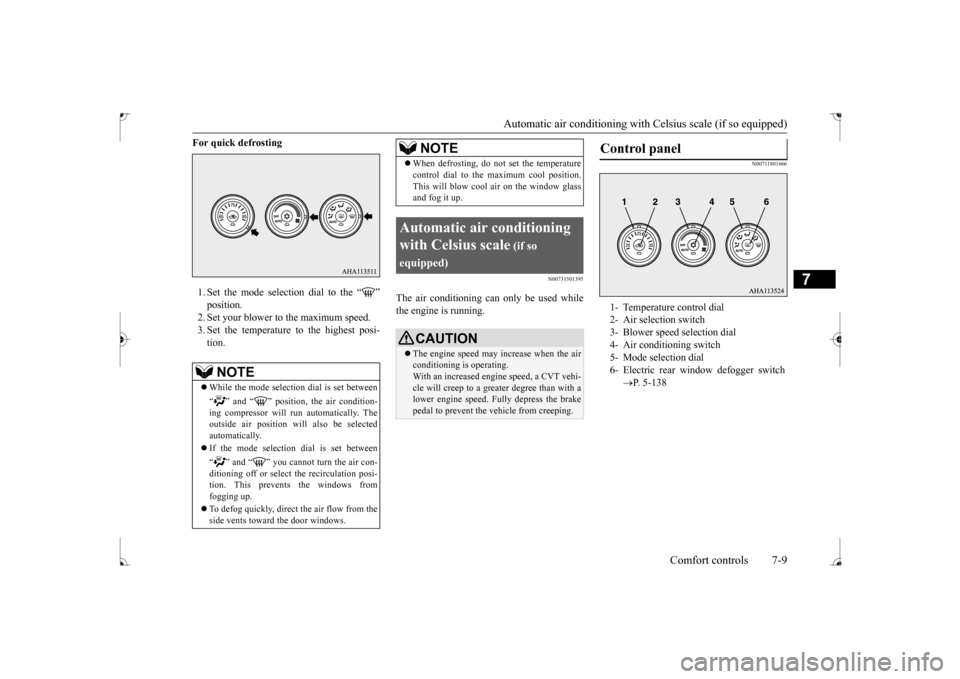
Control panel
1- Temperature control dial 2- Air selection switch 3- Blower speed selection dial4- Air conditioning switch 5- Mode selection dial 6- Electric rear window defogger switch
P. 5-138
BK0237700US.bo
ok 9 ページ 2016年4月15日 金曜日 午前11時28分
Page 257 of 385

Automatic air conditioning with
Celsius scale (if so equipped)
7-10 Comfort controls
7
N00736900111
When the ignition switch is in the “ON” posi- tion, select the blower speed by turning the blower speed selection dial. Turning the dial clockwise will increase theblower speed; turning the dial counterclock- wise will decrease it. When the dial is set to the “OFF” position, all fan-driven airflowwill stop.
N00737001422
Use this dial to adjust the temperature in thepassenger compartment. Turn the temperaturecontrol dial clockwise to make the air warmer. Turn it counterclockwise to make the air cooler.
The above indicates the factory settings. You can personalize the air selection switch and air conditioning switch to match your per-sonal preferences. Contact your Mitsubishi Motors dealer or a repair facility of your choice for assistance.Refer to “Personalizing the air conditioning switch (Changing the function setting)” on page 7-12.Refer to “Personalizing the air selection (Changing the function setting)” on page
NOTE
There is an interior air temperature sensor (A) in the illustrated position. Never place anything over the sensor, since doing so will prevent it from functioning properly.
Blower speed selection dial
Temperature control dial
NOTE
While the engine coolant temperature is low, the temperature of the air from the heater will be cool/cold until the engine warms up, even if you have selected warm air with the dial. When the temperature is set to the highest or the lowest setting under the AUTO opera-tion, the air selection and the air conditioning will be automatically changed as follows. Also, if the air selection is operated manuallyafter an automatic changeover, manual oper- ation will be selected. • Quick Heating (When the temperature is set to the highest setting) Outside air will be introduced and the airconditioning will stop. • Quick Cooling (When the temperature is set to the lowest setting) Inside air will be recirculated and the air conditioning will operate.
BK0237700US.bo
ok 10 ページ 2016年4月15日 金曜日 午前11時28分
Page 260 of 385

Automatic air conditioning with
Celsius scale (if so equipped)
Comfort controls 7-13
7
N00731701502
In normal conditions, use the system in the AUTO mode and follow these procedures: 1. Set the blower speed selection dial to the “AUTO” position.
2. Select the temperature control dial to the desired temperature. The temperature can be set within a range of around 18 to 32. The temperature will increase as the dialis turned to the right. 3. Set the mode selection dial to the “AUTO” position.
The vents, recirculation/outside air, blower speed, and ON/OFF of air conditioning will be controlled automatically.
N00731800098
Blower speed and vent mode may be con-trolled manually by setting the blower speed selection dial and the mode selection dial tothe desired positions. To return to automatic
operation, set the dials to the “AUTO” posi- tion.
N00732401548
To remove frost or mist from the windshield and door windows, use the mode selection dial (“ ” or “ ”). Use this setting to keep the windshield and door windows clear of mist, and to keep the leg area heated (when driving in rain or snow).
While the mode selection dial is set to the “ ” position, the air conditioning will run automatically, even if the system is set to “Disable automatic air conditioning control”,in order to prevent windows from fogging up.
Operating the air conditioning system (automatic mode)
NOTE
NOTE
Set the temperature at about 25 under normal conditions. While the engine coolant temperature is low, the temperature of the air from the heater will be cool/cold until the engine warms up, even if you have selected warm air with thedial. To prevent the windshield and windows from fogging up, the vent mode will be changed to “ ” or “ ” and the blower speed will be reduced.
Operating the air conditioning system (manual mode)
Defrosting or defogging (wind- shield, door windows)
CAUTION For safety, make sure you have a clear view through all the windows.
For ordinary defrosting
BK0237700US.bo
ok 13 ページ 2016年4月15日 金曜日 午前11時28分
Page 262 of 385

Air purifier
Comfort controls 7-15
7
The air conditioning should be operated for at least five minutes each week, even in coldweather. This includes the quick defrosting mode. Operating the air condition system weekly maintains lubrication of the compres-sor internal parts to keep the air conditioning in the best operating condition.
N00733800151
The air conditioning system is equipped withan air filter to remove pollen and dust.
The air filter’s ability to collect pollen and dirt is reduced as it becomes dirty, so replace it periodically. For the maintenance interval, refer to the “WARRANTY AND MAINTE-NANCE MANUAL”.
N00734302098
The audio system can only be used when the ignition switch is in the “ON” or “ACC” position.
CAUTION The air conditioning system in your vehicle must be charged with the refrigerant HFC- 134a and the lubricant SUN-PAG56. Use of any other refrigerant or lubricant will cause severe damage and may require replac-ing your vehicle’s entire air conditioning system. The release of refrigerant into the atmo-sphere is not recommended. The new refrigerant HFC-134a in your vehi- cle is designed not to harm the earth’s ozonelayer. However, it may contribute slightly to global warming. It is recommended that the old refrigerant besaved and recycled for future use.
During a long period of disuse Air purifier
NOTE
Operation in certain conditions such as driv- ing on a dusty road and frequent use of the air conditioning can lead to reduction of ser-vice life of the filter.
When you feel that the
air flow is lower than normal or when the windshield or windows start to fog up easily,replace the air filter. Contact your Mitsubishi Motors dealer or a repair facility of your choice for assistance.
AM/FM radio/CD player
(if
so equipped)
NOTE
To listen to the audio system while the engine is not running, turn the ignition switch to the “ACC” position. If the ignition switch is left in the “ACC” position, the accessory power will automati-cally turn off after a certain period of time and you will no longer be able to use the audio system. The accessory power comeson again if the ignition switch is turned from the “ACC” position. Refer to “ACC power auto-cutout function” on page 5-53. If a cellular phone is used inside the vehicle, it may create noise in the audio equipment.This does not mean that anything is wrong with your audio equipment. In such a case, use the cellular phone at a place as far awayas possible from the audio equipment. If foreign objects or water get into the audio equipment, or if smoke or a strange odor comes from it, immediately turn off the audio system and have it checked at anauthorized Mitsubishi Motors dealer or a repair facility of your choice. Never try to repair it yourself. Avoid using the audio sys-tem until it is inspected by a qualified per- son. If the audio system is damaged by foreign objects, water, or fire, have the system checked by a qualified Mitsubishi Motors technician.
BK0237700US.bo
ok 15 ページ 2016年4月15日 金曜日 午前11時28分
Page 281 of 385

Listen to an iPod 7-34 Comfort controls
7
Press the MEDIA key to set the iPod as the source. The selected source is indicated on the dis- play.
Press the key or key to select the track. This enables selection of the next or previous track. Hold down the 3 key or the 4 key. Fast forward/rewind is possible. Repeat playback and shuffle playback are possible. Press the 1RPT key. Repeat playback of th
e track currently being
played.
For vehicles with a Bluetooth
® 2.0 interface,
the types of devices that can be connectedmay vary. [For vehicles sold in U.S.A.] For details, access the Mitsubishi MotorsNorth America website. [For vehicles sold in Canada and Mexico] For details, access the Mitsubishi Motorswebsite. Please read and agree to the “Warn- ing about Links to the Web Sites of Other Companies”. The websites mentioned abovemay connect you to websites other than the Mitsubishi Motors website. http://www.mitsubishi-motors.com/en/prod-ucts/index.html Regarding how to connect the iPod/iPhone, refer to “How to connect an iPod” on page 5-161. When connecting the iPod/iPhone, use a commercially-available iPod connectioncable. Set up the device in order that no unsafe actions, such as plugging in the connection cable are taken while driving. When inserting and removing the iPod/iPhone, for safety’s sake first stop the vehicle. Depending on the status of the iPod/iPhone, it may take some time until the device is rec-ognized, or playback starts. Buttons on the product will not operate while iPod/iPhone is connected.NOTE
iPod/iPhone specifications and settings may mean that connection is not possible, or result in differences in operation or display. Depending on audio data in the iPod/iPhone, track information may not be displayed cor- rectly. Depending on the status of the vehicle and device, the iPod/iPhone may not play back after starting the engine. Data containing copyright information may not play back. It is recommended that the iPod/iPhone equalizer settings be set to flat. Operate the iPod/iPhone while connected to this product. If the iPod/iPhone is connected via Bluetooth as a Bluetooth-capable audio device, then donot connect the iPod/iPhone using an iPod cable. Connection using both methods will result in erroneous operation. If an iPod/iPhone does not operate correctly, then remove the iPod/iPhone from the prod-uct, reset, then reconnect.
Play iPod
NOTE
Select the Track (File) Fast Forward or Rewind Switch Playback Mode Repeat Playback (RPT)
NOTE
Pressing again will cancel.
BK0237700US.bo
ok 34 ページ 2016年4月15日 金曜日 午前11時28分