2017 MITSUBISHI iMiEV ECO mode
[x] Cancel search: ECO modePage 17 of 296
Familiarizing yourself with i-MiEV
General information/Charging 3-3
3
N01205601036
Motion energy is converted into electric energy using the motor as a power generator. While decelerating, electric energy will becreated and used to charge to the main drive lithium-ion battery. If you lift your foot off the accelerator pedal while driving, a braking force thatequivalent to the engine braking of a gas- oline or diesel powered vehicle engine vehicle will
be generate.
For increased regenerative braking, set the selector lever to “B” (REGENERATIVE BRAKE MODE) or “ECO” (ECOMODE) as follows: • “B”: Strong regenerative braking (For downhill driving)• “ECO”: Moderate regenerative braking (For economical driving or gentle down- hill driving)
As greater brake fo
rce is applied by
depressing the brak
e pedal, increased
regenerative braking occurs. When regenerative braking produces strong brake force, the stop lights willilluminate, even if the brake pedal is not depressed.
N01200300015
Keep the brake pedal depressed until you are ready to drive. When the vehicle is inthe “D” (DRIVE), “ECO” (ECO MODE),“B” (REGENERATIVE BRAKE MODE) or
Page 19 of 296
Familiarizing yourself with i-MiEV
General information/Charging 3-5
3
N01205900016
Put the selector lever in the “B” (REGEN- ERATIVE BRAKE MODE) or “Eco” (ECOMODE) position according to the road con-dition. Using appropriate regenerative brak- ing can help increase
the cruising range.
Refer to “Regenerative braking” on page3-3.NOTE
Range-Driving conditions Shorten driving range
Lengthen
driving range
Range Reducing Condition Range Extending
High acceleration, speed Driving
style Low acceleration, speed
Heater on Heater usage
Heater off
(or use seat heater)
A/C on A/C usage A/C off Highway City/Highway City
Heavy payload Payload Light payload Windy, wet Weather Calm, dry Uphill, rough Road conditio
ns Flat/Downhill, smooth
D-mode Drive mode (Eco or B mode)
BK0220401US.book 5 ページ 2015年6月3日 水曜日 午前7時42分
Page 22 of 296
Mitsubishi Motors genuine parts 3-8 General information/Charging
3
may involve m
odification of the electrical
systems.
N01200800010
Mitsubishi Motors Genuine Parts are designed and manufacture
d to meet high stan-
dards of performance, and are recommendedfor all of your maintenance needs. Also avail- able from a certified i-MiEV dealer are a wide variety of acce
ssories to personalize
your new vehicle. Ea
ch Mitsubishi vehicle
has a selection of Mi
tsubishi Motors autho-
rized accessories to c
hoose from to tailor your
new vehicle to your own personal preference. A certified i-MiEV de
aler’s Parts Manager
has information on va
rious audio systems,
protection items, as well
as interior and exte-
rior accessories available for your specificmodel.
N01200900011
Certain components of th
is vehicle, such as
airbag modules, seat belt pretensioners, and button cell batteries,
may contain perchlorate
materials. Special handling may a
pply. For additional
information, see www
.dtsc.ca.gov/hazardous-
waste/perchlorate.
N01201001045
When the vehicle is driven in a high ambi
ent temperature, its air-conditioner performan
ce can be insufficient. Also, using the
air conditioner
will reduce the vehicle’s cruising range. When the ambient temperature is approximately 104 °F (40 °C) or
higher, the phenomena described be
low may occur. Please take th
e
described actions. Even if the ambient temperature is approx
imately 104 °F (40 °C) or lower, when perfo
rming quick charging,
driving at high-speed
and uphill
repeatedly, the phenomena described below may
occur. Please take the described actions.
CAUTIONPlease consult a certif
ied i-MiEV dealer con-
cerning any such accessory fitment or modi- fication. If the wires interfere
with the vehicle body or
improper installation me
thods are used (pro-
tective fuses not included, etc.), electronic devices may be adversel
y affected, resulting
in a fire, vehicle dama
ge, or other accident.
Mitsubishi Motors genuine parts
California Perchlorate Materials Requirements
Cautions and actions to deal with intense heat BK0220401US.book 8 ページ 2015年6月3日 水曜日 午前7時42分
Page 50 of 296
MiEV Remote System 3-36 General information/Charging
3
N01203401056
The MiEV Remote System has the following three functions. Charging Timer
P.3-41
When the EV charging cable (regular charger) (Level 1 or Level 2) is con-nected, the batteries will only charge during the pre-set
time period selected
using the MiEV Remote.
Remote Climate Control
P.3-47
When the EV charging cable (regular charger) (Level 1 or Level 2) is con-nected, the air-conditi
oner or heater can
be activated for up to 30 minutes prior to vehicle usage. This feature can beused to cool or heat the car and to acti- vate the front and rear window defroster.
Main Drive Lithium-ion Battery Level Indicator
P.3-50
The charge remaining in the Main Drive Lithium-ion Battery can be con-firmed through the MiEV Remote.
For your quick reference, refer to “Basic operation of the MiEV Remote” on page 3-40.
If your vehicle needs to be towed, trans- port the vehicle on a
flatbed truck or tow
the vehicle either with all wheels or therear wheels (drive
wheels) off the ground.
If the rear wheels are on the ground when towing, this may cause damage to the elec-tric motors. This may also cause a fire, if wiring in the electric motor unit room becomes damaged. Refer to “Towing” onpage 8-11. Do not attempt to repair a damaged elec- tric vehicle yourself. Please contact a cer- tified i-MiEV dealer for service. In the event of an ac
cident that requires
body repair and painting, the vehicle should be delivered
to a Certified i-MiEV
dealer to have the main drive lithium-ion battery and high voltage
parts such as the
inverter, including the attached wiringharness, removed prior to painting. If exposed to heat in the paint booth, the main drive lithium-ion battery will experi-ence battery capacity loss. A damaged main drive lithium-ion battery can also pose safety risks to untrainedmechanics and repair personnel.NOTE
The emergency shut-off
system will be acti-
vated and the high-volta
ge system will auto-
matically turn off under the following conditions:WA R N I N G
• Certain front, side or rear collisions. • Certain EV (Electric Vehicle) system mal- functions.
When the emergency shut
-off system is acti-
vated, the ready indicato
r is turned off. Refer
to “Indicator and warning light package” on page 5-43. If the emergency shut-off system activates, contact a Certifie
d i-MiEV dealer.
MiEV Remote System
NOTE
COOL:Operates in cooling mode intended
for exclusive use with Remote Cli- mate Control (P
re-Cooling Mode).
HEAT:Operates in heating mode intended
for exclusive use with Remote Cli- mate Control (P
re-Heating Mode).
The heated seats can be used while the Remote Climate Control is acti- vated. : Operates in defroster mode intended for exclusive use with Remote Cli- mate Control (Pre-Defroster Mode). The electric rear
window defogger is
activated automatically when theRemote Climate Control is activated in Pre-Defroster Mode.
BK0220401US.book 36 ページ 2015年6月3日 水曜日 午前7時42分
Page 52 of 296
MiEV Remote System 3-38 General information/Charging
3
N01203501044
The transmitter signal will reach further when the antenna of the MiEV Remote isfully extended and held upright. The onboard antenna is printed on the right side delta glass
of the vehicle.
When the MiEV Remote is not used for more than 30 seconds, the MiEV Remote willautomatically turn off. Some charge facilities
have a timer function
which turns the power supply on and off automatically. When using a charge facility with this timer function, please adjust thecharging time set by the MiEV Remote to be consistent with the timer used by the charg- ing facility. When you need additi
onal MiEV Remotes,
please contact a certified i-MiEV dealer. Upto four MiEV Remotes
can be used per vehi-
cle. You may hear operating sounds such as sounds from the cooli
ng fan and air condi-
tioning compressor when the Remote Cli-mate Control is activated even if the electric motor switch is in “LOCK” position during timer charging. This is normal.Refer to “Remote Climate Control” on page 3-47.NOTE
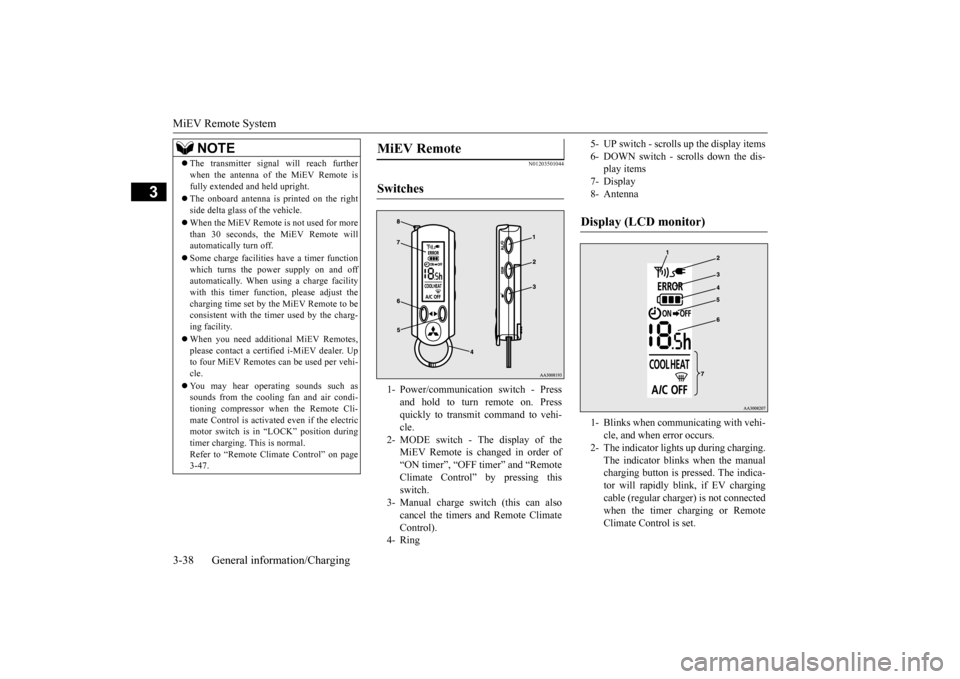
MiEV Remote Switches 1- Power/communication switch - Press
and hold to turn remote on. Pressquickly to transmit command to vehi- cle.
2- MODE switch - The display of the
MiEV Remote is changed in order of “ON timer”, “OFF timer” and “Remote Climate Control” by pressing thisswitch.
3- Manual charge switch (this can also
cancel the timers and Remote Climate Control).
4- Ring
5- UP switch - scrolls
up the display items
6- DOWN switch - scrolls down the dis-
play items
7- Display 8- AntennaDisplay (LCD monitor) 1- Blinks when communicating with vehi-
cle, and when error occurs.
2- The indicator lights up during charging.
The indicator blinks when the manualcharging button is pressed. The indica- tor will rapidly blink, if EV charging cable (regular charge
r) is not connected
when the timer charging or Remote Climate Control is set.
BK0220401US.book 38 ページ 2015年6月3日 水曜日 午前7時42分
Page 54 of 296
MiEV Remote System 3-40 General information/Charging
3
N01206100015
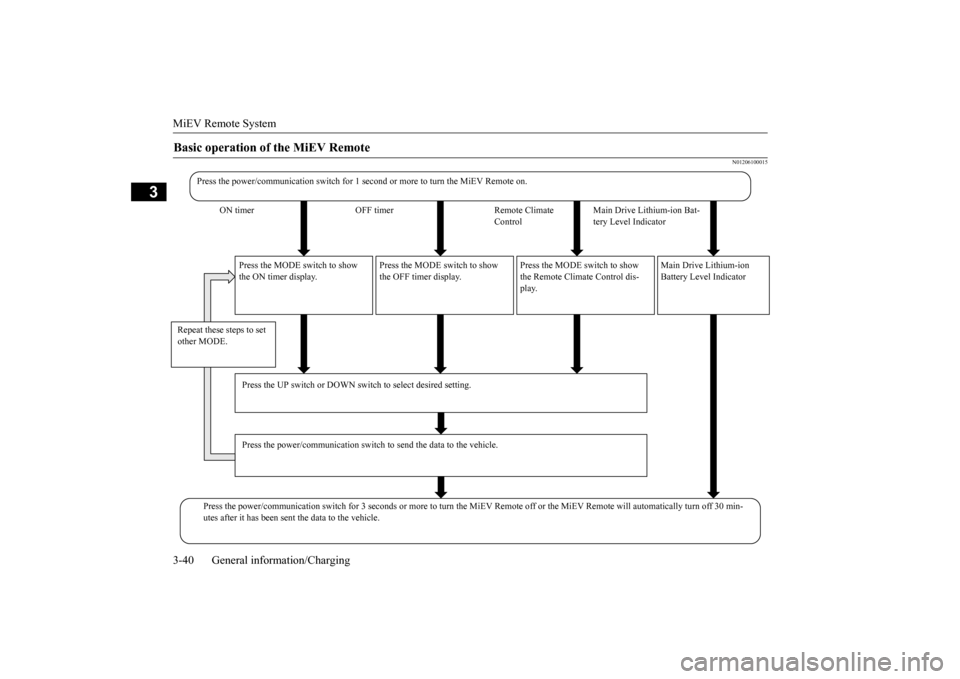
Basic operation of the MiEV Remote
Press the power/communication switch for 1 seco
nd or more to turn
the MiEV Remote on.
ON timer OFF timer Remote Climate
Control
Main Drive Lithium-ion Bat- tery Level Indicator
Press the MODE switch to show the ON timer display.
Press the MODE switch to show the OFF timer display.
Press the MODE switch to show the Remote Climate Control dis- play.
Main Drive Lithium-ion Battery Level Indicator
Repeat these steps to set other MODE.
Press the UP switch or DOWN switch to select desired setting. Press the power/communication switch
to send the data to the vehicle.
Press the power/communication switch for 3 seco
nds or more to turn the Mi
EV Remote off or the MiEV Remote will automatically tu
rn off 30 min-
utes after it has been sent the data to the vehicle.
BK0220401US.book 40 ページ 2015年6月3日 水曜日 午前7時42分
Page 58 of 296

MiEV Remote System 3-44 General information/Charging
3
5. Press the power/communication switch (B) for less than 1 second to send the set-ting data to the vehicle. The MiEV Remote will sound melodies on transmission and reception. 6. To turn off the MiEV Remote, refer to “To turn the MiEV Remote ON/OFF” on page 3-43.
N01206000014
1. Turn on the MiEV Remote. Refer to “Toturn the MiEV Remote ON/OFF” on page3-43. 2. Press the UP switch (C) or the DOWN switch (D) once, and the remaining timefrom the present to the time set for the ON timer will be disp
layed and blink.
3. Change the remainin
g time to 0h by press-
ing the UP switch (C) or the DOWN switch (D).
NOTE
The melodies can be turned off. Refer to “To turn on/off melody
and buzzer” on page
3-49. If a communication error occurs or the MiEV Remote System is not
functioning properly,
the buzzer will sound. Refer to “Display of MiEV Remote during communicating with vehicle” on page 3-46. If the OFF Timer is unset when setting the ON timer, the OFF timer will be automati-cally set with “f
ully charged”.
To set OFF Timer, refer to “To set OFF Timer” on page 3-45.
NOTE
The energy level gauge (E) in the instrument panel on the vehicle wi
ll illuminate and the
charging indicator (F
) will blink approxi-
mately 30 seconds af
ter the vehicle has
received the setting for the ON timer. After approximately 30 seconds, the energylevel gauge and the charging indicator will go off, and the vehicle will be prepared for the Charging Timer. Turning the electric motor switch to the “ON” position or th
e “ACC” position will
cancel the Charging Timer. If the MODE switch is pressed while chang- ing the ON timer setting,
the change will be
canceled. The symbol on the MiEV Remote will be illuminated while the vehicle is charging.
E
F
If the charge connect
or is disconnected
before the time set by the ON timer, theCharging Timer is not canceled. If the chargeconnector is re-connected
again before start-
ing the charge or setting the charge timers, the Charging Timer will resume.
To start the charging immediately after the ON timer has been set
NOTE
BK0220401US.book 44 ページ 2015年6月3日 水曜日 午前7時42分
Page 59 of 296

MiEV Remote System
General information/Charging 3-45
3
4. Press the power/c
ommunication switch
(B) for less than 1 second to send the set-ting data to the vehicle. The MiEV Remote will sound melodies on transmis- sion and reception. The charging willstart. Refer to “Regular charging (charging method with rated AC 120 V outlet)” onpage 3-16. 5. Turn off the MiEV Remote. Refer to “To turn the MiEV Remote ON/OFF” on page 3-43.
N01205301033
The OFF timer can be
set during the regular
charging or after setting the ON timer. 1. When the power of MiEV Remote is off, turn the power on. Refer to “To turn theMiEV Remote ON/OFF” on page 3-43. 2. Press the MODE switc
h (G) to change the
display to the OFF timer (2).
3. Press the UP switch (C) or the DOWN switch (D) once. The time set last time for the OFF timer will be
displayed and blink.
4. If you need to change the time for the OFF timer, press the UP switch (C) or the DOWN switch (D) to change the time.
• The time can be changed within the range from 0.5h to 19.5h by half hourand can be changed to “-h”. • When “-h” is displayed, the charging will end when Main Drive Lithium-ionBattery is fully charged.
5. Press the power/c
ommunication switch
(B) for less than 1 second to send the set- ting data to the vehicle.The MiEV Remote
will sound melodies
on transmission and reception.
To set OFF Timer
1_ Shown the ON timer 2_ Shown the OFF timer 3_ Shown the Remote Climate Control
NOTE
To display “-h”, press the UP switch (C) when 19.5h is displayed or press DOWN switch (D) when 0.5h is displayed.NOTE
The melodies can be turned off. Refer to “To turn on/off melody and buzzer” on page 3-49. If a communication error occurs or the MiEV Remote System is not
functioning properly,
the buzzer will sound. Refer to “Display ofMiEV Remote during
communicating with
vehicle” on page 3-46. If the ON timer is unset when setting the OFF timer, the ON timer will be automati- cally set with “0h”.
BK0220401US.book 45 ページ 2015年6月3日 水曜日 午前7時42分