2017 MITSUBISHI iMiEV steering wheel
[x] Cancel search: steering wheelPage 140 of 296

Tire pressure monitoring system 5-32 Features and controls
5
Driving on a significantly under-inflated tire causes the tire to overheat and can lead to tirefailure. Under-inflation also re
duces alternative fuel
efficiency and tire tread life, and may affectthe vehicle’s handling and stopping ability. Please note that the TP
MS is not a substitute
for proper tire mainte
nance, and it is the
driver’s responsibility to maintain correct tire pressure, even if under-inflation has not reached the level to tri
gger illumination of the
TPMS low tire pressure telltale. Your vehicle has also been equipped with a TPMS malfunction indicator to indicate whenthe system is not operating properly. The TPMS malfunction indicator is combined with the low tire pressure telltale.When the system detects a malfunction, the telltale will flash for
approximately one min-
ute and then remain continuously illuminated.This sequence will continue upon subsequent vehicle start-ups as
long as the malfunction
exists.When the malfunction indicator is illumi- nated, the system may not
be able to detect or
signal low tire pressure as intended.TPMS malfunctions may
occur for a variety
of reasons, including the installation of replacement or alternate tires or wheels on thevehicle that prevent the TPMS from function- ing properly. Always check the TPMS mal- function telltale after replacing one or more
tires or wheels on your vehicle to ensure that the replacement or alternate tires and wheelsallow the TPMS to continue to function prop- erly.
N00532800484
1. If the low tire pressure monitoring system warning light illumi
nates, avoid hard
braking, sharp steering maneuvers and high speeds. You should stop and adjustthe tires to the proper inflation pressure as soon as possible. Refer to “Tires” on page 9-10.
2. If the tire pressure monitoring system warning light remains illuminated afteryou have been driving for about 20 min- utes after you adjust the tire inflation pres- sure, one or more of
the tires may have a
puncture. Inspect the tire and if it has a puncture, have it repaired by a certified i- MiEV dealer as soon as possible.
If the warning light illuminates while driving
NOTE
When inspecting or adjusting the tire pres- sure, to avoid breakage, do not apply exces-sive force to the valve stem. After inspecting or adju
sting the tire pres-
sure, always reinstall the valve cap on the valve stem. Without the valve cap, dirt or moisture couldget into the valve, resulting in damage to the tire inflation pressure sensor. Do not use metal valve caps, which may cause a metal reaction, resulting in corrosion and damage of the tire
inflation pressure sen-
sors. Once adjustments have
been made, the warn-
ing light will go off after a few minutes of driving.
WA R N I N G If the tire pressure monitoring system warning light illumi
nates while you are
driving, avoid hard br
aking, sharp steer-
ing maneuvers and high speeds. Drivingwith an under-inflated tire adversely affects vehicle performance and can result in an accident.CAUTION The tire pressure monitoring system warning light may not illuminate
immediately in the
event of a tire blowout or rapid leak.NOTE
To avoid the risk of damage to the tire infla- tion pressure sensors, have any punctured tire repaired by a cert
ified i-MiEV dealer. If
the tire repair is not done by a certified i- MiEV dealer, it is not
covered by your war-
ranty.
BK0220401US.book 32 ページ 2015年6月3日 水曜日 午前7時42分
Page 157 of 296
Turn signal lever
Features and controls 5-49
5
N00522600506
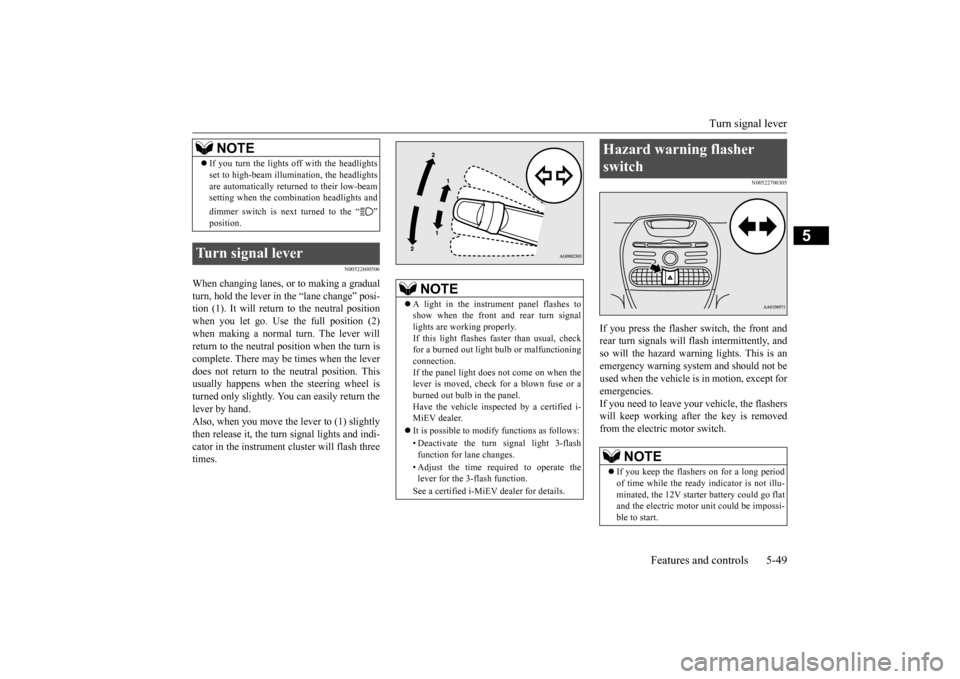
When changing lanes, or to making a gradual turn, hold the lever in the “lane change” posi- tion (1). It will return to the neutral positionwhen you let go. Use the full position (2) when making a normal turn. The lever will return to the neutral position when the turn iscomplete. There may be times when the lever does not return to th
e neutral position. This
usually happens when
the steering wheel is
turned only slightly. You
can easily return the
lever by hand. Also, when you move the lever to (1) slightlythen release it, the turn signal lights and indi- cator in the instrument cluster will flash three times.
N00522700305
If you press the flasher switch, the front andrear turn signals will flash intermittently, and so will the hazard warning lights. This is an emergency warning system and should not beused when the vehicle is in motion, except for emergencies. If you need to leave your
vehicle, the flashers
will keep working after the key is removed from the electric motor switch.
If you turn the lights off with the headlights set to high-beam illumi
nation, the headlights
are automatically returned to their low-beamsetting when the combination headlights and dimmer switch is next turned to the “ ”
Turn signal lever
NOTE
NOTE
A light in the instrument panel flashes to show when the front and rear turn signallights are working properly. If this light flashes fast
er than usual, check
for a burned out light
bulb or malfunctioning
connection. If the panel light does not come on when the lever is moved, check
for a blown fuse or a
burned out bulb in the panel. Have the vehicle insp
ected by a certified i-
MiEV dealer. It is possible to modify functions as follows: • Deactivate the turn signal light 3-flash function for lane changes. • Adjust the time required to operate the lever for the 3-flash function. See a certified i-MiEV dealer for details.
Hazard warning flasher switch
NOTE
If you keep the flashers on for a long period of time while the ready
indicator is not illu-
minated, the 12V starte
r battery could go flat
and the electric motor unit could be impossi- ble to start.
BK0220401US.book 49 ページ 2015年6月3日 水曜日 午前7時42分
Page 161 of 296

Horn switch
Features and controls 5-53
5
N00523800172
To honk the horn, press around the “ ” mark on the steering wheel.
N00563700030
The Link System takes ove
rall control of the
devices connected via the USB input terminal or the Bluetooth
® 2.0 interface allowing the
connected devices to be operated by using theswitches in the vehicl
e or voice commands.
See the following sect
ion for details on how
to operate. Refer to “Bluetooth
® 2.0 interface” on page
5-53. Refer to “USB input terminal” on page 5-73.
Refer to “To play iPod/USB memory device tracks via voice operation” on page 7-20. Bluetooth
® is a registered trademark of
BLUETOOTH SIG, INC.
N00563800015
You have acquired a devi
ce that includes soft-
ware licensed by Mitsub
ishi Motors Corpora-
tion from JOHNSON CONTROLS Inc (the automotive experience business unit), and their subsequent 3rd
party suppliers. For a
complete list of these
3rd party products and
their end user license
agreements, please go
to the following website.http://www.jciblueconne
ct.com/faq/fulldis-
closure.pdf
N00563901286
The Bluetooth
® 2.0 interface allows for mak-
ing/receiving ha
nds-free calls in the vehicle
using a Bluetooth
® compatible cellular phone
based on the wireless communication tech- nology commonly known as Bluetooth
®. It
also allows the user to play music, saved in a
CAUTION The rear window defogge
r is not designed to
melt snow. Remove
any snow manually
before using the rear window defogger. Use the rear window de
fogger only after the
ready indicator is illuminated. Be sure to turnthe defogger switch off immediately after the window is clear to sa
ve on 12V starter bat-
tery power. Do not place stickers,
tape, or other items
that are attached with adhesive over the gridwires on the rear window. When cleaning the inside
rear window, use a
soft cloth and wipe lightly over the grid wires.NOTE
If your vehicle is equi
pped with heated mir-
rors, mist can also be removed from the out-side rearview mirrors when the rear window defogger switch is pressed. (Refer to “Heated mirror”
on page 5-18.)
vated automatically when the Remote Cli-mate Control is activated in Pre-DefrosterMode. Refer to “Remote Climate Control” on page 3-36, 3-47 and “For persons with electro-medical apparatus such
as implantable car-
diac pacemaker or im
plantable cardiovascu-
lar defibrillator” on page 3-6.
Horn switch Link System
(if so equipped)
Agreement
Bluetooth
® 2.0 interface
(if so
equipped)
BK0220401US.book 53 ページ 2015年6月3日 水曜日 午前7時42分
Page 173 of 296

Bluetooth® 2.0 interface (if so equipped)
Features and controls 5-65
5
5. If only 1 telephone number is registered under the name you just said, the voiceguide will proceed to Step 6. If 2 or more telephone
numbers are regis-
tered that match the name you just said,the voice guide will say “Would you like to call
6. The voice guide will say “Calling
the system will dial
the telephone number.
You can redial the last
number called, based
on the history of dialed calls in the paired cel- lular phone. Use the following procedure to redial. 1. Press the PICK-UP button. 2. Say “Redial.”
N00565700018
During a call, press the SPEECH button toenter voice recognition mode, then say “
SPEECH button and speak “1 2 3 4 pound send” and the 1234# will be sent via your cel-lular phone.
N00565800022
If an incoming phone call is received whilethe electric motor switch is in the “ACC” or “ON” position, the audio system will be auto- matically turned on and switched to the incoming call, even when the audio system was originally off.The voice guide announcement for the incoming call will be output from the front passenger’s seat speaker.If the CD player or radio was playing when the incoming call was received, the audio sys- tem will mute the sound from the CD playeror radio and output only the incoming call. To receive the call, press the PICK-UP button on the steering wheel control switch.When the call is over, the audio system will return to its previous state.
N00565900010
At any time during a
call, you can mute the
vehicle microphone. Pressing the SPEECH button and then saying“Mute” during a call will turn ON the mute function and mute the microphone.
NOTE
If the name you sele
cted has matching data
in the vehicle phonebook but no telephone number is registered unde
r the selected loca-
tion, the voice guide will say“{home/work/mobile/other} not found for
nd you can register an
additional telephone number under the selected location. If the name you sele
cted has matching data
in the mobile phonebook but no telephone number is registered unde
r the selected loca-
tion, the voice guide will say “{home/work/mobile/other} not found for
call making will be
cancelled. Start over again from Step 1.
NOTE
When the confirmation function is on, the system will check if
the name and location of
the receiver are correct. If the name is cor- rect, answer “Yes.” answer “No.” The system will return to Step 3.
RedialingSend function
Receiving calls
Mute function
BK0220401US.book 65 ページ 2015年6月3日 水曜日 午前7時42分
Page 194 of 296

Safe driving techniques 6-4 Driving safety
6
Move the driver’s seat as far backward as possible, while still
keeping good visibil-
ity, and good control of the steering wheel, brakes, accele
rator, and controls.
Check the instrument panel indicators forany possible problem. Move the front passe
nger seat as far back
as possible. Make sure that infa
nts and small children
are properly restrained in accordance with all laws and regulations.
Check these by selecti
ng the defroster mode,
and set the blower swit
ch on high. You should
be able to feel the air blowing against the windshield. (Refer to “Defrosting or defogging the wind- shield and door windows” on page 7-9.) Check all the tires for heavy tread wear or uneven wear patterns.
Look for stones, nails,
glass, or other objects
stuck in the tread. Look
for any tread cuts or sidewall cracks. Check the wheel nuts for tightness, and the tires for proper pressures. Replace your tires beforethey are heavily worn out.
As your vehicle is equi
pped with a tire pres-
sure monitoring system, there is a risk ofdamage to the tire inflation pressure sensors when the tire is replaced on the rim. Tire replacement should, th
erefore, be performed
only by a certified i-MiEV dealer. Have someone watch while you turn all the exterior lights on and off. Also check the turn signal indicators and
high-beam indicators on
the instrument panel. Check the ground under the vehicle after parking overnight, for wa
ter, oil, or other
leaks. Make sure all the fluid levels are cor- rect.
N00629200124
Even this vehicle’s safety equipment, andyour safest driving, cannot guarantee that youcan avoid an accident or injury. However, if you give extra attention to the following areas, you can better protect yourself andyour passengers:
Drive defensively. Be aware of traffic, road and weather conditions. Leave plentyof stopping distance between your vehicle and the vehicle ahead. Before changing lanes, check your mir- rors and use your turn signal light. While driving, watch the behavior of other drivers, bicyc
lists, and pedestrians.
Always obey applicable
laws and regula-
tions. Be a polite and alert driver. Always leave room for unexpected events, such as sudden braking.
N00629400416
Check the 12V starter battery, including terminals and cables. During extremely cold weather, the 12V starter battery willnot be as strong and
its power level may
drop. Before driving the vehicle, check to see ifthe headlights are as bright as normal. Charge or replace the 12V starter battery if necessary. During extreme coldweather, it is possibl
e that a very low 12V
starter battery could freeze.
Defrosters Tires
Lights Fluid leaks Safe driving techniques
Driving during cold weather
BK0220401US.book 4 ページ 2015年6月3日 水曜日 午前7時42分
Page 196 of 296
Parking 6-6 Driving safety
6
N00629600317
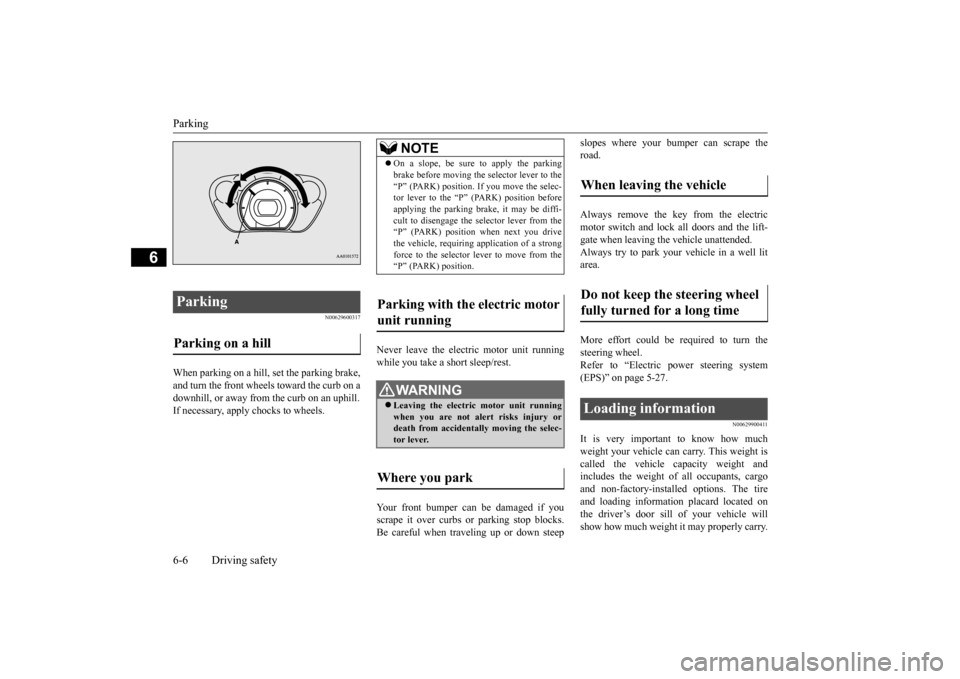
When parking on a hill, set the parking brake, and turn the front wheels toward the curb on a downhill, or away from
the curb on an uphill.
If necessary, apply chocks to wheels.
Never leave the electric motor unit running while you take a short sleep/rest. Your front bumper can be damaged if you scrape it over curbs or parking stop blocks. Be careful when traveling up or down steep
slopes where your bumper can scrape the road. Always remove the key from the electric motor switch and lock all doors and the lift-gate when leaving
the vehicle unattended.
Always try to park your vehicle in a well lit area. More effort could be required to turn the steering wheel. Refer to “Electric power steering system(EPS)” on page 5-27.
N00629900411
It is very important to know how muchweight your vehicle can carry. This weight is called the vehicle ca
pacity weight and
includes the weight of
all occupants, cargo
and non-factory-installed options. The tire and loading information placard located on the driver’s door sill of your vehicle willshow how much weight
it may properly carry.
Parking Parking on a hill
NOTE
On a slope, be sure to apply the parking brake before moving the selector lever to the“P” (PARK) position. If you move the selec-tor lever to the
Page 203 of 296
7
Comfort controlsVents ................................................................................................7-2 Air conditioning ..........
...........
...........
...........
...........
...........
.........
.....7-4
Important air conditioning operating tips ..
...........
...........
.........
.....7-10
Air purifier ..................................................................................... 7-11 Remote Climate Control ................................................................ 7-11 AM/FM electronically tune
d radio with CD player
(if so equipped) .......................................................................... 7-11 To play iPod/USB memory devi
ce tracks via
voice operation
(vehicles with Bluetooth
® 2.0 interface) ...................................7-20
Steering wheel audio remote control
switch (if so equipped) ........7-22
Error codes .....................................................................................7-24 Handling of compact discs .............................................................7-25Antenna ..........................................................................................7-27 Clock (if so equipped) ....................................................................7-27 General information about your radio .....
...........
...........
...........
.....7-28
BK0220401US.book 1 ページ 2015年6月3日 水曜日 午前7時42分
Page 224 of 296

Steering wheel audio remote cont
rol switch (if so equipped)
7-22 Comfort controls
7
5. If there are two or more matches, the voice guide will say “More than onematch was found, would you like to play
de says “Playing
N00772500010
1. Say “Play” on the main menu. 2. After the voice guide says “Would you like to play by Artist, Album, Playlist or Genre?,” say “Genre”. would you like to play?,” say the musictype. 4. If there is only one match, the system pro- ceeds to step 6.5. If there are two or more matches, the voice guide will say “More than one match was found, would you like to play
If you say “No,” the next matching genre is uttered by the system. 6. After the voice gui
de says “Playing
N00714800471
The remote control switch is located on theleft side of th
e steering wheel.
NOTE
If you say “No” to three
or all playlist names
uttered by the system, the voice guide willsay “Playlist not found,
please try again” and
the system returns to step 2.NOTE
If the confirmation function is active, the voice guide confirms if
the playlist name is
correct. If the playlist name is correct, say “Yes”. If not, say “No”. After the voice guidesays “Playlist not foun
d, please try again,”
the system returns to step 2. Refer to “Con- firmation function se
tting” on page 5-57.
To search by genre
NOTE
The Bluetooth
® 2.0 interface
starts recogniz-
ing the connected device.If the connected device
cannot be recognized
or a connection error
occurs, the Bluetooth
®
2.0 interface starts an appropriate voice guide. Follow the voice guide.NOTE
If you say “Genre
NOTE
If you say “No” to three or all genres uttered by the system, the voice guide will say “Genre not found, please try again” and thesystem returns to step 2.NOTE
If the confirmation function is active, the voice guide confirms if the genre is correct. If the genre is correct, say “Yes”. If not, say“No”. After the voice
guide says “Genre not
found, please try again,” the system returns to step 2. Refer to
“Confirmation function
setting” on page 5-57.
Steering wheel audio remote control switch
(if so equipped)
BK0220401US.book 22 ページ 2015年6月3日 水曜日 午前7時42分