2017 MITSUBISHI ASX ignition
[x] Cancel search: ignitionPage 94 of 458

Front passenger’s airbag OFFindication lamp*
E00410201355
The front passenger’s airbag OFF indication
lamp is located in the instrument panel.
The indicator normally illuminates when the
ignition switch is turned to the “ON” position
or the operation mode is put in ON, and goes off a few seconds later.
When the front passenger’s airbag ON-OFF switch is turned OFF, the indication lamp
will stay on to show that the front passen-
ger’s airbag is not operational. When the
front passenger’s airbag ON-OFF switch is
turned ON, the indication lamp goes off to show that the front passenger’s airbag is op-
erational.
WARNINGl Do not fit any accessory that makes the
indication lamp impossible to see, and do
not cover the indication lamp with a stick- er. You would not be able to verify thestatus of the passenger airbag system.To turn an airbag off
E00412301145WARNINGl To reduce risk of serious or fatal injury:
• Always remove the key from the igni-
tion switch before operating a front
passenger’s airbag ON-OFF switch. Failure to do so could adversely affect
the airbag performance.
• Wait at least 60 seconds to operate the
front passenger’s airbag ON-OFF switch after turning the ignition switch
to the “LOCK” position or putting the
operation mode in OFF.
The SRS airbag system is designed to retain enough voltage to deploy the air-
bag.
• Always remove the key from the front
passenger’s airbag ON-OFF switch af-ter operating that switch. Failure to do
so could lead to improper position of the front passenger’s airbag ON-OFF switch.WARNING• Do not turn OFF the front passenger’s
airbag ON-OFF switch except when a child restraint system is fitted to the
front passenger seat.
• If the indicator does not come on when
the front passenger’s airbag ON-OFF switch is turned OFF, do not fit a childrestraint system to the front passenger
seat. We recommend you to have the system inspected by a MITSUBISHI
MOTORS Authorized Service Point.
• If the indication lamp remains on when
the front passenger’s airbag ON-OFF switch is turned ON, do not allow any-
one to sit on the front passenger seat. We recommend you to have the systeminspected by a MITSUBISHI
MOTORS Authorized Service Point.
To turn an airbag off, follow these steps:
1. Insert the key into the front passenger’s
airbag ON-OFF switch, and turn it to the “OFF” position.
2. Remove the key from the key opening of
the front passenger’s airbag ON-OFF switch.
Supplemental restraint system (SRS) - airbag
4-28OGAE17E2Seat and seat belts4
Page 95 of 458

3.Turn the ignition switch to the “ON” po-
sition or put the operation mode in ON. The front passenger’s airbag OFF indi-
cation lamp will stay on.
The front passenger’s airbag is now deactiva- ted and will not deploy until switched on
again.
Driver’s and front passenger’s
airbag system
E00407400792
The driver’s airbag is located under the pad- ded cover in the middle of the steering wheel. The front passenger’s airbag is contained in
the instrument panel above the glove box.
The driver’s airbag and the front passenger’s
airbag are designed to inflate at the same
time even if the passenger seat is not occu- pied.Driver’s knee airbag system*
E00412400022
The driver’s knee airbag is located under the steering wheel.
The driver’s knee airbag is designed to de-
ploy at the same time as the driver’s front air- bag.
Supplemental restraint system (SRS) - airbag
4-29OGAE17E2Seat and seat belts4
Page 98 of 458

WARNINGlDo not attach accessories to, or put them
in front of, the windscreen. These objects
could restrict the airbag inflation, or strike and injure an occupant if the air-
bags inflate.
l Do not attach additional keys or accesso-
ries (hard, pointed or heavy objects) tothe ignition key. Such objects could pre-
vent the driver’s knee airbag from inflat-
ing normally or could be propelled and
cause serious injury if the airbag inflates.
l Do not attach accessories to the lower
portion of the driver’s side instrument panel. Such objects could prevent the
driver’s knee airbag from inflating nor-
mally or could be propelled and cause se- rious injury if the airbag inflates.WARNINGl Do not put packages, pets or other objects
between the airbags and the driver orfront passenger. It could affect airbagperformance, or could cause injury when the airbag inflates.
l Right after the airbag inflation, several
airbag system components will be hot. Do
not touch these components. There is a danger of being burnt.
l The airbag system is designed to work on-
ly once. Once the airbags have deployed, they will not work again. They must
promptly be replaced, and we recommend you to have the entire airbag system in-
spected by a MITSUBISHI MOTORS
Authorized Service Point.Side airbag system*
E00407600303
The side airbags (A) are contained in the
driver and front passenger seatbacks.
The side airbag is designed to inflate only on
the side of the vehicle that is impacted, evenwith no passenger in the front seat.
The label shown here is attached to the seat- backs with a side airbag.
Supplemental restraint system (SRS) - airbag
4-32OGAE17E2Seat and seat belts4
Page 102 of 458

SRS warning lamp/display
E00407802790
Warning lampWarning display type 1Warning display type 2
The system checks itself every time the igni-
tion switch is turned to the “ON” position or the operation mode is put in ON. The SRSwarning lamp will come on for several sec-
onds and then go out. This is normal and
means the system is working properly.
If there is a problem involving one or more of
the SRS components, the warning lamp will come on and stay on. At the same time, thewarning display will appear on the informa-
tion screen in the multi-information display.
The SRS warning lamp/display is shared by
the SRS airbag and the seat belt pretensioner system.WARNINGl If any of the following conditions occur,
there may be a problem with the SRS air- bags and/or seat belt pretensioners, and they may not function properly in a colli-
sion or may suddenly activate without a
collision:
• Even when the ignition switch or the
operation mode is in ON, the SRS
warning lamp does not come on or it
remains on.
• The SRS warning lamp and/or the
warning display comes on while driv-ing.
The SRS airbags and seat belt pretension-
ers are designed to help reduce the risk of serious injury or death in certain colli-sions. If either of the above conditions oc-
curs, immediately have your vehicle
checked by a MITSUBISHI MOTORS
Authorized Service Point.SRS servicing
E00407901521
WARNINGl We recommend any maintenance per-
formed on or near the components of the
SRS to be performed by a MITSUBISHI
MOTORS Authorized Service Point.
Improper work on the SRS components or wiring could result in inadvertent de-
ployment of the airbags, or could render
the SRS inoperative; either situation could result in serious injury.
l Do not modify your steering wheel, seat
belt retractor or any other SRS compo-
nents. For example, replacement of the
steering wheel, or modifications to the
front bumper or body structure can ad- versely affect SRS performance and lead
to possible injury.
l If your vehicle has sustained any damage,
we recommend you to have the SRS in- spected to ensure it is in proper workingorder.
Supplemental restraint system (SRS) - airbag
4-36OGAE17E2Seat and seat belts4
Page 106 of 458

InstrumentsE00500101147
1- Tachometer ® p. 5-02
2- Multi-information display ® p. 5-03
Information screen display list
® p. 5-28
3- Speedometer (km or mph + km/h)
4- Daytime dipper button (meter illumina- tion control) ® p. 5-02
Tachometer
E00500301123
The tachometer indicates the engine speed
(r/min). The tachometer helps you to obtain
more economical driving and also warns you
of excessive engine speeds (Red zone).
CAUTIONl When driving, watch the tachometer to make
sure that the engine speed indication does not rise into the red zone (excessive enginerpm).Daytime dipper button (meter
illumination control)
E00519801267
Each time you press this button, there is a sound and the brightness of the instruments
changes.
NOTEl You can adjust to 8 different levels for when
the position lamps are illuminated and 8 for
when they are not.
l When the lamp switch is in a position other
than the “OFF” position, the meter illumina-
tion switches automatically to the adjusted brightness, depending on the brightness out- side the vehicle.
l The brightness level of the instruments is
stored when the ignition switch is turned to
the “LOCK” position or the operation mode is put in OFF.
l If you press and hold the button for longer
than about 1 second when the position lamps are illuminated, the brightness level changesto the maximum level. Pressing and holding
the button for longer than about 1 second again returns the brightness level to the pre-
vious level.
1- Brightness display
2- Rheostat illumination button
Instruments
5-02OGAE17E2Instruments and controls5
Page 107 of 458
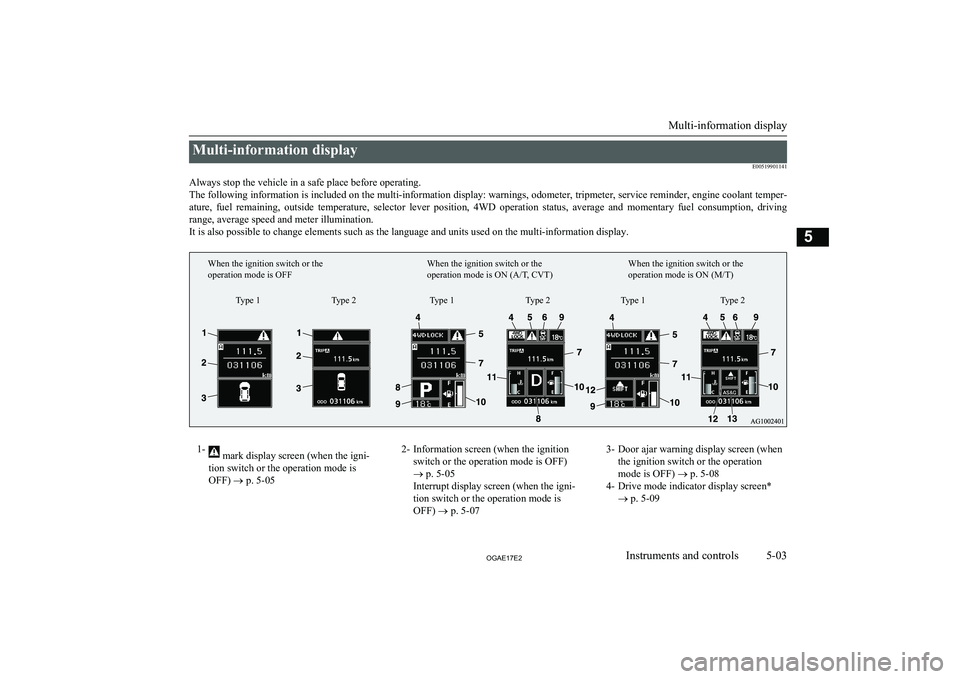
Multi-information displayE00519901141
Always stop the vehicle in a safe place before operating. The following information is included on the multi-information display: warnings, odometer, tripmeter, service reminder, engine coolant temper- ature, fuel remaining, outside temperature, selector lever position, 4WD operation status, average and momentary fuel consumption, driving
range, average speed and meter illumination. It is also possible to change elements such as the language and units used on the multi-information display.1- mark display screen (when the igni-
tion switch or the operation mode is
OFF) ® p. 5-052- Information screen (when the ignition
switch or the operation mode is OFF)
® p. 5-05
Interrupt display screen (when the igni-
tion switch or the operation mode is OFF) ® p. 5-073- Door ajar warning display screen (when
the ignition switch or the operation
mode is OFF) ® p. 5-08
4- Drive mode indicator display screen* ® p. 5-09
Multi-information display
5-03OGAE17E2Instruments and controls5Type 1
When the ignition switch or the
operation mode is OFF
When the ignition switch or the
operation mode is ON (A/T, CVT)When the ignition switch or the
operation mode is ON (M/T)
Type 2 Type 1 Type 2 Type 1 Type 2
Page 108 of 458

5- mark display screen (when the igni-
tion switch or the operation mode is ON)
® p. 5-09
6- Active Stability Control (ASC) OFF dis- play screen* ® p. 5-09
7- Information screen (when the ignition switch or the operation mode is ON)
® p. 5-10
Interrupt display screen (when the igni-
tion switch or the operation mode is ON)
® p. 5-148- Selector lever position display screen*
® p. 5-15
Gearshift indicator display screen* ® p. 6-29
9- Outside temperature display screen ® p. 5-15
10- Fuel remaining display screen ® p. 5-15
11- Engine coolant temperature display* ® p. 5-1112- Gearshift indicator display screen*
® p. 6-23
13- Auto Stop & Go (AS&G) display screen* ® p. 6-19
Auto Stop & Go (AS&G) OFF display
screen* ® p. 6-22NOTEl The fuel units, temperature units, display language, and other settings can be changed.
Refer to “Changing the function settings (when the ignition switch or the operation mode is ON)” on page 5-19.
l The display screen is different depending on whether the ignition switch or the operation mode is OFF or ON.
Refer to “Information screen (when the ignition switch or the operation mode is OFF)” on page 5-05.
Refer to “Warning display list (when the ignition switch or the operation mode is OFF)” on page 5-28.
Refer to “Information screen (when the ignition switch is turned from the “LOCK” position to the “ON” position or the operation mode is changed from OFF to ON)” on page 5-08.
Refer to “Information screen (when the ignition switch or the operation mode is ON)” on page 5-10.
Refer to “Warning display list (when the ignition switch or the operation mode is ON)” on page 5-32.
Multi-information display
5-04OGAE17E2Instruments and controls5
Page 109 of 458

Multi-information meterswitch
E00520000608
Each time the multi-information meter switch
is operated, a sound is emitted and the multi-
information display changes between infor- mation such as warnings, odometer (Type 1),
tripmeter, service reminder, engine coolant temperature (Type 1), average and momenta-
ry fuel consumption, driving range, and aver-
age speed.
It is also possible to change elements such as the language and units used on the multi-in-formation display by operating the multi-in-
formation meter switch.
mark display screen (when
the ignition switch or the oper- ation mode is OFF)
E00520100553
If you press the multi-infor-
mation meter switch and re-turn from the warning dis-
play screen to the previous screen, the
mark is dis-
played.
Refer to “To return to the screen displayed before the warning display” on page 5-07.
This mark is also displayed if there is another
warning other than the one displayed. When
the cause of the warning display is elimina- ted, the
mark goes out automatically.
NOTEl When the mark is displayed, the warning
display screen can be redisplayed on the in- formation screen.
Refer to “Information screen (when the igni-
tion switch or the operation mode is OFF)” on page 5-05.
Refer to “Information screen (when the igni- tion switch or the operation mode is ON)”
on page 5-10.Information screen (when the
ignition switch or the operation mode is OFF)
E00520200570
Each time you lightly press the multi-infor-
mation meter switch, the display screenswitches in the following order.
Type 1Type 2When there is no
warning displayWhen there is a
warning displayWhen there is no
warning displayWhen there is a
warning display
1- Odometer (Type 1)/Tripmeter
2- Odometer (Type 1)/Tripmeter
Multi-information display
5-05OGAE17E2Instruments and controls5