2017 MERCEDES-BENZ SLC-Class ignition
[x] Cancel search: ignitionPage 76 of 294

Convenience closing with KEYLESS-GO
GWARNING
When usingt heconvenience closingf eature,
part soft hebody coul dbetrapped in th eclos-
ing area when aside window is beingc losed.
Thereisar iskofi njury.
Observ ethe completec losingprocedure
when th econvenience closingf eature is oper-
ating. Makes ure that no body partsa re in
close proximity durin gthe closingp rocedure.
Procee dasfollows if someoneist rapped:
XRelease th erecessed sensor surface on the
door handle.
XImmediately pull and hold th edoor handle
and keep th edoor handle pulled.
The side windows open.
WithK EYLESS-GO you can close all side win-
dows simultaneously. The KEYLESS-GO key
must be outside th evehicle .All th edoorsm ust
be closed.
XTouchr ecessed sensor surface :on the
door handle until th eside windows are fully
closed.
iMakes ure you only touch recessed sensor
surface :.
XTo interrup tconvenience closing: release
recessed sensor surface :on th edoor han-
dle.
Resetting th esidew indows
Ifas ide window can no longer be closed fully,
you must reset it.
XClose all th edoors.
XTurn th eSmartKey to position 1or 2in the
ignition lock.
XPull th ecorrespondings witch on thedoor
control panel until th eside window is com-
pletely closed (
Ypage 73).
XHol dthe switch for an additional second.
If th eside window opensa gain slightly:
XImmediately pull thecorrespondings witch on
th ed oor control panel until th eside window is
completely closed (
Ypage 73).
XHol dthe switch for an additional second.
If th erespectiv eside window remains closed
after th ebutto nisr eleased, then it has been
set correctly. If this is no tthe case, repeat the
steps above.
74Sidew indows
Opening and closing
Page 78 of 294

Rthe trunk lidisclosed.
Rthe outside temperatur eisabove 5‡
( Ò 15 †).
Yo uc ould otherwise damag ethe roof ,trunk
and otherp arts of the vehicle.
The vehicle dimensions for opening/closing the
roof can be found in the "Vehicl edata" section
(
Ypage 289).
Make sure that the roof and rea rwindow are
clean and dry before opening the roof .Other-
wise, water or dirt could enter the vehicle inte-
rio rort runk.
Opening and closin gusing the roof
switch
Important safety notes
GWARNING
Whe nopening or closing the roof,b odyp arts
could be trapped by,f or example, the roof
mechanism, trunk li dorsidew indows. There
is ar iskofi njury.
Whe nraising or lowering the roof,m ake sure
that no bod yparts are in the vicinity of moving
components. If someone becomes trapped,
release the button.
For safety reasons, the roof can only be opened
or closed whe nthe vehicle is stationary.
!Operating the roof while pulling away:
RObserve the following traffi ccarefully.
RDo not drive faster than 25 mph (40 km/h).
RAvoida brup tb raking and swerving maneu-
vers.
Do not operate the roof whe ncornering, driv-
ing on uneven surface sorduring strong
winds. The vehicle may otherwise be dam-
aged.
iIf the traffi cconditions mea nthat yo uhave
to drive off while opening/closing the roof,
the procedure which wa sstarted while sta-
tionary can be continued at speeds of up to
approx. 25 mph (40 km/h).
Opening and closing
XVehicles without asemi-automatic trunk
partition: closethe trunk partition
(
Ypage 77).
XClose the trunk li d(Ypage 70).
XTurn the SmartKey to position 2in the ignition
lock.
XOpe nthe cover in the lower center console.
Roof switch :is located under the cover.
XTo open:p ullr oof switch :untilt he entire
roof is stowed away in the trunk.
You see the Vario-Roof in Operation
messageinthe multifunction display .Once
the opening procedure is complete, the mes- sag edisappears and atone will sound.
All of the sid ewindow sopen.
If yo uoperate the roof switch and the Trunk
PartitionOpenmessageappears in the
multifunction display ,the trunk partition is
not closed correctly.
XClose the trunk partition.
XTo close: press and holds oft-top switch:
unti lthe soft top is fully closed.
You see the Vario-Roof in Operation
messageinthe multifunction display .Once
the opening procedure is complete, the mes-
sag edisappears and atone will sound.
All of the sid ewindow sopen.
XTo clos eallsid ew indows, pull the switch
under the cover of the center console
(
Ypage 73).
76Roof
Opening and closing
Page 79 of 294

Opening/closing using the SmartKey
Important safetyn otes
GWARNING
When opening or closing the roof, body parts
could be trapped by, for example, the roof
mechanism, trun klid or side windows. There
is ar isk of injury.
When raising or lowering the roof, make sure
that no body parts are in the vicinity of moving
components. If someoneb ecomes trapped,
release the button.
Opening and closing
This function is only available on vehicles with
KEYLESS-GO or with roof comfort operation.
XClose the trun klid (Ypage 70).
XVehicles with comfort operation: point the
tip of the SmartKey at the driver's door han-
dle.
XVehicles with KEYLESS-GO: the SmartKey
must be within 6ft(2m)ofthe vehicle.
XTo open: press and hold the %button on
the SmartKey until the roof is fully opened.
The roof and the rear side windows open. The
fronts ide windows close.
XTo interrupt the opening procedure:
release the %button.
XTo open the front side windows: press the
% button on the SmartKey again.
XTo close: press and hold the &button on
the SmartKey until the roof is fully closed.
The roof and the side windows close.
XTo interrupt the closing procedure: release
the & button.
Locking the roof again
Important safetyn otes
GWARNING
If you do not fully open/close the soft top, the
soft-top hydraulics depressurizea fterashort
time. This causes the soft top to lower unex-
pectedly and may cause you or other stobe
trapped. There is arisk of injury.
Always open or close the soft top completely.
The roof is not locked if:
Rthe K symbol and the Vario-Roof inOperationmessage appear in the multifunc-
tion display
Rthe K symbol and the Open/CloseVario-RoofCompletelymessage appear in
the multifunction display and you hear awarn-
ing tone
Ryou hear awarning ton efor up to ten seconds
when pulling away or while driving
Locking
You can lock the roof again if it is not locked
fully.
XPull over and stop the vehicle safely as soon
as possible, paying attention to road and traf-
fic conditions.
XMake sure that the SmartKey is in position 2
in the ignition lock.
XPress the roof switch (Ypage 76).
Trunk partition
General notes
!To avoid damaging the roof or luggage when
folding back the roof, you should:
Ronly load the trun ktobelow the trun kpar-
tition
Rnot place any objects on or in frontoft he
trun kpartition
Rnot place any objects on the cover behind
the roll bars
Rnot allow the cargo to push the trun kpar-
tition upwards
The trun kpartition can be used to cover luggage
and loads in the trunk.
Roof77
Opening and closing
Z
Page 82 of 294

Operating AIRGUIDE
XTo fold out AIRGUIDE:turn disc:in the
direction of the arrow towards the middle of
the vehicle to the stop.
XRepeat with disc ;.
XTo fold in AIRGUIDE: turn discs:and ;
back behind the roll bar to the stop.
Discs :and ;can also be used independently
of each other ,e.g. when you are driving without
ap assenger.
MAGIC SKY CONTROL
General notes
MAGIC SKY CONTROL is apanorama roof, the
transparenc yofwhich can be changed by apply-
ing electrical voltage.
MAGIC SKY CONTROL can be switched between
darkened and transparent states.
MAGIC SKY CONTROL darken sautomatically
after ashort period when you turn the SmartKey
to position 0or remove the SmartKey.
Risk of electric shock
GDANGER
MAGIC SKY CONTROL operates using high
voltage. If the trim behind the overhead con-
trol panel is damaged or removed, electrical
component swill be exposed. If you touch
these components, you could get an electric
shock.T here isarisk of fatal injury.
RNever remove the trim behind the overhead
control panel.
RIf the trim is damaged, never touch the
electrical component sbehind it.
RAlways have work on the MAGIC SKY CON-
TROL carried out at aqualified specialist
workshop.
The electrical component sofMAGIC SKY CON-
TROL are protected by apaneling behind the
overhead control panel.
The MAGIC SKY CONTROL control unit is
marked with ayellow warning sticker that warns
you of high voltage. The electric cables of the
high-voltage section are color orange.
Operating MAGIC SKY CONTROL
XTurn the SmartKey to position 1or 2in the
ignition lock.
MAGIC SKY CONTROL switches to the status
it was set to before the engin ewas switched
off.
XTo change the degree of transparency:
press button :.
At temperatures below freezing, the change is
slower and uneven .The entire process may take
some time.
80Roof
Opening and closing
Page 83 of 294
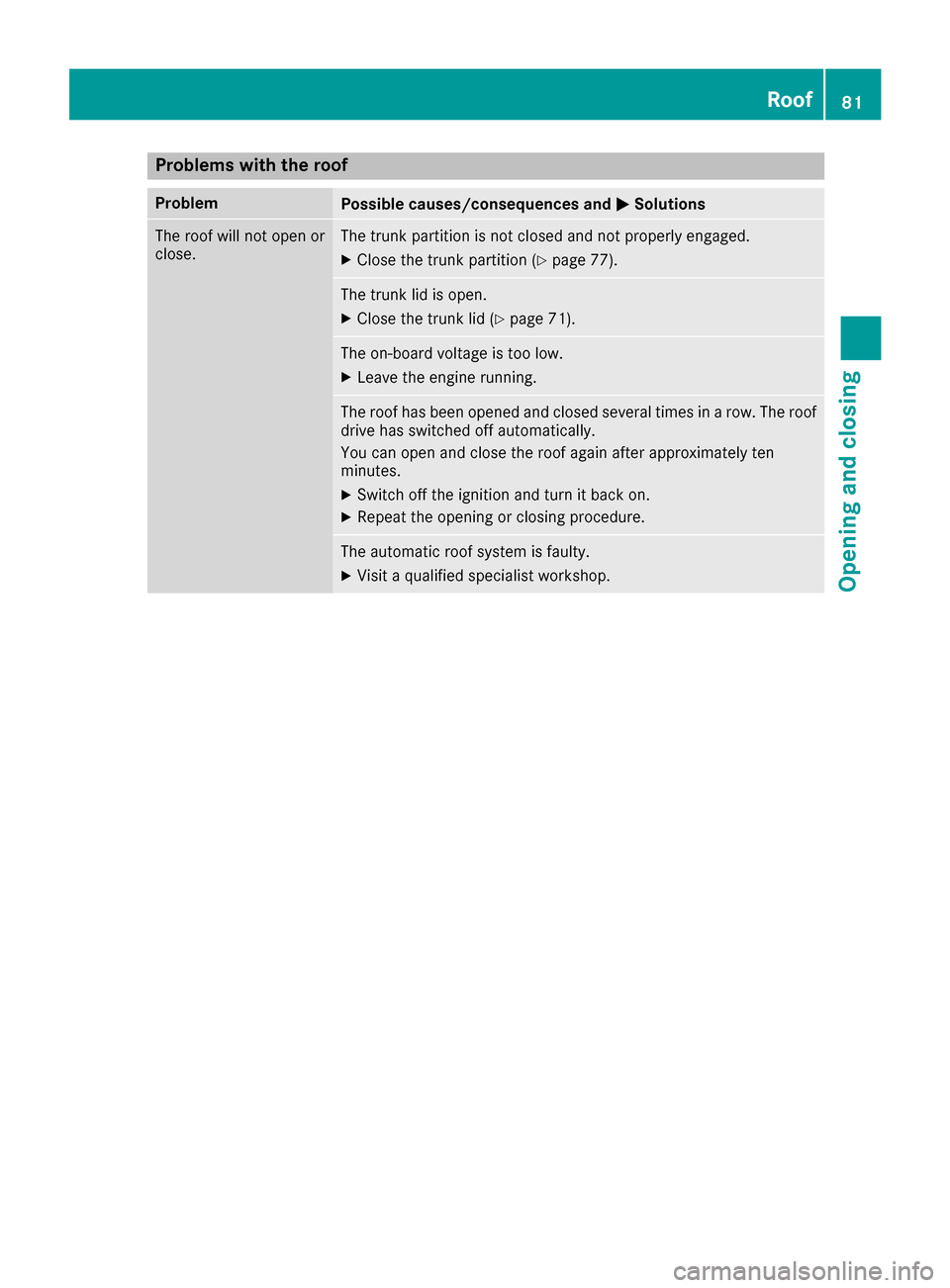
Problems with the roof
ProblemPossible causes/consequences andMSolutions
The roof will not open or
close.The trunk partition is not closed and not properly engaged.
XClose the trunk partition (Ypage 77).
The trunk lid is open.
XClose the trunk lid (Ypage 71).
The on-board voltage is too low.
XLeave the engine running.
The roof has been opened and closed several times in arow. The roof
drive has switched off automatically.
You can open and close the roof again after approximately ten
minutes.
XSwitch off the ignition and turn it back on.
XRepeat the opening or closing procedure.
The automatic roof system is faulty.
XVisit aqualified specialist workshop.
Roof81
Opening and closing
Z
Page 85 of 294

The seats can still be adjusted when there is no
SmartKey in the ignition lock.
GWARNING
When you adjust aseat, you or other vehicle
occupantsc ould become trapped, e.g. on the
seat guide rail. There is arisk of injury.
Make sure when adjusting aseat that no one
has any body parts in the sweep of the seat.
Observe the safety notes on "Air bags"
(
Ypage 42) and "Children in the vehicle"
(Ypage 51).
GWARNING
If the driver's seat is not engaged, it could
move unexpectedly while the vehicle is in
motion .This could cause you to lose control of
the vehicle. There is arisk of an accident.
Always make sure that the driver's seat is
engaged before starting the vehicle.
GWARNING
If you adjust the seat height carelessly, you or
other vehicle occupantsc ould be trapped and
thereby injured. Children in particular could
accidentally press the electrical seat adjust-
ment button sand become trapped. There is a
risk of injury.
While moving the seats, make sure that your
hands or other body parts do not get under the
lever assembly of the seat adjustmen tsys-
tem.
GWARNING
If the head restraints are not installed or not
adjusted correctly, they cannot provide pro-
tection as intended. There is an increased risk
of injury in the head and neck area, e.g. in the event of an accident or when braking.
Always drive with the head restraints instal-
led. Before driving off, make sure for every
vehicle occupant that the center of the head
restraint supports the back of the head at
about eye level.
GWARNING
You could lose control of your vehicle if you do the following while driving:
Radjust the driver's seat, head restraint,
steerin gwheel or mirrors
Rfasten the seat belt
There is arisk of an accident.
Adjust the driver's seat, head restraint, steer-
ing wheel and mirror and fasten your seat belt before starting the engine.
!To avoid damage to the seats and the seat
heating, observe the following information:
Rkeep liquids from spilling on the seats. If
liquid is spilled on the seats, dry them as
soon as possible.
Rif the seat covers are damp or wet, do not
switch on the seat heating. The seat heat-
ing should also not be used to dry the seats.
Rclean the seat covers as recommended;
see the "Interior care" section.
Rdo not transport heavy loads on the seats.
Do not place sharp object sonthe seat
cushions, e.g. knives, nails or tools. The
seats should only be occupied by passen-
gers, if possible.
Rwhen the seat heating is in operation, do
not cover the seats with insulating materi-
als, e.g. blankets ,coats, bags, seat covers,
child seats or booster seats.
!Make sure that there are no object sinthe
footwell under or behind the seats when mov-
ing the seats back. There is arisk that the
seats and/or the object scould be damaged.
iThe head restraints are equipped with the
NECK-PRO system (Ypage 50). For this rea-
son, it is not possible to remove the head
restraints from the seats.
For more information, contact aqualified spe-
cialist workshop.
Seats83
Seats, steering wheel and mirrors
Z
Page 87 of 294

You can adjust the contour of the seat backrests
individually to provide optimum support for your
back.
Switching theseat heating on/off
Switching on/off
GWARNING
Repeatedly switching on the seat heatin gcan
cause the seat cushio nand backrest pads to
becom every hot.T he health of personsw ith
limited temperature sensitivity or alimited
ability to react to excessively high tempera-
ture smay be affected or the ymay even suffer
burn-like injuries. There is arisk of injury.
Therefore, do not switc hthe seat heatin gon
repeatedly.
Driver'sa nd front-passenger seat
The three red indicator lamps in the button indi-
cat ethe heatin glevel you have selected.
The syste mautomatically switches down from
level 3to level 2afte rapproximately eight
minutes.
The syste mautomatically switches down from
level 2to level 1afte rapproximately ten
minutes.
The syste mautomatically switches off approx-
imately 20 minutes afte ritisset to level 1.
XMake sure that the SmartKey is in position 1
or 2in the ignition lock.
XTo switch on: press button:repeatedly
until the desired heatin glevel is set.
XTo switch off: press button:repeatedly
until all the indicator lamps go out.
Problem swith th eseat heating
The seat heatin ghas switched off prematurely
or cannot be switched on. The vehicle's electri-
cal syste mvoltage is too low because too many
electrical consumers are switched on.
XSwitch off electrical consumers that you do
not need, such as the rear window defroster
or interior lighting.
XOnc ethe battery is sufficiently charged,
switc hont he seat heatin gagain.
AIRSCARF
Switching on/off
GWARNING
When AIRSCARF is switched on, very hot air
can flow from the vents in the head restraints. This could result in burns in the immediate
vicinity of the air vents. There is arisk of injury.
Reduce the heater output beforeitb ecomes
too hot.
The AIRSCARF function warms the head and
nec karea of vehicle occupant swith warm air.
The warm air flows out of the holes in the head
restraints.
The three red indicator lamps in the button indi-
cat ethe heatin glevel you have selected.
XMake sure that the SmartKey is in position 2
in the ignition lock.
XTo switch on: press button:.
Three red indicator lamps in the button light
up. The blower starts up afte rapreheating
phase of seven seconds.
Seats85
Seats, steering wheel and mirrors
Z
Page 88 of 294

XPress button:repeatedly until the desired
heating level is set.
XTo switch off: press button:repeatedly
until all the indicator lamps go out.
iThe blower continues runnin gfor seven sec-
onds to cool down the heating elements.
iIf the battery voltage is too low, AIRSCARF
may switch off.
Problems with AIRSCARF
AIRSCARF has switched off prematurely or will
not switch on. The vehicle's electrical system
voltage is too low because too many electrical
consumers are switched on.
XSwitc hoff electrical consumers that you do
not need, such as the rear window defroster
or interior lighting.
XSwitc honA IRSCARF again.
Steering wheel
Important safety notes
GWARNING
You could lose control of your vehicle if you do the following while driving:
Radjust the driver's seat, head restraint,
steerin gwheel or mirrors
Rfasten the seat belt
There is arisk of an accident.
Adjust the driver's seat, head restraint, steer-
ing wheel and mirror and fasten your seat belt before starting the engine.
GWARNING
Children could injure themselves if they
adjust the steerin gwheel. There is arisk of
injury.
When leaving the vehicle, alwayst ake the
SmartKey with you and lock the vehicle. Never
leave children unsupervised in the vehicle.
The electrically adjustable steerin gwheel can
still be adjusted when there is no SmartKey in
the ignition lock.
Adjusting the steering wheel man-
ually
GWARNING
If the steerin gwheel is unlocked while the
vehicle is in motion ,itcould change position
unexpectedly. This could cause you to lose
control of the vehicle. There is arisk of an
accident.
Before starting off, make sure the steering
wheel is locked. Never unlock the steering
wheel while the vehicle is in motion.
:Release lever
;Adjust sthe steerin gwheel height
=Adjust sthe steerin gwheel position (fore-
and-aft adjustment)
XPush release lever :down completely in the
direction of the arrow.
The steerin gcolumn is unlocked.
XAdjust the steerin gwheel to the desired posi-
tion.
XPush release lever :up completely.
The steerin gcolumn is locked.
XCheck if the steerin gcolumn is locked. When
doing so, try to push the steerin gwheel up or
down or try to move it in the fore-and-aft
direction.
86Steering wheel
Seats, steering wheel and mirrors