2017 MERCEDES-BENZ SLC-Class reset
[x] Cancel search: resetPage 77 of 294

Problems with the side windows
GWARNING
If you close aside window again immediately after it has been blocked or reset, the side window
closes with increased or maximum force. The reversing feature is then not active. Parts of the
body could be trapped in the closing area in the process. This poses an increased risk of injury or
even fatal injury.
Make sure that no parts of the body are in the closing area. To stop the closing process, release
the switch or push the switch again to reopen the side window.
ProblemPossible causes/consequences and MSolutions
Aside window cannot be
closed because it is
blocked by objects, e.g.
leaves in the window
guide.XRemove the objects.
XClose the side window.
As ide window cannot be
closed and you cannot
see the cause.If as ide window is obstructed during closing and reopens again
slightly:
XImmediately after the window blocks, pull the correspondings witch
again until the side window has closed.
The side window is closed with increased force.
If as ide window is obstructed again during closing and reopens again
slightly:
XImmediately after the window blocks, pull the correspondings witch
again until the side window has closed.
The side window is closed without the automatic reversing feature.
Roof
Important safety notes
GWARNING
If you do not fully open/close the soft top, the
soft-top hydraulics depressurize after ashort
time. This causes the soft top to lower unex-
pectedly and may cause you or others to be
trapped. There is arisk of injury.
Always open or close the soft top completely.
GWARNING
Closing the roof manually is acomplicated
and technically demanding procedure, which
requires alot of strength. You or others can
become trapped. There is arisk of injury.
Only have the soft top closed manually at a
qualified specialist workshop.
!Never sit on the rear shelf or store heavy
object sthere. You will otherwise damage the
roof and the rear shelf of your vehicle.
!Do not forget that the weather can change
abruptly. Make certain that the roof is closed
when you leave the vehicle. The vehicle elec-
tronics can be damaged if water enters the
vehicle interior.
!When opening and closing the roof, make
sure that:
Rthere is sufficient clearance, as the roof
swings upwards.
Rthere is sufficient clearance behind the
vehicle, as the trunk lid swings backwards
beyond the bumper.
Rthe trunk is only loaded to below the trunk
partition.
Rthe trunk partition is not pushed up by the
load.
Rthe trunk partition is closed.
Roof75
Opening and closing
Z
Page 92 of 294

Automa tica nti-glar emirror s
GWARNIN G
Electrolyt emay escape if th eglassinana uto-
matic anti-glare mirror breaks .The electrolyt e
is harmful and causes irritation .Itmustn ot
come int ocontac twithy our skin, eyes ,res -
piratory organs or clothing or be swallowed.
There is ariskofi njury.
If you come int ocontac twitht he electrolyte,
observ ethe following:
RRins eoff th eelectrolyt efromy our skin
immediately wit hwater.
RImmediately rinse th eelectrolyt eout of
your eyes thoroughly wit hclean water.
RIf th eelectrolyt eisswallowed, immediately
rinse your mout hout thoroughly. Do no t
induce vomiting .
RIf electrolytecom es int ocontac twithy our
skin or hair or is swallowed, see kmedical
attention immediately.
RImmediately chang eout of clothing whic h
has come int ocontac twithe lectrolyte.
RIf an allergic reaction occurs, see kmedical
attention immediately.
The rear-view mirror and th eexter iorm irror on
th ed river's side automatically go int oanti-glare
mod eift hefollowin gconditi onsa re met simul-
taneously:
Rth ei gnition is switched on and
Rinciden tligh tfro mh eadlamp sstrikes th esen-
sor in th erear-view mirror
The mirror sdonotgo int oanti-glare mod eif
revers egear is engage doriftheinterior lighti ng
i
s switched on .
Parking position for th eexteri or mir-
ror on thef ront-passenger side
Setting and stori ng theparki ng position
Usin grevers egear
You can store th eparking position of th eexte-
rio rm irror on th efront-pa ssenger side usin g
memory butto nM ?.T he revers egear mus tnot
be engage dduring th eprocess.
XMak esuret hatthe vehicl eisstationary and
that th eSmartKey is in position 2in th eigni-
tion lock.
XPress butto n; for th eexter iorm irror on th e
front-passenger side .
XEngage reversegear .
The exterio rmirror on th efront-pa ssenger
side moves to th epreset parking position .
XUse adjustmentbutto n= to adjust th eexte-
rio rm irror to aposition that allows you to see
th er ear whee land th ecurb.
The parking position is stored.
iIf you shif tthe transmission to another posi-
tion ,the exterio rmirror on th efront -
passenger side return stothedrivin gposition .
Usingthe memory button
90Mirrors
Seats ,steering wheel and mirrors
Page 93 of 294

You can position the front-passenger side exte-
rior mirror in suchaway that you can see the
rear wheel on that side as soon as you engage
reverse gear. This settin gcan be stored using
memory button M?.
XMake sure that the SmartKey is in position 2
in the ignition lock.
XWith the exterior mirror on the front-
passenger side activated, use adjustment
button =to adjust the exterior mirror. In the
exterior mirror, the rear wheel and the curb
should be visible.
XPress memory button M? and one of the
arrows on adjustmentb utton=within three
seconds.
The parking position is stored if the exterior
mirror does not move.
XIf the mirror moveso ut of position, repeat the
steps.
Calling up astored parking position set-
ting
XTurn the SmartKey to position 2in the ignition
lock.
XAdjust the exterior mirror on the front-
passenger side using button ;.
XEngage reverse gear.
The exterior mirror on the front-passenger
side movestothe stored parking position.
The exterior mirror on the front-passenger side
movesb ack to its original position:
Ras soon as you exceed aspeed of 9mph
(15 km/h)
Rif you press button :for the exterior mirror
on the driver's side
Memory function
Storing settings
GWARNING
If you use the memory function on the driver's side while driving, you could lose control of
the vehicle as aresult of the adjustments
being made. There is arisk of an accident.
Only use the memory function on the driver's
side when the vehicle is stationary.
GWARNING
When the memory function adjust sthe seat or
steeringw heel, you and other vehicle occu-
pant s–p articularly children –could become
trapped. There is arisk of injury.
While the memory function is makin gadjust-
ments, make sure that no one has any body
partsint he sweep of the seat or steering
wheel. If somebody becomes trapped, imme-
diately release the memory function position
button. The adjustmentp rocess is stopped.
GWARNING
Children could becom etrapped if the yacti-
vate the memory function ,particularly when
unattended. There is arisk of injury.
When leaving the vehicle, always tak ethe
SmartKey with you and lock the vehicle. Never
leave children unsupervised in the vehicle.
The memory function can be used at any time,
e.g. even when the SmartKey isn' tinthe ignition
lock.
With the memory function ,you can store up to
three differents ettings, e.g. for three different
people.
The followings ettings are stored as asingle
memory preset:
Rposition of the seat, backrest and head
restraint
Rdriver's side: steeringw heel position
Rdriver's side: position of the exterior mirrors
on the driver's and front-passenger sides
Memory function91
Seats, steering wheel and mirrors
Z
Page 94 of 294

XAdjust the seatelectrically (Ypage 84).
XOn the driver's side ,adjus tthe steering wheel
(Ypage 87 )and the exterio rmirrors
(Ypage 88).
XPress memory button Mand one of the stor-
ag ep osit ionb uttons 1,2 or 3withint hree
seconds.
The settings ar estored in the selecte dpreset
position. Atone sounds when the settings
have been completed.
Calling up astored setting
XPress and hol dthe relevant storag eposition
button 1,2 or 3unti lthe seat, steering wheel
and exterio rmirrors ar einthe stored position.
iThe setting procedur eisinterrupte dassoon
as yo urelease the storag eposition button.
92Memory function
Seats, steering wheel andmirrors
Page 166 of 294
Coolanttemperatur egauge
GWARNING
Opening th ehood when th eengineiso ver-
heated or when there is afireint heengine
compartmen tcoul de xpose you to hot gases
or other servic eproducts. Thereisar isko f
injury.
Let an overheate denginec ooldown before
opening th ehood.Ift here is afireint he
enginec ompartment, keep th ehood closed
and contac tthe fired epartment.
!Ad isplay message is shown if th ecoolant
temperatur eistoohigh.
If th ecoolant temperatur eisover2 48 ‡
(12 0† ), do no tcontinue driving .The engine
will otherwise be damaged.
The coolant temperatur egage is in th einstru-
men tcluste ront heright-hands ide (
Ypage 31).
The Hmarkin ginthecoolant temperatur egauge
corresponds to acoolant temperatur eof
approximately 24 8‡(120† ).
Under normal operatin gconditionsa nd at the
correc tcoolant level, th ecoolant temperature
gauge may ris etotheHmarking.
Operatin gthe on-boar dcomputer
Overview
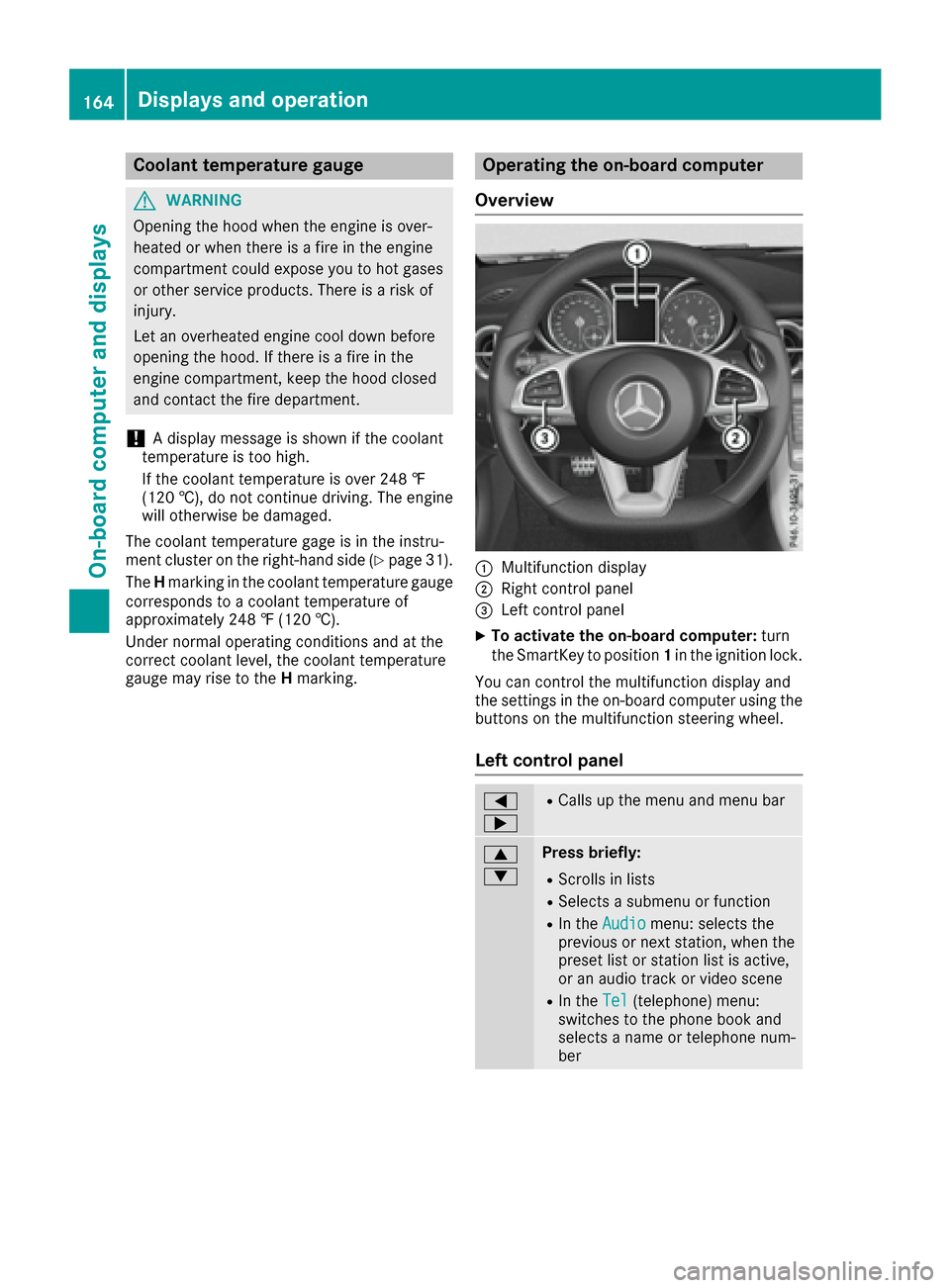
:Multifunction display
;Right control panel
=Leftc ontrol panel
XTo activate th eon-boar dcomputer: turn
th eS ma rtKey to position 1in th eignition lock.
You can control th emultifunction display and
th es ettings in th eon-board computer usingt he
buttons on th emultifunction steering wheel.
Left control panel
=
;RCalls up th emenua nd men ubar
9
:Press briefly:
RScroll sinlists
RSelect sasubmenuorf unction
RIn theAudiomenu: select sthe
previous or next station, when the
preset list or statio nlist is active,
or an audio track or vide oscene
RIn the Tel(telephone )menu:
switches to th ephoneb ook and
selects anam eort elephone num-
ber
164Displays and operation
On-boardc omputer and displays
Page 168 of 294

Menus and submenus
Menu overview
Using the=or; button on the steering
wheel, open the menu bar.
Operating the on-board compute r(
Ypage164).
Depending on the vehiclee quipment, you can
select the following menu:
RTripmenu (Ypag e166)
RNavimenu (navigatio ninstructions)
(Ypag e167)
RAudiomenu (Ypag e168)
RTelmenu (telephone) (Ypag e169)
RDriveAssistmenu (assistance)
(Ypag e170)
RServmenu (Ypag e172)
RSettmenu (settings) (Ypag e172)
RAMGmenu (Mercedes-Benz SLC 43 AMG)
(Ypag e175)
Trip menu
Standard display
XPress and hold the %button on the steer-
ing whee luntil the Tripmenu with trip odom-
eter :and odometer ;appears.
Trip computer "From Start" or "From
Reset"
:Distance
;Driving time
=Average speed
?Average fuel consumption
XPress the =or; button on the steering
whee ltoselect the Tripmenu.
XPress the 9or: button to select
From Startor From Reset.
The values in the From
Startsubmenu are cal-
culated from the start of ajourney whilst the
values in the From Reset
submenu are calcu-
lated from the las ttime the submenu was reset
(
Ypag e167).
In the following cases ,the trip compute risauto-
matically reset From Start
:
Rthe ignitionhas been switched off for more
than four hours.
R999 hour shave bee nexceeded.
R9,999 mile shave been exceeded.
When 9,999 hours or 99,999 mile shave been
exceeded, the trip computer is automatically
reset From Reset
.
ECOd isplay
XPress the =or; button on the steering
whee ltoselect the Tripmenu.
XPress the 9or: button to select ECODISPLAY.
If the ignitio nremains switched off for longer
than four hours ,the ECO display wil lbeauto-
matically reset.
For more information on the ECO display ,see
(
Ypag e134).
Displayingt he range and current fuel
consumption
XPress the =or; button on the steering
whee ltoselect the Tripmenu.
XPress9or: to select the display with
approximate range :and current fuel con-
sumption ;.
Approximate range :that can be covered is
calculated according to you rcurrent driving
166Menus and submenus
On-board computer and displays
Page 169 of 294

style and the amount of fuel in the tank. If
there is onlyasmall amount of fuel left in the
fuel tank, avehicle being refueled C
appears instead of approximate range :.
Recuperation display =shows you if energy
has been recuperated from the kinetic energy in overrun mode and saved in the battery.
Recuperation display =depends on the
engine installed and is therefore not available
in all vehicles.
Digital speedometer
XPress the =or; button on the steering
wheel to select the Tripmenu.
XPress the9or: button to select the
digital speedometer.
Ag earshift recommendation Zmay also
appearint he display.
Observe the information on gearshift recom-
mendation when shifting manually
(
Ypage 127).
Mercedes-Benz SLC 43 AMG: agearshift
recommendation is shown in the status bar of
the multifunction displaya nd not in the digital
speedometer display.
Resetting values
XPress the =or; button on the steering
wheel to select the Tripmenu.
XPress the9or: button to select the
function that you wish to reset.
XPress ato confirm your selection.
XPress :to select Yesand press ato
confirm.
You can reset the values of the following func-
tions:
RTrip odometer
R"From Start" trip computer
R"From Reset" trip computer
RECO display
If you reset the values in the ECO display, the
values in the "From Start" trip computer are also reset. If you reset the values in the "From Start"
trip computer, the values in the ECO displaya re
also reset.
Navigation system menu
Displaying navigation instructions
In the Navimenu, the multifunction display
shows navigation instructions.
Observe the additional information on naviga-
tion in the separate operating instructions of the
multimedia system.
XSwitch on the multimedia system (see sepa-
rate operating instructions).
XPress the =or; button on the steering
wheel to select the Navimenu.
Route guidance not active
:Direction of travel
;Current road
Route guidance active
No change of direction announced
:Distance to destination
;Distance to the next change of direction
=Current road
?"Follow the road's course" symbol
Menus and submenus167
On-board computer and displays
Z
Page 170 of 294

Change of direction announced without a
lane recommendation
:Road intowhicht hechange of direction
leads
;Distance to change of direction and visual
distanc edisplay
=Change-of-direction symbol
When achange of direction is announced ,you
will see change-of-direction symbol =and dis-
tance graphic ;.The distanc eindicator short-
ens towards th etop of th edisplay as you
approach th epointoft heannounced change of
direction.
Change of direction announced with a
lane recommendation
:Road int owhicht hechange of direction
leads
;Distance to change of direction and visual
distanc edisplay
=Lanes no trecommended
?Recommende dlane and new lane durin ga
change of direction
AChange-of-direction symbol
On multilane roads ,new lane recommendations
can be displayedf or thenextc hange of direction
if th edigital map support sthisd ata. During the
change of direction,n ew lanesmay be added.
Lanen otrecommended =:you will no tbeable
to completet henex tchange of direction if you
stay in this lane.
Recommende dlane and new lane durin ga
change of direction ?:inthisl ane you will be
able to completet henex ttwo changes of direc-
tio nw ithout changingl ane.
Other status indicators of th enaviga-
tion system
The navigation system displays additional infor-
mation and th evehicle status.
Possible displays:
RNew Route...or Calculating Route...
An ew rout eiscalculated.
RRoadN ot Mapped
The vehicle position is inside th earea of the
digital map but th eroad is no trecognized, e.g.
newly built streets, car park sorprivate land.
RNo Route
No rout ecoul dbec alculate dtotheselected
destination.
RO
You have reached th edestination or an inter-
mediate destination.
Audio menu
Selecting aradio station
:Activ estatio nlist
;Statio nfrequency with memory position
The multifunction display showss tation ;with
statio nfrequency or statio nname. The preset
position is only displayeda longwith station ;if
this has been stored.
XSwitch on th emultimedia system and select
Radio (see th eseparate operatin ginstruc-
tions).
XPres sthe = or; button on th esteering
wheel to selectt heAudiomenu.
168Menusa nd submenus
On-boardc omputer and displays