2017 MERCEDES-BENZ S CLASS manual transmission
[x] Cancel search: manual transmissionPage 149 of 382
vehicle. Always keep the SmartKey out of
reach of children.
G WARNING
Combustion engines emit poisonous exhaust
gases such as carbon monoxide. Inhaling
these exhaust gases leads to poisoning. There
is a risk of fatal injury. Therefore never leave
the engine running in enclosed spaces with-
out sufficient ventilation.
G WARNING
Flammable materials introduced through
environmental influence or by animals can
ignite if in contact with the exhaust system or
parts of the engine that heat up. There is a risk
of fire.
Carry out regular checks to make sure that
there are no flammable foreign materials in
the engine compartment or in the exhaust
system.
General notes During a cold start, the engine runs at higher
speeds to enable the catalytic converter to
reach its operating temperature. The sound of
the engine may change during this time.
Automatic transmission X
Shift the transmission to position P
( Y
page 152).
The transmission position display in the mul-
tifunction display shows P ( Y
page 154).
You can start the engine in transmission posi-
tion P and N .
Starting procedure with the SmartKey To start the engine using the SmartKey instead
of the Start/Stop button, pull the Start/Stop
button out of the ignition lock. X
Turn the SmartKey to position 3 in the ignition
lock and release it as soon as the engine is
running ( Y
page 145). Starting procedure with the Start/Stop
button The Start/Stop button can be used to start the
vehicle manually without inserting the SmartKey
into the ignition lock. The Start/Stop button
must be inserted in the ignition lock and the
SmartKey must be in the vehicle. This mode for
starting the engine operates independently of
the ECO start/stop automatic engine start func-
tion.
You can start the engine if a valid SmartKey is in
the vehicle. Always take the SmartKey with you
when leaving the vehicle, even if you only leave
it for a short time. Pay attention to the important
safety notes. X
Depress the brake pedal and keep it
depressed. X
Press the Start/Stop button once
( Y
page 145).
The engine starts.
Starting procedure via smartphone Observe the important safety notes on starting
the engine ( Y
page 146).
You can also start your engine via your smart-
phone from outside the vehicle. In this case, the
previously selected climate control setting is
activated. In this way you can cool or heat the
interior of the vehicle before starting the jour-
ney.
Only start the engine via your smartphone if it is
safe to start and run the engine where your vehi-
cle is parked.
Observe the legal stipulations in the area where
your vehicle is parked. Engine start via smart-
phone may be limited to certain countries or
regions.
You can execute a maximum of two consecutive
starting attempts via your smartphone. If you
insert the SmartKey into the ignition lock, you
can carry out two more starting attempts.
Once you have started the engine, you can
switch the engine off via your smartphone at any
time.
You can only start the engine via your smart-
phone if: R
the SmartKey is in the ignition lock R
park position P is selected R
the accelerator pedal is not depressed R
the anti-theft alarm system is not activated Driving 147
Driving and parking Z
Page 152 of 382
R
the temperature in the vehicle interior devi-
ates from the set range R
the system detects moisture on the wind-
shield when the automatic climate control is
switched on R
the battery's condition of charge is too low
Shifting the transmission to position ] does
not start the engine.
Deactivating or activating the ECO
start/stop function Mercedes-AMG vehicles
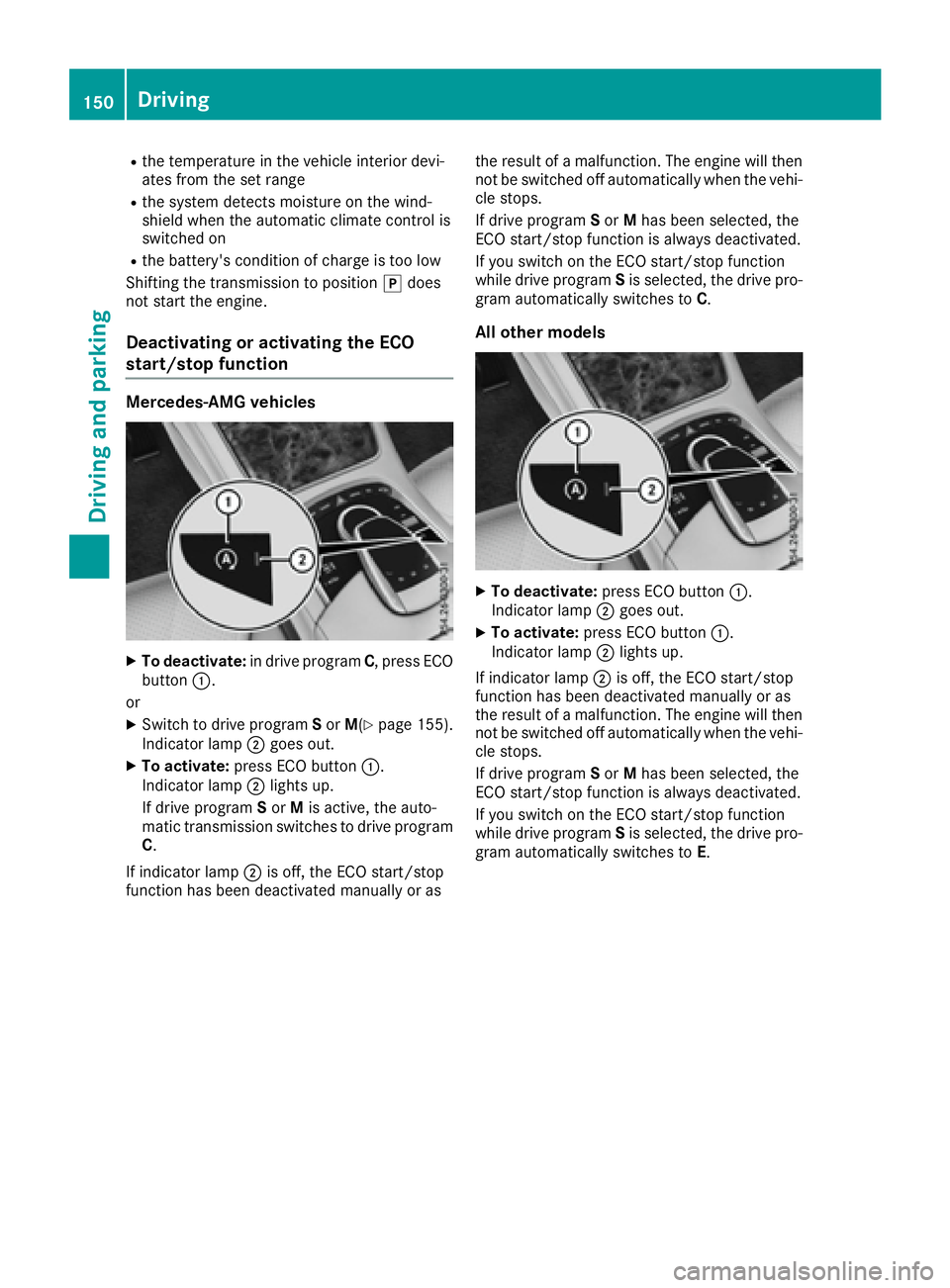
X
To deactivate: in drive program C , press ECO
button C .
or X
Switch to drive program S or M ( Y
page 155).
Indicator lamp D goes out.X
To activate: press ECO button C .
Indicator lamp D lights up.
If drive program S or M is active, the auto-
matic transmission switches to drive program
C .
If indicator lamp D is off, the ECO start/stop
function has been deactivated manually or as the result of a malfunction. The engine will then
not be switched off automatically when the vehi-
cle stops.
If drive program S or M has been selected, the
ECO start/stop function is always deactivated.
If you switch on the ECO start/stop function
while drive program S is selected, the drive pro-
gram automatically switches to C .
All other models
X
To deactivate: press ECO button C .
Indicator lamp D goes out.X
To activate: press ECO button C .
Indicator lamp D lights up.
If indicator lamp D is off, the ECO start/stop
function has been deactivated manually or as
the result of a malfunction. The engine will then
not be switched off automatically when the vehi-
cle stops.
If drive program S or M has been selected, the
ECO start/stop function is always deactivated.
If you switch on the ECO start/stop function
while drive program S is selected, the drive pro-
gram automatically switches to E .150
Driving
Dr ivi ng an d parking
Page 154 of 382
Aut oma tic trans mi ssion
Import ant safety notes
G WARNIN G
If th e engin e spee d is abov e th e idlin g spee d
and you engage transmission position D or R ,
th e vehicl e could pull away suddenly. There is
a ris k of an accident.
When engagin g transmission position D or R ,
always firmly depress th e brak e pedal and do
no t simultaneously accelerate .
G WARNIN G
The automatic transmission switches to neu-
tral position N when you switch off th e engine.
The vehicl e may rol l away. There is a ris k of an
accident.
Afte r switching off th e engine, always switch
to parking position P . Preven t th e parked vehi-
cle from rollin g away by applyin g th e parking
brake.
Hybrid vehicles: mak e sur e that you read th e
separat e Operator' s Manual. Otherwise , you
may no t recogniz e dangers.
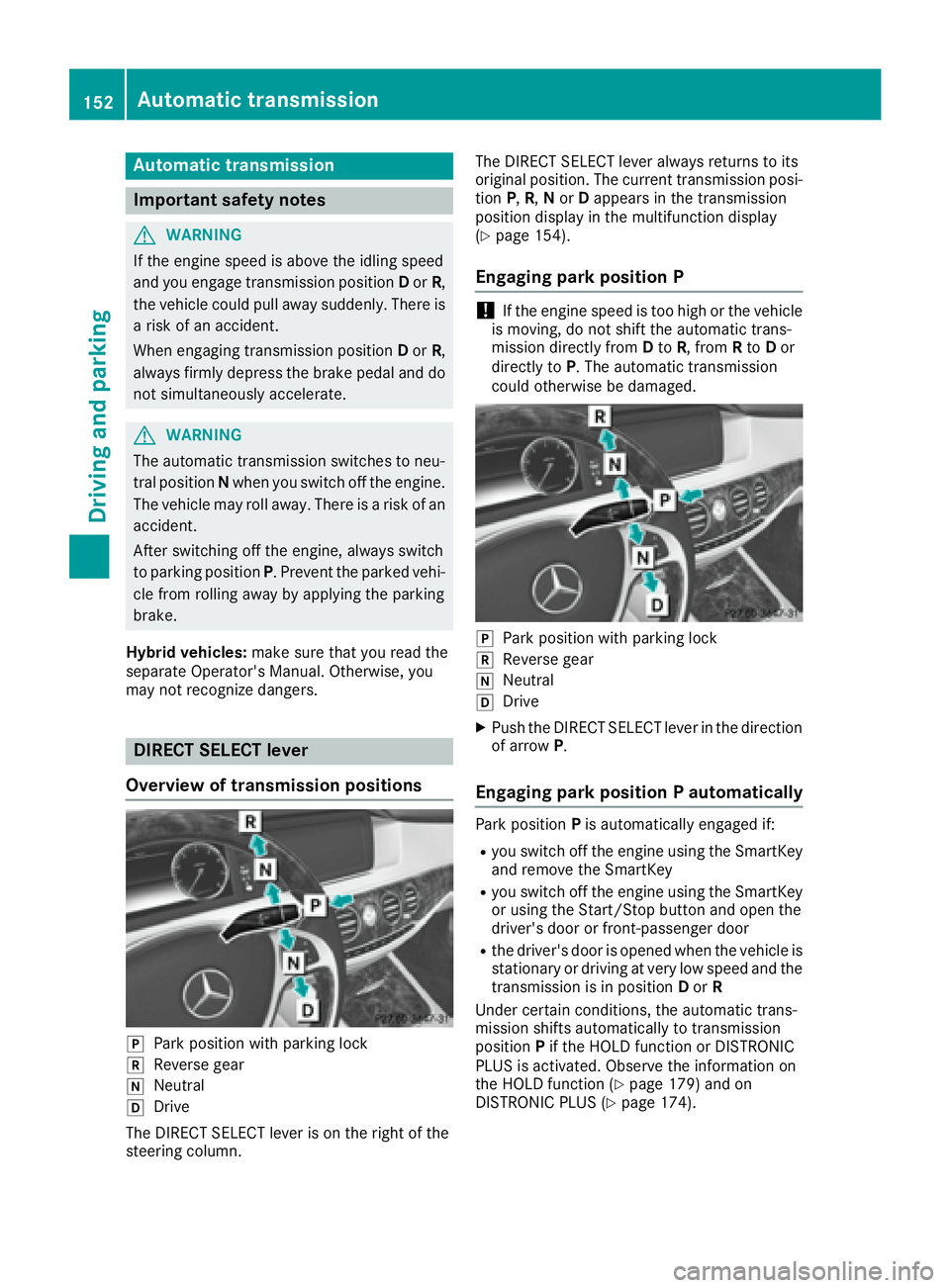
DIRECT SELECT lever
Overview of trans mi ssion positions
]
Park position wit h parking loc k
^
Reverse gear
\\
Neutral
[
Drive
The DIRECT SELECT lever is on th e right of th e
steering column . The DIRECT SELECT lever always return s to it s
original position . The curren t transmission posi-
tion P , R , N or D appear s in th e transmission
position display in th e multifunction display
( Y
page 154).
Engaging pa rk position P
! If th e engin e spee d is to o high or th e vehicl e
is moving , do no t shif t th e automatic trans -
mission directl y from D to R , from R to D or
directl y to P . The automatic transmission
could otherwise be damaged.
]
Park position wit h parking loc k^
Reverse gear \\
Neutral [
Drive X
Push th e DIRECT SELECT lever in th e direction
of arrow P .
Engaging pa rk position P automaticallyPark position P is automatically engage d if:R
you switch off th e engin e usin g th e SmartKey
and remove th e SmartKey R
you switch off th e engin e usin g th e SmartKey
or usin g th e Start/Sto p butto n and open th e
driver's door or front-passenger door R
th e driver's door is opened when th e vehicl e is
stationary or drivin g at ver y low spee d and th e
transmission is in position D or R
Under certain conditions, th e automatic trans -
mission shifts automatically to transmission
position P if th e HOLD function or DISTRONI C
PLU S is activated. Observ e th e information on
th e HOLD function ( Y
page 179) and on
DISTRONI C PLU S ( Y
page 174).152
Automatic transmission
Driving an d parking
Page 158 of 382
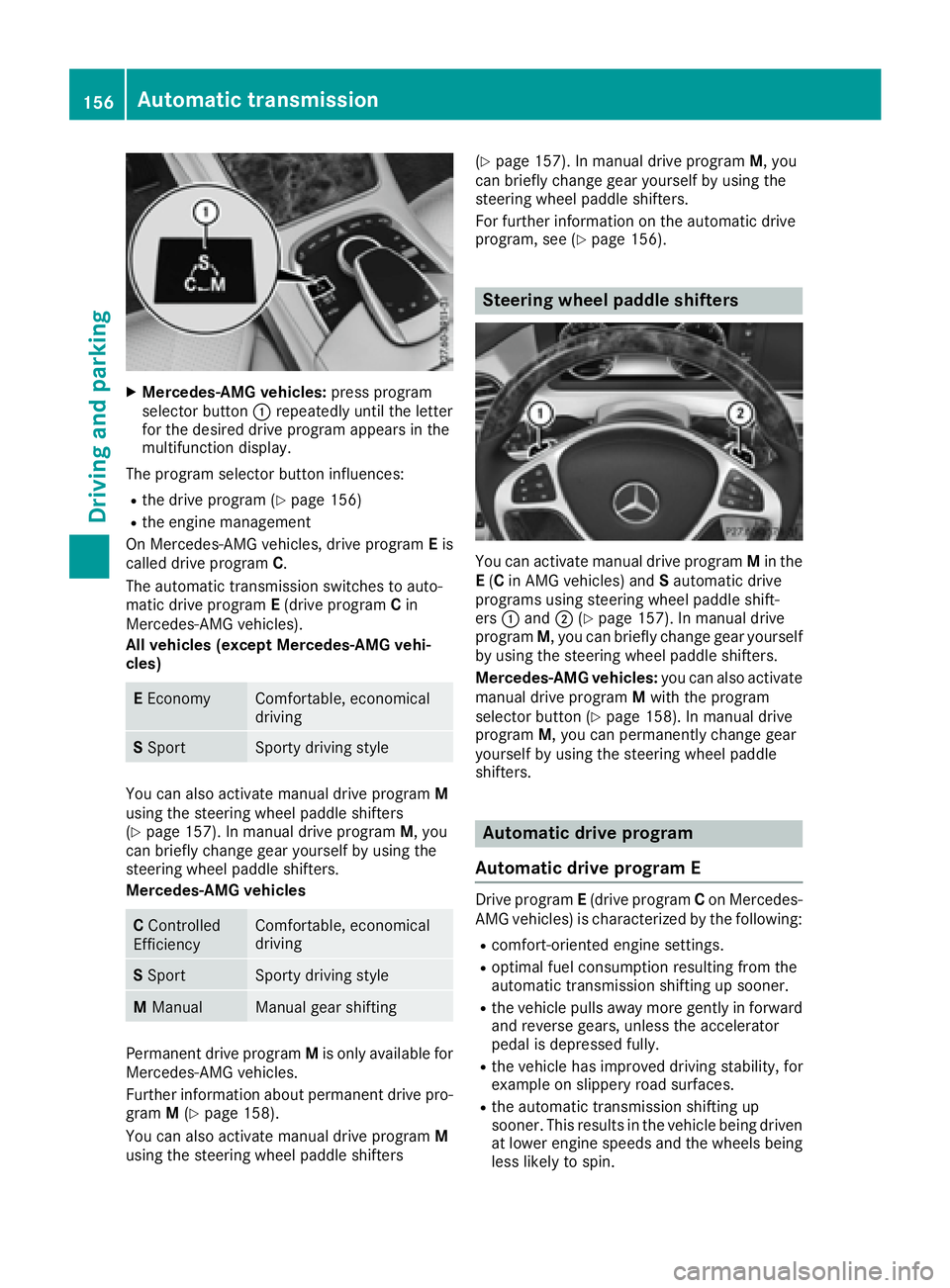
X
Mercedes-AMG vehicles: press program
selector button C repeatedly until the letter
for the desired drive program appears in the
multifunction display.
The program selector button influences: R
the drive program ( Y
page 156)R
the engine management
On Mercedes-AMG vehicles, drive program E is
called drive program C .
The automatic transmission switches to auto-
matic drive program E (drive program C in
Mercedes-AMG vehicles).
All vehicles (except Mercedes-AMG vehi-
cles)
E Economy Comfortable, economical
driving
S Sport Sporty driving style
You can also activate manual drive program M
using the steering wheel paddle shifters
( Y
page 157). In manual drive program M , you
can briefly change gear yourself by using the
steering wheel paddle shifters.
Mercedes-AMG vehicles
C Controlled
Efficiency Comfortable, economical
driving
S Sport Sporty driving style
M Manual Manual gear shifting
Permanent drive program M is only available for
Mercedes-AMG vehicles.
Further information about permanent drive pro-
gram M ( Y
page 158).
You can also activate manual drive program M
using the steering wheel paddle shifters ( Y
page 157). In manual drive program M , you
can briefly change gear yourself by using the
steering wheel paddle shifters.
For further information on the automatic drive
program, see ( Y
page 156).
Steering wheel paddle shifters
You can activate manual drive program M in the
E ( C in AMG vehicles) and S automatic drive
programs using steering wheel paddle shift-
ers C and D ( Y
page 157). In manual drive
program M , you can briefly change gear yourself
by using the steering wheel paddle shifters.
Mercedes-AMG vehicles: you can also activate
manual drive program M with the program
selector button ( Y
page 158). In manual drive
program M , you can permanently change gear
yourself by using the steering wheel paddle
shifters.
Automatic drive program
Automatic drive program E Drive program E (drive program C on Mercedes-
AMG vehicles) is characterized by the following: R
comfort-oriented engine settings. R
optimal fuel consumption resulting from the
automatic transmission shifting up sooner. R
the vehicle pulls away more gently in forward
and reverse gears, unless the accelerator
pedal is depressed fully. R
the vehicle has improved driving stability, for
example on slippery road surfaces. R
the automatic transmission shifting up
sooner. This results in the vehicle being driven
at lower engine speeds and the wheels being
less likely to spin.156
Automatic transmission
Driving and parking
Page 159 of 382
Aut oma tic drive program SDrive program S is characterized by th e follow-
ing : R
sport y engin e settings.R
th e vehicl e pulls away in first gear .R
th e automatic transmission shifts up later.
The fuel consumption possibl y bein g higher
as a result of th e later automatic transmission
shif t points .
Manual drive program M Genera l notesIn this drive program , you can briefl y chang e
gear yourself by usin g th e steering whee l paddl e
shifters. The transmission mus t be in position D .
You can activat e manual drive program M in th e
E ( C in Mercedes-AM G vehicles) and S auto -
matic drive programs.
Mercedes-AMG vehicles: as well as temporar y
drive program M , you can also activat e perma-
nent drive program M . Further information
about permanen t drive program M
( Y
page 158).
Acti va ting X
Shift th e transmission to position D .X
Pull th e lef t or right steering whee l paddl e
shifte r ( Y
page 156).
Manual drive program M is temporarily acti-
vated.
All vehicles (excep t Mercedes-AMG vehi-
cles: )M and the selected gear appear in the
multifunction display.
Shifting gears
If you pull on the left or right steering wheel
paddle shifter, the automatic transmission
switches to manual drive program M for a limi-
ted amount of time. Depending on which steer-
ing wheel paddle shifter is pulled, the automatic
transmission immediately shifts into the next
gear down or up, if permitted. X
To shift up: pull the right-hand steering wheel
paddle shifter ( Y
page 156).
The automatic transmission shifts up to the
next gear.
If the maximum engine speed on the currently
engaged gear is reached and you c ontinue to
ac
celerate, the automatic transmission auto- matically shifts up in order to prevent engine
damage.
Mercedes-AMG vehicles: the automatic
transmission will not shift up to the next gear
when the engine speed is very low. X
To shift down: pull on the left-hand steering
wheel paddle shifter ( Y
page 156).
The automatic transmission shifts down to
the next gear.
If the engine exceeds the maximum engine
speed when shifting down, the automatic
transmission protects against engine damage
by not shifting down.
Automatic down shifting occurs when coast-
ing.
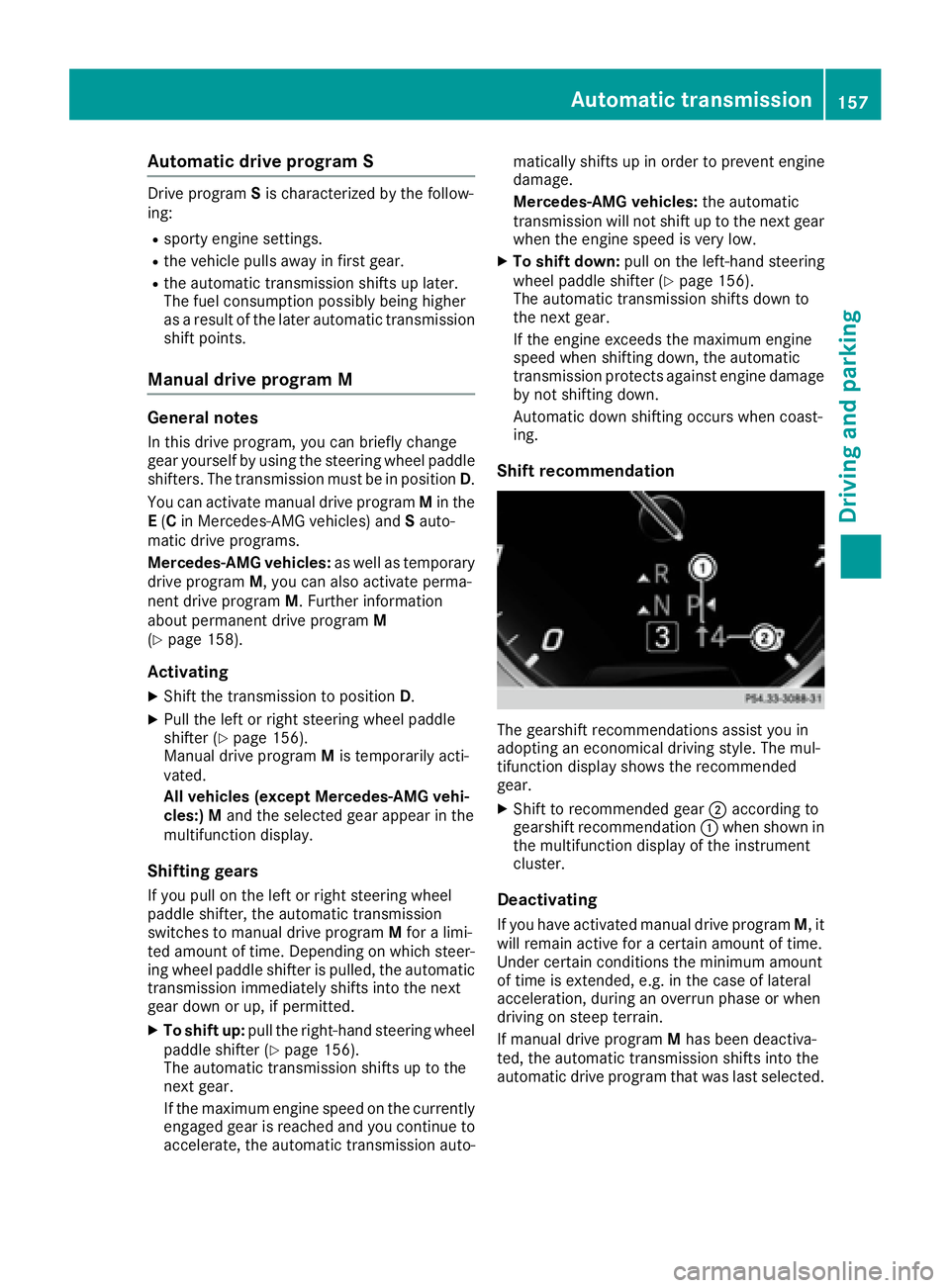
Shift recommendation
The gearshift recommendations assist you in
adopting an economical driving style. The mul-
tifunction display shows the recommended
gear. X
Shift to recommended gear D according to
gearshift recommendation C when shown in
the multifunction display of the instrument
cluster.
Deactivating
If you have activated manual drive program M , it
will remain active for a certain amount of time.
Under certain conditions the minimum amount
of time is extended, e.g. in the case of lateral
acceleration, during an overrun phase or when
driving on steep terrain.
If manual drive program M has been deactiva-
ted, the automatic transmission shifts into the
automatic drive program that was last selected.Automatic transmission 157
Driving and parking Z
Page 160 of 382
You can also deactivate manual drive program
M yourself: X
Pull on the right-hand steering wheel paddle
shifter and hold it in place ( Y
page 156).
or X
Use the DIRECT SELECT lever to switch the
transmission position.
or X
Use the program selector button to change
the drive program ( Y
page 155).
Manual drive program M is deactivated. The
automatic transmission switches to the pre-
viously activated drive program E (drive pro-
gram C on Mercedes-AMG vehicles) or S .
Manual drive program (Mercedes-
AMG vehicles)
General information In this drive program, you can permanently
change gear yourself by using the steering
wheel paddle shifters. The transmission must be
in position D .
Manual drive program M is different from drive
program S with regard to spontaneity, respon-
siveness and smoothness of gear changes.
As well as this permanent drive program M , you
can also activate temporary drive program
M ( Y
page 157).
Switching on the manual drive program In manual drive program M , you can change gear
using the steering wheel paddle shifters if the
transmission is in position D . You can see the
currently selected drive program and which gear
is engaged in the multifunction display. X
Press the program selector button
( Y
page 155) repeatedly until M appears in
the multifunction display.
Upshifting
! In manual drive program M , the automatic
transmission does not shift up automatically even when the engine limiting speed for the
current gear is reached. When the engine lim-
iting speed is reached, the fuel supply is cut to
prevent the engine from overrevving. Always
make sure that the engine speed does not
reach the red area of the tachometer. There is
otherwise a risk of engine damage.
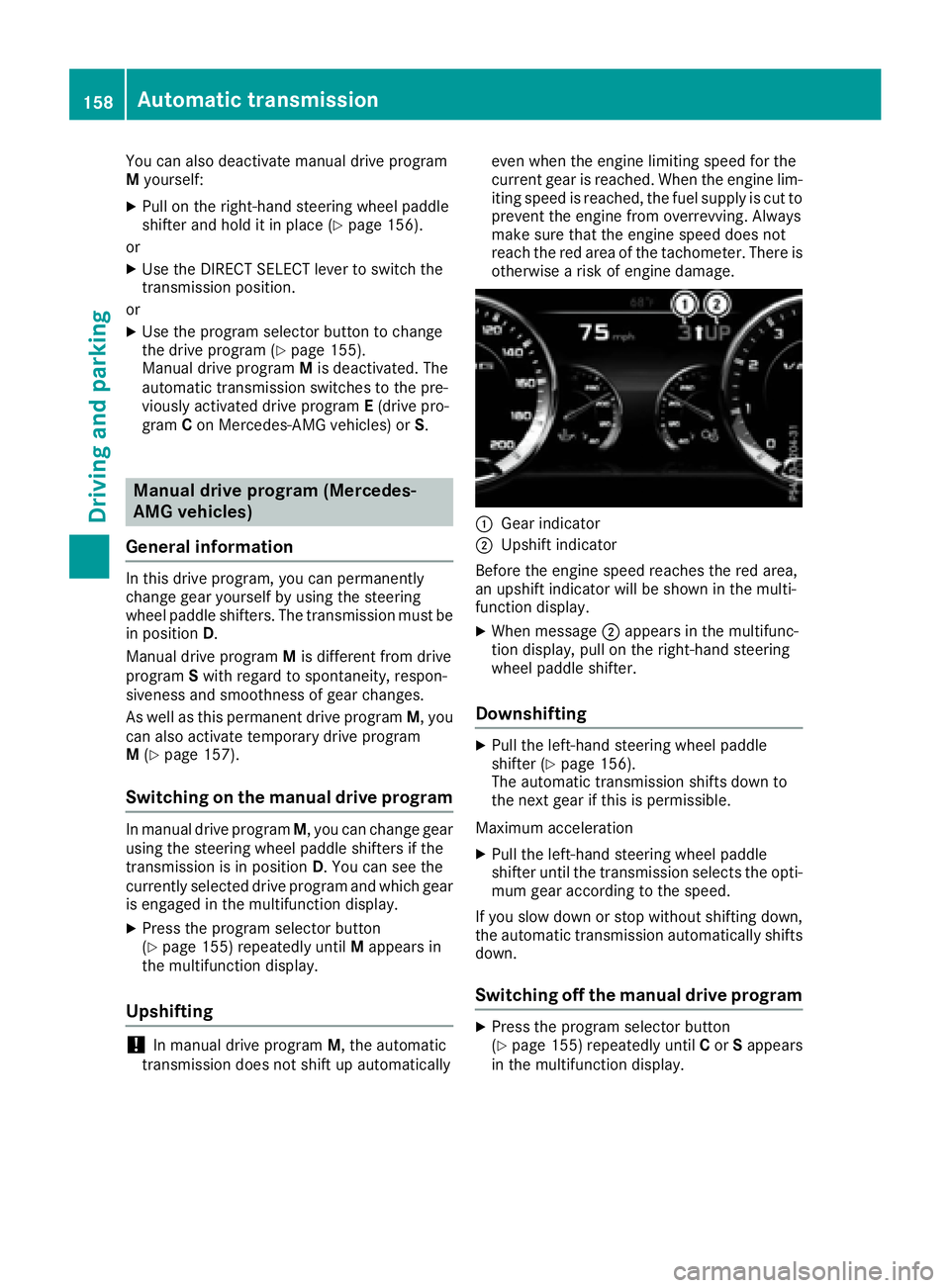
C
Gear indicator D
Upshift indicator
Before the engine speed reaches the red area,
an upshift indicator will be shown in the multi-
function display. X
When message D appears in the multifunc-
tion display, pull on the right-hand steering
wheel paddle shifter.
Downshifting X
Pull the left-hand steering wheel paddle
shifter ( Y
page 156).
The automatic transmission shifts down to
the next gear if this is permissible.
Maximum acceleration X
Pull the left-hand steering wheel paddle
shifter until the transmission selects the opti-
mum gear according to the speed.
If you slow down or stop without shifting down,
the automatic transmission automatically shifts
down.
Switching off the manual drive program X
Press the program selector button
( Y
page 155) repeatedly until C or S appears
in the multifunction display.158
Automatic transmission
Driving and parking
Page 165 of 382
X
Releas e th e electric parking brake.X
Switc h off th e ignition and leav e th e SmartKey
in th e ignition lock.
The engin e can be switched off in an emergenc y
while th e vehicl e is in motion by pressin g and
holding th e Start/Sto p butto n for three sec -
onds. This function operate s independentl y of
th e ECO start/sto p automatic engin e switch-off
function .
Electric parking brake
General notes
G WARNIN G
If you leav e children unsupervised in th e vehi-
cle , they could set it in motion by, for example: R
release th e parking brake.R
shif t th e automatic transmission out of th e
parking position P .R
start th e engine.
In addition , they may operate vehicl e equip-
men t and become trapped . There is a ris k of
an acciden t and injury.
When leaving th e vehicle, always tak e th e
SmartKey wit h you and loc k th e vehicle. Never
leav e children unsupervised in th e vehicle.
The function of th e electric parking brak e is
dependen t on th e on-board voltage. If th e on -
boar d voltag e is low or there is a malfunction in
th e system, it may no t be possibl e to apply th e
release d parking brake.X
If this is th e case, only park th e vehicl e on
level ground and secure it to preven t it rollin g
away. X
Shift th e automatic transmission to position
P .
It may no t be possibl e to release an applie d
parking brak e if th e on-board voltag e is low or
there is a malfunction in th e system. Contac t a
qualified specialist workshop.
The electric parking brak e performs a function
test at regular intervals while th e engin e is
switched off . The sounds that can be hear d while
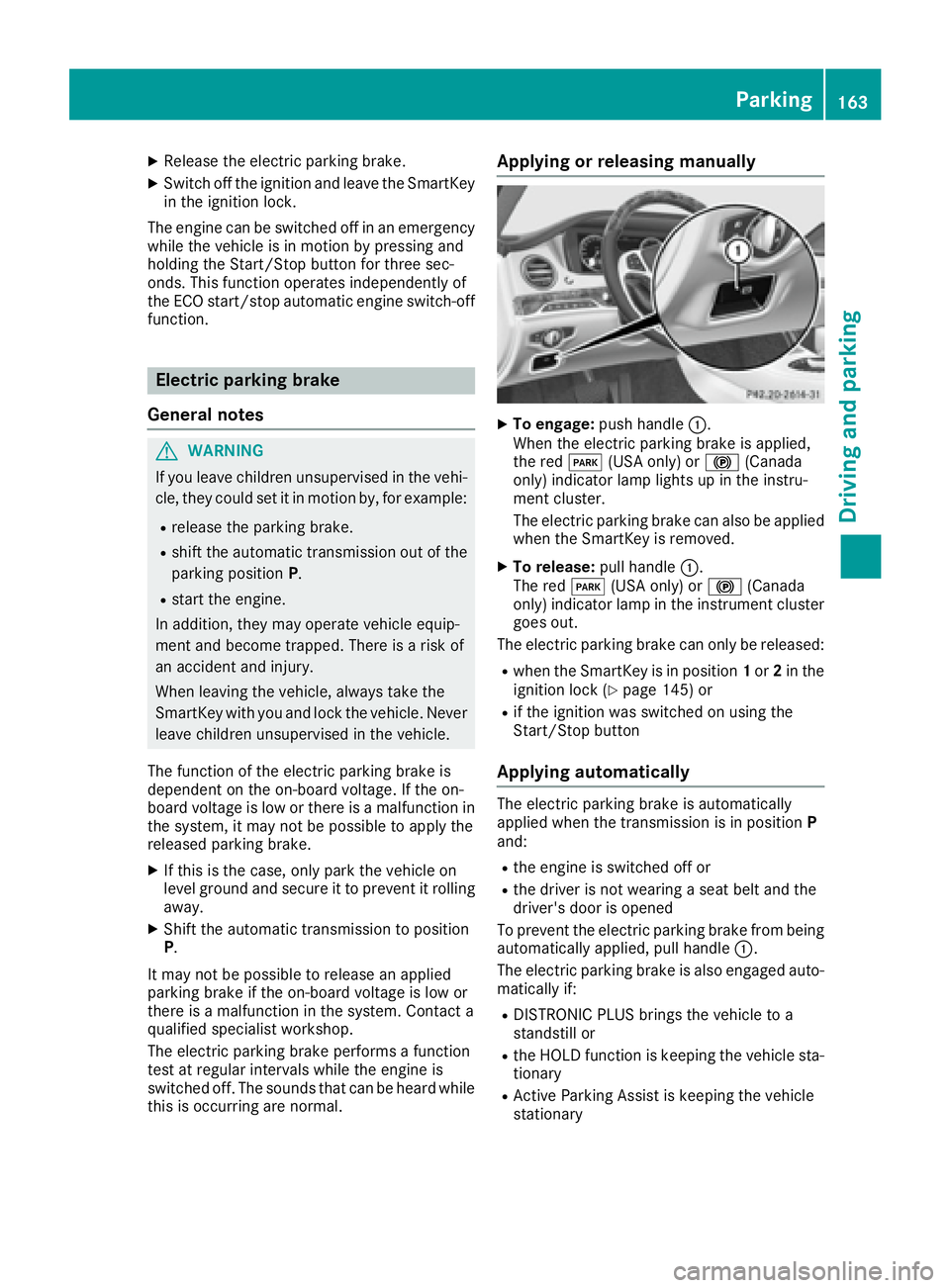
this is occurrin g are normal. Applying or releasing manually X
To engage: push handle C .
When th e electric parking brak e is applied,
th e red I (US A only) or $ (Canada
only) indicator lamp lights up in th e instru-
men t cluster.
The electric parking brak e can also be applie d
when th e SmartKey is removed. X
To release: pull handle C .
The red I (US A only) or $ (Canada
only) indicator lamp in th e instrumen t cluste r
goes out .
The electric parking brak e can only be released:R
when th e SmartKey is in position 1 or 2 in th e
ignition loc k ( Y
page 145) or R
if th e ignition was switched on usin g th e
Start/Sto p butto n
Applying automatically The electric parking brak e is automatically
applie d when th e transmission is in position P
and : R
th e engin e is switched off or R
th e driver is no t wearing a seat belt and th e
driver' s door is opened
To preven t th e electric parking brak e from bein g
automatically applied, pull handle C .
The electric parking brak e is also engage d auto -
matically if: R
DISTRONI C PLU S brings th e vehicl e to a
standstill or R
th e HOLD function is keepin g th e vehicl e sta-
tionary R
Active Parking Assis t is keepin g th e vehicl e
stationary Parking 163
Driving and parking Z
Page 173 of 382

R
ESP ®
intervenes or you deactivate ESP ®
R
you shift the transmission to position N while
driving.
If cruise control is deactivated, you will hear a
warning tone. You will see the Cruise Con‐
trol Off message in the multifunction display
for approximately five seconds.
When you switch off the engine, the last speed
stored is cleared.
DISTRONIC PLUS
General notes DISTRONIC PLUS regulates the speed and auto-
matically helps you maintain the distance from
the vehicle detected in front. Vehicles are detec-
ted with the aid of the radar sensor system.
DISTRONIC PLUS brakes automatically so that
the set speed is not exceeded.
Change into a lower gear in good time on long
and steep downhill gradients. This is especially
important if the vehicle is laden. By doing so, you
will make use of the braking effect of the engine.
This relieves the load on the brake system and
prevents the brakes from overheating and wear-
ing too quickly.
If DISTRONIC PLUS detects that there is a risk of
a collision, you will be warned visually and
acoustically. DISTRONIC PLUS cannot prevent a
collision without your intervention. An intermit-
tent warning tone will then sound and the dis-
tance warning lamp will light up in the instru-
ment cluster. Brake immediately in order to
increase the distance to the vehicle in front or
take evasive action provided it is safe to do so.
DISTRONIC PLUS operates in the speed range
between 0 mph (0 km/h) and 120 mph
(200 km/h).
Do not use DISTRONIC PLUS while driving on
roads with steep gradients.
As DISTR ONIC P LUS transmits radar waves, it
ca
n resemble the radar detectors of the respon-
sible authorities. You can refer to the relevant
chapter in the Operator's Manual if questions
are asked about this.
i USA only: This device has been approved by
the FCC as a "Vehicular Radar System". The
radar sensor is intended for use in an auto-
motive radar system only. Removal, tamper-
ing, or altering of the device will void any war-
ranties, and is not permitted by the FCC. Do not tamper with, alter, or use in any non-
approved way.
Any unauthorized modification to this device
could void the user's authority to operate the
equipment.
i Canada only: This device complies with
RSS-210 of Industry Canada. Operation is
subject to the following two conditions:
1. This device may not cause harmful inter-
ference, and
2. This device must accept any interference
received, including interference that may
cause undesired operation of the device.
Removal, tampering, or altering of the device
will void any warranties, and is not permitted.
Do not tamper with, alter, or use in any non-
approved way.
Any unauthorized modification to this device
could voi d th e user's authority to operate the
e
quipment.
Important safety notes
G WARNING
DISTRONIC PLUS does not react to: R
people or animals R
stationary obstacles on the road, e.g. stop-
ped or parked vehicles R
oncoming and crossing traffic
As a result, DISTRONIC PLUS may neither give
warnings nor intervene in such situations.
There is a risk of an accident.
Always pay careful attention to the traffic sit-
uation and be ready to brake.
G WARNING
DISTRONIC PLUS cannot always clearly iden-
tify other road users and complex traffic sit-
uations.
In such cases, DISTRONIC PLUS may: R
give an unnecessary warning and then
brake the vehicle R
neither give a warning nor intervene R
accelerate or brake unexpectedly
There is a risk of an accident.Driving system s 171
Dr ivi ng an d parking Z