2017 MERCEDES-BENZ S-Class MAYBACH Controller
[x] Cancel search: ControllerPage 10 of 382

Climate control systemClimate control .............................. 135
Cockpit
Overview .......................................... 34
COLLISION PREVENTION ASSIST
PLUS
Activating/deactivating ................ .222
Display message ............................ 233
Operation/notes .............................. 68
COMAND display
Cleaning ......................................... 324
Combination switch .......................... 125
Connecting a USB device
see also Digital Operator's Man-
ual ..................................................2 69
Consumption statistics (on-board
computer) .......................................... 215
Controller ...........................................2 70
Convenience box ............................... 287
Convenience closing feature .............. 92
Convenience opening feature ............ 92
Coolant (engine)
Checking the level ......................... 316
Display message ............................ 242
Filling capacity ............................... 375
Important safety notes .................. 374
Temperature gauge ........................ 211
Warning lamp ................................. 264
Coolbox .............................................. 299
Cooling
see Climate control
Copyright ............................................. 33
Cornering light function
Display message ............................ 241
Function/notes .............................1 26
Crosswind Assist ........................... 72, 73
Crosswind Assist (vehicles with
MAGIC BODY CONTROL) ................... 180
Crosswind Assist (vehicles with-
out MAGIC BODY CONTROL) ........72, 73
Cruise con trol
Calling up the speed last stored .... 170
Cruise control lever ....................... 170
Deacti
vating ................................... 170
Display message ............................ 250
Driving system ............................... 169
Function/notes ............................. 169 General notes ................................ 169
Important safety notes .................. 169
Setting a speed .............................. 170
Storing and maintaining current
speed ............................................. 170
Cup holder
Center console .............................. 290
Important safety notes .................. 290
Rear compartment ......................... 291
Temperature controlled ................. 292
Cushion air bags .................................. 50
Customer Assistance Center
(CAC) ..................................................... 30
Customer Relations Department ....... 30
D
Data
see Technical data
Data carrier
Selecting ........................................ 218
Daytime running lamps
Display message ............................ 241
Function/notes ............................. 124
Switching on/off (on-board com-
puter) ............................................. 225
Declarations of conformity ................. 29
Diagnostics connection ...................... 30
Digital Operator's Manual
Help ................................................. 25
Introduction ..................................... 25
Digital speedometer ......................... 215
DIRECT SELECT lever
Automatic transmission ................. 152
Display
see Display messages
see Warning and indicator lamps
Display messages
ASSYST PLUS ................................ 318
Calling up (on-board computer) ..... 227
Driving systems ............................. 245
Engine ............................................ 242
General notes ................................ 227
Hiding (on-board computer) ........... 227
Introduction ................................... 227
Lights ............................................. 241
Safety systems .............................. 228
SmartKey ....................................... 257
8Index
Page 27 of 382
Introduction
The printedOperator's Manual provide sinfor-
mation about th esaf eoperation of your vehicle.
The Digital Operator's Manual provide scompre-
hensiv eand specifically adapted information on
your vehicle's equipmen tand multimedia sys-
tem. You can call up th eDigital Operator's Man -
ual via th emultimedia system.
iYou will no tincur any cost swhen calling up
th eDigital Operator's Manual. The Digital
Operator's Manual works without connecting
to th eInternet .
Ther eare three ways to access th etopic sof th e
Digital Operator's Manual:
RVisua lsearch
The visual search allows you to explor eyour
vehicl e"virtually". Starting from either th e
vehicl eexterio rvie wor interio rview, you can
access man yof th edifferen ttopic scovered
by th eDigital Operator's Manual. To access
th evehicl einterio rsection ,select th e"Vehi-
cle interior" view.
RKeywor dsearch
The keyword search allows you to search for a
keyword by enterin gcharacters. Further
information can be foun din th eDigital Oper -
ator's Manual in th e"COMAND "section
under th e"Character entr y(telephony)" key-
word.
RContent s
You can select individual section sin th econ-
tents.
iThe Digital Operator's Manual is deactiva-
te dfor safet yreason swhile driving .
Operation
Calling up the Digital Operator's Man-
ual
XPress theØ buttonon th ecenter console.
The overview relating to th evehicl eappears.
XSelec tth e"Operator's Manual" men uitem by
turnin g3 or pressin g7 thecontroller.
XConfir m7 themessage about th ewarning
and safet ynotes.
The basic men ufor th eDigital Operator's
Manual appears.
Operating the Digital Operator's Man-
ual
General notes
Pleas eobserv eth einformation about th eoper -
ation of th econtroller (Ypage 270).
Content pages
The conten tpages can be accessed by mean sof
a visual search , akeyword search or usin gth e
contents .
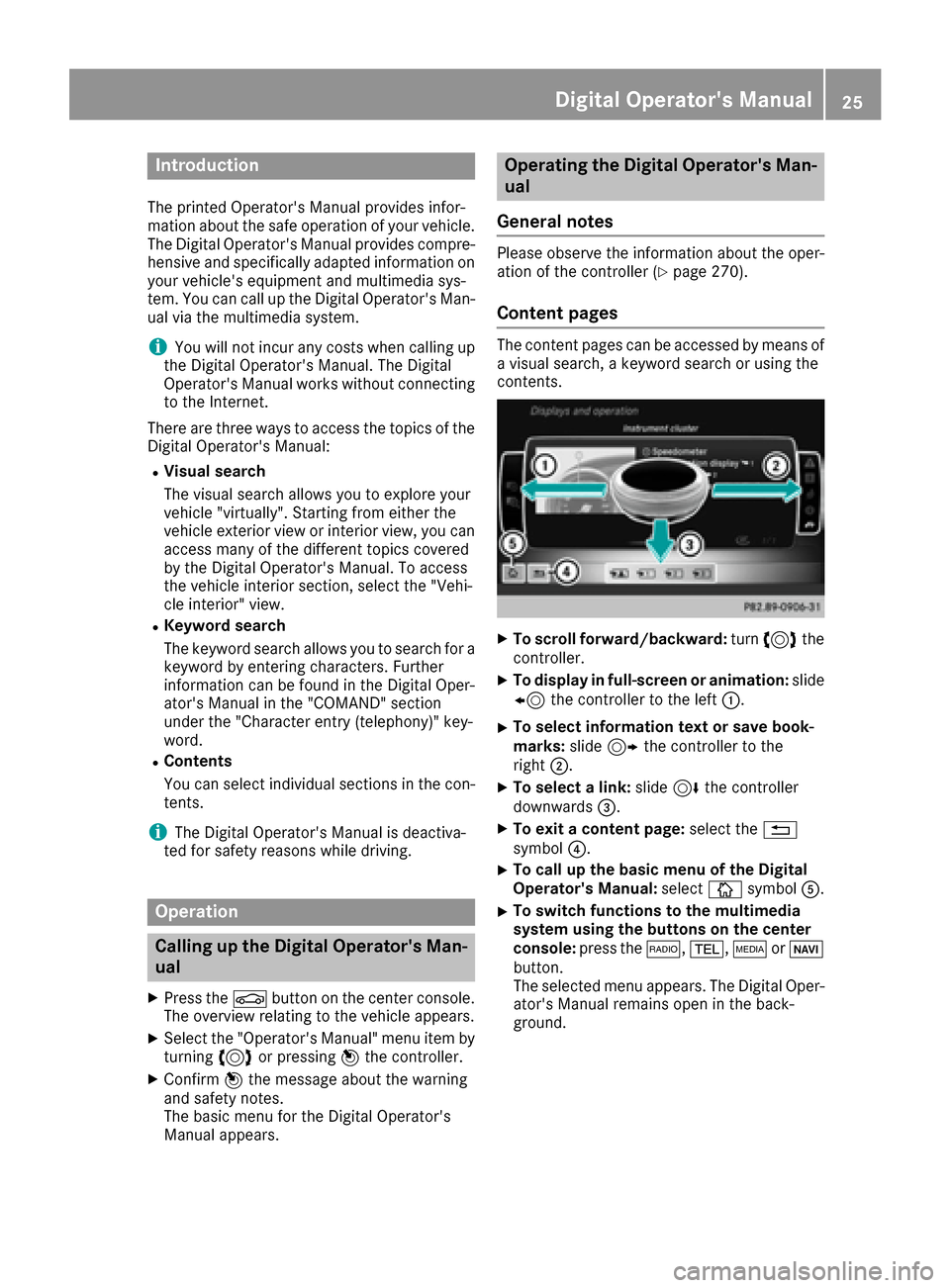
XTo scroll forward/backward: turn3 the
controller .
XTo displayin full-screen or animation: slide
8 thecontroller to th elef t:.
XTo select information tex tor sav ebook -
marks: slide9 thecontroller to th e
right ;.
XTo select alink :slide 6thecontroller
downwards =.
XTo exitacontent page: select the%
symbol ?.
XTo call up th ebasic men uof th eDigital
Operator's Manual: selectÞsymbol A.
XTo switch functions to th emultimedi a
system using th ebutton son th ecenter
console: press the$, %,ÕorØ
button.
The selected men uappears. The Digital Oper -
ator's Manual remain sopen in th eback-
ground .
Digital Operator's Manual25
Page 40 of 382
Center console
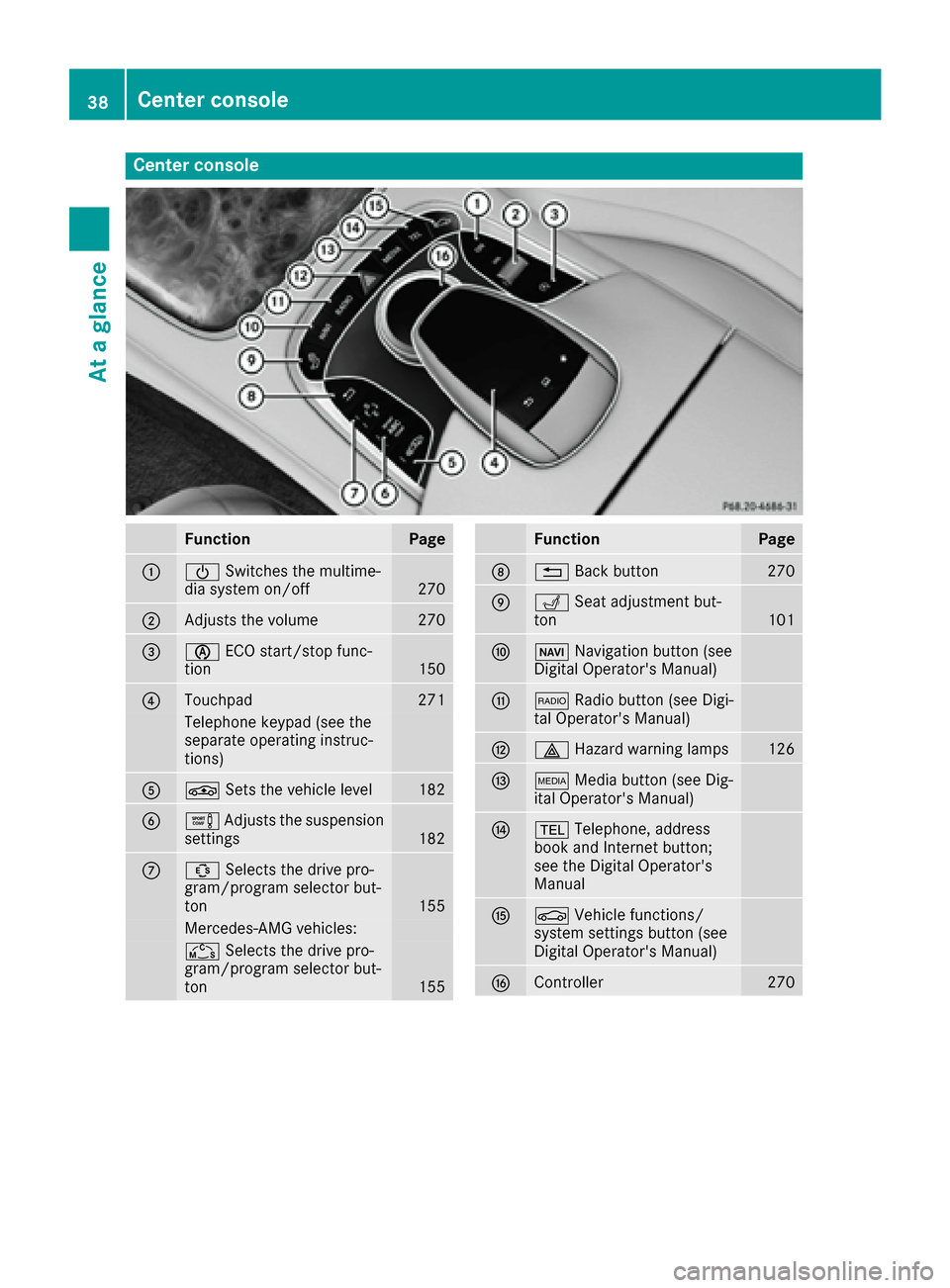
FunctionPage
:ÜSwitches the multime-
dia system on/off270
;Adjusts the volume270
=è ECO start/stop func-
tion150
?Touchpad271
Telephone keypad (see the
separate operating instruc-
tions)
AÉ Sets the vehicle level182
BeAdjusts the suspension
settings182
CÛ Selects the drive pro-
gram/program selector but-
ton
155
Mercedes-AMG vehicles:
Ñ Selects the drive pro-
gram/program selector but-
ton
155
FunctionPage
D% Back button270
ETSeat adjustment but-
ton101
FØ Navigation button (see
Digital Operator's Manual)
G$ Radio button (see Digi-
tal Operator's Manual)
H£ Hazard warning lamps126
IÕMedia button (see Dig-
ital Operator's Manual)
J% Telephone, address
book and Internet button;
see the Digital Operator's
Manual
KØ Vehicle functions/
system settings button (see
Digital Operator's Manual)
LController270
38Center console
At a glance
Page 197 of 382
make sure that there are no persons, animals or
objects in the area in which you are maneuver-
ing.
You are always responsible for safety, and must
always pay attention to your surroundings when parking and maneuvering. This applies to the
areas behind, in front of and beside the vehicle.
You could otherwise endanger yourself and oth-
ers.
The 360° camera will not function or will func-
tion in a limited manner:
Rif the doors are open
Rif the exterior mirrors are folded in
Rif the trunk lid is open
Rin heavy rain, snow or fog
Rat night or in very dark places
Rif the cameras are exposed to very bright light
Rif the area is lit by fluorescent bulbs or LED
lighting (the display may flicker)
Rif the camera lenses fog up, e.g. when driving
into a heated garage in winter, causing a rapid
change in temperature
Rif the camera lenses are dirty or covered.
Observe the notes on cleaning
(
Ypage 323)
Rif the vehicle components in which the cam-
eras are installed are damaged. In this event,have the camera position and setting checked
at a qualified specialist workshop
Do not use the 360° camera in this case. You
can otherwise injure others or cause damage to
objects or the vehicle.
The guide lines on the multimedia system show
the distances to your vehicle. The distances only
apply to road level.
The cameras in the front and in the rear area are
each protected by a flap. These flaps are opened when the 360° camera is activated. Observe the
notes on cleaning (
Ypage 323). For technical
reasons, the flaps may remain open briefly after
the 360° camera has been deactivated.
The field of vision and other functions of the
camera system may be restricted due to addi-
tional attachments (e.g. license plate holder,
rear bicycle carrier).
On vehicl es w
ith height-adjustable chassis,
depending on technical conditions, leaving the
standard height can result in:
Rinaccuracies in the guide lines
Rinaccuracies in the display of generated
images (top view)
Activation conditions
The image from the 360° camera appears if:
Rthe multimedia system is switched on
Rthe 360° Camerafunction is switched on
If the 360° camera is activated at speeds above approximately 19 mph (30 km/h), a warning
message appears.
The warning message disappears if:
Rthe vehicle's speed falls below approximately
19 mph (30 km/h). The 360° camera is then
activated.
Rthe message is confirmed with the %but-
ton.
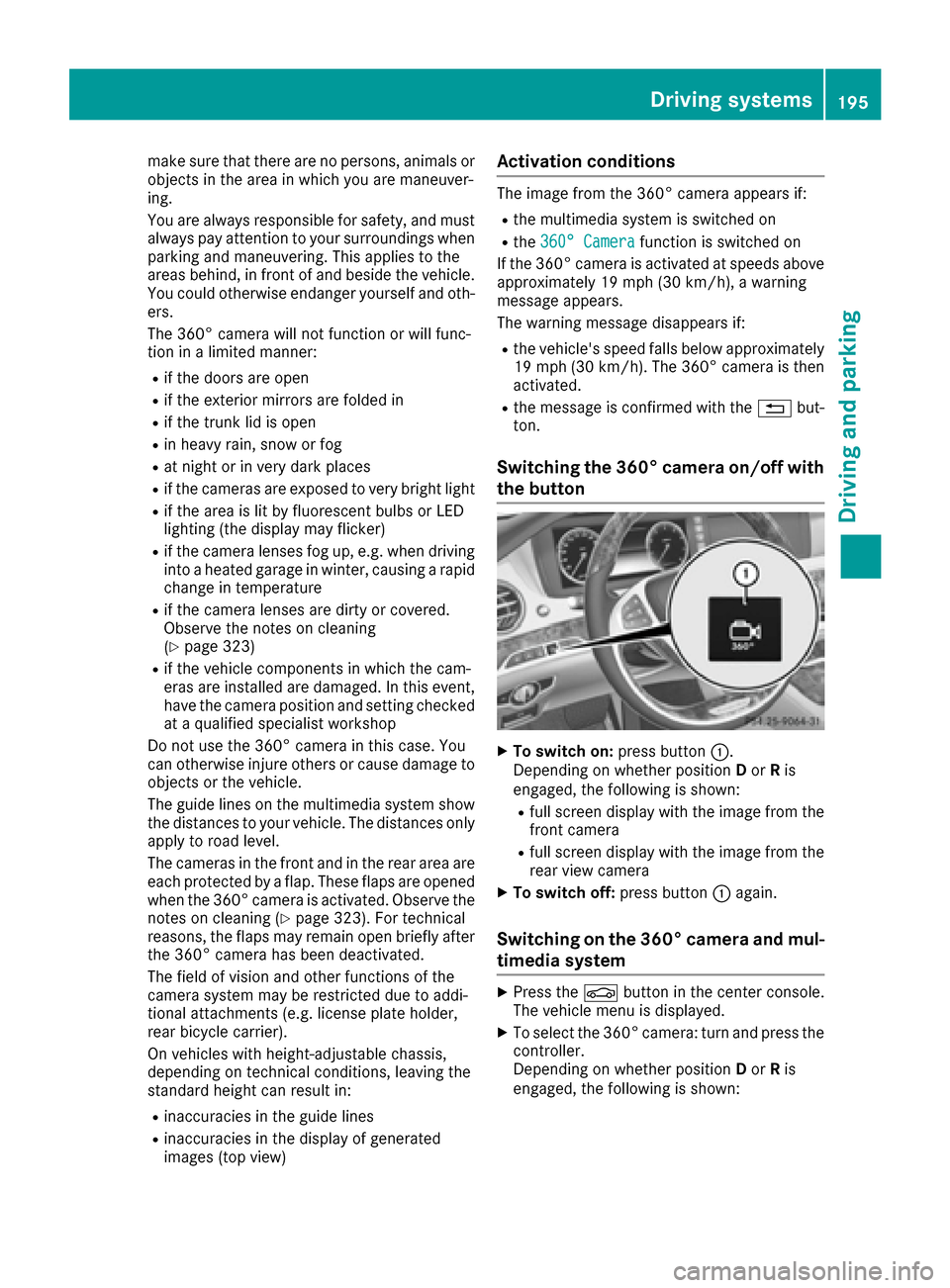
Switching the 360° camera on/off with
the button
XTo switch on: press button:.
Depending on whether position Dor Ris
engaged, the following is shown:
Rfull screen display with the image from the
front camera
Rfull screen display with the image from the
rear view camera
XTo switch off: press button:again.
Switching on the 360° camera and mul-
timedia system
XPress the Øbutton in the center console.
The vehicle menu is displayed.
XTo select the 360° camera: turn and press the
controller.
Depending on whether position Dor Ris
engaged, the following is shown:
Driving systems195
Driving and parking
Z
Page 198 of 382
Ra split screen with top view and the image
from the front camera or
Ra split screen with top view and the image
from the rear view camera
Activating the 360° camera using
reverse gear
The 360° camera images can be automatically
displayed by engaging reverse gear.
XMake sure that theActivation by R gearfunction is selected in the multimedia system
(see the Digital Operator's Manual).
XTo show the 360° camera image: engage
reverse gear.
The multimedia system shows the area
behind the vehicle in split-screen mode. You
see the top view of the vehicle and the image
from the rear view camera.
Selecting the split-screen view and full
screen mode
Switching between split screen views:
XTo switch to the line with the vehicle icons:
slide 5the controller.
XTo select a vehicle icon: turn the controller.
Switching to full screen mode:
XTurn and press 180°Viewwith the controller.
The 180° option is only available in the following
views:
RTop view with picture from the rear view cam-
era
RTop view with picture from the front camera
Displays in the multimedia system
Important safety notes
The camera system may show a distorted view
of obstacles, show them incorrectly or not at all.
Obstacles are not shown by the system in the
following locations:
Runder the front and rear bumpers
Rvery close to the front and rear bumpers
Rin close range above the handle on the trunk
lid
Rvery close to the exterior mirrors
Rin the transitional areas between the various
cameras in the virtual top view
!Objects not at ground level may appear to
be further away than they actually are, e.g.:
Rthe bumper of a parked vehicle
Rthe drawbar of a trailer
Rthe ball coupling of a trailer tow hitch
Rthe rear section of an HGV
Ra slanted post
Use the guidelines only for orientation.
Approach objects no further than the bottom-
most guideline.
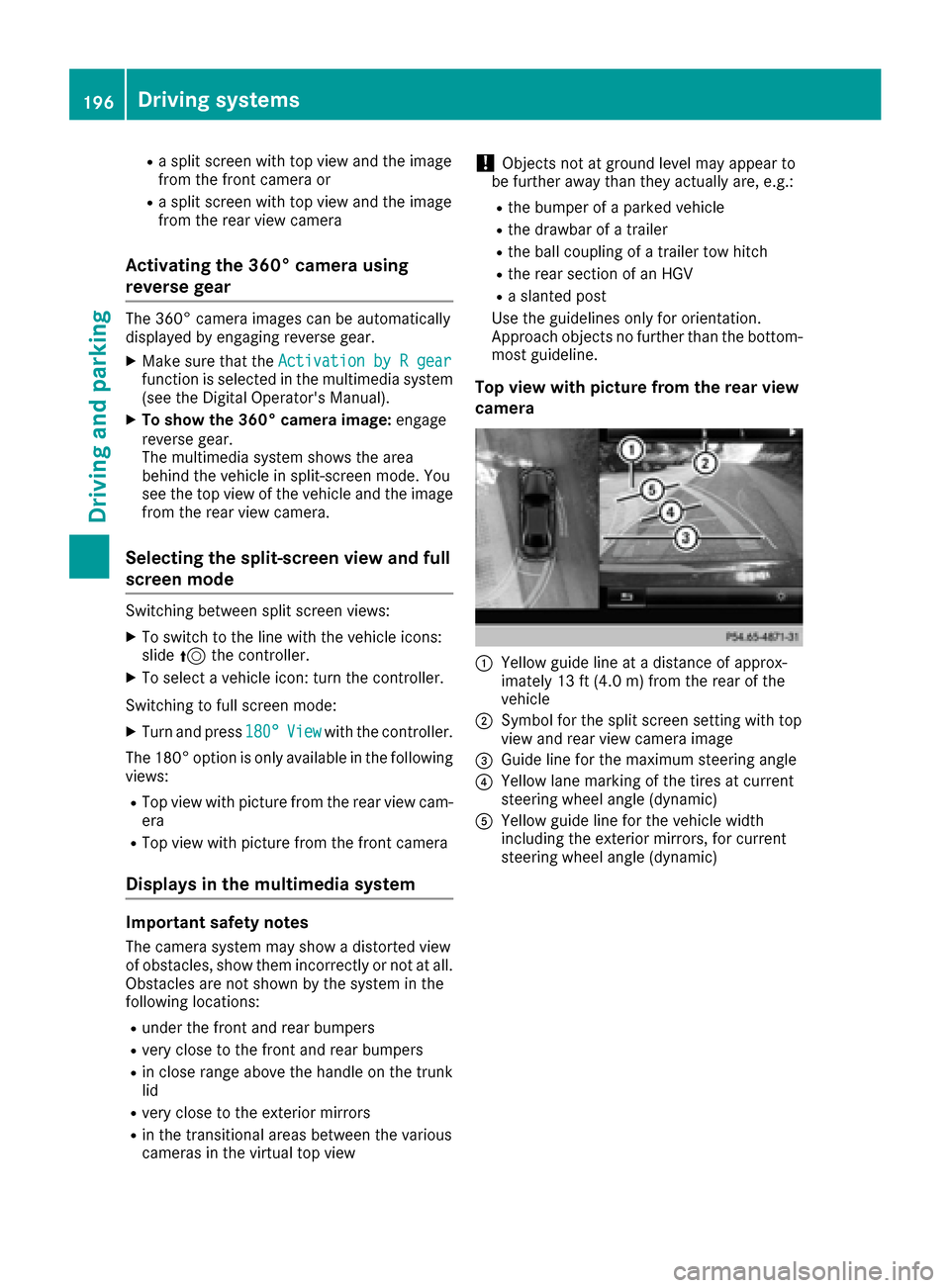
Top view with picture from the rear view
camera
:Yellow guide line at a distance of approx-
imately 13 ft (4.0 m) from the rear of the
vehicle
;Symbol for the split screen setting with top
view and rear view camera image
=Guide line for the maximum steering angle
?Yellow lane marking of the tires at current
steering wheel angle (dynamic)
AYellow guide line for the vehicle width
including the exterior mirrors, for current
steering wheel angle (dynamic)
196Driving systems
Driving and parking
Page 200 of 382
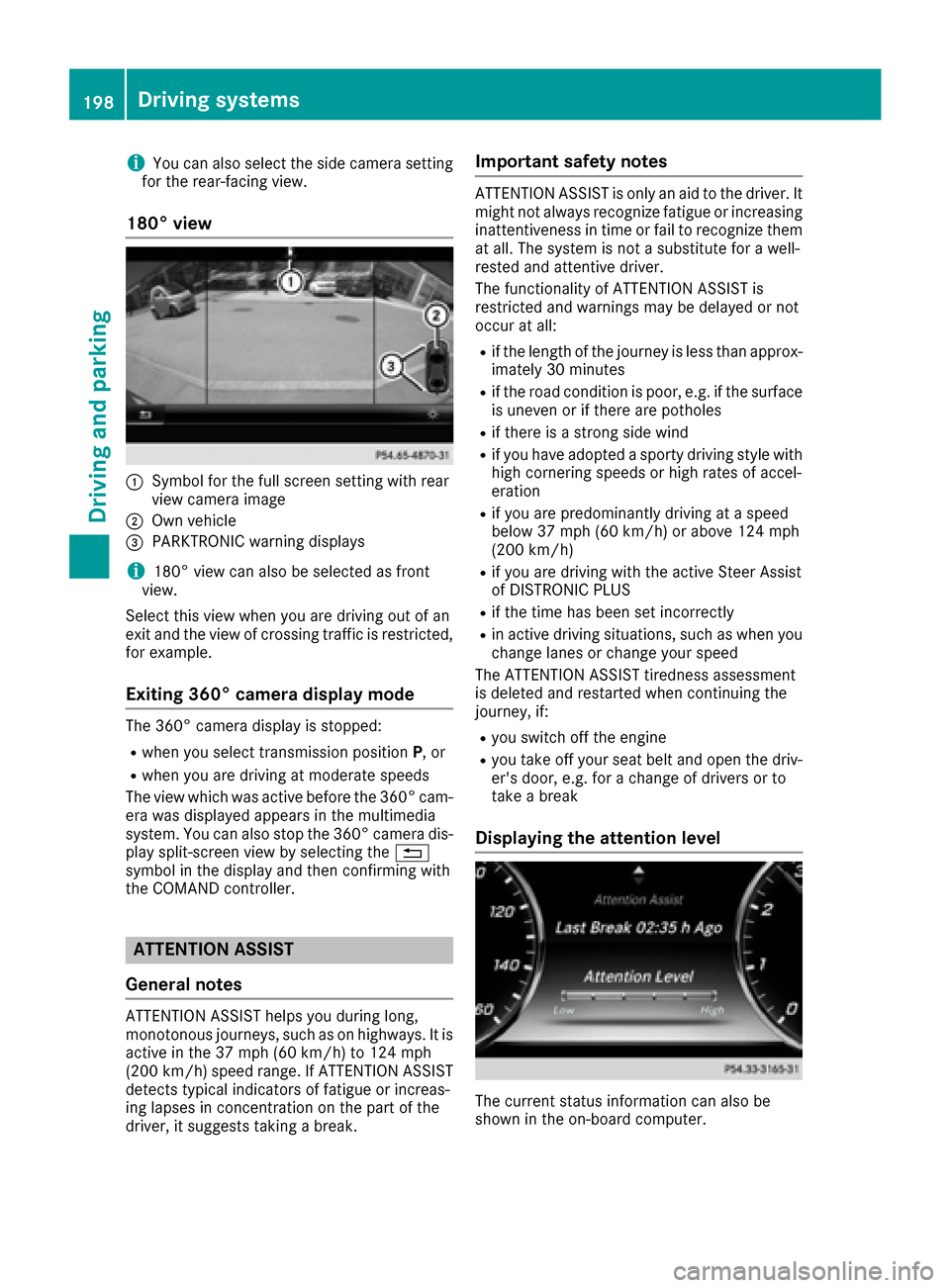
iYou can also select the side camera setting
for the rear-facing view.
180° view
:Symbol for the full screen setting with rear
view camera image
;Own vehicle
=PARKTRONIC warning displays
i180° view can also be selected as front
view.
Select this view when you are driving out of an
exit and the view of crossing traffic is restricted,
for example.
Exiting 360° camera display mode
The 360° camera display is stopped:
Rwhen you select transmission position P, or
Rwhen you are driving at moderate speeds
The view which was active before the 360° cam-
era was displayed appears in the multimedia
system. You can also stop the 360° camera dis-
play split-screen view by selecting the %
symbol in the display and then confirming with
the COMAND controller.
ATTENTION ASSIST
General notes
ATTENTION ASSIST helps you during long,
monotonous journeys, such as on highways. It is
active in the 37 mph (60 km/h) to 124 mph
(200 km/h) speed range. If ATTENTION ASSIST
detects typical indicators of fatigue or increas-
ing lapses in concentration on the part of the
driver, it suggests taking a break.
Important safety notes
ATTENTION ASSIST is only an aid to the driver. It
might not always recognize fatigue or increasing inattentiveness in time or fail to recognize them
at all. The system is not a substitute for a well-
rested and attentive driver.
The functionality of ATTENTION ASSIST is
restricted and warnings may be delayed or not
occur at all:
Rif the length of the journey is less than approx-
imately 30 minutes
Rif the road condition is poor, e.g. if the surface
is uneven or if there are potholes
Rif there is a strong side wind
Rif you have adopted a sporty driving style with
high cornering speeds or high rates of accel-
eration
Rif you are predominantly driving at a speed
below 37 mph (60 km/h) or above 124 mph
(200 km/h)
Rif you are driving with the active Steer Assist
of DISTRONIC PLUS
Rif the time has been set incorrectly
Rin active driving situations, such as when you change lanes or change your speed
The ATTENTION ASSIST tiredness assessment
is deleted and restarted when continuing the
journey, if:
Ryou switch off the engine
Ryou take off your seat belt and open the driv-
er's door, e.g. for a change of drivers or to
take a break
Displaying the attention level
The current status information can also be
shown in the on-board computer.
198Driving systems
Driving and parking
Page 272 of 382
Operating system
Overview
General notes
Wearing polarized sunglasses may impair your
ability to read the display.
The display has an automatic temperature-con-
trolled switch-off feature. The brightness is
automatically reduced if the temperature is too
high. The display may temporarily switch off
completely.
Cleaning instructions
!Do not touch the display. The display has a
very sensitive high-gloss surface; there is a
risk of scratching. If you have to clean the
screen, however, use a mild cleaning agent
and a soft, lint-free cloth.
The display must be switched off and have
cooled down before you start cleaning. Do not
apply pressure to the display surface when
cleaning it, as this could cause irreversible dam-
age to the display.
Switching the multimedia system
on/off
XPress the Übutton on the center console
to the right of the controller.
When you switch the multimedia system on, a
warning message will appear. The multimedia
system calls up the previously selected menu.
If you switch the multimedia system off, play- back of the current media source will also be
switched off.
Adjusting the volume
XTurn the thumbwheel to the right of the con-
troller.
or
XPress the WorX button on the multi-
function steering wheel.
The volume of the media source currently
selected changes.
The volume is adjusted:
Rfor the currently selected media source
Rduring traffic or navigation announcements
Rin hands-free mode during a phone call
Switching the sound on or off
XPress the thumbwheel beside the controller.
or
XPress the 8button on the multifunction
steering wheel.
If the audio output is switched off, the status
line will show the 8symbol. If you switch
the media source or change the volume, the
sound is automatically switched on.
iNavigation announcements will be heard
even if the sound is muted.
Functions
The multimedia system has the following func-
tions:
RRadio mode
RMedia mode with media search
RSound systems
RNavigation system
RCommunication functions
RSIRIUS Weather
RVehicle functions with system settings
RFavorites functions
RMulti-Seat Entertainment System
Controller
The controller in the center console lets you:
Rselect menu items on the display
Renter characters
Rselect a destination on the map
Rsave entries
The controller can be:
Rturned 3
Rslid left or right 1
Rslid forwards or back 4
Rslid diagonally2
Rpressed briefly or pressed and held 7
Back button
You can use the%button to exit a menu or to
call up the basic display of the current operating
mode.
270Operating system
Multimedia system
Page 273 of 382
XTo exit the menu:briefly press the%
button.
The multimedia system changes to the next
higher menu level in the current operating
mode.
XTo call up the basic display: press the%
button for longer than two seconds.
The multimedia system changes to the basic
display of the current operating mode.
The telephone keypad or touchpad
The multimedia system is equipped with either a
telephone keypad or a touchpad.
The telephone keypad is touch-sensitive. As
soon as one or several of the keys are gently
touched, the telephone keypad is shown in the
multimedia system's display. The key being
touched is highlighted.
As an alternative to the controller, the touchpad
enables menu items to be selected and charac-
ter entry including handwriting recognition, for
example.
Touchpad
Switching the touchpad on/off
Multimedia system:
XSelect VehicleQSystem Set‐tingsQTouchpadQActivate Touch‐pad.
The touchpad is switched on Oor off ª.
Operating the touchpad
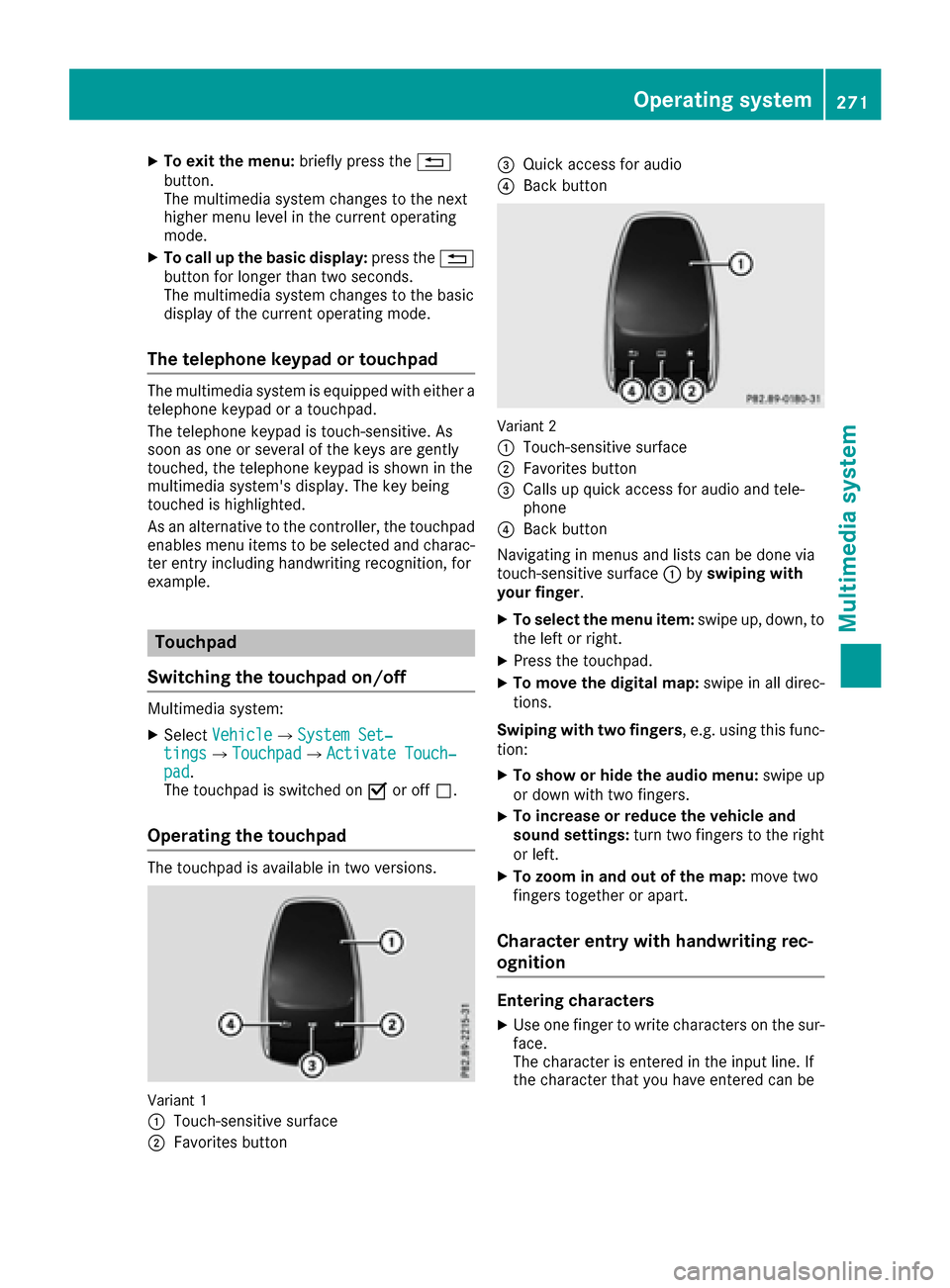
The touchpad is available in two versions.
Variant 1
:
Touch-sensitive surface
;Favorites button
=Quick access for audio
?Back button
Variant 2
:
Touch-sensitive surface
;Favorites button
=Calls up quick access for audio and tele-
phone
?Back button
Navigating in menus and lists can be done via
touch-sensitive surface :byswiping with
your finger.
XTo select the menu item: swipe up, down, to
the left or right.
XPress the touchpad.
XTo move the digital map: swipe in all direc-
tions.
Swiping with two fingers , e.g. using this func-
tion:
XTo show or hide the audio menu: swipe up
or down with two fingers.
XTo increase or reduce the vehicle and
sound settings: turn two fingers to the right
or left.
XTo zoom in and out of the map: move two
fingers together or apart.
Character entry with handwriting rec-
ognition
Entering characters
XUse one finger to write characters on the sur-
face.
The character is entered in the input line. If
the character that you have entered can be
Operating system271
Multimedia system
Z