2017 MERCEDES-BENZ S-Class MAYBACH lock
[x] Cancel search: lockPage 98 of 382
and
Rthe Start/Stop button is used instead of the
SmartKey in the ignition lock
and
Rthe engine is not running
This is carried out by means of a brief radio con-
nection between the vehicle and the SmartKey.
Rain-closing feature
The raised sliding sunroof automatically lowers
at the rear when driving if it starts to rain. The
sliding sunroof is lowered depending on:
Rthe road speed and
Rthe intensity of the rain
You can manually cancel the automatic closing
procedure. Press or pull the 3switch in any
direction.
To raise the sliding sunroof again, press the
3 switch in direction :. The rain-closing
feature remains activated.
Operating the roller sunblinds for the
sliding sunroof
Important safety notes
GWARNING
Parts of the body could become trapped
between the roller sunblind and frame or slid-
ing sunroof during automatic opening or clos-
ing. There is a risk of injury.
When opening or closing, make sure that no
body parts are in the sweep of the roller sun-
blind.
If somebody becomes trapped:
Rrelease the switch immediately, or
Rduring automatic operation, push the
switch briefly in any direction
The opening or closing procedure will be stop- ped.
The roller sunblinds shield the vehicle interior
from sunlight. The front roller sunblind can only be opened and closed when the sliding sunroof
is closed.
Roller sunblind reversing feature
The roller sunblinds are equipped with an auto-
matic reversing feature. If a solid object blocks
or restricts a roller sunblind during the closing
process, the roller sunblind opens again auto-
matically. The automatic reversing feature is
only an aid and is not a substitute for your atten-
tion when closing the roller sunblinds.
GWARNING
The reversing feature does not react in par-
ticular to soft, light and thin objects, e.g. small
fingers. This means that the reversing feature
cannot prevent someone being trapped in
these situations. There is a risk of injury.
When closing the roller sunblind, make sure
that no body parts are in the sweep area.
If somebody becomes trapped:
Rrelease the switch immediately, or
Rpress the switch in any direction during the
automatic closing process
The closing process is stopped.
Opening and closing the front roller sun-
blind
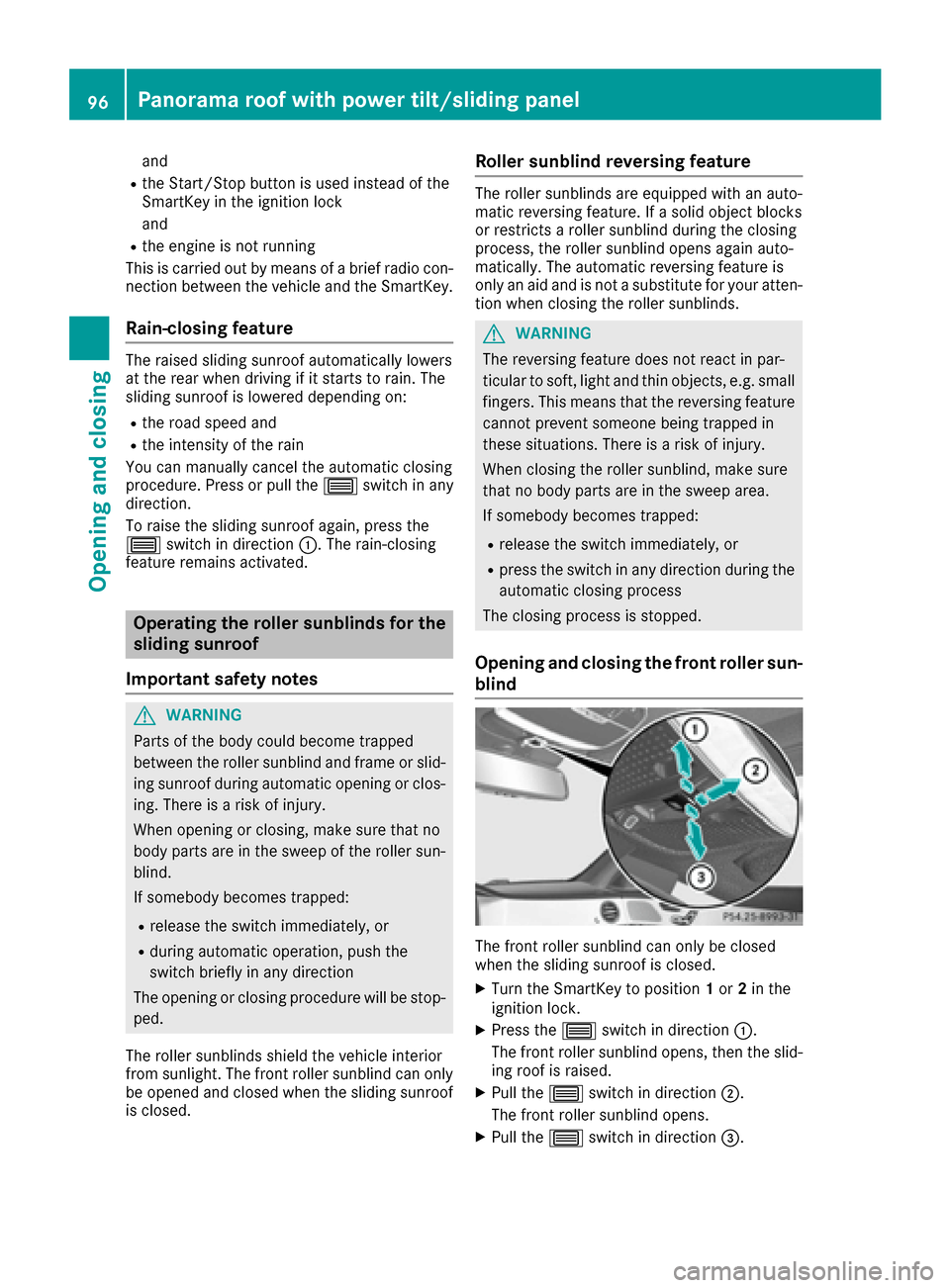
The front roller sunblind can only be closed
when the sliding sunroof is closed.
XTurn the SmartKey to position 1or 2in the
ignition lock.
XPress the 3switch in direction :.
The front roller sunblind opens, then the slid-
ing roof is raised.
XPull the 3switch in direction ;.
The front roller sunblind opens.
XPull the 3switch in direction =.
96Panorama roof with power tilt/sliding panel
Opening and closing
Page 100 of 382
The MAGIC SKY CONTROL voltage transformer
is stamped with a high-voltage symbol, warning
you about the high voltage. The electric cables
of the high-voltage section are color orange.
Operating MAGIC SKY CONTROL from
the front
XTurn the SmartKey to position1or 2in the
ignition lock.
MAGIC SKY CONTROL switches to the status
it was set to before the engine was switched
off.
XTo change the degree of transparency:
press button :.
If the rear MAGIC SKY CONTROL element is in a different state than the front element, the
degree of transparency will change only in the
front element. Both elements will then be in the
same state and any further changes will again
occur synchronously.
At sub-zero temperatures, the change is slower
and uneven. The entire process may take sometime.
Operating the rear MAGIC SKY CON-
TROL element from the rear
XTo change the degree of transparency
when the roller sunblind is fully opened:
press switch :.
XTo change the degree of transparency
when the roller sunblind is fully closed:
pull switch:.
The degree of transparency will change only
after the roller sunblind is opened.
If the rear roller sunblind closes when the rear
MAGIC SKY CONTROL element is not tinted, this
tints automatically.
Resetting the sliding sunroof and the
roller sunblind
Resetting the sliding sunroof or the
front roller sunblinds
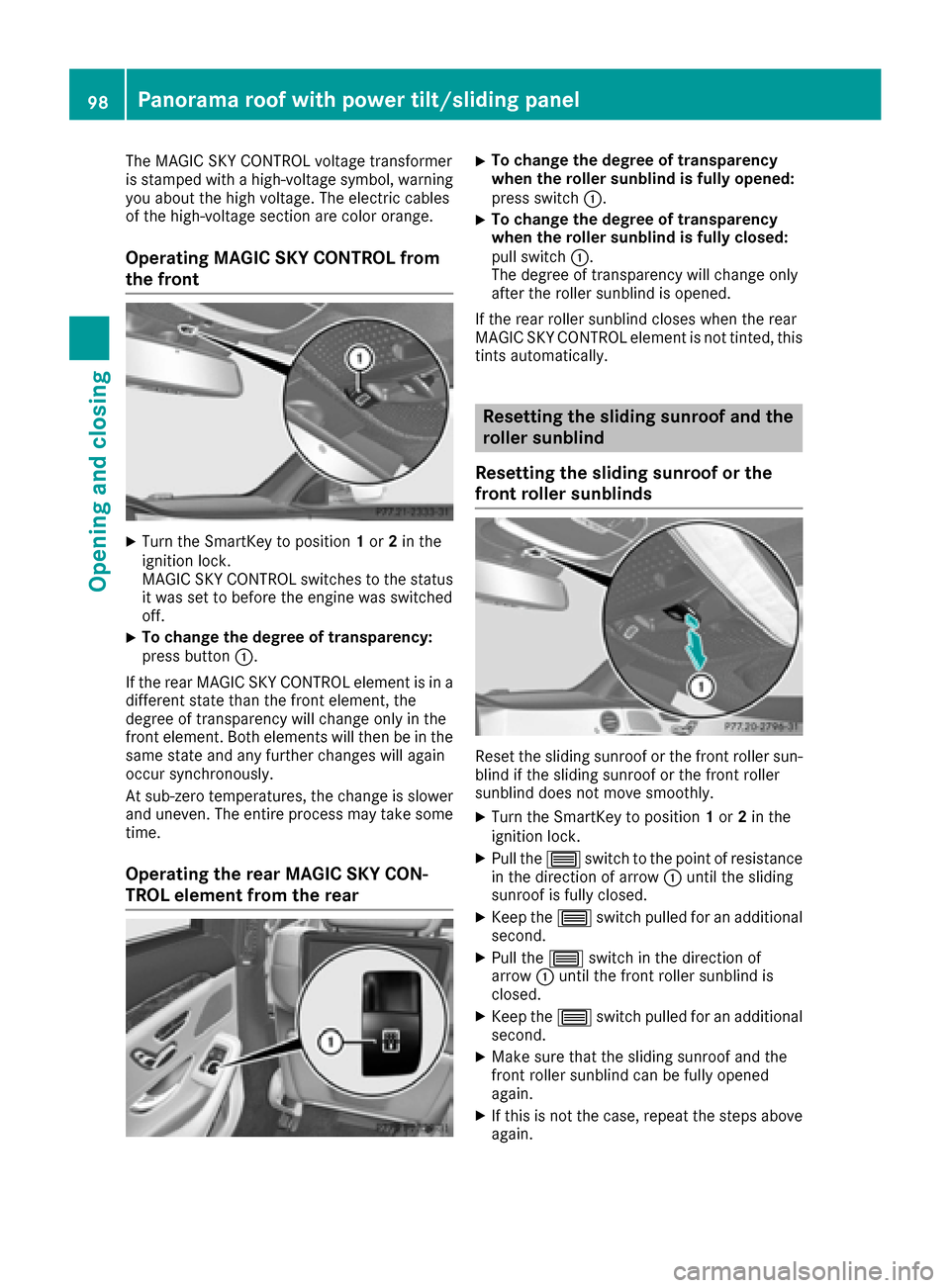
Reset the sliding sunroof or the front roller sun-
blind if the sliding sunroof or the front roller
sunblind does not move smoothly.
XTurn the SmartKey to position 1or 2in the
ignition lock.
XPull the 3switch to the point of resistance
in the direction of arrow :until the sliding
sunroof is fully closed.
XKeep the 3switch pulled for an additional
second.
XPull the 3switch in the direction of
arrow :until the front roller sunblind is
closed.
XKeep the 3switch pulled for an additional
second.
XMake sure that the sliding sunroof and the
front roller sunblind can be fully opened
again.
XIf this is not the case, repeat the steps above
again.
98Panorama roof with power tilt/sliding panel
Opening and closing
Page 101 of 382
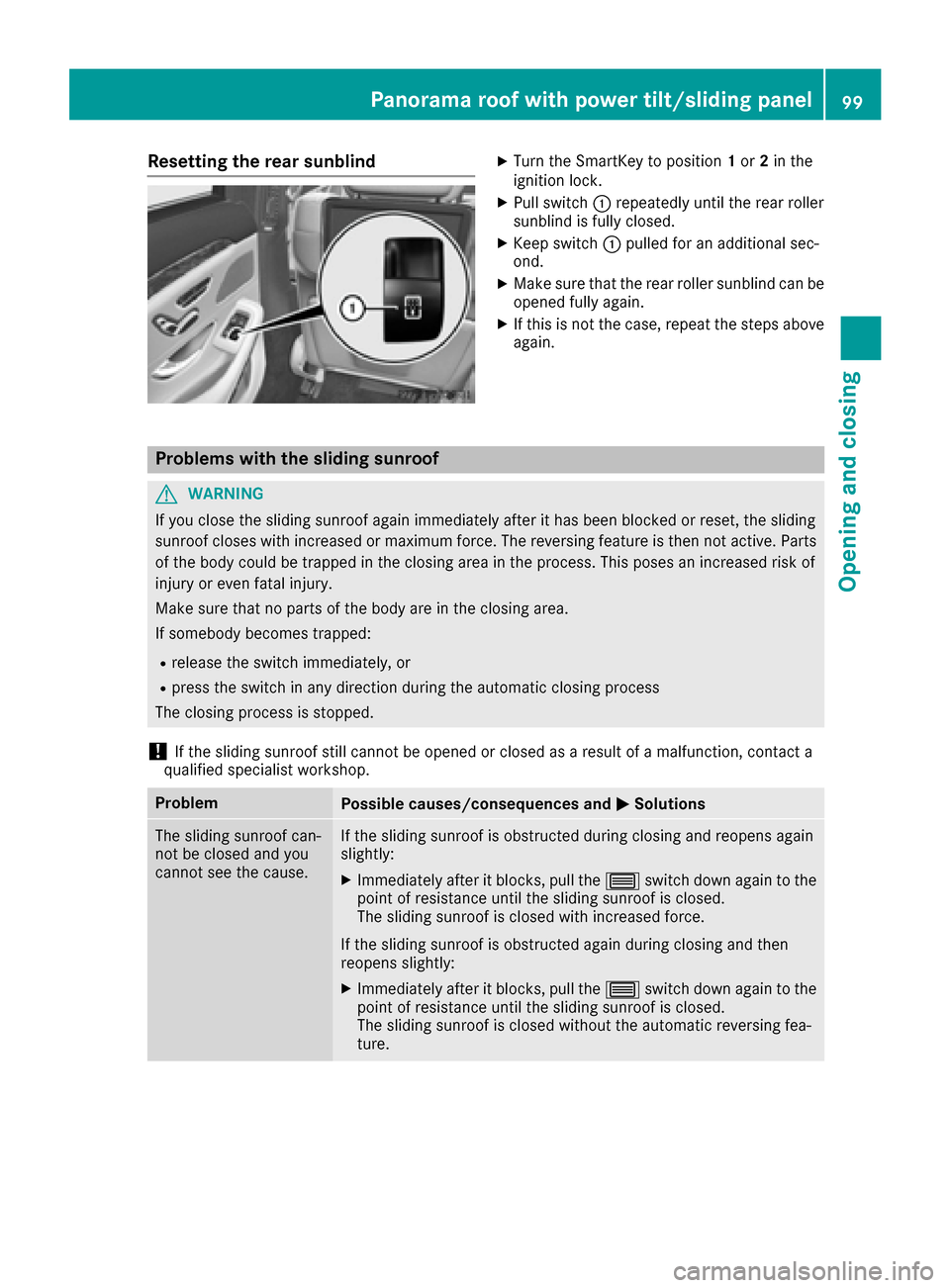
Resetting the rear sunblindXTurn the SmartKey to position1or 2in the
ignition lock.
XPull switch :repeatedly until the rear roller
sunblind is fully closed.
XKeep switch :pulled for an additional sec-
ond.
XMake sure that the rear roller sunblind can be
opened fully again.
XIf this is not the case, repeat the steps above
again.
Problems with the sliding sunroof
GWARNING
If you close the sliding sunroof again immediately after it has been blocked or reset, the sliding
sunroof closes with increased or maximum force. The reversing feature is then not active. Parts
of the body could be trapped in the closing area in the process. This poses an increased risk of
injury or even fatal injury.
Make sure that no parts of the body are in the closing area.
If somebody becomes trapped:
Rrelease the switch immediately, or
Rpress the switch in any direction during the automatic closing process
The closing process is stopped.
!If the sliding sunroof still cannot be opened or closed as a result of a malfunction, contact a
qualified specialist workshop.
ProblemPossible causes/consequences and MSolutions
The sliding sunroof can-
not be closed and you
cannot see the cause.If the sliding sunroof is obstructed during closing and reopens again
slightly:
XImmediately after it blocks, pull the3switch down again to the
point of resistance until the sliding sunroof is closed.
The sliding sunroof is closed with increased force.
If the sliding sunroof is obstructed again during closing and then
reopens slightly:
XImmediately after it blocks, pull the 3switch down again to the
point of resistance until the sliding sunroof is closed.
The sliding sunroof is closed without the automatic reversing fea-
ture.
Panorama roof with power tilt/sliding panel99
Opening and closing
Z
Page 102 of 382
Correct driver's seat position
GWARNING
You could lose control of your vehicle if you do the following while driving:
Radjust the driver's seat, head restraint,
steering wheel or mirrors
Rfasten the seat belt
There is a risk of an accident.
Adjust the driver's seat, head restraint, steer-
ing wheel and mirror and fasten your seat belt before starting the engine.
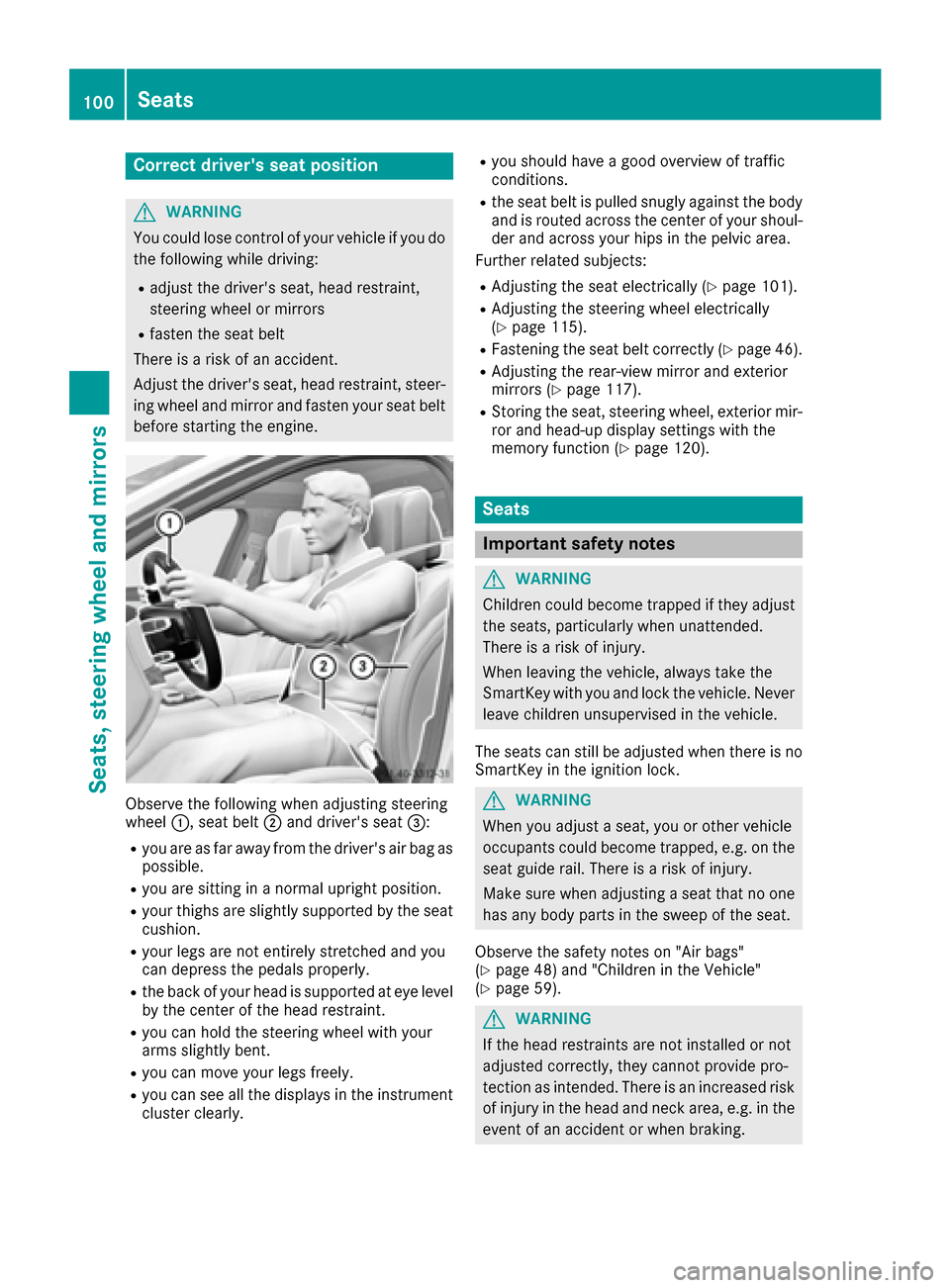
Observe the following when adjusting steering
wheel :, seat belt ;and driver's seat =:
Ryou are as far away from the driver's air bag as
possible.
Ryou are sitting in a normal upright position.
Ryour thighs are slightly supported by the seat
cushion.
Ryour legs are not entirely stretched and you
can depress the pedals properly.
Rthe back of your head is supported at eye level
by the center of the head restraint.
Ryou can hold the steering wheel with your
arms slightly bent.
Ryou can move your legs freely.
Ryou can see all the displays in the instrument
cluster clearly.
Ryou should have a good overview of traffic
conditions.
Rthe seat belt is pulled snugly against the bodyand is routed across the center of your shoul-
der and across your hips in the pelvic area.
Further related subjects:
RAdjusting the seat electrically (Ypage 101).
RAdjusting the steering wheel electrically
(Ypage 115).
RFastening the seat belt correctly (Ypage 46).
RAdjusting the rear-view mirror and exterior
mirrors (Ypage 117).
RStoring the seat, steering wheel, exterior mir-
ror and head-up display settings with the
memory function (
Ypage 120).
Seats
Important safety notes
GWARNING
Children could become trapped if they adjust
the seats, particularly when unattended.
There is a risk of injury.
When leaving the vehicle, always take the
SmartKey with you and lock the vehicle. Never
leave children unsupervised in the vehicle.
The seats can still be adjusted when there is no
SmartKey in the ignition lock.
GWARNING
When you adjust a seat, you or other vehicle
occupants could become trapped, e.g. on the seat guide rail. There is a risk of injury.
Make sure when adjusting a seat that no one
has any body parts in the sweep of the seat.
Observe the safety notes on "Air bags"
(
Ypage 48) and "Children in the Vehicle"
(Ypage 59).
GWARNING
If the head restraints are not installed or not
adjusted correctly, they cannot provide pro-
tection as intended. There is an increased risk
of injury in the head and neck area, e.g. in the event of an accident or when braking.
100Seats
Seats, steering wheel and mirrors
Page 105 of 382
ACombined seat cushion angleand length
BLegrest ang le
CLegrest length
The rear rec lining seat isonly availab le inlong
wheelbase veh iclesequipp edwith "executive
seats". On veh icleswit hout a rear rec lining seat,
the button for setting the ang leand length of the
legrest has no function.
Vehicle swit h a long wheelbase: dependin g on
the veh icleequipment, the rear rec lining seat is
either only on the front-passenger sideor also
on the driver's side.
Mercedes-Maybach veh icles: the rear rec lining
seats are on the driver's and the front-
passenger side.
Vehicle swit h a long wheelbase and equipped
wit h a "Rear compartment chauffeur/memory
package" also have a footrest. This islocated on
the lower part of the front-passenger seat back-
rest (
Ypage 104).
The legrest folds down ifoverloaded. Ifth is is the
case fold up the legrest and engage it.
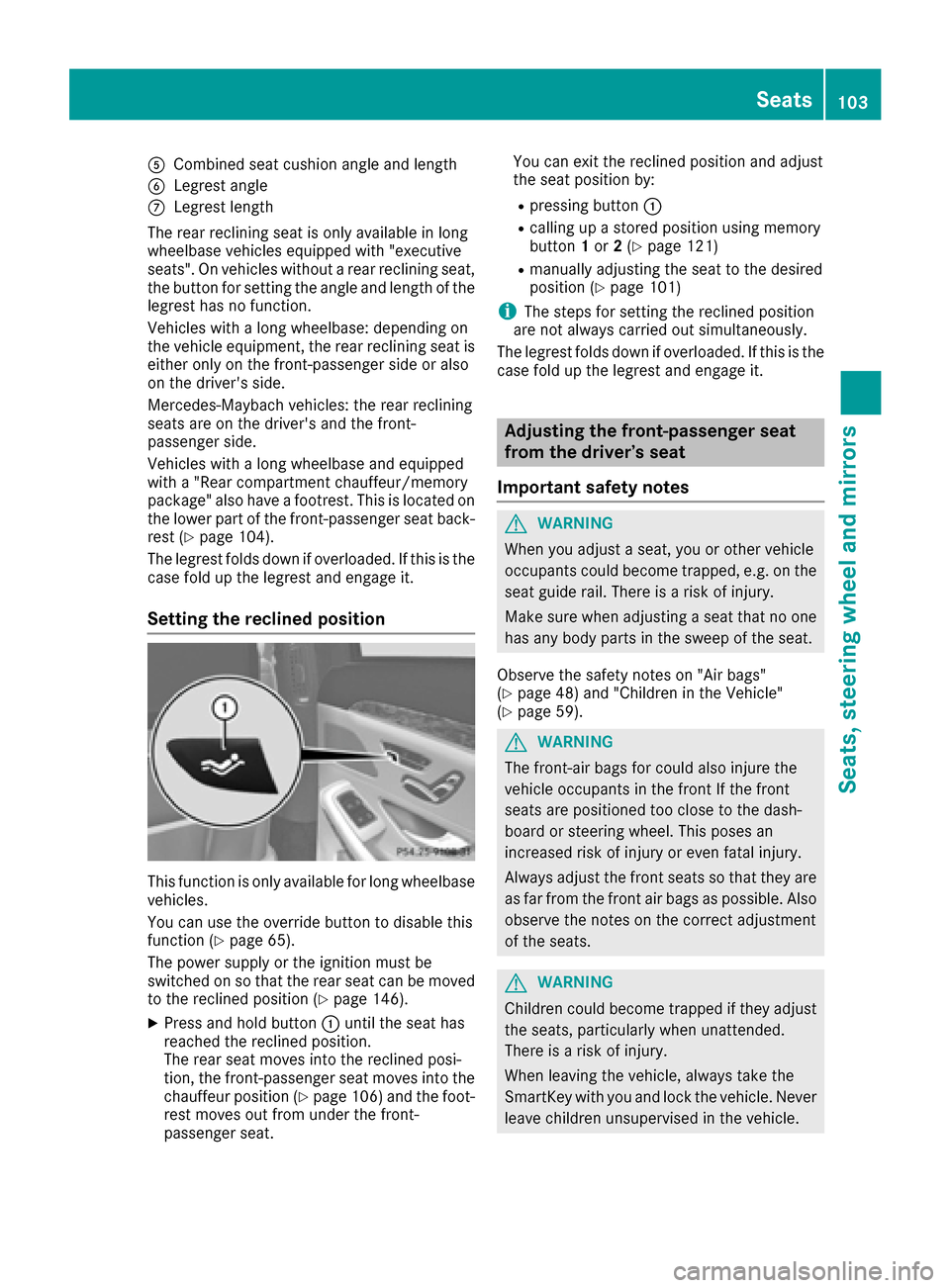
Setting the reclined position
This function isonly availab lefor long wheelbase
veh icles.
You can use the overr idebutton to disable this
function (
Ypage 65).
The power supplyor the ignition must be
swit ched on so that the rear seat can bemoved
to the rec lined position (
Ypage 146).
XPress and hold button :untilthe seat has
reached the rec lined position.
The rear seat moves into the rec lined posi-
tion, the front-passenger seat moves into the
chauffeur position (
Ypage 106) and the foot-
rest moves out from under the front-
passenger seat. You can exit the reclined position and adjust
the seat position by:
Rpressing button
:
Rcalling up a stored position using memory
button1or 2(Ypage 121)
Rmanually adjusting the seat to the desired
position (Ypage 101)
iThe steps for setting the reclined position
are not always carried out simultaneously.
The legrest folds down if overloaded. Ifthis is the
case fold up the legrest and engage it.
Adjusting the front-passenger seat
from the driver’s seat
Important safety notes
GWARNING
When you adjust a seat, you or other vehicle
occupants could become trapped, e.g. on the seat guide rail. There isa risk of injury.
Make sure when adjusting a seat that no one
has any body parts in the sweep of the seat.
Observe the safety notes on "Air bags"
(
Ypage 48) and "Children inthe Vehicle"
(Ypage 59).
GWARNING
The front-air bags for could also injure the
vehicle occupants in the front If the front
seats are positioned too close to the dash-
board or steering wheel. This poses an
increased risk of injury or even fatal injury.
Always adjust the front seats so that they are
as far from the front air bags as possible. Also
observe the notes on the correct adjustment
of the seats.
GWARNING
Childr en could become trapped if they adjust
the seats, particularly when unattende d.
There isa risk of injury.
When leaving the vehicle, always take the
Sm artKey with you and lock the vehicle. Never
leave children unsupervised in the vehicle.
Seats103
Seats, steering wheel and mirrors
Z
Page 106 of 382
!Do not move the front-passenger seat fully
forwards if there are objects in the parcel net
in the front-passenger footwell. The objects
could otherwise be damaged.
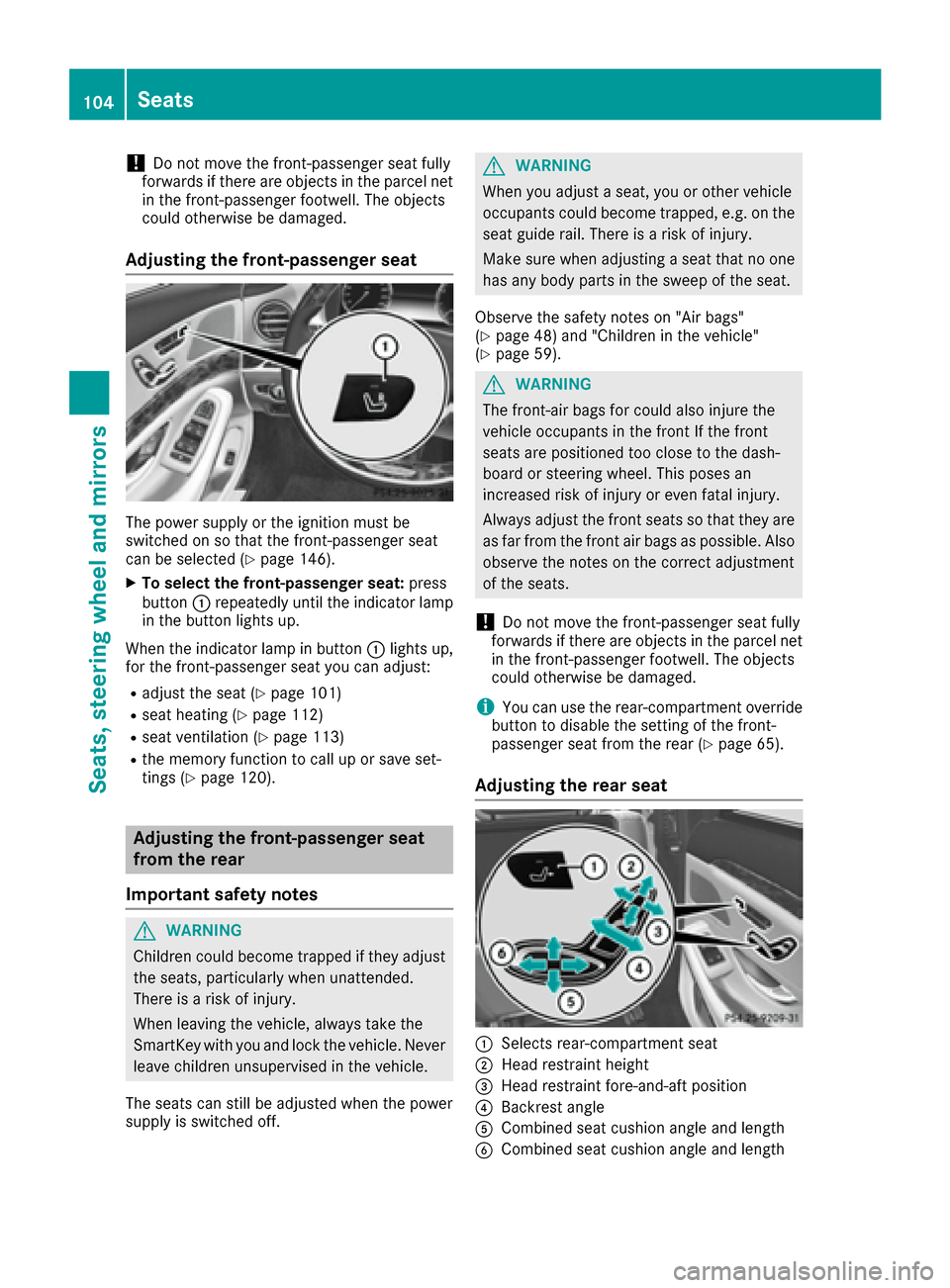
Adjusting the front-passenger seat
The power supply or the ignition must be
switched on so that the front-passenger seat
can be selected (
Ypage 146).
XTo select the front-passenger seat: press
button :repeatedly until the indicator lamp
in the button lights up.
When the indicator lamp in button :lights up,
for the front-passenger seat you can adjust:
Radjust the seat (Ypage 101)
Rseat heating (Ypage 112)
Rseat ventilation (Ypage 113)
Rthe memory function to call up or save set-
tings (Ypage 120).
Adjusting the front-passenger seat
from the rear
Important safety notes
GWARNING
Children could become trapped if they adjust
the seats, particularly when unattended.
There is a risk of injury.
When leaving the vehicle, always take the
SmartKey with you and lock the vehicle. Never
leave children unsupervised in the vehicle.
The seats can still be adjusted when the power
supply is switched off.
GWARNING
When you adjust a seat, you or other vehicle
occupants could become trapped, e.g. on the seat guide rail. There is a risk of injury.
Make sure when adjusting a seat that no one
has any body parts in the sweep of the seat.
Observe the safety notes on "Air bags"
(
Ypage 48) and "Children in the vehicle"
(Ypage 59).
GWARNING
The front-air bags for could also injure the
vehicle occupants in the front If the front
seats are positioned too close to the dash-
board or steering wheel. This poses an
increased risk of injury or even fatal injury.
Always adjust the front seats so that they are
as far from the front air bags as possible. Also
observe the notes on the correct adjustment
of the seats.
!Do not move the front-passenger seat fully
forwards if there are objects in the parcel net
in the front-passenger footwell. The objects
could otherwise be damaged.
iYou can use the rear-compartment override
button to disable the setting of the front-
passenger seat from the rear (
Ypage 65).
Adjusting the rear seat
:Selects rear-compartment seat
;Head restraint height
=Head restraint fore-and-aft position
?Backrest angle
ACombined seat cushion angle and length
BCombined seat cushion angle and length
104Seats
Seats, steering wheel and mirrors
Page 117 of 382
Steering wheel
Important safety notes
GWARNING
You could lose control of your vehicle if you do the following while driving:
Radjust the driver's seat, head restraint,
steering wheel or mirrors
Rfasten the seat belt
There is a risk of an accident.
Adjust the driver's seat, head restraint, steer-
ing wheel and mirror and fasten your seat belt before starting the engine.
GWARNING
Children could injure themselves if they
adjust the steering wheel. There is a risk of
injury.
When leaving the vehicle, always take the
SmartKey with you and lock the vehicle. Never
leave children unsupervised in the vehicle.
The electrically adjustable steering wheel can
still be adjusted when there is no SmartKey in
the ignition lock.
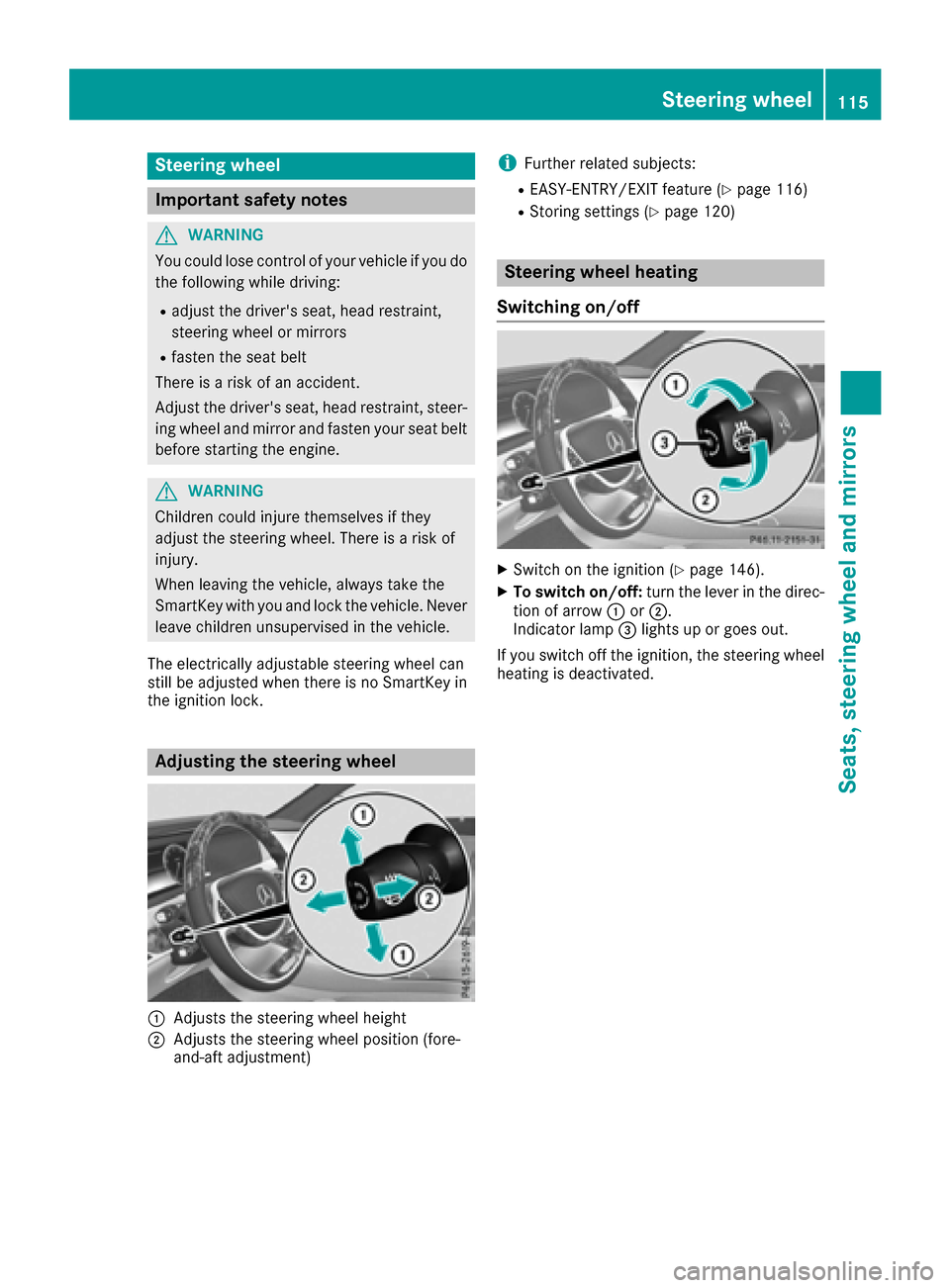
Adjusting the steering wheel
:Adjusts the steering wheel height
;Adjusts the steering wheel position (fore-
and-aft adjustment)
iFurther related subjects:
REASY-ENTRY/EXIT feature (Ypage 116)
RStoring settings (Ypage 120)
Steering wheel heating
Switching on/off
XSwitch on the ignition (Ypage 146).
XTo switch on/off: turn the lever in the direc-
tion of arrow :or;.
Indicator lamp =lights up or goes out.
If you switch off the ignition, the steering wheel
heating is deactivated.
Steering wheel115
Seats, steering wheel and mirrors
Z
Page 118 of 382
Problems with the steering wheel heating
ProblemPossible causes/consequences andMSolutions
The steering wheel heat-
ing has switched off pre-
maturely or cannot be
switched on.The on-board voltage is too low because too many electrical consum-
ers are switched on.
XSwitch off electrical consumers that you do not need, such as the
rear window defroster or interior lighting.
EASY-ENTRY/EXIT feature
Important safety notes
GWARNING
When the EASY-ENTRY/EXIT feature adjusts
the steering wheel and the driver's seat, you
and other vehicle occupants – particularly
children – could become trapped. There is a
risk of injury.
While the EASY-ENTRY/EXIT feature is mak-
ing adjustments, make sure that no one has
any body parts in the sweep of the seat and
the steering wheel.
If there is a risk of becoming trapped by
Rthe steering wheel: move the steering
wheel adjustment lever.
Rthe seat: press the switch for seat adjust-
ment.
The adjustment process is stopped.
You can stop the adjustment process by press-
ing one of the memory function's position but-
tons. This function is only available on vehicles
with memory function.
GWARNING
If children activate the EASY-ENTRY/EXIT fea-
ture, they can become trapped, particularly
when unattended. There is a risk of injury.
When leaving the vehicle, always take the
SmartKey with you and lock the vehicle. Never
leave children unsupervised in the vehicle.
GWARNING
If you drive off while the EASY-ENTRY/EXIT
feature is making adjustments, you could lose
control of the vehicle. There is a risk of an
accident.
Always wait until the adjustment process is
complete before driving off.
The EASY-ENTRY/EXIT feature makes getting in
and out of your vehicle easier.
You can activate and deactivate the EASY-
ENTRY/EXIT feature using the multimedia sys-
tem (see the Digital Operator's Manual).
Position of the steering wheel and the
driver's seat when the EASY-ENTRY/
EXIT feature is active
The steering wheel tilts upwards and the driver's seat moves backwards if you:
Rremove the SmartKey from the ignition lock
Rwith the start/stop button: open the driv-
er's door; the ignition must be switched off
Rwith the SmartKey: open the driver's door;
the SmartKey must be in position 0or 1in the
ignition lock (
Ypage 145)
iThe steering wheel only tilts upwards and
the driver's seat only moves backwards if the
driving position is stored after the seat or
steering column has been adjusted.
The last position of the steering wheel or seat is
stored if:
Rthe ignition is switched off
Rthe setting is stored with the memory function
(Ypage 120).
iThe steering wheel only moves upwards if it
has not already reached the upper stop. The
driver's seat only moves backwards if it is not
already in the rearmost position.
116Steering wheel
Seats, steering wheel and mirrors