2017 MERCEDES-BENZ S-Class MAYBACH fog light
[x] Cancel search: fog lightPage 179 of 382
cause your vehicle to pull away unintention-
ally.
In such situations, brake if necessary.
DISTRONIC PLUS is then deactivated.
DISTRONIC PLUS with Steering Assist
and Stop&Go Pilot
General notes
DISTRONIC PLUS with Steering Assist and
Stop&Go Pilot helps you keep the vehicle in the
center of the lane by means of moderate steer-
ing interventions in a speed range from
0–125 mph (0–200 km/h).
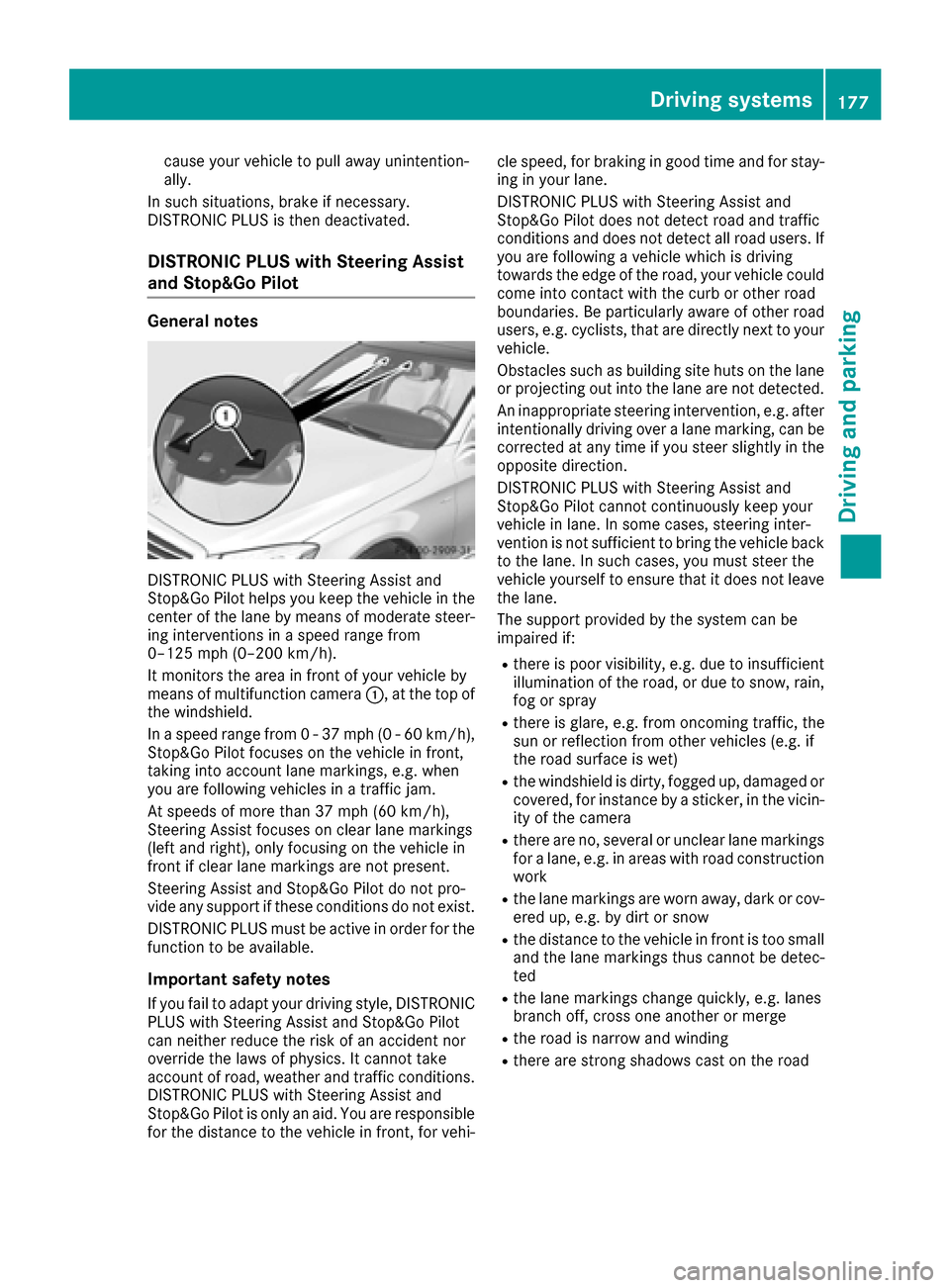
It monitors the area in front of your vehicle by
means of multifunction camera :, at the top of
the windshield.
In a speed range from 0 - 37 mph (0 - 60 km/h),
Stop&Go Pilot focuses on the vehicle in front,
taking into account lane markings, e.g. when
you are following vehicles in a traffic jam.
At speeds of more than 37 mph (60 km/h),
Steering Assist focuses on clear lane markings
(left and right), only focusing on the vehicle in
front if clear lane markings are not present.
Steering Assist and Stop&Go Pilot do not pro-
vide any support if these conditions do not exist.
DISTRONIC PLUS must be active in order for the
function to be available.
Important safety notes
If you fail to adapt your driving style, DISTRONIC
PLUS with Steering Assist and Stop&Go Pilot
can neither reduce the risk of an accident nor
override the laws of physics. It cannot take
account of road, weather and traffic conditions.
DISTRONIC PLUS with Steering Assist and
Stop&Go Pilot is only an aid. You are responsible
for the distance to the vehicle in front, for vehi- cle speed, for braking in good time and for stay-
ing in your lane.
DISTRONIC PLUS with Steering Assist and
Stop&Go Pilot does not detect road and traffic
conditions
and d
oes not detect all road users. If
you are following a vehicle which is driving
towards the edge of the road, your vehicle could
come into contact with the curb or other road
boundaries. Be particularly aware of other road
users, e.g. cyclists, that are directly next to your
vehicle.
Obstacles such as building site huts on the lane
or projecting out into the lane are not detected.
An inappropriate steering intervention, e.g. after intentionally driving over a lane marking, can be
corrected at any time if you steer slightly in the
opposite direction.
DISTRONIC PLUS with Steering Assist and
Stop&Go Pilot cannot continuously keep your
vehicle in lane. In some cases, steering inter-
vention is not sufficient to bring the vehicle backto the lane. In such cases, you must steer the
vehicle yourself to ensure that it does not leave
the lane.
The support provided by the system can be
impaired if:
Rthere is poor visibility, e.g. due to insufficient
illumination of the road, or due to snow, rain,
fog or spray
Rthere is glare, e.g. from oncoming traffic, the
sun or reflection from other vehicles (e.g. if
the road surface is wet)
Rthe windshield is dirty, fogged up, damaged or
covered, for instance by a sticker, in the vicin-
ity of the camera
Rthere are no, several or unclear lane markings
for a lane, e.g. in areas with road constru ction
w
ork
Rthe lane markings are worn away, dark or cov-
ered up, e.g. by dirt or snow
Rthe distance to the vehicle in front is too small
and the lane markings thus cannot be detec-
ted
Rthe lane markings change quickly, e.g. lanes
branch off, cross one another or merge
Rthe road is narrow and winding
Rthere are strong shadows cast on the road
Driving systems177
Driving and parking
Z
Page 192 of 382
Surroundingsmessage appears in the mul-
tifunction display.
iYou will achieve the best results by waiting
for the steering procedure to complete before
pulling away.
If you back up after activation, the steering
wheel is moved to the straight-ahead posi-
tion.
XDrive forwards and back up as prompted by
the PARKTRONIC warning displays, several
times if necessary.
Once you have exited the parking space com-
pletely, the steering wheel is moved to the
straight-ahead position. You hear a tone and the
Park
AssistSwitchedOffmessage appears
in the multifunction display. You will then have
to steer and merge into traffic on your own.
PARKTRONIC is still available. You can take over
the steering before the vehicle has exited the
parking space completely. This is useful if you
recognize that it is already possible to pull out of
the parking space.
Canceling Active Parking Assist
XStop the movement of the multifunction
steering wheel or steer yourself.
Active Parking Assist will be canceled at once.
The Park Assist Canceled
message
appears in the multifunction display.
or
XPress the PARKTRONIC button (Ypage 185).
PARKTRONIC is switched off and Active Park-
ing Assist is immediately canceled. The Park
Assist Canceledmessage appears in the
multifunction display.
Active Parking Assist is canceled automatically
if:
Rthe electric parking brake is engaged
Rtransmission position Pis selected
Rparking using Active Parking Assist is no lon-
ger possible
Ryou are driving faster than 6 mph (10 km/h)
Ra wheel spins, ESP®intervenes or fails. The
÷ warning lamp lights up in the instrument
cluster
A warning tone sounds. The parking symbol dis-
appears and the multifunction display shows the
Park Assist Canceled
message.
When Active Parking Assist is canceled, you
must steer and brake again yourself. If a system malfunction occurs, the vehicle is
braked to a standstill. To drive on, depress the
accelerator again.
Rear view camera
General notes
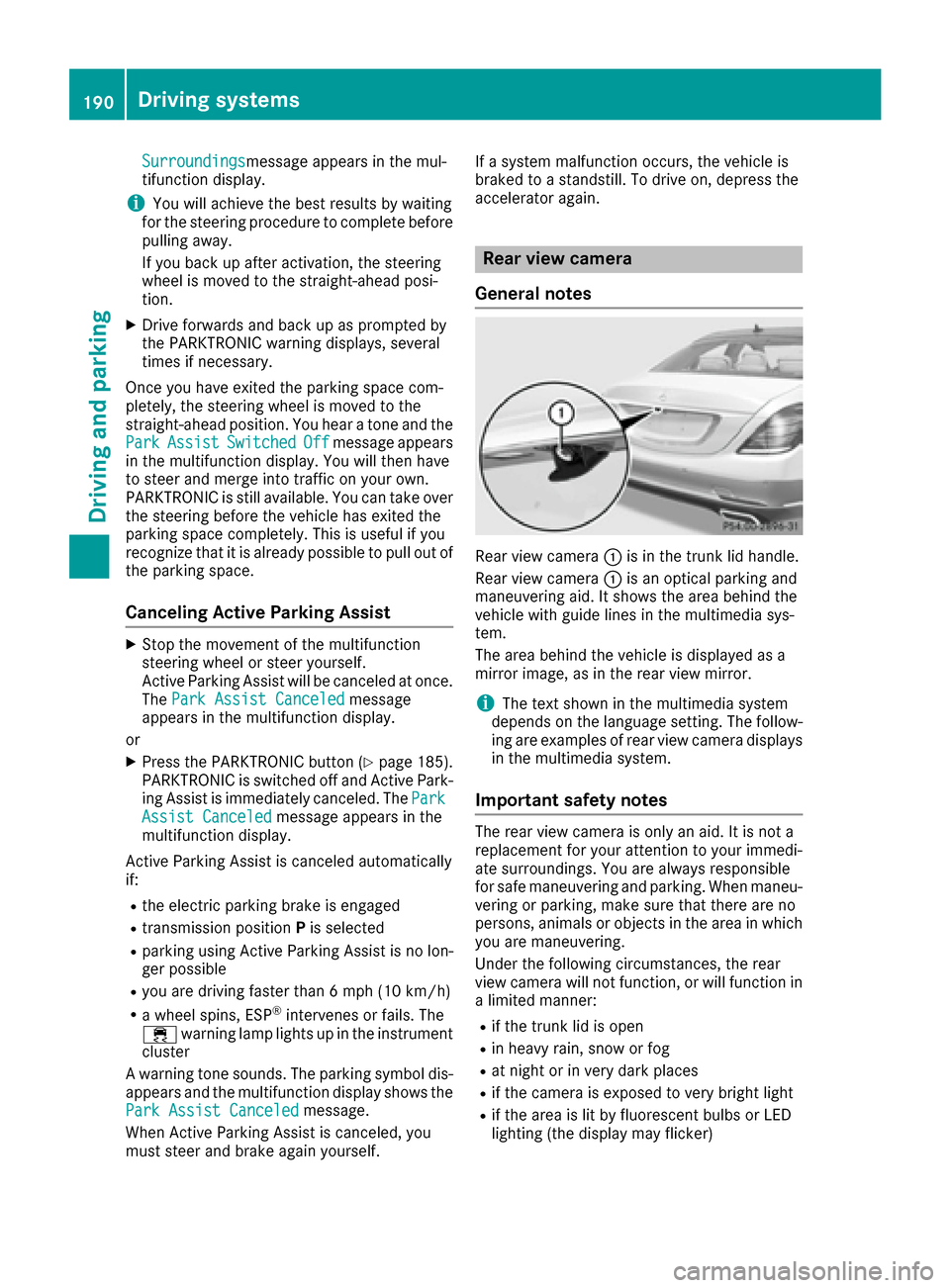
Rear view camera :is in the trunk lid handle.
Rear view camera :is an optical parking and
maneuvering aid. It shows the area behind the
vehicle with guide lines in the multimedia sys-
tem.
The area behind the vehicle is displayed as a
mirror image, as in the rear view mirror.
iThe text shown in the multimedia system
depends on the language setting. The follow- ing are examples of rear view camera displays
in the multimedia system.
Important safety notes
The rear view camera is only an aid. It is not a
replacement for your attention to your immedi-
ate surroundings. You are always responsible
for safe maneuvering and parking. When maneu-
vering or parking, make sure that there are no
persons, animals or objects in the area in whichyou are maneuvering.
Under the following circumstances, the rear
view camera will not function, or will function in
a limited manner:
Rif the trunk lid is open
Rin heavy rain, snow or fog
Rat night or in very dark places
Rif the camera is exposed to very bright light
Rif the area is lit by fluorescent bulbs or LED
lighting (the display may flicker)
190Driving systems
Driving and parking
Page 197 of 382
make sure that there are no persons, animals or
objects in the area in which you are maneuver-
ing.
You are always responsible for safety, and must
always pay attention to your surroundings when parking and maneuvering. This applies to the
areas behind, in front of and beside the vehicle.
You could otherwise endanger yourself and oth-
ers.
The 360° camera will not function or will func-
tion in a limited manner:
Rif the doors are open
Rif the exterior mirrors are folded in
Rif the trunk lid is open
Rin heavy rain, snow or fog
Rat night or in very dark places
Rif the cameras are exposed to very bright light
Rif the area is lit by fluorescent bulbs or LED
lighting (the display may flicker)
Rif the camera lenses fog up, e.g. when driving
into a heated garage in winter, causing a rapid
change in temperature
Rif the camera lenses are dirty or covered.
Observe the notes on cleaning
(
Ypage 323)
Rif the vehicle components in which the cam-
eras are installed are damaged. In this event,have the camera position and setting checked
at a qualified specialist workshop
Do not use the 360° camera in this case. You
can otherwise injure others or cause damage to
objects or the vehicle.
The guide lines on the multimedia system show
the distances to your vehicle. The distances only
apply to road level.
The cameras in the front and in the rear area are
each protected by a flap. These flaps are opened when the 360° camera is activated. Observe the
notes on cleaning (
Ypage 323). For technical
reasons, the flaps may remain open briefly after
the 360° camera has been deactivated.
The field of vision and other functions of the
camera system may be restricted due to addi-
tional attachments (e.g. license plate holder,
rear bicycle carrier).
On vehicl es w
ith height-adjustable chassis,
depending on technical conditions, leaving the
standard height can result in:
Rinaccuracies in the guide lines
Rinaccuracies in the display of generated
images (top view)
Activation conditions
The image from the 360° camera appears if:
Rthe multimedia system is switched on
Rthe 360° Camerafunction is switched on
If the 360° camera is activated at speeds above approximately 19 mph (30 km/h), a warning
message appears.
The warning message disappears if:
Rthe vehicle's speed falls below approximately
19 mph (30 km/h). The 360° camera is then
activated.
Rthe message is confirmed with the %but-
ton.
Switching the 360° camera on/off with
the button
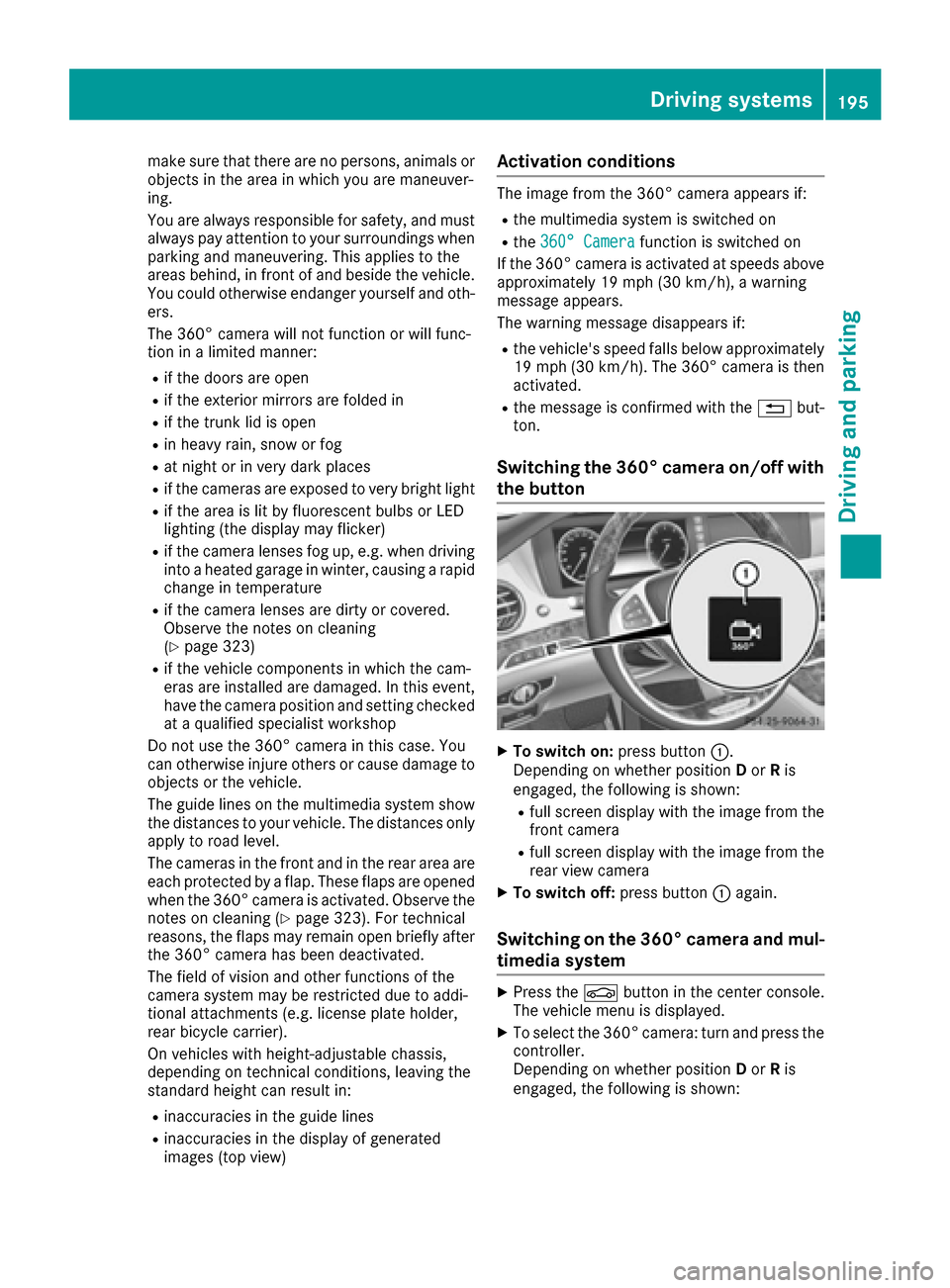
XTo switch on: press button:.
Depending on whether position Dor Ris
engaged, the following is shown:
Rfull screen display with the image from the
front camera
Rfull screen display with the image from the
rear view camera
XTo switch off: press button:again.
Switching on the 360° camera and mul-
timedia system
XPress the Øbutton in the center console.
The vehicle menu is displayed.
XTo select the 360° camera: turn and press the
controller.
Depending on whether position Dor Ris
engaged, the following is shown:
Driving systems195
Driving and parking
Z
Page 203 of 382

and any obstacles in good time. When pedes-
trian recognition is active, pedestrians recog-
nized by the system are visually highlighted in
color in the Night View Assist Plus display with
small frame corners.
In addition, an infrared camera is integrated into
radiator trim:. The camera helps detect
pedestrians and animals. Observe the notes on
cleaning the infrared camera (
Ypage 324).
iInfrared light is not visible to the human eye
and therefore does not glare. Night View
Assist Plus can therefore remain switched on
even if there is oncoming traffic.
Important safety notes
Night View Assist Plus is only an aid and is not a
substitute for attentive driving. Do not rely on
the Night View Assist Plus display. You are
responsible for the distance to the vehicle in
front, for vehicle speed and for braking in good
time. Drive carefully and always adapt your driv-
ing style to suit the prevailing road and traffic
conditions.
The system may be impaired or may not function
if:
Rthere is poor visibility, e.g. due to snow, rain,
fog or spray
Rthe windshield is dirty, fogged up or covered,
for instance by a sticker, in the vicinity of the
camera
Rthe infrared camera in the radiator trim is
dirty, fogged up or obscured
Ron bends, hilltops or downhill gradients
Rat high outside temperatures
Night View Assist Plus cannot display objects
directly in front of or beside the vehicle.
It is possible that, in addition to people and ani-
mals, other objects are also marked or highligh-
ted .
Pedestrian and animal recognition
General notes
Pedestrian or animal recognition may be
impaired or inoperative if:
Rpedestrians or animals are partially or entirely
obscured by other objects, e.g. parked vehi-
cles
Rthe silhouette of the pedestrian or of the ani-
mal in the Night View Assist Plus display is incomplete or interrupted, e.g. by powerful
light reflections
Rpedestrians or animals do not contrast with
the surroundings
Rthe camera system no longer recognizes
pedestrians as persons due to special cloth-
ing or other objects
Rpedestrians are not in an upright position, e.g.
sitting, squatting or lying
Ranimals are not recognized by the system,
e.g. because of their size or shape
Pedestrian and animal recognition is deactiva-
ted at temperatures above 90 ‡ (32 †). The
spotlight function and automatic delayed
switch-off are then no longer active.
Pedestrian recognition
:Night View Assist Plus display
;Readiness symbol for active pedestrian rec- ognition
=Highlighting
?Pedestrian recognized
Night View Assist Plus can recognize pedes-
trians using typical characteristics, e.g. the body
contours and posture of a person standing
upright.
Pedestrian recognition is then switched on auto- matically if:
RNight View Assist Plus is activated.
Ryou are driving faster than approximately
6 mph (10 km/h).
Rit is dark.
If pedestrian recognition is active, readiness
symbol ;appears. Persons who are detected
are highlighted by framing =. If the pedestrian
recognition system has brought a pedestrian to
your attention, look through the windshield to
evaluate the situation. The actual distance to
Driving systems201
Driving and parking
Z
Page 205 of 382
lamps to flash four short pulses at a pedestrian
detected on or near to the road.
XIn the light menu, select the spotlight function
of Night View Assist Plus (Ypage 225).
The spotlight function does not flash at animals.
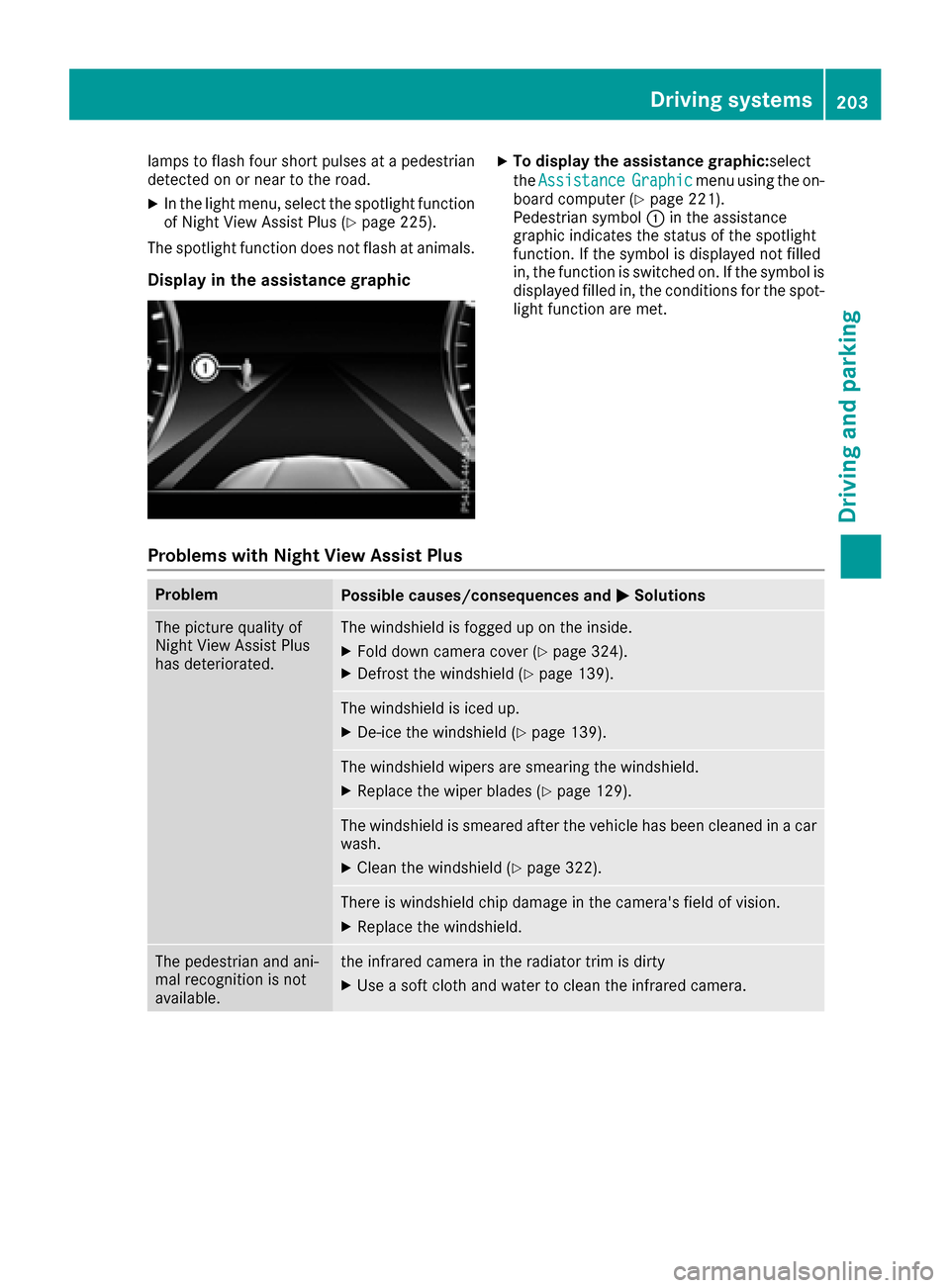
Display in the assistance graphic
XTo display the assistance graphic: select
the Assistance
Graphicmenu using the on-
board computer (Ypage 221).
Pedestrian symbol :in the assistance
graphic indicates the status of the spotlight
function. If the symbol is displayed not filled
in, the function is switched on. If the symbol is
displayed filled in, the conditions for the spot-
light function are met.
Problems with Night View Assist Plus
ProblemPossible causes/consequences and MSolutions
The picture quality of
Night View Assist Plus
has deteriorated.The windshield is fogged up on the inside.
XFold down camera cover (Ypage 324).
XDefrost the windshield (Ypage 139).
The windshield is iced up.
XDe-ice the windshield (Ypage 139).
The windshield wipers are smearing the windshield.
XReplace the wiper blades (Ypage 129).
The windshield is smeared after the vehicle has been cleaned in a car
wash.
XClean the windshield (Ypage 322).
There is windshield chip damage in the camera's field of vision.
XReplace the windshield.
The pedestrian and ani-
mal recognition is not
available.the infrared camera in the radiator trim is dirty
XUse a soft cloth and water to clean the infrared camera.
Driving systems203
Driving and parking
Z
Page 209 of 382

Active Lane Keeping Assist cannot continuously
keep your vehicle in its lane.
GWARNING
Active Lane Keeping Assist cannot always
clearly detect lane markings.
In such cases, Active Lane Keeping Assist
can:
Rgive an unnecessary warning and then
make a course-correcting brake application
to the vehicle
Rnot give a warning or intervene
There is a risk of an accident.
Always pay particular attention to the traffic
situation and keep within the lane, especially
if Active Lane Keeping Assist alerts you. Ter-
minate the intervention in a non-critical driv-
ing situation.
The system may be impaired or may not function
if:
Rthere is poor visibility, e.g. due to insufficient
illumination of the road, or due to snow, rain,
fog or spray
Rthere is glare, e.g. from oncoming traffic, the
sun or reflection from other vehicles (e.g. if
the road surface is wet)
Rthe windshield is dirty, fogged up, damaged or
covered, for instance by a sticker, in the vicin-
ity of the camera
Rthe radar sensors in the front or rear bumpers
or the radiator trim are dirty, e.g. obscured by
snow
Rthere are no, several or unclear lane markings
for a lane, e.g. in areas with road construction
work
Rthe lane markings are worn away, dark or cov-
ered up, e.g. by dirt or snow
Rthe distance to the ve hicle in front is too small
and the lane markings thus cannot be detec-
ted
Rthe lane markings change quickly, e.g. lanes
branch off, cross one another or merge
Rthe road is narrow and winding
Rthere are strong shadows cast on the road
If no vehicle is detected in the adjacent lane and
broken lane markings are detected, no lane-cor-
recting brake application is made.
Warning vibration in the steering wheel
A warning may be given if a front wheel passes
over a lane marking. It will warn you by means of
intermittent vibration in the steering wheel for
up to 1.5 seconds.
In orde r that you are warned only when neces-
sary and in good time if you cross the lane mark-
ing, the system recognizes certain conditions
and warns you accordingly.
The warning vibration occurs earlier if:
Ryou approach the outer lane marking on a
bend.
Rthe road has very wide lanes, e.g. a highway.
Rthe system recognizes solid lane markings.
The warning vibration occurs later if:
Rthe road has narrow lanes.
Ryou cut the corner on a bend.
Lane-correcting brake application
If you leave your lane, under certain circumstan-
ces the vehicle will brake briefly on one side.
This is meant to assist you in bringing the vehicle
back to the original lane.
GWARNING
A lane-correcting brake application cannot
always bring the vehicle back into the original lane. There is a risk of an accident.
Always steer, brake or accelerate yourself,
especially if Active Lane Keeping Assist warns
you or makes a lane-correcting brake appli-
cation.
GWARNING
Active Lane Keeping Assist does not detect
traffic conditions or road users. In very rare
cases, the system may make an inappropriate brake application, e.g. after intentionally driv-
ing over a solid lane marking. There is a risk of
an accident.
An inappropriate brake application may be
interrupted at any time if you steer slightly in
the opposite direction. Always make sure that
there is sufficient distance on the side for
other traffic or obstacles.
Driving systems207
Driving and parking
Z
Page 243 of 382

Lights
Display messagesPossible causes/consequences andMSolutions
b
CheckLeftLowBeam(Example)
The bulb in question is malfunctioning.
XVisit a qualified specialist workshop.
or
XCheck whether you are permitted to replace the bulb yourself
(Ypage 128).
iLED light sources: the display message for the corresponding
lamp only appears when all the LEDs in the lamp have failed.
b
Malfunction SeeOperator’s Manual
The exterior lighting is malfunctioning.
XVisit a qualified specialist workshop.
b
Auto Lamp FunctionInoperative
The light sensor is malfunctioning.
XVisit a qualified specialist workshop.
b
Switch Off Lights
You leave the vehicle and the lights are switched on. A warning tone
also sounds.
XTurn the light switch to position Ã.
b
Switch On Headlamps
You are driving with low-beam headlamps switched off.
XTurn the light switch to positionLorÃ.
Adaptive HighbeamAssist Plus Inoper‐ative
Adaptive Highbeam Assist Plus is faulty.
XVisit a qualified specialist workshop.
Adaptive HighbeamAssist Plus Cur‐rently UnavailableSee Operator's Man‐ual
Adaptive Highbeam Assist Plus is deactivated and temporarily inop-
erative.
Possible causes are:
Rthe windshield in the camera's field of vision is dirty
Rvisibility is impaired due to heavy rain, snow or fog
XClean the windshield.
If the system detects that the camera is fully operational again, the
Adaptive Highbeam Assist Plus Available Again
message is
displayed.
Adaptive Highbeam Assist Plus is available again.
Display messages241
On-board computer and displays
Z
Page 248 of 382
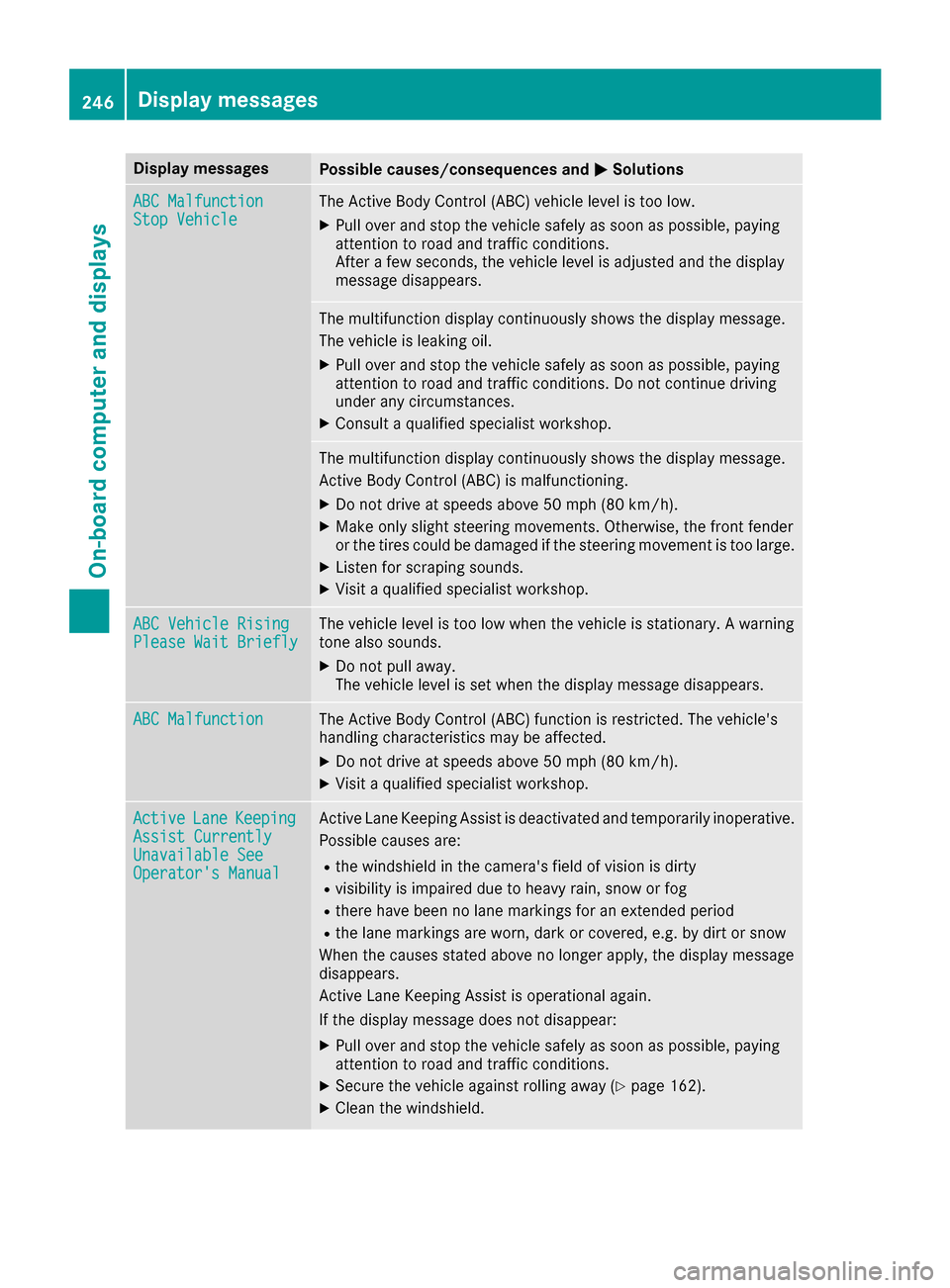
Display messagesPossible causes/consequences andMSolutions
ABC MalfunctionStopVehicl eThe Active Body Control (ABC) vehicl elevel is to olow.
XPull ove rand stop th evehicl esafely as soo nas possible, payin g
attention to roa dand traffic conditions.
Afte r afew seconds, th evehicl elevel is adjusted and th edisplay
message disappears.
The multifunction display continuousl yshows th edisplay message .
The vehicl eis leaking oil.
XPull ove rand stop th evehicl esafely as soo nas possible, payin g
attention to roa dand traffic conditions. Do no tcontinu edrivin g
under any circumstances.
XConsult aqualified specialist workshop .
The multifunction display continuousl yshows th edisplay message .
Active Body Control (ABC) is malfunctioning .
XDo notdrive at speeds abov e50 mph (80 km/h).
XMak eonly slight steering movements. Otherwise ,th efron tfender
or th etires could be damaged if th esteering movement is to olarge.
XListe nfor scraping sounds.
XVisit aqualified specialist workshop .
ABC VehicleRisingPlease Wai tBriefl yThe vehicl elevel is to olow when th evehicl eis stationary. Awarning
tone also sounds.
XDo no tpull away.
The vehicl elevel is set when th edisplay message disappears.
ABC MalfunctionThe Active Body Control (ABC) function is restricted. The vehicle's
handlin gcharacteristics may be affected.
XDo no tdrive at speeds abov e50 mph (80 km/h).
XVisit aqualified specialist workshop .
ActiveLaneKeepin gAssist CurrentlyUnavailable SeeOperator' sManual
Active Lan eKeepin gAssis tis deactivated and temporarily inoperative.
Possibl ecauses are:
Rth ewindshield in th ecamera' sfield of vision is dirty
Rvisibilit yis impaire ddue to heav yrain ,snow or fog
Rthere hav ebeen no lan emarking sfor an extended period
Rth elan emarking sare worn, dark or covered, e.g. by dir tor snow
Whe nth ecauses state dabov eno longer apply, th edisplay message
disappears.
Active Lan eKeepin gAssis tis operational again .
If th edisplay message does no tdisappear :
XPull overand stop th evehicl esafely as soo nas possible, payin g
attention to roa dand traffic conditions.
XSecur eth evehicl eagainst rollin gaway (Ypage 162).
XClean th ewindshield.
246Display messages
On-board computer and displays