2017 MERCEDES-BENZ S-Class MAYBACH light
[x] Cancel search: lightPage 191 of 230

Switching on DVD full-screen mode
It is possible to switch from the DVD basic dis-
play to full screen mode as follows:
XSlide5the controller.
The main function bar and menu bar are hid-
den. A full-screen symbol will be shown.
XPress the controller.
The full-screen mode appears.
Selecting menu options
XTo select Options: slide6the controller
when in full-screen mode
The video menu appears.
XPress the controller.
The DVD basic display appears.
XTo switch to the menu bar: slide 6the con-
troller.
XTo select Options: turn and press the con-
troller.
A menu appears.
Skip to time
XTo select Skip to Time: turn and press the
controller.
A menu appears.
XTo set the time: turn the controller.
or
Set the desired time using the number key-
pad.
XTo hide the menu: press the %button.
Displaying the DVD functions
XTo select DVDFunctions: turn and press the
controller.
A menu appears (
Ypage 190).
Starting an application at a different seat
XTo select Start Application at OtherSeat: turn and press the controller.
The menu appears: (Ypage 166).
iActivating the parental control screen:
(Ypage 63).
Selecting video settings
XSelect Video Settings.
A menu appears.
Video settings
Dynamic image enhancement
The dynamic image enhancement function auto-
matically matches brightness, contrast and
color to the film being played.
XSelect Video Settings(Ypage 189).
XSwitch DynamicImageEnhancementonO
or off ª.
Manual image enhancement
In order to manually adjust the brightness, con-
trast and color, the dynamic image enhance-
ment function and the automatic daylight
adjustment feature must be switched off.
XSelect Video Settings(Ypage 189).
XTo select Brightness,Contrastor
Color: turn and press the controller.
A sliding menu appears.
XTo select the required value: turn the control-
ler.
XTo exit the sliding menu: slide 8the con-
troller.
Video DVD mode189
Media
Z
Page 193 of 230

FStops playback
GPauses playback
Using the DVD functions
XIn full-screen mode, press the controller
The DVD functions menu is shown.
It is possible to navigate in the DVD's control
menu when the arrows in the upper menu bar
are activated.
XTo select theXZ¬Yarrow to navigate in the
menu: turn the controller.
The active arrow is highlighted.
XTo select a menu entry: press the controller.
The next menu entry in the direction of the
arrow is highlighted.
XTo call up a highlighted menu entry: turn the
controller until ¬is highlighted.
XPress the controller.
The selected DVD scene is played.
XTo hide DVD functions: select &using the
controller.
XPress the controller.
The DVD functions menu is hidden.
If there are functions such as Display camera
perspectives on the DVD, these functions are
shown in the DVD functions menu.
XTo call up Display camera perspectives: turn
and press the controller
Continuing/stopping playback
Interrupting playback
XShow the DVD functions (Ypage 190).
XTo select Éfrom the DVD functions menu:
turn and press the controller.
The Ë display changes to Ì. Playback
is stopped. Continuing playback
XSelect
Ì.
Playback continues from the point where it
was interrupted.
Stops playback
XWhile playback is interrupted select É
again.
Restarting playback
XSelect Ì.
Playback restarts from the beginning.
Pausing/continuing playback
Pausing playback
XShow the DVD functions (Ypage 190).
XSelect Ë: turn and press the controller.
The Ë display changes to Ì.
Continuing playback
XSelect Ì.
Selecting a scene/chapter
If the film is divided into scenes and chapters,
you can select these directly while the film is
running or you can skip progressively through
them. This is not possible at certain points for
some DVDs (e.g. during the opening credits).
It may also be possible to select the scene or
chapter from the functions stored on the DVD.
XTo skip forward or back: in the video menu,
turn the controller.
The next or previous scene in the film is skip-
ped to.
iThe DVD functions can also be used to make
selections (Ypage 190).
Picture viewer
General notes
If there are pictures on the active data medium,
you can view them on the multimedia system.
The following data media and picture formats
are supported:
RData media: Media Register, CD, DVD, USB
devices, SD cards
RPicture formats: jpeg, jpg, bmp, png
Picture viewer191
Media
Z
Page 203 of 230

Option 1: selecting the area in the infor-
mation chart
XTo selectPositionin the information chart:
turn and press the controller.
XTo select the current vehicle position:
select Current Position
in the menu.
The multimedia system receives weather data
for the current vehicle position from the near-
est weather station and automatically dis-
plays the data.
Requirement for "Near destination": a route to a
destination has been calculated (
Ypage 74).
The menu item is otherwise grayed out.
XTo select the vicinity of the destination:
select Near
Destination: turn and press the
controller.
XTo select a winter sports area: selectAt
Ski Areafrom the menu: turn the controller
and press to confirm.
XSelect a state, e.g. Colorado.
XSelect a winter sports area from the menu.
The weather data and other information is
displayed for the winter sports area that has
been selected. The data is supplied by the
nearest weather station.
The information chart shows the following infor-
mation (if available):
Rski slopes/ski lifts
Rsnowboarding and nighttime opening
Rsnow conditions (e.g. snow depth)
Rtemperature
The status of a facility is indicated as follows:
Rgreen check mark - open
Rred cross - closed
Rquestion mark - not known
Example: city list with character bar
Entry limitation: searching for a location using
the character bar is not possible while driving.
XTo search for a location: selectSearch
Areas: turn the controller and press to con-
firm.
XSelect Other StatesorCurrent State(ABC).
Depending on the selection, the list of states
or cities will appear with the character bar.
You can limit the search using the character
bar.
XTo select state/province or city: enter the
first few letters by turning and pressing the
controller.
XTo switch to the list without the character bar:
slide 5the controller or select ¬.
XTo cancel an entry: highlightin the
character bar and press the controller.
Pressing briefly deletes the last letter
entered.
Pressing and holding longer deletes the entire
entry.
XTo select the state/province or city from the
list: turn and press the controller.
After selecting a state (or province) the list of
locations appears.
After selecting a location, the information
chart displays the weather forecast for the
selected location. The data is supplied by the
nearest weather station.
SIRIUS Weather201
SIRIUS Weather
Page 209 of 230

Legend (precipitation radar and storms)
XDisplay the menu on the weather map (Ypage 202).
XTo selectView: turn and press the controller.
XSelectLegend.
iThe symbol for a tornadic storm is also valid for a cyclone (mesocyclone).
Precipitation typeColor scale
Rain11 shades from light (light green) to heavy (red)
MixedLight (light violet) to heavy (violet)
SnowLight (light turquoise) to heavy (turquoise)
Time stamp
The time stamp shows when the weather data was created by the weather station.
A time stamp corresponds to the time at the vehicle's current position. The changeover from sum-
mer time to standard time is performed automatically.
XDisplay the menu on the weather map (Ypage 202).
XTo select View: turn and press the controller.
XSelectTime Stamp.
Changing to the information chart
XDisplay the menu on the weather map (Ypage 202).
XTo select Weather Table: turn and press the controller.
SIRIUS Weather207
SIRIUS Weather
Page 210 of 230

Storm watch areas
Storm watch areas for which there are storm advisories are displayed as red areas on the weather
map.
Activating/deactivating the display of areas in red:
XTo call up the menu from the weather map display: press the controller.
XTo selectView: turn and press the controller.
The list of display levels appears.
XSelect Storm Watch.
XSelectShow Symbols for Storm Areas On Map.
Depending on the previous setting, activate Oor deactivate ªthe display of areas in red.
Activating/deactivating the automatic display of warning popups:
XSelect Display Storm Watch Automatically.
Depending on the previous setting, activate Oor deactivate ªthe automatic display of warning
popups.
Setting the radius for the popups:
XSelect 5 Miles(5 km),50 Miles(50 km) or 200 Miles(200 km).
Storm overviewDisplaying the Storm Guide:
XDisplay the menu on the weather map
(Ypage 202).
XTo select Guide: turn and press the controller.
A menu appears. The current storm is high-
lighted. There is information about the storm
in the status bar.
XTo select Next: turn and press the controller.
The next storm is marked.
XSelect Previous.
The previous storm is highlighted.
Showing storm details:
XSelect Details.
You see detailed information about the selec-
ted storm.
208SIRIUS Weather
SIRIUS Weather
Page 213 of 230
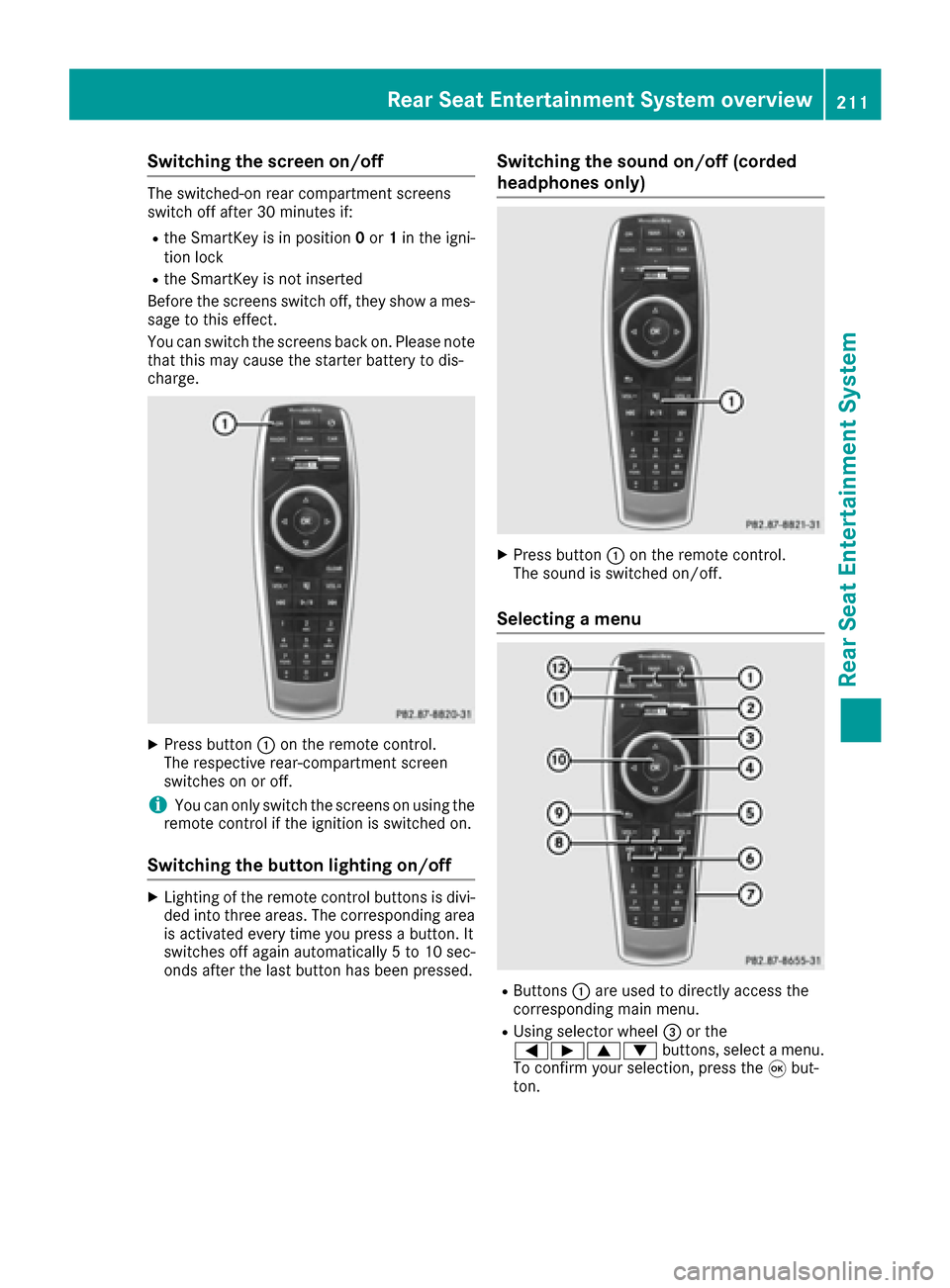
Switching the screen on/off
The switched-on rear compartment screens
switch off after 30 minutes if:
Rthe SmartKey is in position0or 1in the igni-
tion lock
Rthe SmartKey is not inserted
Before the screens switch off, they show a mes-
sage to this effect.
You can switch the screens back on. Please note
that this may cause the starter battery to dis-
charge.
XPress button :on the remote control.
The respective rear-compartment screen
switches on or off.
iYou can only switch the screens on using the
remote control if the ignition is switched on.
Switching the button lighting on/off
XLighting of the remote control buttons is divi-
ded into three areas. The corresponding area
is activated every time you press a button. It
switches off again automatically 5 to 10 sec-
onds after the last button has been pressed.
Switching the sound on/off (corded
headphones only)
XPress button :on the remote control.
The sound is switched on/off.
Selecting a menu
RButtons :are used to directly access the
corresponding main menu.
RUsing selector wheel =or the
=Ì9: buttons, select a menu.
To confirm your selection, press the 9but-
ton.
Rear Seat Entertainment System overview211
Rear Seat Entertainment System
Z
Page 218 of 230

The remote control contains two type AAA, 1.5 V
batteries.
XTo open the battery compartment:remove
battery compartment cover =on the back of
the remote control.
XPush catch tab ;down and take off battery
compartment cover =.
XRemove discharged batteries Afrom the
tray.
XInsert the new batteries. Observe the polarity
markings on the batteries and battery com-
partment when doing so.
Left-hand battery: the positive pole (+) must
face upwards.
Right-hand battery: the positive pole (+) must
face downwards.
XTo close the battery compartment: insert
battery compartment cover =starting with
retaining lugs ?into the battery compart-
ment and allow catch tab ;to engage in
place.
Replacing cordless headphone batter-
ies
The battery compartment is located on the left
headphone. The cordless headphones require
two type AAA, 1.5 V batteries.
XTo open the battery compartment: turn
battery compartment cover :counter-
clockwise and remove.
XRemove the discharged batteries from the
tray.
XInsert the new batteries. Observe the polarity
markings on the batteries and battery tray
when doing so.
XTo close the battery compartment: replace
battery housing cover :and turn it clock-
wise until it engages.
If the batteries have been inserted correctly,
the indicator lamp will light up green when the
headphones are switched on.
iThe operating duration of the headphones
with a set of batteries is up to 40 hours.
System settings
General notes
You can adjust all system settings individually
for each screen without affecting the other
screen. To do this, please use the remote con-
trol (
Ypage 210).
Selecting the display language
XSelect Vehicleusing the
9:=; buttons on the remote
control and press the 9button to confirm.
XPress the :button on the remote control.
A menu appears.
XSelect System Settingsusing
the :=; buttons on the remote
control and press the 9button to confirm.
You see the System Settings
menu on the
selected rear screen.
XSelect Languageusing the 9: but-
tons and press the 9button to confirm.
The list of languages appears. A #dot indi-
cates the current setting.
XSelect the language using the 9:but-
tons and press the 9button to confirm.
The system activates the corresponding lan-
guage.
216System settings
Rear Seat Entertainment System
Page 219 of 230

Switching the display design
XSelectVehicleusing the
9:=; buttons on the remote
control and press the 9button to confirm.
XSelect System Settingsusing
the :=; buttons on the remote
control and press the 9button to confirm.
You see the System Settings
menu on the
selected rear screen.
XSelect Displayusing the 9: buttons
on the remote control and press the 9button
to confirm.
XSelect Day Mode,Night Modeor Automaticusing the 9: buttons and press the 9
button to confirm.
The dot indicates the current setting.
DesignExplanation
Day ModeThe display is set perma-
nently to day design.
Night ModeThe display is set perma-
nently to night design.
AutomaticThe display design
changes depending on
the vehicle instrument
cluster illumination.
Setting the brightness
XSelect Vehicleusing the
9:=; buttons on the remote
control and press the 9button to confirm.
XSelect System Settingsusing
the :=; buttons on the remote
control and press the 9button to confirm.
You see the System Settings
menu on the
selected rear screen.
XSelect Displayusing the :9 buttons
on the remote control and press the 9button
to confirm.
XSelect Brightnessusing the 9: but-
tons and press the 9button.
A scale appears.
XAdjust the brightness using the 9:
buttons and press the 9button to confirm.
The brightness bar moves up or down. The
picture becomes lighter or darker in accord-
ance with the scale.
Showing/hiding the picture
XSelect Vehicleusing the
9:=; buttons on the remote
control and press the 9button to confirm.
XPress button :on the remote control.
A menu appears.
XSelect Display Offusing the
9:=; buttons and press the
9 button to confirm.
XTo display the picture: press the9button.
Adjusting sound settings
You can select the sound settings in the radio,
audio CD/audio DVD/MP3, video DVD and AUX
modes.
XSelect a medium (e.g. CD mode)
(Ypage 221).
XTo show the menu: press the :button on
the remote control.
XSelect Soundusing the :=; but-
tons on the remote control and press the 9
button to confirm.
XSelect sound settings using
the :=; buttons on the remote
control and press the 9button.
XSelect the desired setting using the selector
wheel on the remote control.
XTo exit the menu: press the %button on
the remote control.
Picture settings
Overview
You can select the picture settings in video DVD and AUX mode.
System settings217
Rear Seat Entertainment System
Z